lights HYUNDAI PALISADE 2022 Service Manual
[x] Cancel search | Manufacturer: HYUNDAI, Model Year: 2022, Model line: PALISADE, Model: HYUNDAI PALISADE 2022Pages: 663, PDF Size: 15.74 MB
Page 346 of 663
5-12
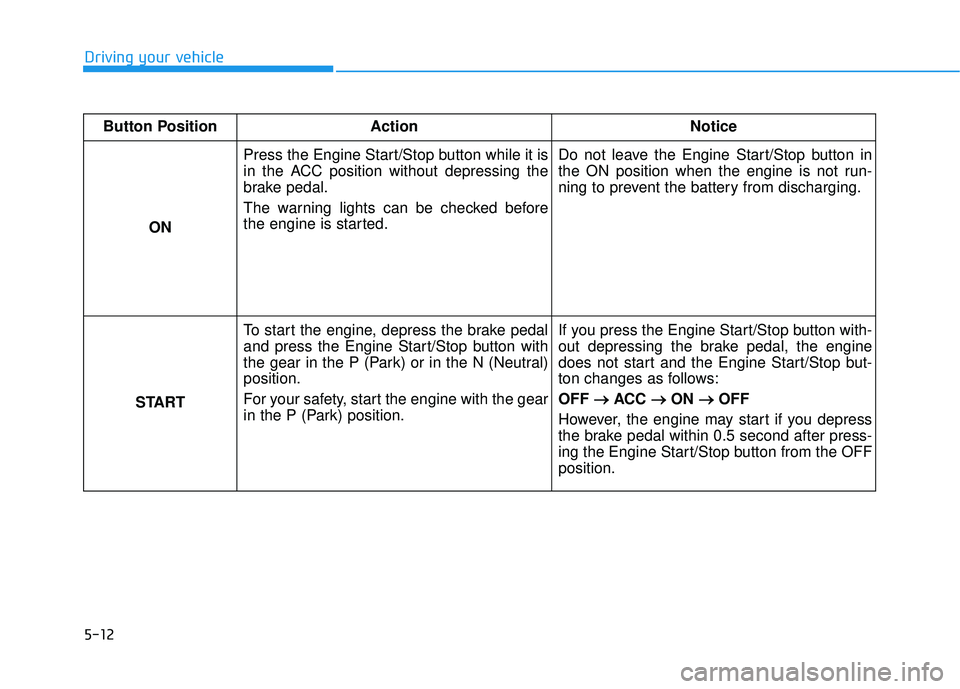
Driving your vehicleButton Position Action Notice
ON Press the Engine Start/Stop button while it is
in the ACC position without depressing the
brake pedal.
The warning lights can be checked before
the engine is started.
Do not leave the Engine Start/Stop button in
the ON position when the engine is not run-
ning to prevent the battery from discharging.
START To start the engine, depress the brake pedal
and press the Engine Start/Stop button with
the gear in the P (Park) or in the N (Neutral)
position.
For your safety, start the engine with the gear
in the P (Park) position. If you press the Engine Start/Stop button with-
out depressing the brake pedal, the engine
does not start and the Engine Start/Stop but-
ton changes as follows:
OFF
→ →
ACC → →
ON → →
OFF
However, the engine may start if you depress
the brake pedal within 0.5 second after press-
ing the Engine Start/Stop button from the OFF
position.
Page 369 of 663
5-35
Driving your vehicle
5
When you drive on a road having
poor traction, such as an icy road,
and apply your brakes continu-
ously, the ABS will be active con-
tinuously and the ABS warning
light ( ) may illuminate. Pull
your car over to a safe place and
turn the engine off.
Restart the engine. If the ABS
warning light is off, then your ABS
system is normal.
Otherwise, you may have a prob-
lem with your ABS system.
Contact an authorized HYUNDAI
dealer as soon as possible.
Information
When you jump start your vehicle
because of a drained battery, the ABS
warning light ( ) may turn on at the
same time. This happens because of
the low battery voltage. It does not
mean your ABS is malfunctioning.
Have the battery recharged before
driving the vehicle.
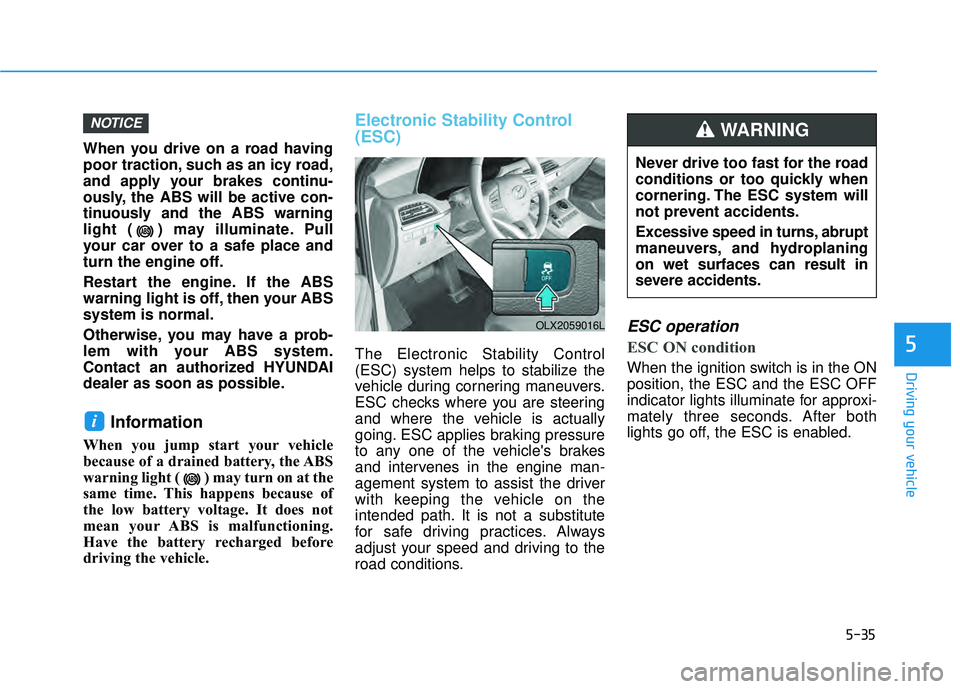
Electronic Stability Control
(ESC)
The Electronic Stability Control
(ESC) system helps to stabilize the
vehicle during cornering maneuvers.
ESC checks where you are steering
and where the vehicle is actually
going. ESC applies braking pressure
to any one of the vehicle's brakes
and intervenes in the engine man-
agement system to assist the driver
with keeping the vehicle on the
intended path. It is not a substitute
for safe driving practices. Always
adjust your speed and driving to the
road conditions.
ESC operation
ESC ON condition
When the ignition switch is in the ON
position, the ESC and the ESC OFF
indicator lights illuminate for approxi-
mately three seconds. After both
lights go off, the ESC is enabled.
i
NOTICE
OLX2059016L
Never drive too fast for the road
conditions or too quickly when
cornering. The ESC system will
not prevent accidents.
Excessive speed in turns, abrupt
maneuvers, and hydroplaning
on wet surfaces can result in
severe accidents.
WARNING
Page 370 of 663
5-36
Driving your vehicle
When operating
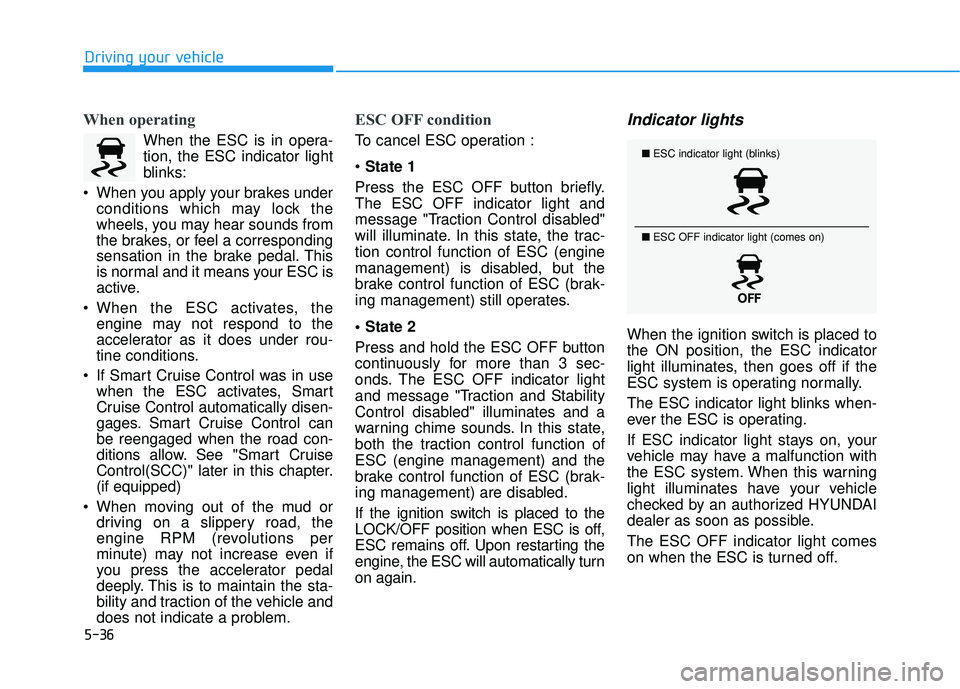
When the ESC is in opera-
tion, the ESC indicator light
blinks:
When you apply your brakes under conditions which may lock the
wheels, you may hear sounds from
the brakes, or feel a corresponding
sensation in the brake pedal. This
is normal and it means your ESC is
active.
When the ESC activates, the engine may not respond to the
accelerator as it does under rou-
tine conditions.
If Smart Cruise Control was in use when the ESC activates, Smart
Cruise Control automatically disen-
gages. Smart Cruise Control can
be reengaged when the road con-
ditions allow. See "Smart Cruise
Control(SCC)" later in this chapter.
(if equipped)
When moving out of the mud or driving on a slippery road, the
engine RPM (revolutions per
minute) may not increase even if
you press the accelerator pedal
deeply. This is to maintain the sta-
bility and traction of the vehicle and
does not indicate a problem.
ESC OFF condition
To cancel ESC operation :
State 1
Press the ESC OFF button briefly.
The ESC OFF indicator light and
message "Traction Control disabled"
will illuminate. In this state, the trac-
tion control function of ESC (engine
management) is disabled, but the
brake control function of ESC (brak-
ing management) still operates.
Press and hold the ESC OFF button
continuously for more than 3 sec-
onds. The ESC OFF indicator light
and message "Traction and Stability
Control disabled" illuminates and a
warning chime sounds. In this state,
both the traction control function of
ESC (engine management) and the
brake control function of ESC (brak-
ing management) are disabled.
If the ignition switch is placed to the
LOCK/OFF position when ESC is off,
ESC remains off. Upon restarting the
engine, the ESC will automatically turn
on again.
Indicator lights
When the ignition switch is placed to
the ON position, the ESC indicator
light illuminates, then goes off if the
ESC system is operating normally.
The ESC indicator light blinks when-
ever the ESC is operating.
If ESC indicator light stays on, your
vehicle may have a malfunction with
the ESC system. When this warning
light illuminates have your vehicle
checked by an authorized HYUNDAI
dealer as soon as possible.
The ESC OFF indicator light comes
on when the ESC is turned off.
■ ESC indicator light (blinks)
■ ESC OFF indicator light (comes on)
Page 371 of 663
5-37
Driving your vehicle
5Driving with wheels and tires with
different sizes may cause the ESC
system to malfunction. Before
replacing tires, make sure all four
tires and wheels are the same
size. Never drive the vehicle with
different sized wheels and tires
installed.
ESC OFF usage
When Driving
The ESC OFF mode should only be
used briefly to help free the vehicle if
stuck in snow or mud by temporarily
stopping operation of the ESC to
maintain wheel torque.
To turn ESC off while driving, press
the ESC OFF button while driving on
a flat road surface.
To prevent damage to the trans-
mission:
Do not allow wheel(s) of oneaxle to spin excessively while
the ESC, ABS, and parking brake
warning lights are displayed.
The repairs would not be cov-
ered by the vehicle warranty.
Reduce engine power and do
not spin the wheel(s) excessive-
ly while these lights are dis-
played.
When operating the vehicle on a dynamometer, make sure the
ESC is turned off (ESC OFF light
illuminated).
Information
Turning the ESC off does not affect ABS
or standard brake system operation.
i
NOTICENOTICE
When the ESC is blinking, this
indicates the ESC is active:
Drive slowly and NEVER attempt
to accelerate. NEVER turn the
ESC off while the ESC indicator
light is blinking or you may lose
control of the vehicle resulting in
an accident.
WARNING
Page 384 of 663
5-50
Driving your vehicle
The Idle Stop and Go (ISG) system
automatically and temporarily shuts
down the engine when the vehicle is
stopped and idling to improve fuel
efficiency and reduce exhaust gas
emissions. (i.e. red stop light, stop
sign, and traffic jam).
The engine is automatically started
upon satisfying the starting condi-
tions.
The ISG system is always active,
when the engine is running.
Information
When the engine is automatically
started by the ISG system, some warn-
ing lights (i.e. ABS, ESC, ESC OFF,
EPS, and parking brake warning
light) may illuminate for a few sec-
onds due to the low battery voltage.
However, it does not indicate a mal-
function with the ISG system.
To Activate the ISG System
Prerequisite for activation
The ISG system operates in the fol-
lowing situations.
The driver's seatbelt is fastened
The driver's door and hood are closed
The brake vacuum pressure is adequate
The battery sensor is activated and the battery is sufficiently charged
Outside temperature is not too low or too high
The vehicle is driven over a con- stant speed and stops
The climate control system satis- fies the conditions
The vehicle is sufficiently warmed up
The incline is gradual
The steering wheel is turned less than 180 degrees and then the
vehicle stops
Information
The ISG system is
not activated, when
the prerequisites to
activate the ISG sys-
tem are unsatisfied.
In this case, the ISG
OFF button indicator illuminates,
and the auto stop indicator ( )
illuminates in yellow on the instru-
ment cluster.
• When the above indicator remains illuminated on the instrument clus-
ter, we recommend that you have
the IGS system checked by an
authorized HYUNDAI dealer.
i
i
I IS S G G ( ( I ID D L LE E S S T T O O P P A A N N D D G G O O ) ) S S Y Y S ST T E EM M ( ( I IF F E E Q Q U UI IP P P PE ED D ) )
•
Page 404 of 663
5-70
Driving your vehicle
Forward Collision-Avoidance
Assist malfunction and limita-
tions
Forward Collision-AvoidanceAssist malfunction
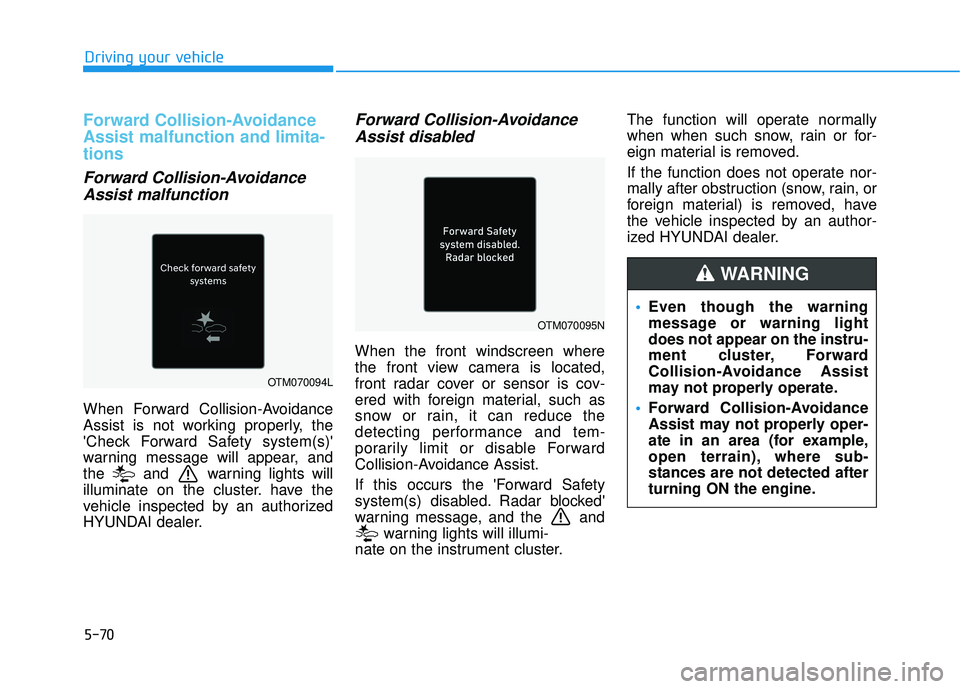
When Forward Collision-Avoidance
Assist is not working properly, the
'Check Forward Safety system(s)'
warning message will appear, and
the and warning lights will
illuminate on the cluster. have the
vehicle inspected by an authorized
HYUNDAI dealer.
Forward Collision-AvoidanceAssist disabled
When the front windscreen where
the front view camera is located,
front radar cover or sensor is cov-
ered with foreign material, such as
snow or rain, it can reduce the
detecting performance and tem-
porarily limit or disable Forward
Collision-Avoidance Assist.
If this occurs the 'Forward Safety
system(s) disabled. Radar blocked'
warning message, and the and
warning lights will illumi-
nate on the instrument cluster. The function will operate normally
when when such snow, rain or for-
eign material is removed.
If the function does not operate nor-
mally after obstruction (snow, rain, or
foreign material) is removed, have
the vehicle inspected by an author-
ized HYUNDAI dealer.
OTM070094L
OTM070095N
Even though the warning
message or warning light
does not appear on the instru-
ment cluster, Forward
Collision-Avoidance Assist
may not properly operate.
Forward Collision-Avoidance
Assist may not properly oper-
ate in an area (for example,
open terrain), where sub-
stances are not detected after
turning ON the engine.
WARNING
Page 405 of 663
5-71
Driving your vehicle
5
Limitations of the ForwardCollision-Avoidance Assist
Forward Collision-Avoidance Assist
may not operate normally, or the
function may operate unexpectedly
under the following circumstances:
The detecting sensor or the sur-
roundings are contaminated or
damaged
The temperature around the front view camera is high or low
The camera lens is contaminated due to tinted, filmed or coated
windscreen, damaged glass, or
stuck of foreign material (sticker,
bug, etc.) on the glass
Moisture is not removed or frozen on the windscreen
Washer fluid is continuously sprayed, or the wiper is on
Driving in heavy rain or snow, or thick fog
The field of view of the front view camera is obstructed by sun glare Street light or light from an oncom-
ing vehicle is reflected on the wet
road surface, such as a puddle on
the road
An object is placed on the instru- ment panel
Your vehicle is being towed
The surroundings are very bright
The surroundings are very dark, such as in a tunnel, etc.
The brightness changes suddenly, for example when entering or exit-
ing a tunnel
The brightness outside is low, and the headlamps are not on or are
not bright
Driving through steam, smoke or shadow
Only part of the vehicle, pedestrian or cyclist is detected
The vehicle in front is a bus, heavy truck, truck with a unusually
shaped luggage, trailer, etc. The vehicle in front has no tail
lights, tail lights are located unusu-
ally, etc.
The brightness outside is low, and the tail lamps are not on or are not
bright
The rear of the front vehicle is small or the vehicle does not look
normal, such as when the vehicle
is tilted, overturned, or the side of
the vehicle is visible, etc.
The front vehicle's ground clear- ance is low or high
A vehicle, pedestrian or cyclist suddenly cuts in front
The bumper around the front radar is impacted, damaged or the front
radar is out of position
The temperature around the front radar is high or low
Driving through a tunnel or iron bridge
Driving in large areas where there are few vehicles or structures (for
example, desert, meadow, suburb,
etc.)
Page 407 of 663
5-73
Driving your vehicle
5
The pedestrian or cyclist is wear-ing clothing that easily blends into
the background, making it difficult
to detect
The pedestrian or cyclist is difficult to distinguish from the similar
shaped structure in the surround-
ings
You are driving by a pedestrian, cyclist, traffic sign, structure, etc.,
near the intersection
Driving in a parking lot
Driving through a tollgate, con- struction area, unpaved road, par-
tial paved road, uneven road,
speed bumps, etc.
Driving on an incline road, curved road, etc.
Driving on a roadside with trees or streetlights
The adverse road conditions cause excessive vehicle vibrations while
driving
Your vehicle height is low or high due to heavy loads, abnormal tyre
pressure, etc. Driving on a narrow road where
trees or grass are overgrown
There is interference from electro- magnetic waves, such as driving in
an area with strong radio waves or
electrical noise
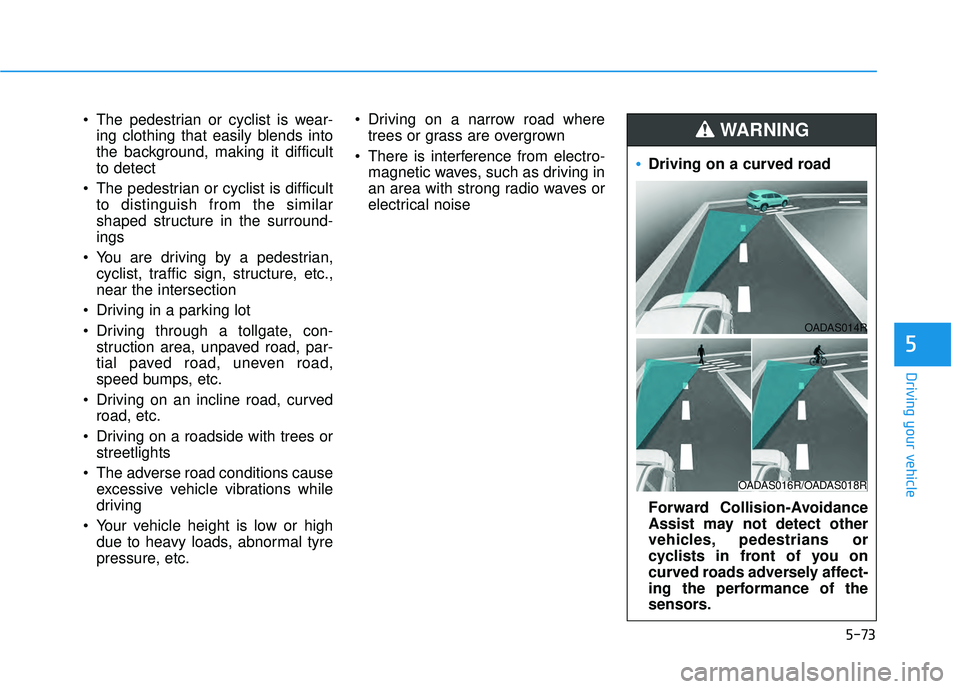
Driving on a curved road
Forward Collision-Avoidance
Assist may not detect other
vehicles, pedestrians or
cyclists in front of you on
curved roads adversely affect-
ing the performance of the
sensors.
WARNING
OADAS016R/OADAS018R
OADAS014R
Page 498 of 663
5-164
Driving your vehicle
Limitations of Smart CruiseControl
Smart Cruise Control may not oper-
ate normally, or it may operate unex-
pectedly under the following circum-
stances:
The detecting sensor or the sur-
roundings are contaminated or
damaged
fluid is continuously sprayed, or the wiper is on
The camera lens is contaminated due to tinted, filmed or coated
windshield, damaged glass, or
sticky foreign material (sticker, bug,
etc.) on the glass
Moisture is not removed or frozen on the windshield
The field of view of the front view camera is obstructed by sun glare
Street light or light from an oncom- ing vehicle is reflected on the wet
road surface, such as a puddle on
the road
The temperature around the front view camera is high or low An object is placed on the dash-
board
The surrounding is very bright
The surrounding is very dark, such as in a tunnel, etc.
The brightness changes suddenly, for example when entering or exit-
ing a tunnel
The brightness outside is low, and the headlamps are not on or are
not bright
Driving in heavy rain or snow, or thick fog
Driving through steam, smoke or shadow
Only part of the vehicle is detected
The vehicle in front has no tail lights, tail lights are located unusu-
ally, etc.
The brightness outside is low, and the tail lamps are not on or are not
bright
The rear of the front vehicle is small or does not look normal (for
example, tilted, overturned, etc.)
The front vehicle’s ground clear- ance is low or high
Even though the warning mes-
sage does not appear on the
cluster, Smart Cruise Control
may not properly operate.
WARNING
Smart Cruise Control may not
properly operate in an area (for
example, open terrain), where
there is nothing to detect after
turning ON the engine.
CAUTION
Page 499 of 663
5-165
Driving your vehicle
5
A vehicle suddenly cuts in front
Your vehicle is being towed
Driving through a tunnel or ironbridge
Driving near areas containing metal substances, such as a con-
struction zone, railroad, etc.
A material is near that reflects very well on the front radar, such as a
guardrail, nearby vehicle, etc.
The bumper around the front radar is impacted, damaged or the front
radar is out of position
The temperature around the front radar is high or low
Driving in large areas where there are few vehicles or structures (for
example, desert, meadow, suburb,
etc.)
The vehicle in front is made of material that does not reflect on
the front radar
Driving near a highway (or motor- way) interchange or tollgate
Driving on a slippery surface due to snow, water puddle, ice, etc.
Driving on a curved road The vehicle in front is detected late
The vehicle in front is suddenly
blocked by a obstacle
The vehicle in front suddenly changes lane or suddenly reduces
speed
The vehicle in front is bent out of shape
The front vehicle’s speed is fast or slow
With a vehicle in front, your vehicle changes lane at low speed
The vehicle in front is covered with snow
Unstable driving
You are on a roundabout and the vehicle in front is not detected
You are continuously driving in a circle
Driving in a parking lot
Driving through a construction area, unpaved road, partial paved
road, uneven road, speed bumps,
etc. Driving on an incline road, curved
road, etc.
Driving through a roadside with trees or streetlights
The adverse road conditions cause excessive vehicle vibrations while
driving
Your vehicle height is low or high due to heavy loads, abnormal tire
pressure, etc.
Driving through a narrow road where trees or grass are over-
grown
There is interference by electro- magnetic waves, such as driving in
an area with strong radio waves or
electrical noise