Engine picture HYUNDAI PALISADE 2022 Owners Manual
[x] Cancel search | Manufacturer: HYUNDAI, Model Year: 2022, Model line: PALISADE, Model: HYUNDAI PALISADE 2022Pages: 663, PDF Size: 15.74 MB
Page 250 of 663
3-154
Convenience Features
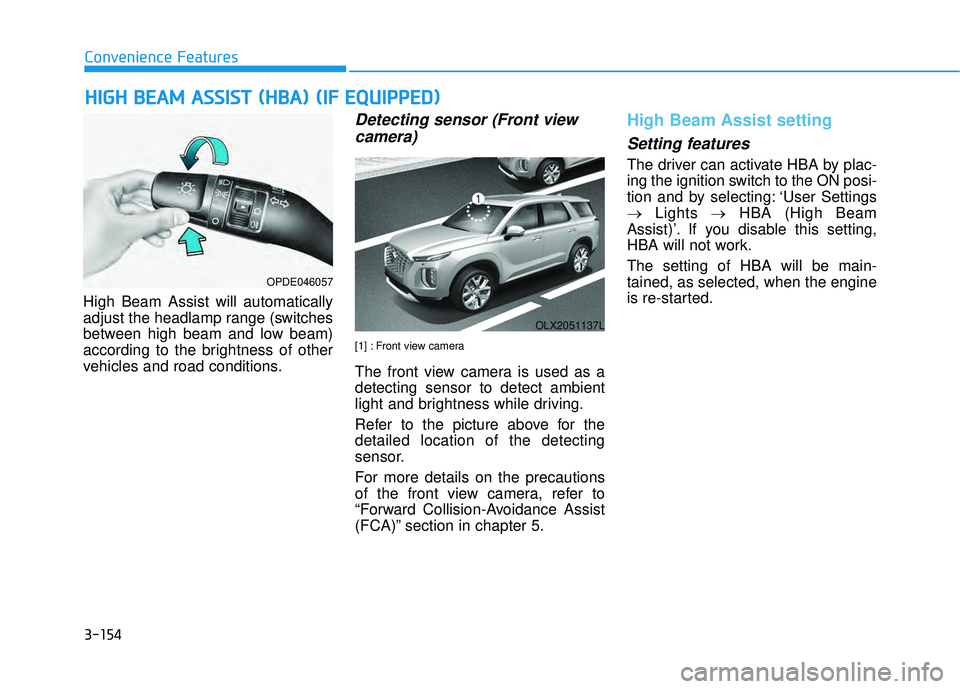
High Beam Assist will automatically
adjust the headlamp range (switches
between high beam and low beam)
according to the brightness of other
vehicles and road conditions.
Detecting sensor (Front view camera)
[1] : Front view camera
The front view camera is used as a
detecting sensor to detect ambient
light and brightness while driving.
Refer to the picture above for the
detailed location of the detecting
sensor.
For more details on the precautions
of the front view camera, refer to
“Forward Collision-Avoidance Assist
(FCA)” section in chapter 5.
High Beam Assist setting
Setting features
The driver can activate HBA by plac-
ing the ignition switch to the ON posi-
tion and by selecting: ‘User Settings
→ Lights →HBA (High Beam
Assist)’. If you disable this setting,
HBA will not work.
The setting of HBA will be main-
tained, as selected, when the engine
is re-started.
H H I IG G H H B B E EA A M M A A S SS SI IS S T T ( ( H H B BA A ) ) ( ( I IF F E E Q Q U UI IP P P PE ED D ) )
OPDE046057
OLX2051137L
Page 258 of 663
3-162
Convenience features
R RE EA A R R V V I IE E W W M M O ON NI IT T O O R R ( ( R R V V M M ) ) ( ( I IF F E E Q Q U UI IP P P PE ED D ) )
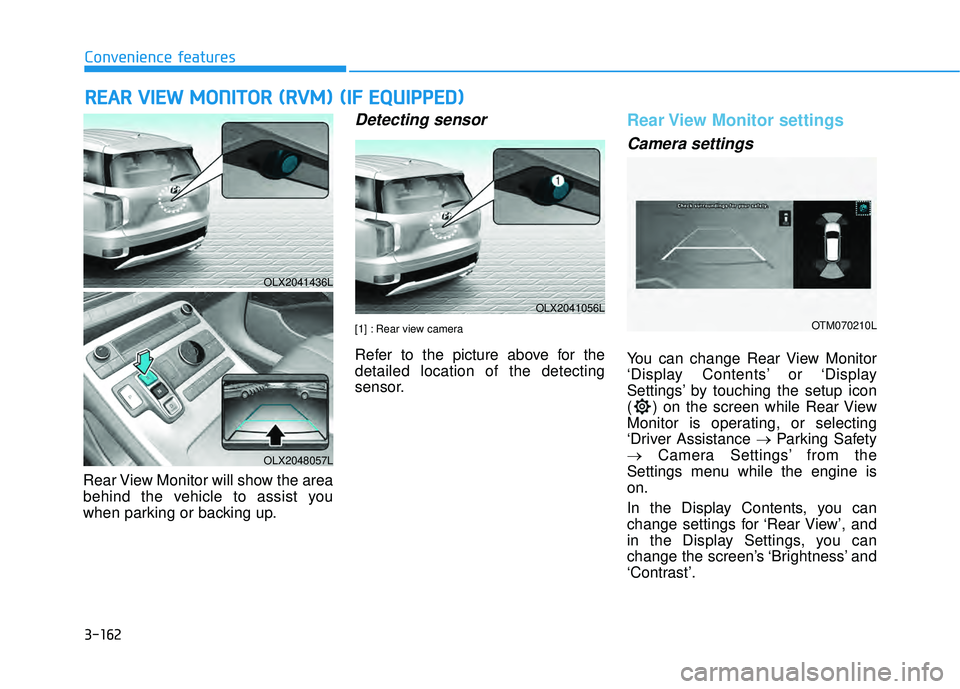
Rear View Monitor will show the area
behind the vehicle to assist you
when parking or backing up.
Detecting sensor
[1] : Rear view camera
Refer to the picture above for the
detailed location of the detecting
sensor.
Rear View Monitor settings
Camera settings
You can change Rear View Monitor
‘Display Contents’ or ‘Display
Settings’ by touching the setup icon
( ) on the screen while Rear View
Monitor is operating, or selecting
‘Driver Assistance → Parking Safety
→ Camera Settings’ from the
Settings menu while the engine is
on.
In the Display Contents, you can
change settings for ‘Rear View’, and
in the Display Settings, you can
change the screen’s ‘Brightness’ and
‘Contrast’.
OLX2041436L
OLX2048057L
OLX2041056L
OTM070210L
Page 262 of 663
3-166
Convenience features
Reverse Parking Distance Warning
will help warn the driver if an obsta-
cle is detected within a certain dis-
tance when the vehicle is moving in
reverse at low speeds.
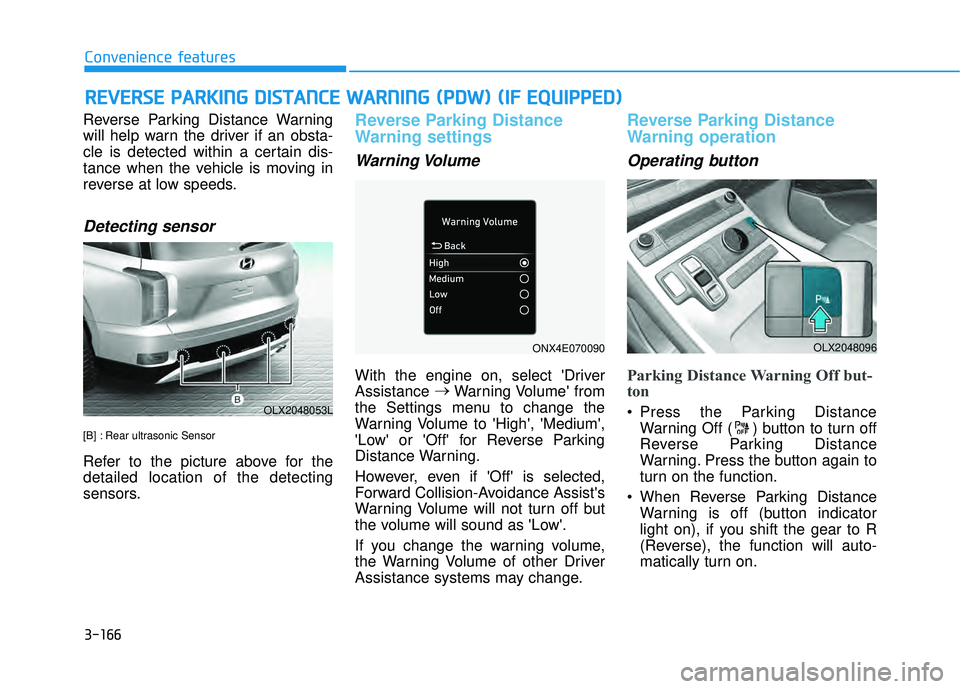
Detecting sensor
[B] : Rear ultrasonic Sensor
Refer to the picture above for the
detailed location of the detecting
sensors.
Reverse Parking Distance
Warning settings
Warning Volume
With the engine on, select 'Driver
Assistance →
Warning Volume' from
the Settings menu to change the
Warning Volume to 'High', 'Medium',
'Low' or 'Off' for Reverse Parking
Distance Warning.
However, even if 'Off' is selected,
Forward Collision-Avoidance Assist's
Warning Volume will not turn off but
the volume will sound as 'Low'.
If you change the warning volume,
the Warning Volume of other Driver
Assistance systems may change.
Reverse Parking Distance
Warning operation
Operating button
Parking Distance Warning Off but-
ton
Press the Parking Distance Warning Off ( ) button to turn off
Reverse Parking Distance
Warning. Press the button again to
turn on the function.
When Reverse Parking Distance Warning is off (button indicator
light on), if you shift the gear to R
(Reverse), the function will auto-
matically turn on.
R RE EV V E ER R S SE E P P A A R RK K I IN N G G D D I IS S T T A A N N C CE E W W A AR RN N I IN N G G ( ( P P D D W W ) ) ( ( I IF F E E Q Q U UI IP P P PE ED D ) )
OLX2048053L
OLX2048096ONX4E070090
Page 266 of 663
3-170
Convenience features
Forward/Reverse Parking Distance
Warning will help warn the driver if
an obstacle is detected within a cer-
tain distance when the vehicle is
moving forward or in reverse at low
speeds.
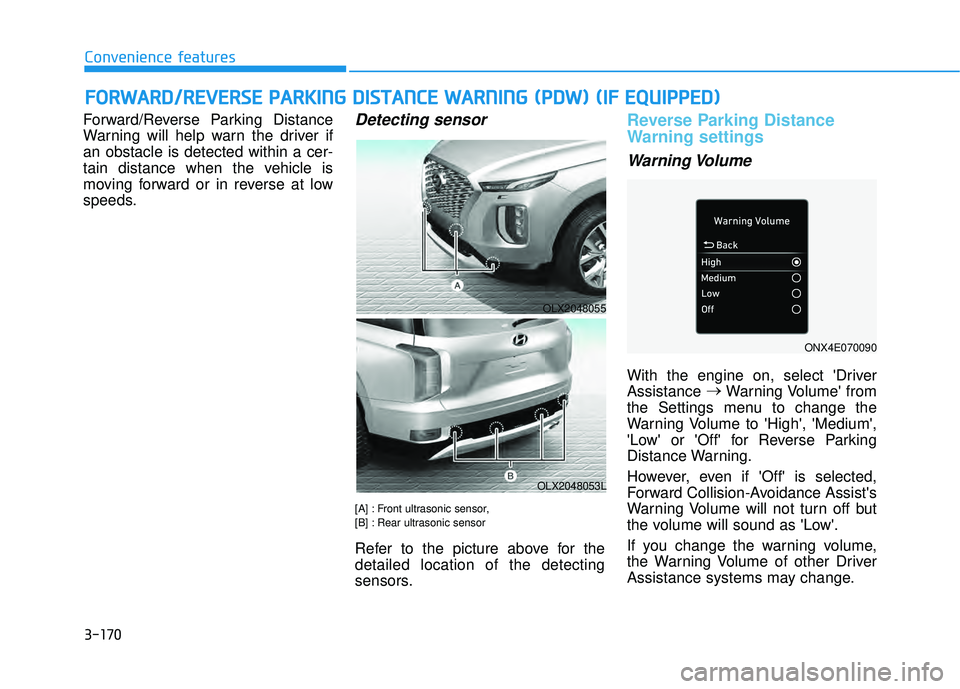
Detecting sensor
[A] : Front ultrasonic sensor,
[B] : Rear ultrasonic sensor
Refer to the picture above for the
detailed location of the detecting
sensors.
Reverse Parking Distance
Warning settings
Warning Volume
With the engine on, select 'Driver
Assistance →
Warning Volume' from
the Settings menu to change the
Warning Volume to 'High', 'Medium',
'Low' or 'Off' for Reverse Parking
Distance Warning.
However, even if 'Off' is selected,
Forward Collision-Avoidance Assist's
Warning Volume will not turn off but
the volume will sound as 'Low'.
If you change the warning volume,
the Warning Volume of other Driver
Assistance systems may change.
F F O O R RW W A AR RD D / /R R E EV V E ER R S SE E P P A A R RK K I IN N G G D D I IS S T T A A N N C CE E W W A AR RN N I IN N G G ( ( P P D D W W ) ) ( ( I IF F E E Q Q U UI IP P P PE ED D ) )
OLX2048055
OLX2048053L
ONX4E070090
Page 272 of 663
![HYUNDAI PALISADE 2022 Owners Manual 3-176
Convenience features
Surround View Monitor will assist in
parking by allowing the driver to see
around the vehicle.
Detecting sensor
[1] : Surround-front view camera,
[2],[3] : Surround-side vi](/img/35/41170/w960_41170-271.png "HYUNDAI PALISADE 2022 Owners Manual 3-176
Convenience features
Surround View Monitor will assist in
parking by allowing the driver to see
around the vehicle.
Detecting sensor
[1] : Surround-front view camera,
[2],[3] : Surround-side vi")
3-176
Convenience features
Surround View Monitor will assist in
parking by allowing the driver to see
around the vehicle.
Detecting sensor
[1] : Surround-front view camera,
[2],[3] : Surround-side view camera (under the outside rearview mirror),
[4] : Surround-rear view camera
Refer to the picture above for the
detailed location of the detecting
sensors.
Surround View Monitor set-
tings
Camera settings
You can change Surround View Monitor ‘Display Contents’ or
‘Display Settings’ by touching the
setup icon ( ) on the screen
while Surround View Monitor is
operating, or selecting ‘Driver
Assistance →Parking Safety →
Camera Settings’ from the Settings
menu while the engine is on.
In the Display Contents, you can change settings for ‘Top View
Parking Guidance’, ‘Rear View
Parking Guidance’ and ‘Parking
Distance Warning’.
In the Display Settings, you can change the screen’s ‘Brightness’
and ‘Contrast’.
S SU U R RR RO O U UN ND D V V I IE E W W M M O ON NI IT T O O R R ( ( S S V V M M ) ) ( ( I IF F E E Q Q U UI IP P P PE ED D ) )
OLX2048060
OTM070213L
OLX2051135L
OLX2041432L
OLX2041431L
Page 278 of 663
![HYUNDAI PALISADE 2022 Owners Manual 3-182
Convenience features
Blind-Spot View Monitor displays the
rear blind spot area of the vehicle in
the cluster when the turn signal is
turned on to help safely change
lanes.
Detecting sensor
[1],](/img/35/41170/w960_41170-277.png "HYUNDAI PALISADE 2022 Owners Manual 3-182
Convenience features
Blind-Spot View Monitor displays the
rear blind spot area of the vehicle in
the cluster when the turn signal is
turned on to help safely change
lanes.
Detecting sensor
[1],")
3-182
Convenience features
Blind-Spot View Monitor displays the
rear blind spot area of the vehicle in
the cluster when the turn signal is
turned on to help safely change
lanes.
Detecting sensor
[1], [2]: Surround-side view camera (camera located at bottom of the mirror)
Refer to the picture above for the
detailed location of the detecting
sensors.
Blind-Spot View Monitor set-
tings
Setting features
Blind-Spot View
With the engine on, select ‘Driver
Assistance →Blind-Spot Safety →
Blind- Spot View’ from the Settings
menu to turn on Blind-Spot View
Monitor and deselect to turn off the
function.
B B L LI IN N D D- -S S P P O O T T V V I IE E W W M M O ON NI IT T O O R R ( ( B B V V M M ) ) ( ( I IF F E E Q Q U UI IP P P PE ED D ) )
OLX2051136L
OLX2041433L/OLX2041434L
■ Left side ■Right side
Page 412 of 663
5-78
Driving your vehicle
Lane Keeping Assist is designed to
help detect lane markings (or road
edges) while driving over a certain
speed. Lane Keeping Assist will warn
the driver if the vehicle leaves the
lane without using the turn signal, or
will automatically assist the driver’s
steering to help prevent the vehicle
from departing the lane.
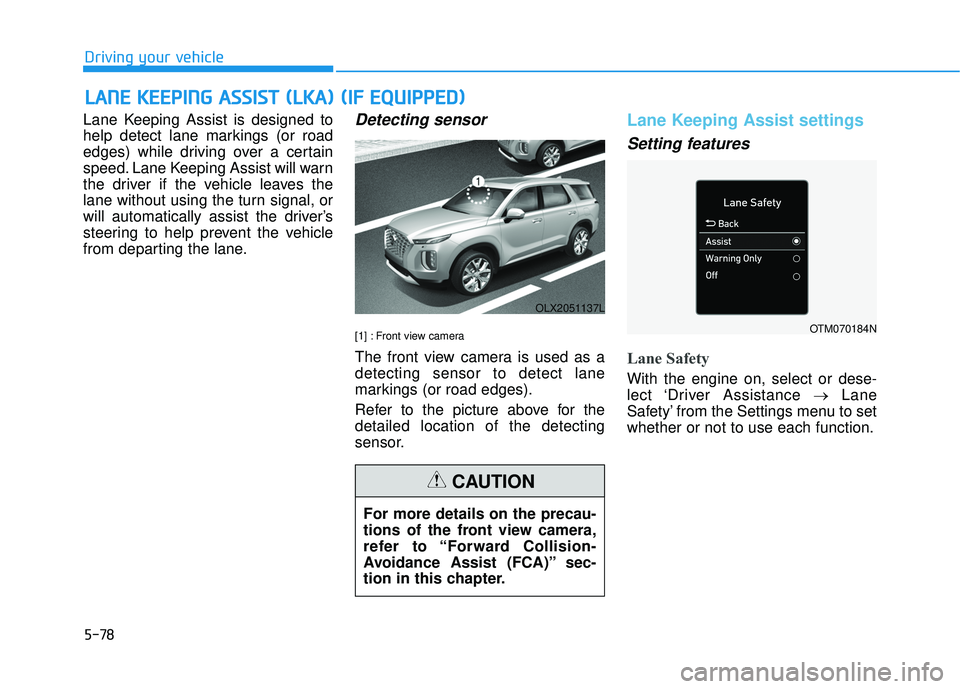
Detecting sensor
[1] : Front view camera
The front view camera is used as a
detecting sensor to detect lane
markings (or road edges).
Refer to the picture above for the
detailed location of the detecting
sensor.
Lane Keeping Assist settings
Setting features
Lane Safety
With the engine on, select or dese-
lect ‘Driver Assistance →Lane
Safety’ from the Settings menu to set
whether or not to use each function.
L L A A N N E E K K E EE EP P I IN N G G A A S SS SI IS S T T ( ( L L K K A A ) ) ( ( I IF F E E Q Q U UI IP P P PE ED D ) )
OLX2051137L
For more details on the precau-
tions of the front view camera,
refer to “Forward Collision-
Avoidance Assist (FCA)” sec-
tion in this chapter.
CAUTION
OTM070184N