change tire HYUNDAI PALISADE 2022 Owners Manual
[x] Cancel search | Manufacturer: HYUNDAI, Model Year: 2022, Model line: PALISADE, Model: HYUNDAI PALISADE 2022Pages: 663, PDF Size: 15.74 MB
Page 169 of 663
3-73
Convenience Features
3
The power liftgate can be oper-ated when the engine is not run-
ning. However, the power liftgate
operation consumes a large
amount of electic power.
To prevent the battery from
being discharged, do not oper-
ate it excessively (e.g. more than
5 times repeatedly).
To prevent the battery from being discharged, do not leave
the power liftgate in the open
position for a long time.
Do not modify or repair any part of the power liftgate by yourself.
This must be done by an author-
ized HYUNDAI dealer.
When jacking up the vehicle to change a tire or repair the vehi-
cle, do not operate the power
liftgate. This could cause the
power liftgate to operate
improperly.
In cold and wet climates, the power liftgate may not work
properly due to freezing condi-
tions.
Automatic reversal
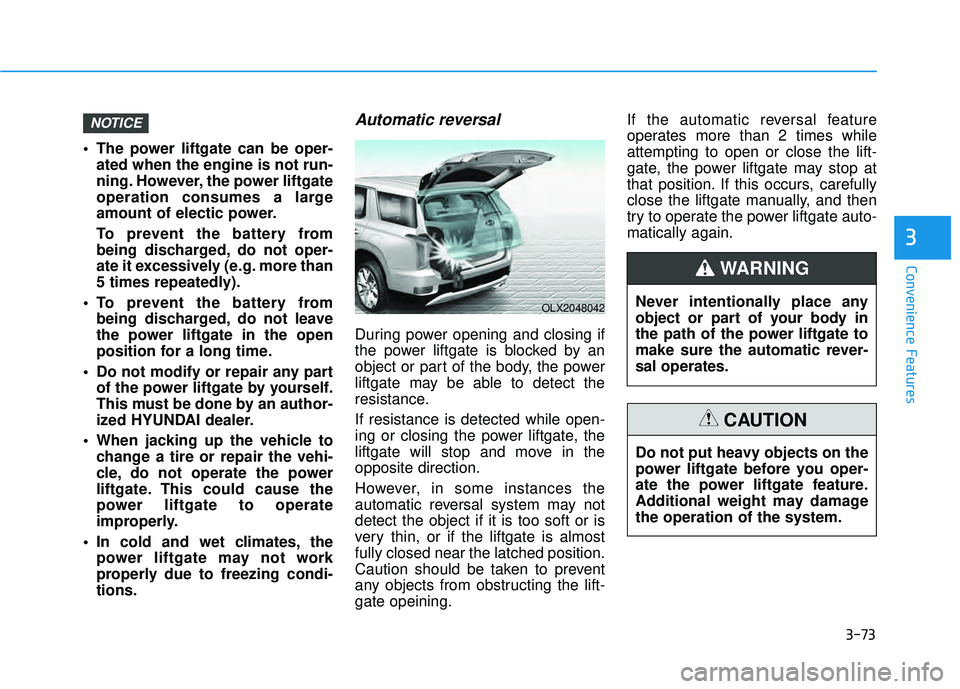
During power opening and closing if
the power liftgate is blocked by an
object or part of the body, the power
liftgate may be able to detect the
resistance.
If resistance is detected while open-
ing or closing the power liftgate, the
liftgate will stop and move in the
opposite direction.
However, in some instances the
automatic reversal system may not
detect the object if it is too soft or is
very thin, or if the liftgate is almost
fully closed near the latched position.
Caution should be taken to prevent
any objects from obstructing the lift-
gate opeining. If the automatic reversal feature
operates more than 2 times while
attempting to open or close the lift-
gate, the power liftgate may stop at
that position. If this occurs, carefully
close the liftgate manually, and then
try to operate the power liftgate auto-
matically again.
NOTICE
OLX2048042Never intentionally place any
object or part of your body in
the path of the power liftgate to
make sure the automatic rever-
sal operates.
WARNING
Do not put heavy objects on the
power liftgate before you oper-
ate the power liftgate feature.
Additional weight may damage
the operation of the system.
CAUTION
Page 377 of 663
5-43
Driving your vehicle
5
The All Wheel Drive (AWD) system
delivers engine torque to both the
front and rear wheels for extra trac-
tion. AWD is useful when maximum
traction is required on slippery,
muddy, wet, or snow-covered roads.
Occasional off-road use such as
established unpaved roads and trails
are OK. It is always important that
the driver carefully reduces the
speed to a level that does not exceed
the safe operating speed for those
conditions. Do not drive in water if the level
is higher than the bottom of the
vehicle.
Check your brake condition once you are out of mud or
water. Depress the brake pedal
several times as you move slow-
ly until you feel normal braking
return.
Shorten your scheduled mainte- nance interval if you drive in off-
road conditions such as sand,
mud or water (see "Maintenance
Under Severe Usage Conditions"
in chapter 7).
Always wash your vehicle thor- oughly after off road use, espe-
cially the bottom of the vehicle.
Be sure to equip the vehicle with four tires of the same size and
type.
Make sure that a full time AWD vehicle is towed by a flat bed
tow truck.NOTICE
A AL LL L W W H HE EE EL L D D R RI IV V E E ( ( A A W W D D) ) ( ( I IF F E E Q Q U UI IP P P PE ED D ) )
To reduce the risk of SERIOUS
INJURY or DEATH:
Do not drive in conditions that
exceed the vehicles intended
design such as challenging
off-road conditions.
Avoid high speeds when cor-
nering or turning.
Do not make quick steering
wheel movements, such as
sharp lane changes or fast,
sharp turns.
The risk of a rollover is great-
ly increased if you lose con-
trol of your vehicle at highway
speeds.
Loss of control often occurs if
two or more wheels drop off
the roadway and the driver
over steers to reenter the
roadway.
In the event your vehicle
leaves the roadway, do not
steer sharply. Instead, slow
down before pulling back into
the travel lanes.
WARNING
Page 426 of 663
5-92
Driving your vehicle
Limitations of Blind-SpotCollision Warning
Blind-Spot Collision Warning may not
operate normally, or the function may
operate unexpectedly under the fol-
lowing circumstances:
There is inclement weather, such
as heavy snow, heavy rain, etc.
The rear corner radar is covered with snow, rain, dirt, etc.
The temperature around the rear corner radar is high or low
Driving on a highway (or motor- way) ramp
The road pavement (or the periph- eral ground) abnormally contains
metallic components (i.e. possibly
due to subway construction)
There is a fixed object near the vehicle, such as sound barriers,
guardrails, central dividers, entry
barriers, street lamps, signs, tun-
nels, walls, etc. (including double
structures)
Driving in large areas where there are few vehicles or structures (i.e.
desert, meadow, suburb, etc.) Driving through a narrow road
where trees or grass are over-
grown
Driving on a wet road surface, such as a puddle on the road
The other vehicle drives very close behind your vehicle, or the other
vehicle passes by your vehicle in
close proximity
The speed of the other vehicle is very fast that it passes by your
vehicle in a short time
Your vehicle passes by the other vehicle
Your vehicle changes lane
Your vehicle has started at the same time as the vehicle next to
you and has accelerated
The vehicle in the next lane moves two lanes away from you, or when
the vehicle two lanes away moves
to the next lane from you
A trailer or carrier is installed around the rear corner radar
The bumper around the rear cor- ner radar is covered with objects,
such as a bumper sticker, bumper
guard, bike rack, etc. The bumper around the rear cor-
ner radar is impacted, damaged or
the radar is out of position
Your vehicle height is low or high due to heavy loads, abnormal tire
pressure, etc.
Page 441 of 663
5-107
Driving your vehicle
5
Driving through a narrow roadwhere trees or grass are over-
grown
Driving on a wet road surface, such as a puddle on the road
The other vehicle drives very close behind your vehicle, or the other
vehicle passes by your vehicle in
close proximity
The speed of the other vehicle is very fast that it passes by your
vehicle in a short time
Your vehicle passes by the other vehicle
Your vehicle changes lane
Your vehicle has started at the same time as the vehicle next to
you and has accelerated
The vehicle in the next lane moves two lanes away from you, or when
the vehicle two lanes away moves
to the next lane from you
A trailer or carrier is installed around the rear corner radar The bumper around the rear cor-
ner radar is covered with objects,
such as a bumper sticker, bumper
guard, bike rack, etc.
The bumper around the rear cor- ner radar is impacted, damaged or
the radar is out of position
Your vehicle height is low or high due to heavy loads, abnormal tire
pressure, etc. Blind-Spot Safety system may not
operate normally, or the function may
operate unexpectedly when the fol-
lowing objects are detected:
A motorcycle or bicycle is detected
A vehicle such as a flat trailer is
detected
A big vehicle such as a bus or truck is detected
A moving obstacle such as a pedestrian, animal, shopping cart
or a baby stroller is detected
A vehicle with low height such as a sports car is detected
Braking control may not work, dri-
ver’s attention is required in the fol-
lowing circumstances:
The vehicle severely vibrates while driving over a bumpy road, uneven
road or concrete patch
Driving on a slippery surface due to snow, water puddle, ice, etc.
The tire pressure is low or a tire is damaged
The brake is reworked
The vehicle makes abrupt lane changes
Page 499 of 663
5-165
Driving your vehicle
5
A vehicle suddenly cuts in front
Your vehicle is being towed
Driving through a tunnel or ironbridge
Driving near areas containing metal substances, such as a con-
struction zone, railroad, etc.
A material is near that reflects very well on the front radar, such as a
guardrail, nearby vehicle, etc.
The bumper around the front radar is impacted, damaged or the front
radar is out of position
The temperature around the front radar is high or low
Driving in large areas where there are few vehicles or structures (for
example, desert, meadow, suburb,
etc.)
The vehicle in front is made of material that does not reflect on
the front radar
Driving near a highway (or motor- way) interchange or tollgate
Driving on a slippery surface due to snow, water puddle, ice, etc.
Driving on a curved road The vehicle in front is detected late
The vehicle in front is suddenly
blocked by a obstacle
The vehicle in front suddenly changes lane or suddenly reduces
speed
The vehicle in front is bent out of shape
The front vehicle’s speed is fast or slow
With a vehicle in front, your vehicle changes lane at low speed
The vehicle in front is covered with snow
Unstable driving
You are on a roundabout and the vehicle in front is not detected
You are continuously driving in a circle
Driving in a parking lot
Driving through a construction area, unpaved road, partial paved
road, uneven road, speed bumps,
etc. Driving on an incline road, curved
road, etc.
Driving through a roadside with trees or streetlights
The adverse road conditions cause excessive vehicle vibrations while
driving
Your vehicle height is low or high due to heavy loads, abnormal tire
pressure, etc.
Driving through a narrow road where trees or grass are over-
grown
There is interference by electro- magnetic waves, such as driving in
an area with strong radio waves or
electrical noise
Page 512 of 663
5-178
Driving your vehicle
Hazardous Driving Conditions
When hazardous driving elements
are encountered such as water,
snow, ice, mud and sand, take the
below suggestions:
Drive cautiously and keep a longerbraking distance.
Avoid abrupt braking or steering.
When your vehicle is stuck in snow, mud, or sand, use second gear.
Accelerate slowly to avoid unnec-
essary wheel spin.
Put sand, rock salt, tire chains or other non-slip materials under the
wheels to provide additional trac-
tion while the vehicle becomes
stuck in ice, snow, or mud.
Rocking the Vehicle
If it is necessary to rock the vehicle
to free it from snow, sand, or mud,
first turn the steering wheel right and
left to clear the area around your
front wheels. Then, shift back and
forth between R (Reverse) and a for-
ward gear.
Try to avoid spinning the wheels, and
do not race the engine.
To prevent transmission wear, wait
until the wheels stop spinning before
shifting gears. Release the accelera-
tor pedal while shifting, and press
lightly on the accelerator pedal while
the transmission is in gear. Slowly
spinning the wheels in forward and
reverse directions causes a rocking
motion that may free the vehicle.
S SP P E EC CI IA A L L D D R RI IV V I IN N G G C C O O N ND DI IT T I IO O N NS S
Downshifting with an automatic
transmission while driving on
slippery surfaces can cause an
accident. The sudden change in
tire speed could cause the tires
to skid. Be careful when down-
shifting on slippery surfaces.
WARNING
If the vehicle is stuck and
excessive wheel spin occurs,
the temperature in the tires can
increase very quickly. If the tires
become damaged, a tire blow
out or tire explosion can occur.
This condition is dangerous -
you and others may be injured.
Do not attempt this procedure if
people or objects are anywhere
near the vehicle.
If you attempt to free the vehicle,
the vehicle can overheat quickly,
possibly causing an engine
compartment fire or other dam-
age. Try to avoid spinning the
wheels as much as possible to
prevent overheating of either the
tires or the engine. DO NOT
allow the vehicle to spin the
wheels above 35 mph (56 km/h).
WARNING
Page 518 of 663
5-184
Driving your vehicle
- When using tire chains:
Wrong size chains or improperly installed chains can damage
your vehicle's brake lines, sus-
pension, body and wheels.
Use SAE "S" class or wire chains.
If you hear noise caused by chains contacting the body,
retighten the chain to prevent
contact with the vehicle body.
To prevent body damage, retighten the chains after driving
0.3~0.6 miles (0.5~1.0 km).
Do not use tire chains on vehi- cles equipped with aluminum
wheels. If unavoidable, use a
wire type chain.
Use wire chains less than 0.59 inch (15 mm) wide to prevent
damage to the chain’s connec-
tion.
Winter Precautions
Use high quality ethylene glycolcoolant
Your vehicle is delivered with high
quality ethylene glycol coolant in the
cooling system. It is the only type of
coolant that should be used because
it helps prevent corrosion in the cool-
ing system, lubricates the water
pump and prevents freezing. Be sure
to replace or replenish your coolant
in accordance with the maintenance
schedule in chapter 7. Before winter,
have your coolant tested to assure
that its freezing point is sufficient for
the temperatures anticipated during
the winter.
Change to "winter weight" oil ifnecessary
In some climates it is recommended
that a lower viscosity "winter weight"
oil be used during cold weather. See
chapter 8 for recommendations. If
you aren't sure what weight oil you
should use, consult an authorized
HYUNDAI dealer.
Check battery and cables
Winter puts additional burdens on
the battery system. Visually inspect
the battery and cables as described
in chapter 7. The level of charge in
your battery can be checked by an
authorized HYUNDAI dealer or a
service station.
NOTICE
Page 542 of 663
6-8
What to do in an emergency
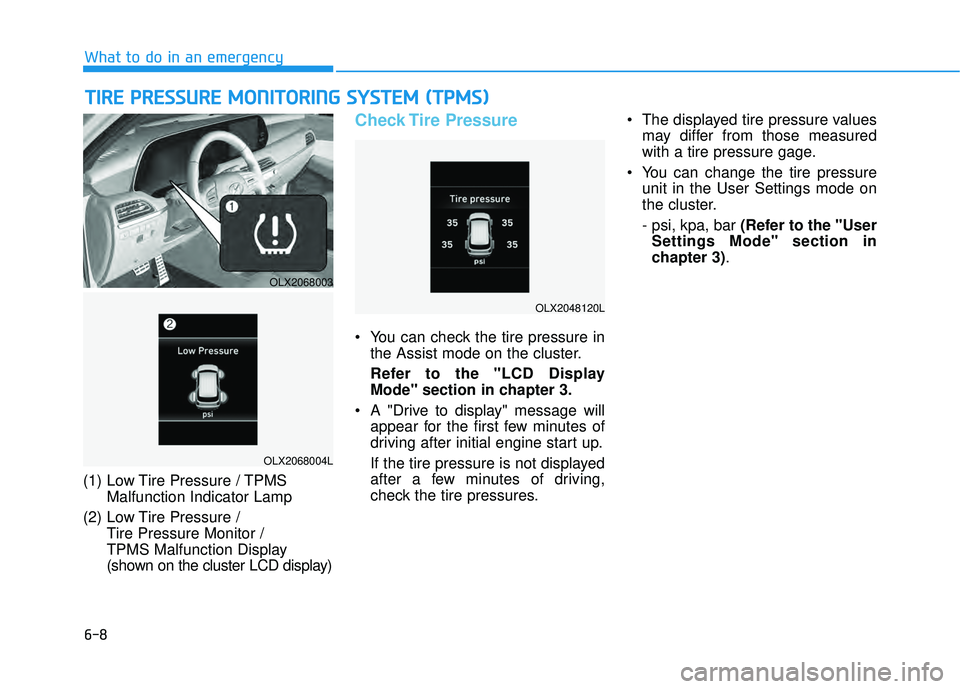
(1) Low Tire Pressure / TPMS Malfunction Indicator Lamp
(2) Low Tire Pressure / Tire Pressure Monitor /
TPMS Malfunction Display
(shown on the cluster LCD display)
Check Tire Pressure
You can check the tire pressure inthe Assist mode on the cluster.
Refer to the "LCD Display Mode" section in chapter 3.
A "Drive to display" message will appear for the first few minutes of
driving after initial engine start up.
If the tire pressure is not displayed
after a few minutes of driving,
check the tire pressures. The displayed tire pressure values
may differ from those measured
with a tire pressure gage.
You can change the tire pressure unit in the User Settings mode on
the cluster.
- psi, kpa, bar (Refer to the "UserSettings Mode" section in
chapter 3).
T TI IR R E E P P R R E ES SS SU U R RE E M M O ON NI IT T O O R RI IN N G G S S Y Y S ST T E EM M ( ( T T P P M M S S) )
OLX2068003
OLX2068004L
OLX2048120L
Page 547 of 663
6-13
What to do in an emergency
6
You may not be able identify a tire
with low pressure by simply looking
at it. Always use a good quality tire
pressure gauge to measure the tire's
inflation pressure. Please note that a
tire that is hot (from being driven) will
have a higher pressure measure-
ment than a tire that is cold.
A cold tire means the vehicle has
been sitting for 3 hours and driven for
less than 1 mile (1.6 km) in that 3
hour period.
Allow the tire to cool before measur-
ing the inflation pressure. Always be
sure the tire is cold before inflating to
the recommended pressure.Information
This device complies with Part 15 of
the FCC rules.
Operation is subject to the following
three conditions:
1. This device may not cause harmfulinterference.
2. This device must accept any inter- ference received, including interfer-
ence that may cause undesired oper-
ation.
3. Changes or modifications not expressly approved by the party
responsible for compliance could
void the user's authority to operate
the equipment.
i
The TPMS cannot alert you to
severe and sudden tire dam-
age caused by external fac-
tors such as nails or road
debris.
If you feel any vehicle instabil-
ity, immediately take your foot
off the accelerator, apply the
brakes gradually with light
force, and slowly move to a
safe position off the road.
WARNING
Tampering with, modifying, or
disabling the Tire Pressure
Monitoring System (TPMS)
components may interfere with
the system's ability to warn the
driver of low tire pressure con-
ditions and/or TPMS malfunc-
tions. Tampering with, modify-
ing, or disabling the Tire
Pressure Monitoring System
(TPMS) components may void
the warranty for that portion of
the vehicle.
WARNING
Page 550 of 663
6-16
What to do in an emergency
To store the spare tire:
1. Lay the tire on the ground with the valve stem facing up.
2. Place the wheel under the vehicle and install the retainer guide and
chain through the wheel center.
3. Turn the wrench clockwise until it clicks.
Changing Tires
Follow these steps to change your
vehicle's tire:
1. Park on a level, firm surface.
2. Move the shift button into P (Park), apply the parking brake,
and place the ignition switch in the
OFF position.
3. Press the hazard warning flasher button.
4. Remove the wheel lug nut wrench, jack, jack handle, wheel
cap remover (big cap only) and
spare tire from the vehicle.
5. Block both the front and rear of the tire diagonally opposite of the
tire you are changing.
A vehicle can slip or roll off of a
jack causing serious injury or
death to you or those nearby.
Take the following safety pre-
cautions:
Never place any portion of
your body under a vehicle that
is supported by a jack.
NEVER attempt to change a
tire in the lane of traffic.
ALWAYS move the vehicle
completely off the road on
level, firm ground away from
traffic before trying to change
a tire. If you cannot find a level,
firm place off the road, call a
towing service for assistance.
Be sure to use the jack pro-
vided with the vehicle.
ALWAYS place the jack on the
designated jacking positions
on the vehicle and NEVER on
the bumpers or any other part
of the vehicle for jacking sup-
port.
Do not start or run the engine
while the vehicle is on the
jack.
Do not allow anyone to remain
in the vehicle while it is on the
jack.
Keep children away from the
road and the vehicle.
WARNING
Ensure the spare tire retainer
guide is properly aligned with
the center of the spare tire to
prevent the spare tire from "rat-
tling".
Otherwise, it may cause the
spare tire to fall off the carrier
and lead to an accident.
CAUTION