ignition Hyundai Santa Fe 2003 Owner's Guide
[x] Cancel search | Manufacturer: HYUNDAI, Model Year: 2003, Model line: Santa Fe, Model: Hyundai Santa Fe 2003Pages: 221, PDF Size: 15.98 MB
Page 109 of 221
FEATURES OF YOUR HYUNDAI 1- 97
7. TAPE/CD Select Button
Press this button to play a tape when listening
to the radio. Press TAPE/CD to switch between
the tape and compact disc if both are loaded.
The inactive tape or CD will remain safe inside
the radio for future listening.
8. Cassette Tape EJECT Button
Press this button located to the right of the
cassette tape slot to eject a tape. The tape is
ejected with the radio off. Cassette tape may be
loaded with the radio off.
9. Cassette Tape Messages
CHECK TAPE
If this message appears on the radio display, the
tape won't play because of one of the following
errors.
o The tape is tight and the player can't turn the
tape hubs. Remove the tape. Hold the tape
with the open end down and try to turn the
right hub counterclockwise with a pencil.
Turn the tape over and repeat. If the hubs do
not turn easily, your tape may be damaged
and should not be used in the player. Try a
new tape to make sure your player is work-
ing properly.
o The tape is broken. Try a new tape.
o The tape is wrapped around the tape head.
Attempt to get the cassette out. Try a new
tape.
CLEAN
If this message appears on the display, the
cassette tape player needs to be cleaned. It will
still play tapes, but you should clean it as soon
as possible to prevent damage to the tapes and
player. See "Care of Your Cassette Tape Player"
in the Index.
If any error occurs repeatedly or if an error can't
be corrected, contact your dealer.
10. Care of Your Cassette Tape Player
A tape player that is not cleaned regularly can
cause reduced sound quality, reined cassettes
or a damaged mechanism. Cassette tapes
should be stored in their case away from con-
taminants, direct sunlight and extreme heat. If
they aren't they may not operate properly or
may cause failure of the tape player.
Your tape player should be cleaned regularly
after every 59 hours of use. Your radio may
display CLEAN to indicate that you have used
your tape player needs to be cleaned. It will still
play tapes, but you should clean it as soon as
possible to prevent damage to your tapes and
player. If you notice a reduction in sound quality,
try a known good cassette to see of it is the tape
or the tape player or fault. If this other cassette
has no improvement in sound quality, clean the
tape player.The recommended cleaning method for your
cassette tape player is the use of a scrubbing
action, non-abrasive cleaning cassette with
pads which scrub the tape head as the hubs of
the cleaner cassette turn. The recommended
cleaning cassette is available through your
dealer.
When cleaning the cassette tape player with the
recommended non-abrasive cleaning cassette,
it is possible that the cassette may eject, be-
cause the cut tape detection feature on your
radio may recognize it as a broken tape. To
prevent the cleaning cassette from being
ejected, use the following steps:
1. Turn the ignition to ON or ACC.
2. Turn the radio off.
3. Press and hold the TAPE/CD select button
for five seconds. READY will appear on the
display and a cassette symbol will flash for
five second.
4. Insert the scrubbing action cleaning cas-
sette.
5. Eject the cleaning cassette after the
manufacturer's recommended cleaning time.
When the cleaning cassette has been ejected,
the broken tape detection feature is active
again.
Page 112 of 221
1- 100 FEATURES OF YOUR HYUNDAI
D285F01O-AATPlaying a Compact Disc
Insert a disc partway into the slot. Label side up.
The player will pull it in and the disc should begin
playing. The display will show the CD symbol.
You can inset a compact disc with the ignition off.
1. SEEK/SCAN Button
SEEK
Press this Pushbutton to go to the next TRACK
and the track number will appear on the display.
If you hold this pushbutton or press it more than
once, the player will continue moving forward
through the disc. The sound will mute while
seeking.
SEEK
Press this Pushbutton to go to the previous
track if the current track has been playing for
less than eight seconds. If this pushbutton is
pressed and the current track has been playing
for more than eight seconds, it will go to the
beginning of the current track. TRACK and the
track number will appear on the display. If you
hold this pushbutton or press it more than once,
the player will continue moving back through the
disc. The sound will mute while seeking.
SCAN
Press and hold either SEEK SCAN arrow for
more than two seconds until SCAN appears on
the display and you hear a beep. Use SEEK
SCAN to listen to each track for a few seconds.
The sounds will mute while scanning. SCAN will
appear on the display. Press either SEEK SCAN
arrow again, to stop scanning.
2. REVERSE Button
Press and hold this pushbutton to reverse
quickly within a track. Press and hold this
pushbutton for less than two seconds to re-
verse at six times the normal playing speed.
Press and hold it for more than two seconds to
reverse at 17 times the normal playing speed.
Release it to play the passage. The display will
show ET and the elapsed time.
3. FORWARD Button
Press and hold this pushbutton to advance
quickly within a track. Press and hold this
pushbutton for less than two seconds to ad-
vance at six times the normal playing speed.
Press and hold it for more than two seconds to
advance at 17 times the normal playing speed.
Release it to play the passage. The display will
show ET and the elapsed time.
4. RANDOM Button
Press this pushbutton to hear the tracks in
random, rather than sequential, order. RDM will
appear on the display. RDM T and the track
number will appear on the display when each
track starts to play. Press it again to turn off
random play. RDM OFF will appear on the
display.
5. BAND Select Button
Press this button to listen to the radio when a
disc is playing. The disc will stop but remain in
the player.
6. TAPE/CD Select Button
Press this button to play a CD when listening to
the radio. Press TAPE CD to switch between the
tape and compact disc if both are loaded. The
inactive tape or CD will remain safely inside the
radio for future listening.
7. CD EJECT Button
Press this button, located to the left of the CD
slot, to eject a CD. Eject may be activated with
either the ignition or radio off. CDs may be
loaded with the radio and ignition off.
Page 118 of 221
1- 106 FEATURES OF YOUR HYUNDAI
D295D01O-AAT1. LOAD Button
This compact disc playing will accommodate up
to six discs.
To insert one disc do the following:
1. Turn the ignition on.
2. Press and release the LOAD Button.
3. Wait for the light, located to the right of the slot,
to turn green.
4. Load a disc. Insert a disc partway into the slot,
label side up. The player will pull the disc in.
When the disc is inserted, the CD symbol will be
displayed. If you select an EQ setting for your
disc, it will be activated each time you play a disc.
If the radio is on or off, the disc will begin to play
automatically.
To inset multiple discs do the followings:
1. Turn the ignition on.
2. Press and hold the LOAD button for two
seconds.
You will then hear two beeps and the light,
located to the right of the slot, will begin to
flash.
3. Once the light stops flashing and turns
green. Load a disc. Insert a disc partway into
the slot, label side up.The player will pull the disc in.
Once the disc is loaded, the light will begin
flashing again. Once the light stop flashing
and turns green you can then load another
disc. The disc player takes up to six discs.
Do not try to load more than six.
When a disc is inserted, the CD symbol will
be displayed. If more than one disc has been
loaded, number for each disc will be dis-
played. If you select an EQ setting for your
disc, it will be activated each time you play a
disc.
If the radio is on or off, the last disc loaded will
begin to play automatically.
4. To load more than one disc but less than six,
complete Steps 1, 2 and 3. When you have
finished loading discs, with the radio on or off,
press LOAD to cancel the loading function.
The radio will begin to play the last CD loaded.
As each new track starts to play, the track
number will appear on the display.
Playing a Specific Loaded CD
For every CD loaded, a number will appear on
the radio display. To play a specific CD, first
press the CD select button to start playing a CD.
Then press the numbered button that corre-
sponds to the CD you want to play.
A small bar will appear under the CD number that
is playing, it could be due to one of the following
conditions:o The road is too rough. The disc should play
when the road is smoother.
o The disc is dirty, scratched, wet or upside
down.
o The air is very humid. If so, wait about an hour
and try again.
If any error occurs repeatedly or if an error can't
be corrected, please contact your dealer. If
your radio displays an error message, write it
down and provide it to your dealer when report-
ing the problem.
2. CD EJECT Button
This button will eject a disc or discs, if you have
multiple discs loaded. To eject a disc or discs
from the disc player perform one of the following
steps:
o Press and release the eject button to eject
the disc that is currently playing.
o To eject all of the discs, press this button for
two seconds, you will hear three beeps, and
the light will flash to let you know when a disc
is being ejected.
When the eject button is pressed, the receiver
will eject the disc and REMOVE CD will be
displayed. You can now remove the disc. If the
disc is not removed, after 25 seconds, the disc
will be automatically pulled back into the re-
ceiver, If you try to push the disc back into the
receiver, before the 25 second time period is
Page 125 of 221
DRIVING YOUR HYUNDAI 2- 3
!!WARNING:o The 2WD Santa Fe is not designed for
off-road use. The 4WD Santa Fe is de-
signed primarily for use on paved roads.
However, occasional use in off-highway
conditions such as established unpaved
roads and non-challenging off-road
trails is allowed. The 4WD Santa Fe is not
designed for blazing new trails, chal-
lenging off-road conditions, or unpaved
hill climbing. Exceeding the conditions
that were intended for the vehicle's pri-
mary design may result in injury or death.
o Utility vehicle has a significantly higher
collision rate than other type of vehicles.
o Utility vehicle have higher ground clear-
ance and a narrower track to make them
capable of performing in a wide variety
of off-road applications. Specific design
characteristics give them a higher center
of gravitiy than ordinary cars. An advan-
tage of the higher ground clearance is a
better view of the road allowing you to
anticipate problem. They are not de-
signed for cornering at the same speeds
as conventional 2-wheel drive vehicles
any more than low-slung sports cars are
designed to perform satisfactorily un-
der off-road conditions. If at all possible,
avoid sharp turns or abrupt maneuvers.
As with other vehicles of this type, fail-
ure to operate this vehicle correctly may
result in loss of control or vehicle rollover.
C020A01A-AATBEFORE STARTING THE ENGINE
Before you start the engine, you should always:
1. Look around the vehicle to be sure there are
no flat tires, puddles of oil, water or other
indications of possible trouble.
2. After entering the car, check to be sure the
parking brake is engaged.
3. Check that all windows, and lights are clean.
4. Check that the interior and exterior mirrors
are clean and in position.
5. Check your seat, seatback and headrest to
be sure they are in their proper positions.
6. Lock all the doors.
7. Fasten your seat belt and be sure that all
other occupants have fastened theirs.
8. Turn off all lights and accessories that are
not needed.
9. When you turn the ignition switch to "ON",
check that all appropriate warning lights are
operating and that you have sufficient fuel.
10.Check the operation of warning lights and all
bulbs when key is in the "ON" position.
C030A01E-AATCOMBINATION IGNITION SWITCH
To Start the Engine
o If your Hyundai is equipped with a manual
transaxle, place the shift lever in neutral and
depress the clutch pedal fully.
o If your Hyundai has an automatic transaxle,
place the shift lever in "P" (park).
o To start the engine, insert the ignition key and
turn it to the "START" position. Release it as
soon as the engine starts. Do not hold the
key in the "START" position for more that 15
seconds.
NOTE:o For safety, the engine will not start if the
clutch pedal is not depressed fully
(Manual Transaxle) or the shift lever is
not in "P" or "N" Position (Automatic
Transaxle).
o The ignition key cannot be turned from
"ACC" position to "LOCK" position un-
less the shift lever is in the "P" (Park)
position or the negative battery terminal
is disconnected from the battery. To
remove the key, always confirm that the
shift lever is securely positioned in "P"
(Park) (For Automatic Transaxle)
o For additional information about start-
ing, see page 2-5.
WARNING:o In a collision crash, an unbelted person
is significantly more likely to die than a
person wearing a seatbelt.
Page 126 of 221
2- 4 DRIVING YOUR HYUNDAI
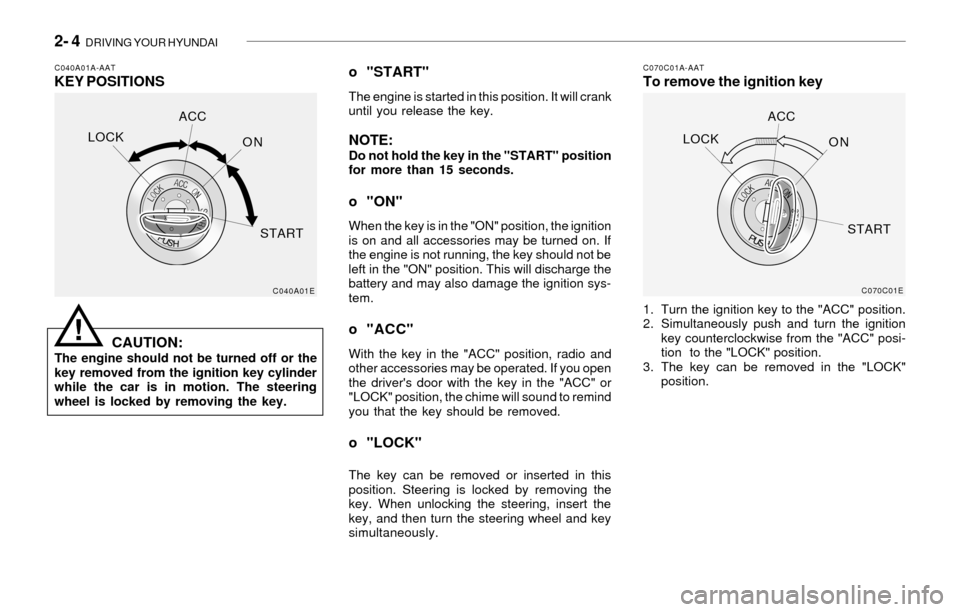
C040A01A-AATKEY POSITIONSC070C01A-AATTo remove the ignition key
CAUTION:
The engine should not be turned off or the
key removed from the ignition key cylinder
while the car is in motion. The steering
wheel is locked by removing the key.
o "START"
The engine is started in this position. It will crank
until you release the key.
NOTE:Do not hold the key in the "START" position
for more than 15 seconds.
o "ON"
When the key is in the "ON" position, the ignition
is on and all accessories may be turned on. If
the engine is not running, the key should not be
left in the "ON" position. This will discharge the
battery and may also damage the ignition sys-
tem.
o "ACC"
With the key in the "ACC" position, radio and
other accessories may be operated. If you open
the driver's door with the key in the "ACC" or
"LOCK" position, the chime will sound to remind
you that the key should be removed.
o "LOCK"
The key can be removed or inserted in this
position. Steering is locked by removing the
key. When unlocking the steering, insert the
key, and then turn the steering wheel and key
simultaneously.1. Turn the ignition key to the "ACC" position.
2. Simultaneously push and turn the ignition
key counterclockwise from the "ACC" posi-
tion to the "LOCK" position.
3. The key can be removed in the "LOCK"
position.
C040A01EC070C01E
LOCKACC
ON
STARTLOCKACC
ON
START
!
Page 127 of 221
DRIVING YOUR HYUNDAI 2- 5
!
C050A01A-AATSTARTING
WARNING:
Never run the engine in a closed or poorly
ventilated area any longer than is needed to
move your car in or out of the area. The
carbon monoxide gas emitted is odorless
and can cause serious injury or death.
C050B01A-AATNormal Conditions:
The Starting Procedure:
1. Insert key, and fasten the seat belt.
2. Depress the clutch pedal fully and place the
gearshift lever (manual transaxle) in neutral
or the selector lever (automatic transaxle) in
"P" (park) position.
3. After turning the ignition key to the "ON"
position, make certain all warning lights and
gauges are functioning properly before start-
ing the engine.
WARNING:Be sure that the clutch is fully depressed
when starting a manual transaxle vehicle.
Your manual transaxle equipped vehicle
will not start unless the clutch pedal is fully
depressed. On a manual transaxle equipped
vehicle that can be started without de-
pressing the clutch, there is the potential to
cause damage to the vehicle or injury to
someone inside or outside the vehicle as a
result of the forward or backward move-
ment of the vehicle that will occur if the
clutch is not depressed when the vehicle is
started.4. Turn the ignition key to the "Start" position
and release it when the engine starts.
After the engine has started, allow the engine
to run for 10 to 20 seconds prior to placing
the vehicle in gear.
The starter should not be operated for more
than 15 seconds at a time. Wait 15-30 sec-
onds between starting attempts to protect
the starter from overheating.
!
C070A01A-AATOPERATING THE MANUAL
TRANSAXLE
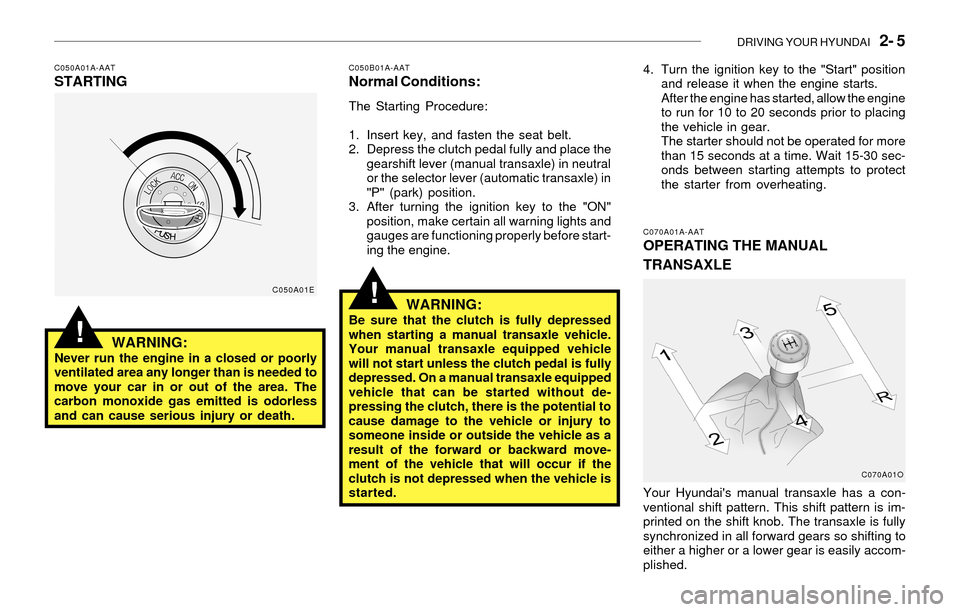
Your Hyundai's manual transaxle has a con-
ventional shift pattern. This shift pattern is im-
printed on the shift knob. The transaxle is fully
synchronized in all forward gears so shifting to
either a higher or a lower gear is easily accom-
plished.
C050A01E
C070A01O
Page 130 of 221
2- 8 DRIVING YOUR HYUNDAI
!
C090E01O-AAT
o D(Drive):
Use for normal driving. The transaxle will auto-
matically shift through a four gear sequence.
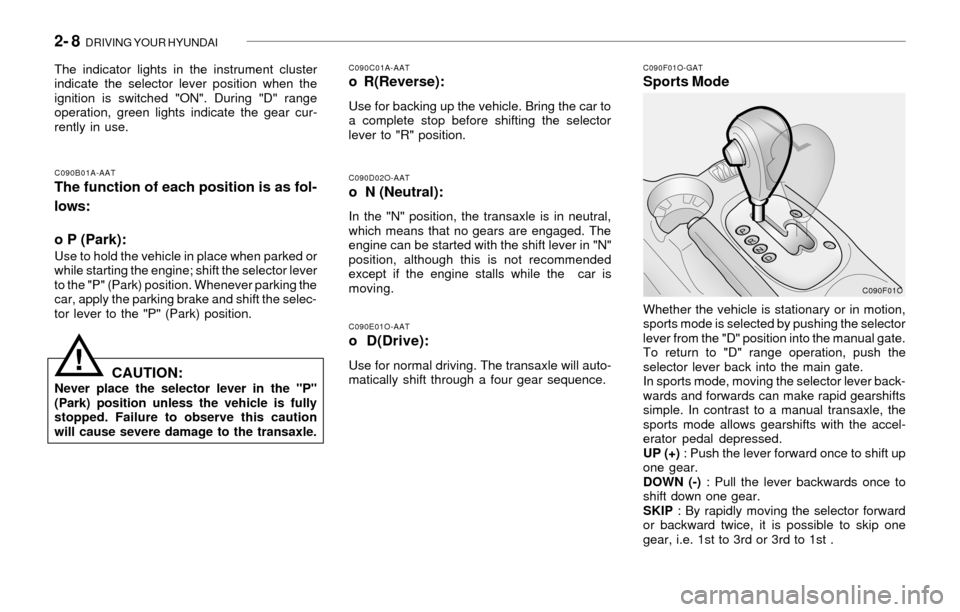
C090F01O-GATSports Mode
C090D02O-AATo N (Neutral):
In the "N" position, the transaxle is in neutral,
which means that no gears are engaged. The
engine can be started with the shift lever in "N"
position, although this is not recommended
except if the engine stalls while the car is
moving.
C090B01A-AAT
The function of each position is as fol-
lows:
o P (Park):
Use to hold the vehicle in place when parked or
while starting the engine; shift the selector lever
to the "P" (Park) position. Whenever parking the
car, apply the parking brake and shift the selec-
tor lever to the "P" (Park) position.
C090C01A-AATo R(Reverse):
Use for backing up the vehicle. Bring the car to
a complete stop before shifting the selector
lever to "R" position. The indicator lights in the instrument cluster
indicate the selector lever position when the
ignition is switched "ON". During "D" range
operation, green lights indicate the gear cur-
rently in use.
CAUTION:Never place the selector lever in the "P"
(Park) position unless the vehicle is fully
stopped. Failure to observe this caution
will cause severe damage to the transaxle.Whether the vehicle is stationary or in motion,
sports mode is selected by pushing the selector
lever from the "D" position into the manual gate.
To return to "D" range operation, push the
selector lever back into the main gate.
In sports mode, moving the selector lever back-
wards and forwards can make rapid gearshifts
simple. In contrast to a manual transaxle, the
sports mode allows gearshifts with the accel-
erator pedal depressed.
UP (+) : Push the lever forward once to shift up
one gear.
DOWN (-) : Pull the lever backwards once to
shift down one gear.
SKIP : By rapidly moving the selector forward
or backward twice, it is possible to skip one
gear, i.e. 1st to 3rd or 3rd to 1st .
C090F01O
Page 131 of 221
DRIVING YOUR HYUNDAI 2- 9
!!
o Before driving away from a stop on a
slippery road, push the selector lever
forward into the +(UP) position. This
causes the transaxle to shift into 2nd
gear which is better for smooth driving
away on a slippery road. Push the selec-
tor lever to the -(DOWN) side to shift
back to 1st gear.
CAUTION:o In sports mode, The driver must execute
upward shifts in accordance with pre-
vailing road conditions, taking care to
keep the engine speed below the red
zone.
o For engine protection, upward shifts are
made automatically when the engine
rpm reaches the red zone.
o By rapidly moving the selector lever back-
wards (-) twice it is possible to skip one
gear, i.e., 3rd to 1st, 4th to 2nd. Since
sudden engine braking and/or rapid ac-
celeration can cause a loss of traction,
however, downshifts must be made care-
fully in accordance with the vehicle's
speed.
NOTE:o In sports mode, only the four forward
gears can be selected. To reverse or park
the vehicle, move the selector lever to
the "R" or "P" position as required.
o In sports mode, downward shifts are
made automatically when the vehicle
slows down. When the vehicle stops, 1st
gear is automatically selected.
o To maintain the required levels of ve-
hicle performance and safety, the sys-
tem may not execute certain gearshifts
when the selector lever is operated.
C090H01Y-AATNOTE:o For smooth and safe operation, depress
the brake pedal when shifting from "Neu-
tral" position or "Park" position to a
forward or reverse gear.
o The ignition key must be in the "ON"
position and the brake pedal fully de-
pressed in order to move the shift lever
from the "P" (Park) position to any of the
other positions.
o It is always possible to shift from "R",
"N", "D", "2", "3", L" position to "P"
position. The vehicle must be fully
stopped to avoid transaxle damage.
C090I01Y-AAT
CAUTION:o Shift into "R" and "P" position only when
the vehicle has completely stopped.
o Do not accelerate the engine in reverse
or any of the forward positions with the
brakes applied.
o Always apply the footbrake when shift-
ing from "P" or "N", to "R", "D", "2", "3"
or "L" position.
o Do not use the "P" (Park) position in
place of the parking brake. Always set
the parking brake, shift the transaxle
into "P" (Park) position and turn off the
ignition when you leave the vehicle, even
momentarily. Never leave the vehicle
unattended while the engine is running.
o Check the automatic transaxle fluid level
regularly, and add fluid as necessary.
See the maintenance for the proper fluid
recommendation.
Page 134 of 221
2- 12 DRIVING YOUR HYUNDAI
!
C300D02O-AATIndicator and Warning
The indicator should illuminate when the ignition
key is turned to ON or START but should go out
after three seconds.
If the indicator does not illuminate, have it checked
by an authorized dealer.
Should there be any unusual conditions in the
device while driving, TCS illuminates as a warn-
ing.
If TCS illuminates, pull your car to a safe place
and stop the engine. Then, start the engine
again to check if the TCS indicator goes out.
If the indicator remains lit even after the engine
has been started, have your car checked by an
authorized Hyundai dealer.
NOTE:When TCS indicator illuminates, traction
control is automatically deactivated for
safety.
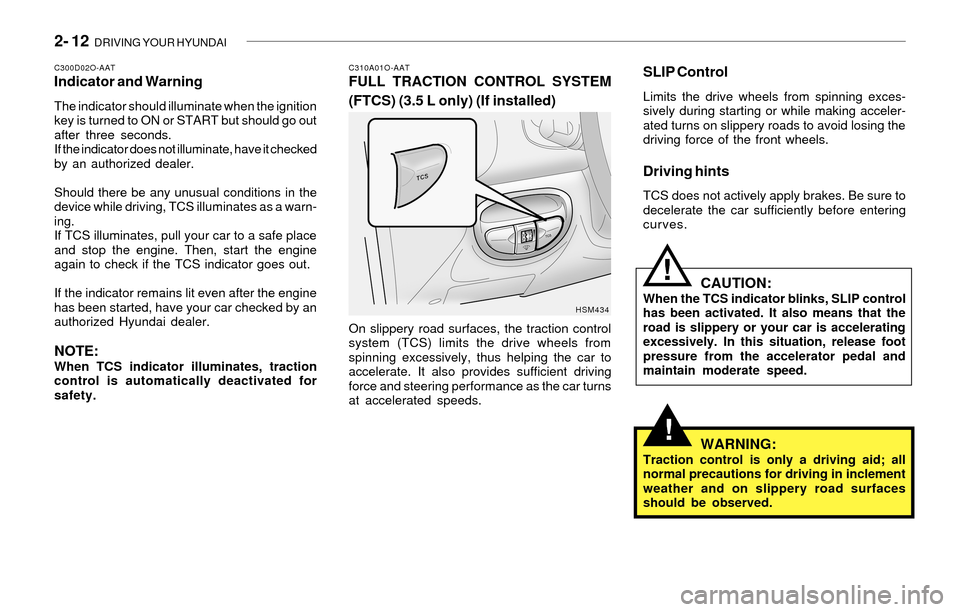
C310A01O-AATFULL TRACTION CONTROL SYSTEM
(FTCS) (3.5 L only) (If installed)
On slippery road surfaces, the traction control
system (TCS) limits the drive wheels from
spinning excessively, thus helping the car to
accelerate. It also provides sufficient driving
force and steering performance as the car turns
at accelerated speeds.
HSM434
SLIP Control
Limits the drive wheels from spinning exces-
sively during starting or while making acceler-
ated turns on slippery roads to avoid losing the
driving force of the front wheels.
Driving hints
TCS does not actively apply brakes. Be sure to
decelerate the car sufficiently before entering
curves.
CAUTION:When the TCS indicator blinks, SLIP control
has been activated. It also means that the
road is slippery or your car is accelerating
excessively. In this situation, release foot
pressure from the accelerator pedal and
maintain moderate speed.
WARNING:Traction control is only a driving aid; all
normal precautions for driving in inclement
weather and on slippery road surfaces
should be observed.
!
Page 136 of 221
2- 14 DRIVING YOUR HYUNDAI
When driving on a snow-covered road or a
slippery, muddy surface, make sure that
you keep a sufficient distance between your
vehicle and the one ahead of you.
(7) Since the driving torque is always applied to
the 4 wheels, the performance of the full-time
4WD vehicle is greatly affected by the con-
dition of the tires. Be sure to equip it with all
four tires of the same size and type.
o When replacement of any of the tires or
disc wheels is necessary, replace all of
them.
o Rotate the tires and check the tire pres-
sure at regular intervals.
(8)The full-time 4WD vehicle cannot be
towed by an ordinary tow truck. Make
sure that the vehicle is towed with its
four wheels raised off the ground.
o Roadside Assistance Program:
Off-roading is not covered. To receive
service, the vehicle must be on a publicly
maintained road.
o If the vehicle is towed with its only two
wheels raised off the ground, the 4WD
system could be damaged.
o In unavoidable case, if the vehicle is
being towed with all four wheels on the
ground, it should be towed only forward
direction with rope.
o While towing, check the following items.
1. The ignition switch is in "ACC" or
"ON".
2. Place the shift lever in neutral (For
Automatic Transaxle, "N" position).
3. Release the parking brake.NOTE:To avoid serious damage to your 4WD ve-
hicle, limit towing to 10 mph and not for
more than 1 mile at ANY TIME.
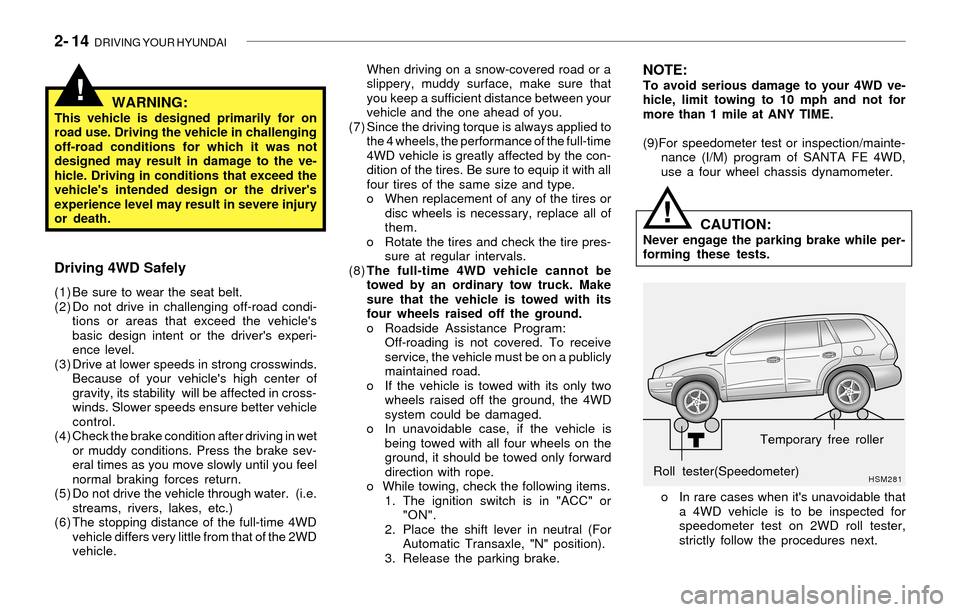
(9)For speedometer test or inspection/mainte-
nance (I/M) program of SANTA FE 4WD,
use a four wheel chassis dynamometer.
HSM281Roll tester(Speedometer)Temporary free roller
o In rare cases when it's unavoidable that
a 4WD vehicle is to be inspected for
speedometer test on 2WD roll tester,
strictly follow the procedures next.
CAUTION:Never engage the parking brake while per-
forming these tests.
!
!WARNING:This vehicle is designed primarily for on
road use. Driving the vehicle in challenging
off-road conditions for which it was not
designed may result in damage to the ve-
hicle. Driving in conditions that exceed the
vehicle's intended design or the driver's
experience level may result in severe injury
or death.
Driving 4WD Safely
(1) Be sure to wear the seat belt.
(2) Do not drive in challenging off-road condi-
tions or areas that exceed the vehicle's
basic design intent or the driver's experi-
ence level.
(3) Drive at lower speeds in strong crosswinds.
Because of your vehicle's high center of
gravity, its stability will be affected in cross-
winds. Slower speeds ensure better vehicle
control.
(4) Check the brake condition after driving in wet
or muddy conditions. Press the brake sev-
eral times as you move slowly until you feel
normal braking forces return.
(5) Do not drive the vehicle through water. (i.e.
streams, rivers, lakes, etc.)
(6) The stopping distance of the full-time 4WD
vehicle differs very little from that of the 2WD
vehicle.