warning light Hyundai Santa Fe 2006 Owner's Guide
[x] Cancel search | Manufacturer: HYUNDAI, Model Year: 2006, Model line: Santa Fe, Model: Hyundai Santa Fe 2006Pages: 281, PDF Size: 8.94 MB
Page 166 of 281
2
DRIVING YOUR HYUNDAI
15
FULL TRACTION CONTROL SYS-
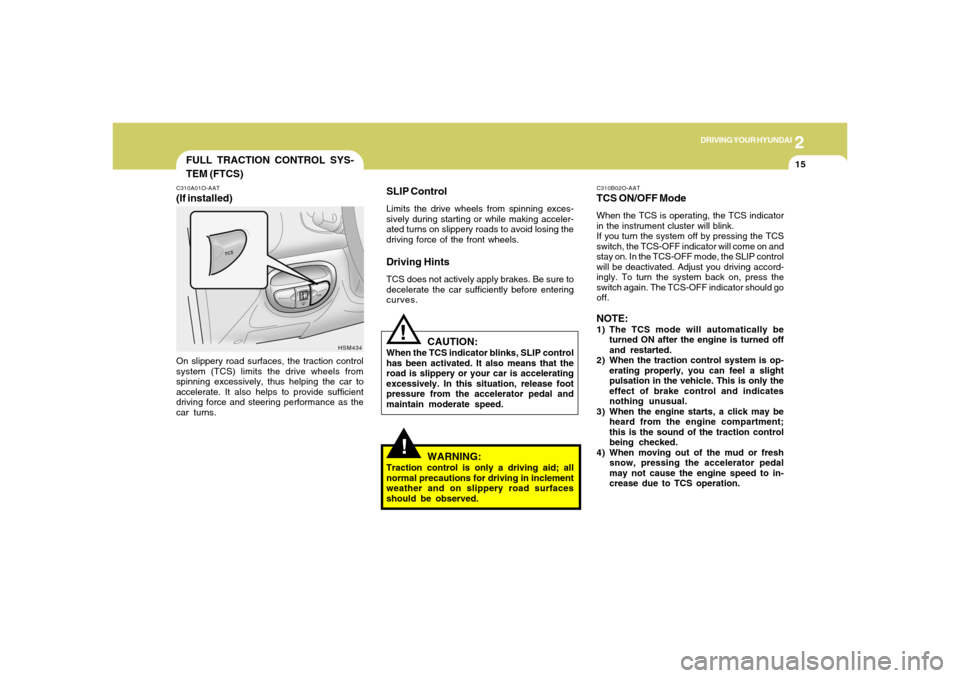
TEM (FTCS)C310A01O-AAT(If installed)On slippery road surfaces, the traction control
system (TCS) limits the drive wheels from
spinning excessively, thus helping the car to
accelerate. It also helps to provide sufficient
driving force and steering performance as the
car turns.
HSM434
!
SLIP ControlLimits the drive wheels from spinning exces-
sively during starting or while making acceler-
ated turns on slippery roads to avoid losing the
driving force of the front wheels.Driving HintsTCS does not actively apply brakes. Be sure to
decelerate the car sufficiently before entering
curves.
CAUTION:
When the TCS indicator blinks, SLIP control
has been activated. It also means that the
road is slippery or your car is accelerating
excessively. In this situation, release foot
pressure from the accelerator pedal and
maintain moderate speed.
WARNING:
Traction control is only a driving aid; all
normal precautions for driving in inclement
weather and on slippery road surfaces
should be observed.
!
C310B02O-AATTCS ON/OFF ModeWhen the TCS is operating, the TCS indicator
in the instrument cluster will blink.
If you turn the system off by pressing the TCS
switch, the TCS-OFF indicator will come on and
stay on. In the TCS-OFF mode, the SLIP control
will be deactivated. Adjust you driving accord-
ingly. To turn the system back on, press the
switch again. The TCS-OFF indicator should go
off.NOTE:1) The TCS mode will automatically be
turned ON after the engine is turned off
and restarted.
2) When the traction control system is op-
erating properly, you can feel a slight
pulsation in the vehicle. This is only the
effect of brake control and indicates
nothing unusual.
3) When the engine starts, a click may be
heard from the engine compartment;
this is the sound of the traction control
being checked.
4) When moving out of the mud or fresh
snow, pressing the accelerator pedal
may not cause the engine speed to in-
crease due to TCS operation.
Page 170 of 281
2
DRIVING YOUR HYUNDAI
19
!
WARNING:
o Avoid high cornering speeds.
o Do not make quick steering wheel move-
ments, such as sharp lane charges or
fast, sharp turns.
o The risk of rollover is greatly increased if
you lose control of your vehicle at high-
way speeds.
o In a collision, an unbelted person is
significantly more likely to be seriously
injured or killed than a person wearing a
seat belt.
o Loss of control may occurs if two or
more wheels drop off the roadway and
the driver oversteers to reenter the road-
way.
o In the event your vehicle leaves the road-
way, do not steer sharply. Instead, slow
down before pulling back into the travel
lanes.
LIMITED-SLIP DIFFERENTIALD190A01HP-GAT(If installed)A limited-slip differential, if equipped, is for the
rear wheel differential only. The features of this
limited-slip differential are described below:
Just as with a conventional differential, the
wheel on one side is allowed to turn at a different
speed from the wheel on the other side when the
vehicle is cornering. The difference between
the limited-slip differential and a conventional
differential is that if the wheel on one side of the
vehicle loses traction, a greater amount of
torque is applied to the rear wheel on the other
side to improve traction.
CAUTION:
o Never start the engine with the gearshift
lever placed in the forward or reverse
while one of the rear wheels is jacked up
and the other in contact with the
ground; doing so may cause the vehicle
to jump forward.
o Use only recommended oil for LSD in
the rear axle.
See page 9-5 for the recommended oil
descriptions.
!
!GOOD BRAKING PRACTICESC130A01L-AAT
WARNING:
Nothing should be carried on top of the
cargo area cover behind the rear seat. If
there were an accident or a sudden stop,
such objects could move forward and cause
damage to the vehicle or injure the occu-
pants.
o After being parked, check to be sure the
parking brake is not engaged and that the
parking brake indicator light is out before
driving away.
o Driving through water may get the brakes
wet. They can also get wet when the car is
washed. Wet brakes can be dangerous!
Your car will not stop as quickly if the brakes
are wet. Wet brakes may cause the car to
pull to one side. To dry the brakes, apply the
brakes lightly while driving slowly until the
braking action returns to normal, taking care
to keep the car under control at all times. If
the braking action does not return to normal,
stop as soon as it is safe to do so and call your
Hyundai dealer for assistance.
Page 185 of 281
32WHAT TO DO IN AN EMERGENCY
D010B01O
IF THE ENGINE WILL NOT START!
D010A01A-AAT D010B01L-AAT
If Engine Doesn't Turn Over or Turns
Over Slowly
D010C02Y-AATIf Engine Turns Over Normally but Does
Not Start1. Check fuel level.
2. With the key in the "OFF" position, check all
connectors at ignition, coil and spark plugs.
Reconnect any that may be disconnected or
loose.
3. Check the fuel line in the engine compart-
ment.
4. If the engine still does not start, call a Hyundai
dealer or seek other qualified assistance.D010D01A-AATIf Engine Stalls While Driving1. Reduce your speed gradually, keeping a
straight line. Move cautiously off the road to
a safe place.
2. Turn on your emergency flashers.
3. Try to start the engine again. If your vehicle
will not start, contact a Hyundai dealer or
seek other qualified assistance.
WARNING:
If the engine will not start, do not push or
pull the car to start it. This could result in a
collision or cause other damage. In addi-
tion, push or pull starting may cause the
catalytic converter to be overloaded and
create a fire hazard.
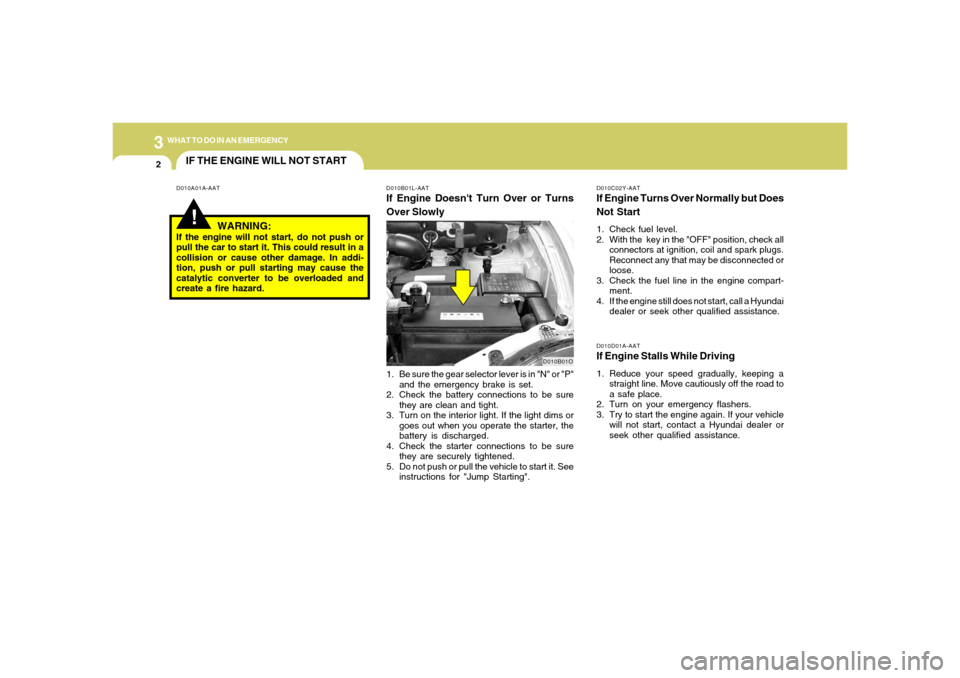
1. Be sure the gear selector lever is in "N" or "P"
and the emergency brake is set.
2. Check the battery connections to be sure
they are clean and tight.
3. Turn on the interior light. If the light dims or
goes out when you operate the starter, the
battery is discharged.
4. Check the starter connections to be sure
they are securely tightened.
5. Do not push or pull the vehicle to start it. See
instructions for "Jump Starting".
Page 186 of 281
3
WHAT TO DO IN AN EMERGENCY
3
JUMP STARTING!
o If you should accidentally get acid on your
skin or in your eyes, immediately remove
any contaminated clothing and flush the area
with clear water for at least 15 minutes. Then
promptly obtain medical attention. If you
must be transported to an emergency facil-
ity, continue to apply water to the affected
area with a sponge or cloth.
o The gas produced by the battery during the
jump-start operation is highly explosive. Do
not smoke or allow a spark or an open flame
in the vicinity.
o The battery being used to provide the jump
start must be 12-volt. If you cannot deter-
mine that it is a 12-volt battery, do not attempt
to use it for the jump start.
o To jump start a car with a discharged battery,
follow this procedure exactly:
1. If the booster battery is installed in another
vehicle, be sure the two vehicles are not
touching.
2. Turn off all unnecessary lights and acces-
sories in both vehicles.
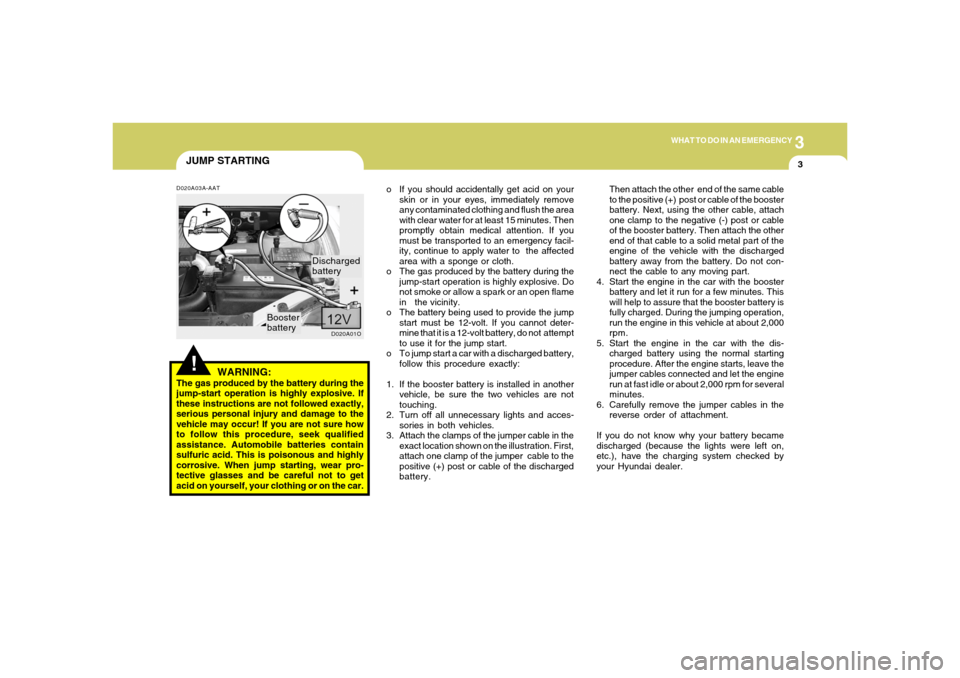
3. Attach the clamps of the jumper cable in the
exact location shown on the illustration. First,
attach one clamp of the jumper cable to the
positive (+) post or cable of the discharged
battery.Then attach the other end of the same cable
to the positive (+) post or cable of the booster
battery. Next, using the other cable, attach
one clamp to the negative (-) post or cable
of the booster battery. Then attach the other
end of that cable to a solid metal part of the
engine of the vehicle with the discharged
battery away from the battery. Do not con-
nect the cable to any moving part.
4. Start the engine in the car with the booster
battery and let it run for a few minutes. This
will help to assure that the booster battery is
fully charged. During the jumping operation,
run the engine in this vehicle at about 2,000
rpm.
5. Start the engine in the car with the dis-
charged battery using the normal starting
procedure. After the engine starts, leave the
jumper cables connected and let the engine
run at fast idle or about 2,000 rpm for several
minutes.
6. Carefully remove the jumper cables in the
reverse order of attachment.
If you do not know why your battery became
discharged (because the lights were left on,
etc.), have the charging system checked by
your Hyundai dealer.
D020A03A-AAT
WARNING:
The gas produced by the battery during the
jump-start operation is highly explosive. If
these instructions are not followed exactly,
serious personal injury and damage to the
vehicle may occur! If you are not sure how
to follow this procedure, seek qualified
assistance. Automobile batteries contain
sulfuric acid. This is poisonous and highly
corrosive. When jump starting, wear pro-
tective glasses and be careful not to get
acid on yourself, your clothing or on the car.
D020A01O
Booster
batteryDischarged
battery
Page 192 of 281
3
WHAT TO DO IN AN EMERGENCY
9
!
Raise the car high enough so that the
fully inflated spare tire can be installed.
To do this, you will need more ground
clearance than is required to remove
the flat tire.
WARNING:
Do not get under the car when it is
supported by the jack! This is very
dangerous as the vehicle could fall
and cause serious injury or death.
No one should stay in the car while
the jack is being used.
!
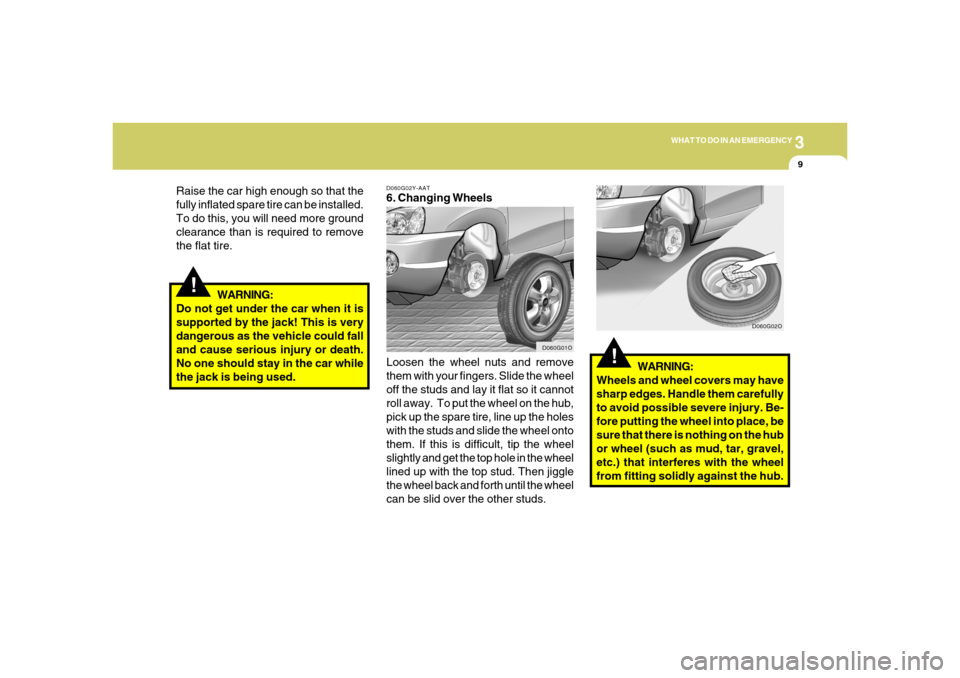
D060G02Y-AAT6. Changing Wheels
Loosen the wheel nuts and remove
them with your fingers. Slide the wheel
off the studs and lay it flat so it cannot
roll away. To put the wheel on the hub,
pick up the spare tire, line up the holes
with the studs and slide the wheel onto
them. If this is difficult, tip the wheel
slightly and get the top hole in the wheel
lined up with the top stud. Then jiggle
the wheel back and forth until the wheel
can be slid over the other studs.WARNING:
Wheels and wheel covers may have
sharp edges. Handle them carefully
to avoid possible severe injury. Be-
fore putting the wheel into place, be
sure that there is nothing on the hub
or wheel (such as mud, tar, gravel,
etc.) that interferes with the wheel
from fitting solidly against the hub.
D060G01OD060G02O
Page 236 of 281
6
DO-IT-YOURSELF MAINTENANCE
23
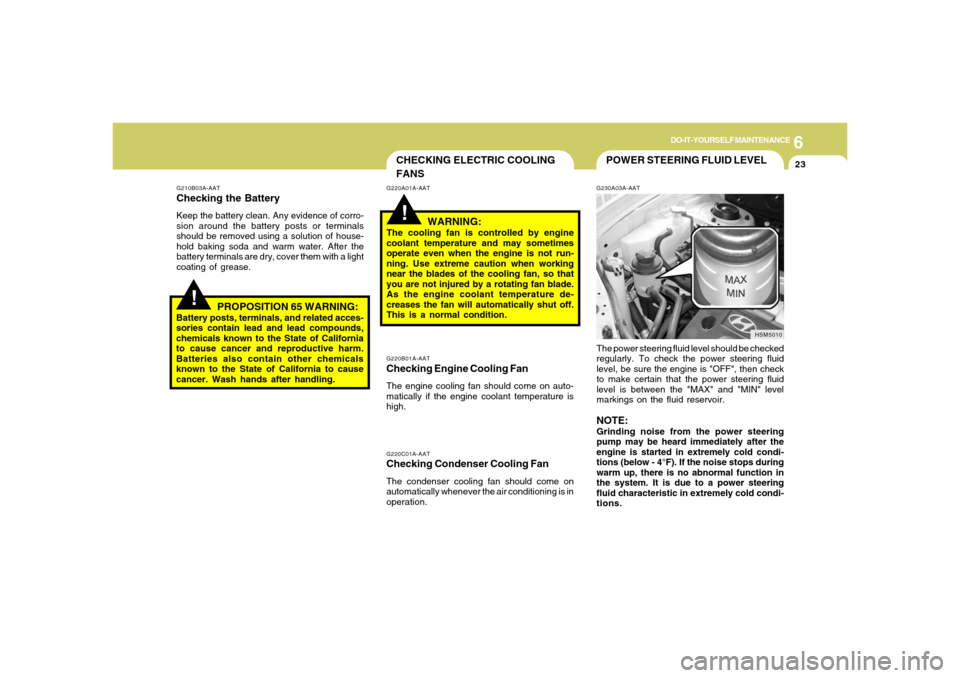
POWER STEERING FLUID LEVELG230A03A-AATThe power steering fluid level should be checked
regularly. To check the power steering fluid
level, be sure the engine is "OFF", then check
to make certain that the power steering fluid
level is between the "MAX" and "MIN" level
markings on the fluid reservoir.NOTE:Grinding noise from the power steering
pump may be heard immediately after the
engine is started in extremely cold condi-
tions (below - 4°F). If the noise stops during
warm up, there is no abnormal function in
the system. It is due to a power steering
fluid characteristic in extremely cold condi-
tions.
HSM5010
CHECKING ELECTRIC COOLING
FANS!
!
G220A01A-AAT
WARNING:
The cooling fan is controlled by engine
coolant temperature and may sometimes
operate even when the engine is not run-
ning. Use extreme caution when working
near the blades of the cooling fan, so that
you are not injured by a rotating fan blade.
As the engine coolant temperature de-
creases the fan will automatically shut off.
This is a normal condition.
G210B03A-AATChecking the BatteryKeep the battery clean. Any evidence of corro-
sion around the battery posts or terminals
should be removed using a solution of house-
hold baking soda and warm water. After the
battery terminals are dry, cover them with a light
coating of grease.
PROPOSITION 65 WARNING:
Battery posts, terminals, and related acces-
sories contain lead and lead compounds,
chemicals known to the State of California
to cause cancer and reproductive harm.
Batteries also contain other chemicals
known to the State of California to cause
cancer. Wash hands after handling.
G220C01A-AATChecking Condenser Cooling FanThe condenser cooling fan should come on
automatically whenever the air conditioning is in
operation.G220B01A-AATChecking Engine Cooling FanThe engine cooling fan should come on auto-
matically if the engine coolant temperature is
high.
Page 238 of 281
6
DO-IT-YOURSELF MAINTENANCE
25
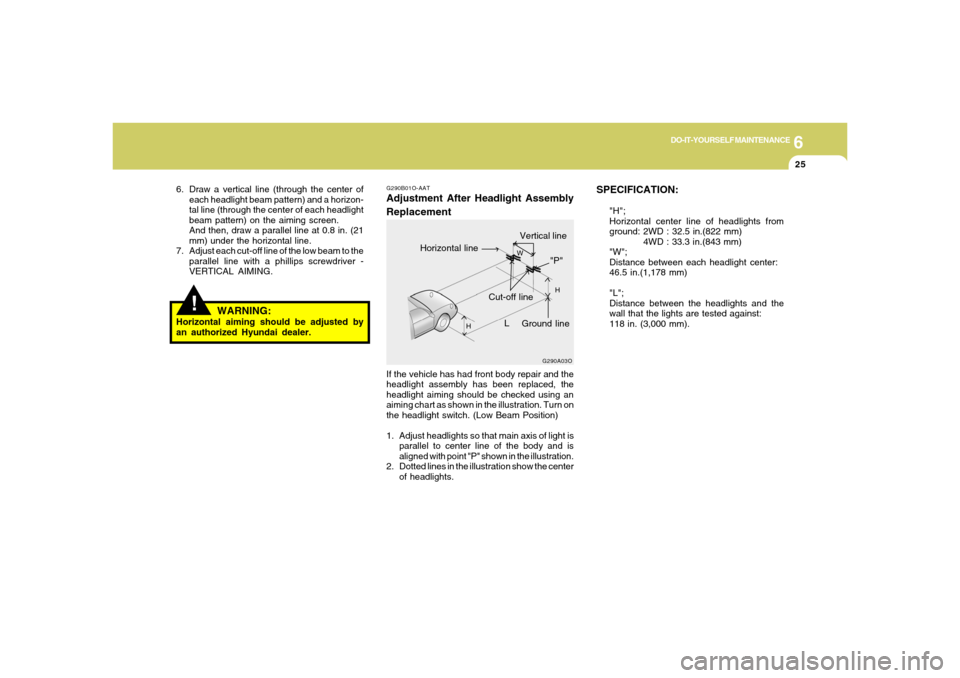
SPECIFICATION:
"H";
Horizontal center line of headlights from
ground: 2WD : 32.5 in.(822 mm)
4WD : 33.3 in.(843 mm)
"W";
Distance between each headlight center:
46.5 in.(1,178 mm)
"L";
Distance between the headlights and the
wall that the lights are tested against:
118 in. (3,000 mm).
Vertical line
G290B01O-AATAdjustment After Headlight Assembly
ReplacementIf the vehicle has had front body repair and the
headlight assembly has been replaced, the
headlight aiming should be checked using an
aiming chart as shown in the illustration. Turn on
the headlight switch. (Low Beam Position)
1. Adjust headlights so that main axis of light is
parallel to center line of the body and is
aligned with point "P" shown in the illustration.
2. Dotted lines in the illustration show the center
of headlights.
G290A03O
L
W
H
H
Cut-off line
Ground line
"P"
Horizontal line
!
6. Draw a vertical line (through the center of
each headlight beam pattern) and a horizon-
tal line (through the center of each headlight
beam pattern) on the aiming screen.
And then, draw a parallel line at 0.8 in. (21
mm) under the horizontal line.
7. Adjust each cut-off line of the low beam to the
parallel line with a phillips screwdriver -
VERTICAL AIMING.
WARNING:
Horizontal aiming should be adjusted by
an authorized Hyundai dealer.
Page 241 of 281
6
DO-IT-YOURSELF MAINTENANCE
28
!
WARNING:
This halogen bulb contains gas under pres-
sure and if impacted could shatter, result-
ing in flying fragments. Always wear eye
protection when servicing the bulb. Protect
the bulb against abrasions or scratches
and against liquids when lighted. Turn the
bulb on only when installing in a headlight.
Replace the headlight if damaged or cracked.
Keep the bulb out of the reach of children
and dispose of the used bulb with care.
G270A03O
12.To replace the front turn signal light bulb,
remove from the bulb holder and install the
new bulb. Do not touch the glass of the new
bulb.
HSM332
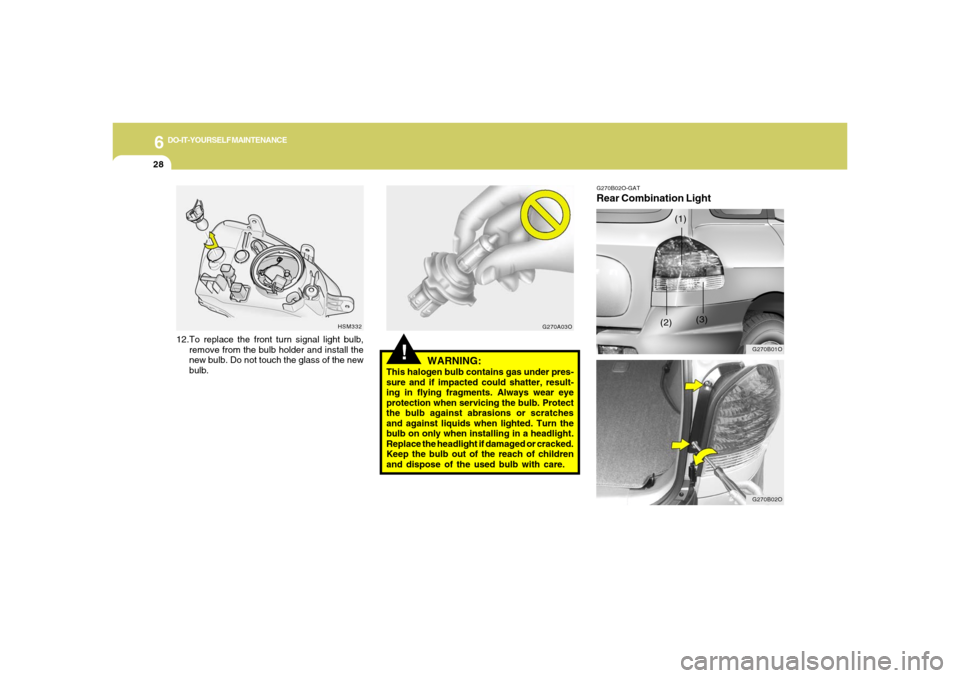
G270B02O-GATRear Combination Light
G270B01O
(3) (1)
(2)
G270B02O
Page 245 of 281
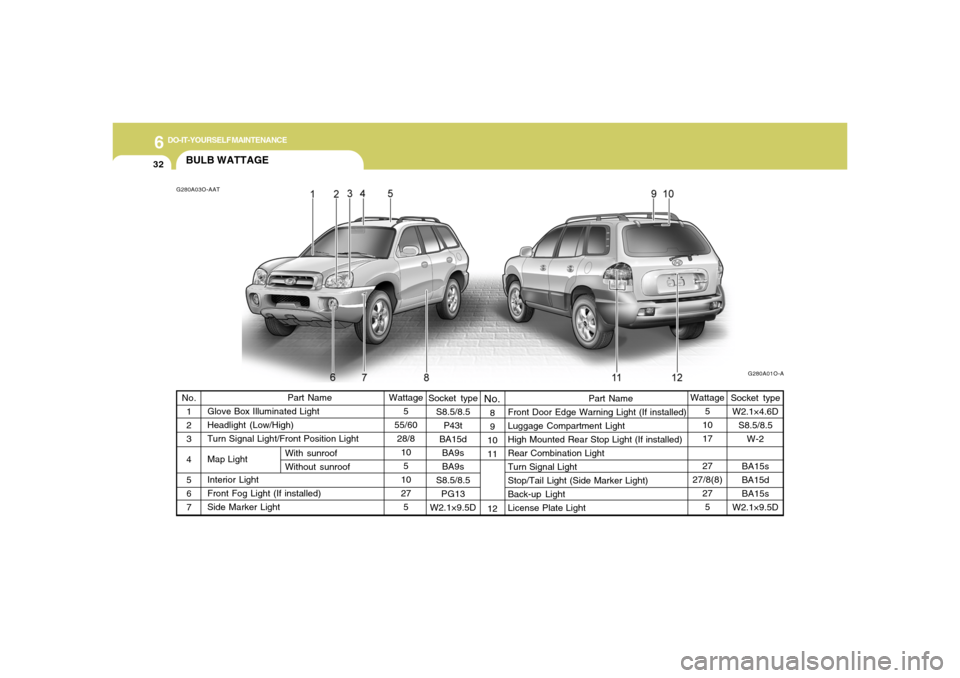
6
DO-IT-YOURSELF MAINTENANCE
32
Socket type
S8.5/8.5
P43t
BA15d
BA9s
BA9s
S8.5/8.5
PG13
W2.1×9.5D
Part Name
Front Door Edge Warning Light (If installed)
Luggage Compartment Light
High Mounted Rear Stop Light (If installed)
Rear Combination Light
Turn Signal Light
Stop/Tail Light (Side Marker Light)
Back-up Light
License Plate LightWattage
5
10
17
27
27/8(8)
27
5 No.
1
2
3
4
5
6
7
BULB WATTAGEG280A03O-AAT
G280A01O-A
Part Name
Glove Box Illuminated Light
Headlight (Low/High)
Turn Signal Light/Front Position Light
Map Light
Interior Light
Front Fog Light (If installed)
Side Marker LightWattage
5
55/60
28/8
10
5
10
27
5
No.
With sunroof
Without sunroof8
9
10
11
12
Socket type
W2.1×4.6D
S8.5/8.5
W-2
BA15s
BA15d
BA15s
W2.1×9.5D
Page 247 of 281
6
DO-IT-YOURSELF MAINTENANCE
34
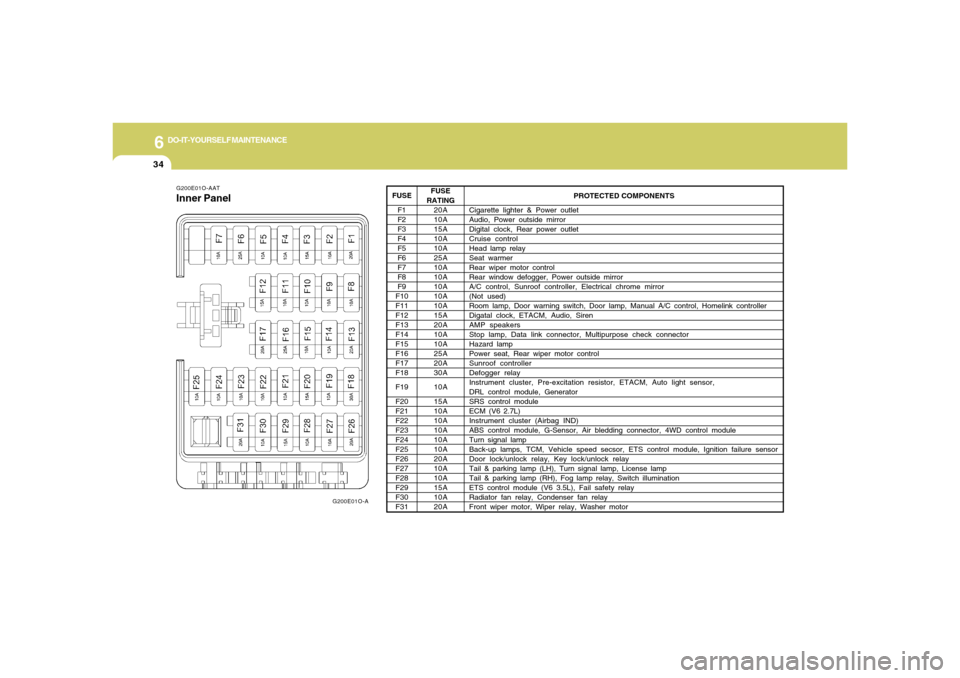
G200E01O-AATInner Panel
G200E01O-A
PROTECTED COMPONENTS
Cigarette lighter & Power outlet
Audio, Power outside mirror
Digital clock, Rear power outlet
Cruise control
Head lamp relay
Seat warmer
Rear wiper motor control
Rear window defogger, Power outside mirror
A/C control, Sunroof controller, Electrical chrome mirror
(Not used)
Room lamp, Door warning switch, Door lamp, Manual A/C control, Homelink controller
Digatal clock, ETACM, Audio, Siren
AMP speakers
Stop lamp, Data link connector, Multipurpose check connector
Hazard lamp
Power seat, Rear wiper motor control
Sunroof controller
Defogger relay
Instrument cluster, Pre-excitation resistor, ETACM, Auto light sensor,
DRL control module, Generator
SRS control module
ECM (V6 2.7L)
Instrument cluster (Airbag IND)
ABS control module, G-Sensor, Air bledding connector, 4WD control module
Turn signal lamp
Back-up lamps, TCM, Vehicle speed secsor, ETS control module, Ignition failure sensor
Door lock/unlock relay, Key lock/unlock relay
Tail & parking lamp (LH), Turn signal lamp, License lamp
Tail & parking lamp (RH), Fog lamp relay, Switch illumination
ETS control module (V6 3.5L), Fail safety relay
Radiator fan relay, Condenser fan relay
Front wiper motor, Wiper relay, Washer motor
FUSE
RATING
20A
10A
15A
10A
10A
25A
10A
10A
10A
10A
10A
15A
20A
10A
10A
25A
20A
30A
10A
15A
10A
10A
10A
10A
10A
20A
10A
10A
15A
10A
20A FUSE
F1
F2
F3
F4
F5
F6
F7
F8
F9
F10
F11
F12
F13
F14
F15
F16
F17
F18
F19
F20
F21
F22
F23
F24
F25
F26
F27
F28
F29
F30
F31