reset Hyundai Santa Fe 2008 User Guide
[x] Cancel search | Manufacturer: HYUNDAI, Model Year: 2008, Model line: Santa Fe, Model: Hyundai Santa Fe 2008Pages: 355, PDF Size: 12.36 MB
Page 166 of 355
1FEATURES OF YOUR HYUNDAI
154
The 5 preset equalizer settings have been
optimized for the 5 common genres of
music. For example, the ROCK setting
enhances bass reproduction with rock
music whereas the CLASSIC setting en-
hances the clarity of string instruments
during audio reproduction of classical
music. You may want to experiment with
the different settings to confirm your per-
sonal preferences.
If you store an AM/FM station or a XM
channel Preset (1-6) with a specific equal-
izer setting, that setting is automatically
used when you select that preset again.
EQ is not available for Model D466S.NOTE:To return all audio control settings (ex-
cept for EQ) to the default (centered)
positions, press and hold the audio con-
trol knob for more than 2 seconds. An
audible beep indicates that all audio con-
trols have been returned to the default
setting.
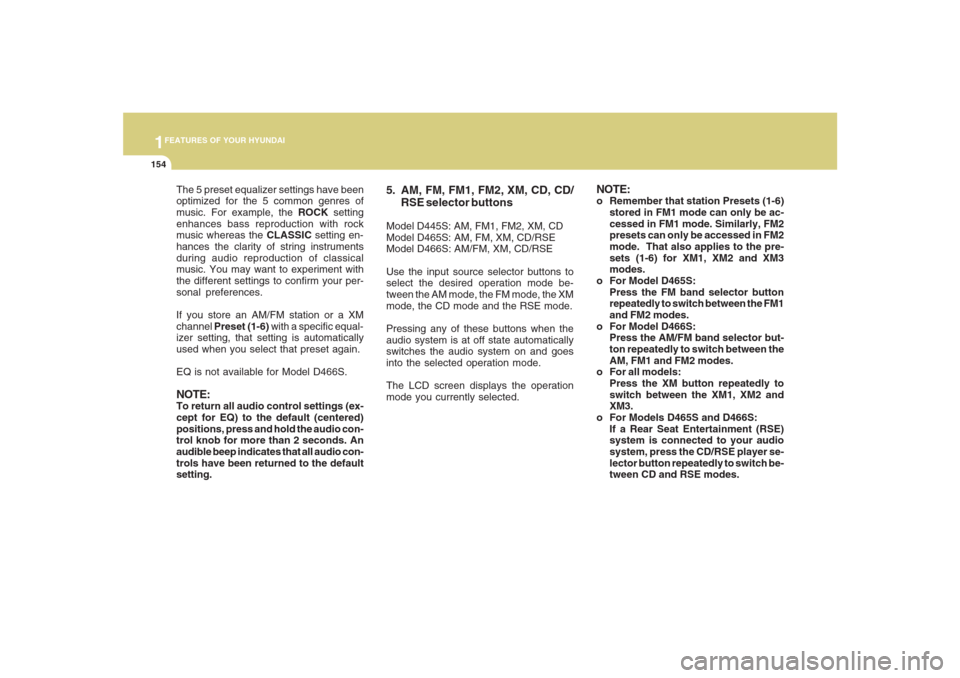
5. AM, FM, FM1, FM2, XM, CD, CD/
RSE selector buttonsModel D445S: AM, FM1, FM2, XM, CD
Model D465S: AM, FM, XM, CD/RSE
Model D466S: AM/FM, XM, CD/RSE
Use the input source selector buttons to
select the desired operation mode be-
tween the AM mode, the FM mode, the XM
mode, the CD mode and the RSE mode.
Pressing any of these buttons when the
audio system is at off state automatically
switches the audio system on and goes
into the selected operation mode.
The LCD screen displays the operation
mode you currently selected.
NOTE:o Remember that station Presets (1-6)
stored in FM1 mode can only be ac-
cessed in FM1 mode. Similarly, FM2
presets can only be accessed in FM2
mode. That also applies to the pre-
sets (1-6) for XM1, XM2 and XM3
modes.
o For Model D465S:
Press the FM band selector button
repeatedly to switch between the FM1
and FM2 modes.
o For Model D466S:
Press the AM/FM band selector but-
ton repeatedly to switch between the
AM, FM1 and FM2 modes.
o For all models:
Press the XM button repeatedly to
switch between the XM1, XM2 and
XM3.
o For Models D465S and D466S:
If a Rear Seat Entertainment (RSE)
system is connected to your audio
system, press the CD/RSE player se-
lector button repeatedly to switch be-
tween CD and RSE modes.
Page 168 of 355
1FEATURES OF YOUR HYUNDAI
156
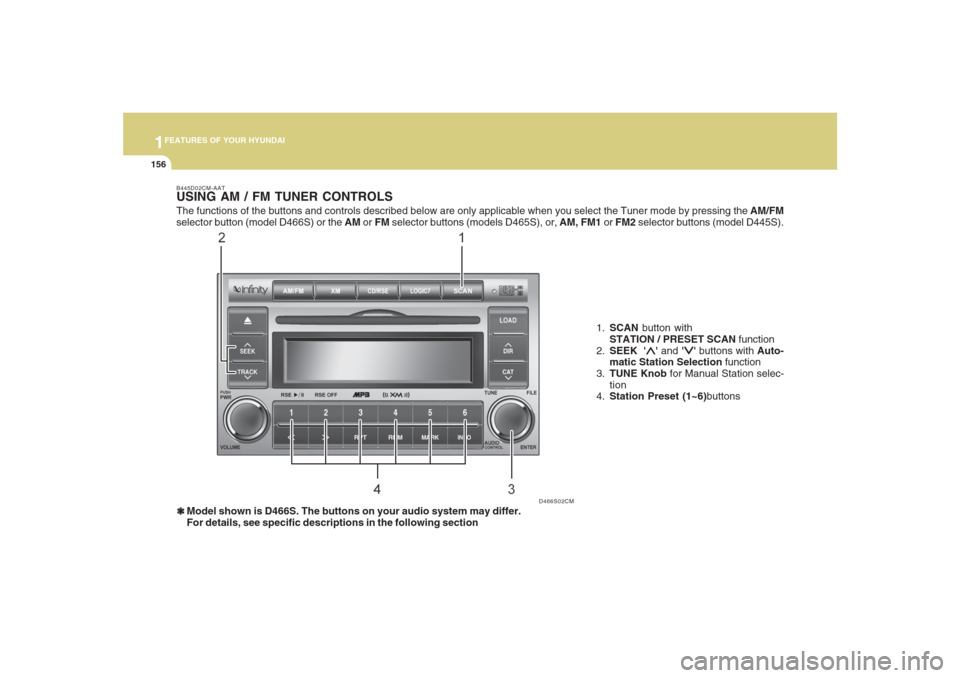
B445D02CM-AATUSING AM / FM TUNER CONTROLS❃ ❃❃ ❃
❃Model shown is D466S. The buttons on your audio system may differ.
For details, see specific descriptions in the following section1.SCAN button with
STATION / PRESET SCAN function
2.SEEK '
∧ ∧∧ ∧
∧' and '
∨ ∨∨ ∨
∨' buttons with Auto-
matic Station Selection function
3.TUNE Knob for Manual Station selec-
tion
4.Station Preset (1~6)buttons
D466S02CM
The functions of the buttons and controls described below are only applicable when you select the Tuner mode by pressing the AM/FM
selector button (model D466S) or the AM or FM selector buttons (models D465S), or, AM, FM1 or FM2 selector buttons (model D445S).
Page 169 of 355
1157157157157157157
FEATURES OF YOUR HYUNDAI
B445E02CM-AAT1. SCAN buttonStation scan function
Press the SCAN button for the tuner to
scan for radio signals in the selected fre-
quency band (AM or FM). Once the tuner
locks onto the signal of a transmitting sta-
tion, it plays that station for 5 seconds
before scanning for the next available sta-
tion in the selected frequency band.
If you want to keep listening to a particular
station and want to stop the scanning,
press the SCAN button again.
This function is useful for providing you
with a good overview of all the radio sta-
tions within range of your tuner.
Preset scan function
Press and hold the SCAN button for more
than 2 seconds. Each preset radio stations
will be automatically played for 5 seconds.
If you want to keep listening to a particular
preset station and want to stop the scan-
ning, press the SCAN button again.
2. SEEK '
∧ ∧∧ ∧
∧' and '
∨ ∨∨ ∨
∨' buttons
Automatic Station Selection function
Press the '
∧ ∧∧ ∧
∧' and '
∨ ∨∨ ∨
∨' buttons to scan up
and down the frequency range for the next
available radio station and automatically
lock on to that frequency.
The LCD screen displays the frequency of
the radio station transmitting a clear and
strong signal.
Use this function to search for a radio
station you want. If you like a particular
station, you can store it as one of 6 presets
using the Preset buttons described later.
NOTE:This function is not effective if you are
experiencing poor reception in your vi-
cinity.
3. TUNE KnobManual Station Selection
Rotate the knob clockwise or counter-clock-
wise to manually advance up or down the
frequency range. The Tune knob also gives
you fine-grain control which you can use to
manually fine-tune your frequency selec-
tion. This is useful if you are searching for
a radio signal which is not strong enough
for you to use the Automatic Station Selec-
tion functionNOTE:The speed at which you advance up or
down the frequency range depends on
how fast you turn the knob.
Page 170 of 355
1FEATURES OF YOUR HYUNDAI
158
4. Station Preset buttons (1~6)There are 6 Station Preset buttons which
you can use to store the frequencies of
your 6 favorite radio stations. Saving a
station as a preset gives you one-touch
access to the station you want. Remember
that the 6 presets stations you store are for
the specific radio band mode you are in.
That means that you can store up to 6
stations in AM mode, 6 in FM1 mode, and
6 in FM2 mode. This means that you can
store up to 18 of your favorite stations in the
preset memory.NOTE:o For Model D445S, use FM1 and FM2
buttons to switch between FM1 and
FM2 modes.
o For Model D465S, use FM button to
switch between FM1 and FM2 modes.
o For Model D466S, use AM/FM button
to switch between AM, FM1 and FM2
modes.
o Remember that if you store a station
as preset 1 in FM2 mode, you must
first select FM2 mode before you can
use that preset button.
o This function is not effective if you are
experiencing poor reception in your
vicinity.
Using PresetsTo save a radio station as a preset:
1. Take note of the band selection dis-
played on the LCD screen (AM, FM1 or
FM2)
2. Tune in to the radio station you want
using either the SEEK UP and DOWN
buttons or the TUNE Knob.
3. Choose the preset button (1~6) you
want to use to store the radio station.
4. Press and hold the Preset button for
more than 2 seconds.
The system beeps to indicate that it has
saved the new station and displays the
frequency and preset number on the
LCD screen.NOTE:Saving a new station erases the previ-
ous setting saved in that preset.To tune in to a preset station:
1. Select the band (AM, FM1 or FM2) you
want using the band selector buttons.
2. Press the preset button corresponding
to the radio station you want.
The system automatically jumps to the
preset station. The frequency and pre-
set number is displayed on the LCD
screen.
Buttons not in use in tuner mode
The following buttons and functions are
not used in tuner mode.
-<< button
->> button
-RPT button
-RDM button
-MARK button
-INFO button
Page 180 of 355
1FEATURES OF YOUR HYUNDAI
168
D466S05CM B466A02CM-AAT
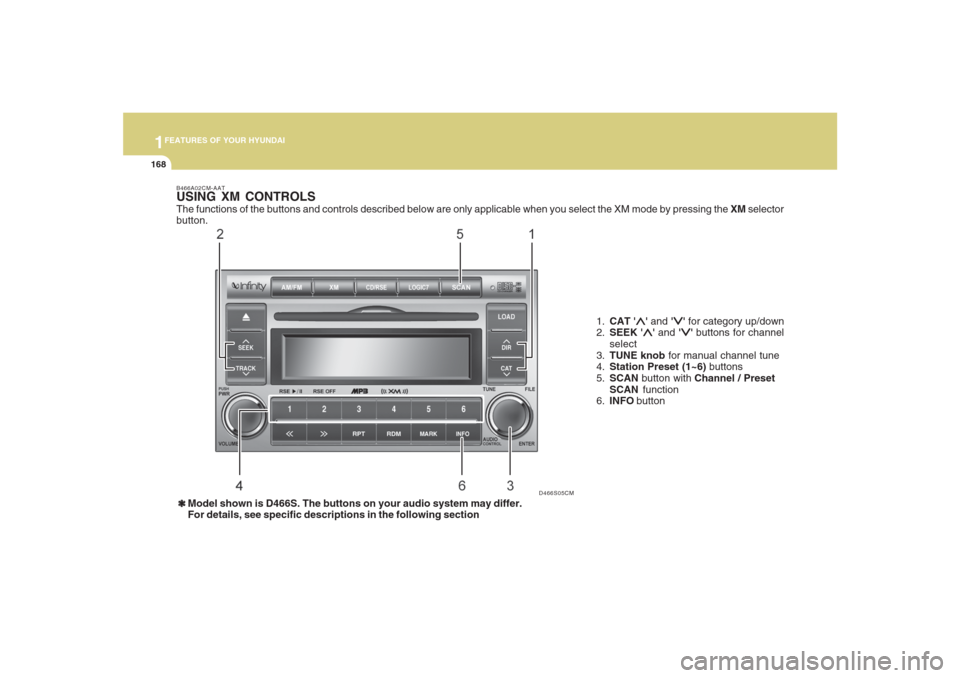
USING XM CONTROLSThe functions of the buttons and controls described below are only applicable when you select the XM mode by pressing the XM selector
button.
1.CAT '
∧ ∧∧ ∧
∧' and '
∨ ∨∨ ∨
∨' for category up/down
2.SEEK '
∧ ∧∧ ∧
∧' and '
∨ ∨∨ ∨
∨' buttons for channel
select
3.TUNE knob for manual channel tune
4.Station Preset (1~6) buttons
5.SCAN button with Channel / Preset
SCAN function
6.INFO button
❃ ❃❃ ❃
❃Model shown is D466S. The buttons on your audio system may differ.
For details, see specific descriptions in the following section
Page 182 of 355
1FEATURES OF YOUR HYUNDAI
170
3. TUNE KnobTurn the TUNE knob to scroll through the
XM channels. This is called manual tun-
ing. Upon reaching the desired channel,
press the knob (ENTER) to make a selec-
tion. During manual tuning, the audio sys-
tem plays the current channel audio until
a selection is made.
If there is no ENTER being pressed 5
seconds after stopped turning the TUNE
knob, the manual tune will be canceled.
The audio system then reverts the display
back to its current channel.
When the category search is on, the manual
tuning is blinded within the current cat-
egory. Otherwise, it is done across the
categories.
4. Channel Preset buttons (1~6)There are 6 Preset buttons in each XM
band you can use to store your favorite XM
channels. Saving a channel as a preset
gives you one-touch access to the channel
you want. Remember that the 6 presets
channels you stored are for the specific XM
band mode you are in. There are a total of
3 XM bands. That means you can store up
to 18 of your favorite channels in the preset
memory.NOTE:Remember that if you store a channel as
preset 3 in XM2 mode, you must first
select XM2 mode before you can use
that preset button.
Using PresetsTo save a XM channel as a preset:
1. Take note of the band selection dis-
played on the LCD screen (XM1, XM2
or XM3)
2. Select a XM channel you want using
either the SEEK '
∧ ∧∧ ∧
∧' and '
∨ ∨∨ ∨
∨' buttons or
the TUNE Knob.
3. Choose the preset button (1 – 6) you
want to store that channel.
4. Press and hold the Preset button for
more than 2 seconds.
The system beeps to indicate that it has
saved the new channel and displays
the preset number on the LCD screen.
NOTE:Saving a new channel erases the previ-
ous setting saved in that preset.
Page 183 of 355
1171171171171171171
FEATURES OF YOUR HYUNDAI
To call back a preset channel:
1. Select the band (XM1, XM2 or XM3) you
want using the XM button.
2. Press the preset button you want.
The system automatically jumps to the
preset channel. The channel informa-
tion and preset number are displayed
on the LCD screen.5. SCAN buttonChannel scan function
Press the SCAN button to scan all the
channels in XM. The audio system plays
the audio of a channel for 10 seconds
before scanning for the next channel. When
the category search is on, the channel
scan is blinded within the current category.
Otherwise, it is done across the catego-
ries.
If you want to keep listening to a particular
channel and want to stop the scanning,
press the SCAN button again.
This function is useful for providing you
with a good overview of all the radio sta-
tions within range of your tuner.Preset scan function
Press and hold the SCAN button for more
than 2 seconds. Each preset channel will
be automatically played for 10 seconds. If
you want to keep listening to a particular
preset channel and want to stop the scan-
ning, press the SCAN button again.
6. INFO buttonINFO button brings out the extra channel
info of the current played channel. The
audio system shows the following extra
channel info in sequence when the INFO
is pressed several times. First, it shows the
song/program title. Then, it follows by the
name of the artist/feature. The last one is
the category name. Another press of INFO
button brings the display back to the status
of the current played channel.Checking RADIO IDEvery SDAR box comes with one unique
RADIO ID. You need ID to make subscrip-
tion with XM service provider. Do single
seek to channel 0 using SEEK '
∧ ∧∧ ∧
∧' and '
∨ ∨∨ ∨
∨'
buttons. The audio system will then dis-
play the RADIO ID of the SDAR box.
Buttons not in use in tuner modeThe following buttons and functions are
not used in XM mode.
-<< button
->> button
-RPT button
-RDM button
-MARK button
Page 187 of 355
1175175175175175175
FEATURES OF YOUR HYUNDAI
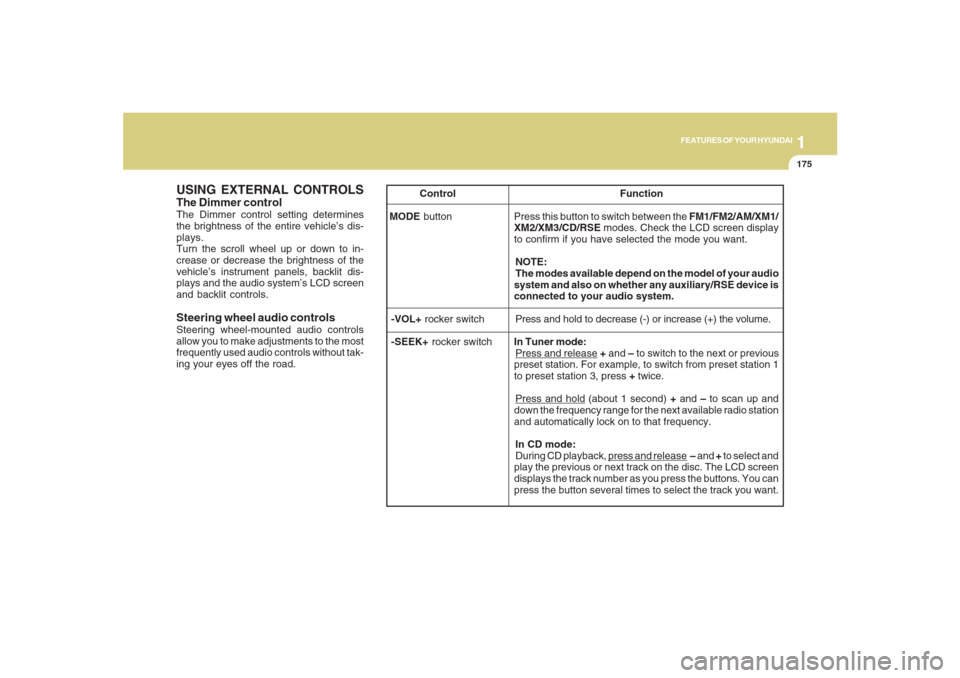
USING EXTERNAL CONTROLSThe Dimmer controlThe Dimmer control setting determines
the brightness of the entire vehicle’s dis-
plays.
Turn the scroll wheel up or down to in-
crease or decrease the brightness of the
vehicle’s instrument panels, backlit dis-
plays and the audio system’s LCD screen
and backlit controls.
Steering wheel audio controlsSteering wheel-mounted audio controls
allow you to make adjustments to the most
frequently used audio controls without tak-
ing your eyes off the road. Control Function
MODE button Press this button to switch between the FM1/FM2/AM/XM1/
XM2/XM3/CD/RSE modes. Check the LCD screen display
to confirm if you have selected the mode you want.
NOTE:
The modes available depend on the model of your audio
system and also on whether any auxiliary/RSE device is
connected to your audio system.
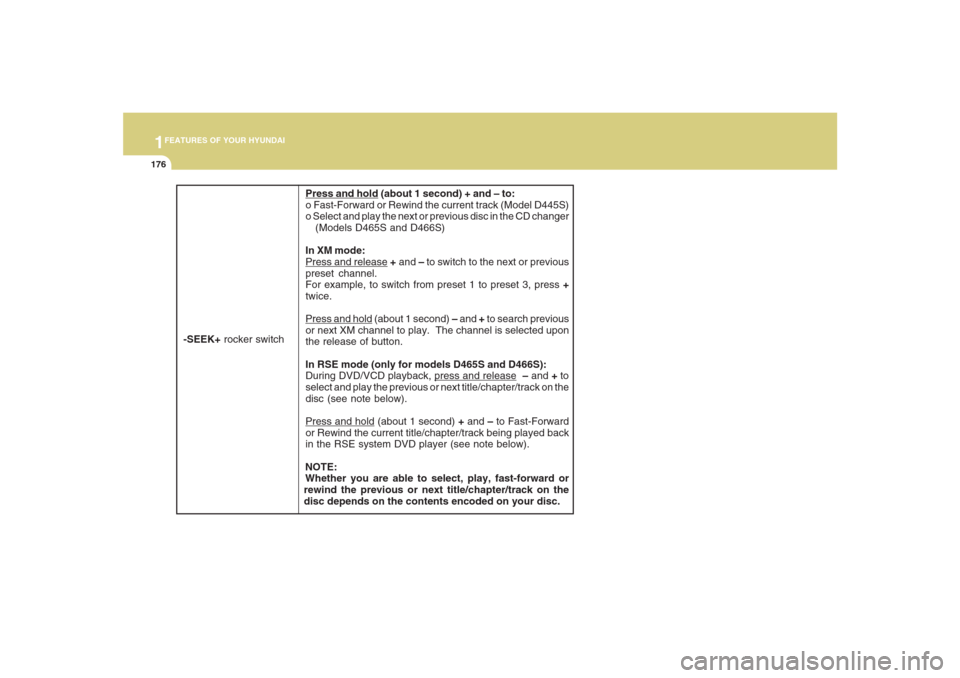
-VOL+ rocker switchPress and hold to decrease (-) or increase (+) the volume.
-SEEK+ rocker switchIn Tuner mode:
Press and release + and – to switch to the next or previous
preset station. For example, to switch from preset station 1
to preset station 3, press + twice.Press and hold (about 1 second) + and – to scan up and
down the frequency range for the next available radio station
and automatically lock on to that frequency.
In CD mode:
During CD playback,
press and release – and + to select and
play the previous or next track on the disc. The LCD screen
displays the track number as you press the buttons. You can
press the button several times to select the track you want.
Page 188 of 355
1FEATURES OF YOUR HYUNDAI
176
Press and hold (about 1 second) + and – to:
o Fast-Forward or Rewind the current track (Model D445S)
o Select and play the next or previous disc in the CD changer
(Models D465S and D466S)
In XM mode:Press and release + and – to switch to the next or previous
preset channel.
For example, to switch from preset 1 to preset 3, press +
twice.Press and hold (about 1 second) – and + to search previous
or next XM channel to play. The channel is selected upon
the release of button.
In RSE mode (only for models D465S and D466S):
During DVD/VCD playback,
press and release – and + to
select and play the previous or next title/chapter/track on the
disc (see note below).
Press and hold (about 1 second) + and – to Fast-Forward
or Rewind the current title/chapter/track being played back
in the RSE system DVD player (see note below).
NOTE:
Whether you are able to select, play, fast-forward or
rewind the previous or next title/chapter/track on the
disc depends on the contents encoded on your disc.
-SEEK+ rocker switch
Page 205 of 355
1
FEATURES OF YOUR HYUNDAI
193
FEATURES OF YOUR HYUNDAI
193193193193
3. Previous/Next File
While a disc is playing, press the
∨ ∨∨ ∨
∨ PREV
button to jump to the beginning of the
current file. If less than 10 seconds has
elapsed on the current file, pressing PREV
will go to the previous file. Press it again to
select previous files. Press the button re-
peatedly to continue moving through pre-
vious files.
Press the
∧ ∧∧ ∧
∧ NEXT button to jump to the
beginning of the next file. Press the button
repeatedly to continue moving through the
following files.
Instead of using the
∧ ∧∧ ∧
∧ NEXT/
∨ ∨∨ ∨
∨ PREV
buttons, you can also enter the file number
using the numbers on the remote control-
ler. While a disc is playing, press the num-
ber button(s) that correspond to the de-
sired file and press ENTER.
The current folder name/number and file
name/number are shown in the Status
Display at the top of the LCD display.4. Stop
The disc will automatically stop when any
other source (e.g. the vehicle radio or an
external game) is selected. When you
switch back to the disc, it will begin playing
at the point where it stopped.
While a disc is playing, you can stop the
disc by pressing the ON/OFF button on the
remote controller or the POWER/VOLUME
knob on the RSE control panel. When the
RSE is turned on again, it will automati-
cally begin playing the disc at the point
where it was stopped.
Turning the vehicle off, or selecting a differ-
ent RSE Source, will also stop playing the
disc. When the vehicle is turned on again,
or the disc is again selected as the source,
the disc will begin playing at the point
where it was stopped. The player will au-
tomatically resume play at the point where
it was stopped unless the disc is ejected.
5. Eject
Press the EJECT button to eject the
disc. Disc can be ejected even when the
unit is not turned on.
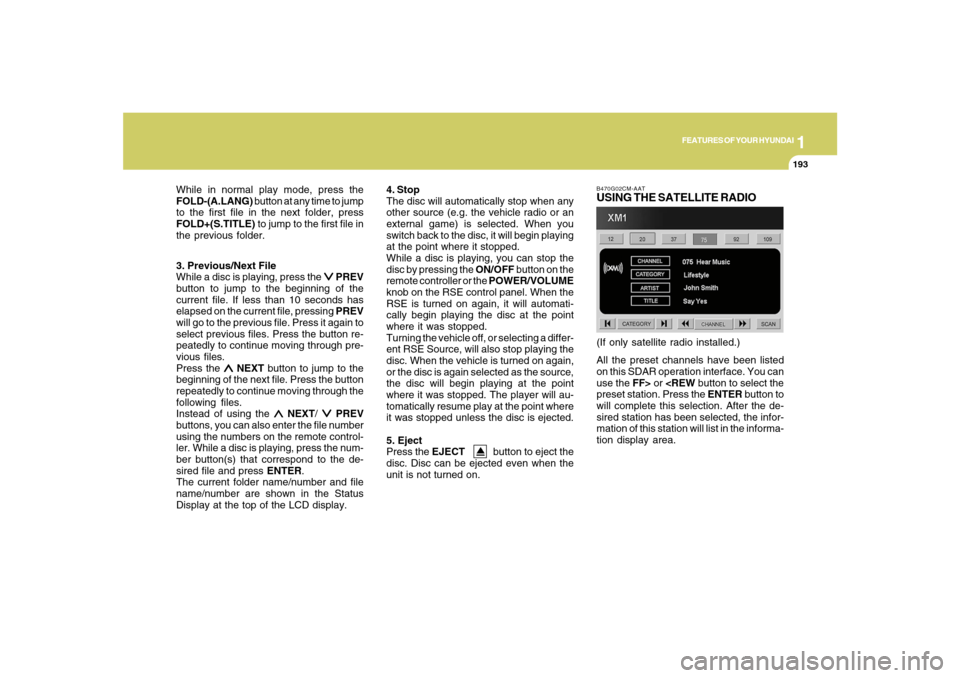
B470G02CM-AATUSING THE SATELLITE RADIOAll the preset channels have been listed
on this SDAR operation interface. You can
use the FF> or
will complete this selection. After the de-
sired station has been selected, the infor-
mation of this station will list in the informa-
tion display area.(If only satellite radio installed.) While in normal play mode, press the
FOLD-(A.LANG) button at any time to jump
to the first file in the next folder, press
FOLD+(S.TITLE) to jump to the first file in
the previous folder.