lock Hyundai Santa Fe 2009 Workshop Manual
[x] Cancel search | Manufacturer: HYUNDAI, Model Year: 2009, Model line: Santa Fe, Model: Hyundai Santa Fe 2009Pages: 353, PDF Size: 10.86 MB
Page 163 of 353
1FEATURES OF YOUR HYUNDAI
152
Models D465S and D466S :
Press the LOAD button to automatically
switch the audio system to the CD player
mode.
Follow the instructions on the LCD screen
to load and play your CDs.NOTE:To load more than 1 CD (maximum of 6),
press and hold the load button for more
than 2 seconds. The disc number indica-
tor will flash to indicate how many CDs
you can still load.
2. Loading CDsModel D445S :
Only one CD can be loaded at any one
time. If there is already a disc inserted in
the CD player, eject the disc before load-
ing a new CD.
To load a CD, gently insert the CD into the
CD slot. The CD will be automatically
loaded. The CD player then starts to play
the CD.NOTE:o Do not force-load the CD as it will
damage the loading mechanism and
cause your disc to jam in the player.
o If a CD cannot be loaded, check if
there is already a disc in the player
and eject it first.
B445D02CM-AAT1. Power ON-OFF / Volume Control
knobPower
To operate your audio system, your igni-
tion key must be in the “ACC” or “ON”
position.
Press the knob to switch on the audio
system. The audio system resumes opera-
tion in either the Radio, CD mode, XM
mode or RSE mode (only for model D465S
or D466S with RSE system connected).
Press the knob again to switch off the audio
system.
Volume Control Knob
Rotate the knob clockwise to increase the
volume and rotate the knob counter-clock-
wise to reduce the volume.
Page 164 of 353
1153153153153153153
FEATURES OF YOUR HYUNDAI
3. CD EJECT ( ) ButtonModel D445S :
Press the button once to eject the CD
from the CD player.
Models D465S and D466S :
Press the button once to eject the last
CD played.
Press and hold button for more than 2
seconds to eject all the CDs in the changer
in sequence beginning with the last CD
played.NOTE:You can eject discs even if the audio
system is switched off.
4. Audio Control knobUse the audio control knob to change how
music playback sounds and also to control
how sound is distributed to the speaker
system.
Sound properties
Press the knob repeatedly to display the
corresponding audio control settings
(Bass, Middle, Treble, Fader, Balance,
EQ).
The LCD screen displays the audio control
settings in sequence. Once the audio con-
trol setting you want is displayed, rotate the
knob clockwise/anti-clockwise to change
the level of that audio setting.Bass– increases/decreases Bass re-
sponse of audio reproduction
Middle– increases/decreases Mid-
range response of audio re-
production
Treble– increases/decreases Treble
response of audio reproduc-
tion
Fader– sets front/rear balance level
for your speaker system
Balance– sets left/right balance level for
your speaker system
EQ– selects one of the 6 equalizer-
settings: ROCK, POP, JAZZ,
CLASSIC, TALK and equal-
izer off by turning the audio
control knob once in the EQ
mode. If no icon is displayed in
the LCD screen, the equalizer
is switched off.
Page 168 of 353
1157157157157157157
FEATURES OF YOUR HYUNDAI
B445E02CM-AAT1. SCAN buttonStation scan function
Press the SCAN button for the tuner to
scan for radio signals in the selected fre-
quency band (AM or FM). Once the tuner
locks onto the signal of a transmitting sta-
tion, it plays that station for 5 seconds
before scanning for the next available sta-
tion in the selected frequency band.
If you want to keep listening to a particular
station and want to stop the scanning,
press the SCAN button again.
This function is useful for providing you
with a good overview of all the radio sta-
tions within range of your tuner.
Preset scan function
Press and hold the SCAN button for more
than 2 seconds. Each preset radio stations
will be automatically played for 5 seconds.
If you want to keep listening to a particular
preset station and want to stop the scan-
ning, press the SCAN button again.
2. SEEK '
∧ ∧∧ ∧
∧' and '
∨ ∨∨ ∨
∨' buttons
Automatic Station Selection function
Press the '
∧ ∧∧ ∧
∧' and '
∨ ∨∨ ∨
∨' buttons to scan up
and down the frequency range for the next
available radio station and automatically
lock on to that frequency.
The LCD screen displays the frequency of
the radio station transmitting a clear and
strong signal.
Use this function to search for a radio
station you want. If you like a particular
station, you can store it as one of 6 presets
using the Preset buttons described later.
NOTE:This function is not effective if you are
experiencing poor reception in your vi-
cinity.
3. TUNE KnobManual Station Selection
Rotate the knob clockwise or counter-clock-
wise to manually advance up or down the
frequency range. The Tune knob also gives
you fine-grain control which you can use to
manually fine-tune your frequency selec-
tion. This is useful if you are searching for
a radio signal which is not strong enough
for you to use the Automatic Station Selec-
tion functionNOTE:The speed at which you advance up or
down the frequency range depends on
how fast you turn the knob.
Page 172 of 353
1161161161161161161
FEATURES OF YOUR HYUNDAI
6. File Search KnobRotate the knob clockwise or counter-clock-
wise to manually advance up or down the
track list of the CD currently played. This
function allows you to quickly scroll to a
specific track number. It is especially use-
ful if you are playing an MP3 or WMA CD
which contains many directories and
tracks. The LCD screen displays the track
number you have scrolled to.
Once the track number you want is dis-
played, press the File Search knob to
ENTER your selection and begin play-
back of the selected track.
NOTE:You must push the File Search knob to
select the track for playback. Other-
wise, the CD player will not jump to the
track number displayed in the number
counter.
Use the File Search knob and the DIR '
∧ ∧∧ ∧
∧'
and '
∨ ∨∨ ∨
∨' buttons in together to quickly
search for a track you want on an MP3
CD with many directories and tracks.
7. RPT, RDM, MARK & INFO buttonsThese buttons correspond to the Repeat,
Random Playback, Marklist and Disc In-
formation functions.
Turn to the next section of your handbook
for detailed instructions.
Page 183 of 353
1FEATURES OF YOUR HYUNDAI
172
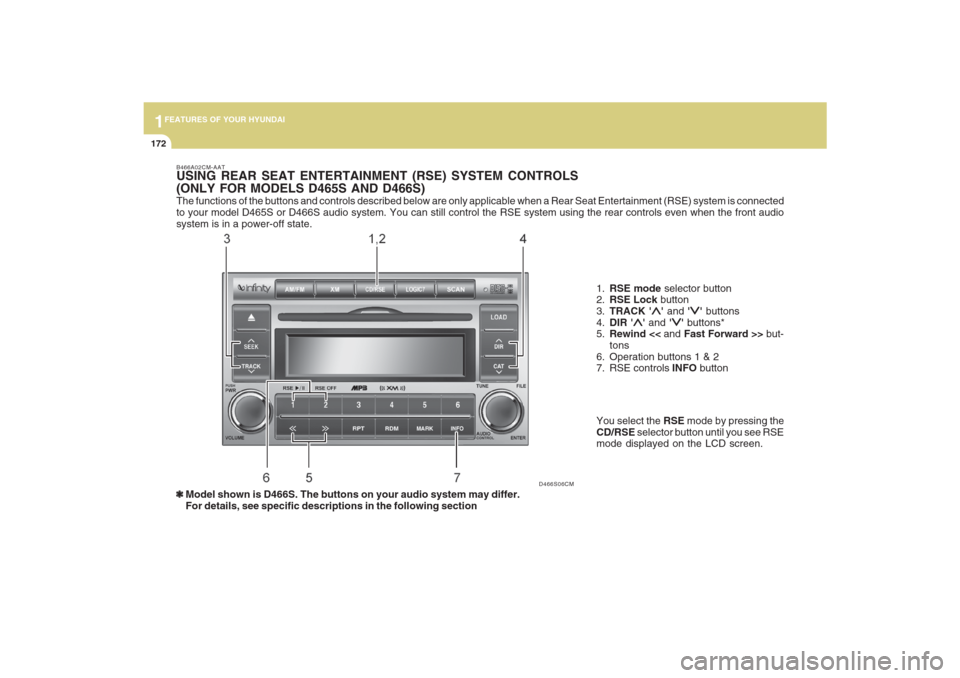
The functions of the buttons and controls described below are only applicable when a Rear Seat Entertainment (RSE) system is connected
to your model D465S or D466S audio system. You can still control the RSE system using the rear controls even when the front audio
system is in a power-off state.
D466S06CM B466A02CM-AAT
USING REAR SEAT ENTERTAINMENT (RSE) SYSTEM CONTROLS
(ONLY FOR MODELS D465S AND D466S)
1.RSE mode selector button
2.RSE Lock button
3.TRACK '
∧ ∧∧ ∧
∧' and '
∨ ∨∨ ∨
∨' buttons
4.DIR '
∧ ∧∧ ∧
∧' and '
∨ ∨∨ ∨
∨' buttons*
5.Rewind << and Fast Forward >> but-
tons
6. Operation buttons 1 & 2
7. RSE controls INFO button
❃ ❃❃ ❃
❃Model shown is D466S. The buttons on your audio system may differ.
For details, see specific descriptions in the following sectionYou select the RSE mode by pressing the
CD/RSE selector button until you see RSE
mode displayed on the LCD screen.
Page 184 of 353
1173173173173173173
FEATURES OF YOUR HYUNDAI
B466B02CM-AAT1. CD/RSE button (Switching to RSE
mode)Switch between RSE mode and CD mode
by pressing the CD/RSE selector button
until you see RSE mode displayed in the
LCD screen. In RSE mode, you can control
the RSE system from the controls on the
front panel of the audio system.NOTE:o If you are in Radio mode, press the
CD/RSE selector button once to switch
to CD mode and then press the CD/
RSE selector button again to switch to
RSE mode.
o If the CD changer does not contain
any CDs, you must press the CD/RSE
selector button a second time within
5 seconds of the first. Otherwise, the
audio system will automatically switch
back to radio mode.
2. RSE Lock buttonIn any mode, press and hold the CD/RSE
selector button for more than 2 seconds to
lock or release the RSE from the LOCK
mode. The LCD screen displays LOCK to
indicate that the system is in LOCK mode.
When the LOCK mode is engaged, only
the POWER ON/OFF button and the EJECT
button on the RSE system will be func-
tional.
This function is useful if you do not want
rear-seat passengers (e.g. children) to play
with the controls or otherwise interrupt disc
playback.
3. Track '
∧ ∧∧ ∧
∧' and '
∨ ∨∨ ∨
∨' buttons
If the RSE system is playing a disc and the
audio system is in RSE mode, press the
TRACK '
∧ ∧∧ ∧
∧' and '
∨ ∨∨ ∨
∨' buttons to select and
play the next or previous track on the disc
being played in the RSE.
The LCD screen displays the track status
as you press the buttons. You can press
the button several times to select the track
you want.
Page 186 of 353
1175175175175175175
FEATURES OF YOUR HYUNDAI
USING EXTERNAL CONTROLSThe Dimmer controlThe Dimmer control setting determines
the brightness of the entire vehicle’s dis-
plays.
Turn the scroll wheel up or down to in-
crease or decrease the brightness of the
vehicle’s instrument panels, backlit dis-
plays and the audio system’s LCD screen
and backlit controls.
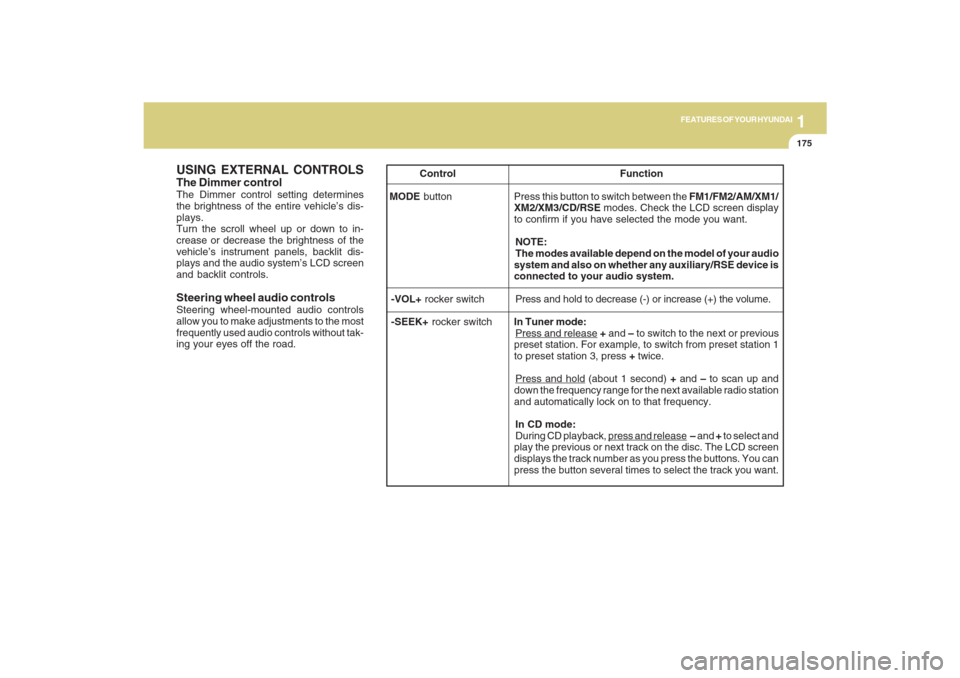
Steering wheel audio controlsSteering wheel-mounted audio controls
allow you to make adjustments to the most
frequently used audio controls without tak-
ing your eyes off the road. Control Function
MODE button Press this button to switch between the FM1/FM2/AM/XM1/
XM2/XM3/CD/RSE modes. Check the LCD screen display
to confirm if you have selected the mode you want.
NOTE:
The modes available depend on the model of your audio
system and also on whether any auxiliary/RSE device is
connected to your audio system.
-VOL+ rocker switchPress and hold to decrease (-) or increase (+) the volume.
-SEEK+ rocker switchIn Tuner mode:
Press and release + and – to switch to the next or previous
preset station. For example, to switch from preset station 1
to preset station 3, press + twice.Press and hold (about 1 second) + and – to scan up and
down the frequency range for the next available radio station
and automatically lock on to that frequency.
In CD mode:
During CD playback,
press and release – and + to select and
play the previous or next track on the disc. The LCD screen
displays the track number as you press the buttons. You can
press the button several times to select the track you want.
Page 192 of 353
1
FEATURES OF YOUR HYUNDAI
181
FEATURES OF YOUR HYUNDAI
181181181181
Adjusting the LCD Display
Press the DISP button on the RSE control
panel to adjust the LCD display. To adjust
the brightness, select Brightness, then,
press the < REW (dimmer) or FWD >
(brighter) buttons. The next time the RSE
is turned on, the LCD display will return to
the brightness level it was adjusted to
when last used. Brightness can be ad-
justed regardless of whether the RSE is
playing an audio or video source.
While the RSE is playing a video signal,
press DISP and then press the
∧ ∧∧ ∧
∧ NEXT or
∨ ∨∨ ∨
∨ PREV buttons to cycle through other
LCD display adjustments including
SCREEN SIZE, CONTRAST, CHROMA
and HUE. With any of these settings dis-
played, press the < REW or FF > buttons to
adjust the settings.
To close the LCD display, pull the bottom
edge towards you and push it up until it
clicks and locks into the stow-away posi-
tion.
Cleaning the LCD Display
If the LCD display becomes dusty or dirty,
clean it by wiping gently with a soft, dry,
clean cloth. Do not use chemical cleanser
to clean the screen.Loading a Disc
To load a disc in the player, insert it part
way into the loading slot. The player will
automatically grip the disc and pull it the
rest of the way in.
Disc Protection
The player has an Auto-Reload Disc Pro-
tection feature to protect discs from acci-
dental damage. If a disc is not removed
within 12 seconds after being ejected, it
will be pulled back into the player. The disc
will not begin playing.
Audio via Vehicle Speakers
To hear the audio from the RSE through
the vehicle's speakers, the RSE must be
selected by the radio CD/AUX button in the
front of the vehicle. Regardless of whether
RSE audio is selected for the vehicle
speakers or not, when the RSE audio is
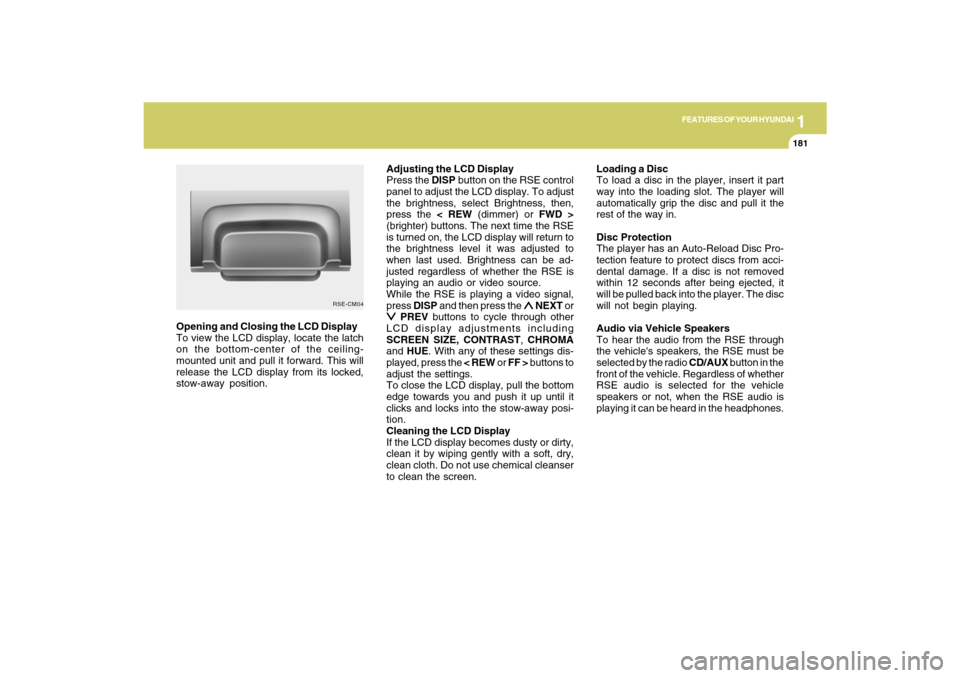
playing it can be heard in the headphones. Opening and Closing the LCD Display
To view the LCD display, locate the latch
on the bottom-center of the ceiling-
mounted unit and pull it forward. This will
release the LCD display from its locked,
stow-away position.
RSE-CM04
Page 195 of 353
1FEATURES OF YOUR HYUNDAI
184
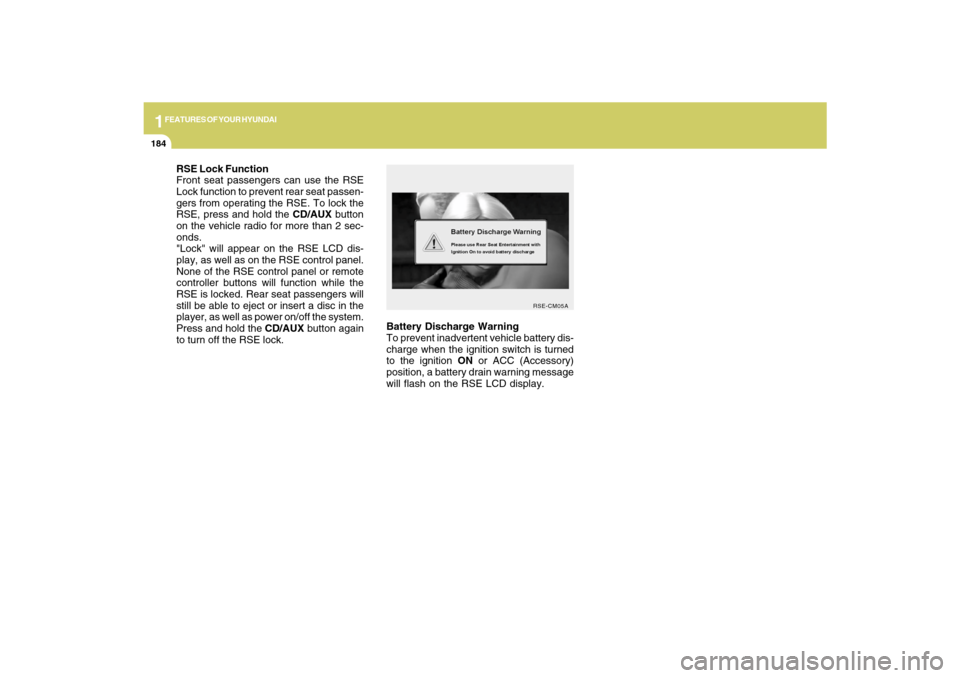
Battery Discharge Warning
To prevent inadvertent vehicle battery dis-
charge when the ignition switch is turned
to the ignition ON or ACC (Accessory)
position, a battery drain warning message
will flash on the RSE LCD display.
RSE-CM05A
RSE Lock Function
Front seat passengers can use the RSE
Lock function to prevent rear seat passen-
gers from operating the RSE. To lock the
RSE, press and hold the CD/AUX button
on the vehicle radio for more than 2 sec-
onds.
"Lock" will appear on the RSE LCD dis-
play, as well as on the RSE control panel.
None of the RSE control panel or remote
controller buttons will function while the
RSE is locked. Rear seat passengers will
still be able to eject or insert a disc in the
player, as well as power on/off the system.
Press and hold the CD/AUX button again
to turn off the RSE lock.
Page 210 of 353
1
FEATURES OF YOUR HYUNDAI
199
FEATURES OF YOUR HYUNDAI
199199199199
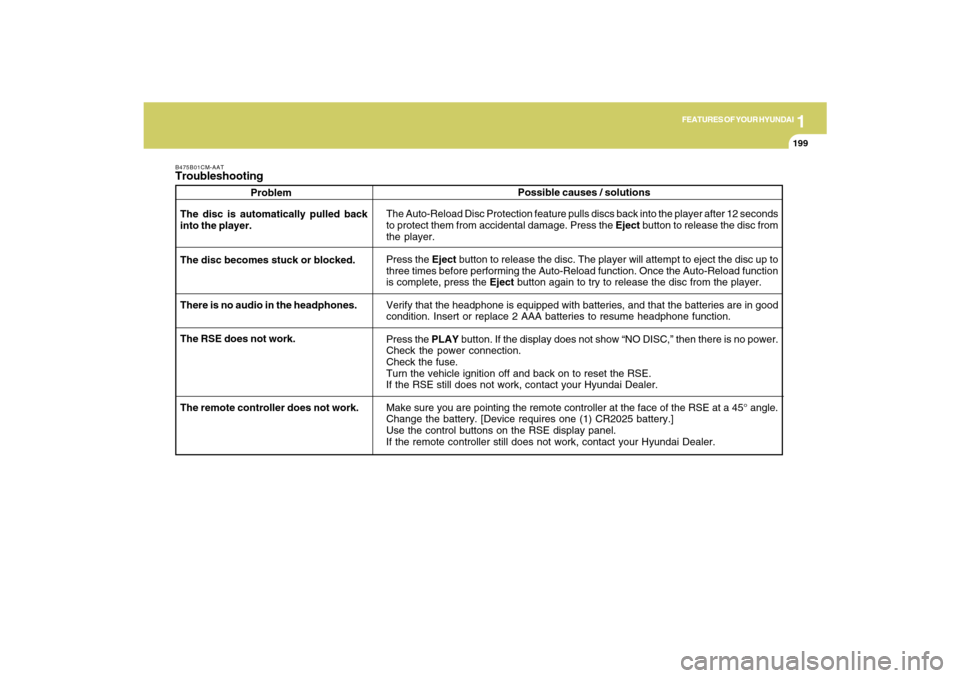
B475B01CM-AATTroubleshooting
Problem
The Auto-Reload Disc Protection feature pulls discs back into the player after 12 seconds
to protect them from accidental damage. Press the Eject button to release the disc from
the player.
Press the Eject button to release the disc. The player will attempt to eject the disc up to
three times before performing the Auto-Reload function. Once the Auto-Reload function
is complete, press the Eject button again to try to release the disc from the player.
Verify that the headphone is equipped with batteries, and that the batteries are in good
condition. Insert or replace 2 AAA batteries to resume headphone function.
Press the PLAY button. If the display does not show “NO DISC,” then there is no power.
Check the power connection.
Check the fuse.
Turn the vehicle ignition off and back on to reset the RSE.
If the RSE still does not work, contact your Hyundai Dealer.
Make sure you are pointing the remote controller at the face of the RSE at a 45° angle.
Change the battery. [Device requires one (1) CR2025 battery.]
Use the control buttons on the RSE display panel.
If the remote controller still does not work, contact your Hyundai Dealer. The disc is automatically pulled back
into the player.
The disc becomes stuck or blocked.
There is no audio in the headphones.
The RSE does not work.Possible causes / solutions
The remote controller does not work.