eco Hyundai Santa Fe 2012 Manual Online
[x] Cancel search | Manufacturer: HYUNDAI, Model Year: 2012, Model line: Santa Fe, Model: Hyundai Santa Fe 2012Pages: 419, PDF Size: 5.61 MB
Page 188 of 419
4109
Features of your vehicle
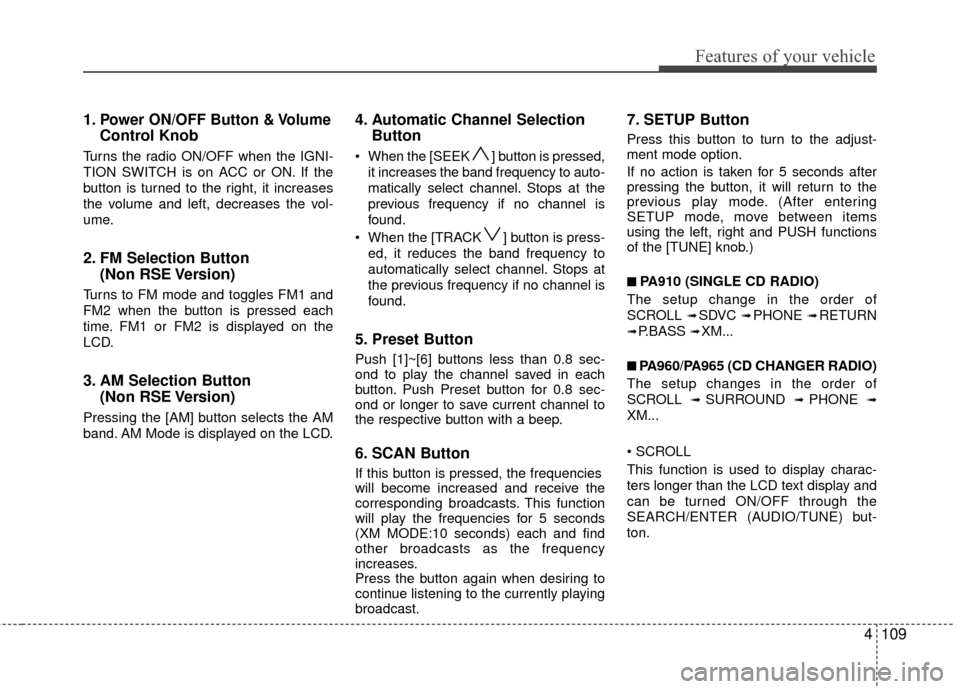
1.Power ON/OFF Button & Volume
Control Knob
Turns the radio ON/OFF when the IGNI-
TION SWITCH is on ACC or ON. If the
button is turned to the right, it increases
the volume and left, decreases the vol-
ume.
2. FM Selection Button (Non RSE Version)
Turns to FM mode and toggles FM1 and
FM2 when the button is pressed each
time. FM1 or FM2 is displayed on the
LCD.
3. AM Selection Button (Non RSE Version)
Pressing the [AM] button selects the AM
band. AM Mode is displayed on the LCD.
4. Automatic Channel SelectionButton
When the [SEEK ] button is pressed,
it increases the band frequency to auto-
matically select channel. Stops at the
previous frequency if no channel is
found.
When the [TRACK ] button is press- ed, it reduces the band frequency to
automatically select channel. Stops at
the previous frequency if no channel is
found.
5. Preset Button
Push [1]~[6] buttons less than 0.8 sec-
ond to play the channel saved in each
button. Push Preset button for 0.8 sec-
ond or longer to save current channel to
the respective button with a beep.
6. SCAN Button
If this button is pressed, the frequencies
will become increased and receive the
corresponding broadcasts. This function
will play the frequencies for 5 seconds
(XM MODE:10 seconds) each and find
other broadcasts as the frequency
increases.
Press the button again when desiring to
continue listening to the currently playing
broadcast.
7. SETUP Button
Press this button to turn to the adjust-
ment mode option.
If no action is taken for 5 seconds after
pressing the button, it will return to the
previous play mode. (After entering
SETUP mode, move between items
using the left, right and PUSH functions
of the [TUNE] knob.)
■ ■
PA910 (SINGLE CD RADIO)
The setup change in the order of
SCROLL
➟ SDVC ➟ PHONE ➟ RETURN
➟ P.BASS ➟ XM...
■ ■
PA960/PA965 (CD CHANGER RADIO)
The setup changes in the order of
SCROLL
➟ SURROUND ➟ PHONE ➟
XM...
This function is used to display charac-
ters longer than the LCD text display and
can be turned ON/OFF through the
SEARCH/ENTER (AUDIO/TUNE) but-
ton.
Page 192 of 419
4113
Features of your vehicle
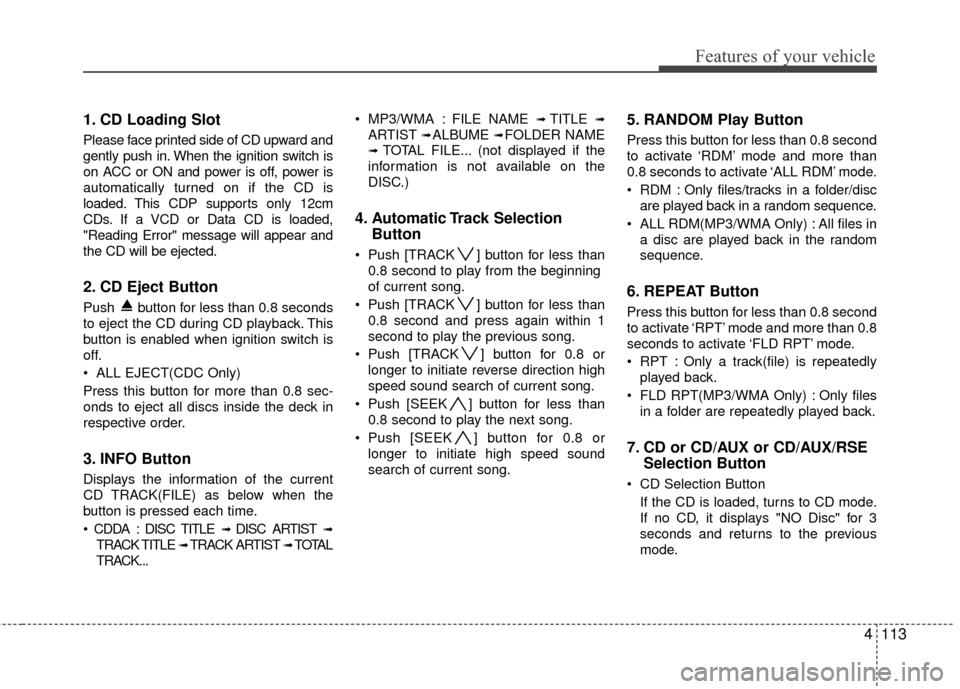
1. CD Loading Slot
Please face printed side of CD upward and
gently push in. When the ignition switch is
on ACC or ON and power is off, power is
automatically turned on if the CD is
loaded. This CDP supports only 12cm
CDs. If a VCD or Data CD is loaded,
"Reading Error" message will appear and
the CD will be ejected.
2. CD Eject Button
Push button for less than 0.8 seconds
to eject the CD during CD playback. This
button is enabled when ignition switch is
off.
ALL EJECT(CDC Only)
Press this button for more than 0.8 sec-
onds to eject all discs inside the deck in
respective order.
3. INFO Button
Displays the information of the current
CD TRACK(FILE) as below when the
button is pressed each time.
DISC TITLE
➟ DISC ARTIST ➟
TRACK TITLE ➟ TRACK ARTIST ➟ TOTAL
TRACK... MP3/WMA : FILE NAME
➟ TITLE ➟
ARTIST ➟ ALBUME ➟ FOLDER NAME
➟TOTAL FILE... (not displayed if the
information is not available on the
DISC.)
4. Automatic Track Selection Button
Push [TRACK ] button for less than
0.8 second to play from the beginning
of current song.
Push [TRACK ] button for less than 0.8 second and press again within 1
second to play the previous song.
Push [TRACK ] button for 0.8 or longer to initiate reverse direction high
speed sound search of current song.
Push [SEEK ] button for less than 0.8 second to play the next song.
Push [SEEK ] button for 0.8 or longer to initiate high speed sound
search of current song.
5. RANDOM Play Button
Press this button for less than 0.8 second
to activate ‘RDM’ mode and more than
0.8 seconds to activate ‘ALL RDM’ mode.
RDM : Only files/tracks in a folder/discare played back in a random sequence.
ALL RDM(MP3/WMA Only) : All files in a disc are played back in the random
sequence.
6. REPEAT Button
Press this button for less than 0.8 second
to activate ‘RPT’ mode and more than 0.8
seconds to activate ‘FLD RPT’ mode.
RPT : Only a track(file) is repeatedlyplayed back.
FLD RPT(MP3/WMA Only) : Only files in a folder are repeatedly played back.
7. CD or CD/AUX or CD/AUX/RSE Selection Button
CD Selection Button
If the CD is loaded, turns to CD mode.
If no CD, it displays "NO Disc" for 3
seconds and returns to the previous
mode.
Page 193 of 419
Features of your vehicle
114
4
CD/AUX Selection Button
If an auxiliary device is connected, it
switches to the AUX mode from the
other mode to play the sound from the
auxiliary player. If the CD is loaded,
turns to CD mode, and if a device is
connected to AUX then it toggles
CD
➟AUX➟CD... when the button is
pressed each time (It will not turn to
AUX if the auxiliary device is not con-
nected). If no CD or auxiliary device is
connected, it displays "NO Media" for 3
seconds and returns to the previous
mode.
CD/AUX/RSE Selection Button If the auxiliary device is connected, it
switches to the AUX mode from the
other mode to play the sound from the
auxiliary player. If the CD is loaded,
turns to CD mode, and if a device is
connected to AUX and there is a CD in
the RSE then it toggles:
CD
➟AUX➟RSE➟CD... when the but-
ton is pressed each time (It will not turn
to AUX and RSE if the auxiliary device
is not connected and there is no CD in
the RSE). If no CD, and auxiliary device is not
connected, it displays "NO Media" for 3
seconds and returns to the previous
mode.
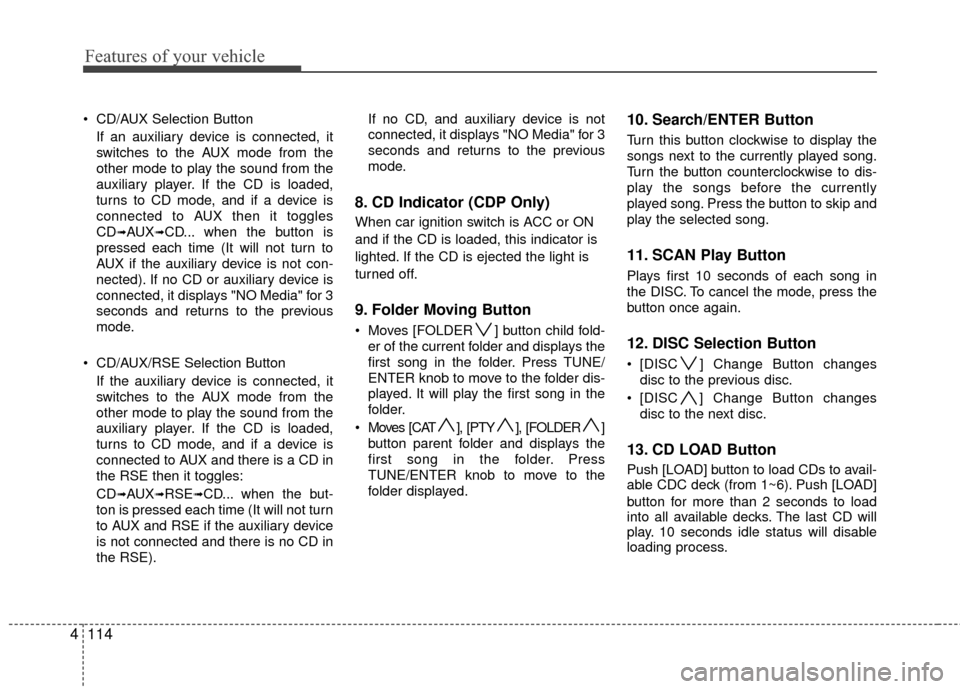
8. CD Indicator (CDP Only)
When car ignition switch is ACC or ON
and if the CD is loaded, this indicator is
lighted. If the CD is ejected the light is
turned off.
9. Folder Moving Button
Moves [FOLDER ] button child fold-
er of the current folder and displays the
first song in the folder. Press TUNE/
ENTER knob to move to the folder dis-
played. It will play the first song in the
folder.
Moves [CAT ], [PTY ], [FOLDER ] button parent folder and displays the
first song in the folder. Press
TUNE/ENTER knob to move to the
folder displayed.
10. Search/ENTER Button
Turn this button clockwise to display the
songs next to the currently played song.
Turn the button counterclockwise to dis-
play the songs before the currently
played song. Press the button to skip and
play the selected song.
11. SCAN Play Button
Plays first 10 seconds of each song in
the DISC. To cancel the mode, press the
button once again.
12. DISC Selection Button
[DISC ] Change Button changesdisc to the previous disc.
[DISC ] Change Button changes disc to the next disc.
13. CD LOAD Button
Push [LOAD] button to load CDs to avail-
able CDC deck (from 1~6). Push [LOAD]
button for more than 2 seconds to load
into all available decks. The last CD will
play. 10 seconds idle status will disable
loading process.
Page 194 of 419
4115
Features of your vehicle
CAUTION IN USING
USB DEVICE
To use the external USB device,
make sure the device is notmounted when starting up the vehicle. Mount the device afterstarting up.
If you start the vehicle when the USB device is mounted, it maydamage the USB device. (USBflashdrives are very sensitive toelectric shock.)
If the vehicle is started up or turned off while the external USBdevice is connected, the externalUSB device may not work.
It may not play inauthentic MP3 or WMA files.
1) It can only play MP3 files with the compression rate between8Kbps~320Kbps.
2) It can only play WMA music files with the compression ratebetween 8Kbps~320Kbps.
Take cautions for static electricity when mounting or dismountingthe external USB device.
Encoded MP3 PLAYER is not rec- ognizable.
(Continued)
(Continued) Depending on the condition of the external USB device, the con-nected external USB device canbe unrecognizable.
When the formatted byte/sector setting of External USB devices isnot either 512BYTE or 2048BYTE,then the device will not be recog-nized.
Only use an USB device format- ted to FAT 12/16/32.
USB device without USB IF authen- tication may not be recognizable.
Make sure the USB connection terminal does not come in contactwith the human body or anyobject.
If you repeat mounting or dis- mounting USB device in a shortperiod of time, it may break the device.
You might hear strange noise when mounting or dismounting aUSB device.
(Continued)(Continued) If you dismount the external USB device during playback in USBmode, the external USB device canbe damaged or malfunction.Therefore, mount the external USB device when the engine is turnedoff or in another mode.
Depending on the type and capac- ity of the external USB device orthe type of the files stored in the device, there may be a differencein the time taken for recognition of the device. It may be necessary towait for a moment.
Do not use the USB device for pur- poses other than playing music
files.
Use of USB accessories such as the recharger or heater using USBI/F may lower the performance or cause trouble.
If you use devices such as the USB hub you purchased separate-ly, the vehicle’s audio system maynot recognize the USB device. Connect the USB device directlyto the multimedia terminal of the vehicle.
(Continued)
Page 195 of 419
Features of your vehicle
116
4
(Continued)
If the USB device is divided by logical drives, only the music fileson the highest-priority drive arerecognized by car audio.
Devices such as MP3 Player/ Cellular phone/Digital camerathat are not recognizable by stan-dard USB I/F may be unrecog-nized by the system.
USB devices other than standard- ized goods (METAL COVER TYPEUSB) can be unrecognizable.
USB flash memory reader (such as CF, SD, microSD, etc.) or exter-nal-HDD type devices and be unrecognizable.
Music files protected by DRM (DIGITAL RIGHTS MANAGEMENT)are not recognizable.
The data in the USB memory may lost while using this AUDIO, It isrecommended to back up impor-tant data on a personal computeror storage device.
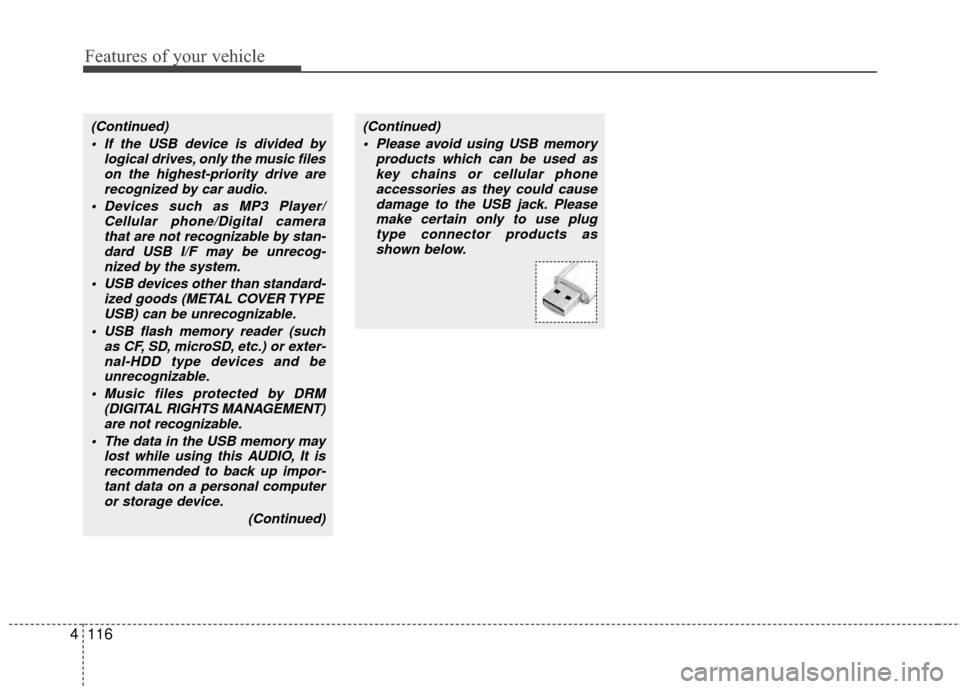
(Continued)(Continued) Please avoid using USB memory products which can be used askey chains or cellular phoneaccessories as they could causedamage to the USB jack. Pleasemake certain only to use plug type connector products asshown below.
Page 198 of 419
4119
Features of your vehicle
1. INFO Selection Button
Displays the information of the file cur-
rently played in the order of FILE NAME
➟TITLE➟ARTIST➟ALBUM➟FOLDER➟
TOTAL FILE➟NORMAL DISPLAY➟FILE
NAME
➟... (Displays no information if the
file has no song information.)
2. Track Moving Button
Press the [TRACK ] button for less than 0.8 second to play from the begin-
ning of the song currently played.
Press the button for less than 0.8 sec-
ond and press it again within 1 second
to move and play the previous track.
Press the button for 0.8 second or
longer to play the song in reverse
direction in fast speed.
Press the [SEEK ] button for less than 0.8 second to move to the next-
track. Press the button for 0.8 second
or longer to play the song in forward
direction in fast speed.
3. RANDOM Playback Button
Press this button for less than 0.8 sec-
onds to activate 'RDM' mode and more
than 0.8 seconds to activate 'ALL RDM'
mode. RDM : Only files in a folder are played
back in a random sequence.
ALL RDM : All files in a USB memory are played back in the random sequence.
4. REPEAT Button
Press this button for less than 0.8 sec-
onds to activate 'RPT' mode and more
than 0.8 seconds to activate 'FLD RPT'
mode.
RPT : Only a file is repeatedly playedback.
FLD RPT : Only files in a folder are repeatedly played back.
5. USB Selection Button
If USB is connected, it switches to the
USB mode from the other mode to play
the song files stored in the USB. If no CD
and auxiliary device is not connected, it
displays "NO Media" for 3 seconds and
returns to the previous mode.
6. Folder Moving Button
Moves [FOLDER ] button child folderof the current folder and displays the first
song in the folder. Press TUNE/ ENTER
knob to move to the folder displayed. It
will play the first song in the folder.
Moves [CAT ] button parent folder and displays the first song in the folder.
Press TUNE/ENTER knob to move to
the folder displayed
7. Search/ENTER Button
Turn this button clockwise to display the
songs next to the currently played song.
Turn the button counterclockwise to dis-
play the songs before the currently
played song. Press the button to skip and
play the selected song.
8. SCAN Selection Button
Plays 10 seconds of each song in the
USB device. Press the button once again
to cancel scanning.
Page 201 of 419
Features of your vehicle
122
4
When using an iPod with the exclusive
cable: Connect the exclusive cable to the
multiple terminal in the lower center area
to the right hand side of the cigarette
lighter. When the iPod is connected, the
'iPod' icon will be displayed on the top left
corner of the display screen.
❈Exclusive cable : Allows radio system
and iPod to be integrated together.
1. INFO Selection Button
Displays the information of the file cur-
rently played in the order of TITLE
➟
ARTIST➟ALBUM➟NORMAL DISPLAY➟
TITLE➟... (Displays no information if the
file has no song information.)
2. Track Moving Button
Press the [TRACK ] button for less than 0.8 second to play from the begin-
ning of the song currently played.
Press the button for less than 0.8 sec-
ond and press it again within 1 second
to move and play the previous track.
Press the button for 0.8 second or
longer to play the song in reverse
direction in fast speed. Press the [SEEK ] button for less
than 0.8 second to move to the next
track. Press the button for 0.8 second
or longer to play the song in forward
direction in fast speed.
3. RANDOM Playback Button
Press the button for less than 0.8 second
to activate or deactivate the random play-
back of the songs within the current cat-
egory. Press the button for longer than
0.8 second to randomly play all songs in
the entire album of the iPod. Press the
button once again to cancel the mode.
4. REPEAT Button
Repeats the song currently played.
5. iPod Selection Button
If iPod is connected, the audio switches
to the iPod mode from the CD mode to
play the song files stored in the iPod. If no
CD and auxiliary device is connected, it
displays "NO Media" for 3 seconds and
returns to the previous mode.
6. Menu/Category Selection Button
The menu button(preset 6) allows you to
see what category you are currently in
the iPod. The menu button along with the
Search/ENTER button will allow you to
select from the following list:
Songs, Composers, Playlists, Artists,
Albums, Genres.
7. Search/ENTER Button
When you turn the button clockwise or
counterclockwise, it will scroll to various
categories: songs, composers, playlists,
artists, albums, genres.
When you press ENTER on a desired
category, you can scroll through the list
of items in that category by turning the
button clockwise, or counterclockwise.
If you want to listen to the song displayed
in the song category, press the button,
when you have arrived at an item you
want to select within a category press the
ENTER button. Then it will skip to the
selected song and begin to play.
Page 205 of 419
Features of your vehicle
126
4
1. XM Selection Button
Turns to XM Satellite Radio Mode. XM
mode toggles in order to XM1
➟XM2➟
XM3➟XM1... when the button is pressed
each time.
2. INFO Button
Displays the information of the current
channel in the order of Artist/Song title
➟
Category/Channel name➟Current Play
Channel
➟Artist/Song title➟Category/
Channel name... when the button is
pressed each time.
If the whole text information on the dis-
play can not be seen, rotate the TUNE
button to see the next page.
3. Automatic Channel Selection Button
Push [TRACK ] button for less than
0.8 second to select previous channel.
Push [TRACK ] button for 0.8 sec- ond or longer to continuously move to
previous channel.
Push [SEEK ] button for less than 0.8 second to select next channel.
Push [SEEK ] button for 0.8 second or longer to continuously move to next
channel.
Radio ID : Seek or Tune to XM channel 0 to display the Radio ID.
4. SCAN Button
Press to hear a brief 10 seconds sam-
pling of all channel. To cancel the scan
mode, press
the button once again.
5. CATEGORY Search Button
Push [FOLDER ] button to searchprevious category.
Push [CAT ] button to search next category. To listen to the displayed cat-
egory, press the TUNE/SETUP button.
To scan channel in displayed category,
press the scan button. To search chan-
nel in displayed category, press seek
buttons or turn the tune button clock-
wise/counterclockwise.(CATEGORY
icon is will be turned on in Category
mode)
6. Manual Channel Selection Button
While listening to XM broadcast, rotate
this control to the right or left to search
other channels while listening to current
channel. (Turn to the right to search high-
er channels and left, lower channels)
7. Preset Button
Push [1]~[6] buttons less than 0.8 sec-
ond to play the channel saved in each
button. Push Preset button for 0.8 sec-
ond or longer to save current channel to
the respective button with a beep.
Page 207 of 419
Features of your vehicle
128
4
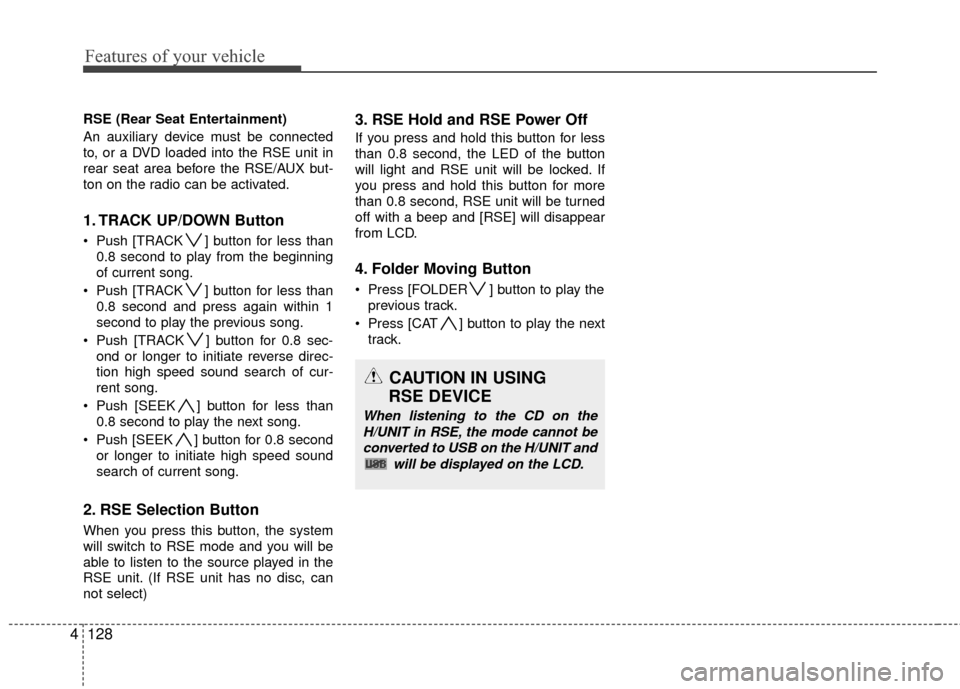
RSE (Rear Seat Entertainment)
An auxiliary device must be connected
to, or a DVD loaded into the RSE unit in
rear seat area before the RSE/AUX but-
ton on the radio can be activated.
1. TRACK UP/DOWN Button
Push [TRACK ] button for less than
0.8 second to play from the beginning
of current song.
Push [TRACK ] button for less than 0.8 second and press again within 1
second to play the previous song.
Push [TRACK ] button for 0.8 sec- ond or longer to initiate reverse direc-
tion high speed sound search of cur-
rent song.
Push [SEEK ] button for less than 0.8 second to play the next song.
Push [SEEK ] button for 0.8 second or longer to initiate high speed sound
search of current song.
2. RSE Selection Button
When you press this button, the system
will switch to RSE mode and you will be
able to listen to the source played in the
RSE unit. (If RSE unit has no disc, can
not select)
3. RSE Hold and RSE Power Off
If you press and hold this button for less
than 0.8 second, the LED of the button
will light and RSE unit will be locked. If
you press and hold this button for more
than 0.8 second, RSE unit will be turned
off with a beep and [RSE] will disappear
from LCD.
4. Folder Moving Button
Press [FOLDER ] button to play theprevious track.
Press [CAT ] button to play the next track.
CAUTION IN USING
RSE DEVICE
When listening to the CD on the
H/UNIT in RSE, the mode cannot beconverted to USB on the H/UNIT and will be displayed on the LCD.
Page 208 of 419
4129
Features of your vehicle
BLUETOOTH® WIRELESS TECHNOLOGY PHONE OPERATION (IF EQUIPPED)
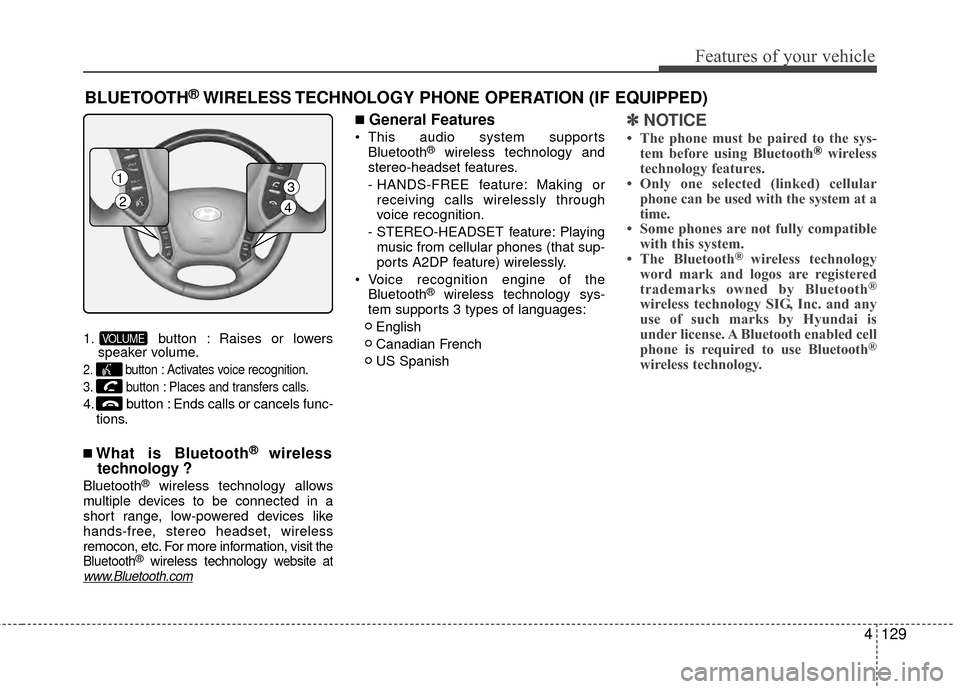
1. button : Raises or lowersspeaker volume.
2. button : Activates voice recognition.
3. button : Places and transfers calls.
4. button : Ends calls or cancels func-
tions.
■What is Bluetooth® wireless
technology ?
Bluetooth®wireless technology allows
multiple devices to be connected in a
short range, low-powered devices like
hands-free, stereo headset, wireless
remocon, etc. For more information, visit
the
Bluetooth®wireless technology website atwww.Bluetooth.com
■General Features
This audio system supports Bluetooth®wireless technology and
stereo-headset features.
- HANDS-FREE feature: Making or receiving calls wirelessly through
voice recognition.
- STEREO-HEADSET feature: Playing music from cellular phones (that sup-
ports A2DP feature) wirelessly.
Voice recognition engine of the Bluetooth
®wireless technology sys-
tem supports 3 types of languages:
English
Canadian French
US Spanish
✽ ✽ NOTICE
• The phone must be paired to the sys-
tem before using Bluetooth®wireless
technology features.
• Only one selected (linked) cellular phone can be used with the system at a
time.
• Some phones are not fully compatible with this system.
• The Bluetooth
® wireless technology
word mark and logos are registered
trademarks owned by Bluetooth
®
wireless technology SIG, Inc. and any
use of such marks by Hyundai is
under license. A Bluetooth enabled cell
phone is required to use Bluetooth
®
wireless technology.
VOLUME
1
23
4