engine mount Hyundai Santa Fe 2012 Owner's Manual
[x] Cancel search | Manufacturer: HYUNDAI, Model Year: 2012, Model line: Santa Fe, Model: Hyundai Santa Fe 2012Pages: 419, PDF Size: 5.61 MB
Page 23 of 419
Safety systems of your vehicle
63
CAUTION
The power seat is driven by anelectric motor. Stop operatingonce the adjustment is complet- ed. Excessive operation maydamage the electrical equipment.
When in operation, the power seat consumes a large amount ofelectrical power. To preventunnecessary charging system drain, don’t adjust the power seatlonger than necessary while the engine is not running.
Do not operate two or more power seat control switches at the sametime. Doing so may result inpower seat motor or electricalcomponent malfunction.
C010105AFD
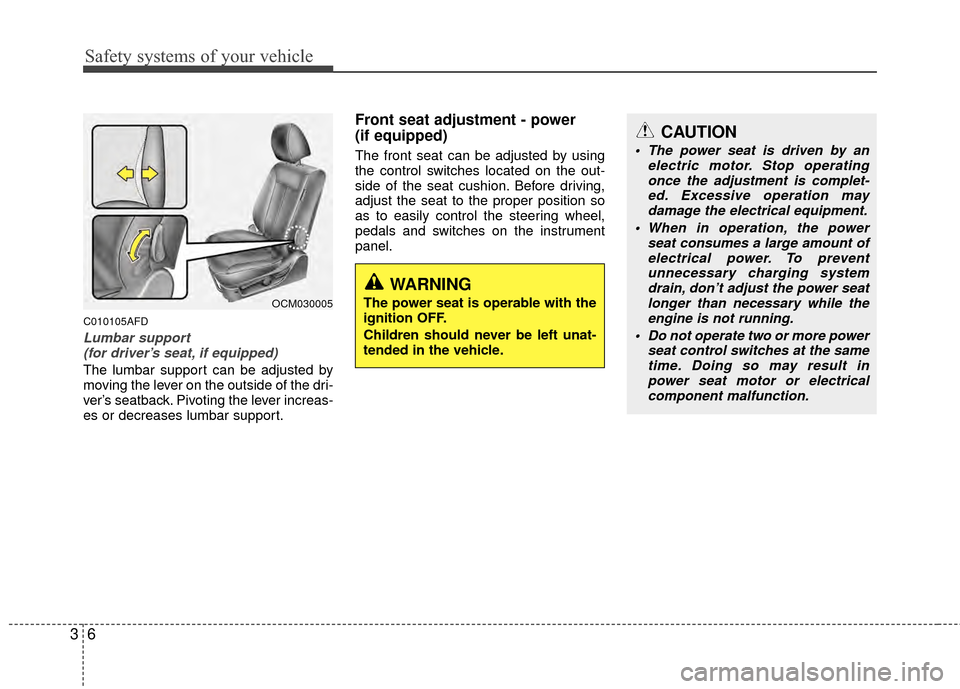
Lumbar support (for driver’s seat, if equipped)
The lumbar support can be adjusted by
moving the lever on the outside of the dri-
ver’s seatback. Pivoting the lever increas-
es or decreases lumbar support.
Front seat adjustment - power
(if equipped)
The front seat can be adjusted by using
the control switches located on the out-
side of the seat cushion. Before driving,
adjust the seat to the proper position so
as to easily control the steering wheel,
pedals and switches on the instrument
panel.
OCM030005
WARNING
The power seat is operable with the
ignition OFF.
Children should never be left unat-
tended in the vehicle.
Page 122 of 419
443
Features of your vehicle
D150204AUN
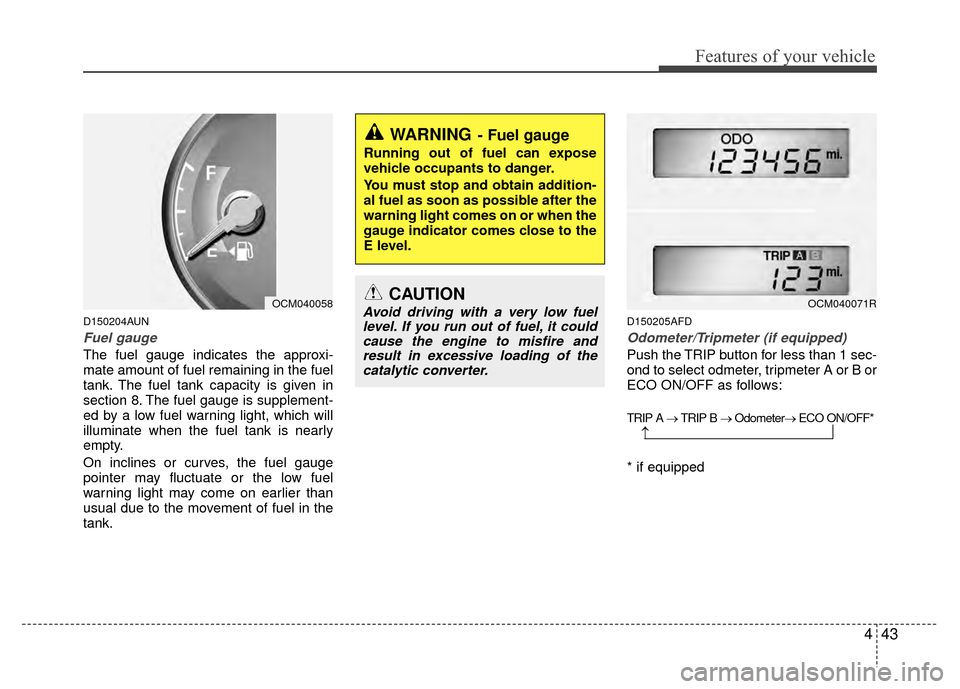
Fuel gauge
The fuel gauge indicates the approxi-
mate amount of fuel remaining in the fuel
tank. The fuel tank capacity is given in
section 8. The fuel gauge is supplement-
ed by a low fuel warning light, which will
illuminate when the fuel tank is nearly
empty.
On inclines or curves, the fuel gauge
pointer may fluctuate or the low fuel
warning light may come on earlier than
usual due to the movement of fuel in the
tank.
D150205AFD
Odometer/Tripmeter (if equipped)
Push the TRIP button for less than 1 sec-
ond to select odmeter, tripmeter A or B or
ECO ON/OFF as follows:
TRIP A → TRIP B → Odometer→ ECO ON/OFF*
* if equipped
WARNING- Fuel gauge
Running out of fuel can expose
vehicle occupants to danger.
You must stop and obtain addition-
al fuel as soon as possible after the
warning light comes on or when the
gauge indicator comes close to the
E level.
CAUTION
Avoid driving with a very low fuel
level. If you run out of fuel, it couldcause the engine to misfire andresult in excessive loading of thecatalytic converter.
→
OCM040058OCM040071R
Page 125 of 419
Features of your vehicle
46
4
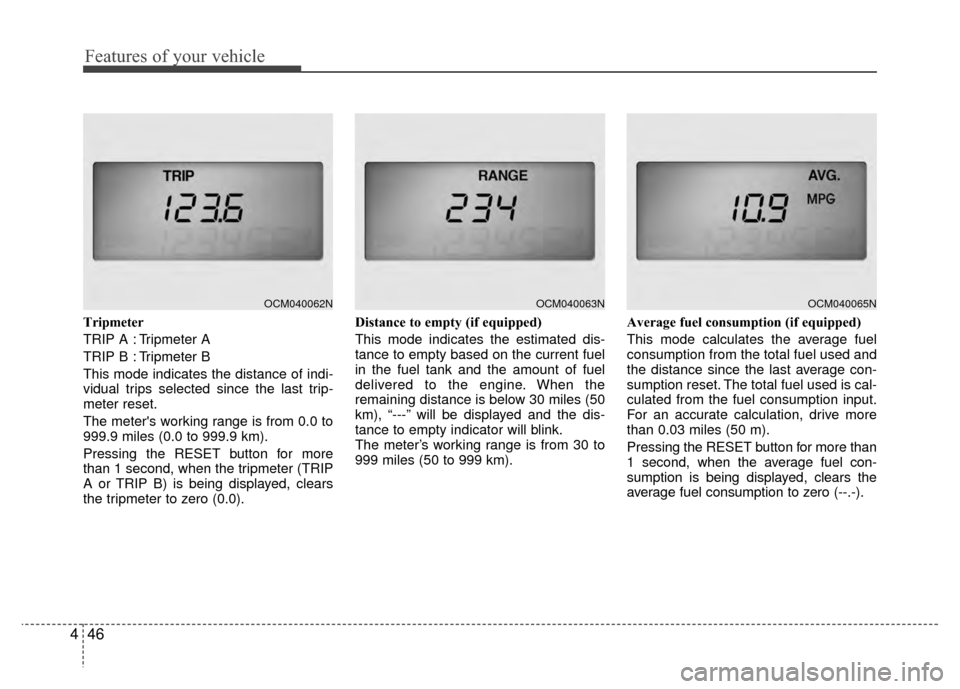
Tripmeter
TRIP A : Tripmeter A
TRIP B : Tripmeter B
This mode indicates the distance of indi-
vidual trips selected since the last trip-
meter reset.
The meter's working range is from 0.0 to
999.9 miles (0.0 to 999.9 km).
Pressing the RESET button for more
than 1 second, when the tripmeter (TRIP
A or TRIP B) is being displayed, clears
the tripmeter to zero (0.0). Distance to empty (if equipped)
This mode indicates the estimated dis-
tance to empty based on the current fuel
in the fuel tank and the amount of fuel
delivered to the engine. When the
remaining distance is below 30 miles (50
km), “---” will be displayed and the dis-
tance to empty indicator will blink.
The meter’s working range is from 30 to
999 miles (50 to 999 km).
Average fuel consumption (if equipped)
This mode calculates the average fuel
consumption from the total fuel used and
the distance since the last average con-
sumption reset. The total fuel used is cal-
culated from the fuel consumption input.
For an accurate calculation, drive more
than 0.03 miles (50 m).
Pressing the RESET button for more than
1 second, when the average fuel con-
sumption is being displayed, clears the
average fuel consumption to zero (--.-).
OCM040062NOCM040063NOCM040065N
Page 157 of 419
Features of your vehicle
78
4
Manual heating and air condition-
ing
The heating and cooling system can be
controlled manually by pressing buttons
or turning knob(s) other than the AUTO
button. In this case, the system works
sequentially according to the order of
buttons or knob(s) selected.
1. Start the engine.
2. Set the mode to the desired position.
To improve the effectiveness of heat-ing and cooling;
- Heating:
- Cooling:
3. Set the temperature control to the desired position.
4. Set the air intake control to the outside (fresh) air position.
5. Set the fan speed control to the desired speed.
6. If air conditioning is desired, turn the air conditioning system on.
Press the AUTO button in order to con-
vert to full automatic control of the sys-
tem.
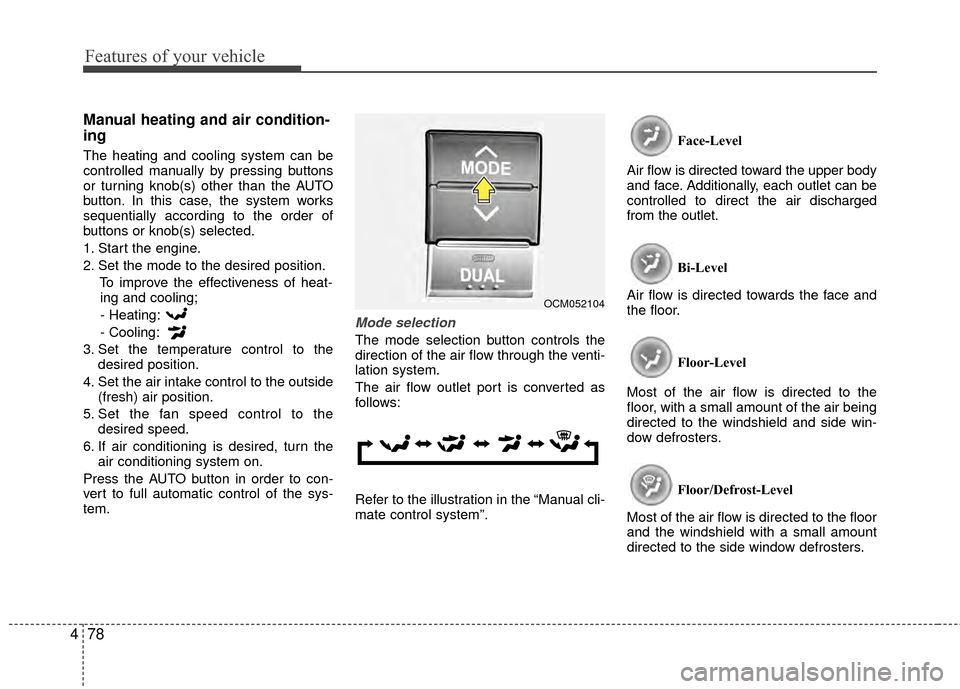
Mode selection
The mode selection button controls the
direction of the air flow through the venti-
lation system.
The air flow outlet port is converted as
follows:
Refer to the illustration in the “Manual cli-
mate control system”. Face-Level
Air flow is directed toward the upper body
and face. Additionally, each outlet can be
controlled to direct the air discharged
from the outlet.
Bi-Level
Air flow is directed towards the face and
the floor.
Floor-Level
Most of the air flow is directed to the
floor, with a small amount of the air being
directed to the windshield and side win-
dow defrosters.
Floor/Defrost-Level
Most of the air flow is directed to the floor
and the windshield with a small amount
directed to the side window defrosters.
OCM052104
Page 194 of 419
4115
Features of your vehicle
CAUTION IN USING
USB DEVICE
To use the external USB device,
make sure the device is notmounted when starting up the vehicle. Mount the device afterstarting up.
If you start the vehicle when the USB device is mounted, it maydamage the USB device. (USBflashdrives are very sensitive toelectric shock.)
If the vehicle is started up or turned off while the external USBdevice is connected, the externalUSB device may not work.
It may not play inauthentic MP3 or WMA files.
1) It can only play MP3 files with the compression rate between8Kbps~320Kbps.
2) It can only play WMA music files with the compression ratebetween 8Kbps~320Kbps.
Take cautions for static electricity when mounting or dismountingthe external USB device.
Encoded MP3 PLAYER is not rec- ognizable.
(Continued)
(Continued) Depending on the condition of the external USB device, the con-nected external USB device canbe unrecognizable.
When the formatted byte/sector setting of External USB devices isnot either 512BYTE or 2048BYTE,then the device will not be recog-nized.
Only use an USB device format- ted to FAT 12/16/32.
USB device without USB IF authen- tication may not be recognizable.
Make sure the USB connection terminal does not come in contactwith the human body or anyobject.
If you repeat mounting or dis- mounting USB device in a shortperiod of time, it may break the device.
You might hear strange noise when mounting or dismounting aUSB device.
(Continued)(Continued) If you dismount the external USB device during playback in USBmode, the external USB device canbe damaged or malfunction.Therefore, mount the external USB device when the engine is turnedoff or in another mode.
Depending on the type and capac- ity of the external USB device orthe type of the files stored in the device, there may be a differencein the time taken for recognition of the device. It may be necessary towait for a moment.
Do not use the USB device for pur- poses other than playing music
files.
Use of USB accessories such as the recharger or heater using USBI/F may lower the performance or cause trouble.
If you use devices such as the USB hub you purchased separate-ly, the vehicle’s audio system maynot recognize the USB device. Connect the USB device directlyto the multimedia terminal of the vehicle.
(Continued)
Page 245 of 419
Driving your vehicle
45
E020300AUN
Before starting
Close and lock all doors.
Position the seat so that all controls areeasily reached.
Adjust the inside and outside rearview mirrors.
Be sure that all lights work.
Check all gauges.
Check the operation of warning lights when the ignition switch is turned to
the ON position.
Release the parking brake and make sure the brake warning light goes out.
For safe operation, be sure you are famil-
iar with your vehicle and its equipment.
WARNING- Driving under
the influence of alcohol or
drugs
Drinking and driving is dangerous.
Drunk driving is the number one
contributor to the highway death
toll each year. Even a small amount
of alcohol will affect your reflexes,
perceptions and judgement.
Driving while under the influence of
drugs is as dangerous or more dan-
gerous than driving drunk.
You are much more likely to have a
serious accident if you drink or
take drugs and drive.
If you are drinking or taking drugs,
do not drive. Do not ride with a driv-
er who has been drinking or taking
drugs. Choose a designated driver
or call a cab.
WARNING
All passengers must be properly
belted whenever the vehicle is mov-
ing. Refer to “Seat belts” in section
3 for more information on their
proper use.
WARNING
Always check the surrounding areas
near your vehicle for people, espe-
cially children, before putting a vehi-
cle into D (Drive) or R (Reverse).
WARNING
When you intend to park or stop
the vehicle with the engine on, be
careful not to depress the accel-
erator pedal for a long period of
time. It may overheat the engine
or exhaust system and cause fire.
When you make a sudden stop or turn the steering wheel rapidly,
loose objects may drop on the
floor and it could interfere with
the operation of the foot pedals,
possibly causing an accident.
Keep all things in the vehicle
safely stored.
If you do not focus on driving, it may cause an accident. Be care-
ful when operating what may dis-
turb driving such as audio or
heater. It is the responsibility of
the driver to always drive safely.
Page 285 of 419
Driving your vehicle
44
5
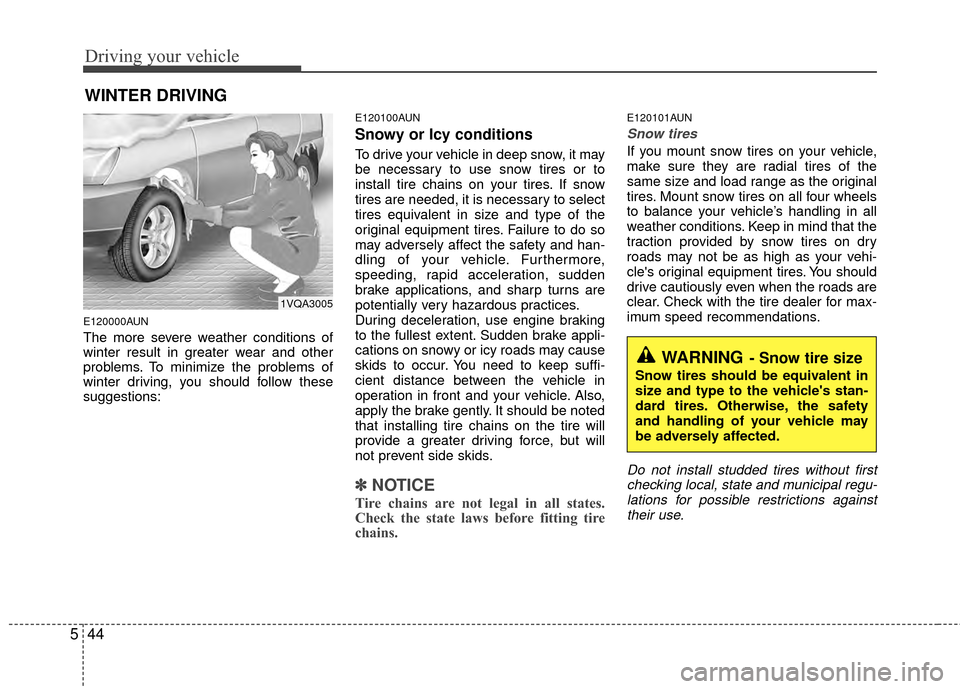
E120000AUN
The more severe weather conditions of
winter result in greater wear and other
problems. To minimize the problems of
winter driving, you should follow these
suggestions:
E120100AUN
Snowy or Icy conditions
To drive your vehicle in deep snow, it may
be necessary to use snow tires or to
install tire chains on your tires. If snow
tires are needed, it is necessary to select
tires equivalent in size and type of the
original equipment tires. Failure to do so
may adversely affect the safety and han-
dling of your vehicle. Furthermore,
speeding, rapid acceleration, sudden
brake applications, and sharp turns are
potentially very hazardous practices.
During deceleration, use engine braking
to the fullest extent. Sudden brake appli-
cations on snowy or icy roads may cause
skids to occur. You need to keep suffi-
cient distance between the vehicle in
operation in front and your vehicle. Also,
apply the brake gently. It should be noted
that installing tire chains on the tire will
provide a greater driving force, but will
not prevent side skids.
✽ ✽
NOTICE
Tire chains are not legal in all states.
Check the state laws before fitting tire
chains.
E120101AUN
Snow tires
If you mount snow tires on your vehicle,
make sure they are radial tires of the
same size and load range as the original
tires. Mount snow tires on all four wheels
to balance your vehicle’s handling in all
weather conditions. Keep in mind that the
traction provided by snow tires on dry
roads may not be as high as your vehi-
cle's original equipment tires. You should
drive cautiously even when the roads are
clear. Check with the tire dealer for max-
imum speed recommendations.
Do not install studded tires without first
checking local, state and municipal regu-lations for possible restrictions againsttheir use.
WINTER DRIVING
WARNING- Snow tire size
Snow tires should be equivalent in
size and type to the vehicle's stan-
dard tires. Otherwise, the safety
and handling of your vehicle may
be adversely affected.
1VQA3005
Page 286 of 419
545
Driving your vehicle
Tire chains
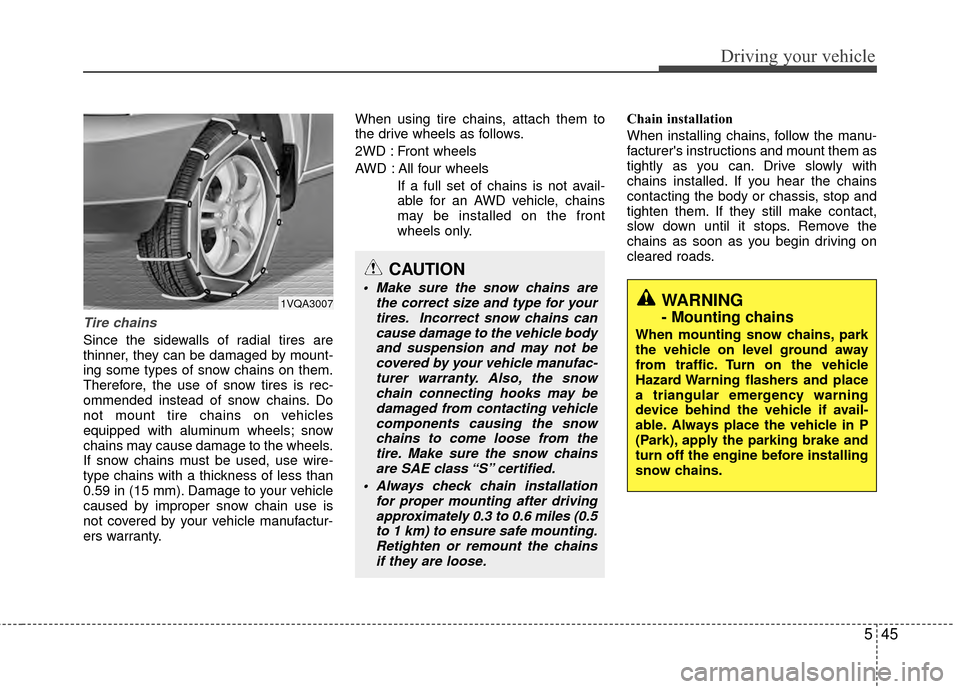
Since the sidewalls of radial tires are
thinner, they can be damaged by mount-
ing some types of snow chains on them.
Therefore, the use of snow tires is rec-
ommended instead of snow chains. Do
not mount tire chains on vehicles
equipped with aluminum wheels; snow
chains may cause damage to the wheels.
If snow chains must be used, use wire-
type chains with a thickness of less than
0.59 in (15 mm). Damage to your vehicle
caused by improper snow chain use is
not covered by your vehicle manufactur-
ers warranty.When using tire chains, attach them to
the drive wheels as follows.
2WD : Front wheels
AWD : All four wheels
If a full set of chains is not avail-
able for an AWD vehicle, chains
may be installed on the front
wheels only. Chain installation
When installing chains, follow the manu-
facturer's instructions and mount them as
tightly as you can. Drive slowly with
chains installed. If you hear the chains
contacting the body or chassis, stop and
tighten them. If they still make contact,
slow down until it stops. Remove the
chains as soon as you begin driving on
cleared roads.
CAUTION
Make sure the snow chains are
the correct size and type for yourtires. Incorrect snow chains cancause damage to the vehicle bodyand suspension and may not becovered by your vehicle manufac- turer warranty. Also, the snowchain connecting hooks may bedamaged from contacting vehiclecomponents causing the snowchains to come loose from thetire. Make sure the snow chainsare SAE class “S” certified.
Always check chain installation for proper mounting after drivingapproximately 0.3 to 0.6 miles (0.5to 1 km) to ensure safe mounting. Retighten or remount the chainsif they are loose.WARNING
- Mounting chains
When mounting snow chains, park
the vehicle on level ground away
from traffic. Turn on the vehicle
Hazard Warning flashers and place
a triangular emergency warning
device behind the vehicle if avail-
able. Always place the vehicle in P
(Park), apply the parking brake and
turn off the engine before installing
snow chains.
1VQA3007
Page 291 of 419
Driving your vehicle
50
5
E140400AUN
Driving with a trailer
Towing a trailer requires a certain
amount of experience. Before setting out
for the open road, you must get to know
your trailer. Acquaint yourself with the
feel of handling and braking with the
added weight of the trailer. And always
keep in mind that the vehicle you are
driving is now a good deal longer and not
nearly so responsive as your vehicle is
by itself.
Before you start, check the trailer hitch
and platform, safety chains, electrical
connector(s), lights, tires and mirror
adjustment. If the trailer has electric
brakes, start your vehicle and trailer mov-
ing and then apply the trailer brake con-
troller by hand to be sure the brakes are
working. This lets you check your electri-
cal connection at the same time.
During your trip, check occasionally to be
sure that the load is secure, and that the
lights and any trailer brakes are still work-
ing.
E140401AUN
Following distance
Stay at least twice as far behind the vehi-
cle ahead as you would when driving
your vehicle without a trailer. This can
help you avoid situations that require
heavy braking and sudden turns.
E140402AUN
Passing
You’ll need more passing distance up
ahead when you’re towing a trailer. And,
because of the increased vehicle length,
you’ll need to go much farther beyond the
passed vehicle before you can return to
your lane. Due to the added load to the
engine when going uphill the vehicle may
also take longer to pass than it would on
flat ground.
E140403AUN
Backing up
Hold the bottom of the steering wheel
with one hand. Then, to move the trailer
to the left, just move your hand to the left.
To move the trailer to the right, move your
hand to the right. Always back up slowly
and, if possible, have someone guide
you.
E140404AUN
Making turns
When you’re turning with a trailer, make
wider turns than normal. Do this so your
trailer won’t strike soft shoulders, curbs,
road signs, trees, or other objects near
the edge of the road. Avoid jerky or sud-
den maneuvers. Signal well in advance
before turning or lane changes.
Page 335 of 419
Maintenance
87
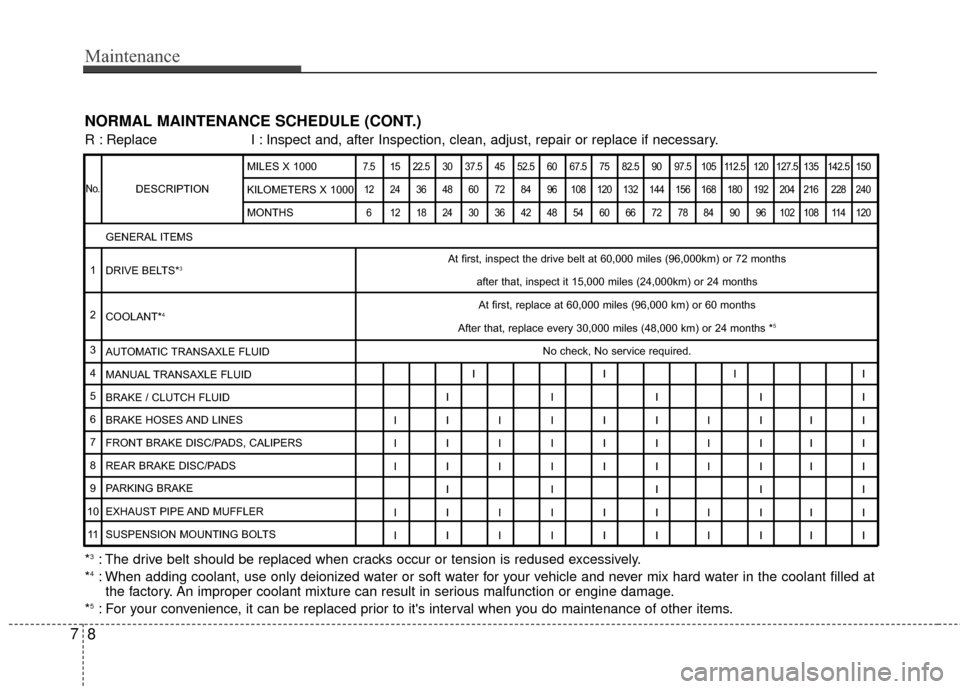
NORMAL MAINTENANCE SCHEDULE (CONT.)
DESCRIPTION
7.5 15 22.5 30 37.5 45 52.5 60 67.5 75 82.5 90 97.5 105 112.5 120 127.5 135 142.5 15012 24 36 48 60 72 84 96 108 120 132 144 156 168 180 192 204 216 228 240 6 121824303642485460667278849096102108114120
At first, inspect the drive belt at 60,000 miles (96,000km) or 72 mont\
hs after that, inspect it 15,000 miles (24,000km) or 24 monthsAt first, replace at 60,000 miles (96,000 km) or 60 months
After that, replace every 30,000 miles (48,000 km) or 24 months *
5
No check, No service required.
IIII
IIIII
IIIIIIIIII
IIIIIIIIII
IIIIIIIIII IIIII
IIIIIIIIII
IIIIIIIIII
GENERAL ITEMS
DRIVE BELTS*
3
COOLANT*4
AUTOMATIC TRANSAXLE FLUID
MANUAL TRANSAXLE FLUID
BRAKE / CLUTCH FLUID
BRAKE HOSES AND LINES
FRONT BRAKE DISC/PADS, CALIPERS
REAR BRAKE DISC/PADS
PARKING BRAKE
EXHAUST PIPE AND MUFFLER
SUSPENSION MOUNTING BOLTS MILES X 1000
KILOMETERS X 1000
MONTHS
R : Replace
I : Inspect and, after Inspection, clean, adjust, repair or replace if neces\
sary.
No.
1
2
3
4
5
6
7
8
9
10 11
*3: The drive belt should be replaced when cracks occur or tension is redused excessively.
*4: When adding coolant, use only deionized water or soft water for your vehicle and never mix hard water in the coolant filled at the factory. An improper coolant mixture can result in serious malfunction or engine damage.
*
5: For your convenience, it can be replaced prior to it's interval when you do maintenance of other items.