battery Hyundai Santa Fe 2013 User Guide
[x] Cancel search | Manufacturer: HYUNDAI, Model Year: 2013, Model line: Santa Fe, Model: Hyundai Santa Fe 2013Pages: 711, PDF Size: 14.72 MB
Page 112 of 711
411
Features of your vehicle
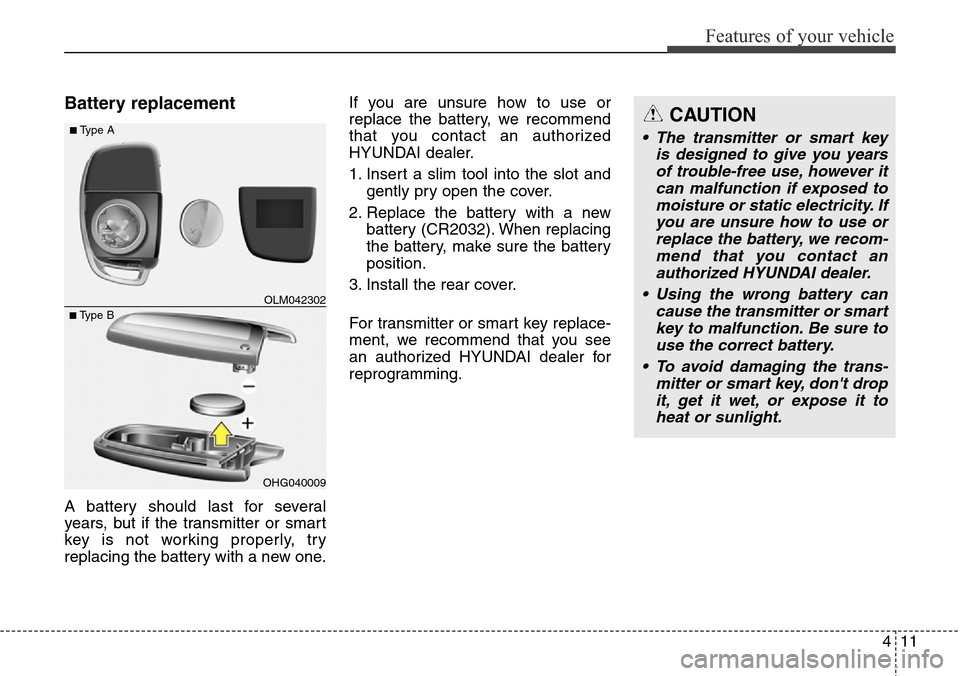
Battery replacement
A battery should last for several
years, but if the transmitter or smart
key is not working properly, try
replacing the battery with a new one.If you are unsure how to use or
replace the battery, we recommend
that you contact an authorized
HYUNDAI dealer.
1. Insert a slim tool into the slot and
gently pry open the cover.
2. Replace the battery with a new
battery (CR2032). When replacing
the battery, make sure the battery
position.
3. Install the rear cover.
For transmitter or smart key replace-
ment, we recommend that you see
an authorized HYUNDAI dealer for
reprogramming.
OHG040009
■Type BOLM042302
■Type ACAUTION
• The transmitter or smart key
is designed to give you years
of trouble-free use, however it
can malfunction if exposed to
moisture or static electricity. If
you are unsure how to use or
replace the battery, we recom-
mend that you contact an
authorized HYUNDAI dealer.
• Using the wrong battery can
cause the transmitter or smart
key to malfunction. Be sure to
use the correct battery.
• To avoid damaging the trans-
mitter or smart key, don't drop
it, get it wet, or expose it to
heat or sunlight.
Page 113 of 711
Features of your vehicle
12 4
CAUTION
An inappropriately disposed
battery can be harmful to the
environment and human health.
Dispose the battery according to
your local law(s) or regulation.
Page 142 of 711

441
Features of your vehicle
Resetting the sunroof
Whenever the vehicle battery is dis-
connected or discharged, you must
reset your sunroof system as follows:
1.Turn the ignition switch to the ON
position.
2.Close the sunshade and sunroof
completely if opened.
3.Release the sunroof control lever.
4.Push the sunroof control lever for-
ward in the direction of close
(about 10 seconds) until the sun-
roof moves a little. Then, release
the lever.5.Push the sunroof control lever for-
ward in the direction of close, until
the sunroof operates as follows
again:
The sunshade and sunroof glass
slide open →The sunroof glass
slide close →The sunshade close
Then, release the lever.
When this is complete, the sunroof
system has been reset.
✽NOTICE
If you do not reset the sunroof, it
may not work properly.
Page 156 of 711

455
Features of your vehicle
• With smart key system
- The mirror will fold or unfold when
the door is locked or unlocked by
the smart key.
- The mirror will fold or unfold when
the door is locked or unlocked by
the button on the outside door
handle.
- The mirror will unfold when you
approach the vehicle (all doors
closed and locked) with a smart
key in possession. (if equipped)
CAUTION
In case it is an electric type out-
side rearview mirror, don’t fold it
by hand. It could cause motor
failure.
CAUTION
The electric type outside
rearview mirror operates even
though the ignition switch is in
the OFF position. However, to
prevent unnecessary battery
discharge, do not adjust the
mirrors longer than necessary
while the engine is not running.
Page 169 of 711

Features of your vehicle
68 4
Service in OFF
If the service interval is not set,
“Service in OFF” message is dis-
played on the LCD display.
✽NOTICE
If any of the following conditions
occurs, the mileage and days may be
incorrect.
- The battery cable is disconnected.
- The fuse switch is turned off.
- The battery is discharged.
User Settings Mode
Description
On this mode, you can change set-
ting of the doors, lamps, and so on.
Door
Auto Door Lock (if equipped)
• Off:
The auto door lock operation will
be deactivated.
• Speed:
All doors will be automatically
locked when the vehicle speed
exceeds 15km/h (9.3mph).
• Shift Lever:
All doors will be automatically
locked if the automatic transaxle
shift lever is shifted from the P
(Park) position to the R (Reverse),
N (Neutral), or D (Drive) position.
ODMEDI2068/ODMEDI2072 ■Type A
■Type B
ODMEDI2025/ODMEDI2054 ■Type A
■Type B
Page 173 of 711

Features of your vehicle
72 4
Warning Messages
Shift to "P" position (for smart key
system and automatic transaxle)
• This warning message illuminates
if you try to turn off the engine with-
out the shift lever in P (Park) posi-
tion.
• At this time, the Engine Start/Stop
Button turns to the ACC position (If
you press the Engine Start/Stop
Button once more, it will turn to the
ON position).
Low Key Battery
(for smart key system)
• This warning message illuminates
if the battery of the smart key is
discharged when the Engine
Start/Stop Button changes to the
OFF position.
Press start button while turn
steering (for smart key system)
• This warning message illuminates
if the steering wheel does not
unlock normally when the Engine
Start/Stop Button is pressed.
• It means that you should press the
Engine Start/Stop Button while
turning the steering wheel right
and left.
ODMEDI2003/ODMEDI2031 ■Type A
■Type BODMEDI2002/ODMEDI2030 ■Type A
■Type BODMEDI2004/ODMEDI2032 ■Type A
■Type B
Page 180 of 711

479
Features of your vehicle
Overview
Description
The trip computer is a microcomput-
er-controlled driver information sys-
tem that displays information related
to driving.
✽NOTICE
Some driving information stored in
the trip computer (for example
Average Vehicle Speed) resets if the
battery is disconnected.
Trip Modes
TRIP COMPUTER
• Tripmeter [A]
• Average Vehicle Speed [A]
• Elapsed Time [A]
TRIP A
• Tripmeter [B]
• Average Vehicle Speed [B]
• Elapsed Time [B]
TRIP B
• Distance To Empty
• Average Fuel Economy
• Instant Fuel Economy
FUEL ECONOMY
Page 182 of 711

481
Features of your vehicle
✽NOTICE
• The average vehicle speed is not
displayed if the driving distance is
less than 50 meters (0.03 miles) or
the driving time is less than 10 sec-
onds since the ignition switch or
Engine Start/Stop button is turned
to ON.
• Even if the vehicle is not in motion,
the average vehicle speed keeps
going while the engine is running.
Elapsed Time (3)
• The elapsed time is the total driv-
ing time since the last elapsed time
reset.
- Time range (hh:mm): 00:00 ~ 99:59
• To reset the elapsed time, press
the SELECT/RESET button on
the steering wheel for more than 1
second when the elapsed time is
displayed.
✽NOTICE
Even if the vehicle is not in motion,
the elapsed time keeps going while
the engine is running.
Fuel EconomyDistance To Empty (1)
• The distance to empty is the esti-
mated distance the vehicle can be
driven with the remaining fuel.
- Distance range: 50 ~ 9999 km or
30 ~ 9999 mi.
• If the estimated distance is below 50
km (30 mi.), the trip computer will
display “---” as distance to empty.
✽NOTICE
• If the vehicle is not on level ground
or the battery power has been
interrupted, the distance to empty
function may not operate correctly.
• The distance to empty may differ
from the actual driving distance as
it is an estimate of the available
driving distance.
• The trip computer may not regis-
ter additional fuel if less than 6
liters (1.6 gallons) of fuel are
added to the vehicle.
• The fuel economy and distance to
empty may vary significantly based
on driving conditions, driving
habits, and condition of the vehicle.
ODMEDI2026/ODMEDI2061/
ODMEDI2055/ODMEDI2056
■Type A
- km, L/100km
- mi., MPG
- km, L/100km - mi., MPG
■Type B
Page 195 of 711

Features of your vehicle
94 4
Immobilizer Indicator
Light (Without Smart
Key) (if equipped)
This indicator light illuminates:
• When the vehicle detects the
immobilizer in your key properly
while the ignition switch is ON.
- At this time, you can start the
engine.
- The indicator light goes off after
starting the engine.
This indicator light blinks:
• When there is a malfunction with
the immobilizer system.
In this case, we recommend that
you have the vehicle inspected by
an authorized HYUNDAI dealer.
Immobilizer Indicator
Light (With Smart Key)
(if equipped)
This indicator light illuminates for up
to 30 seconds:
• When the vehicle detects the
smart key in the vehicle properly
while the Engine Start/Stop Button
is ACC or ON.
- At this time, you can start the
engine.
- The indicator light goes off after
starting the engine.
This indicator light blinks for a few
seconds:
• When the smart key is not in the
vehicle.
- At this time, you can not start the
engine.This indicator light illuminates for 2
seconds and goes off:
• When the vehicle can not detect
the smart key which is in the vehi-
cle while the Engine Start/Stop
Button is ON.
In this case, we recommend that
you have the vehicle inspected by
an authorized HYUNDAI dealer.
This indicator light blinks:
• When the battery of the smart key
is weak.
- At this time, you can not start the
engine. However, you can start
the engine if you press the Engine
Start/Stop Button with the smart
key. (For more details, refer to
“Starting the Engine” in section 5).
• When there is a malfunction with
the immobilizer system.
In this case, we recommend that
you have the vehicle inspected by
an authorized HYUNDAI dealer.
Page 197 of 711
![Hyundai Santa Fe 2013 User Guide Features of your vehicle
96 4
AUTO HOLD Indicator
Light (if equipped)
This indicator light illuminates:
• [White] When you activate the auto
hold system by pressing the AUTO
HOLD button.
• [Green]](/img/35/16368/w960_16368-196.png "Hyundai Santa Fe 2013 User Guide Features of your vehicle
96 4
AUTO HOLD Indicator
Light (if equipped)
This indicator light illuminates:
• [White] When you activate the auto
hold system by pressing the AUTO
HOLD button.
• [Green]")
Features of your vehicle
96 4
AUTO HOLD Indicator
Light (if equipped)
This indicator light illuminates:
• [White] When you activate the auto
hold system by pressing the AUTO
HOLD button.
• [Green] When you stop the vehicle
completely by depressing the
brake pedal with the auto hold sys-
tem activated.
• [Yellow] When there is a malfunc-
tion with the auto hold system.
In this case, we recommend that
you have the vehicle inspected by
an authorized HYUNDAI dealer.
For more details, refer to “Auto Hold”
in chapter 5.
Glow Indicator Light
(Diesel Engine)
This indicator light illuminates:
• When the engine is being preheat-
ed with the ignition switch or
Engine Start/Stop Button in the ON
position.
- The engine can be started after
the glow indicator light goes off.
- The illumination time varies with
the engine coolant temperature,
air temperature, and battery con-
dition.
If the indicator light remains on or
blinks after the engine has warmed
up or while driving, there may a mal-
function with the engine preheating
system.
In this case, we recommend that you
have the vehicle inspected by an
authorized HYUNDAI dealer.
✽NOTICE - Engine Preheating
If the engine does not start within 10
seconds after the preheating is com-
pleted, set the ignition switch or
Engine Start/Stop Button to the
LOCK or OFF position for 10 sec-
onds and then to the ON position in
order to preheat the engine again.AUTO
HOLD