light Hyundai Santa Fe 2014 Owner's Guide
[x] Cancel search | Manufacturer: HYUNDAI, Model Year: 2014, Model line: Santa Fe, Model: Hyundai Santa Fe 2014Pages: 711, PDF Size: 14.72 MB
Page 85 of 711
Safety features of your vehicle
60 3
(Continued)
• The SRS is designed to
deploy the front air bags only
when an impact is sufficiently
severe and when the impact
angle is less than 30° from the
forward longitudinal axis of
the vehicle. Additionally, the
air bags will only deploy once.
Seat belts must be worn at all
times.
• Front air bags are not intend-
ed to deploy in side-impact,
rear-impact or rollover crash-
es. In addition, front air bags
will not deploy in frontal
crashes below the deploy-
ment threshold.
• A child restraint system must
never be placed in the front
seat. The infant or child could
be severely injured or killed
by an air bag deployment in
case of an accident.
(Continued)(Continued)
• No objects should be placed
over or near the air bag mod-
ules on the steering wheel,
instrument panel, and the front
passenger's panel above the
glove box, because any such
object could cause harm if the
vehicle is in a crash severe
enough to cause the air bags
to deploy.
• Do not tamper with or discon-
nect SRS wiring or other com-
ponents of the SRS system.
Doing so could result in injury,
due to accidental deployment
of the air bags or by rendering
the SRS inoperative.
• If the SRS air bag warning light
remains illuminated while the
vehicle is being driven, we rec-
ommend that the system be
inspected by an authorized
HYUNDAI dealer.
• Air bags can only be used
once – we recommend that the
system be replaced by an
authorized HYUNDAI dealer.
(Continued)(Continued)
• Front and side air bags can
injure occupants improperly
positioned in the front seats.
• Move your seat as far back as
practical from the front air
bags, while still maintaining
control of the vehicle.
• You and your passengers
should never sit or lean
unnecessarily close to the air
bags. Improperly positioned
drivers and passengers can
be severely injured by inflat-
ing air bags.
• Never lean against the door or
center console – always sit in
an upright position.
• Do not allow a passenger to
ride in the front seat when the
passenger’s front air bag OFF
indicator is illuminated,
because the air bag will not
deploy in the event of a mod-
erate or severe frontal crash.
(Continued)
Page 87 of 711
Safety features of your vehicle
62 3
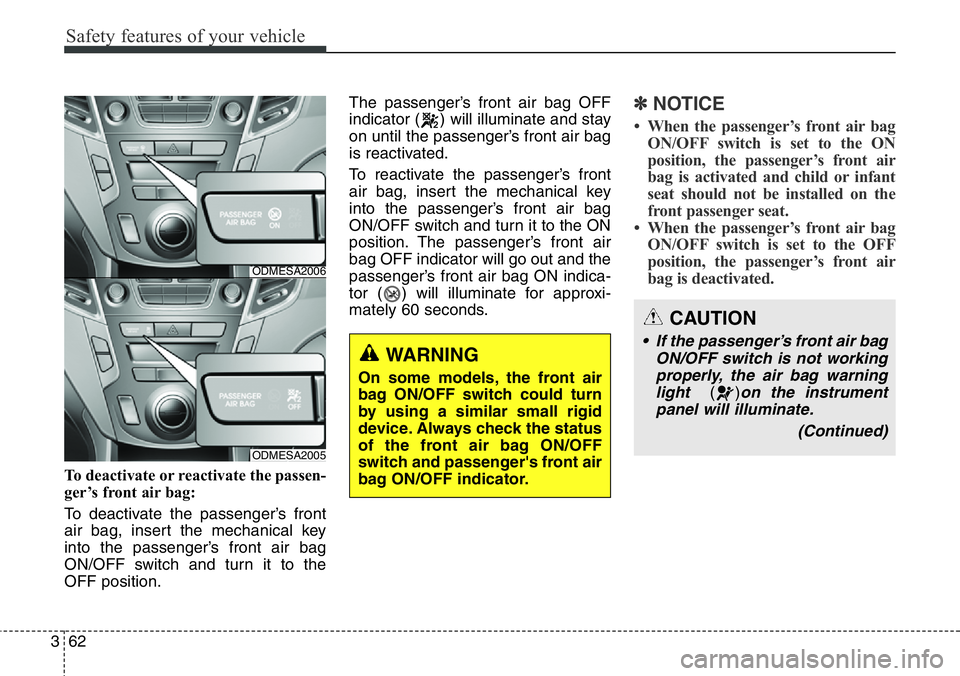
To deactivate or reactivate the passen-
ger’s front air bag:
To deactivate the passenger’s front
air bag, insert the mechanical key
into the passenger’s front air bag
ON/OFF switch and turn it to the
OFF position.The passenger’s front air bag OFF
indicator ( ) will illuminate and stay
on until the passenger’s front air bag
is reactivated.
To reactivate the passenger’s front
air bag, insert the mechanical key
into the passenger’s front air bag
ON/OFF switch and turn it to the ON
position. The passenger’s front air
bag OFF indicator will go out and the
passenger’s front air bag ON indica-
tor ( ) will illuminate for approxi-
mately 60 seconds.
✽NOTICE
• When the passenger’s front air bag
ON/OFF switch is set to the ON
position, the passenger’s front air
bag is activated and child or infant
seat should not be installed on the
front passenger seat.
• When the passenger’s front air bag
ON/OFF switch is set to the OFF
position, the passenger’s front air
bag is deactivated.
WARNING
On some models, the front air
bag ON/OFF switch could turn
by using a similar small rigid
device. Always check the status
of the front air bag ON/OFF
switch and passenger's front air
bag ON/OFF indicator.
CAUTION
• If the passenger’s front air bag
ON/OFF switch is not working
properly, the air bag warning
light
()on the instrument
panel will illuminate.
(Continued)
ODMESA2006
ODMESA2005
Page 88 of 711
363
Safety features of your vehicle
(Continued)
• Even though your vehicle is
equipped with the passen-
ger's front air bag ON/OFF
switch, do not install a child
restraint system in the front
passenger's seat. A child
restraint system must never
be placed in the front seat.
Children who are too large for
child restraint systems
should always occupy the
rear seat and use the available
lap/shoulder belts. Children
are afforded the most safety
in the event of an accident
when they are restrained by a
proper restraint system in the
rear seat.
• As soon as the child seat is
no longer needed on the front
passenger's seat, reactivate
the front passenger's air bag.WARNING
• The driver is responsible for
the proper position of the pas-
senger’s front air bag ON/OFF
switch.
• Deactivate the passenger's
front air bag only when the
ignition switch is switched off,
or the malfunction may occur
in the SRS Control Module.
And there may be a danger
that the driver's and/or front
passenger’s and/or side and
curtain air bag may fail to trig-
ger, or not trigger correctly
during a collision.
• Never install a rearward fac-
ing child seat on the front pas-
senger's seat unless the pas-
senger's front air bag has
been deactivated. The infant
or child could be severely
injured or killed by an air bag
deployment in case of an acci-
dent.
(Continued)
(Continued)
And, the passenger's front air
bag OFF indicator
() will not
illuminate (The passenger's
front air bag ON indicator
comes on and goes off after
approximately 60 seconds),
the SRS Control Module reac-
tivates the passenger’s front
air bag and the passenger’s
front air bag will inflate in
frontal impact crashes even if
the passenger’s front air bag
ON/OFF switch is set to the
OFF position.
If this occurs, we recommend
that the system be inspected
by an authorized HYUNDAI
dealer.
• If the SRS air bag warning
light blinks or does not illumi-
nate when the ignition switch
is turned to the ON position,
or if it illuminates while the
vehicle is being driven, we
recommend that the system
be inspected by an authorized
HYUNDAI dealer.
Page 97 of 711
Safety features of your vehicle
72 3
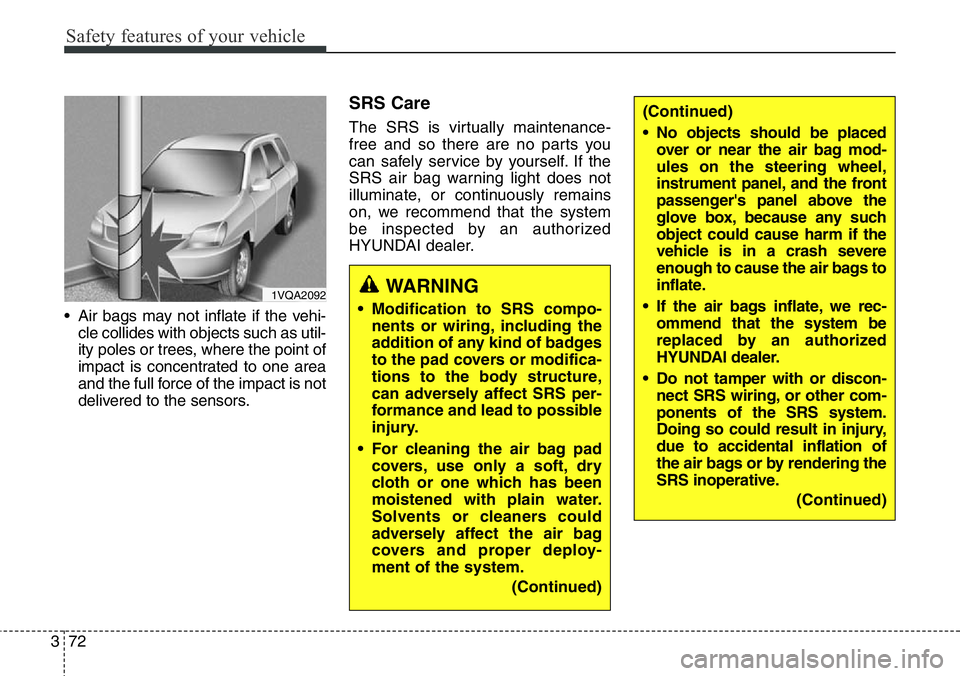
• Air bags may not inflate if the vehi-
cle collides with objects such as util-
ity poles or trees, where the point of
impact is concentrated to one area
and the full force of the impact is not
delivered to the sensors.
SRS Care
The SRS is virtually maintenance-
free and so there are no parts you
can safely service by yourself. If the
SRS air bag warning light does not
illuminate, or continuously remains
on, we recommend that the system
be inspected by an authorized
HYUNDAI dealer.
1VQA2092WARNING
• Modification to SRS compo-
nents or wiring, including the
addition of any kind of badges
to the pad covers or modifica-
tions to the body structure,
can adversely affect SRS per-
formance and lead to possible
injury.
• For cleaning the air bag pad
covers, use only a soft, dry
cloth or one which has been
moistened with plain water.
Solvents or cleaners could
adversely affect the air bag
covers and proper deploy-
ment of the system.
(Continued)
(Continued)
• No objects should be placed
over or near the air bag mod-
ules on the steering wheel,
instrument panel, and the front
passenger's panel above the
glove box, because any such
object could cause harm if the
vehicle is in a crash severe
enough to cause the air bags to
inflate.
• If the air bags inflate, we rec-
ommend that the system be
replaced by an authorized
HYUNDAI dealer.
• Do not tamper with or discon-
nect SRS wiring, or other com-
ponents of the SRS system.
Doing so could result in injury,
due to accidental inflation of
the air bags or by rendering the
SRS inoperative.
(Continued)
Page 103 of 711
Mirrors . . . . . . . . . . . . . . . . . . . . . . . . . . . . . . . . . . 4-48
• Inside rearview mirror . . . . . . . . . . . . . . . . . . . . . . . . 4-48
• Outside rearview mirror . . . . . . . . . . . . . . . . . . . . . . . 4-52
Instrument cluster . . . . . . . . . . . . . . . . . . . . . . . . . 4-56
• Instrument Cluster Control . . . . . . . . . . . . . . . . . . . . 4-58
• LCD Display Control . . . . . . . . . . . . . . . . . . . . . . . . . 4-59
• Gauges . . . . . . . . . . . . . . . . . . . . . . . . . . . . . . . . . . . . . 4-59
• Transaxle Shift Indicator . . . . . . . . . . . . . . . . . . . . . . 4-64
LCD display . . . . . . . . . . . . . . . . . . . . . . . . . . . . . . 4-66
• LCD Modes . . . . . . . . . . . . . . . . . . . . . . . . . . . . . . . . . 4-66
• Service Mode . . . . . . . . . . . . . . . . . . . . . . . . . . . . . . . . 4-67
• User Settings Mode . . . . . . . . . . . . . . . . . . . . . . . . . . . 4-68
• A/V Mode . . . . . . . . . . . . . . . . . . . . . . . . . . . . . . . . . . . 4-71
• Turn By Turn Mode. . . . . . . . . . . . . . . . . . . . . . . . . . . 4-71
• Warning Messages . . . . . . . . . . . . . . . . . . . . . . . . . . . . 4-72
Trip computer . . . . . . . . . . . . . . . . . . . . . . . . . . . . . 4-79
• Overview. . . . . . . . . . . . . . . . . . . . . . . . . . . . . . . . . . . . 4-79
• Trip A/B . . . . . . . . . . . . . . . . . . . . . . . . . . . . . . . . . . . . 4-80
• Fuel Economy . . . . . . . . . . . . . . . . . . . . . . . . . . . . . . . 4-81
Warning and indicator lights . . . . . . . . . . . . . . . . 4-83
• Warning lights . . . . . . . . . . . . . . . . . . . . . . . . . . . . . . . 4-83
• Indicator Lights . . . . . . . . . . . . . . . . . . . . . . . . . . . . . . 4-93
Rear parking assist system . . . . . . . . . . . . . . . . . . 4-98
• Operation . . . . . . . . . . . . . . . . . . . . . . . . . . . . . . . . . . . 4-98
• Non-operational conditions . . . . . . . . . . . . . . . . . . . . 4-99• Self-diagnosis . . . . . . . . . . . . . . . . . . . . . . . . . . . . . . . 4-100
Parking assist system . . . . . . . . . . . . . . . . . . . . . . 4-101
• Operation . . . . . . . . . . . . . . . . . . . . . . . . . . . . . . . . . . 4-101
• Non-operational conditions . . . . . . . . . . . . . . . . . . . 4-103
• Self-diagnosis . . . . . . . . . . . . . . . . . . . . . . . . . . . . . . . 4-105
Smart parking assist system(SPAS) . . . . . . . . . . 4-106
• Operation . . . . . . . . . . . . . . . . . . . . . . . . . . . . . . . . . . 4-107
• Non-operational conditions . . . . . . . . . . . . . . . . . . . 4-107
• How the system works . . . . . . . . . . . . . . . . . . . . . . . 4-110
• Additional instructions . . . . . . . . . . . . . . . . . . . . . . . 4-117
• System malfunction . . . . . . . . . . . . . . . . . . . . . . . . . . 4-118
Rearview camera . . . . . . . . . . . . . . . . . . . . . . . . . 4-119
Hazard warning flasher . . . . . . . . . . . . . . . . . . . . 4-120
Lighting . . . . . . . . . . . . . . . . . . . . . . . . . . . . . . . . . 4-121
• Battery saver function. . . . . . . . . . . . . . . . . . . . . . . . 4-121
• Headlamp escort function. . . . . . . . . . . . . . . . . . . . . 4-121
• Smart cornering light . . . . . . . . . . . . . . . . . . . . . . . . 4-121
• Lighting control . . . . . . . . . . . . . . . . . . . . . . . . . . . . . 4-122
• Traffic change . . . . . . . . . . . . . . . . . . . . . . . . . . . . . . 4-124
• High - beam operation . . . . . . . . . . . . . . . . . . . . . . . 4-125
• Turn signals and lane change signals . . . . . . . . . . . 4-126
• Front fog light . . . . . . . . . . . . . . . . . . . . . . . . . . . . . . 4-127
• Rear fog light . . . . . . . . . . . . . . . . . . . . . . . . . . . . . . . 4-128
• Daytime running light . . . . . . . . . . . . . . . . . . . . . . . . 4-128
• Headlight leveling device . . . . . . . . . . . . . . . . . . . . . 4-129
4
Page 104 of 711
• Adaptive Front Lighting System (AFLS) . . . . . . . . 4-130
Wipers and washers . . . . . . . . . . . . . . . . . . . . . . . 4-131
• Windshield wipers (front) . . . . . . . . . . . . . . . . . . . . . 4-132
• Windshield washers (front) . . . . . . . . . . . . . . . . . . . 4-133
• Rear window wiper and washer switch . . . . . . . . . 4-135
Interior light . . . . . . . . . . . . . . . . . . . . . . . . . . . . . 4-136
• Interior lamp AUTO cut . . . . . . . . . . . . . . . . . . . . . . 4-136
• Map lamp . . . . . . . . . . . . . . . . . . . . . . . . . . . . . . . . . . 4-136
• Room lamp . . . . . . . . . . . . . . . . . . . . . . . . . . . . . . . . . 4-137
• Vanity mirror lamp . . . . . . . . . . . . . . . . . . . . . . . . . . 4-138
• Luggage room lamp . . . . . . . . . . . . . . . . . . . . . . . . . 4-138
• Glove box lamp . . . . . . . . . . . . . . . . . . . . . . . . . . . . . 4-139
• Door courtesy lamp . . . . . . . . . . . . . . . . . . . . . . . . . . 4-139
Welcome system . . . . . . . . . . . . . . . . . . . . . . . . . . 4-140
• Headlamp welcome . . . . . . . . . . . . . . . . . . . . . . . . . . 4-140
• Interior light. . . . . . . . . . . . . . . . . . . . . . . . . . . . . . . . 4-140
• Puddle lamp and pocket lamp . . . . . . . . . . . . . . . . . 4-140
Defroster . . . . . . . . . . . . . . . . . . . . . . . . . . . . . . . . 4-141
• Rear window defroster . . . . . . . . . . . . . . . . . . . . . . . 4-141
Manual climate control system . . . . . . . . . . . . . . 4-143
• Heating and air conditioning . . . . . . . . . . . . . . . . . . 4-144
• 3rd row air conditioning . . . . . . . . . . . . . . . . . . . . . . 4-149
• System operation . . . . . . . . . . . . . . . . . . . . . . . . . . . . 4-150
• Climate control air filter . . . . . . . . . . . . . . . . . . . . . . 4-152
• Air conditioning refrigerant label . . . . . . . . . . . . . . 4-153• Checking the amount of air conditioner refrigerant
and compressor lubricant . . . . . . . . . . . . . . . . . . . 4-154
Automatic climate control system. . . . . . . . . . . . 4-155
• Automatic heating and air conditioning . . . . . . . . . 4-157
• Manual heating and air conditioning . . . . . . . . . . . 4-158
• 3rd row air conditioning . . . . . . . . . . . . . . . . . . . . . . 4-164
• System operation . . . . . . . . . . . . . . . . . . . . . . . . . . . . 4-165
• Climate control air filter . . . . . . . . . . . . . . . . . . . . . . 4-167
• Air conditioning refrigerant label . . . . . . . . . . . . . . 4-168
• Checking the amount of air conditioner
refrigerant and compressor lubricant . . . . . . . . . 4-169
Windshield defrosting and defogging . . . . . . . . . 4-170
• Manual climate control system . . . . . . . . . . . . . . . . 4-170
• Automatic climate control system . . . . . . . . . . . . . . 4-171
Clean air . . . . . . . . . . . . . . . . . . . . . . . . . . . . . . . . 4-173
Storage compartment. . . . . . . . . . . . . . . . . . . . . . 4-174
• Center console storage . . . . . . . . . . . . . . . . . . . . . . . 4-174
• Glove box . . . . . . . . . . . . . . . . . . . . . . . . . . . . . . . . . . 4-174
• Cool box . . . . . . . . . . . . . . . . . . . . . . . . . . . . . . . . . . . 4-175
• Multi box . . . . . . . . . . . . . . . . . . . . . . . . . . . . . . . . . . 4-176
• Sunglass holder . . . . . . . . . . . . . . . . . . . . . . . . . . . . . 4-176
• Luggage tray . . . . . . . . . . . . . . . . . . . . . . . . . . . . . . . 4-177
Interior features . . . . . . . . . . . . . . . . . . . . . . . . . . 4-178
• Cigarette lighter. . . . . . . . . . . . . . . . . . . . . . . . . . . . . 4-178
• Ashtray . . . . . . . . . . . . . . . . . . . . . . . . . . . . . . . . . . . . 4-178
4
Page 110 of 711
49
Features of your vehicle
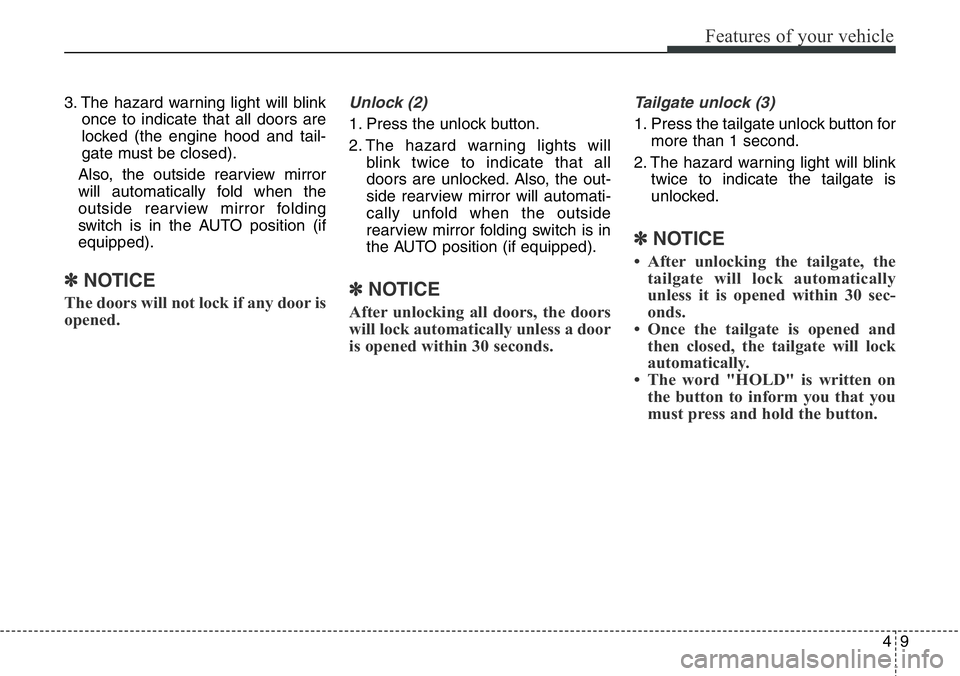
3. The hazard warning light will blink
once to indicate that all doors are
locked (the engine hood and tail-
gate must be closed).
Also, the outside rearview mirror
will automatically fold when the
outside rearview mirror folding
switch is in the AUTO position (if
equipped).
✽NOTICE
The doors will not lock if any door is
opened.
Unlock (2)
1. Press the unlock button.
2. The hazard warning lights will
blink twice to indicate that all
doors are unlocked. Also, the out-
side rearview mirror will automati-
cally unfold when the outside
rearview mirror folding switch is in
the AUTO position (if equipped).
✽NOTICE
After unlocking all doors, the doors
will lock automatically unless a door
is opened within 30 seconds.
Tailgate unlock (3)
1. Press the tailgate unlock button for
more than 1 second.
2. The hazard warning light will blink
twice to indicate the tailgate is
unlocked.
✽NOTICE
• After unlocking the tailgate, the
tailgate will lock automatically
unless it is opened within 30 sec-
onds.
• Once the tailgate is opened and
then closed, the tailgate will lock
automatically.
• The word "HOLD" is written on
the button to inform you that you
must press and hold the button.
Page 112 of 711
411
Features of your vehicle
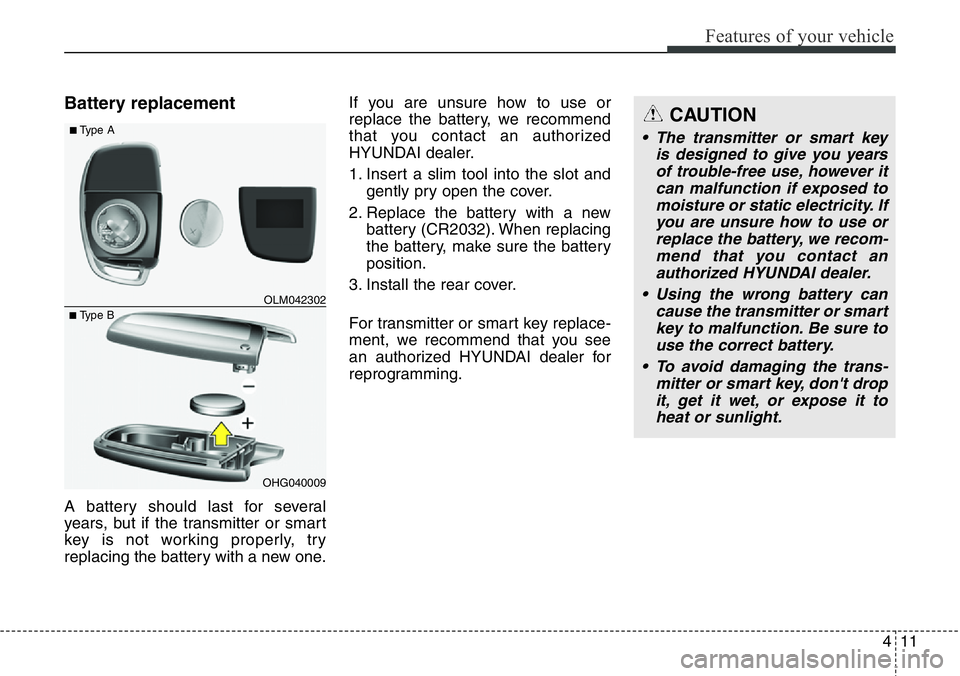
Battery replacement
A battery should last for several
years, but if the transmitter or smart
key is not working properly, try
replacing the battery with a new one.If you are unsure how to use or
replace the battery, we recommend
that you contact an authorized
HYUNDAI dealer.
1. Insert a slim tool into the slot and
gently pry open the cover.
2. Replace the battery with a new
battery (CR2032). When replacing
the battery, make sure the battery
position.
3. Install the rear cover.
For transmitter or smart key replace-
ment, we recommend that you see
an authorized HYUNDAI dealer for
reprogramming.
OHG040009
■Type BOLM042302
■Type ACAUTION
• The transmitter or smart key
is designed to give you years
of trouble-free use, however it
can malfunction if exposed to
moisture or static electricity. If
you are unsure how to use or
replace the battery, we recom-
mend that you contact an
authorized HYUNDAI dealer.
• Using the wrong battery can
cause the transmitter or smart
key to malfunction. Be sure to
use the correct battery.
• To avoid damaging the trans-
mitter or smart key, don't drop
it, get it wet, or expose it to
heat or sunlight.
Page 114 of 711
413
Features of your vehicle
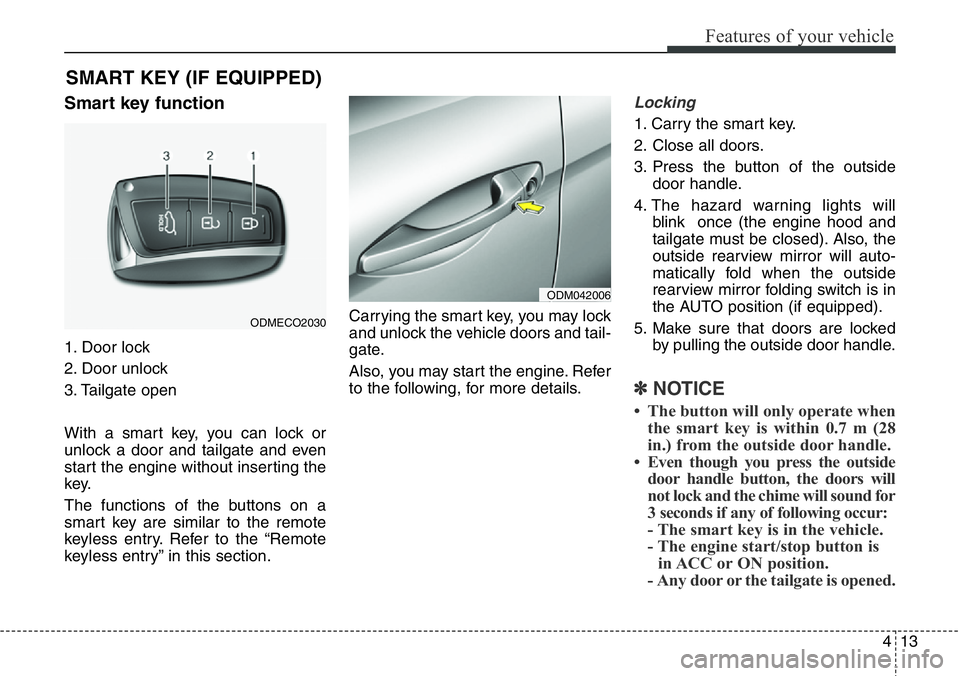
Smart key function
1. Door lock
2. Door unlock
3. Tailgate open
With a smart key, you can lock or
unlock a door and tailgate and even
start the engine without inserting the
key.
The functions of the buttons on a
smart key are similar to the remote
keyless entry. Refer to the “Remote
keyless entry” in this section.Carrying the smart key, you may lock
and unlock the vehicle doors and tail-
gate.
Also, you may start the engine. Refer
to the following, for more details.
Locking
1. Carry the smart key.
2. Close all doors.
3. Press the button of the outside
door handle.
4. The hazard warning lights will
blink once (the engine hood and
tailgate must be closed). Also, the
outside rearview mirror will auto-
matically fold when the outside
rearview mirror folding switch is in
the AUTO position (if equipped).
5. Make sure that doors are locked
by pulling the outside door handle.
✽NOTICE
• The button will only operate when
the smart key is within 0.7 m (28
in.) from the outside door handle.
• Even though you press the outside
door handle button, the doors will
not lock and the chime will sound for
3 seconds if any of following occur:
- The smart key is in the vehicle.
- The engine start/stop button is
in ACC or ON position.
- Any door or the tailgate is opened.
SMART KEY (IF EQUIPPED)
ODM042006
ODMECO2030
Page 115 of 711
Features of your vehicle
14 4
Unlocking
1. Carry the smart key.
2. Press the button of the front out-
side door handle.
3. All doors will unlock and the hazard
warning lights will blink twice. Also,
the outside rearview mirror will auto-
matically unfold when the outside
rearview mirror folding switch is in
the AUTO position (if equipped).
✽NOTICE
• The button will only operate when
the smart key is within 0.7 m (28
in.) from the outside door handle.
• When the smart key is recognized
in the area of 0.7 m (28 in.) from
the front outside door handle, other
people can also open the doors.
• After unlocking all doors, the
doors will lock automatically
unless a door is opened.
Tailgate unlocking
1.Carry the smart key.
2.Press the tailgate handle switch.
3.The tailgate will unlock.
✽NOTICE
• Once the tailgate is opened and
then closed, the tailgate will lock
automatically.
• The button will only operate when
the smart key is within 0.7 m (28
in.) from the tailgate handle.
Smart key precautions
✽NOTICE
• If, for some reason, you happen to
lose your smart key, you will not be
able to start the engine. Tow the
vehicle, if necessary, and we rec-
ommend that you contact an
authorized HYUNDAI dealer.
• A maximum of 2 smart keys can be
registered to a single vehicle. If you
lose a smart key, we recommend
that you take the vehicle and key to
your authorized HYUNDAI dealer
to protect it from potential theft.
• The smart key will not work if any
of the following occurs:
- The smart key is close to a radio
transmitter such as a radio sta-
tion or an airport which can
interfere with normal operation
of the smart key.
- The smart key is near a mobile
two-way radio system or a cellu-
lar phone.
- Another vehicle’s smart key is
being operated close to your
vehicle.
(Continued)