lock Hyundai Santa Fe 2014 Manual Online
[x] Cancel search | Manufacturer: HYUNDAI, Model Year: 2014, Model line: Santa Fe, Model: Hyundai Santa Fe 2014Pages: 711, PDF Size: 14.72 MB
Page 362 of 711
4261
Features of your vehicle
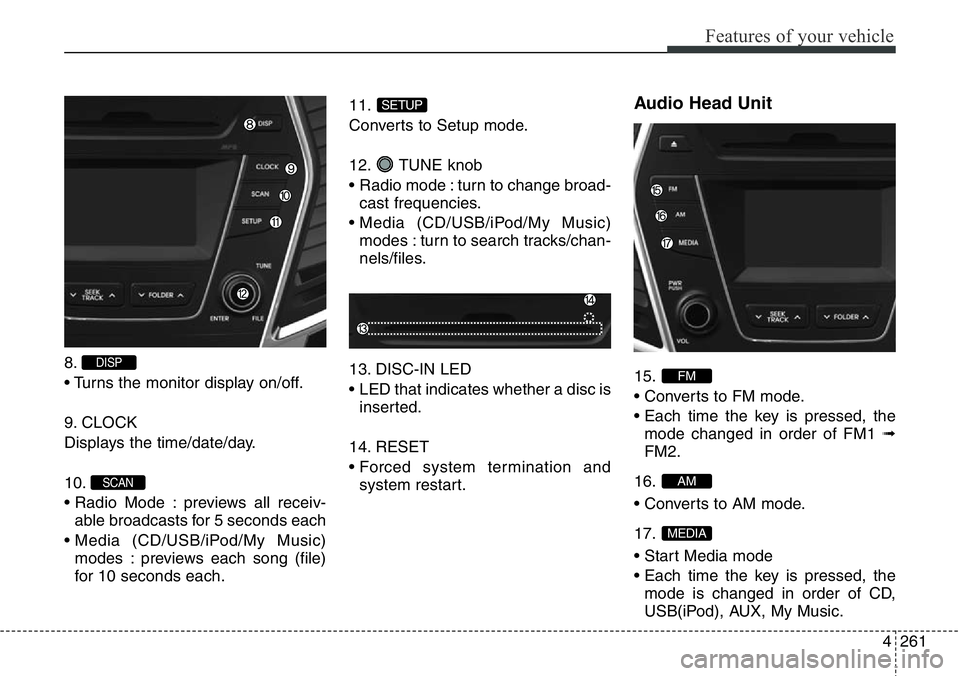
8.
• Turns the monitor display on/off.
9. CLOCK
Displays the time/date/day.
10.
• Radio Mode : previews all receiv-
able broadcasts for 5 seconds each
• Media (CD/USB/iPod/My Music)
modes : previews each song (file)
for 10 seconds each.11.
Converts to Setup mode.
12. TUNE knob
• Radio mode : turn to change broad-
cast frequencies.
• Media (CD/USB/iPod/My Music)
modes : turn to search tracks/chan-
nels/files.
13. DISC-IN LED
• LED that indicates whether a disc is
inserted.
14. RESET
• Forced system termination and
system restart.
Audio Head Unit
15.
• Converts to FM mode.
• Each time the key is pressed, the
mode changed in order of FM1 ➟
FM2.
16.
• Converts to AM mode.
17.
• Start Media mode
• Each time the key is pressed, the
mode is changed in order of CD,
USB(iPod), AUX, My Music.
MEDIA
AM
FM
SETUP
SCAN
DISP
Page 385 of 711
Features of your vehicle
284 4
(Continued)
• Charging through the USB may
not work for some mobile devices.
• The device may not support nor-
mal operation when using a USB
memory type besides (Metal
Cover Type) USB Memory.
• The device may not support nor-
mal operation when using formats
such as HDD Type, CF, or SD
Memory.
• The device will not support files
locked by DRM (Digital Rights
Management.)
• USB memory sticks used by con-
necting an Adaptor (SD Type or
CF Type) may not be properly rec-
ognized.
• The device may not operate prop-
erly when using USB HDDs or
USBs subject to connection fail-
ures caused by vehicle vibrations.
(e.g. i-stick type)
(Continued)(Continued)
• Avoid use of USB
memory products that
can also be used as key
chains or mobile phone
accessories. Use of such products
may cause damage to the USB
jack.
• Connecting an MP3 device or
phone through various channels,
such as AUX/BT or Audio/USB
mode may result in pop noises or
abnormal operation.
Page 431 of 711
Features of your vehicle
330 4
SETUP
(for RDS,
Bluetooth®Wireless
Technologyequipped model)
- AM904DMEE, AM914DMEE
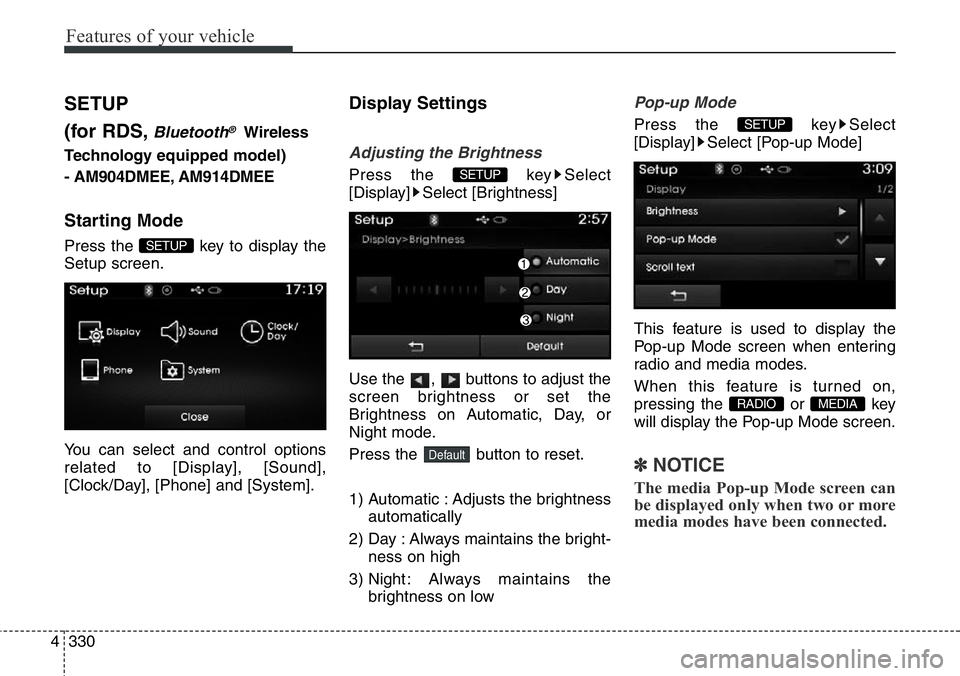
Starting Mode
Press the key to display the
Setup screen.
You can select and control options
related to [Display], [Sound],
[Clock/Day], [Phone] and [System].
Display Settings
Adjusting the Brightness
Press the key Select
[Display] Select [Brightness]
Use the , buttons to adjust the
screen brightness or set the
Brightness on Automatic, Day, or
Night mode.
Press the button to reset.
1) Automatic : Adjusts the brightness
automatically
2) Day : Always maintains the bright-
ness on high
3) Night : Always maintains the
brightness on low
Pop-up Mode
Press the key Select
[Display] Select [Pop-up Mode]
This feature is used to display the
Pop-up Mode screen when entering
radio and media modes.
When this feature is turned on,
pressing the or key
will display the Pop-up Mode screen.
✽NOTICE
The media Pop-up Mode screen can
be displayed only when two or more
media modes have been connected.
MEDIA RADIO
SETUP
Default
SETUP
SETUP
Page 434 of 711
![Hyundai Santa Fe 2014 Manual Online 4333
Features of your vehicle
SDVC (Speed Dependent Volume
Control)
Press the key Select
[Sound] Select [Speed Dependent
Vol.]
The volume level is controlled auto-
matically according to the vehicle](/img/35/16363/w960_16363-433.png "Hyundai Santa Fe 2014 Manual Online 4333
Features of your vehicle
SDVC (Speed Dependent Volume
Control)
Press the key Select
[Sound] Select [Speed Dependent
Vol.]
The volume level is controlled auto-
matically according to the vehicle")
4333
Features of your vehicle
SDVC (Speed Dependent Volume
Control)
Press the key Select
[Sound] Select [Speed Dependent
Vol.]
The volume level is controlled auto-
matically according to the vehicle
speed. SDVC can be set by selecting
from Off/Low/Mid/High.
Voice Recognition Setting
Press the key Select
[Sound] Select [Volume Dialogue]
Use the , buttons to adjust
the Volume Dialog.
Touch Screen Beep
Press the key Select
[Sound] Select [Touch Screen
Beep]
This feature is used to turn the touch
screen beep on/off.
Clock/Day Setting
Clock Setting
Press the key Select
[Clock/Day] Select [Clock Settings]
Use the , buttons to set the
Hour, Minutes and AM/PM setting.
✽NOTICE
Press and hold the key (over
0.8 seconds) to display the Clock/
Day screen.CLOCK
SETUP
SETUP
SETUP
SETUP
Page 435 of 711
![Hyundai Santa Fe 2014 Manual Online Features of your vehicle
334 4
Calendar Setting
Press the key Select
[Clock/Day] Select [Day Settings]
Use the , buttons to set the
Day, Month and Year setting.
Time Format
Press the key Select
[C](/img/35/16363/w960_16363-434.png "Hyundai Santa Fe 2014 Manual Online Features of your vehicle
334 4
Calendar Setting
Press the key Select
[Clock/Day] Select [Day Settings]
Use the , buttons to set the
Day, Month and Year setting.
Time Format
Press the key Select
[C")
Features of your vehicle
334 4
Calendar Setting
Press the key Select
[Clock/Day] Select [Day Settings]
Use the , buttons to set the
Day, Month and Year setting.
Time Format
Press the key Select
[Clock/Day] Select [Time Format]
This feature is used to change the
clock format between 12hr or 24hr.
Clock Display
Press the key Select
[Clock/Day] Select [Clock Display
(Power off)]
This feature is used to display a clock
on the screen when the audio sys-
tem is turned off.
Automatic RDS Time
Press the key Select
[Clock/Day] Select [Automatic RDS
Time]
This feature is used to set time auto-
matically by synchronizing with RDS.SETUP SETUP
SETUP
SETUP
Page 440 of 711
4339
Features of your vehicle
SETUP
(for
Bluetooth®Wireless
Technologyequipped model)
-AM900DMMG, AM910DMMG,
AM911DMMG, AM901DMGG,
AM910DMEE, AM911DMEE,
AM912DMEE, AM913DMEE,
AM910DMGL, AM911DMGL,
AM900DMMN, AM910DMMN
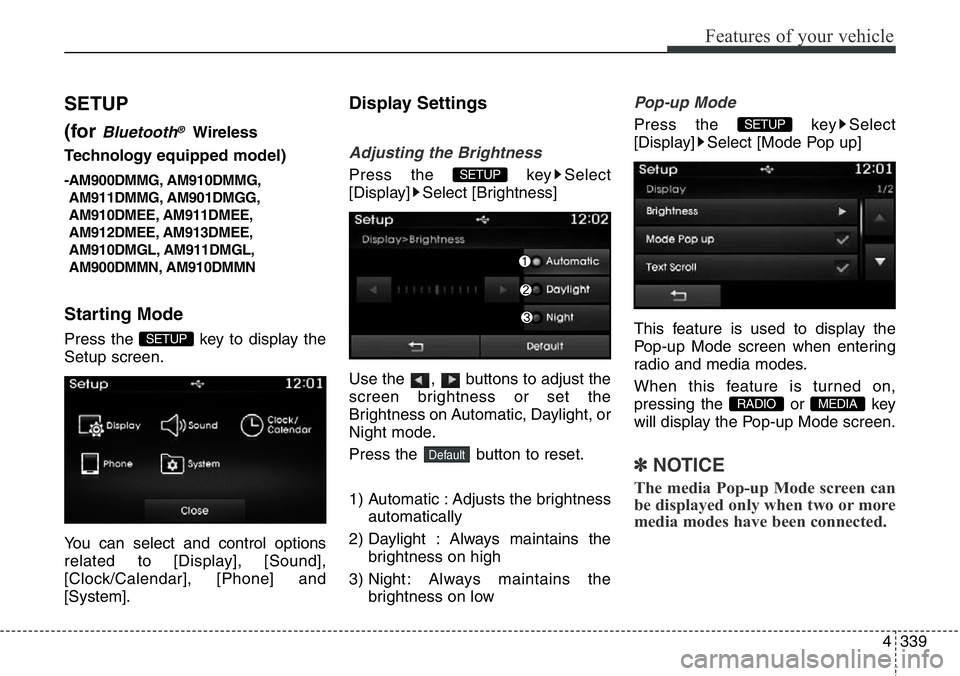
Starting Mode
Press the key to display the
Setup screen.
You can select and control options
related to [Display], [Sound],
[Clock/Calendar], [Phone] and
[System].
Display Settings
Adjusting the Brightness
Press the key Select
[Display] Select [Brightness]
Use the , buttons to adjust the
screen brightness or set the
Brightness on Automatic, Daylight, or
Night mode.
Press the button to reset.
1) Automatic : Adjusts the brightness
automatically
2) Daylight : Always maintains the
brightness on high
3) Night : Always maintains the
brightness on low
Pop-up Mode
Press the key Select
[Display] Select [Mode Pop up]
This feature is used to display the
Pop-up Mode screen when entering
radio and media modes.
When this feature is turned on,
pressing the or key
will display the Pop-up Mode screen.
✽NOTICE
The media Pop-up Mode screen can
be displayed only when two or more
media modes have been connected.
MEDIA RADIO
SETUP
Default
SETUP
SETUP
Page 443 of 711
![Hyundai Santa Fe 2014 Manual Online Features of your vehicle
342 4
Clock/Calendar Setting
Clock Setting
Press the key Select
[Clock/Calendar] Select [Clock
Settings]
Use the , buttons to set the
Hour, Minutes and AM/PM setting.
✽NO](/img/35/16363/w960_16363-442.png "Hyundai Santa Fe 2014 Manual Online Features of your vehicle
342 4
Clock/Calendar Setting
Clock Setting
Press the key Select
[Clock/Calendar] Select [Clock
Settings]
Use the , buttons to set the
Hour, Minutes and AM/PM setting.
✽NO")
Features of your vehicle
342 4
Clock/Calendar Setting
Clock Setting
Press the key Select
[Clock/Calendar] Select [Clock
Settings]
Use the , buttons to set the
Hour, Minutes and AM/PM setting.
✽NOTICE
Press and hold the key (over
0.8 seconds) to set the Clock/
Calendar screen.
Calendar Setting
Press the key Select
[Clock/Calendar] Select [Calendar
Settings]
Use the , buttons to set the
Day, Month and Year setting.
Clock Display
Press the key Select
[Clock/Calendar] Select [Clock
Display (Power off)]
This feature is used to display a clock
on the screen when the audio sys-
tem is turned off.SETUP SETUP
CLOCK
SETUP
Page 450 of 711
Driving your vehicle
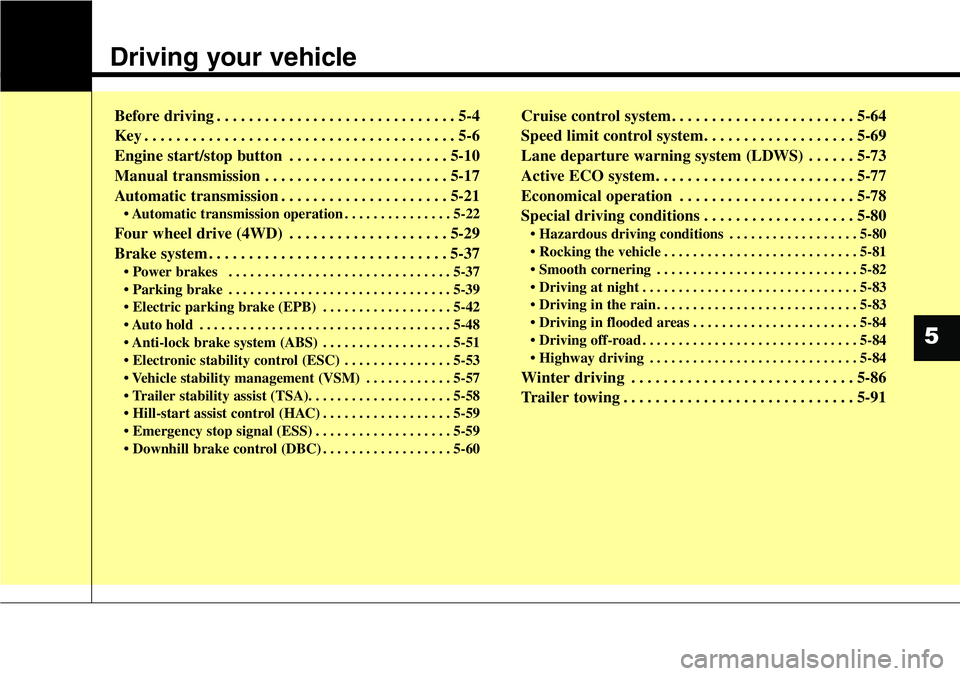
Before driving . . . . . . . . . . . . . . . . . . . . . . . . . . . . . . 5-4
Key . . . . . . . . . . . . . . . . . . . . . . . . . . . . . . . . . . . . . . . 5-6
Engine start/stop button . . . . . . . . . . . . . . . . . . . . 5-10
Manual transmission . . . . . . . . . . . . . . . . . . . . . . . 5-17
Automatic transmission . . . . . . . . . . . . . . . . . . . . . 5-21
• Automatic transmission operation . . . . . . . . . . . . . . . 5-22
Four wheel drive (4WD) . . . . . . . . . . . . . . . . . . . . 5-29
Brake system . . . . . . . . . . . . . . . . . . . . . . . . . . . . . . 5-37
• Power brakes . . . . . . . . . . . . . . . . . . . . . . . . . . . . . . . 5-37
• Parking brake . . . . . . . . . . . . . . . . . . . . . . . . . . . . . . . 5-39
• Electric parking brake (EPB) . . . . . . . . . . . . . . . . . . 5-42
• Auto hold . . . . . . . . . . . . . . . . . . . . . . . . . . . . . . . . . . . 5-48
• Anti-lock brake system (ABS) . . . . . . . . . . . . . . . . . . 5-51
• Electronic stability control (ESC) . . . . . . . . . . . . . . . 5-53
• Vehicle stability management (VSM) . . . . . . . . . . . . 5-57
• Trailer stability assist (TSA). . . . . . . . . . . . . . . . . . . . 5-58
• Hill-start assist control (HAC) . . . . . . . . . . . . . . . . . . 5-59
• Emergency stop signal (ESS) . . . . . . . . . . . . . . . . . . . 5-59
• Downhill brake control (DBC) . . . . . . . . . . . . . . . . . . 5-60
Cruise control system. . . . . . . . . . . . . . . . . . . . . . . 5-64
Speed limit control system. . . . . . . . . . . . . . . . . . . 5-69
Lane departure warning system (LDWS) . . . . . . 5-73
Active ECO system. . . . . . . . . . . . . . . . . . . . . . . . . 5-77
Economical operation . . . . . . . . . . . . . . . . . . . . . . 5-78
Special driving conditions . . . . . . . . . . . . . . . . . . . 5-80
• Hazardous driving conditions . . . . . . . . . . . . . . . . . . 5-80
• Rocking the vehicle . . . . . . . . . . . . . . . . . . . . . . . . . . . 5-81
• Smooth cornering . . . . . . . . . . . . . . . . . . . . . . . . . . . . 5-82
• Driving at night . . . . . . . . . . . . . . . . . . . . . . . . . . . . . . 5-83
• Driving in the rain . . . . . . . . . . . . . . . . . . . . . . . . . . . . 5-83
• Driving in flooded areas . . . . . . . . . . . . . . . . . . . . . . . 5-84
• Driving off-road . . . . . . . . . . . . . . . . . . . . . . . . . . . . . . 5-84
• Highway driving . . . . . . . . . . . . . . . . . . . . . . . . . . . . . 5-84
Winter driving . . . . . . . . . . . . . . . . . . . . . . . . . . . . 5-86
Trailer towing . . . . . . . . . . . . . . . . . . . . . . . . . . . . . 5-91
5
Page 453 of 711
Driving your vehicle
4 5
Before entering vehicle
• Be sure that all windows, outside
mirror(s), and outside lights are
clean.
• Check the condition of the tires.
• Check under the vehicle for any
sign of leaks.
• Be sure there are no obstacles
behind you if you intend to back up.
Necessary inspections
Fluid levels, such as engine oil,
engine coolant, brake fluid, and
washer fluid should be checked on a
regular basis, with the exact interval
depending on the fluid. Further
details are provided in section 7,
“Maintenance”.
Before starting
• Close and lock all doors.
• Position the seat so that all con-
trols are easily reached.
• Adjust the inside and outside
rearview mirrors.
• Be sure that all lights work.
• Check all gauges.
• Check the operation of warning
lights when the ignition switch is
turned to the ON position.
• Release the parking brake and
make sure the brake warning light
goes out.
For safe operation, be sure you are
familiar with your vehicle and its
equipment.
BEFORE DRIVING
WARNING
All passengers must be proper-
ly belted whenever the vehicle
is moving. Refer to “Seat belts”
in section 3 for more informa-
tion on their proper use.
WARNING
Driving while distracted can
result in a loss of vehicle con-
trol, that may lead to an acci-
dent, severe personal injury,
and death. The driver’s primary
responsibility is in the safe and
legal operation of a vehicle, and
use of any handheld devices,
other equipment, or vehicle sys-
tems which take the driver’s
eyes, attention and focus away
from the safe operation of a
vehicle or which are not permis-
sible by law should never be
used during operation of the
vehicle.
Page 455 of 711
Driving your vehicle
6 5
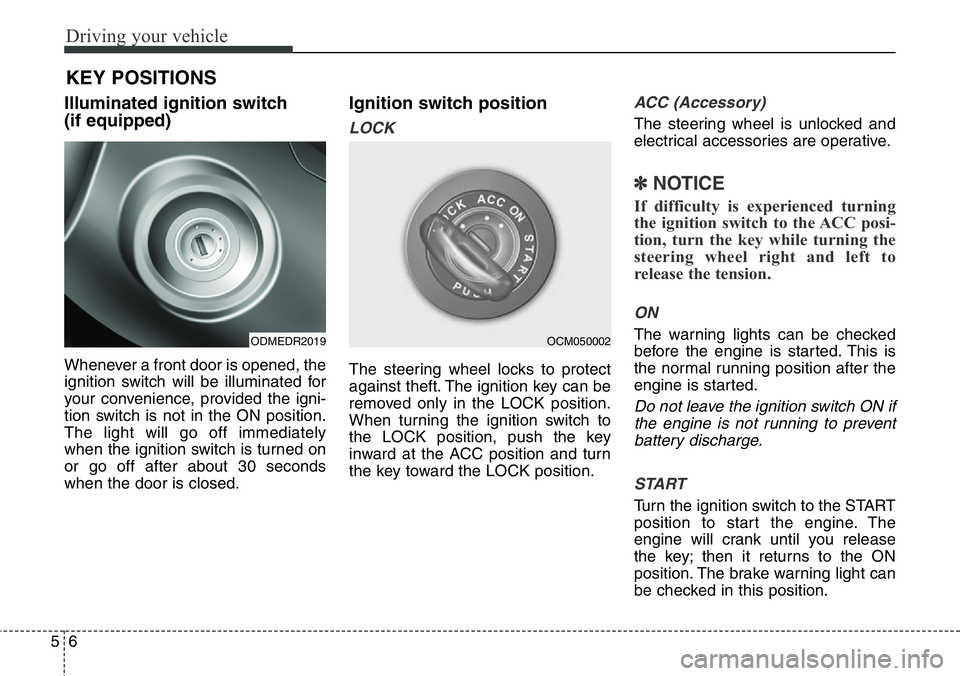
Illuminated ignition switch
(if equipped)
Whenever a front door is opened, the
ignition switch will be illuminated for
your convenience, provided the igni-
tion switch is not in the ON position.
The light will go off immediately
when the ignition switch is turned on
or go off after about 30 seconds
when the door is closed.
Ignition switch position
LOCK
The steering wheel locks to protect
against theft. The ignition key can be
removed only in the LOCK position.
When turning the ignition switch to
the LOCK position, push the key
inward at the ACC position and turn
the key toward the LOCK position.
ACC (Accessory)
The steering wheel is unlocked and
electrical accessories are operative.
✽NOTICE
If difficulty is experienced turning
the ignition switch to the ACC posi-
tion, turn the key while turning the
steering wheel right and left to
release the tension.
ON
The warning lights can be checked
before the engine is started. This is
the normal running position after the
engine is started.
Do not leave the ignition switch ON if
the engine is not running to prevent
battery discharge.
START
Turn the ignition switch to the START
position to start the engine. The
engine will crank until you release
the key; then it returns to the ON
position. The brake warning light can
be checked in this position.
KEY POSITIONS
ODMEDR2019OCM050002