lock Hyundai Santa Fe 2014 Manual PDF
[x] Cancel search | Manufacturer: HYUNDAI, Model Year: 2014, Model line: Santa Fe, Model: Hyundai Santa Fe 2014Pages: 711, PDF Size: 14.72 MB
Page 281 of 711
Features of your vehicle
180 4
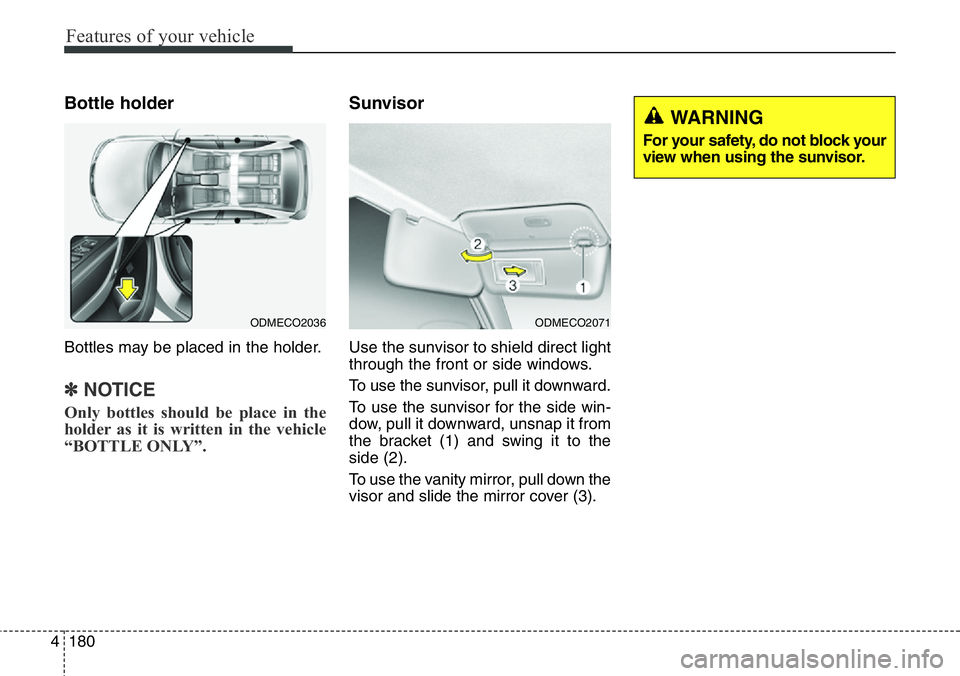
Bottle holder
Bottles may be placed in the holder.
✽NOTICE
Only bottles should be place in the
holder as it is written in the vehicle
“BOTTLE ONLY”.
Sunvisor
Use the sunvisor to shield direct light
through the front or side windows.
To use the sunvisor, pull it downward.
To use the sunvisor for the side win-
dow, pull it downward, unsnap it from
the bracket (1) and swing it to the
side (2).
To use the vanity mirror, pull down the
visor and slide the mirror cover (3).
ODMECO2036ODMECO2071
WARNING
For your safety, do not block your
view when using the sunvisor.
Page 291 of 711
Features of your vehicle
190 4
✽NOTICE
• If you install an aftermarket HID
head lamp, your vehicle’s audio
and electronic device may mal-
function.
• Prevent chemicals such as per-
fume, cosmetic oil, sun cream,
hand cleaner and air freshener
from contacting the interior parts
because they may cause damage
or discoloration.
Antenna
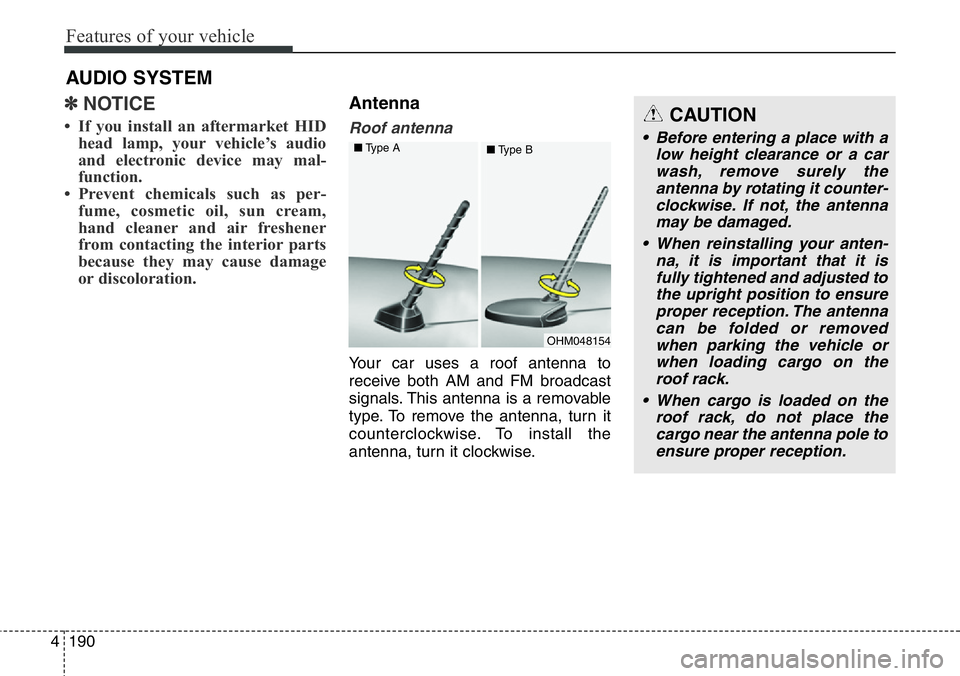
Roof antenna
Your car uses a roof antenna to
receive both AM and FM broadcast
signals. This antenna is a removable
type. To remove the antenna, turn it
counterclockwise. To install the
antenna, turn it clockwise.
AUDIO SYSTEM
CAUTION
• Before entering a place with a
low height clearance or a car
wash, remove surely the
antenna by rotating it counter-
clockwise. If not, the antenna
may be damaged.
• When reinstalling your anten-
na, it is important that it is
fully tightened and adjusted to
the upright position to ensure
proper reception. The antenna
can be folded or removed
when parking the vehicle or
when loading cargo on the
roof rack.
• When cargo is loaded on the
roof rack, do not place the
cargo near the antenna pole to
ensure proper reception.
OHM048154 ■Type A
■Type B
Page 294 of 711
4193
Features of your vehicle
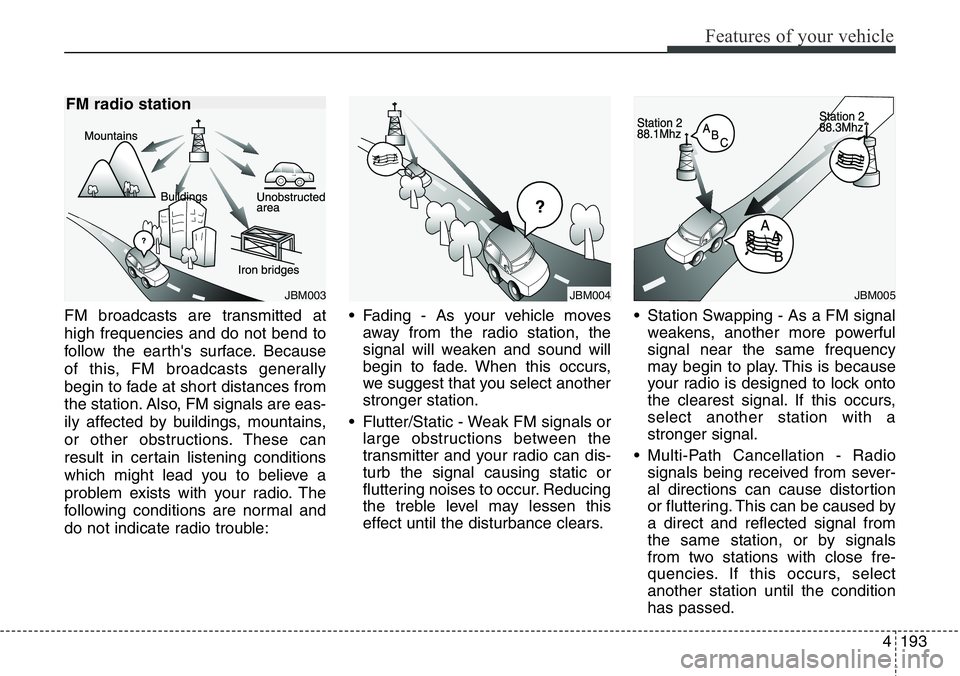
FM broadcasts are transmitted at
high frequencies and do not bend to
follow the earth's surface. Because
of this, FM broadcasts generally
begin to fade at short distances from
the station. Also, FM signals are eas-
ily affected by buildings, mountains,
or other obstructions. These can
result in certain listening conditions
which might lead you to believe a
problem exists with your radio. The
following conditions are normal and
do not indicate radio trouble:• Fading - As your vehicle moves
away from the radio station, the
signal will weaken and sound will
begin to fade. When this occurs,
we suggest that you select another
stronger station.
• Flutter/Static - Weak FM signals or
large obstructions between the
transmitter and your radio can dis-
turb the signal causing static or
fluttering noises to occur. Reducing
the treble level may lessen this
effect until the disturbance clears.• Station Swapping - As a FM signal
weakens, another more powerful
signal near the same frequency
may begin to play. This is because
your radio is designed to lock onto
the clearest signal. If this occurs,
select another station with a
stronger signal.
• Multi-Path Cancellation - Radio
signals being received from sever-
al directions can cause distortion
or fluttering. This can be caused by
a direct and reflected signal from
the same station, or by signals
from two stations with close fre-
quencies. If this occurs, select
another station until the condition
has passed.
JBM004JBM005JBM003
FM radio station
Page 305 of 711
Features of your vehicle
204 4
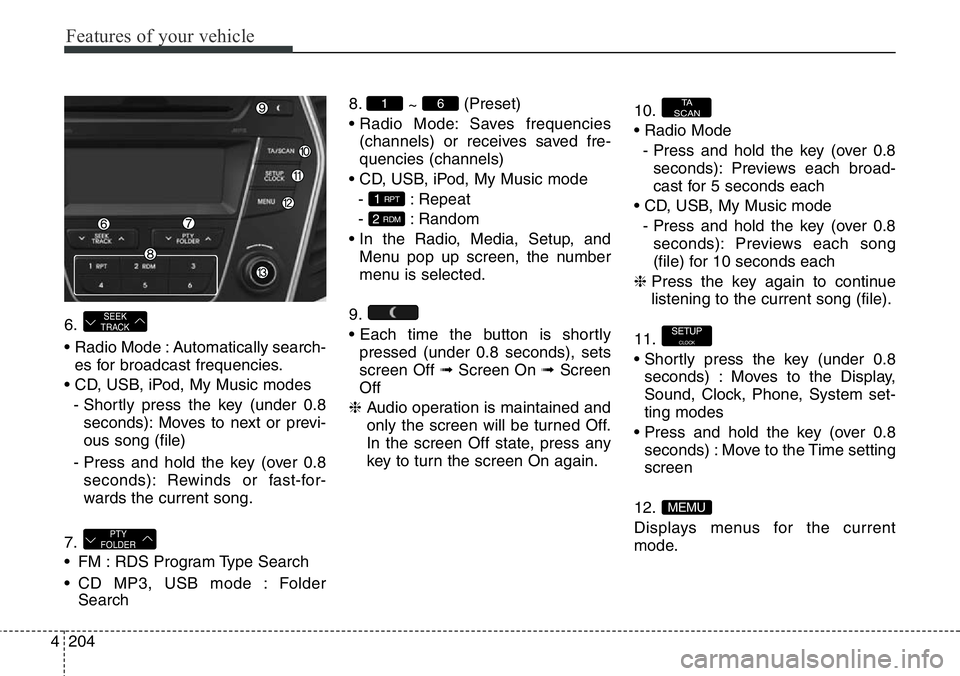
6.
• Radio Mode : Automatically search-
es for broadcast frequencies.
• CD, USB, iPod, My Music modes
- Shortly press the key (under 0.8
seconds): Moves to next or previ-
ous song (file)
- Press and hold the key (over 0.8
seconds): Rewinds or fast-for-
wards the current song.
7.
• FM : RDS Program Type Search
• CD MP3, USB mode : Folder
Search8.
~ (Preset)
• Radio Mode: Saves frequencies
(channels) or receives saved fre-
quencies (channels)
• CD, USB, iPod, My Music mode
- : Repeat
- : Random
• In the Radio, Media, Setup, and
Menu pop up screen, the number
menu is selected.
9.
• Each time the button is shortly
pressed (under 0.8 seconds), sets
screen Off ➟Screen On ➟Screen
Off
❈ Audio operation is maintained and
only the screen will be turned Off.
In the screen Off state, press any
key to turn the screen On again.10.
• Radio Mode
- Press and hold the key (over 0.8
seconds): Previews each broad-
cast for 5 seconds each
• CD, USB, My Music mode
- Press and hold the key (over 0.8
seconds): Previews each song
(file) for 10 seconds each
❈ Press the key again to continue
listening to the current song (file).
11.
• Shortly press the key (under 0.8
seconds) : Moves to the Display,
Sound, Clock, Phone, System set-
ting modes
• Press and hold the key (over 0.8
seconds) : Move to the Time setting
screen
12.
Displays menus for the current
mode.
MEMU
SETUPCLOCK
TA
SCAN
2 RDM
1 RPT
61
PTY
FOLDER
SEEK
TRACK
Page 308 of 711
4207
Features of your vehicle
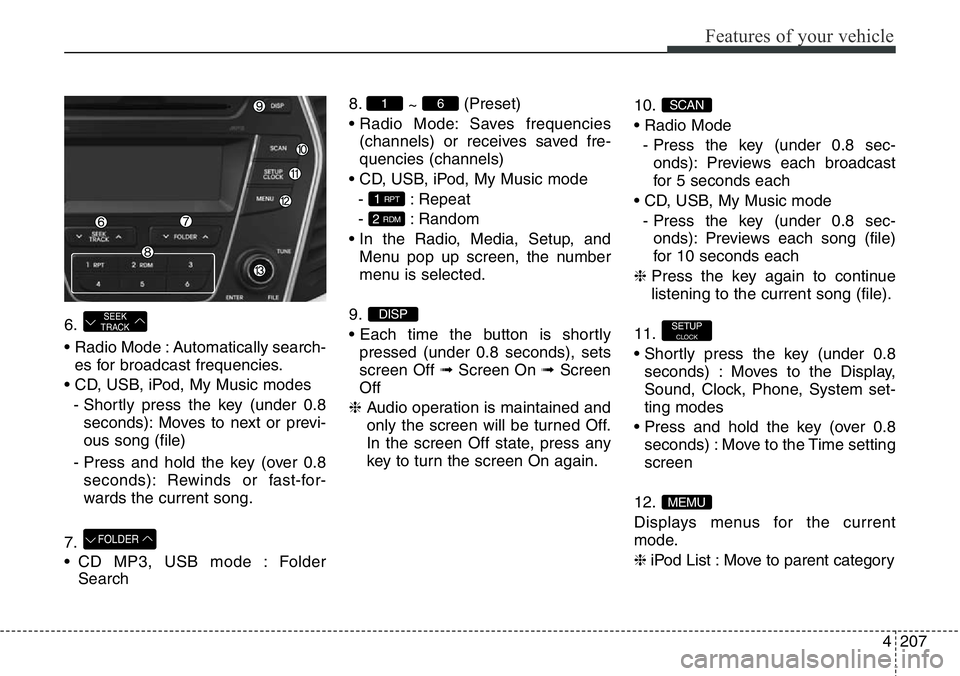
6.
• Radio Mode : Automatically search-
es for broadcast frequencies.
• CD, USB, iPod, My Music modes
- Shortly press the key (under 0.8
seconds): Moves to next or previ-
ous song (file)
- Press and hold the key (over 0.8
seconds): Rewinds or fast-for-
wards the current song.
7.
• CD MP3, USB mode : Folder
Search8.
~ (Preset)
• Radio Mode: Saves frequencies
(channels) or receives saved fre-
quencies (channels)
• CD, USB, iPod, My Music mode
- : Repeat
- : Random
• In the Radio, Media, Setup, and
Menu pop up screen, the number
menu is selected.
9.
• Each time the button is shortly
pressed (under 0.8 seconds), sets
screen Off ➟Screen On ➟Screen
Off
❈ Audio operation is maintained and
only the screen will be turned Off.
In the screen Off state, press any
key to turn the screen On again.10.
• Radio Mode
- Press the key (under 0.8 sec-
onds): Previews each broadcast
for 5 seconds each
• CD, USB, My Music mode
- Press the key (under 0.8 sec-
onds): Previews each song (file)
for 10 seconds each
❈ Press the key again to continue
listening to the current song (file).
11.
• Shortly press the key (under 0.8
seconds) : Moves to the Display,
Sound, Clock, Phone, System set-
ting modes
• Press and hold the key (over 0.8
seconds) : Move to the Time setting
screen
12.
Displays menus for the current
mode.
❈ iPod List : Move to parent category
MEMU
SETUPCLOCK
SCAN
DISP
2 RDM
1 RPT
61
FOLDER
SEEK
TRACK
Page 312 of 711
![Hyundai Santa Fe 2014 Manual PDF 4211
Features of your vehicle
Clock Settings
Press the key Select
[Clock] through TUNE knob or
key Select menu through
TUNE knob
Clock Settings
This menu is used to set the time.
Select [Clock Sett](/img/35/16363/w960_16363-311.png "Hyundai Santa Fe 2014 Manual PDF 4211
Features of your vehicle
Clock Settings
Press the key Select
[Clock] through TUNE knob or
key Select menu through
TUNE knob
Clock Settings
This menu is used to set the time.
Select [Clock Sett")
4211
Features of your vehicle
Clock Settings
Press the key Select
[Clock] through TUNE knob or
key Select menu through
TUNE knob
Clock Settings
This menu is used to set the time.
Select [Clock Settings] Set through
TUNE knob Press TUNE knob
❈ Adjust the number currently in
focus to set the [hour] and press
the tune knob to set the [minute].
Day Settings
This menu is used to set the date
(DD/MM/YYYY).
Select [Day Settings] Set through
TUNE knob Press TUNE knob
❈ Adjust the number currently in
focus to make the settings and
press the tune knob to move to the
next setting. (Set in order of
Year/Month/Day)
3
SETUPCLOCK
Page 313 of 711
![Hyundai Santa Fe 2014 Manual PDF Features of your vehicle
212 4
Time Format
This function is used to set the 12/24
hour time format of the audio system.
Select [Time Format] Set 12Hr /
24Hr through TUNE knob
Clock Display when Power](/img/35/16363/w960_16363-312.png "Hyundai Santa Fe 2014 Manual PDF Features of your vehicle
212 4
Time Format
This function is used to set the 12/24
hour time format of the audio system.
Select [Time Format] Set 12Hr /
24Hr through TUNE knob
Clock Display when Power")
Features of your vehicle
212 4
Time Format
This function is used to set the 12/24
hour time format of the audio system.
Select [Time Format] Set 12Hr /
24Hr through TUNE knob
Clock Display when Power is
OFF
Select [Clock Disp.(Pwr Off) Set
/ through TUNE knob
• : Displays time/date on screen
• : Turn off.
Automatic RDS Time
This option is used to automatically
set the time by synchronizing with
RDS.
Select [Automatic RDS Time] Set
/ through TUNE knob
• : Turn on Automatic Time
• : Turn off.
Off
On
OffOn
Off
On
OffOn
Page 322 of 711
![Hyundai Santa Fe 2014 Manual PDF 4221
Features of your vehicle
Speed Dependent Volume
Control
This feature is used to automatically
control the volume level according to
the speed of the vehicle.
Select [Speed Dependent Vol.] Set
in](/img/35/16363/w960_16363-321.png "Hyundai Santa Fe 2014 Manual PDF 4221
Features of your vehicle
Speed Dependent Volume
Control
This feature is used to automatically
control the volume level according to
the speed of the vehicle.
Select [Speed Dependent Vol.] Set
in")
4221
Features of your vehicle
Speed Dependent Volume
Control
This feature is used to automatically
control the volume level according to
the speed of the vehicle.
Select [Speed Dependent Vol.] Set
in 4 levels [Off/Low/Mid/High] of
TUNE knob
Clock Settings
Press the key Select
[Clock] through TUNE knob or
key Select menu through
TUNE knob
Clock Settings
This menu is used to set the time.
Select [Clock Settings] Set through
TUNE knob Press TUNE knob
❈ Adjust the number currently in
focus to set the [hour] and press
the tune knob to set the [minute].
3
SETUPCLOCK
Page 323 of 711
![Hyundai Santa Fe 2014 Manual PDF Features of your vehicle
222 4
Calendar Settings
This menu is used to set the date
(DD/MM/YYYY).
Select [Calendar Settings] Set
through TUNE knob Press
TUNE knob
❈ Adjust the number currently in
fo](/img/35/16363/w960_16363-322.png "Hyundai Santa Fe 2014 Manual PDF Features of your vehicle
222 4
Calendar Settings
This menu is used to set the date
(DD/MM/YYYY).
Select [Calendar Settings] Set
through TUNE knob Press
TUNE knob
❈ Adjust the number currently in
fo")
Features of your vehicle
222 4
Calendar Settings
This menu is used to set the date
(DD/MM/YYYY).
Select [Calendar Settings] Set
through TUNE knob Press
TUNE knob
❈ Adjust the number currently in
focus to make the settings and
press the tune knob to move to the
next setting. (Set in order of
Year/Month/Day)
Clock Display when Power is
OFF
Select [Clock Disp.(Pwr Off) Set
/ through TUNE knob
• : Displays time/date on screen
• : Turn off.
Off
On
OffOn
Page 358 of 711
4257
Features of your vehicle
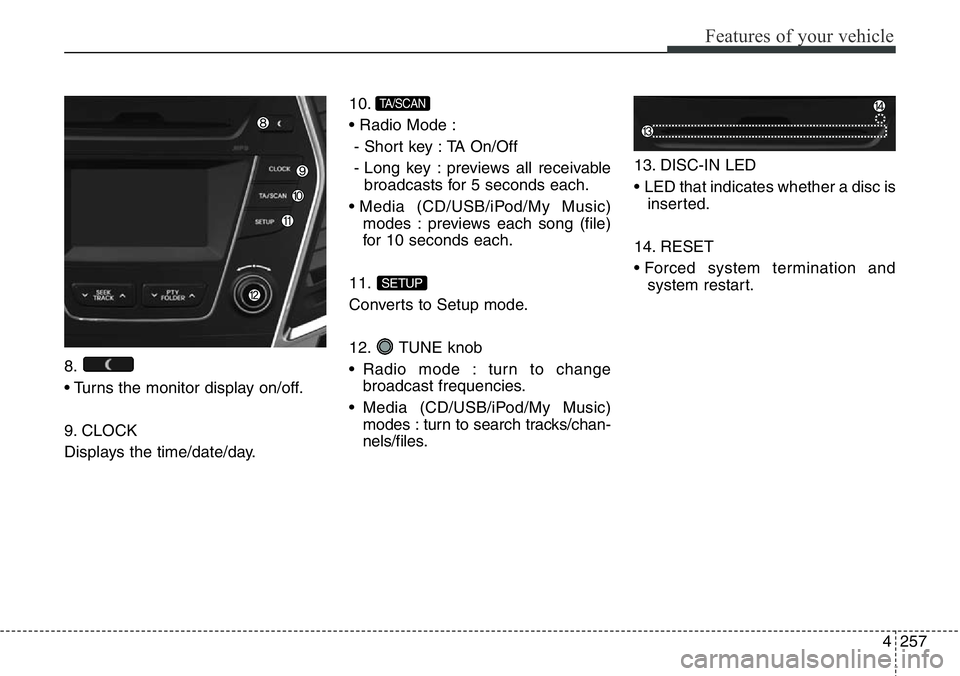
8.
• Turns the monitor display on/off.
9. CLOCK
Displays the time/date/day.10.
• Radio Mode :
- Short key : TA On/Off
- Long key : previews all receivable
broadcasts for 5 seconds each.
• Media (CD/USB/iPod/My Music)
modes : previews each song (file)
for 10 seconds each.
11.
Converts to Setup mode.
12. TUNE knob
• Radio mode : turn to change
broadcast frequencies.
• Media (CD/USB/iPod/My Music)
modes : turn to search tracks/chan-
nels/files.13. DISC-IN LED
• LED that indicates whether a disc is
inserted.
14. RESET
• Forced system termination and
system restart.
SETUP
TA/SCAN