tow Hyundai Santa Fe 2016 Owner's Guide
[x] Cancel search | Manufacturer: HYUNDAI, Model Year: 2016, Model line: Santa Fe, Model: Hyundai Santa Fe 2016Pages: 759, PDF Size: 29.36 MB
Page 203 of 759
Features of your vehicle
106
4
This system will activate when
backing up with the ignition switch
ON.
If the vehicle is moving at a speed
over 10 km/h (6 mph), the system
will be deactivated.
The sensing distance while the rear parking assist system is in
operation is approximately 47 in.
(120 cm).
When more than two objects are sensed at the same time, the clos-
est object will be recognized first.Types of warning sound
When an object is 47 in. to 24 in.(120 cm to 61 cm) from the rear
bumper: Buzzer beeps intermit-
tently.
When an object is 23 in. to 12 in. (60 cm to 31 cm) from the rear
bumper: Buzzer beeps more fre-
quently.
When an object is within 11.8 in. (30 cm) of the rear bumper:
Buzzer sounds continuously.
Non-operational conditions of
rear parking assist system
The rear parking assist system
may not operate properly when:
1. Moisture is frozen to the sensor. (It will operate normally when the
moisture has been cleared.)
2. The sensor is covered with foreign matter, such as snow or water, or
the sensor cover is blocked. (It will
operate normally when the materi-
al is removed or the sensor is no
longer blocked.)
3. Driving on uneven road surfaces (unpaved roads, gravel, bumps,
gradient).
4. Objects generating excessive noise (vehicle horns, loud motor-
cycle engines, or truck air brakes)
are within range of the sensor.
5. Heavy rain or water spray exists.
6. Wireless transmitters or mobile phones are within range of the
sensor.
7. Trailer towing.
Page 212 of 759
4115
Features of your vehicle
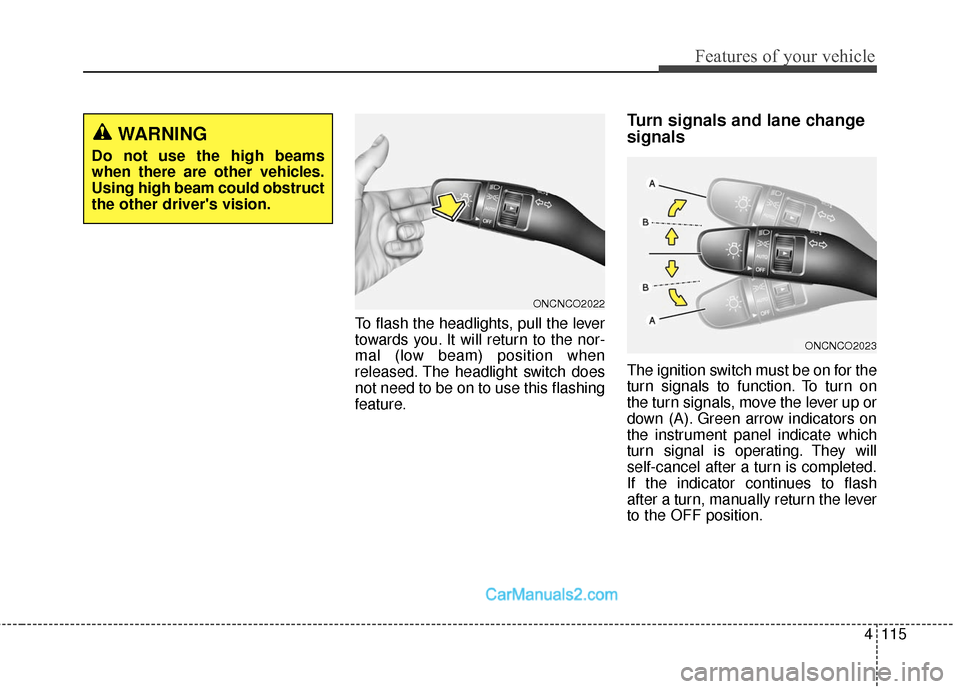
To flash the headlights, pull the lever
towards you. It will return to the nor-
mal (low beam) position when
released. The headlight switch does
not need to be on to use this flashing
feature.
Turn signals and lane change
signals
The ignition switch must be on for the
turn signals to function. To turn on
the turn signals, move the lever up or
down (A). Green arrow indicators on
the instrument panel indicate which
turn signal is operating. They will
self-cancel after a turn is completed.
If the indicator continues to flash
after a turn, manually return the lever
to the OFF position.
WARNING
Do not use the high beams
when there are other vehicles.
Using high beam could obstruct
the other driver's vision.
ONCNCO2022
ONCNCO2023
Page 215 of 759
Features of your vehicle
118
4
✽
✽
NOTICE
If there is heavy accumulation of
snow or ice on the windshield,
defrost the windshield for about 10
minutes, or until the snow and/or ice
is removed before using the wind-
shield wipers to ensure proper oper-
ation.
✽ ✽NOTICE
• When you operate the wipers, if
your vehicle has a problem in any
part of the wiper operation sys-
tem, the wiper may operate in the
LO mode regardless of the wiper
switch position. In this case, have
your vehicle checked by an
authorized HYUNDAI dealer as
soon as possible.
• When the ignition key is removed, the wiper blade sometimes may
move slightly for reducing the
deterioration of the windshield
wipers.
Windshield washers
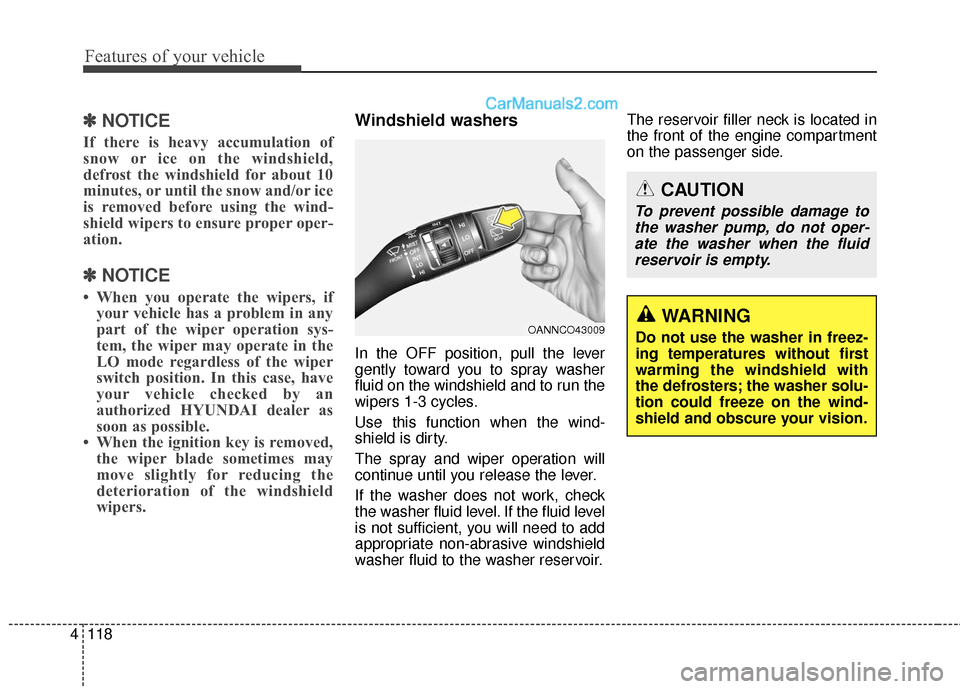
In the OFF position, pull the lever
gently toward you to spray washer
fluid on the windshield and to run the
wipers 1-3 cycles.
Use this function when the wind-
shield is dirty.
The spray and wiper operation will
continue until you release the lever.
If the washer does not work, check
the washer fluid level. If the fluid level
is not sufficient, you will need to add
appropriate non-abrasive windshield
washer fluid to the washer reservoir. The reservoir filler neck is located in
the front of the engine compartment
on the passenger side.
OANNCO43009
CAUTION
To prevent possible damage to
the washer pump, do not oper-ate the washer when the fluidreservoir is empty.
WARNING
Do not use the washer in freez-
ing temperatures without first
warming the windshield with
the defrosters; the washer solu-
tion could freeze on the wind-
shield and obscure your vision.
Page 224 of 759
4127
Features of your vehicle
Mode selection
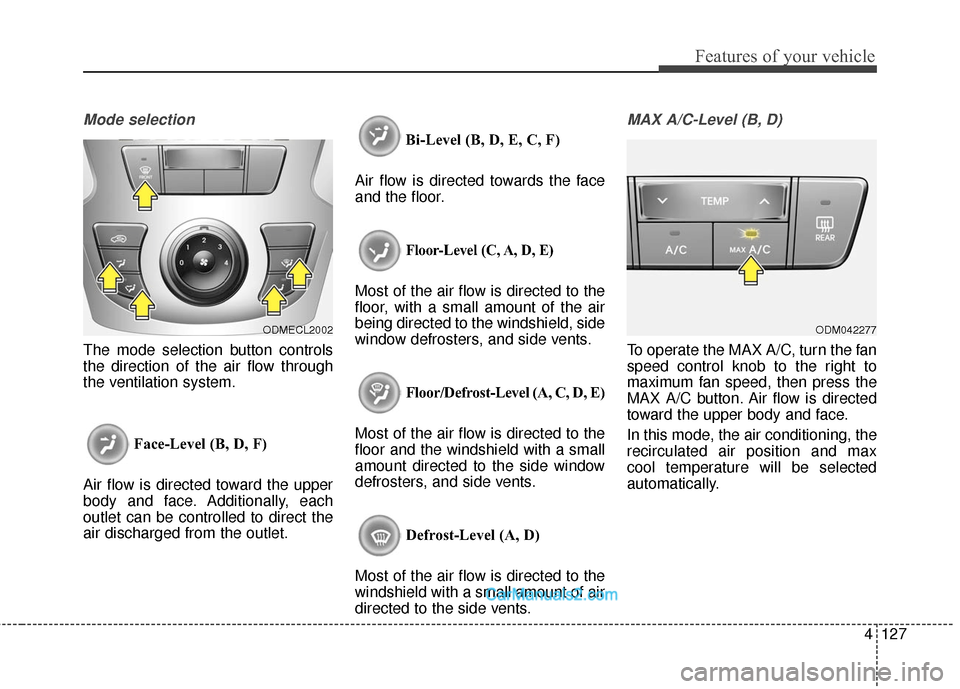
The mode selection button controls
the direction of the air flow through
the ventilation system.Face-Level (B, D, F)
Air flow is directed toward the upper
body and face. Additionally, each
outlet can be controlled to direct the
air discharged from the outlet. Bi-Level (B, D, E, C, F)
Air flow is directed towards the face
and the floor.
Floor-Level (C, A, D, E)
Most of the air flow is directed to the
floor, with a small amount of the air
being directed to the windshield, side
window defrosters, and side vents.
Floor/Defrost-Level (A, C, D, E)
Most of the air flow is directed to the
floor and the windshield with a small
amount directed to the side window
defrosters, and side vents.
Defrost-Level (A, D)
Most of the air flow is directed to the
windshield with a small amount of air
directed to the side vents.
MAX A/C-Level (B, D)
To operate the MAX A/C, turn the fan
speed control knob to the right to
maximum fan speed, then press the
MAX A/C button. Air flow is directed
toward the upper body and face.
In this mode, the air conditioning, the
recirculated air position and max
cool temperature will be selected
automatically.
ODMECL2002ODM042277
Page 236 of 759
4139
Features of your vehicle
Face-Level
Air flow is directed toward the upper
body and face. Additionally, each
outlet can be controlled to direct the
air discharged from the outlet.
Bi-Level
Air flow is directed towards the face
and the floor.
Floor-Level
Most of the air flow is directed to the
floor, with a small amount of the air
being directed to the windshield and
side window defrosters.
Floor & Defrost
Most of the air flow is directed to the
floor and the windshield with a small
amount directed to the side window
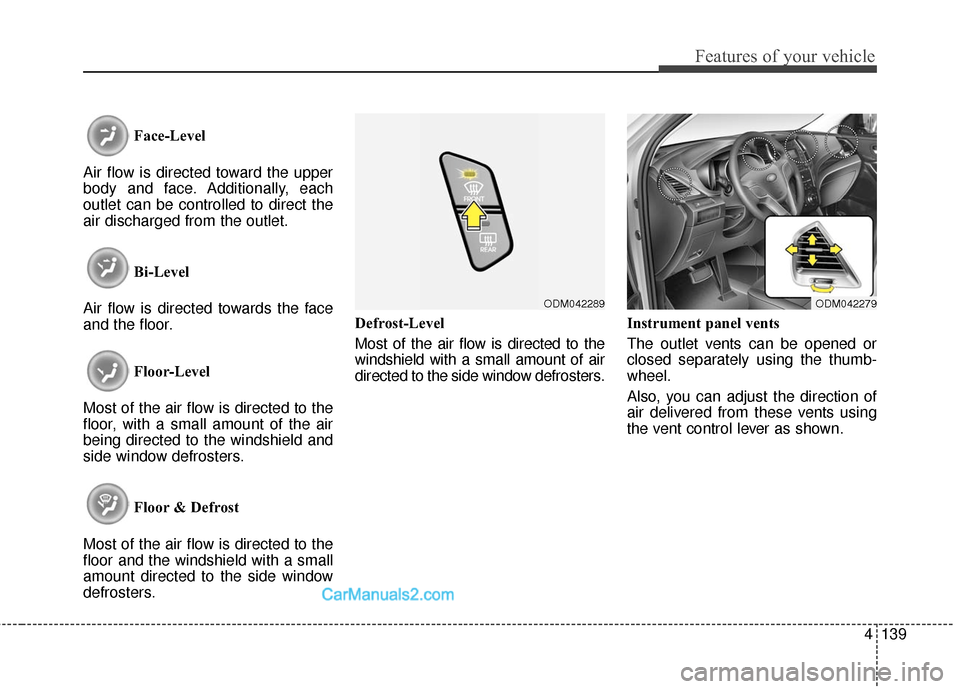
defrosters. Defrost-Level
Most of the air flow is directed to the
windshield with a small amount of air
directed to the side window defrosters.
Instrument panel vents
The outlet vents can be opened or
closed separately using the thumb-
wheel.
Also, you can adjust the direction of
air delivered from these vents using
the vent control lever as shown.
ODM042279ODM042289
Page 243 of 759
Features of your vehicle
146
4
Auto defogging system
(if equipped)
Auto defogging reduces the probabil-
ity of fogging up the inside of the
windshield by automatically sensing
the moisture of inside the windshield.
The auto defogging system operates
when the heater or air conditioning is
on.
This indicator illuminates
when the auto defogging
system senses the mois-
ture of inside the wind-
shield and operates. If more moisture is in the vehicle, the
automated steps operate as follows:
If auto defogging does not defog the
window at step 1, outside air position,
step 2, blowing air toward the wind-
shield occurs.
Step 1 : Outside air position
Step 2 : Blowing air toward the wind-
shield
Step 3 : Increasing air flow toward the windshield
Step 4 : Operating the air conditioning
Step 5 : Maximizing the air conditioning
The auto defogging system is auto-
matically activated when the condi-
tions are met. However, if you would
like to cancel the auto defogging sys-
tem, press the front defroster button
4 times within 2 seconds while press-
ing the AUTO button. The indicator of
the front defroster button will blink 3
times to notify you that the system is
cancelled. To use the auto defogging
system again, follow the procedures
mentioned above.
If the battery has been disconnected
or discharged, it resets to the auto
defogging status.
✽ ✽ NOTICE
When the air conditioning is turned
on and the outside air position is
selected by the auto defogging sys-
tem, if you try to turn off the air con-
ditioning and select the recirculated
air position, the indicator will blink
3 times and the air conditioning will
not be turned off and recirculated
air position will not be selected.
ONCNCO2038
CAUTION
Do not remove the sensor cover
located on the upper end of thedriver side windshield glass.Damage to system parts couldoccur and may not be coveredby your vehicle warranty.
Page 255 of 759
Features of your vehicle
158
4
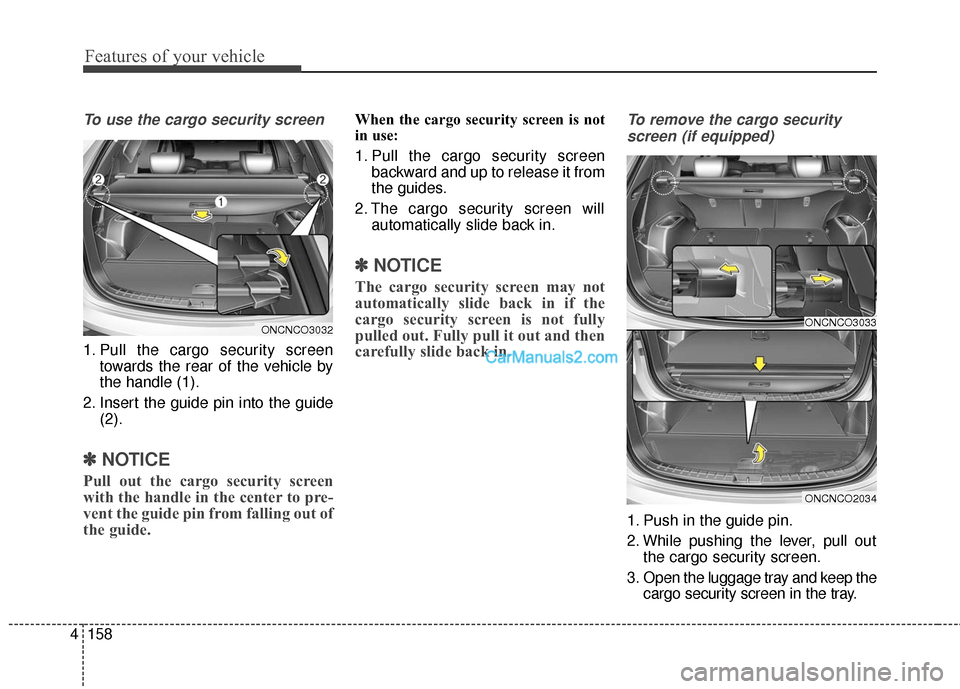
To use the cargo security screen
1. Pull the cargo security screen
towards the rear of the vehicle by
the handle (1).
2. Insert the guide pin into the guide (2).
✽ ✽NOTICE
Pull out the cargo security screen
with the handle in the center to pre-
vent the guide pin from falling out of
the guide.
When the cargo security screen is not
in use:
1. Pull the cargo security screen
backward and up to release it from
the guides.
2. The cargo security screen will automatically slide back in.
✽ ✽NOTICE
The cargo security screen may not
automatically slide back in if the
cargo security screen is not fully
pulled out. Fully pull it out and then
carefully slide back in.
To remove the cargo security
screen (if equipped)
1. Push in the guide pin.
2. While pushing the lever, pull out the cargo security screen.
3. Open the luggage tray and keep the cargo security screen in the tray.
ONCNCO3032ONCNCO3033
ONCNCO2034
Page 260 of 759
4163
Features of your vehicle
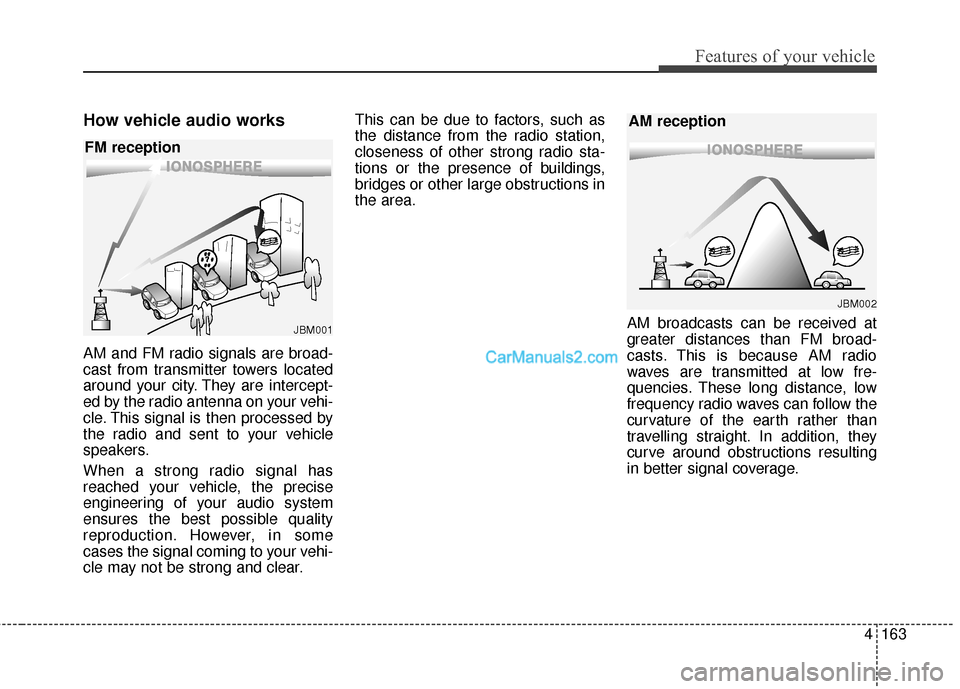
How vehicle audio works
AM and FM radio signals are broad-
cast from transmitter towers located
around your city. They are intercept-
ed by the radio antenna on your vehi-
cle. This signal is then processed by
the radio and sent to your vehicle
speakers.
When a strong radio signal has
reached your vehicle, the precise
engineering of your audio system
ensures the best possible quality
reproduction. However, in some
cases the signal coming to your vehi-
cle may not be strong and clear.This can be due to factors, such as
the distance from the radio station,
closeness of other strong radio sta-
tions or the presence of buildings,
bridges or other large obstructions in
the area.
AM broadcasts can be received at
greater distances than FM broad-
casts. This is because AM radio
waves are transmitted at low fre-
quencies. These long distance, low
frequency radio waves can follow the
curvature of the earth rather than
travelling straight. In addition, they
curve around obstructions resulting
in better signal coverage.
JBM001
FM reception
JBM002
AM reception
Page 392 of 759
4295
Features of your vehicle
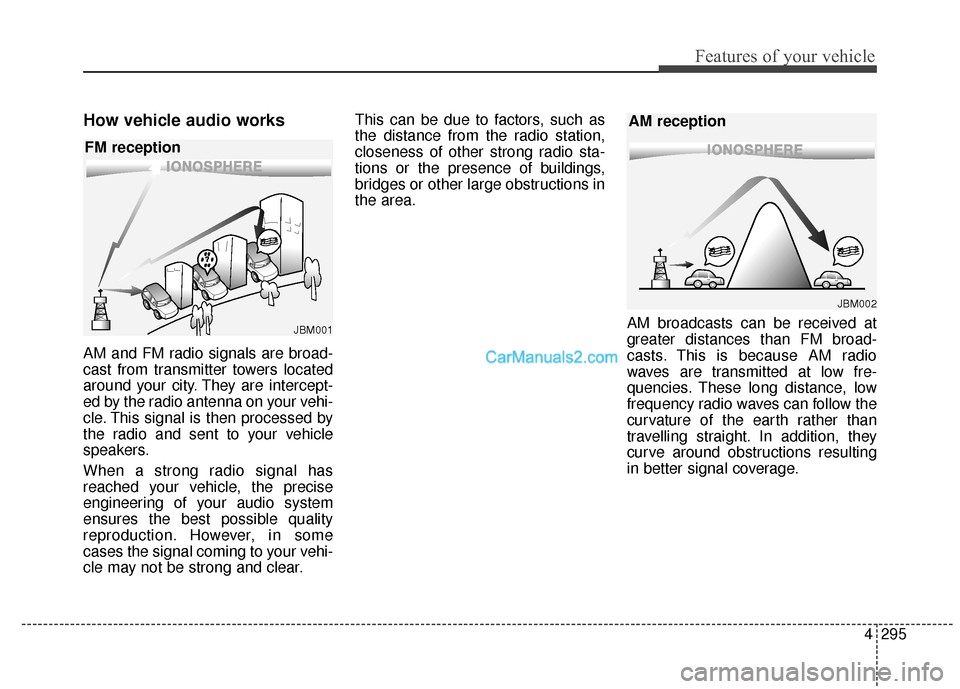
How vehicle audio works
AM and FM radio signals are broad-
cast from transmitter towers located
around your city. They are intercept-
ed by the radio antenna on your vehi-
cle. This signal is then processed by
the radio and sent to your vehicle
speakers.
When a strong radio signal has
reached your vehicle, the precise
engineering of your audio system
ensures the best possible quality
reproduction. However, in some
cases the signal coming to your vehi-
cle may not be strong and clear.This can be due to factors, such as
the distance from the radio station,
closeness of other strong radio sta-
tions or the presence of buildings,
bridges or other large obstructions in
the area.
AM broadcasts can be received at
greater distances than FM broad-
casts. This is because AM radio
waves are transmitted at low fre-
quencies. These long distance, low
frequency radio waves can follow the
curvature of the earth rather than
travelling straight. In addition, they
curve around obstructions resulting
in better signal coverage.
JBM001
FM reception
JBM002
AM reception
Page 526 of 759

Driving your vehicle
Before driving . . . . . . . . . . . . . . . . . . . . . . . . . . . . . . 5-3
Key . . . . . . . . . . . . . . . . . . . . . . . . . . . . . . . . . . . . \
. . . 5-6
Engine start/stop button . . . . . . . . . . . . . . . . . . . . . 5-9
Automatic transaxle . . . . . . . . . . . . . . . . . . . . . . . . 5-14
• Automatic transaxle operation . . . . . . . . . . . . . . . . . . 5-14
All wheel drive (AWD) . . . . . . . . . . . . . . . . . . . . . . 5-21
Brake system . . . . . . . . . . . . . . . . . . . . . . . . . . . . . . 5-28
• Power brakes . . . . . . . . . . . . . . . . . . . . . . . . . . . . . . . 5-28
• Parking brake . . . . . . . . . . . . . . . . . . . . . . . . . . . . . . . 5-30
• Anti-lock brake system (ABS) . . . . . . . . . . . . . . . . . . 5-32
• Electronic stability control (ESC) . . . . . . . . . . . . . . . 5-35
• Vehicle stability management (VSM) . . . . . . . . . . . . 5-39
• Downhill brake control (DBC) . . . . . . . . . . . . . . . . . . 5-40
• Hill-start assist control (HAC) . . . . . . . . . . . . . . . . . . 5-42
Cruise control system. . . . . . . . . . . . . . . . . . . . . . . 5-45
Blind spot detection system (BSD) . . . . . . . . . . . . 5-50
Active ECO system. . . . . . . . . . . . . . . . . . . . . . . . . 5-56
Economical operation . . . . . . . . . . . . . . . . . . . . . . 5-57Special driving conditions . . . . . . . . . . . . . . . . . . . 5-59
• Hazardous driving conditions . . . . . . . . . . . . . . . . . . 5-59
• Rocking the vehicle . . . . . . . . . . . . . . . . . . . . . . . . . . . 5-60
• Smooth cornering . . . . . . . . . . . . . . . . . . . . . . . . . . . . 5-61
• Driving at night . . . . . . . . . . . . . . . . . . . . . . . . . . . . . . 5-61
• Driving in the rain . . . . . . . . . . . . . . . . . . . . . . . . . . . . 5-62
• Driving in flooded areas . . . . . . . . . . . . . . . . . . . . . . . 5-63
• Driving off-road . . . . . . . . . . . . . . . . . . . . . . . . . . . . . . 5-63
• Highway driving . . . . . . . . . . . . . . . . . . . . . . . . . . . . . 5-63
Winter driving . . . . . . . . . . . . . . . . . . . . . . . . . . . . 5-65
Trailer towing . . . . . . . . . . . . . . . . . . . . . . . . . . . . . 5-70
Vehicle load limit . . . . . . . . . . . . . . . . . . . . . . . . . . 5-79
Vehicle weight . . . . . . . . . . . . . . . . . . . . . . . . . . . . . 5-84
• Base curb weight . . . . . . . . . . . . . . . . . . . . . . . . . . . . . 5-84
• Vehicle curb weight . . . . . . . . . . . . . . . . . . . . . . . . . . . 5-84
• Cargo weight . . . . . . . . . . . . . . . . . . . . . . . . . . . . . . . . 5-84
• GAW (Gross axle weight) . . . . . . . . . . . . . . . . . . . . . . 5-84
• GAWR (Gross axle weight rating) . . . . . . . . . . . . . . . 5-84
• GVW (Gross vehicle weight) . . . . . . . . . . . . . . . . . . . 5-84
• GVWR (Gross vehicle weight rating) . . . . . . . . . . . . 5-845