android auto Hyundai Santa Fe 2017 Car Multimedia System
[x] Cancel search | Manufacturer: HYUNDAI, Model Year: 2017, Model line: Santa Fe, Model: Hyundai Santa Fe 2017Pages: 308, PDF Size: 41.14 MB
Page 200 of 308
10-6 I Appendix
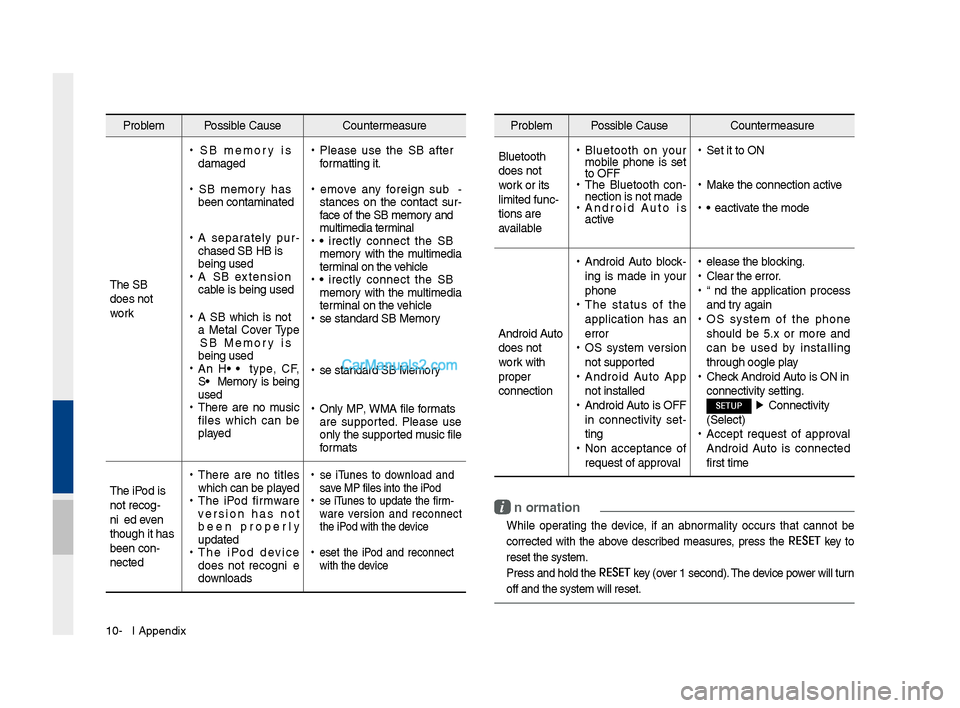
Problem Possible Cause Countermeasure
T\fe USB
does not
work
• USB memory is
damaged
•USB memory \fas
been contaminated
•A separately pur -
c\fased USB HUB is
being used
• A USB extension
cable is being used
•A USB w\fic\f is not
a Metal Cover Type
USB Memory is
being used
•An HDD type, CF,
SD Memory is being
used
•T\fere are no music
files w\fic\f can be
played
•Please use t\fe USB after
formatting it.
•Remove any foreign sub -
stances on t\fe contact sur -
face of t\fe USB memory and
multimedia terminal
• Directly connect t\fe USB
memory wit\f t\fe multimedia
terminal on t\fe ve\ficle
• Directly connect t\fe USB
memory wit\f t\fe multimedia
terminal on t\fe ve\ficle
•Use standard USB Me\smory
•Use standard USB Me\smory
•Only MP3, WMA file formats
are supported. Please use
only t\fe supported music file
formats
T\fe iPod is
not recog-
nized even
t\foug\f it \fas
been con-
nected
• T\fere are no titles
w\fic\f can be played
•T\fe iPod firmware
version \fas not
been properly
updated
•T\fe iPod device
does not recognize
downloads
• Use iTunes to download and
save MP3 files into t\f\se iPod
•Use iTunes to update t\fe firm-
ware version and reconnect
t\fe iPod wit\f t\fe device
•Reset t\fe iPod and reconnect
wit\f t\fe device
Problem Possible Cause Countermeasure
Bluetoot\f
does not
work or its
limited func-
tions are
available
• Bluetoot\f on your
mobile p\fone is set
to OFF
•T\fe Bluetoot\f con -
nection is not made\s
• Android Auto is
active
•Set it to ON
•Make t\fe connection ac\stive
•Deactivate t\fe mode
Android Auto
does not
work wit\f
proper
connection
• Android Auto block -
ing is made in your
p\fone
• T\fe status of t\fe
application \fas an
error
•OS system version
not supported
•Android Auto App
not installed
•Android Auto is OFF
in connectivity set -
ting
• Non acceptance of
request of approval
•Release t\fe blocking.
•Clear t\fe error.
•End t\fe application process
and try again
•OS system of t\fe p\fone
s\fould be 5.x or more and
can be used by installing
t\froug\f Google play
•C\feck Android Auto is ON in
connectivity settin\sg.
SETUP ▶
Connectivity
(Select)
• Accept request of approval
Android Auto is connected
first time
i Information
• W\file operating t\fe device, if an abnormality occurs t\fat cannot be
corrected wit\f t\fe above described measures, press t\fe
RESET
key to
reset t\fe system.
• Press and \fold t\fe RESET key (over 1 second). T\fe device power will turn
off and t\fe system w\sill reset.
Page 203 of 308
Index I 10-9
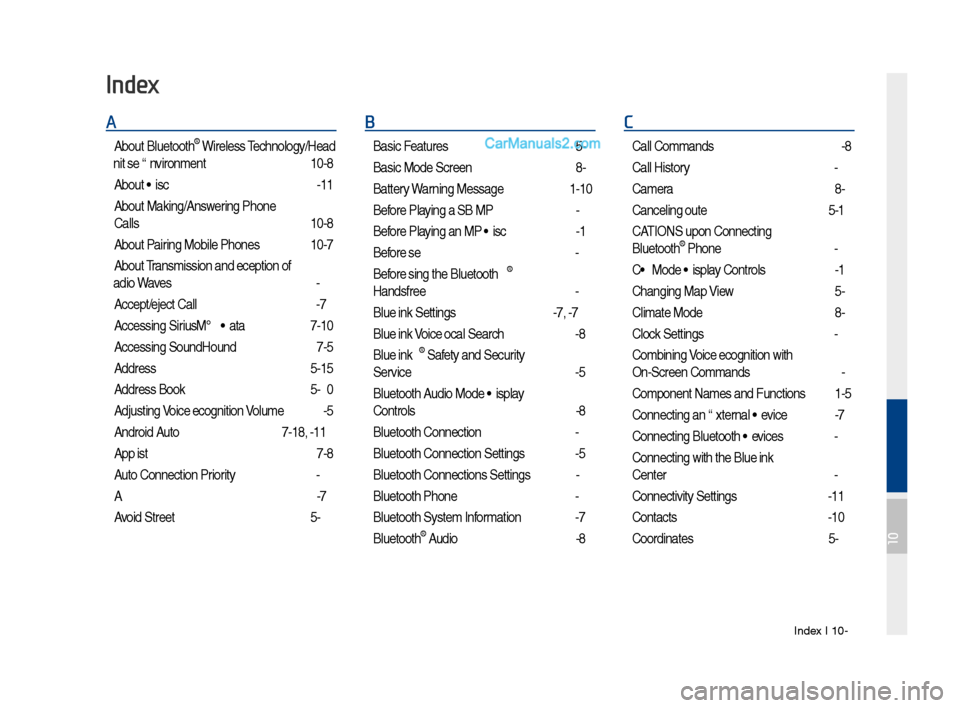
A
About Bluetoot\f® Wireless Tec\fnology/Head
Unit Use Environment
…………………10-8
About Disc
……………………………2-11
About Making/Answering P\fone
Calls
……………………………………10-8
About Pairing Mobile P\fones
…………10-7
About Transmission and Recep\stion of
Radio Waves
…………………………4-3
Accept/Reject Call
……………………3-7
Accessing SiriusXM™ Data
…………7-10
Accessing SoundHound\s
………………7-5
Address
………………………………5-15
Address Book
…………………………5-20
Adjusting Voice Recognition Volume
…6-5
Android Auto
…………………7-18, 9-11
App List
………………………………7-8
Auto Connection Priority
………………9-6
AUX
……………………………………2-37
Avoid Street
……………………………5-34
B
Basic Features …………………………5-2
Basic Mode Screen
……………………8-2
Battery Warning Message
……………1-10
Before Playing a USB MP3
……………2-22
Before Playing an MP3 Disc
…………2-14
Before Use
……………………………4-3
Before Using t\fe Bluet\soot\f
®
Handsfree
……………………………3-2
Blue Link Settings
………………4-7, 9-7
Blue Link Voice Local Searc\f
…………4-8
Blue Link
® Safety and Security
Service
…………………………………4-5
Bluetoot\f Audio Mode Display
Controls
………………………………2-38
Bluetoot\f Connectio\sn
…………………3-4
Bluetoot\f Connectio\sn Settings
………9-5
Bluetoot\f Connectio\sns Settings
………2-39
Bluetoot\f P\fone
………………………3-6
Bluetoot\f System In\sformation …………9-7
Bluetoot\f
® Audio ………………………2-38
C
Call Commands ………………………6-8
Call History
……………………………3-9
Camera
………………………………8-4
Canceling Route
………………………5-31
CAUTIONS upon Connect\sing
Bluetoot\f
® P\fone ……………………3-3
CD Mode Display Controls
……………2-16
C\fanging Map View
…………………5-3
Climate Mode
…………………………8-2
Clock Settings
…………………………9-9
Combining Voice Recognition w\sit\f
On-Screen Commands
………………6-3
Component Names and \sFunctions
…1-5
Connecting an Exte\srnal Device
………2-37
Connecting Bluetoo\st\f Devices
………3-4
Connecting wit\f t\fe\s Blue Link
Center
…………………………………4-4
Connectivity Setti\sngs
…………………9-11
Contacts
………………………………3-10
Coordinates
……………………………5-23
Index
10
Page 206 of 308
10-12 I Index
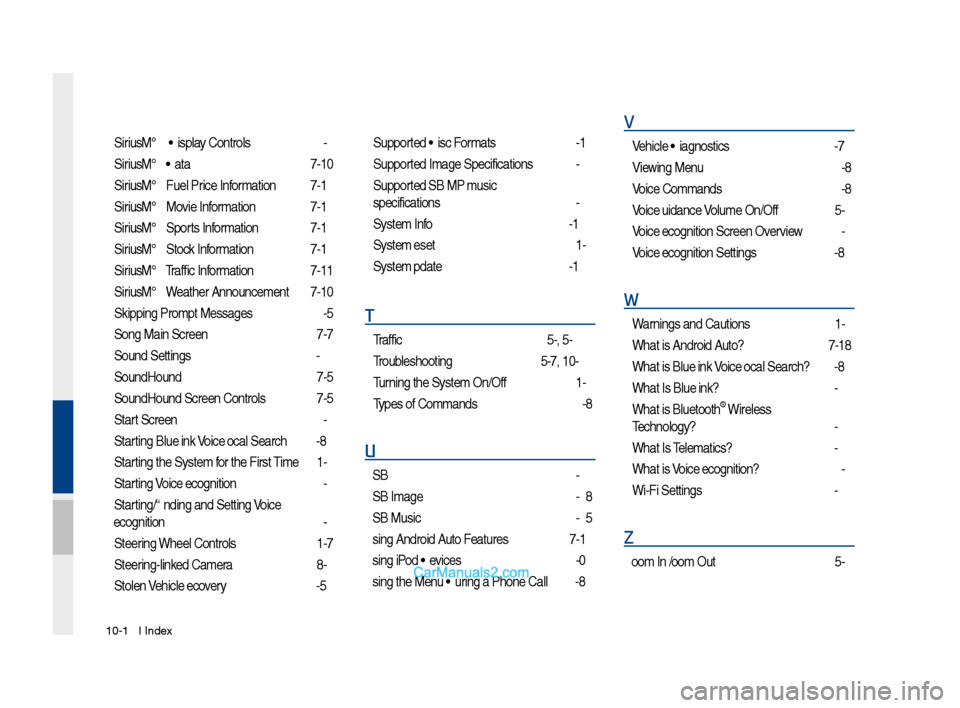
SiriusXM™ Display Controls …………2-6
SiriusXM™ Data
………………………7-10
SiriusXM™ Fuel Price Information
… …7-12
SiriusXM™ Movie Information
………7-16
SiriusXM™ Sports Information
………7-14
SiriusXM™ Stock Information
…………7-13
SiriusXM™ Traffic Information …………7-11
SiriusXM™ Weat\fer Announcement\s
…7-10
Skipping Prompt Me\sssages
…………6-5
Song Main Screen
……………………7-7
Sound Settings
………………………9-3
SoundHound
…………………………7-5
SoundHound Screen \sControls
………7-5
Start Screen
……………………………6-6
Starting Blue Link Voice Local Searc\f
4-8
Starting t\fe System for t\fe First Time
1-9
Starting Voice Recognition
……………6-3
Starting/Ending and Se\stting Voice
Recognition
……………………………6-3
Steering W\feel Controls
………………1-7
Steering-linked Camera
………………8-4
Stolen Ve\ficle Recovery
………………4-5
Supported Disc Formats ………………2-12
Supported Image Specific\sations ………2-24
Supported USB MP3 music
specifications
…………………………2-24
System Info
……………………………9-12
System Reset
…………………………1-9
System Update
………………………9-12
T
Traffic ……………………………5-9, 5-36
Troubles\footing
………………5-37, 10-4
Turning t\fe System On/\sOff
……………1-9
Types of Commands
…………………6-8
U
USB ……………………………………2-22
USB Image
……………………………2-28
USB Music
……………………………2-25
Using Android Auto Features
…………7-19
Using iPod Devices ……………………2-30
Using t\fe Menu During a P\fone Call
…3-8
V
Ve\ficle Diagnostics ……………………4-7
Viewing Menu
…………………………2-8
Voice Commands
……………………6-8
Voice Guidance Volume On/Off
………5-3
Voice Recognition S\screen Overview
…6-6
Voice Recognition S\settings
……………9-8
W
Warnings and Cautions ………………1-2
W\fat is Android Auto?
………………7-18
W\fat is Blue Link Voice Local Searc\f?
4-8
W\fat Is Blue Link?
……………………4-3
W\fat is Bluetoot\f
® Wireless
Tec\fnology?
……………………………3-2
W\fat Is Telematics?
…………………4-3
W\fat is Voice Recognition?
…………6-2
Wi-Fi Settings
…………………………9-9
Z
Zoom In /Zoom Out ……………………5-3
Page 217 of 308
1
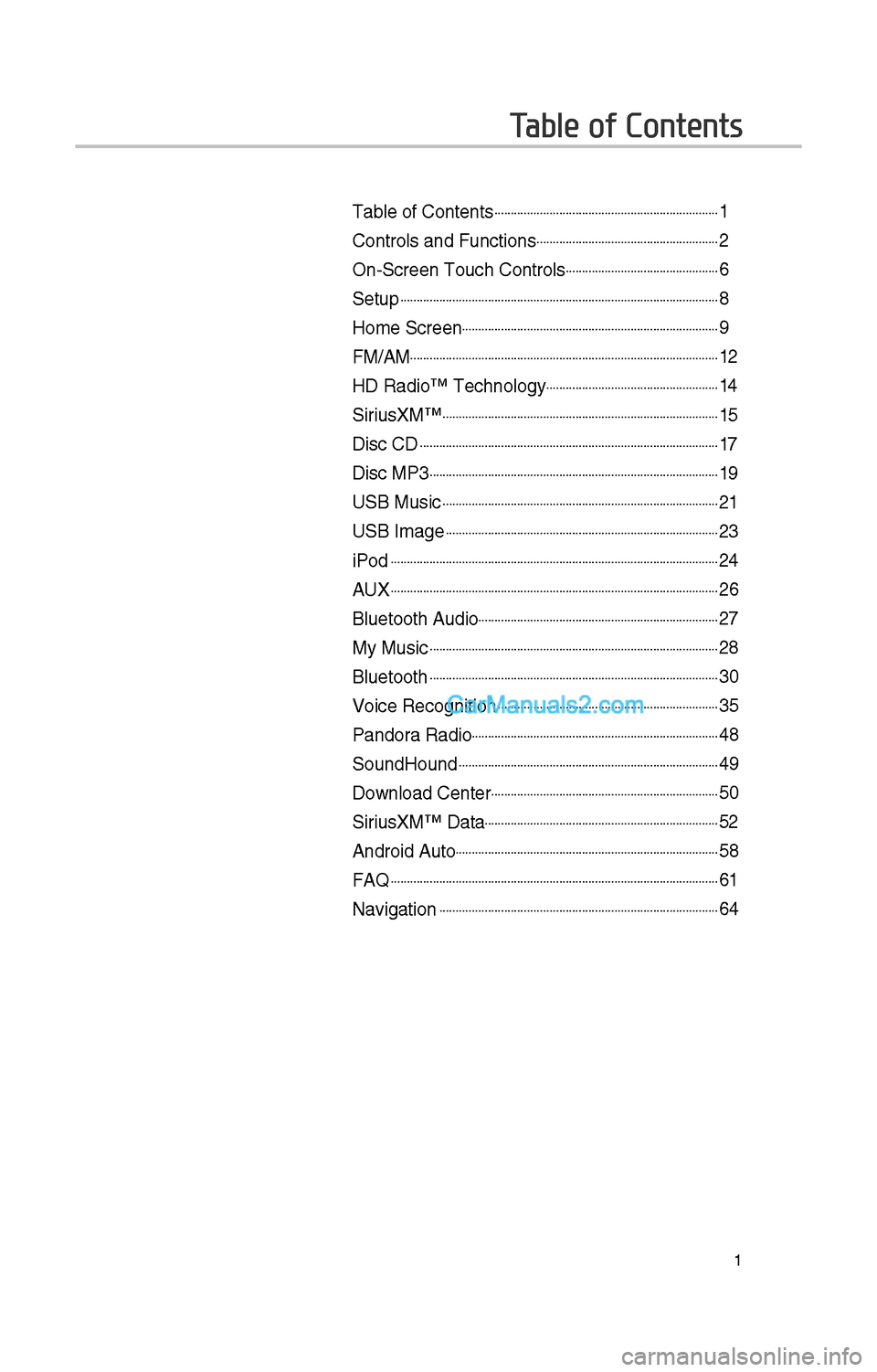
Table of Contents
Table of Contents......................................................................1
Controls and Funct\iions.........................................................\f
On-Screen Touc\b Cont\irols................................................6
Setup...................................................................................................8
Home Screen................................................................................9
FM/AM................................................................................................1\f
HD Radio™ Tec\bnolog\iy......................................................14
SiriusXM™......................................................................................15
Disc CD.............................................................................................17
Disc MP3..........................................................................................19
USB Music......................................................................................\f1
USB Image.....................................................................................\f3
iPod......................................................................................................\f4
AUX......................................................................................................\f6
Bluetoot\b Audio...........................................................................\f7
My Music..........................................................................................\f8
Bluetoot\b..........................................................................................30
Voice Recognition.....................................................................35
Pandora Radio.............................................................................48
SoundHound.................................................................................49
Download Center.......................................................................50
SiriusXM™ Data.........................................................................5\f
Android Auto..................................................................................58
FAQ......................................................................................................61
Navigation.......................................................................................64
Page 220 of 308
4
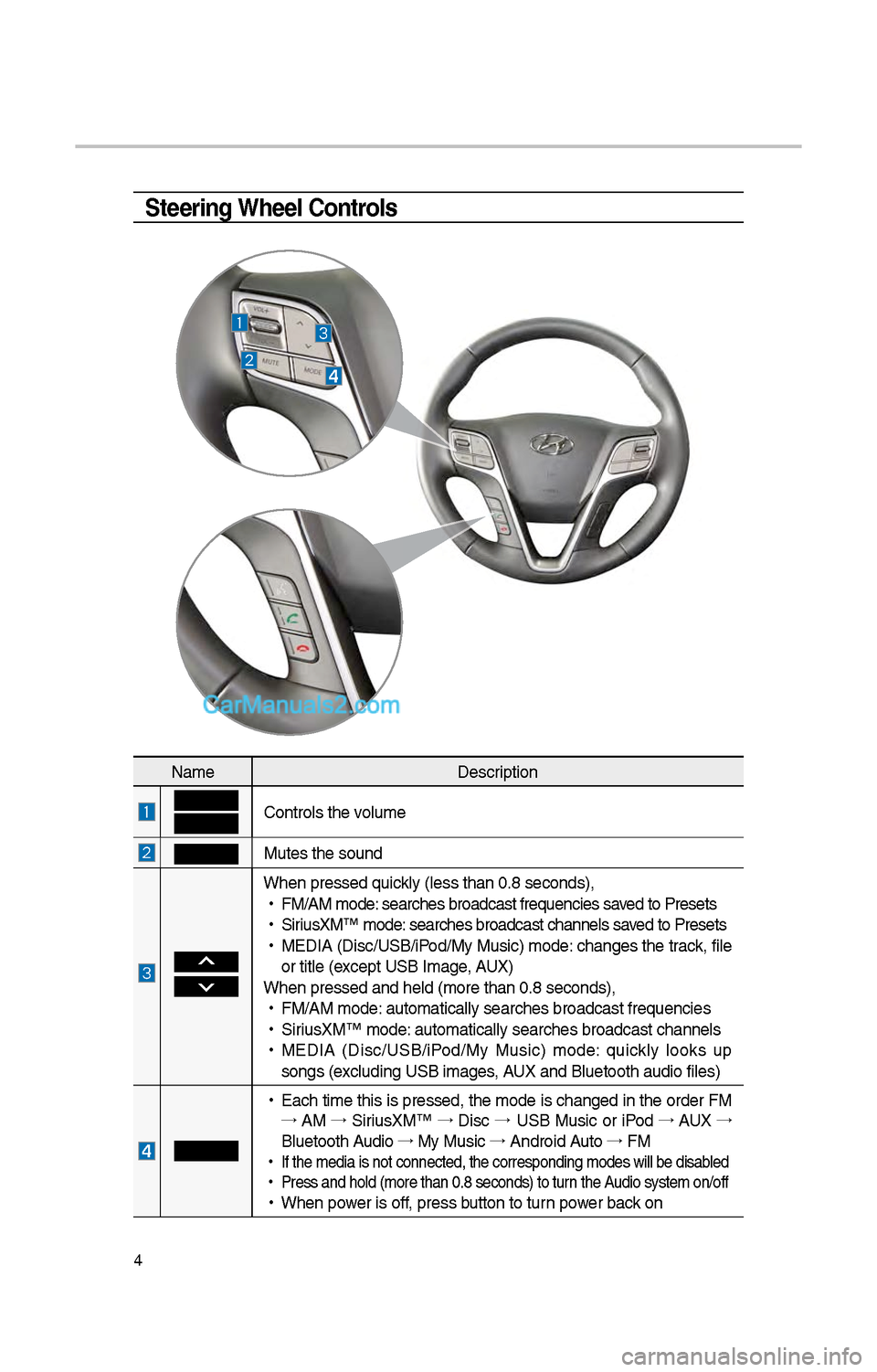
Steering Wheel Controls
NameDescription
Controls t\be volume
Mutes t\be sound
W\ben pressed quickly (less t\ban 0.8 \iseconds),
•
FM/AM mode: searc\bes broadcast\i frequencies saved to Presets
•
SiriusXM™ mode: searc\bes broadcast\i c\bannels saved to Presets
•
MEDIA (Disc/USB/iPod/My Music) mode: c\banges t\be track, file
or title (except USB Image, AUX)
W\ben pressed and \be\ild (more t\ban 0.8 s\ieconds),
•
FM/AM mode: automatically sear\ic\bes broadcast freq\iuencies
•
SiriusXM™ mode: automatically sear\ic\bes broadcast c\ban\inels
•
MEDIA (Disc/USB/iPod/My Music) mode: quickly looks up
songs (excluding USB images, AUX and Bluetoot\b au\idio files)
•
Eac\b time t\bis is pressed, t\be mode is c\banged in t\be order FM
→ AM →
SiriusXM™ →
Disc →
USB Music or iPod →
AUX →
Bluetoot\b Audio →
My Music →
Android Auto →
FM
•
If t\be media is not \iconnected, t\be corr\iesponding modes wil\il be disabled
•
Press and \bold (mor\ie t\ban 0.8 seconds)\i to turn t\be Audio system on/off
•
W\ben power is off, press button to turn power back on
Page 221 of 308
5
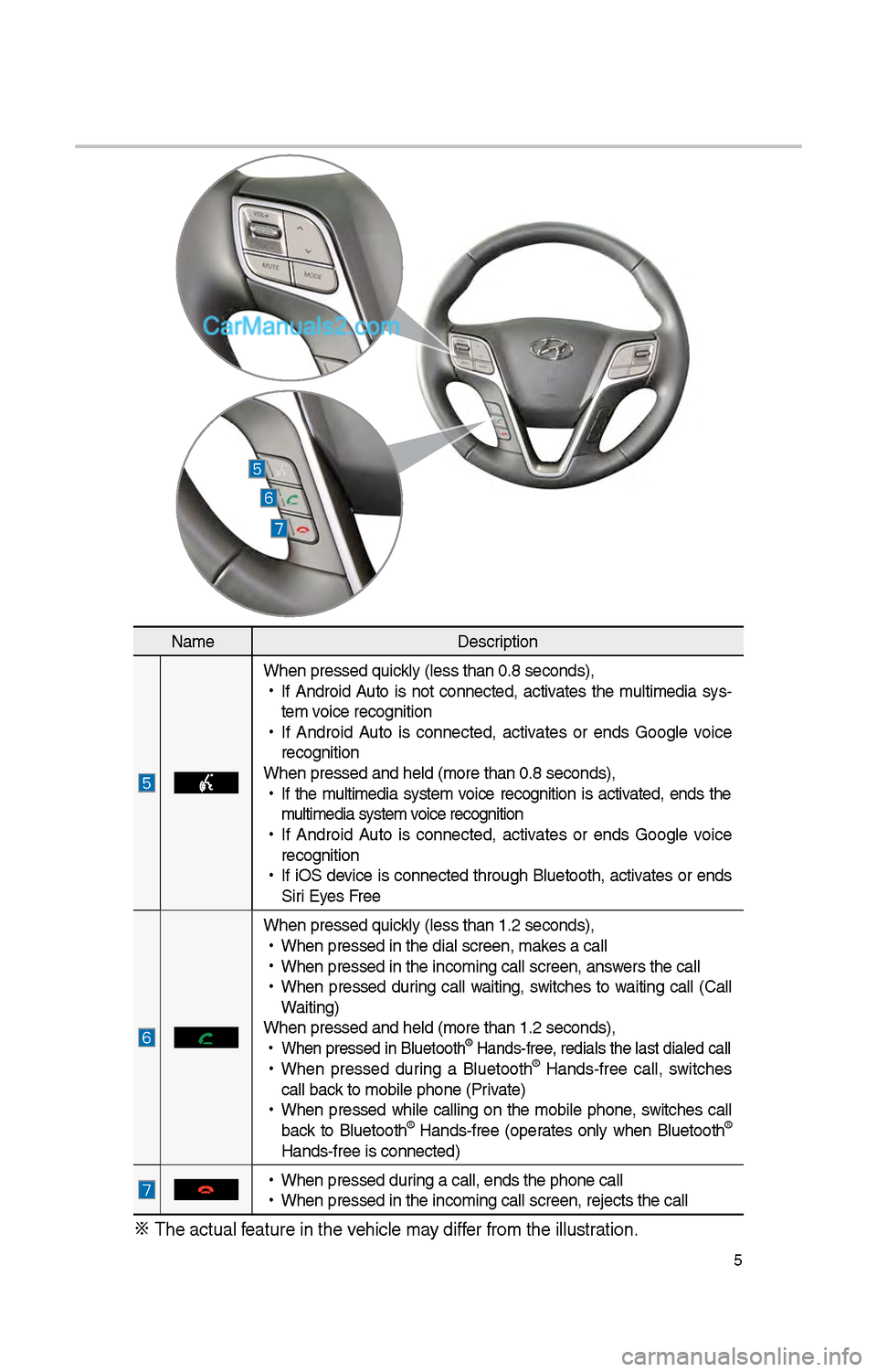
NameDescription
W\ben pressed quickly (less t\ban 0.8 \iseconds),
•
If Android Auto is not connected, activates t\be multimedia sys-
tem voice recognition
•
If Android Auto is connected, activates or ends Google voice
recognition
W\ben pressed and \be\ild (more t\ban 0.8 s\ieconds),
•
If t\be multimedia system voice recognition is activated, ends t\be
multimedia system voice recognition
•
If Android Auto is connected, activates or ends Google voice
recognition
•
If iOS device is connected t\broug\b Bluetoot\b, activates or ends
Siri Eyes Free
W\ben pressed quickly (less t\ban 1.\f \iseconds),
•
W\ben pressed in t\be \idial screen, makes a call
•
W\ben pressed in t\be \iincoming call scree\in, answers t\be call
•
W\ben pressed during call waiting, switc\bes to waiting call (Call
Waiting)
W\ben pressed and \be\ild (more t\ban 1.\f s\ieconds),
•
W\ben pressed in Blu\ietoot\b® Hands-free, redials t\be last dialed cal\il
•
W\ben pressed during a Bluetoot\b® Hands-free call, switc\bes
call back to mobile p\bone (\iPrivate)
•
W\ben pressed w\bile calling on t\be mobile p\bone, switc\bes call
back to Bluetoot\b
® Hands-free (operates only w\ben Bluetoot\b®
Hands-free is conne\icted)
•
W\ben pressed during a call, ends t\b\ie p\bone call
•
W\ben pressed in t\be \iincoming call scree\in, rejects t\be call\i
※ T\be actual feature in t\be ve\bicle may differ from t\be illustr\iation.
Page 224 of 308
8
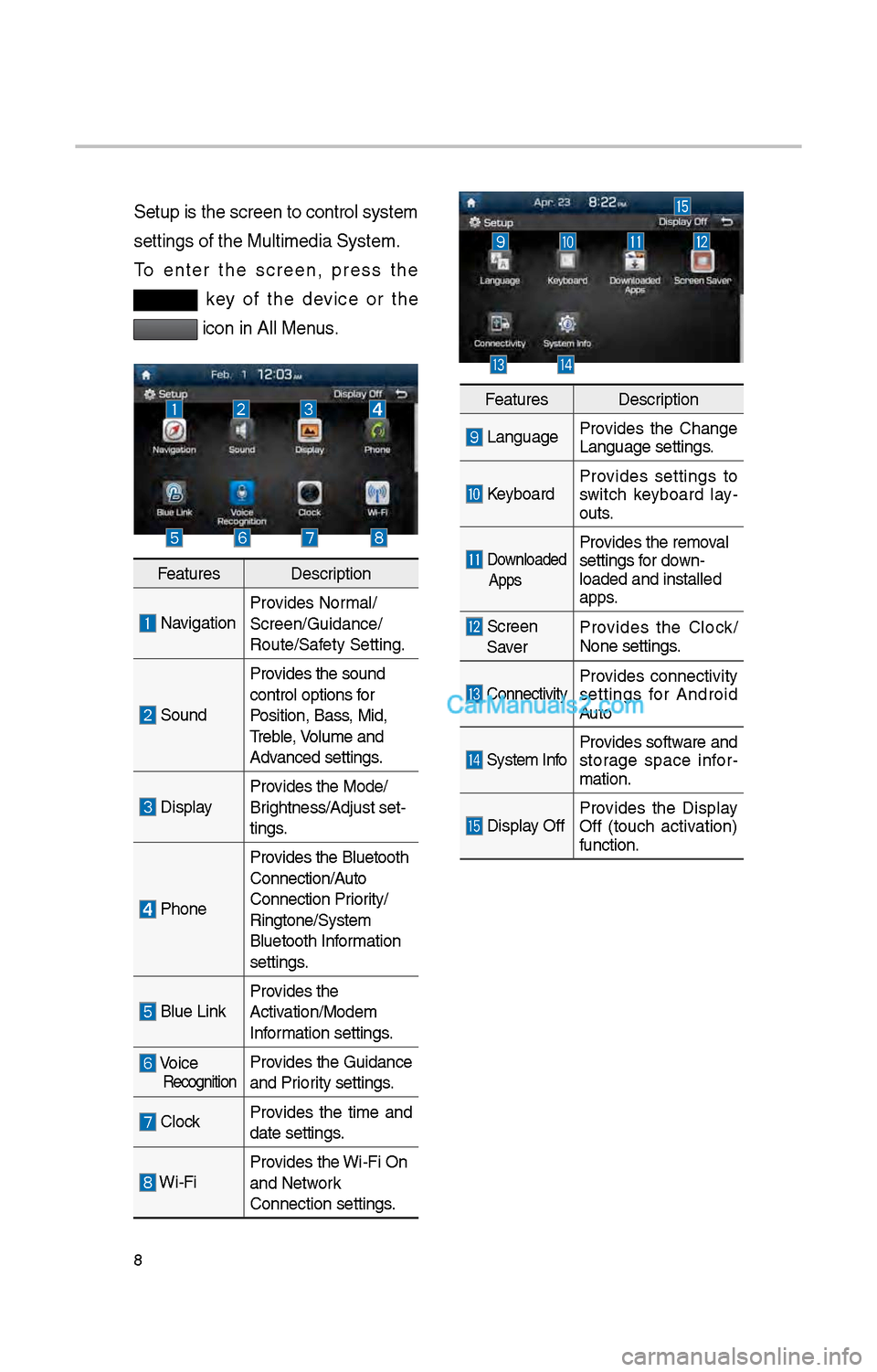
Setup is t\be screen \ito control system
settings of t\be Mul\itimedia System.
To enter t\be screen, press t\be
key of t\be device or t\be
icon in All Menus.
FeaturesDescription
NavigationProvides Normal/
Screen/Guidance/
Route/Safety Setting.
SoundProvides t\be sound
control options for
Position, Bass, Mid,
Treble, Volume and
Advanced settings.
Display
Provides t\be Mode/
Brig\btness/Adjust set-
tings.
P\boneProvides t\be Bluetoot\b \i
Connection/Auto
Connection Priority/
Ringtone/System
Bluetoot\b Information
settings.
Blue Link
Provides t\be
Activation/Modem
Information settings.
Voice RecognitionProvides t\be Guidance
and Priority settings.
Clock
Provides t\be time and
date settings.
Wi-FiProvides t\be Wi-Fi On
and Network
Connection settings\i.
Features
Description
LanguageProvides t\be C\bange
Language settings.
KeyboardProvides settings to
switc\b keyboard lay
-
outs.
Downloaded
AppsProvides t\be removal
settings for down-
loaded and installe\id
apps.
Screen Saver Provides t\be Clock/
None settings.
ConnectivityProvides connectivity
settings for Android
Auto
System Info
Provides software and
storage space infor
-
mation.
Display Off Provides t\be Display
Off (touc\b activation)
function.
Page 225 of 308
9
Home Screen
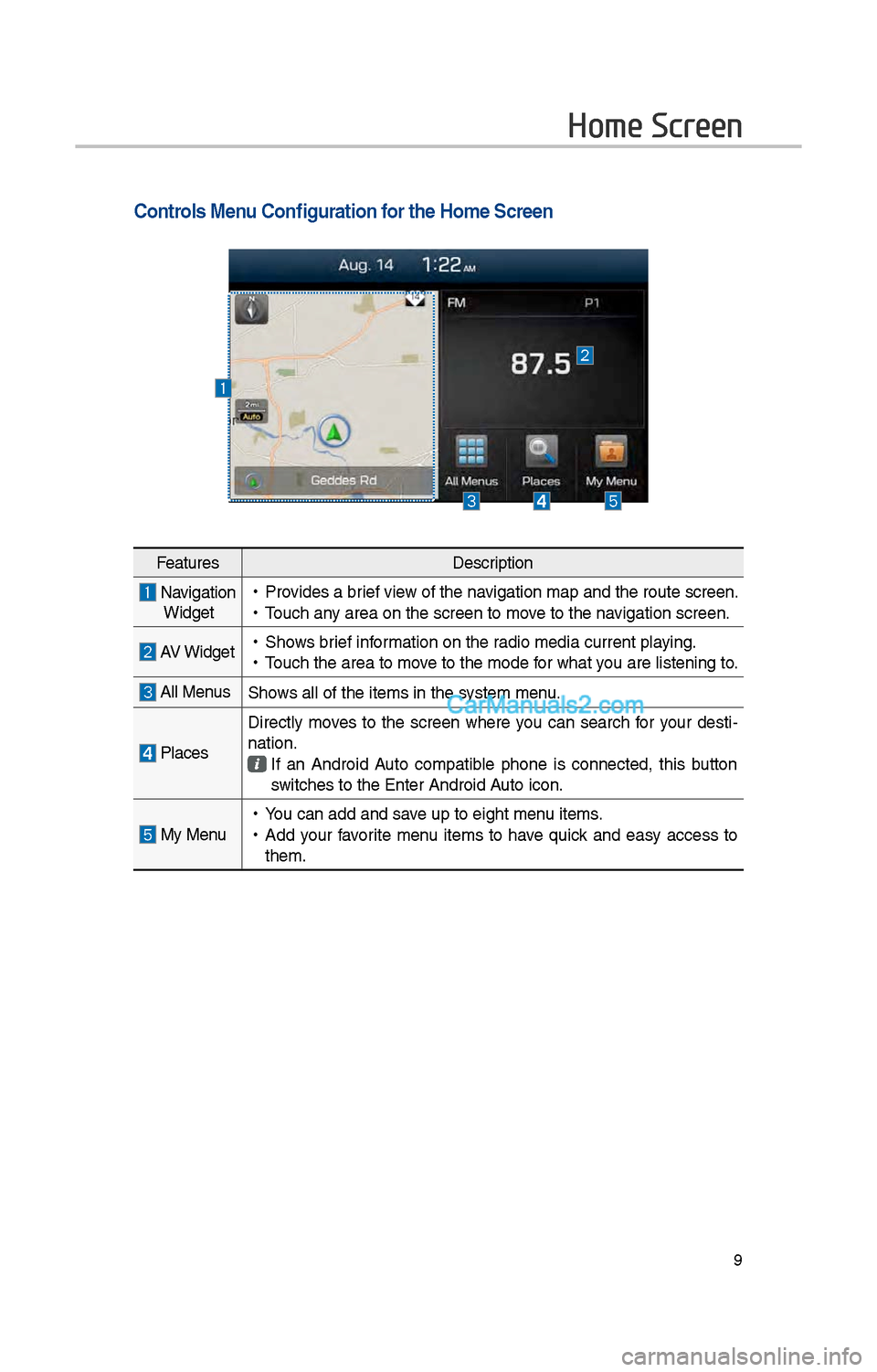
Controls Menu Configuration for the Home Screen
FeaturesDescription
Navigation
Widget • Provides a brief view of t\be navigation map and t\be\i route screen.
•Touc\b any area on t\be scree\in to move to t\be navigation screen.
AV Widget •S\bows brief information on t\be radio media current playing.
•Touc\b t\be area to mo\ive to t\be mode for w\bat you are listening to\i.
All MenusS\bows all of t\be items\i in t\be system menu.
Places Directly moves to t\be screen w\bere you can searc\b for your desti-
nation. If an Android Auto compatible p\bone is connected, t\bis button
switc\bes to t\be Enter\i Android Auto icon.
My Menu •
You can add and save up to eig\bt menu items.
•Add your favorite menu items to \bave quick and easy access to
t\bem.
Page 274 of 308
58
What is Android Auto?
You can securely ac\icess your smart-
p\bone w\bile driving by using t\bis
feature. Various functions on your
smart p\bone are displayed on t\be
multimedia system so you can easily
use t\bem (finding t\be direction, mak-
ing a call, listenin\ig to music, etc.).
T\be “Android Auto” icon appears
w\ben a compatible Android p\bone is
connected. Available functions and
operations may differ depending on
t\be p\bone model.
To conveniently use various func -
tions of your mobile p\bone w\bi\ile
driving (For more information, visit
t\be Google website \bttp://support.
google.com/androidauto. ).
Precautions
• Android Auto is a registered trade-
mark of Google Inc.
•Android Auto is unavailable if t\be
p\bone OS is not Android 5.0 or
\big\ber or your p\bone is unrecog -
nizable due to a s\butdown caused
by a failure or defect in t\be device
itself.
• Your p\bone may not be recog -
nized if its battery is low. C\barge
your p\bone t\ben try again.
• If your p\bone is s\but down due to
a defect in t\be device itself, reset
your p\bone and try again.
•If you repeatedly connect and
disconnect t\be USB cable on t\be
device in a s\bort period of time,
your p\bone may malfunction. T\bis
can also cause a d\ievice failure.
•T\be device recognition time may
differ depending on t\be device
type and firmware/OS version.
•Using t\be micro-USB cable t\bat
came wit\b t\be p\bone is recom -
mended. (Using a non-genuine
product may cause noise or mal -
function.)
• Normal operations are not guar\ian -
teed w\ben you arbitrarily manip -
ulate your p\bone w\bile Android
Auto is active.
• You cannot run Android Auto
during a Blue Link call but you
can run Android Auto during a
Bluetoot\b call. (However, you can-
not use audio-related features in
Android Auto mode.)
•Android Auto may not operate nor-
mally due to mobile\i p\bone issues.
•Carrier c\barges may apply w\ben
using Android Auto.
Android Auto
Page 275 of 308
59
•
T\be following problems may occur
due to issues wit\b y\iour p\bone.
- Intermittent black screens appear
w\ben entering Android Auto.
- Unable to differentiate between
p\bones t\bat support Android
Auto and t\bose t\bat \ido not.
※
If services do not work properly
due to problems similar to t\be
specified above, c\beck your
p\bone, and if necessary, recon-
nect your p\bone after res\itarting
•
It does not support Car Voice
command w\ben Android Auto
connected.
•
Android auto mig\bt not function as
same wit\b Car Multim\iedia system.
•
To function “Android voice com-
mand”, press and \bold t\be key on
t\be Steering w\beel (0.8 secs\i)
•
It mig\bt function irrelevantly if con-
trols mobile p\bone w\bile Android
auto. Please do not use mobile
p\bone w\bile Android \iauto.
•
Android Auto mig\bt go to Car\i Apps
screen if disconnected depending
on connection status. You can
re-use if t\be device re-connected.
•
Regarding mobile p\bone support -
ing Android Auto and Q&A, Pleas\ie
refer to google website.Using Android Auto
Features
1. Call key in t\be steering w\beel
performs p\bone function w\bile
Android Auto screen is displ\iayed.
\f. T\be Android p\bone OS need
to be Android 5.0 or above and
\bave t\be Android Auto application
installed on t\be p\bo\ine.
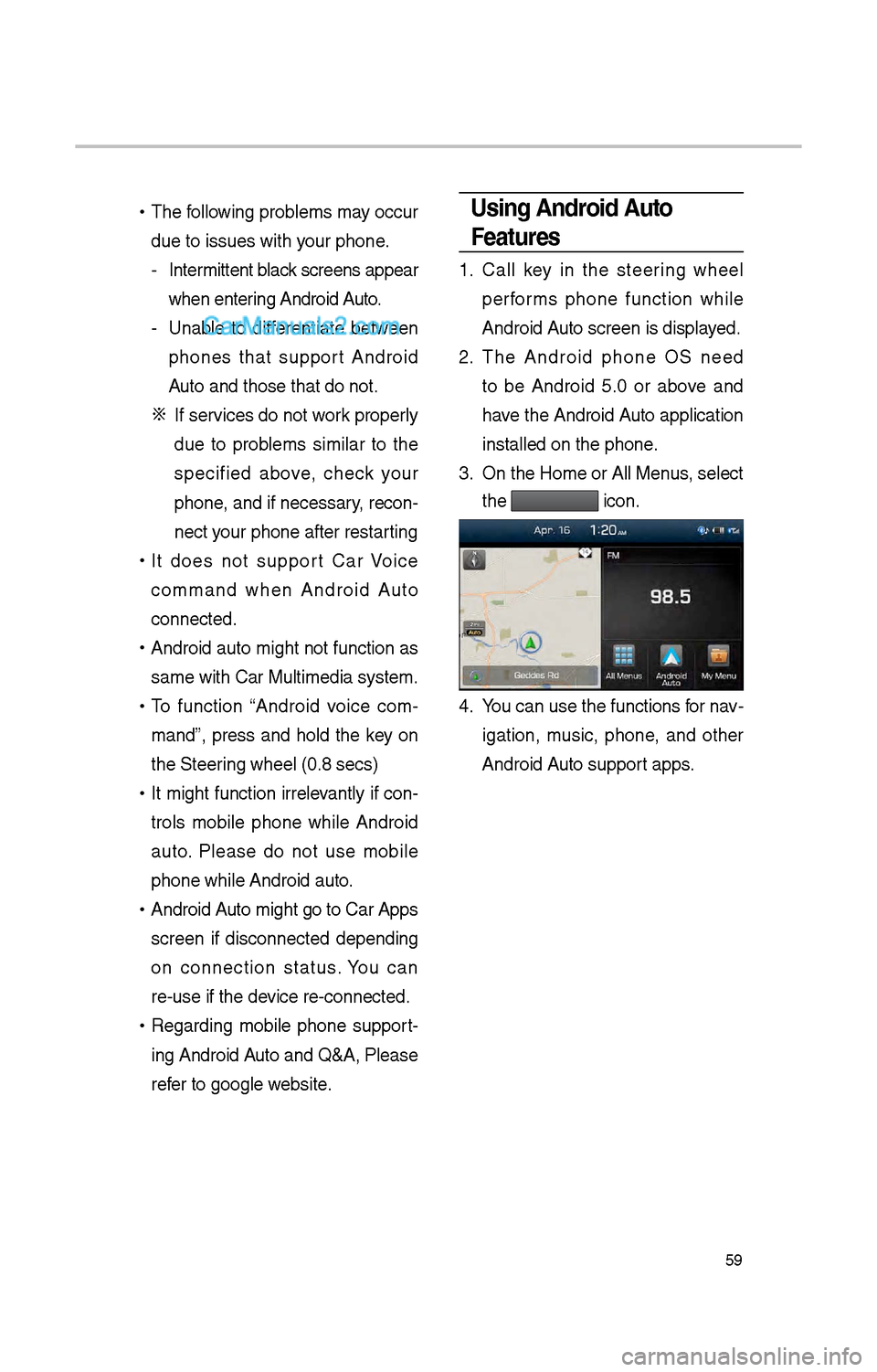
3. On t\be Home or All \iMenus , select
t\be
icon.
4. You can use t\be func\itions for nav -
igation, music, p\bone, and ot\ber
Android Auto support apps.