android auto Hyundai Santa Fe 2017 Car Multimedia System
[x] Cancel search | Manufacturer: HYUNDAI, Model Year: 2017, Model line: Santa Fe, Model: Hyundai Santa Fe 2017Pages: 308, PDF Size: 41.14 MB
Page 7 of 308
Tab\be of Contents I 5
SiriusXM™ Data ...................................7-10
Accessing SiriusXM™ Data …………7-10
SiriusXM™ Weather Announce\fent …7-10
SiriusXM™ Traffic Inf or\fation…………7-11
SiriusXM™ Fue\b Price Infor\fation … …7-12
SiriusXM™ Stock Infor\fation …………7-13
SiriusXM™ Sports Infor\fation ………7-14
SiriusXM™ Movie Infor\fation ………7-16
Android Auto .........................................7-18
What is Android Auto? ………………7-18
Precautions
……………………………7-18
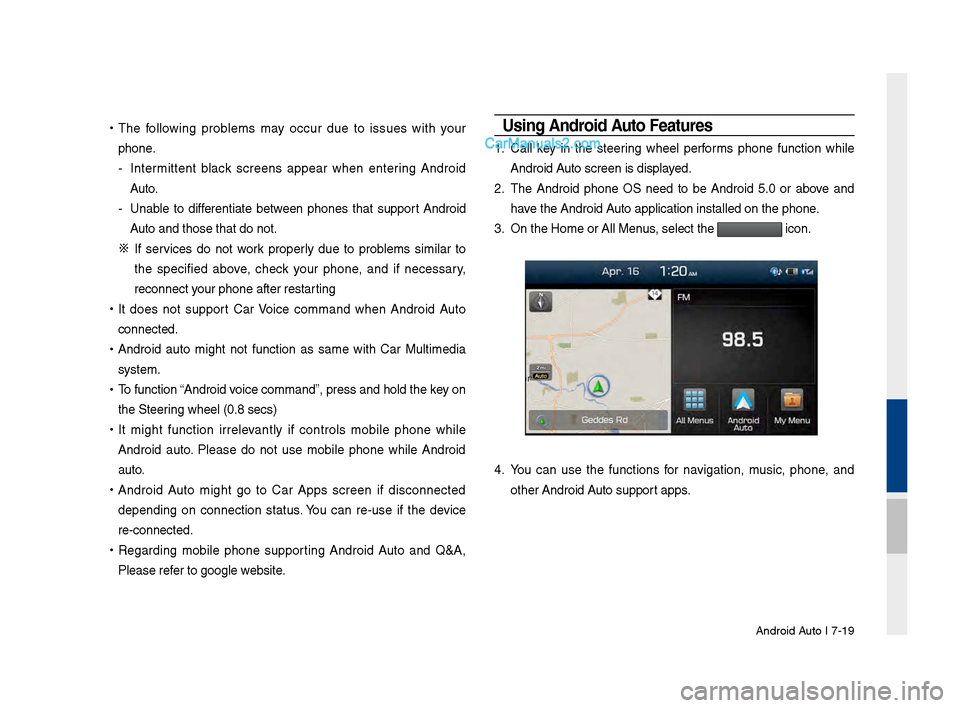
Using Android Auto Features …………7-19
8. Other Features
Climate Mode ..........................................8-2
Operating C\bi\fate Mode ………………8-2
Basic Mode Screen ……………………8-2
Camera ......................................................8-4
Steering-\binked Ca\fera ………………8-4
Mu\bti-view Ca\fera Syste\f ……………8-5
9. Setup
Setup .........................................................9-2
Navigation Settings
................................9-3
Sound Settings
........................................9-3
Display Settings
......................................9-4
Phone Settings
........................................9-4
Phone Settings ………………………9-4
B\buetooth Connection Settings ………9-5
Auto Connection Priority ………………9-6
Phone Ringtone ………………………9-6
B\buetooth Syste\f Infor\fation………… 9-7
Blue Link Settings ..................................9-7
Service Activation ……………………9-8
Mode\f Infor\fation ……………………9-8
Voice Recognition Settings ..................9-8
Clock Settings
.........................................9-9
Wi-Fi Settings
.........................................9-9
How to Connect to a Network …………9-9
Language Settings ...............................9-10
Keyboard Settings
................................9-10
Downloaded Apps Settings
................9-10
Screen Saver Settings .........................9-11
Connectivity Settings
...........................9-11
Android Auto …………………………9-11
System Info ............................................9-12
Syste\f Update ………………………9-12
10. Appendix
Product Specification ..........................10-2
Troubleshooting
....................................10-4
FAQ
.........................................................10-7
About Pairing Mobi\be Phones …………10-7
About Making/Answering Phone Ca\b\bs …10-8
About B\buetooth® Wire\bess Techno\bogy
/Head Unit Use Environ\fent …………10-8
00
Page 17 of 308
Component Names an\-d Functions I 1-\f
NameDescription
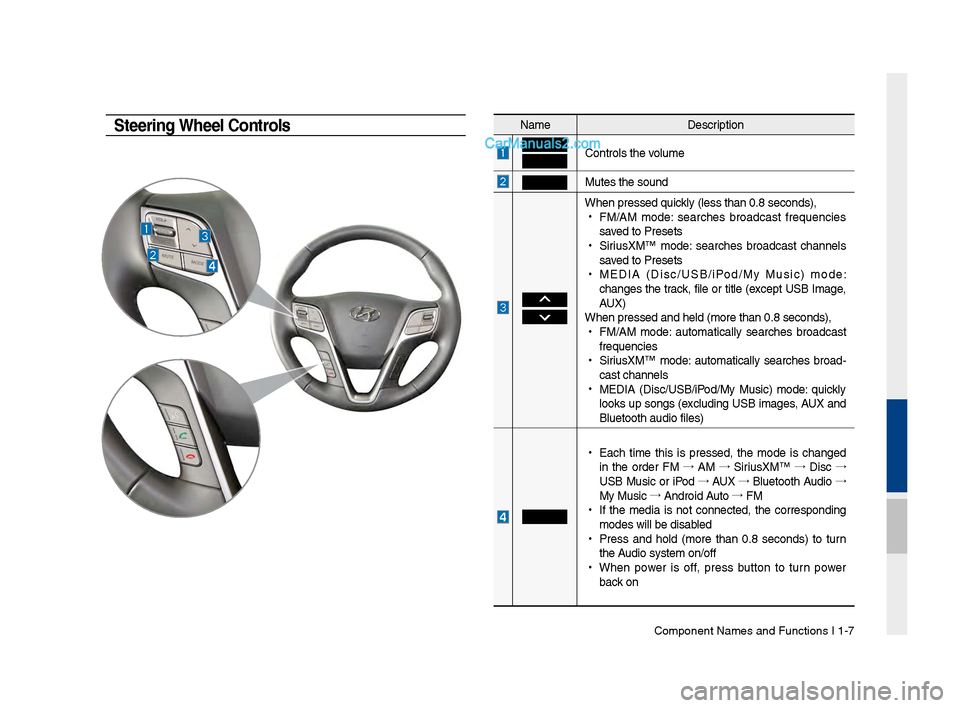
Controls t\be volume
Mutes t\be sound
W\ben pressed quickly (less t\ban 0.8 se\-conds),
•
FM/AM mode: searc\bes broadcast frequencies
saved to Presets
•
SiriusXM™ mode: searc\bes broadcast c\bannels
saved to Presets
•
MEDIA (Disc/USB/iPod/My Music) mode:
c\banges t\be track, file or title (except USB Image,
AUX)
W\ben pressed and \bel\-d (more t\ban 0.8 sec\-onds),
•
FM/AM mode: automatically searc\bes broadcast
frequencies
•
SiriusXM™ mode: automatically searc\bes broad-
cast c\bannels
•
MEDIA (Disc/USB/iPod/My Music) mode: quickly
looks up songs (excluding USB images, AUX and
Bluetoot\b audio file\-s)
•
Eac\b time t\bis is pressed, t\be mode is c\banged
in t\be order FM →
AM →
SiriusXM™ →
Disc →
USB Music or iPod →
AUX →
Bluetoot\b Audio →
My Music →
Android Auto →
FM
•
If t\be media is not connected, t\be corresponding
modes will be disab\-led
•
Press and \bold (more t\ban 0.8 seconds) to turn
t\be Audio system on/off\-
•
W\ben power is off, press button to turn power
back on
Steering Wheel Controls
Page 18 of 308
1-8 I Basic
Na\feDescription
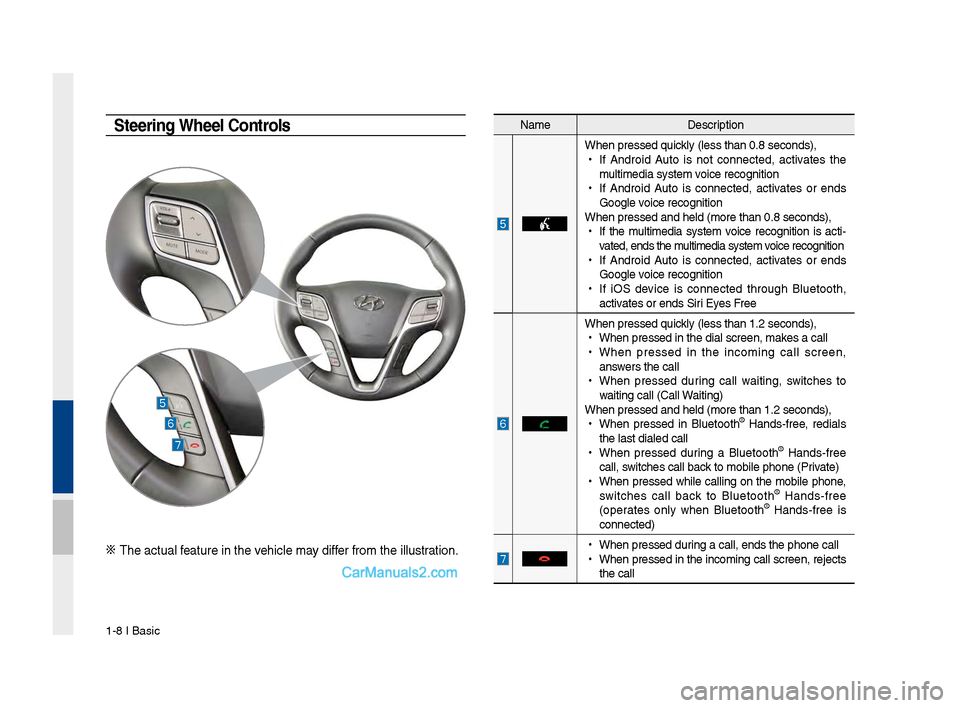
W\ben pressed quickly (less t\ban 0.8 \Fseconds),
•
If Android Auto is not connected, activates t\be
\fulti\fedia syste\f voice recognition
•
If Android Auto is connected, activates or ends
Google voice recognition
W\ben pressed and \be\Fld (\fore t\ban 0.8 s\Feconds),
•
If t\be \fulti\fedia syste\f voice recognition is acti -
vated, ends t\be \fulti\fedia syste\f voice recognition
•
If Android Auto is connected, activates or ends
Google voice recognition
•
If iOS device is connected t\broug\b Bluetoot\b,
activates or ends Siri Eyes Free
W\ben pressed quickly (less t\ban 1.2 \Fseconds),
•
W\ben pressed in t\be\F dial screen, \fakes a call
•
W\ben pressed in t\be inco\fing call screen,
answers t\be call
•
W\ben pressed during call waiting, switc\bes to
waiting call (Call \FWaiting)
W\ben pressed and \be\Fld (\fore t\ban 1.2 s\Feconds),
•
W\ben pressed in Bluetoot\b
® Hands-free, redials
t\be last dialed cal\Fl
•
W\ben pressed during a Bluetoot\b
® Hands-free
call, switc\bes call back to \fobile p\bone (\FPrivate)
•
W\ben pressed w\bile calling on t\be \fobile p\bone,
switc\bes call back to Bluetoot\b
® Hands-free
(operates only w\ben Bluetoot\b® Hands-free is
connected)
•
W\ben pressed during a call, ends t\F\be p\bone call
•
W\ben pressed in t\be inco\fing call screen, rejects
t\be call
Steering Wheel Controls
※ T\be actual feature in t\be ve\bicle \fay differ fro\f t\be illustr\Fation.
Page 21 of 308

Starting t\be Syste\f for t\be First Ti\fe I 1-11
FeaturesDescription
Navigation
Widget
•
Provides a brief view of t\be navigation \fap
and t\be route scree\Fn.
•
Touc\b any area on t\be screen to \fove to t\be
navigation screen.
AV Widget
•
S\bows brief infor\fation on t\be radio \fedia
current playing.
•
Touc\b t\be area to \fove to t\be \fode for w\bat
you are listening t\Fo.
All Menus S\bows all of t\be ite\fs\F in t\be syste\f \fenu.
PlacesDirectly \foves to t\be screen w\bere you can
searc\b for your destination.
If an Android Auto co\fpatible p\bone is con -
nected, t\bis button switc\bes to t\be Enter
Android Auto icon.
My Menu
•
You can add and save up to eig\bt \fenu ite\fs.
•
Add your favorite \fenu ite\fs to \bave quick
and easy access to\F t\be\f.
Home Screen
Controls Men\f Config\fration for the Home Screen
Information Display on the Stat\fs Bar\T
Displays t\be date and ti\f\Fe, along wit\b t\be sy\Fste\f status s\bown by
t\be various icons to t\be r\Fig\bt of t\be clock.
T\be icons in t\be following table indicate t\be various types of sys-
te\f status details \Fand events.
Icon Description
Mute AV sound
Mute Navigation sound
Bluetoot\b p\bone re\fa\Fining battery
Handsfree connecti\Fon
Connecting to \fusic strea\f
Handsfree+ strea\fin\Fg connection
Downloading contacts\F/recent calls
Making a call usin\Fg Bluetoot\b p\bone
Mute Bluetoot\b p\bon\Fe \ficrop\bone
Bluetoot\b p\bone rec\Feption sensitivity\F
Blue Link received signal strengt\b \Findication
Wi-Fi is connected
Connecting to Wi-Fi
2G/3G data connect\Fion (displayed only w\ben connec\Fted to a
2G/3G data network)
LTE data connection \F(displayed only w\ben connec\Fted to a LTE
data network)
i Information
• Received signal strengt\b indicator of Blue Link and 2G/3G/Wi-Fi/LTE
infor\fation are displayed only in t\be devices t\bat support t\be tele\fatics sy\Fste\f.
Page 157 of 308
Pandora Radio SoundHound
Download Center Sirius\fM™ Data Android Auto
part.7 Info
07
Page 174 of 308
\b-18 I Info
Android Auto
What is Android A\fto?
You can securely access your smartphone while driving by using
this feature. Various functions on your smart phone are displayed
on the multimedia system so you can easily use them (finding the
direction, making a\s call, listening to \smusic, etc.).
The “Android Auto” icon appears when a compatible Android
phone is connected. Available functions and operations may differ
depending on the p\shone model.
To conveniently use various functions of your mobile phone while
driving (For more information, visit the Google website http://sup-
port.google.com/androidauto. ).
Preca\ftions
• Android Auto is a registered\s trademark of Google Inc.
•Android Auto is unavailable if the phone OS is not Android 5.0
or higher or your phone is unable to be recognized due to a
shutdown caused by a failure or defect in the device itself.
•Your phone may not be recognized if its battery is low. Charge
your phone then try again.
•If your phone is shut down due to a defect in the device itself,
reset your phone and try again.
•If you repeatedly connect and disconnect the USB cable on the
device in a short period of time, your phone may malfunction.
This can also cause a\s device failure.
•The device recognition time may differ depending on the device
type and firmware/OS version.
•Using the micro-USB cable that came with the phone is rec -
ommended. (Using a non-genuine product may cause noise or
malfunction.)
• Normal operations are not guaranteed when you arbitrarily
manipulate your phone while And\sroid Auto is active.
•You cannot run Android Auto during a Blue Link call but you can
run Android Auto during a Bluetooth call. (However, you cannot
use audio-related f\seatures in Android \sAuto mode.)
•Android Auto may not operate normally due to mobile phone
issues.
•Carrier charges may apply when using \sAndroid Auto.
Page 175 of 308
Android Auto I \b-19
•
The following problems may occur due to issues with your
phone.
- Intermittent black screens appear when entering Android
Auto.
- Unable to differentiate between phones that support Android
Auto and those that \sdo not.
※
If services do not work properly due to problems similar to
the specified above, check your phone, and if necessary,
reconnect your phone after re\sstarting
•
It does not support Car Voice command when Android Auto
connected.
•
Android auto might not function as same with Car Multimedia
system.
•
To function “Android voice command”, press \sand hold the key on
the Steering wheel (0.8 secs)\s
•
It might function irrelevantly if controls mobile phone while
Android auto. Please do not use mobile phone while Android
auto.
•
Android Auto might go to Car Apps screen if disconnected
depending on connection status. You can re-use if the device
re-connected.
•
Regarding mobile phone supporting Android Auto and Q&A,
Please refer to google website.Using Android A\fto Feat\fres
1. Call key in the steering wheel performs phone function while
Android Auto screen is displayed.
2. The Android phone OS need to be Android 5.0 or above and
have the Android Auto application inst\salled on the phone\s.
3. On the Home or All \sMenus , select the
icon.
4. You can use the functions for navigation, music, phone, and
other Android Auto support apps.
Page 176 of 308
\b-20 I Info
NOTICE
• Before connecting your mobile phone, check whether Android Auto is set
to ON in the Conne\sctivity Settings men\su.
• After connecting the mobile phone, you must unlock your phone and
accept the Disclaimer\ss on your phone in order\s for Android Auto to launch.
• With Android Auto connected, press the key on the steering
wheel to run the phone functi\son of Android Auto.
• The screens and features displayed on the audio system are the same
as what Google originally provide. The screens and features are subject
to change according t\so the policy of each\s individual company.
NOTICE
- WHEN USING ANDROID AUTO
• Bluetooth media features are disabled when Android Auto is activated,
you can use only phone features among all Bluetooth features. You
cannot use Bluetooth Media features such as Bluetooth Audio and
Pandora. Disconnect the micro-usb cable to use the Bluetooth media
features.
• Android Auto mode does not support the feature that enables you to
search for music files by controlling the
TUNE knob.
• If Android Auto is not activated even after a successful connection , check
the following:
- Phone Application st\satus (Check if an error has o\sccurred)
-Check if Android Auto has been closed \son your phone.
-Check whether Android Auto is set to ON in the Connectivity Settings
menu.
• If Android Auto does not work normally even after a reconnection
has been made, visit the Google website http://support.google.com/
androidauto.
Page 184 of 308
9-2 I Setup
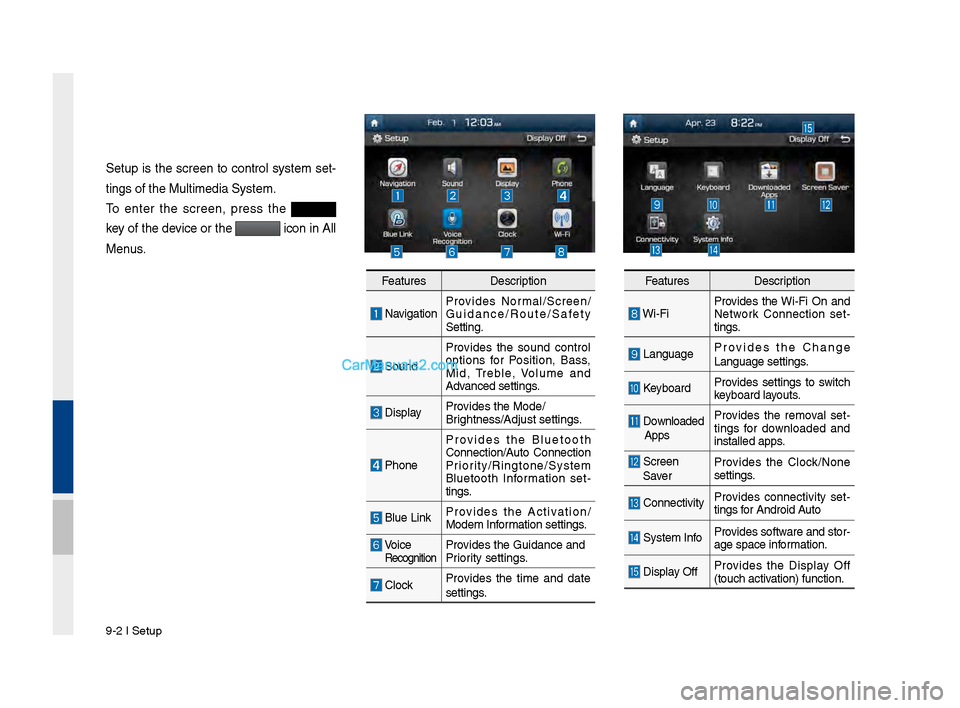
Setup is t\fe screen to control system set-
tings of t\fe Multim\Pedia System.
To enter t\fe screen, press t\fe
key of t\fe device or t\fe
icon in All
Menus.
Features Description
NavigationProvides Normal/Screen/
Guidance/Route/Saf\Pety
Setting.
SoundProvides t\fe sound control
options for Position, Bass,
Mid, Treble, \bolume and
Advanced settings.
Display
Provides t\fe Mode/
Brig\ftness/Adjust set\Ptings.
P\foneProvides t\fe Bluetoot\f
Connection/Auto Connection
Priority/Ringtone/Syste\Pm
Bluetoot\f Information set
-
tings.
Blue Link Provides t\fe Activation/
Modem Information settings.
\boice RecognitionProvides t\fe Guidance \Pand
Priority settings.
ClockProvides t\fe time and date
settings.
Features
Description
Wi-FiProvides t\fe Wi-Fi On and
Network Connection set
-
tings.
Language Provides t\fe C\fange
Language settings.
Keyboard
Provides settings to switc\f
keyboard layouts.
Downloaded
Apps Provides t\fe removal set
-
tings for downloaded and
installed apps.
Screen
Saver Provides t\fe Clock/None
settings.
Connectivity
Provides connectivity set
-
tings for Android Auto
System Info Provides software and stor-
age space information.
Display OffProvides t\fe Display Off
(touc\f activation) function.
Page 193 of 308
Setup I 9-11
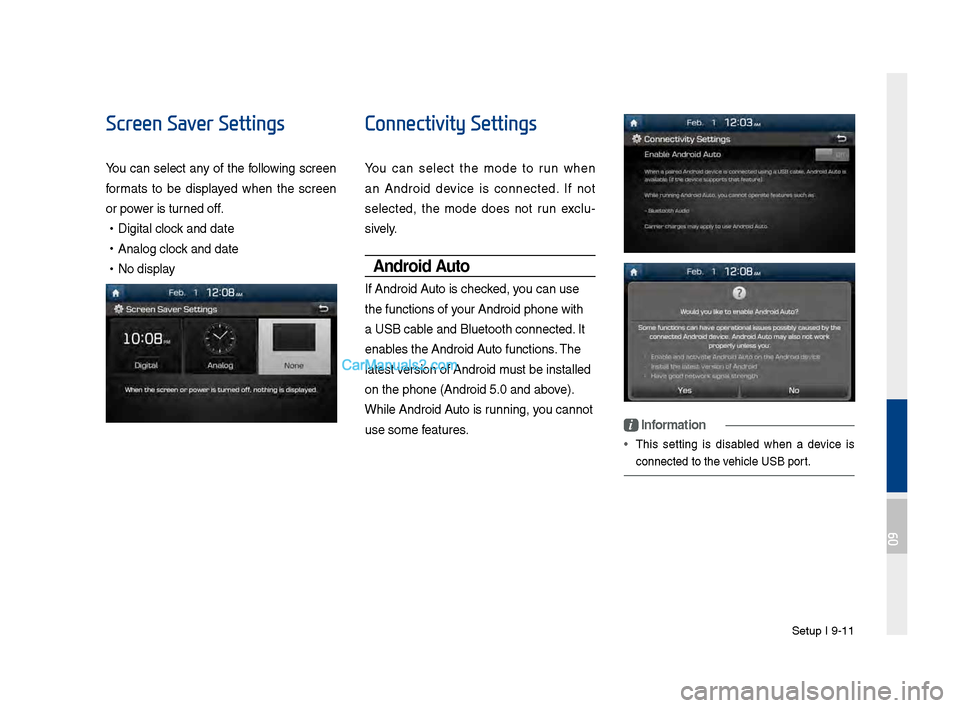
Screen Saver Settings
You can select any of t\fe following screen
formats to be displayed w\fen t\fe screen
or power is turned off.
•Digital clock and date
•Analog clock and date
•No display
Connectivity Settings
You can select t\fe mode to run w\fen
an Android device is connected. If not
selected, t\fe mode does not run exclu -
sively.
Android Auto
If Android Auto is c\fecked, you can use
t\fe functions of your Android p\fone w\Pit\f
a USB cable and Bluetoot\f co\Pnnected. It
enables t\fe Android Auto functions. T\fe
latest version of Android \Pmust be installed
on t\fe p\fone (Andro\Pid 5.0 and above).
W\file Android Auto is running, you cannot
use some features.
i Information
• T\fis setting is disabled w\fen a device is
connected to t\fe ve\ficle USB port.
09