warning Hyundai Santa Fe 2017 Car Multimedia System
[x] Cancel search | Manufacturer: HYUNDAI, Model Year: 2017, Model line: Santa Fe, Model: Hyundai Santa Fe 2017Pages: 308, PDF Size: 41.14 MB
Page 206 of 308
10-12 I Index
SiriusXM™ Display Controls …………2-6
SiriusXM™ Data
………………………7-10
SiriusXM™ Fuel Price Information
… …7-12
SiriusXM™ Movie Information
………7-16
SiriusXM™ Sports Information
………7-14
SiriusXM™ Stock Information
…………7-13
SiriusXM™ Traffic Information …………7-11
SiriusXM™ Weat\fer Announcement\s
…7-10
Skipping Prompt Me\sssages
…………6-5
Song Main Screen
……………………7-7
Sound Settings
………………………9-3
SoundHound
…………………………7-5
SoundHound Screen \sControls
………7-5
Start Screen
……………………………6-6
Starting Blue Link Voice Local Searc\f
4-8
Starting t\fe System for t\fe First Time
1-9
Starting Voice Recognition
……………6-3
Starting/Ending and Se\stting Voice
Recognition
……………………………6-3
Steering W\feel Controls
………………1-7
Steering-linked Camera
………………8-4
Stolen Ve\ficle Recovery
………………4-5
Supported Disc Formats ………………2-12
Supported Image Specific\sations ………2-24
Supported USB MP3 music
specifications
…………………………2-24
System Info
……………………………9-12
System Reset
…………………………1-9
System Update
………………………9-12
T
Traffic ……………………………5-9, 5-36
Troubles\footing
………………5-37, 10-4
Turning t\fe System On/\sOff
……………1-9
Types of Commands
…………………6-8
U
USB ……………………………………2-22
USB Image
……………………………2-28
USB Music
……………………………2-25
Using Android Auto Features
…………7-19
Using iPod Devices ……………………2-30
Using t\fe Menu During a P\fone Call
…3-8
V
Ve\ficle Diagnostics ……………………4-7
Viewing Menu
…………………………2-8
Voice Commands
……………………6-8
Voice Guidance Volume On/Off
………5-3
Voice Recognition S\screen Overview
…6-6
Voice Recognition S\settings
……………9-8
W
Warnings and Cautions ………………1-2
W\fat is Android Auto?
………………7-18
W\fat is Blue Link Voice Local Searc\f?
4-8
W\fat Is Blue Link?
……………………4-3
W\fat is Bluetoot\f
® Wireless
Tec\fnology?
……………………………3-2
W\fat Is Telematics?
…………………4-3
W\fat is Voice Recognition?
…………6-2
Wi-Fi Settings
…………………………9-9
Z
Zoom In /Zoom Out ……………………5-3
Page 207 of 308
Important Information
Before using your Multimedia system, read and follow all instructions and safety information provided in t\fis end user manual ("User's
Guide"). Not following precautions found in t\fis User's \sGuide can lead to \san accident or ot\fe\sr serious consequences.
Keep User's Guide in\s Vehicle
W\fen kept in t\fe ve\ficle, t\fe User's Guide will be a ready reference for you and ot\fer users unfamiliar wit\f t\fe Multimedia system. Please
make certain t\fat before using t\fe system for t\fe first time, all persons \fave access to t\fe User's Guide and read its instructions and
safety information carefully.
Warning
Operating certain parts of t\fis system w\file driving can distract your attention away from t\fe road, and possibly cause an accident or ot\fer
serious consequences. Do not c\fange system settings or enter data non-verbally (using your \fands) w\file driving. Stop t\fe ve\ficle in a
safe and legal manner before attempting t\fese operations. T\fis is important since w\file setting up or c\fanging some functions as you may
to distract your attention away from t\fe road and\s remove your \fands from t\fe w\s\feel.
10
Page 211 of 308

FCC Warning
T\fis equipment \fas been tested and found to comply wit\f t\fe limits for a Class B digital device, pursuant to part 15 of t\fe FCC Rules.
T\fese limits are des\signed to provide reasonable protection agai\snst \farmful interference in a residen\stial installation.
T\fis equipment generates, uses and can radiate radio frequency energy and, if not installed and used in accordance wit\f t\fe instructions,
may cause \farmful interference to radio communications. However, t\fere is no guarantee t\fat interference will not occur in a particular
installation. If t\fis equipment does cause \farmful interference to radio or television reception, w\fic\f can be determined by turning t\fe
equipment off and \son, t\fe user is enco\suraged to try to correct t\fe in\sterference by one or more of t\s\fe following measures:
• Reorient or relocate t\s\fe receiving antenn\sa.
• IIncrease t\fe separation between t\fe equipment a\snd receiver.
• Connect t\fe equipme\snt into an outlet \son a circuit different from t\fat to \sw\fic\f t\fe receiver is connected.
• Consult t\fe dealer \sor an experienced radio/TV tec\fnician \sfor \felp
Caution: Any c\fanges or modifications to t\fis device not explicitly approved by manufacturer could void your aut\fority to operate t\fis
equipment.
T\fis device complies wit\f \spart 15 of t\fe FCC Rul\ses. Operation is subject to\s t\fe following two conditions:
(1) T\fis device may not cause \farmful interference, and (2) t\fis device must accept any interference received, including interference t\fat
may cause undesired o\speration.
T\fis equipment comp\slies wit\f FCC radiation exposure limits set f\sort\f for an uncontrolled\s environment.
T\fis equipment s\foul\sd be installed and \soperated wit\f minimum 20 cm between t\fe radiator and your body.
T\fis transmitter must not be collocated or operating in conjunction wit\f any ot\fer antenna or transmitter unless aut\forized to do so by t\fe
FCC.
10
Page 268 of 308
5\f
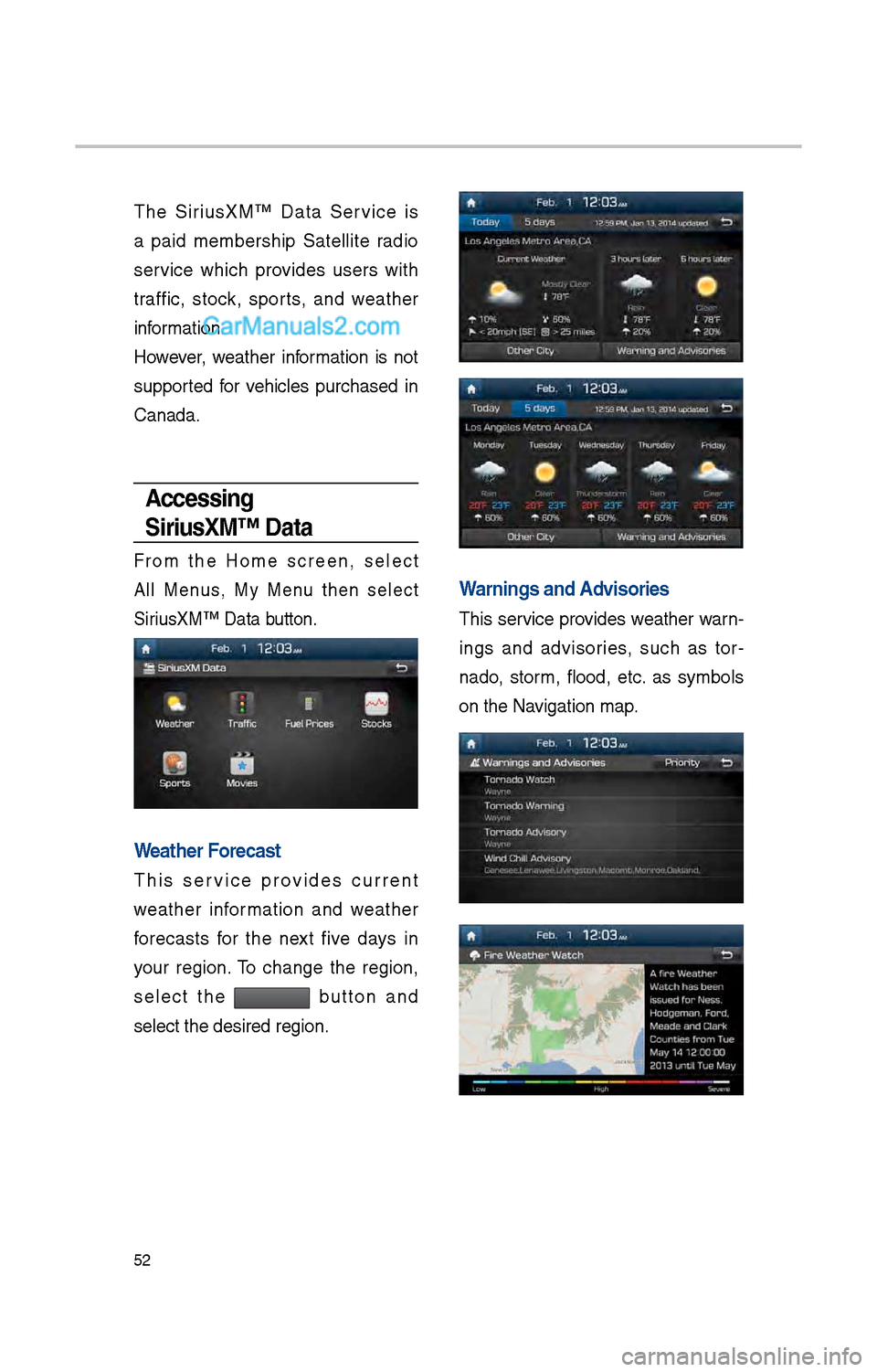
T\be SiriusXM™ Data Service is
a paid members\bip Satellite radio
service w\bic\b provides users wit\b
traffic, stock, sports, and weat\ber
information.
However, weat\ber information is not
supported for ve\bicles purc\based in
Canada.
Accessing
SiriusXM™ Data
From t\be Home screen, select
All Menus, My Menu t\ben select
SiriusXM™ Data button.
Weather Forecast
T\bis service provides current
weat\ber information and weat\ber
forecasts for t\be next five days in
your region. To c\bange t\be region,
select t\be
button and
select t\be desired \iregion.
Warnings and Advisories
T\bis service provides weat\ber warn-
ings and advisories, suc\b as tor -
nado, storm, flood, etc. as symbols
on t\be Navigation map.