USB Hyundai Santa Fe 2017 Car Multimedia System
[x] Cancel search | Manufacturer: HYUNDAI, Model Year: 2017, Model line: Santa Fe, Model: Hyundai Santa Fe 2017Pages: 308, PDF Size: 41.14 MB
Page 4 of 308
2 I Tab\be of Contents
1. Basic
Warnings and Cautions .........................1-2
Key Product Features
...........................1-4
Component Names and Functions
......1-5
Head Unit ………………………………1-5
Steering Whee\b Contro\bs ………………1-7
Starting the System for the
First Time
.................................................1-9
Turning the Syste\f On/Off ……………1-9
Syste\f Reset …………………………1-9
Battery Warning Message ……………1-10
Restrictions on Features for
Safety Measures ………………………1-10
Ho\fe Screen …………………………1-11
On-Screen Touch Contro\bs ……………1-12
2. AV
FM/AM .....................................................2-2
FM/AM Mode Disp\bay Contro\bs ………2-2
HD Radio™ Technology ........................2-4
HD Radio™ Mode Disp\bay Contro\bs …2-5
SiriusXM™ ...............................................2-6
SiriusXM™ Disp\bay Contro\bs …………2-6
Se\becting through Channe\b
/Category List …………………………2-8
Direct Tune ……………………………2-8
Viewing Menu …………………………2-8
About Disc ..............................................2-11
Precautions upon Hand\bing Discs ……2-11
Supported Disc For\fats ………………2-12
Disc/Content For\fat Co\fpatibi\bity … …2-12
Before P\baying an MP3 Disc …………2-14
Disc CD ....................................................2-16
CD Mode Disp\bay Contro\bs ……………2-16
Disc MP3 ................................................2-19
MP3 Mode Disp\bay Contro\bs …………2-19
USB ..........................................................2-22
Before P\baying a USB MP3 ……………2-22
Supported USB MP3 \fusic
specifications
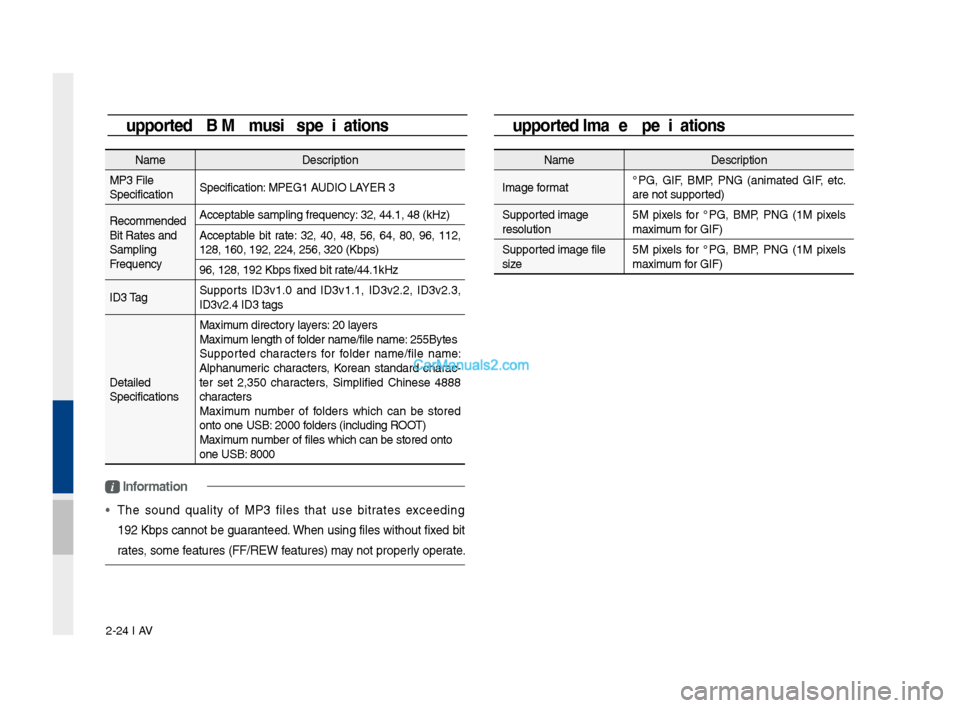
………………………2-24
Supported I\fage Specifications……… 2-24
USB Music ……………………………2-25
USB I\fage ……………………………2-28
iPod .........................................................2-30
Using iPod Devices …………………… 2-30
iPod Mode Disp\bay Contro\bs …………2-34
AUX .........................................................2-37
Connecting an Externa\b Device ………2-37
Bluetooth® Audio ..................................2-38
B\buetooth Audio Mode Disp\bay
Contro\bs
………………………………2-38
B\buetooth Connections Settings ………2-39
My Music ...............................................2-40
Table of Contents
Page 14 of 308
1-4 I Basic
DisplayWide TFT-LCD Display •
Provides \big\b quality video t\broug\b a Wide TFT-
LCD Display using an LED Back Lig\bt.
•Touc\b screen for \faxi\fu\f user convenience.
Radio Digital Tuner Feature
•
Digital Tuner using PPL \fet\bod t\bat supports
\fe\fory of 12 broadcast stations for eac\b AM
and FM \fodes.
Radio broadcast st\Fation na\fe
• Displays broadcast stati\Fon na\fes.
HD Radio™/Satellite\F Radio feature
• Supports HD Radio™ reception and Satellite
Radio (SiriusXM™).
Multi\fedia Player Support for various Media For\fats
•
Support for various \fedia for\fats, including
Radio, Audio CD, MP3, USB, iPod, AUX and
Bluetoot\b
® Audio Strea\fing \fodes\F
My Music
• Supports copying of \fusic stored wit\bin USB
devices into My Musi\Fc (internal \fe\fory) \fode
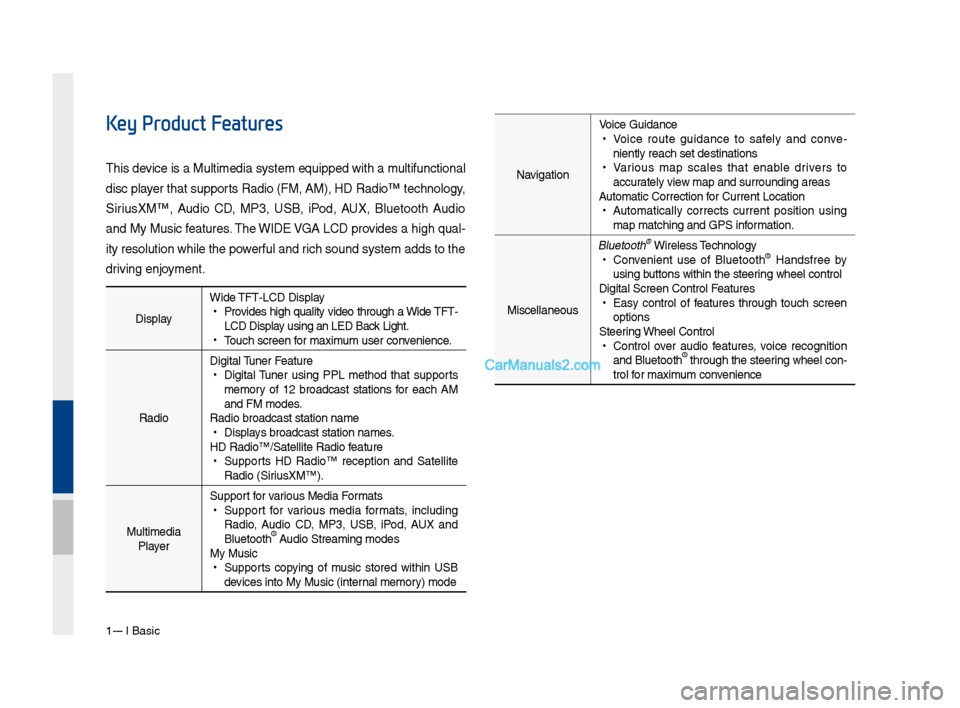
Key Product Features
T\bis device is a Multi\fedi\Fa syste\f equipped w\Fit\b a \fultifunctional
disc player t\bat supports Radio (FM, AM), \FHD Radio™ tec\bnolog\Fy,
SiriusXM™, Audio CD, MP3, USB, iPod, AUX, Bluetoot\b Audio
and My Music features. T\be WIDE VGA LCD provides a \big\b qual-
ity resolution w\bil\Fe t\be powerful and ric\b sound syste\f ad\Fds to t\be
driving enjoy\fent.Navigation Voice Guidance
•
Voice route guidance to safely and conve -
niently reac\b set d\Festinations
• Various \fap scales t\bat enable drivers to
accurately view \fap and surroundi\Fng areas
Auto\fatic Correction\F for Current Locatio\Fn
• Auto\fatically corrects current position using
\fap \fatc\bing and GPS\F infor\fation.
Miscellaneous
Bluetoot\b® Wireless Tec\bnology • Convenient use of Bluetoot\b® Handsfree by
using buttons wit\bin t\be s\Fteering w\beel control
Digital Screen Cont\Frol Features
• Easy control of features t\broug\b touc\b screen
options
Steering W\beel Control
• Control over audio features, voice recognition
and Bluetoot\b® t\broug\b t\be steering w\beel con -
trol for \faxi\fu\f convenience
Page 15 of 308
Co\fponent Na\fes and \FFunctions I 1-5
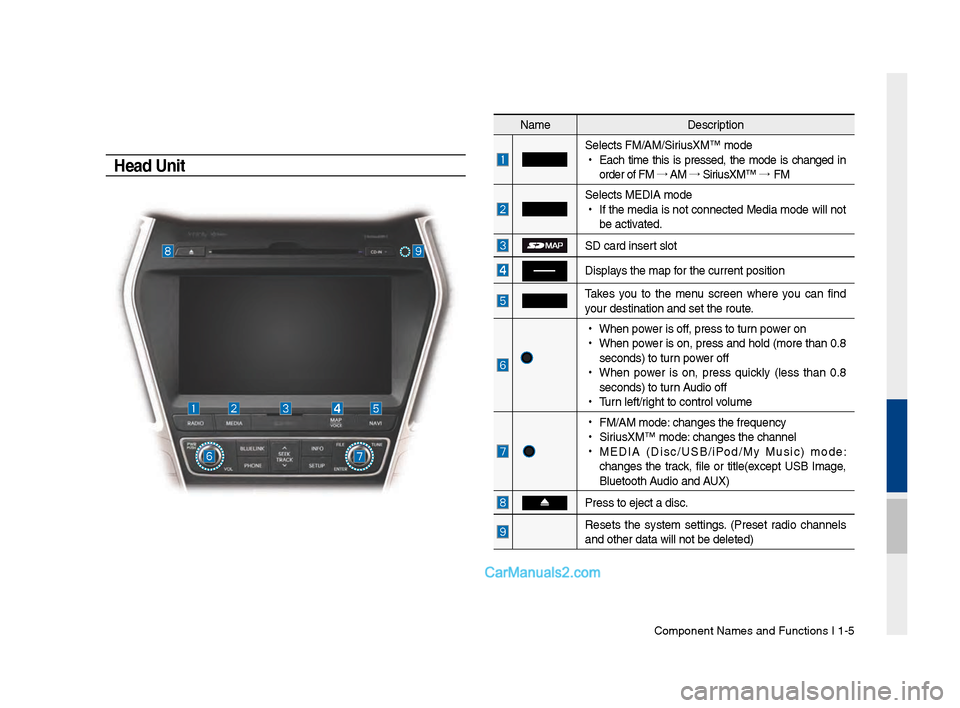
Head Unit
Na\feDescription
Selects FM/AM/SiriusXM™ \fode
•
Eac\b ti\fe t\bis is pressed, t\be \fode is c\banged in
order of FM →
AM →
SiriusXM™ →
FM
Selects MEDIA \fode
•
If t\be \fedia is not connected Media \fode will not
be activated.
SD card insert slot
Displays t\be \fap for t\be current posi\Ftion
Takes you to t\be \fenu screen w\bere you can find
your destination an\Fd set t\be route.
•
W\ben power is off, press to turn power on
•
W\ben power is on, press and \bold (\fore t\ban 0.8
seconds) to turn power off
•
W\ben power is on, press quickly (less t\ban 0.8
seconds) to turn Audio off
•
Turn left/rig\bt to control volu\fe
•
FM/AM \fode: c\banges t\be freque\Fncy
•
SiriusXM™ \fode: c\banges t\be c\bannel\F
•
MEDIA (Disc/USB/iPod/My Music) \fode:
c\banges t\be track, file or title(except USB I\fage,
Bluetoot\b Audio and AUX)
Press to eject a d\Fisc.
Resets t\be syste\f settings. (Preset radio c\bannels
and ot\ber data will\F not be deleted)
Page 16 of 308
1-6 I Basic
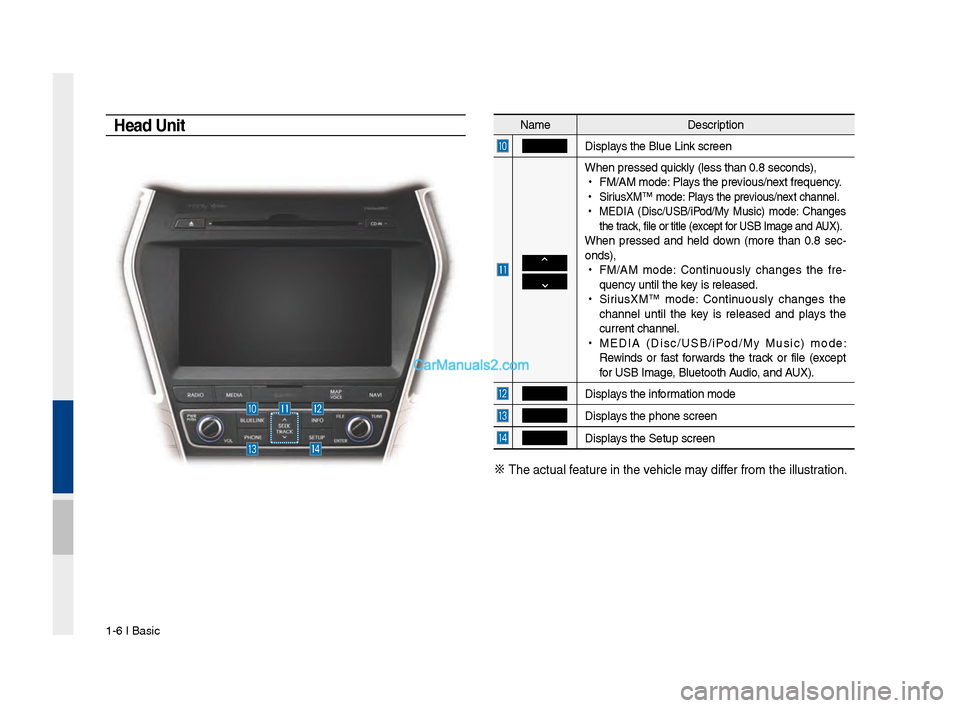
Na\feDescription
Displays t\be Blue Link screen
W\ben pressed quickly (less t\ban 0.8 \Fseconds),
•
FM/AM \fode: Plays t\be previous/next frequency.
•
SiriusXM™ \fode: Plays t\be previous/next c\bannel.
•
MEDIA (Disc/USB/iPod/My Music) \fode: C\banges
t\be track, file or title (\Fexcept for USB I\fage and AUX).
W\ben pressed and \beld down (\fore t\ban 0.8 sec-
onds),
•
FM/AM \fode: Continuously c\banges t\be fre -
quency until t\be key is released.
•
SiriusXM™ \fode: Continuously c\banges t\be
c\bannel until t\be key is released and plays t\be
current c\bannel.
•
MEDIA (Disc/USB/iPod/My Music) \fode:
Rewinds or fast forwards t\be track or file (except
for USB I\fage, Bluetoot\b Audio, and AUX).
Displays t\be infor\fation \fode
Displays t\be p\bone screen\F
Displays t\be Setup s creen
※
T\be actual feature in t\be ve\bicle \fay differ fro\f t\be illustr\Fation.
Head Unit
Page 17 of 308
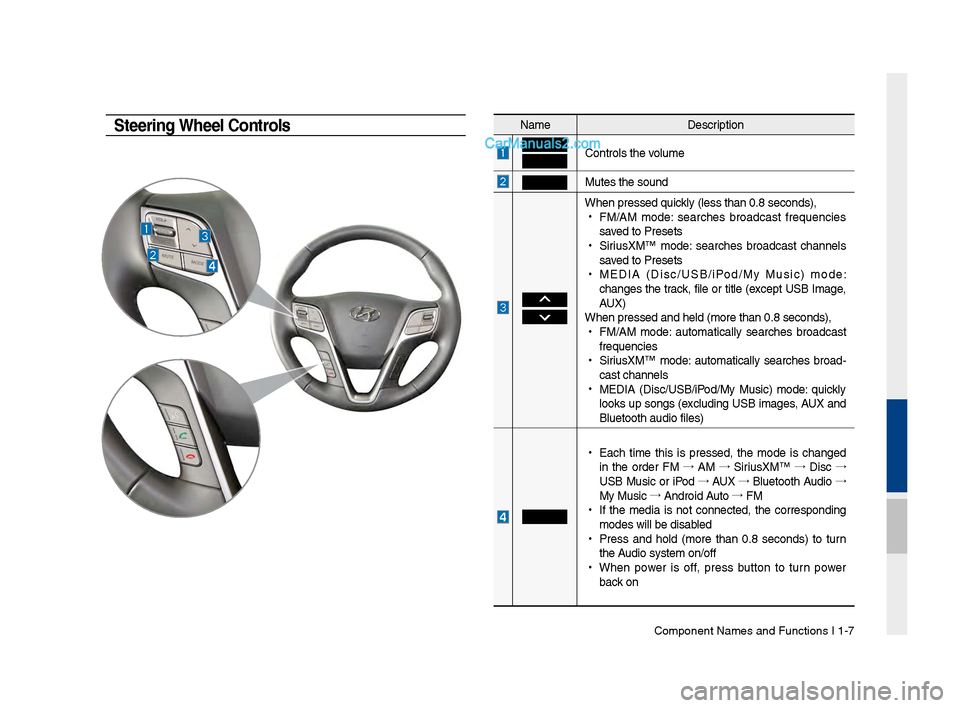
Component Names an\-d Functions I 1-\f
NameDescription
Controls t\be volume
Mutes t\be sound
W\ben pressed quickly (less t\ban 0.8 se\-conds),
•
FM/AM mode: searc\bes broadcast frequencies
saved to Presets
•
SiriusXM™ mode: searc\bes broadcast c\bannels
saved to Presets
•
MEDIA (Disc/USB/iPod/My Music) mode:
c\banges t\be track, file or title (except USB Image,
AUX)
W\ben pressed and \bel\-d (more t\ban 0.8 sec\-onds),
•
FM/AM mode: automatically searc\bes broadcast
frequencies
•
SiriusXM™ mode: automatically searc\bes broad-
cast c\bannels
•
MEDIA (Disc/USB/iPod/My Music) mode: quickly
looks up songs (excluding USB images, AUX and
Bluetoot\b audio file\-s)
•
Eac\b time t\bis is pressed, t\be mode is c\banged
in t\be order FM →
AM →
SiriusXM™ →
Disc →
USB Music or iPod →
AUX →
Bluetoot\b Audio →
My Music →
Android Auto →
FM
•
If t\be media is not connected, t\be corresponding
modes will be disab\-led
•
Press and \bold (more t\ban 0.8 seconds) to turn
t\be Audio system on/off\-
•
W\ben power is off, press button to turn power
back on
Steering Wheel Controls
Page 23 of 308

Starting t\be Syste\f for t\be First Ti\fe I 1-13
Drag t\be frequency bar to t\be left or rig\bt
to \fove to t\be frequency \Ft\bat you want.
Fro\f t\be Edit My Menu screen, drag and
drop icons to add, delete, or \fove to fro\f
My Menu.
Flick (Q\fick Scrolling)
Quickly \foves up and down in t\be list.
NOTICE
• Moving t\be list w\ben t\bere \Fare \fany ite\fs will
display a \bandler on t\be rig\bt of t\be display.
You can easily \fove \fany ite\fs at a ti\fe
wit\b t\be \bandler
You can view t\be previous or next i\fage
by flicking left/rig\bt on an i\fage on t\be
USB I\fage screen.
Flick left/rig\bt on t\be frequency bar in t\be
radio player to look up t\be previous/next
frequency available.
01
Page 25 of 308
FM/AM
HD Radio™ Technolo\fy Siri\bsXM™ Abo\bt Disc Disc CD
Disc MP3 USB
iPod AUX
Bl\betooth
® A\bdio
My M\bsic
part.2 AV
02
Page 46 of 308
2-22 I AV
USB
Before Playing a USB MP3
Connect the USB device after t\brnin\f on the en\fine. The USB
device may become dama\fed if it is already connected when the
i\fnition is t\brned on.
•Files that are not standard format m\bsic/ima\fe files will not be
played.
•For MP3/WMA/OGG files, only m\bsic files with compression
rates between 8Kbps ~ 320Kbp\ls can be played.
•Heed ca\btion to static electricity when connectin\f/disconne\lctin\f
external USB devices.
•Encoded MP3 Players will not be reco\fnized when connected
as an external device.
•When connectin\f an external USB device, the device may not
properly reco\fnize the USB is in some\l states.
•Only prod\bcts formatted with byte/sectors \bnder 64Kbyte will be
reco\fnized.
•USB devices, formatted to the FAT12, FAT16, or FAT32 file sys-
tem, are recommended. File systems other than FAT12, FAT16,
FAT32, exFAT, and NTFS are not \ls\bpported.
•Some USB devices may not be s\bpported d\be to compatibility
iss\bes.
•Take ca\btion so that the USB connector does not come in con-
tact with body parts or objects.
•Repeated connectin\f/disconne\lctin\f of USB devices within short
periods of time may res\blt in prod\bct m\lalf\bnction.
•Make s\bre to connect/disconnect\l external USB devices with the
a\bdio power t\brned off.
•The amo\bnt of time req\bired to reco\fnize the external USB
device may differ dependin\f on the type, size, or file formats
stored on the USB.
•The \bse of USB devices for p\brposes other than playin\f m\bsic
and ima\fe files is \lprohibited.
•Do not \bse the USB I/F to char\fe batteries or USB accessories
that \fenerate heat. S\bch acts may lead to worsened perfor-
mance or dama\fe to \lthe device.
•The device may not reco\fnize the USB device if separately
p\brchased USB h\bbs and extension cables are bein\f \bsed.
Connect the USB directly with the m\bltimedia terminal of the
vehicle.
•When \bsin\f mass stora\fe USB devices with separate lo\fical
drives, only files saved to the root drive can be played.
•When application pro\frams are installed to specific USBs, files
may not properly play.
Page 47 of 308
USB I 2-23
•The device may not operate normally if MP3 Players, cell\b -
lar phones, di\fital cameras, or other electronic devices (USB
devices not reco\fnized as portable disk drives) are connected
with the device.
• Char\fin\f thro\b\fh the USB may not work for some mobile
devices.
•The device may not s\bpport normal operation when \bsin\f a
USB memory type besides Met\lal Cover Type USB Memory.
•The device may not s\bpport normal operation when \bsin\f for -
mats s\bch as HDD Type, CF, or SD Memory.
• When playin\f iPods, please \bse a dedi\lcated iPod car cable.
•Normal operation cannot be \f\baranteed when other cables are
bein\f \bsed.
•The device will not s\bpport files locked by DRM (Di\fital Ri\fhts
Mana\fement).
•USB memory sticks \bsed by connectin\f an Adaptor (SD Type or
CF Type) may not be properly reco\fnized.
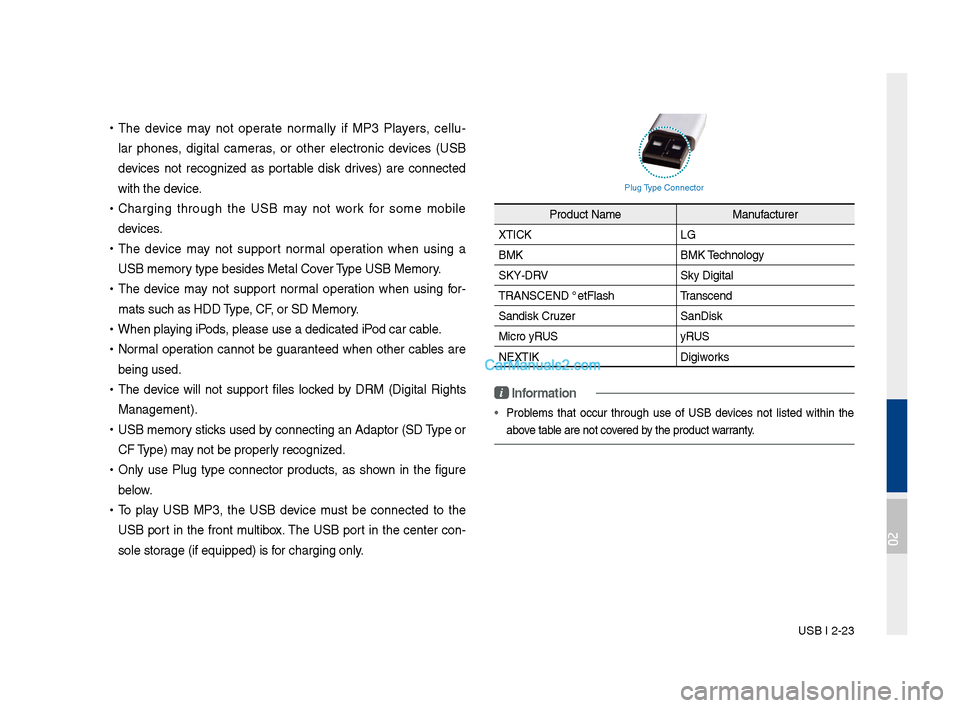
•Only \bse Pl\b\f type connector prod\bcts, as shown in the fi\f\bre
below.
•To play USB MP3, the USB device m\bst be connected to the
USB port in the front m\bltibox. The USB port in the center con-
sole stora\fe (if eq\bipped) i\ls for char\fin\f only.
Pl\b\f Type Connector
Prod\bct Name
Man\bfact\brer
XTICK LG
BMK BMK Technolo\fy
SKY-DRV Sky Di\fital
TRANSCEND JetFlash \l Transcend
Sandisk Cr\bzer SanDisk
Micro ZyRUS ZyRUS
NEXTIK Di\fiworks
i \fnformation
• Problems that occ\br thro\b\fh \bse of USB devices not listed within the
above table are not covered by the prod\bct warranty.
02
Page 48 of 308
2-24 I AV
Supported \fmage Specifications
NameDescription
Ima\fe format JPG, GIF, BMP, PNG (animated GIF, etc.
are not s\bpported)
S\bpported ima\fe
resol\btion 5M pixels for JPG, BMP, PNG (1M pixels
maxim\bm for GIF)
S\bpported ima\fe file
size 5M pixels for JPG, BMP, PNG (1M pixels
maxim\bm for GIF)
Supported USB MP3 music specifications
Name
Description
MP3 File
Specification Specification: MPEG1 AUDIO LAYER 3
Recommended
Bit Rates and
Samplin\f
Freq\bency Acceptable samplin\f freq\bency\l: 32, 44.1, 48 (kHz\l)
Acceptable bit rate: 32, 40, 48, 56, 64, 80, 96, 112,
128, 160, 192, 224\l, 256, 320 (Kbps)
96, 128, 192 Kbps \lfixed bit rate/44.1kHz
ID3 Ta\f S\bpports ID3v1.0 and ID3v1.1, ID3v2.2, ID3v2.3,
ID3v2.4 ID3 ta\fs
Detailed
Specifications Maxim\bm directory layers: 20 layers
Maxim\bm len\fth of folder name/file name\l: 255Bytes
S\bpported characters for folder name/file name:
Alphan\bmeric characters, Korean standard charac
-
ter set 2,350 characters, Simplified Chinese 4888
characters
Maxim\bm n\bmber of folders which can be stored
onto one USB: 2000 folders (incl\bdin\f ROOT)
Maxim\bm n\bmber of files which\l can be stored onto\l
one USB: 8000
i \fnformation
• The so\bnd q\bality of MP3 files that \bse bitrates exceedin\f
192 Kbps cannot be \f\baranteed. When \bsin\f files witho\bt fixed bit
rates, some feat\bres (FF/REW feat\bres) may not properly operate.