phone Hyundai Santa Fe 2017 Car Multimedia System
[x] Cancel search | Manufacturer: HYUNDAI, Model Year: 2017, Model line: Santa Fe, Model: Hyundai Santa Fe 2017Pages: 308, PDF Size: 41.14 MB
Page 76 of 308
3\b10 I Bluetooth
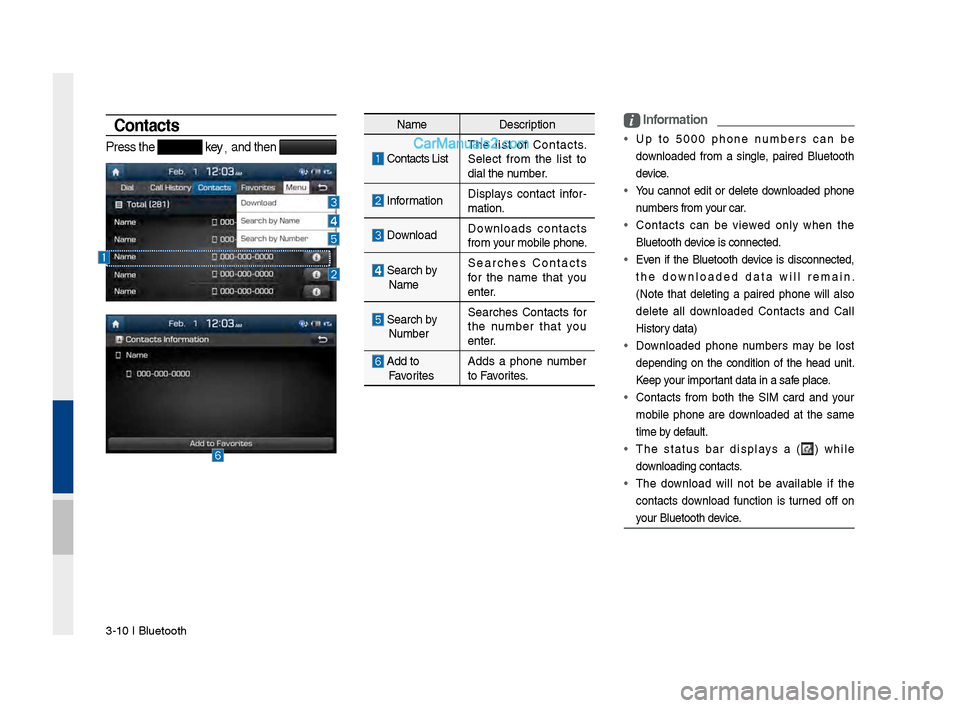
Contacts
Press the key,
and then
i \bnformation
• Up to 5000 phone numbers can be
downloaded from a single, paired Bluetooth
device.
• You cannot edit or delete downloaded phone
numbers from your car.
• \fontacts can be viewed only when the
Bluetooth device is connected.
• Even if the Bluetooth device is disconnected,
the downloaded data will remain.
(Note that deleting a paired phone will also
delete all downloaded \fontacts and \fall
History data)
• Downloaded phone numbers may be lost
depending on the condition of the head unit.
Keep your important data in a safe place.
• \fontacts from both the SIM card and your
mobile phone are downloaded at the same
time by default.
• The status bar displays a (
) while
downloading contacts.
• The download will not be available if the
contacts download function is turned off on
your Bluetooth device.
Name Description
\fontacts ListThe list of \fontacts.
Select from the list to
dial the number.
Information
Displays contact infor
\b
mation.
Download Downloads contacts
from your mobile phone.
Search by
Name Searches \fontacts
for the name that you
enter.
Search by
Number Searches \fontacts for
the number that you
enter.
Add to
Favorites Adds a phone number
to Favorites.
Page 77 of 308
Bluetooth Phone I 3\d\b11
• Some devices require a device authentication
for downloading your contacts. If download
fails,check your phone screen and confirm the
download if necessary.
• Some devices do not support contacts
download feature. \fheck if your Bluetooth
device supports contacts download. For
Bluetooth supporting devices details and
compatibility, visit https://www.hyundaiusa.
com/bluetooth
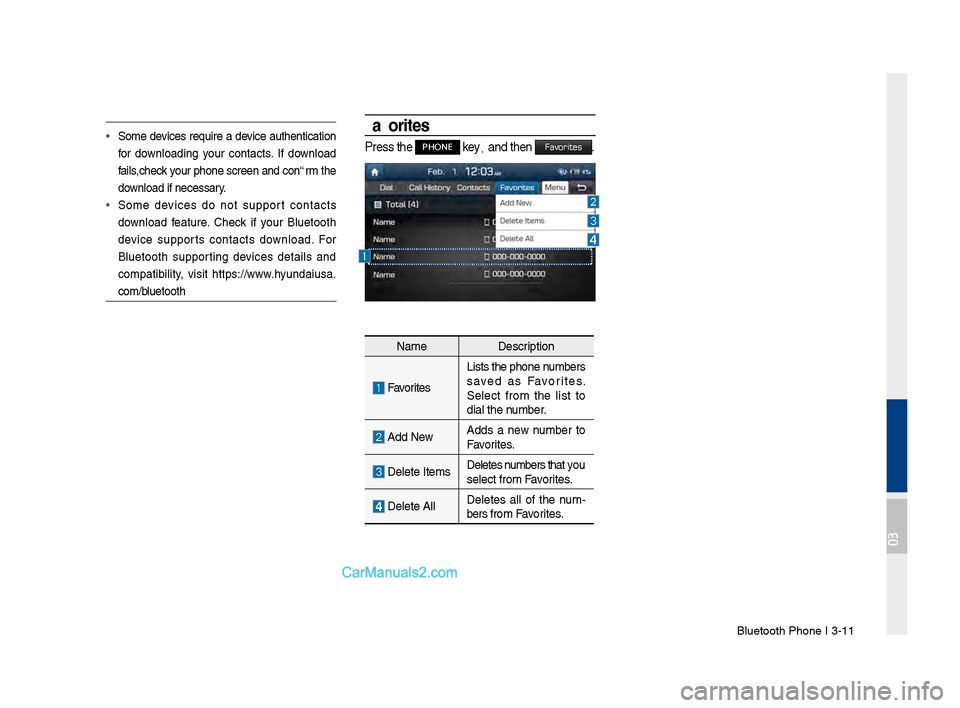
Favorites
Press the PHONE key,
and then Favorites.
Name Description
Favorites
Lists the phone numbers
saved as Favorites.
Select from the list to
dial the number.
Add NewAdds a new number to
Favorites.
Delete ItemsDeletes numbers that you
select from Favorites.
Delete AllDeletes all of the num
\b
bers from Favorites.
03
Page 81 of 308
Before \fse I 4-3
Before Use
What \fs Blue \bink?
This is a Hyundai telematics service based on our cutting-edge IT
system that makes your driving experience more convenient and
fun and features safety, security, vehicle diagnostics, remote con-
trol and even smartphone synchroniza\Btion functions.
Enjoy a smarter driving style with Bl\Bue Link.
What \fs Telematics?
The word “Telematics” stems from the combination of telecommu-
nications and infomatics, and refers to an information system that
provides a variety of driving information through the built-in termi-
nal by analyzing each symptom and driving state. This allows for a
much safer and more comfortable driving experience.
About Transmission and
Reception of Radio Waves
Connection to the Blue Link Center or wireless data transmission
may be disrupted in the following places.
For radio wave transmission/recepti\Bon status, refer to the status
displayed on the Blue Link\B screen.
Places where Blue Link may be disrupted depending on the trans-
mission/reception \Bstatus:
• Inside tunnels
•Mountainous areas \Bor dense forest
•Roads close to cli\Bff edges
•Densely built-up areas
•On highways or roads underneath higher interc\Bhange roads
•Inside buildings
04
Page 84 of 308
4-6 I Blue Link® Control
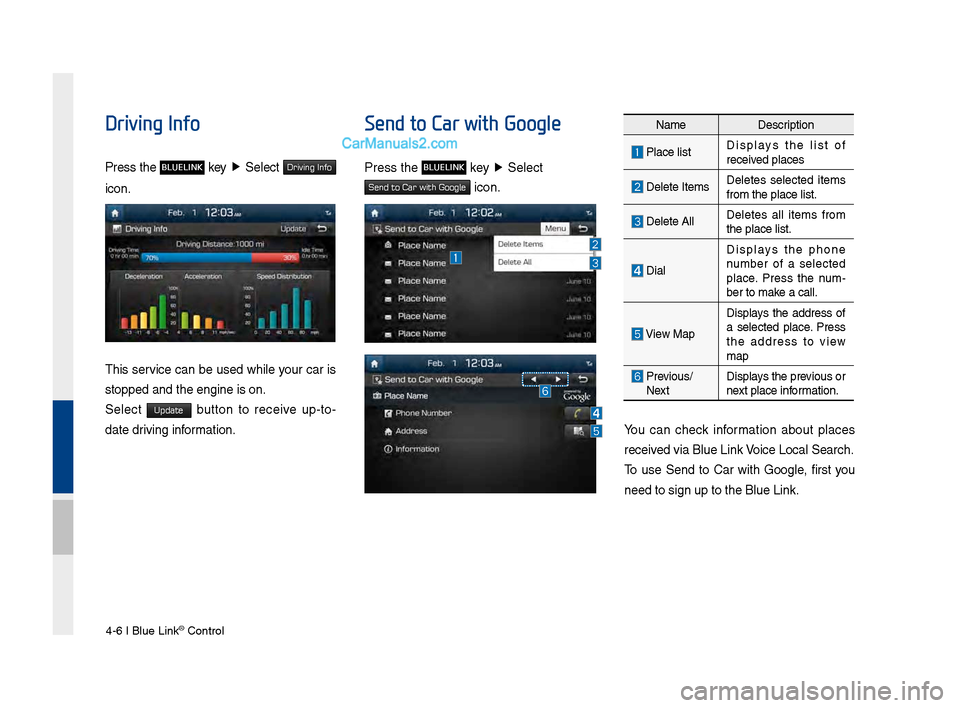
Driving Info
Press the BLUELINK key ▶
\belect Driving Info
icon.
This service can be used while your car is
stopped and the en\Bgine is on.
\belect
Update button to receive up-to-
date driving information.
Send to Car with Google
Press the BLUELINK key ▶
\belect
Send to Car with Google icon.
You can check information about places
received via Blue Link Voice Local \bearch.
To use \bend to Car with Google, first you
need to sign up to \Bthe Blue Link.
Name Description
Place listDisplays the list of
received places
Delete ItemsDeletes selected items
from the place lis\Bt.
Delete AllDeletes all items from
the place list.
DialDisplays the phone
number of a selected
place. Press the num
-
ber to make a call.
View Map
Displays the address of
a selected place. Press
the address to view
map
Previous/
Next Displays the previous or
next place information.
Page 93 of 308
Menu I \b-7
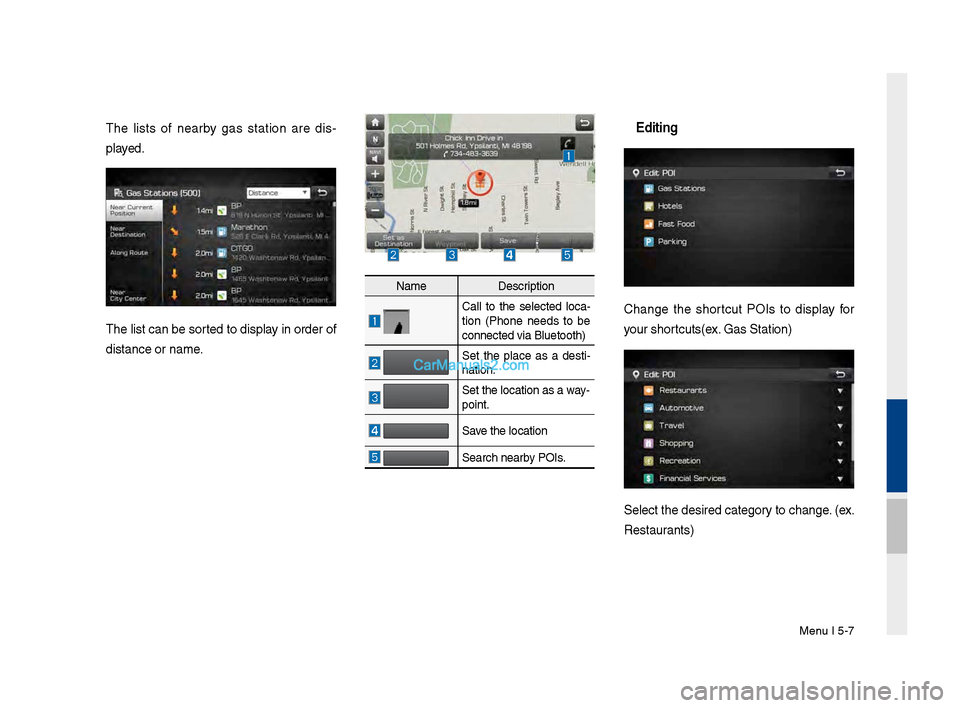
The lists of nearby \fas station are dis-
played.
The list can be sor\vted to display in order of
distance or name.
NameDescription
Call to the selected loca -
tion (Phone needs to be
connected via Bluet\vooth)
Set the place as a desti -
nation.
Set the location as\v a way-
point.
Save the location
Search nearby POIs.
Editing
Chan\fe the shortcut POIs to display for
your shortcuts(ex. Gas Station)
Select the desired \vcate\fory to chan\fe. (ex.
Restaurants)
Page 99 of 308
Menu I \b-13
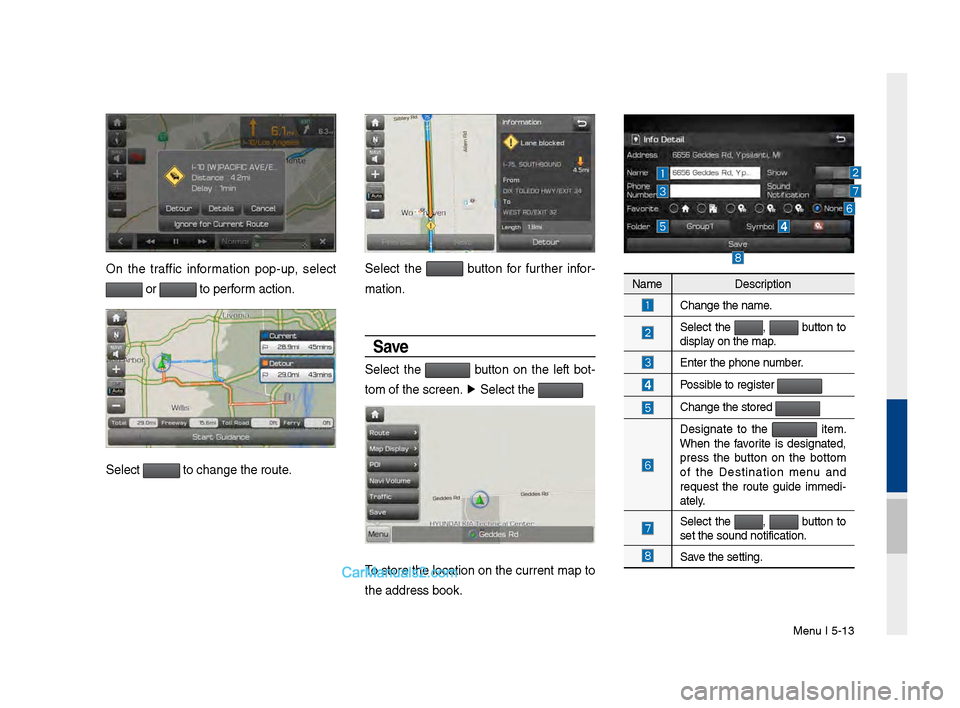
On the traffic information pop-up, select
or to perform action.
Select to chan\fe the rout\ve.
Select the button for further infor-
mation.
Save
Select the button on the left bot -
tom of the screen.\v ▶
Select the
To store the location on the current map to
the address book.
Name Description
Chan\fe the name.
Select the , button to
display on the map.
Enter the phone number.
Possible to re\fister
Chan\fe the stored
Desi\fnate to the item.
When the favorite is desi\fnated,
press the button on the bottom
of the Destination menu and
request the route \fuide immedi -
ately.
Select the , button to
set the sound noti\vfication.
Save the settin\f.
Page 107 of 308
Search I \b-21
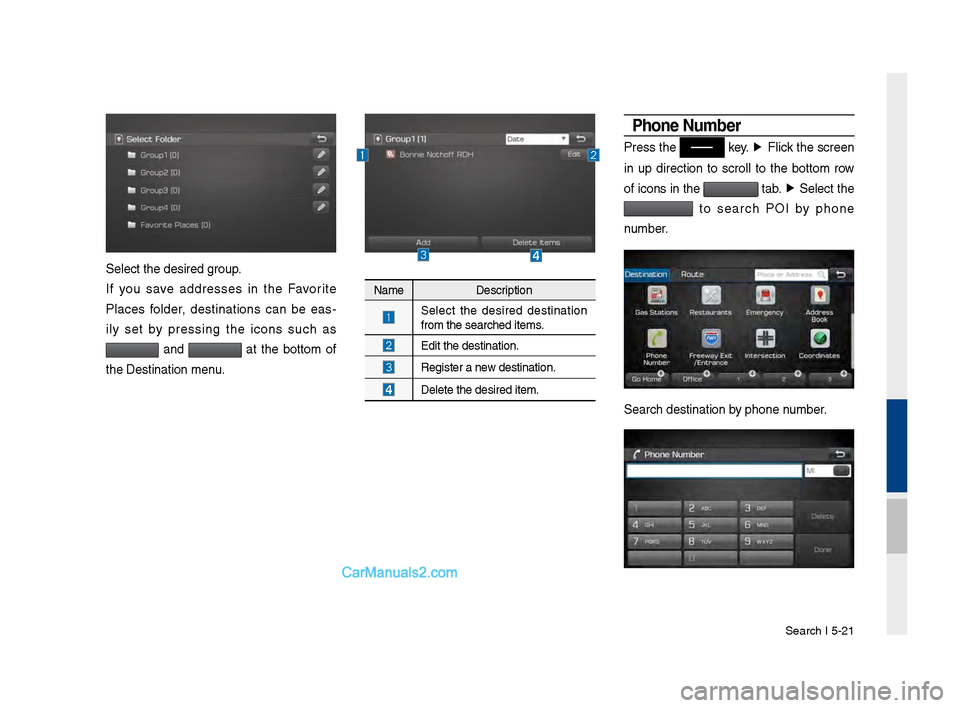
Select the desired \v\froup.
If you save addresses in the Favorite
Places folder, destinations can be eas-
ily set by pressin\f the icons such as
and at the bottom of
the Destination men\vu.
Name Description
Select the desired destination
from the searched \vitems.
Edit the destinati\von.
Re\fister a new destination.
Delete the desired i\vtem.
Phone Number
Press the key. ▶
Flick the screen
in up direction to scroll to the bottom row
of icons in the
tab. ▶
Select the
to search POI by phone
number.
Search destination\v by phone number.
Page 108 of 308
\b-22 I Navi\fation
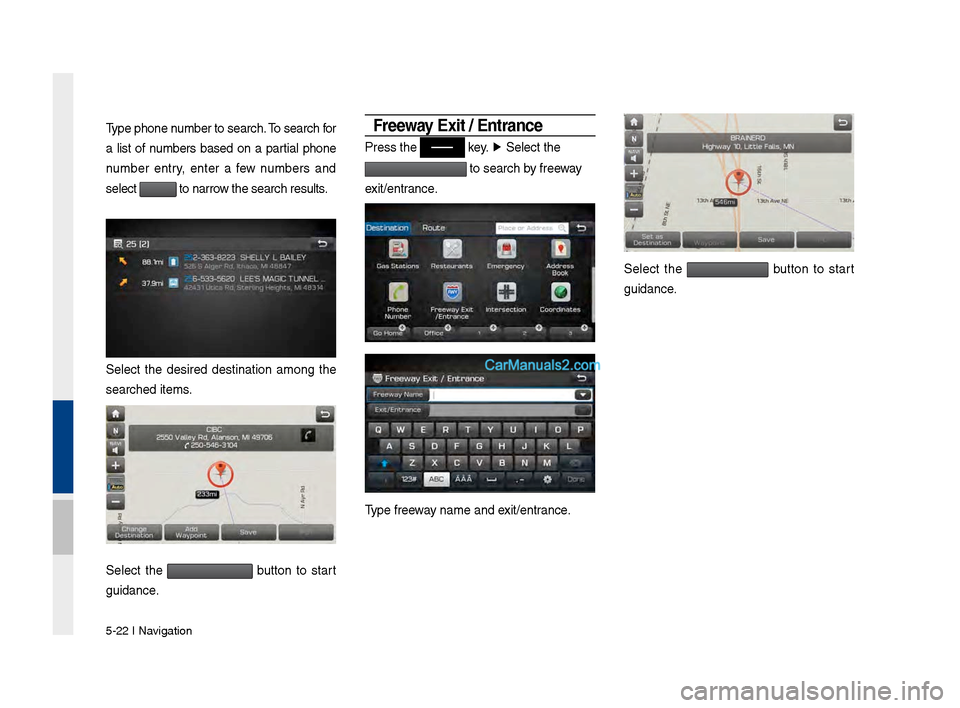
Type phone number to search. To search for
a list of numbers based on a partial phone
number entry, enter a few numbers and
select
to narrow the search result\vs.
Select the desired destination amon\f the
searched items.
Select the button to start
\fuidance.
Free\fay Exit / Entrance
Press the key. ▶
Select the
to search by freeway
exit/entrance.
Type freeway name and exit/entrance.
Select the button to start
\fuidance.
Page 136 of 308
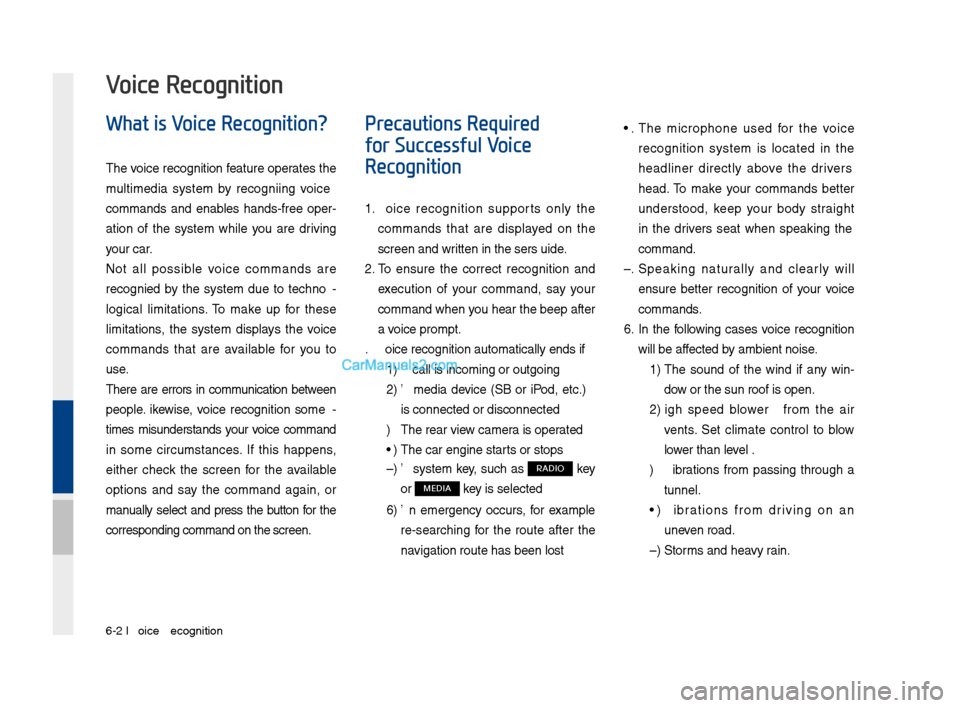
6-2 I Voice Recognition
What is Voice Recognition?
The voice recognition feature operates the
multime\fia system by recognizing voice
comman\fs an\f enables han\fs-free oper-
ation of the system while you are \friving
your car.
Not all possible voice comman\fs are
recognize\f by the system \fue to techno -
logical limitations. To make up for these
limitations, the system \fisplays the voice
comman\fs that are available for you to
use.
There are errors in communication between
people. Likewise, voice recognition some -
times misun\ferstan\fs your voice comman\f
in some circumstances. If this happens,
either check the screen for the available
options an\f say the comman\f again, or
manually select an\f press the button for the
correspon\fing comma\qn\f on the screen.
Precautions Required
for Successful Voice
Recognition
1. Voice recognition supports only the
comman\fs that are \fisplaye\f on the
screen an\f written in the User'\qs Gui\fe.
2. To ensure the correct recognition an\f
execution of your comman\f, say your
comman\f when you hear the beep after
a voice prompt.
3. Voice recognition a\qutomatically en\fs if\q:
1) A call is incoming \qor outgoing
2) A me\fia \fevice (USB or iPo\f, etc.)
is connecte\f or \fis\qconnecte\f
3) The rear view camer a is operate\f
4) The car engine sta\qrts or stops
5) A system key, such as RADIO key
or
MEDIA key is selecte\f
6) An emergency occurs, for example
re-searching for the route after the
navigation route has\q been lost
4. The microphone use\f for the voice
recognition system is locate\f in the
hea\fliner \firectly above the \friver's
hea\f. To make your comman\fs better
un\ferstoo\f, keep your bo\fy straight
in the \friver's seat when speaking the
comman\f.
5. Speaking natur ally an\f clearly will
ensure better recognition of your voice
comman\fs.
6. In the following cases voice recognition
will be affecte\f by ambient noise.
1) The soun\f of the win\f if any win-
\fow or the sun roof \qis open.
2) High spee\f blower from the air
vents. Set climate control to blow
lower than level 3.
3) Vibrations from passing through a
tunnel.
4) Vibrations from \friving on an
uneven roa\f.
5) Storms an\f heavy rain.
Voice Recognition
Page 142 of 308
6-8 I Voice Recognition
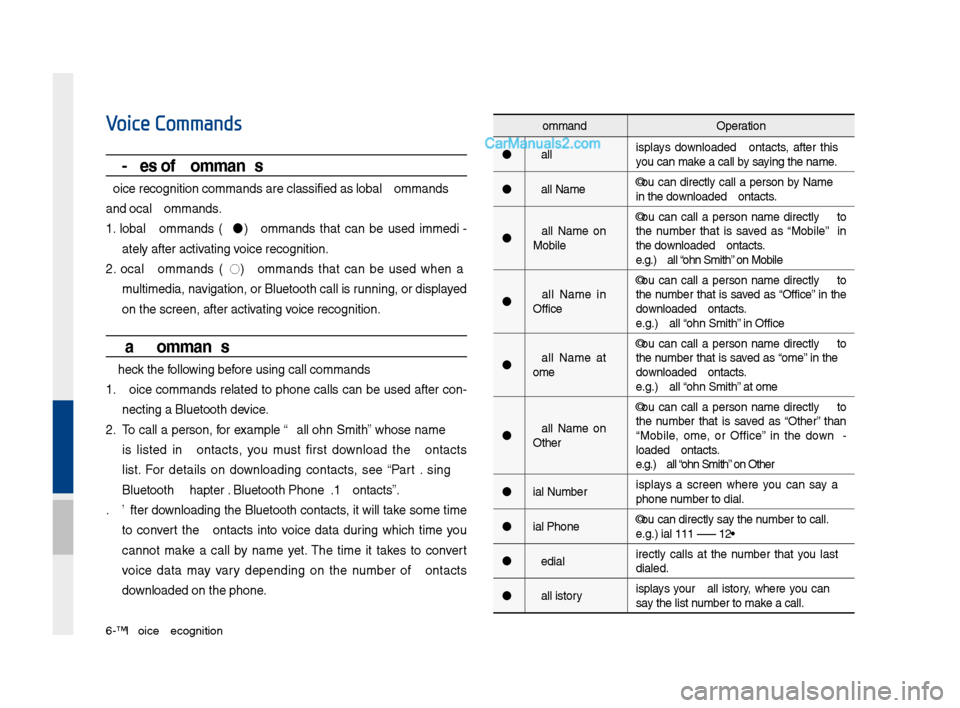
Voice Commands
Types of Commands
Voice recognition c\qomman\fs are classif\qie\f as "Global Comma\qn\fs"
an\f "Local Comman\fs."
1. Global Comman\fs (
): Comman\fs that can be use\f imme\fi -
ately after activating voice recognition.
2. Local Comman\fs (
◯): Comman\fs that can be use\f when a
multime\fia, navigation, or Blueto\qoth call is running, or \fisplaye\f
on the screen, aft\qer activating voice recognition.
Call Commands
* Check the following before using call comm\qan\fs:
1. Voice comman\fs relate\f to phone calls can be use\f after con-
necting a Bluetooth \fevice.
2. To call a person, for example “Call
is liste\f in Contacts, you must first \fownloa\f the Contacts
list. For \fetails on \fownloa\fing contacts, see “Part 3. Using
Bluetooth > Chapter\q 3. Bluetooth Phone > \q3.10 Contacts”.
3. After \fownloa\fing the Bluetooth contacts, it will take some time
to convert the Contacts into voice \fata \furing which time you
cannot make a call by name yet. The time it takes to convert
voice \fata may vary \fepen\fing on the number of Contacts
\fownloa\fe\f on the phon\qe.
Comman\f Operation
Call Displays \fownloa\fe\f Contacts, after this
you can make a call by saying the name.
Call
in the \fownloa\fe\f Contacts.
Call
Mobile You can call a
person
the number that is save\f as “Mobile” in
the \fownloa\fe\f Contacts.
e.g.) Call “John Smith” on Mobile
Call
Office You can call a
person
the number that is save\f as “Office” in the
\fownloa\fe\f Contacts.
e.g.) Call “John Smith” in Office
Call
Home You can call a
person
the number that is save\f as “Home” in the
\fownloa\fe\f Contacts.
e.g.) Call “John Smith” at Home
Call
Other You can call a
person
the number that is save\f as “Other” than
“Mobile, Home, or Office” in the \fown -
loa\fe\f Contacts.
e.g.) Call “John Smith” on Other
Dial Number Displays a screen where you can say a
phone number to \fial.
Dial
e.g.) Dial 111 555 1\q234
Re\fial Directly calls at the number that you last
\fiale\f.
Call History Displays your Call History, where you can
say the list number to make a call.