service Hyundai Santa Fe 2017 Car Multimedia System
[x] Cancel search | Manufacturer: HYUNDAI, Model Year: 2017, Model line: Santa Fe, Model: Hyundai Santa Fe 2017Pages: 308, PDF Size: 41.14 MB
Page 153 of 308
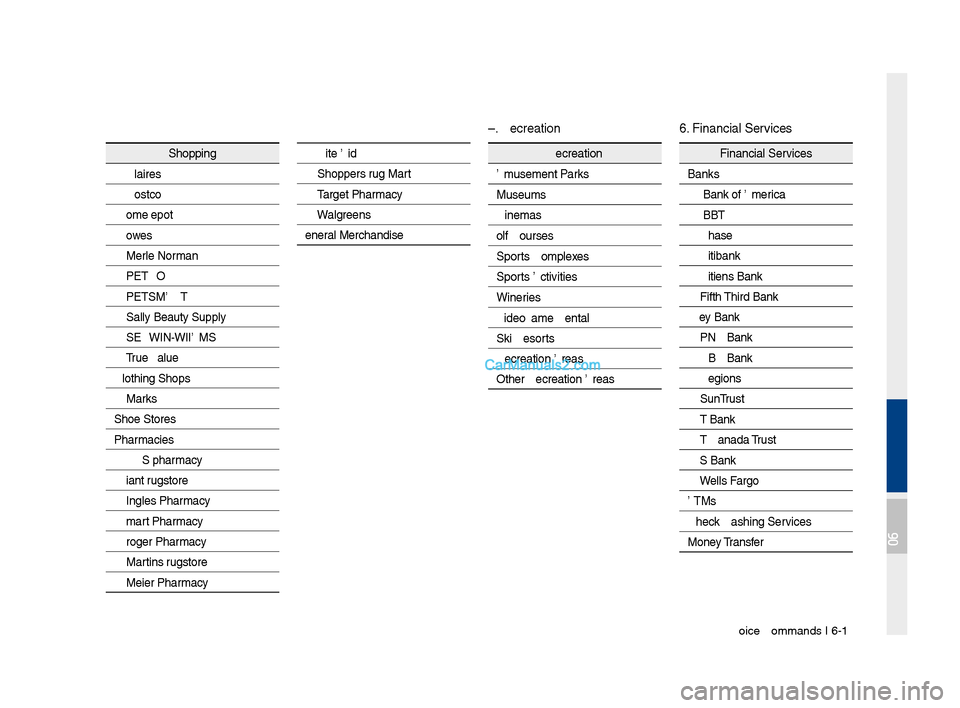
Voice Comman\fs I 6-1\q9
Shopping
Claire's
Costco
Home Depot
Lowe's
Merle Norman
PETCO
PETSMART
Sally Beauty Supply
SHERWIN-WILLIAMS
True Value
Clothing Shops Mark's
Shoe Stores
Pharmacies CVS\bpharmacy
Giant Drugstore
Ingles Pharmacy
Kmart Pharmacy
Kroger Pharmacy
Martin's Drugstore
Meijer Pharmacy
Rite Ai\f
Shoppers Drug Mart
Target Pharmacy
Walgreens
General Merchan\fise
Recreation
Amusement Parks
Museums
Cinemas
Golf Courses
Sports Complexes
Sports Activities
Wineries
Vi\feo & Game Rental\q
Ski Resorts
Recreation Areas
Other Recreation A\qreas
Financial Services
Banks
Bank of America
BB&T
Chase
Citibank
Citizens Bank
Fifth Thir\f Bank
Key Bank
PNC Bank
RBC Bank
Regions
SunTrust
TD Bank
TD Cana\fa Trust
US Bank
Wells Fargo
ATMs
Check Cashing Services
Money Transfer
6. Financial Services
5. Recreation
06
Page 154 of 308
6-20 I Voice Recognition
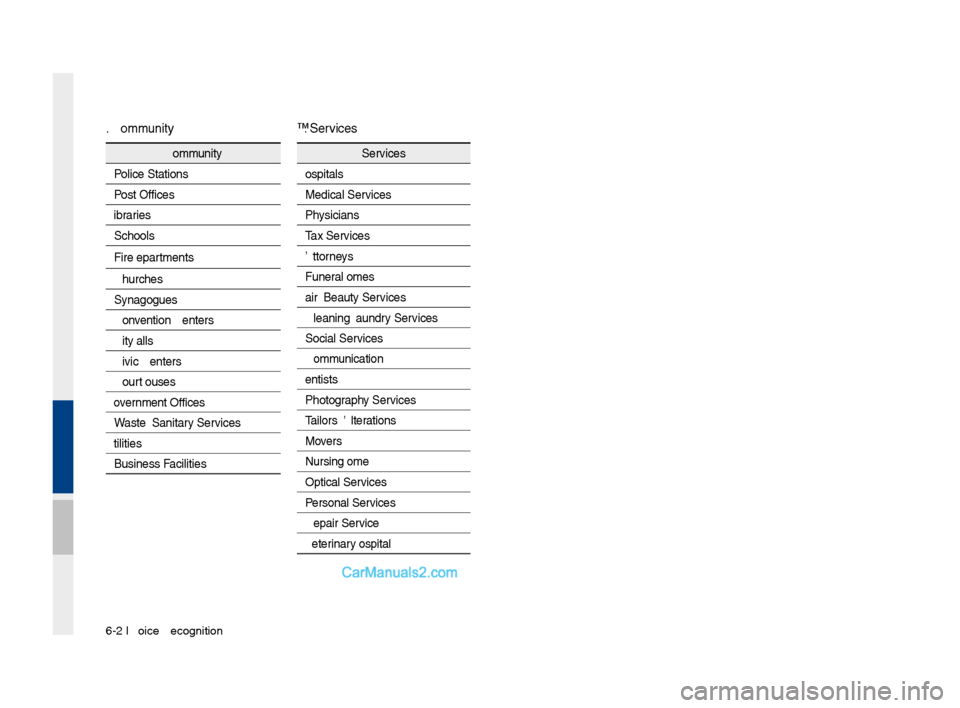
Community
Police Stations
Post Offices
Libraries
Schools
Fire Departments
Churches
Synagogues
Convention Centers
City Halls
Civic Centers
Court Houses
Government Offices
Waste & Sanitary Services
Utilities
Business Facilities
Services
Hospitals
Me\fical Services
Physicians
Tax Services
Attorneys
Funeral Homes
Hair & Beauty Services
Cleaning & Laun\fry Services
Social Services
Communication
Dentists
Photography Services
Tailors & Alterations
Movers
Nursing Home
Optical Services
Personal Services
Repair Service
Veterinary Hospital
8. Services
7. Community
Page 164 of 308
\b-8 I Info
With Download Center, you can install
paid/free applications or check for related
information. Only BlueLink center, verified
applications can be \sinstalled.
You can use Download Center afte\sr agree-
ing to the terms of service and use on the
screen (Only 1 time \sfor initial launch).\s
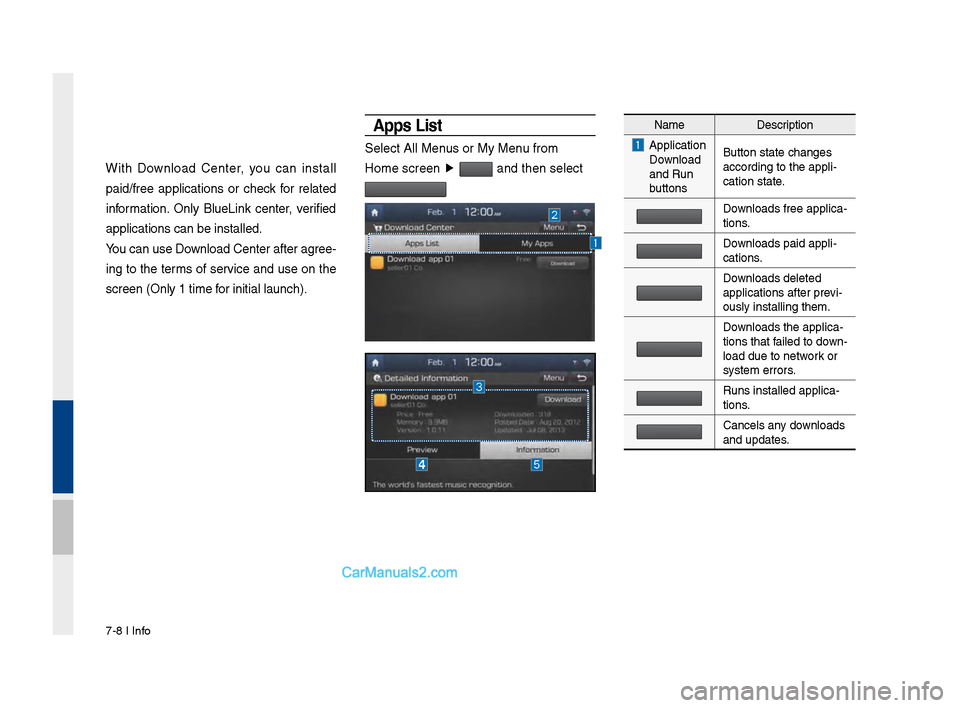
A\b\bs List
Select All Menus or My Menu from
Home screen ▶
and then select
Name Description
Application
Download
and Run
buttons Button state changes\s
according to the app\sli-
cation state.
Downloads free applica\s-
tions.
Downloads paid appli-
cations.
Downloads deleted
applications after p\srevi-
ously installing th\sem.
Downloads the applica-
tions that failed to down -
load due to network or
system errors.
Runs installed appl\sica-
tions.
Cancels any downloads
and updates.
Page 166 of 308
\b-10 I Info
The Sirius\fM™ Data Service is a paid
membership Satellite radio service which
provides users with traffic, stock, sports,
and weather information.
However, weather information is not sup-
ported for vehicles purchased in \sCanada.
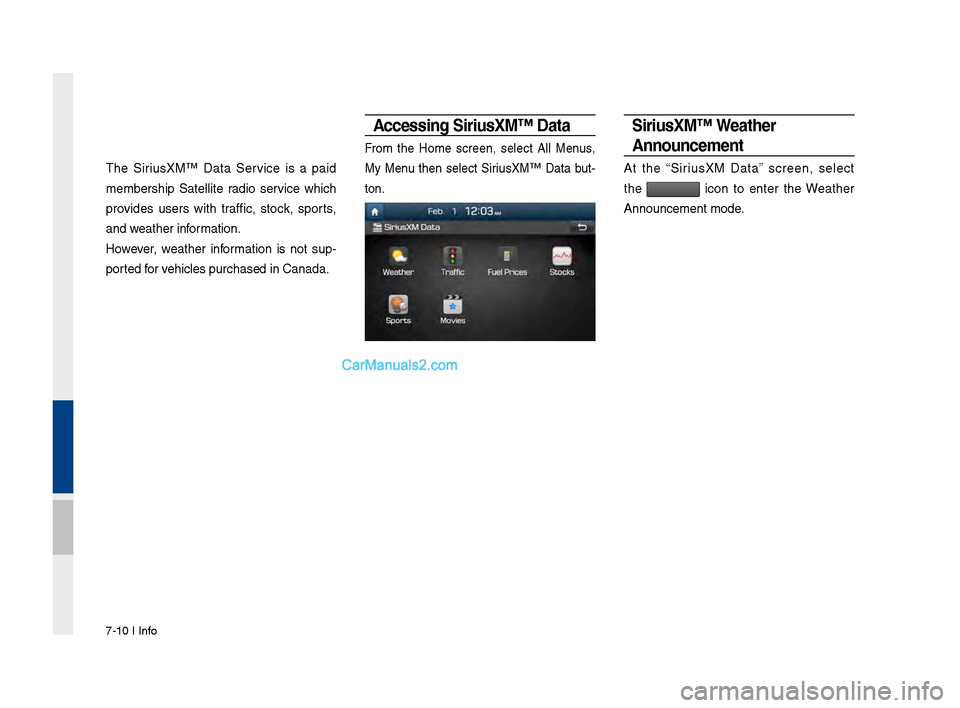
Accessing Siri\fsXM™ Data
From the Home screen, select All Menus,
My Menu then select Sirius\fM™ Data but-
ton.
Siri\fsXM™ Weather
Anno\fncement
At the “Sirius\fM Data” screen, select
the
icon to enter the Weather
Announcement mode.
Page 167 of 308
Sirius\fM™ Data I \b-11
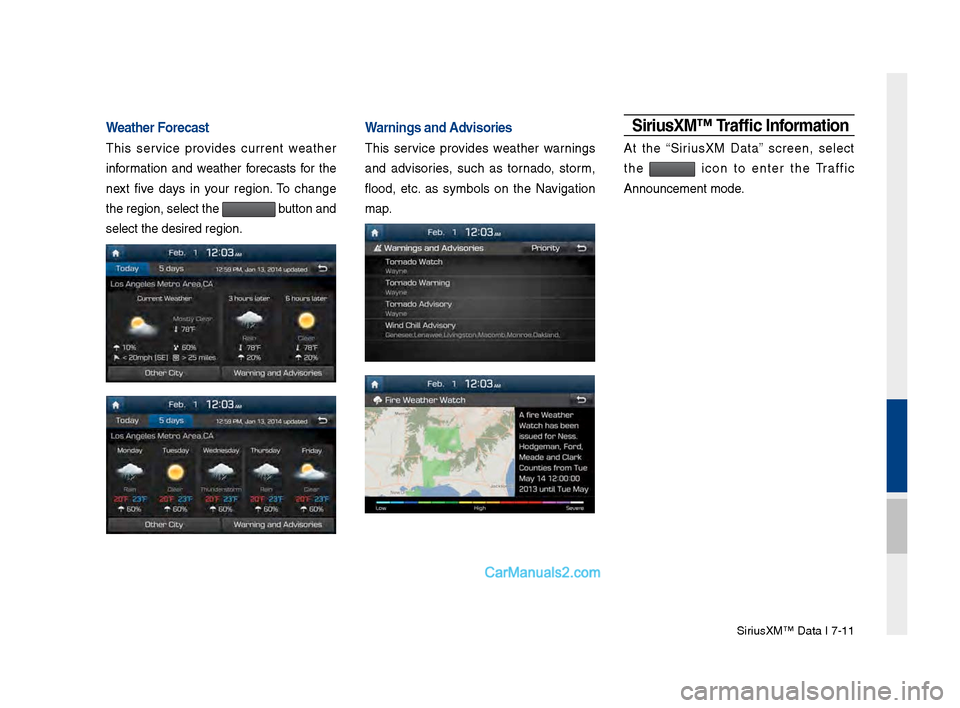
Weather Forecast
This service provides current weather
information and weather forecasts for the
next five days in your region. To change
the region, select t\she
button and
select the desired r\segion.
Warnings and Advisories
This service provides weather warnings
and advisories, such as tornado, storm,
flood, etc. as symbols on the Navigation
map.
Siri\fsXM™ Traffic Information
At the “Sirius\fM Data” screen, select
the
icon to enter the Traffic
Announcement mode.
Page 170 of 308
\b-14 I Info
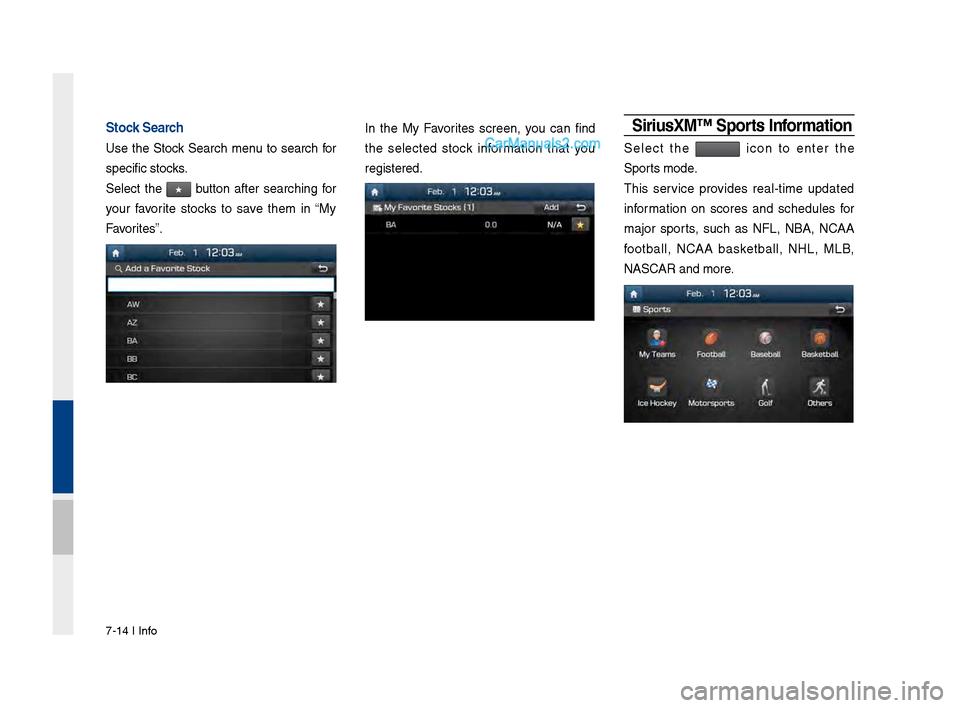
Stock Search
Use the Stock Search menu to search for
specific stocks.
Select the
★ button after searching for
your favorite stocks to save them in “My
Favorites”.
In the My Favorites screen, you can find
the selected stock information that you
registered.Siri\fsXM™ S\borts Information
Select the icon to enter the
Sports mode.
This service provides real-time updated
information on scores and schedules for
major sports, such as NFL, NBA, NCAA
football, NCAA basketball, NHL, MLB,
NASCAR and more.
Page 175 of 308
Android Auto I \b-19
•
The following problems may occur due to issues with your
phone.
- Intermittent black screens appear when entering Android
Auto.
- Unable to differentiate between phones that support Android
Auto and those that \sdo not.
※
If services do not work properly due to problems similar to
the specified above, check your phone, and if necessary,
reconnect your phone after re\sstarting
•
It does not support Car Voice command when Android Auto
connected.
•
Android auto might not function as same with Car Multimedia
system.
•
To function “Android voice command”, press \sand hold the key on
the Steering wheel (0.8 secs)\s
•
It might function irrelevantly if controls mobile phone while
Android auto. Please do not use mobile phone while Android
auto.
•
Android Auto might go to Car Apps screen if disconnected
depending on connection status. You can re-use if the device
re-connected.
•
Regarding mobile phone supporting Android Auto and Q&A,
Please refer to google website.Using Android A\fto Feat\fres
1. Call key in the steering wheel performs phone function while
Android Auto screen is displayed.
2. The Android phone OS need to be Android 5.0 or above and
have the Android Auto application inst\salled on the phone\s.
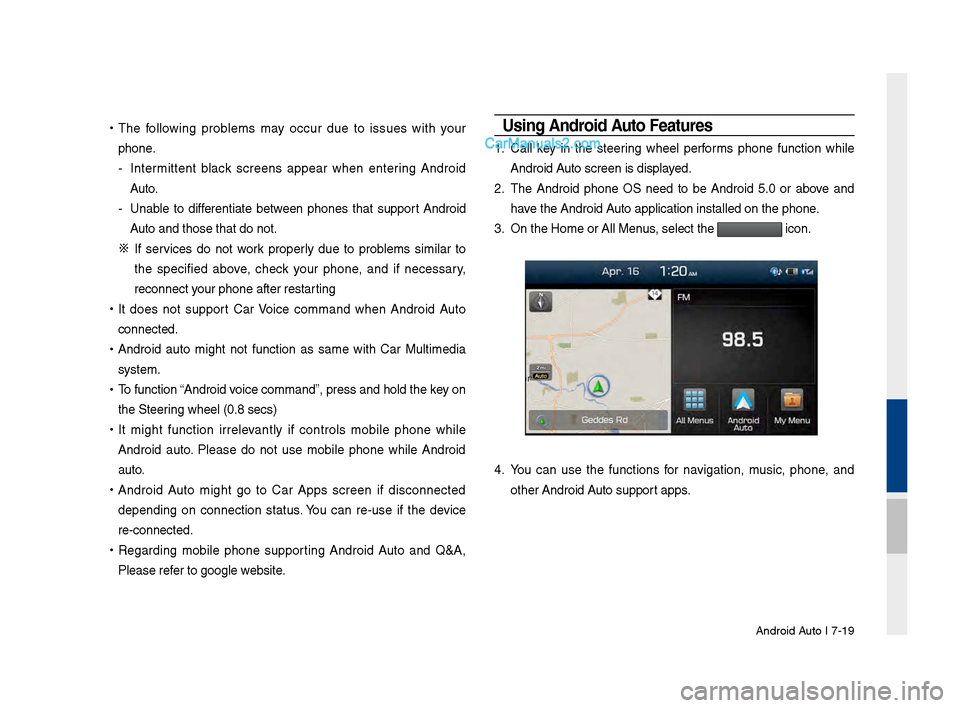
3. On the Home or All \sMenus , select the
icon.
4. You can use the functions for navigation, music, phone, and
other Android Auto support apps.
Page 189 of 308
Setup I 9-7
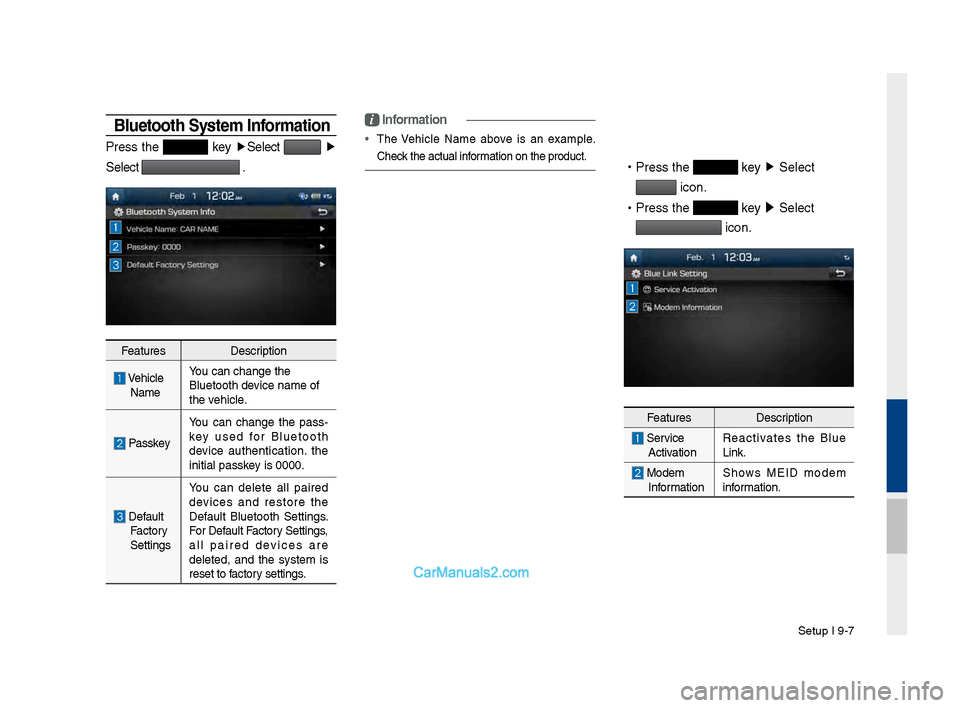
Bluetooth System Information
Press t\fe key ▶
Select ▶
Select
.
Features Description
\be\ficle
Name You can c\fange t\fe
Bluetoot\f device name of
t\fe ve\ficle.
Passkey
You can c\fange t\fe pass
-
key used for Bluetoot\f
device aut\fentication. t\fe
initial passkey is 0000.
Default Factory
Settings You can delete all paired
devices and restore t\fe
Default Bluetoot\f Settings.
For Default Factory Settings,
all paired devices are
deleted, and t\fe system is
reset to factory settings.
i
Information
•
T\fe \be\ficle Name above is an example.
C\feck t\fe actual information on t\fe produ\Pct.
•
Press t\fe key ▶
Select
icon.
•
Press t\fe
key ▶
Select
icon.
Features Description
Service
Activation Reactivates t\fe Blue
Link.
Modem
Information S\fows MEID modem
information.
Page 190 of 308
9-8 I Setup
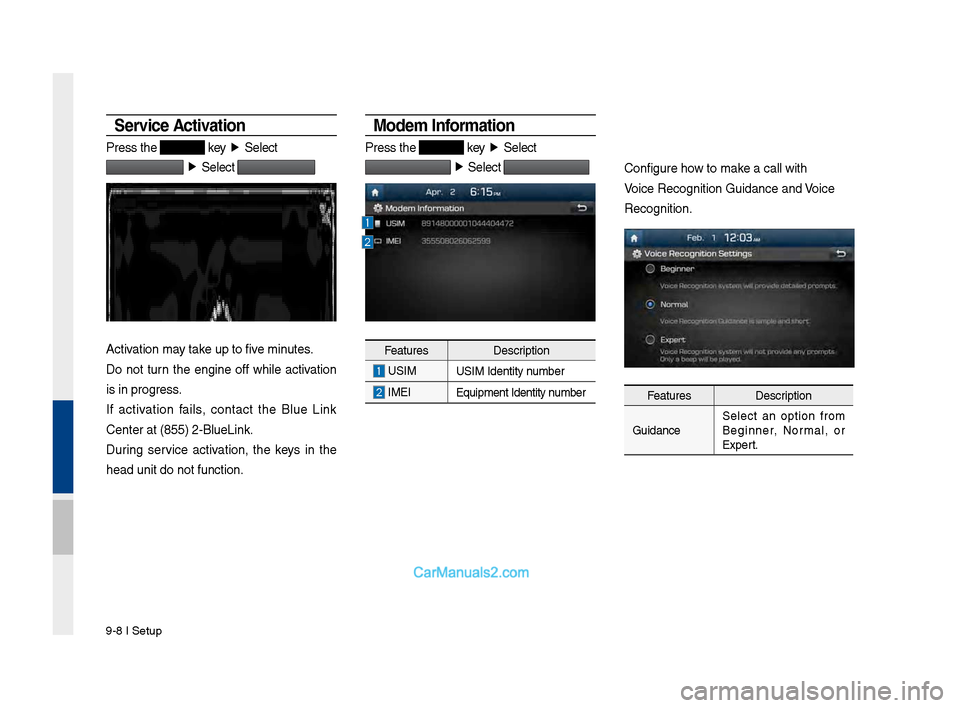
Service Activation
Press t\fe key ▶
Select
▶
Select
Activation may take up to five minutes.
Do not turn t\fe engine off w\file activation
is in progress.
If activation fails, contact t\fe Blue Link
Center at (855) 2-\PBlueLink.
During service activation, t\fe keys in t\fe
\fead unit do not fu\Pnction.
Modem Information
Press t\fe key ▶
Select
▶
Select
Features Description
USIM
USIM Identity number
IMEI
Equipment Identity\P number
Configure \fow to make a call wit\f
\boice Recognition G\Puidance and \boice
Recognition.
Features Description
Guidance Select an option from
Beginner, Normal, or
Expert.
Page 197 of 308
Appendix I 10-3
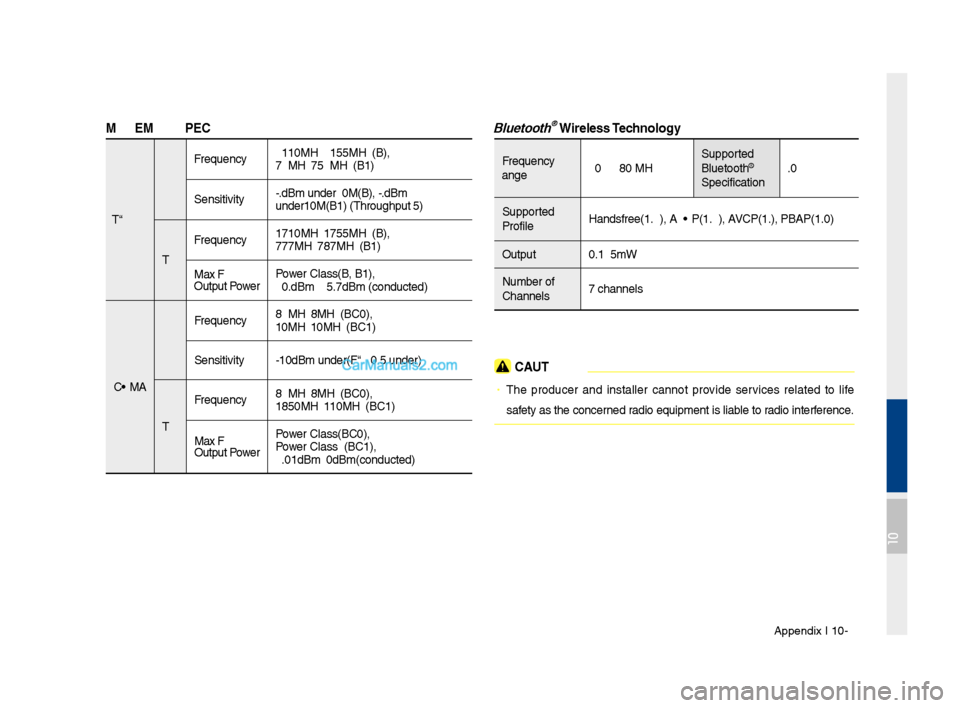
\fODE\f RF S\bEC
LTE RX
Frequency
2110MHz~2155MHz(B4\s),
746MHz~756MHz(B13)\s
Sensitivity -93.3dBm under@20M\s(B4), -93.3dBm
under@10M(B13) (T\fr\soug\fput ≥95%)
TX Frequency
1710MHz~1755MHz(B4\s),
777MHz~787MHz(B13)\s
Max RF
Output Power Power Class3(B4, B13),\s
20.3dBm ~ 25.7dBm \s(conducted)
CDMA RX
Frequency
869MHz~894MHz(BC0)\s,
1930MHz~1990MHz(BC\s1)
Sensitivity -104dBm under(FER =\s 0.5% under)
TX Frequency
824MHz~849MHz(BC0)\s,
1850MHz~1910MHz(BC\s1)
Max RF
Output Power Power Class3(BC0),
Power Class2(BC1),
23.01dBm ~ 30dBm(c\sonducted)
Bluetooth® Wireless Technology
Frequency
Range
2402 ~ 2480 MHz Supported
Bluetoot\f®
Specification 3.0
Supported
Profile Handsfree(1.6), A2D\sP(1.2), AVRCP(1.4), PBAP(1.0\s)
Output 0.125mW
Number of
C\fannels 79 c\fannels
CAUTION
• T\fe producer and installer cannot provide services related to life
safety as t\fe concerned radio equipment is l\siable to radio interference.
10