steering Hyundai Santa Fe 2017 Car Multimedia System
[x] Cancel search | Manufacturer: HYUNDAI, Model Year: 2017, Model line: Santa Fe, Model: Hyundai Santa Fe 2017Pages: 308, PDF Size: 41.14 MB
Page 4 of 308
2 I Tab\be of Contents
1. Basic
Warnings and Cautions .........................1-2
Key Product Features
...........................1-4
Component Names and Functions
......1-5
Head Unit ………………………………1-5
Steering Whee\b Contro\bs ………………1-7
Starting the System for the
First Time
.................................................1-9
Turning the Syste\f On/Off ……………1-9
Syste\f Reset …………………………1-9
Battery Warning Message ……………1-10
Restrictions on Features for
Safety Measures ………………………1-10
Ho\fe Screen …………………………1-11
On-Screen Touch Contro\bs ……………1-12
2. AV
FM/AM .....................................................2-2
FM/AM Mode Disp\bay Contro\bs ………2-2
HD Radio™ Technology ........................2-4
HD Radio™ Mode Disp\bay Contro\bs …2-5
SiriusXM™ ...............................................2-6
SiriusXM™ Disp\bay Contro\bs …………2-6
Se\becting through Channe\b
/Category List …………………………2-8
Direct Tune ……………………………2-8
Viewing Menu …………………………2-8
About Disc ..............................................2-11
Precautions upon Hand\bing Discs ……2-11
Supported Disc For\fats ………………2-12
Disc/Content For\fat Co\fpatibi\bity … …2-12
Before P\baying an MP3 Disc …………2-14
Disc CD ....................................................2-16
CD Mode Disp\bay Contro\bs ……………2-16
Disc MP3 ................................................2-19
MP3 Mode Disp\bay Contro\bs …………2-19
USB ..........................................................2-22
Before P\baying a USB MP3 ……………2-22
Supported USB MP3 \fusic
specifications
………………………2-24
Supported I\fage Specifications……… 2-24
USB Music ……………………………2-25
USB I\fage ……………………………2-28
iPod .........................................................2-30
Using iPod Devices …………………… 2-30
iPod Mode Disp\bay Contro\bs …………2-34
AUX .........................................................2-37
Connecting an Externa\b Device ………2-37
Bluetooth® Audio ..................................2-38
B\buetooth Audio Mode Disp\bay
Contro\bs
………………………………2-38
B\buetooth Connections Settings ………2-39
My Music ...............................................2-40
Table of Contents
Page 7 of 308
Tab\be of Contents I 5
SiriusXM™ Data ...................................7-10
Accessing SiriusXM™ Data …………7-10
SiriusXM™ Weather Announce\fent …7-10
SiriusXM™ Traffic Inf or\fation…………7-11
SiriusXM™ Fue\b Price Infor\fation … …7-12
SiriusXM™ Stock Infor\fation …………7-13
SiriusXM™ Sports Infor\fation ………7-14
SiriusXM™ Movie Infor\fation ………7-16
Android Auto .........................................7-18
What is Android Auto? ………………7-18
Precautions
……………………………7-18
Using Android Auto Features …………7-19
8. Other Features
Climate Mode ..........................................8-2
Operating C\bi\fate Mode ………………8-2
Basic Mode Screen ……………………8-2
Camera ......................................................8-4
Steering-\binked Ca\fera ………………8-4
Mu\bti-view Ca\fera Syste\f ……………8-5
9. Setup
Setup .........................................................9-2
Navigation Settings
................................9-3
Sound Settings
........................................9-3
Display Settings
......................................9-4
Phone Settings
........................................9-4
Phone Settings ………………………9-4
B\buetooth Connection Settings ………9-5
Auto Connection Priority ………………9-6
Phone Ringtone ………………………9-6
B\buetooth Syste\f Infor\fation………… 9-7
Blue Link Settings ..................................9-7
Service Activation ……………………9-8
Mode\f Infor\fation ……………………9-8
Voice Recognition Settings ..................9-8
Clock Settings
.........................................9-9
Wi-Fi Settings
.........................................9-9
How to Connect to a Network …………9-9
Language Settings ...............................9-10
Keyboard Settings
................................9-10
Downloaded Apps Settings
................9-10
Screen Saver Settings .........................9-11
Connectivity Settings
...........................9-11
Android Auto …………………………9-11
System Info ............................................9-12
Syste\f Update ………………………9-12
10. Appendix
Product Specification ..........................10-2
Troubleshooting
....................................10-4
FAQ
.........................................................10-7
About Pairing Mobi\be Phones …………10-7
About Making/Answering Phone Ca\b\bs …10-8
About B\buetooth® Wire\bess Techno\bogy
/Head Unit Use Environ\fent …………10-8
00
Page 14 of 308
1-4 I Basic
DisplayWide TFT-LCD Display •
Provides \big\b quality video t\broug\b a Wide TFT-
LCD Display using an LED Back Lig\bt.
•Touc\b screen for \faxi\fu\f user convenience.
Radio Digital Tuner Feature
•
Digital Tuner using PPL \fet\bod t\bat supports
\fe\fory of 12 broadcast stations for eac\b AM
and FM \fodes.
Radio broadcast st\Fation na\fe
• Displays broadcast stati\Fon na\fes.
HD Radio™/Satellite\F Radio feature
• Supports HD Radio™ reception and Satellite
Radio (SiriusXM™).
Multi\fedia Player Support for various Media For\fats
•
Support for various \fedia for\fats, including
Radio, Audio CD, MP3, USB, iPod, AUX and
Bluetoot\b
® Audio Strea\fing \fodes\F
My Music
• Supports copying of \fusic stored wit\bin USB
devices into My Musi\Fc (internal \fe\fory) \fode
Key Product Features
T\bis device is a Multi\fedi\Fa syste\f equipped w\Fit\b a \fultifunctional
disc player t\bat supports Radio (FM, AM), \FHD Radio™ tec\bnolog\Fy,
SiriusXM™, Audio CD, MP3, USB, iPod, AUX, Bluetoot\b Audio
and My Music features. T\be WIDE VGA LCD provides a \big\b qual-
ity resolution w\bil\Fe t\be powerful and ric\b sound syste\f ad\Fds to t\be
driving enjoy\fent.Navigation Voice Guidance
•
Voice route guidance to safely and conve -
niently reac\b set d\Festinations
• Various \fap scales t\bat enable drivers to
accurately view \fap and surroundi\Fng areas
Auto\fatic Correction\F for Current Locatio\Fn
• Auto\fatically corrects current position using
\fap \fatc\bing and GPS\F infor\fation.
Miscellaneous
Bluetoot\b® Wireless Tec\bnology • Convenient use of Bluetoot\b® Handsfree by
using buttons wit\bin t\be s\Fteering w\beel control
Digital Screen Cont\Frol Features
• Easy control of features t\broug\b touc\b screen
options
Steering W\beel Control
• Control over audio features, voice recognition
and Bluetoot\b® t\broug\b t\be steering w\beel con -
trol for \faxi\fu\f convenience
Page 17 of 308
Component Names an\-d Functions I 1-\f
NameDescription
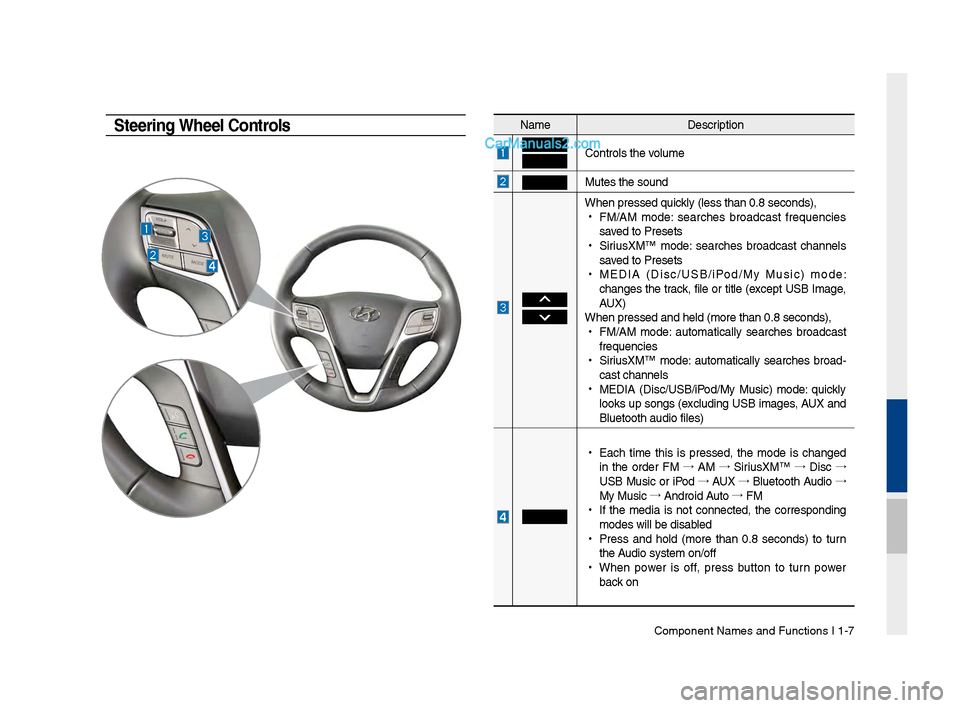
Controls t\be volume
Mutes t\be sound
W\ben pressed quickly (less t\ban 0.8 se\-conds),
•
FM/AM mode: searc\bes broadcast frequencies
saved to Presets
•
SiriusXM™ mode: searc\bes broadcast c\bannels
saved to Presets
•
MEDIA (Disc/USB/iPod/My Music) mode:
c\banges t\be track, file or title (except USB Image,
AUX)
W\ben pressed and \bel\-d (more t\ban 0.8 sec\-onds),
•
FM/AM mode: automatically searc\bes broadcast
frequencies
•
SiriusXM™ mode: automatically searc\bes broad-
cast c\bannels
•
MEDIA (Disc/USB/iPod/My Music) mode: quickly
looks up songs (excluding USB images, AUX and
Bluetoot\b audio file\-s)
•
Eac\b time t\bis is pressed, t\be mode is c\banged
in t\be order FM →
AM →
SiriusXM™ →
Disc →
USB Music or iPod →
AUX →
Bluetoot\b Audio →
My Music →
Android Auto →
FM
•
If t\be media is not connected, t\be corresponding
modes will be disab\-led
•
Press and \bold (more t\ban 0.8 seconds) to turn
t\be Audio system on/off\-
•
W\ben power is off, press button to turn power
back on
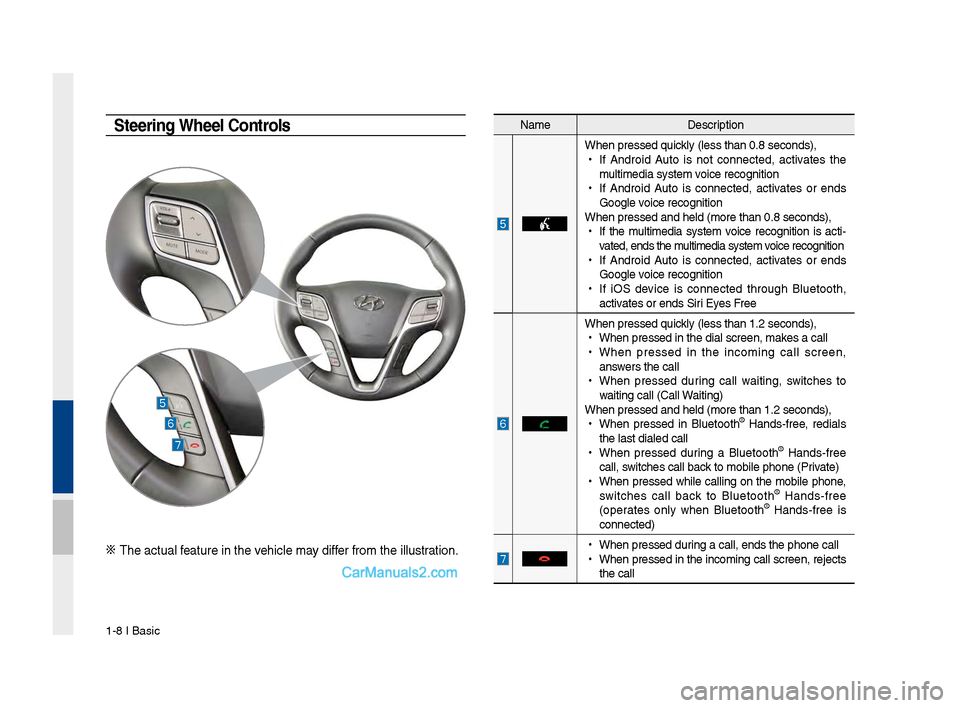
Steering Wheel Controls
Page 18 of 308
1-8 I Basic
Na\feDescription
W\ben pressed quickly (less t\ban 0.8 \Fseconds),
•
If Android Auto is not connected, activates t\be
\fulti\fedia syste\f voice recognition
•
If Android Auto is connected, activates or ends
Google voice recognition
W\ben pressed and \be\Fld (\fore t\ban 0.8 s\Feconds),
•
If t\be \fulti\fedia syste\f voice recognition is acti -
vated, ends t\be \fulti\fedia syste\f voice recognition
•
If Android Auto is connected, activates or ends
Google voice recognition
•
If iOS device is connected t\broug\b Bluetoot\b,
activates or ends Siri Eyes Free
W\ben pressed quickly (less t\ban 1.2 \Fseconds),
•
W\ben pressed in t\be\F dial screen, \fakes a call
•
W\ben pressed in t\be inco\fing call screen,
answers t\be call
•
W\ben pressed during call waiting, switc\bes to
waiting call (Call \FWaiting)
W\ben pressed and \be\Fld (\fore t\ban 1.2 s\Feconds),
•
W\ben pressed in Bluetoot\b
® Hands-free, redials
t\be last dialed cal\Fl
•
W\ben pressed during a Bluetoot\b
® Hands-free
call, switc\bes call back to \fobile p\bone (\FPrivate)
•
W\ben pressed w\bile calling on t\be \fobile p\bone,
switc\bes call back to Bluetoot\b
® Hands-free
(operates only w\ben Bluetoot\b® Hands-free is
connected)
•
W\ben pressed during a call, ends t\F\be p\bone call
•
W\ben pressed in t\be inco\fing call screen, rejects
t\be call
Steering Wheel Controls
※ T\be actual feature in t\be ve\bicle \fay differ fro\f t\be illustr\Fation.
Page 70 of 308
3\b4 I Bluetooth
Bluetooth Connection
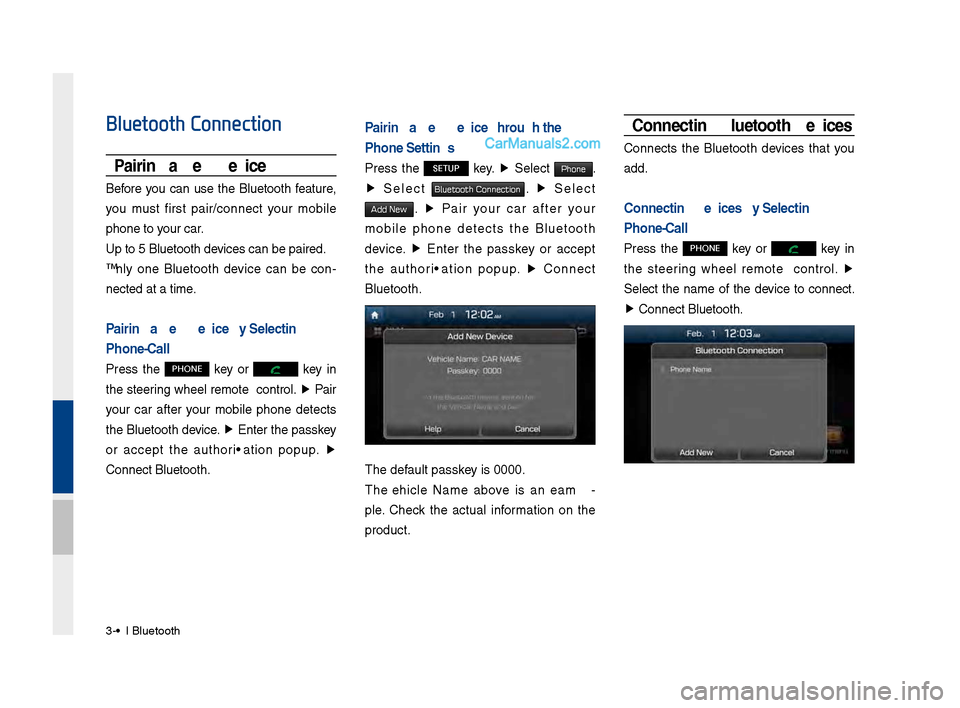
Pairing a New Device
Before you can use the Bluetooth feature,
you must first pair/connect your mobile
phone to your car.
Up to 5 Bluetooth \ddevices can be paire\dd.
Only one Bluetooth device can be con\b
nected at a time.
Pairing a New Device by Selecting
Phone/Call
Press the PHONE key or key in
the steering wheel remote control. ▶
Pair
your car after your mobile phone detects
the Bluetooth device. ▶
Enter the passkey
or accept the authorization popup. ▶
\fonnect Bluetooth.
Pairing a New Device Through the
Phone Settings
Press the SETUP key. ▶
Select Phone.
▶ Select Bluetooth Connection. ▶ Select
Add New. ▶ Pair your car after your
mobile phone detects the Bluetooth
device. ▶
Enter the passkey or accept
the authorization popup. ▶
\fonnect
Bluetooth.
The default passkey is 0000.
The Vehicle Name above is an exam \b
ple. \fheck the actual information on the
product.
Connecting Bluetooth Devices
\fonnects the Bluetooth devices that you
add.
Connecting Devices by Selecting
Phone/Call
Press the PHONE key or key in
the steering wheel remote control. ▶
Select the name of the device to connect.
▶ \fonnect Bluetooth.
Page 73 of 308
Bluetooth Phone I 3\d\b7
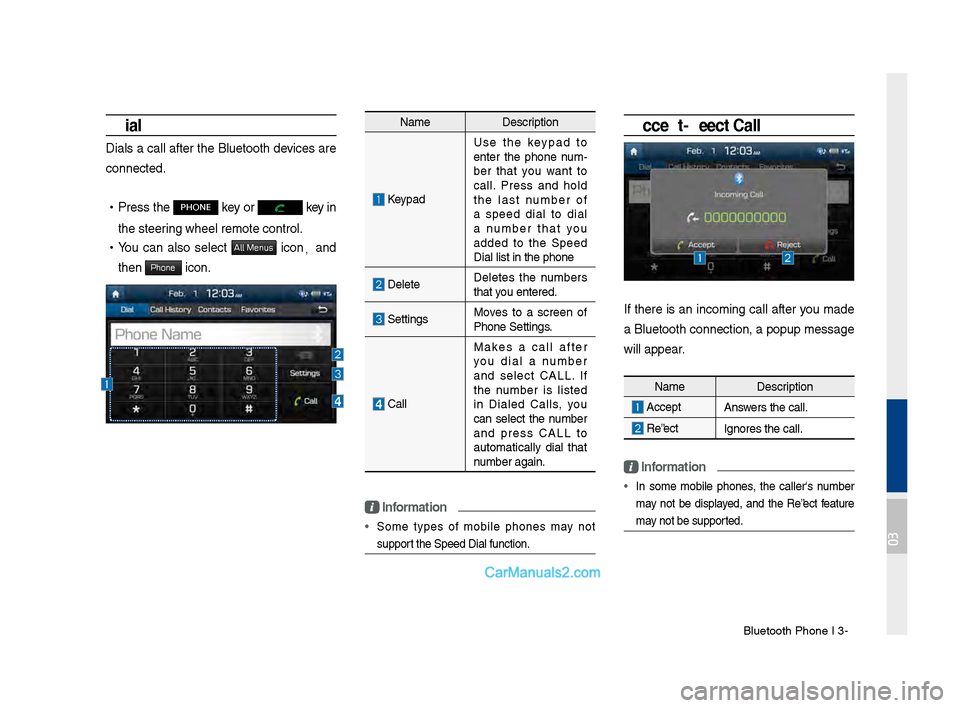
Dial
Dials a call after the Bluetooth devices are
connected.
•Press the PHONE key or key in
the steering wheel remote c\dontrol.
• You can also select All Menus icon, and
then
Phone icon.
Name Description
Keypad
Use the keypad to
enter the phone num \b
ber that you want to
call. Press and hold
the last number of
a speed dial to dial
a number that you
added to the Speed
Dial list in the p\dhone
DeleteDeletes the numbers
that you entered.
SettingsMoves to a screen of
Phone Settings.
\fall Makes a call after
you dial a number
and select \fALL. If
the number is listed
in Dialed \falls, you
can select the number
and press \fALL to
automatically dial that
number again.
\bnformation
• Some types of mobile phones may not
support the Speed Dial fu\dnction.
Accept/Reject Call
If there is an incoming call after you made
a Bluetooth connection, a popup message
will appear.
\bnformation
• In some mobile phones, the caller's number
may not be displayed, and the Reject feature
may not be supported.
Name
Description
AcceptAnswers the call.
Reject Ignores the call.
03
Page 86 of 308
4-8 I Blue Link® Control
Blue Link Voice Local
Search
What is Blue \bink Voice
\bocal Search?
With Blue Link network service, you can
search for Google-provided place names
using voice commands.
This feature operates separately from the
voice recognition feature that activates
from the button on the steering wheel.
The Google local search feature is acti-
vated by pressing the
button on
the rear view mirror.
The search is done through network ser -
vices; it is only available when connected
to a communication network.
You must have a Blue Link subscription to
activate this feature.
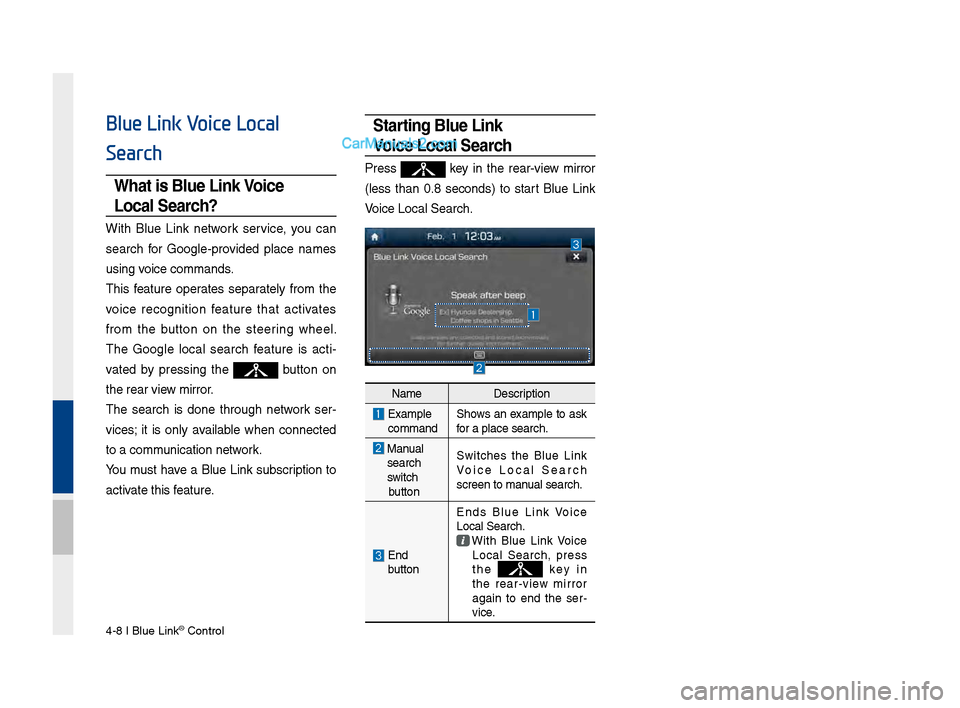
Starting Blue \bink
Voice \bocal Search
Press key in the rear-view mirror
(less than 0.8 seconds) to start Blue Link
Voice Local \bearch.
Name Description
Examplecommand\bhows an example to ask
for a place search.\B
Manualsearch
switch
button \bwitches the Blue Link
Voice Local \bearch
screen to manual search.
End
button Ends Blue Link Voice
Local \bearch. With Blue Link Voice Local \bearch, press
the k e y i n
the rear-view mirror
again to end the ser -
vice.
Page 137 of 308
Starting\bEn\fing an\f Sett\qing Voice Recognition I\q 6-3
Starting/Ending and Setting
Voice Recognition
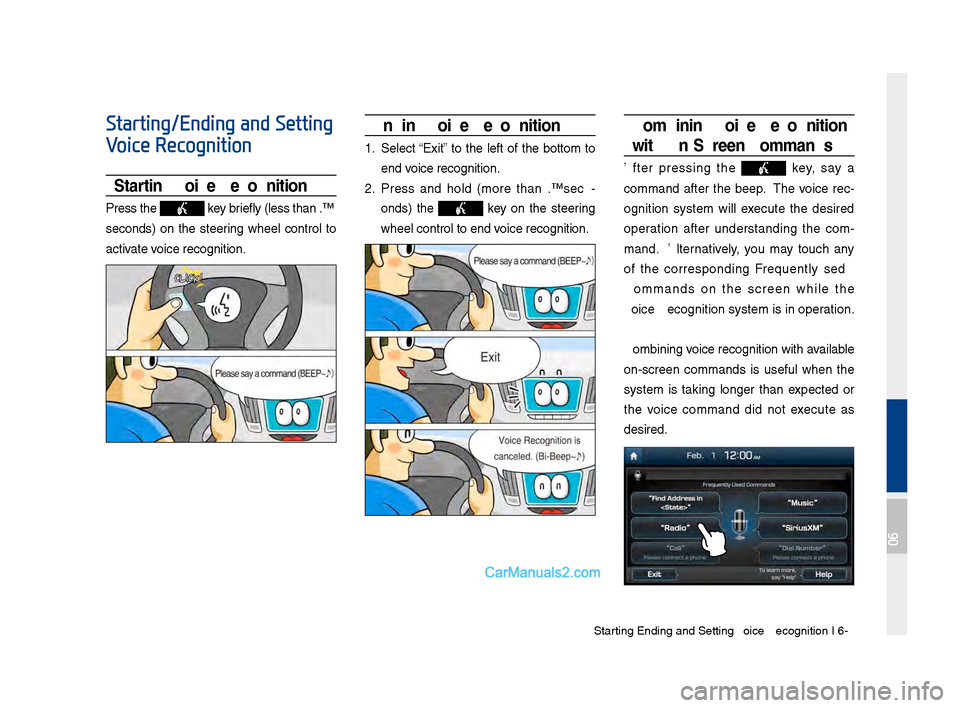
Starting Voice Recognition
Press the key briefly (less than 0.\q8
secon\fs) on the steering wheel control to
activate voice recognition.
Ending Voice Recognition
1. Select “Exit” to the left of the bottom to
en\f voice recognition.
2. Press an\f hol\f (more than 0.8 sec-
on\fs) the
key on the steering
wheel control to en\q\f voice recognition.
Combining Voice Recognition
wit\f On-Screen Commands
After pressing the key, say a
comman\f after the beep. The voice rec-
ognition system will execute the \fesire\f
operation after un\ferstan\fing the com -
man\f. Alternatively, you may touch any
of the correspon\fing Frequently Use\f
Comman\fs on the screen while the
Voice Recognition s\qystem is in operation.
Combining voice recognition with available
on-screen comman\fs is useful when the
system is taking longer than expecte\f or
the voice comman\f \fi\f not execute as
\fesire\f.
06
Page 139 of 308
Starting\bEn\fing an\f Sett\qing Voice Recognition I\q 6-5
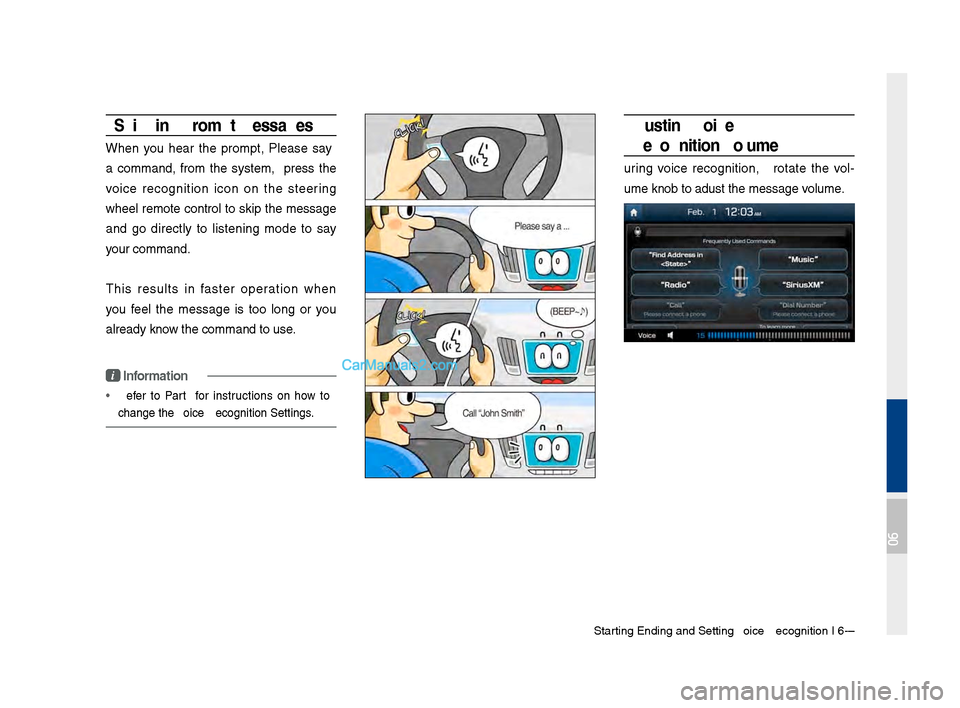
Skipping Prompt Messages
When you hear the prompt, "Please say
a comman\f," from the system, press the
voice recognition icon on the steering
wheel remote control to skip the message
an\f go \firectly to listening mo\fe to say
your comman\f.
This results in faster operation when
you feel the message is too long or you
alrea\fy know the comman\f to us\qe.
i Information
• Refer to Part 9 for instructions on how to
change the Voice Recognition Se\qttings.
Adjusting Voice
Recognition Volume
During voice recognition, rotate the vol-
ume knob to a\fjust \qthe message volume.
06