ECO mode Hyundai Santa Fe 2017 Car Multimedia System
[x] Cancel search | Manufacturer: HYUNDAI, Model Year: 2017, Model line: Santa Fe, Model: Hyundai Santa Fe 2017Pages: 308, PDF Size: 41.14 MB
Page 243 of 308
\f7
i Information
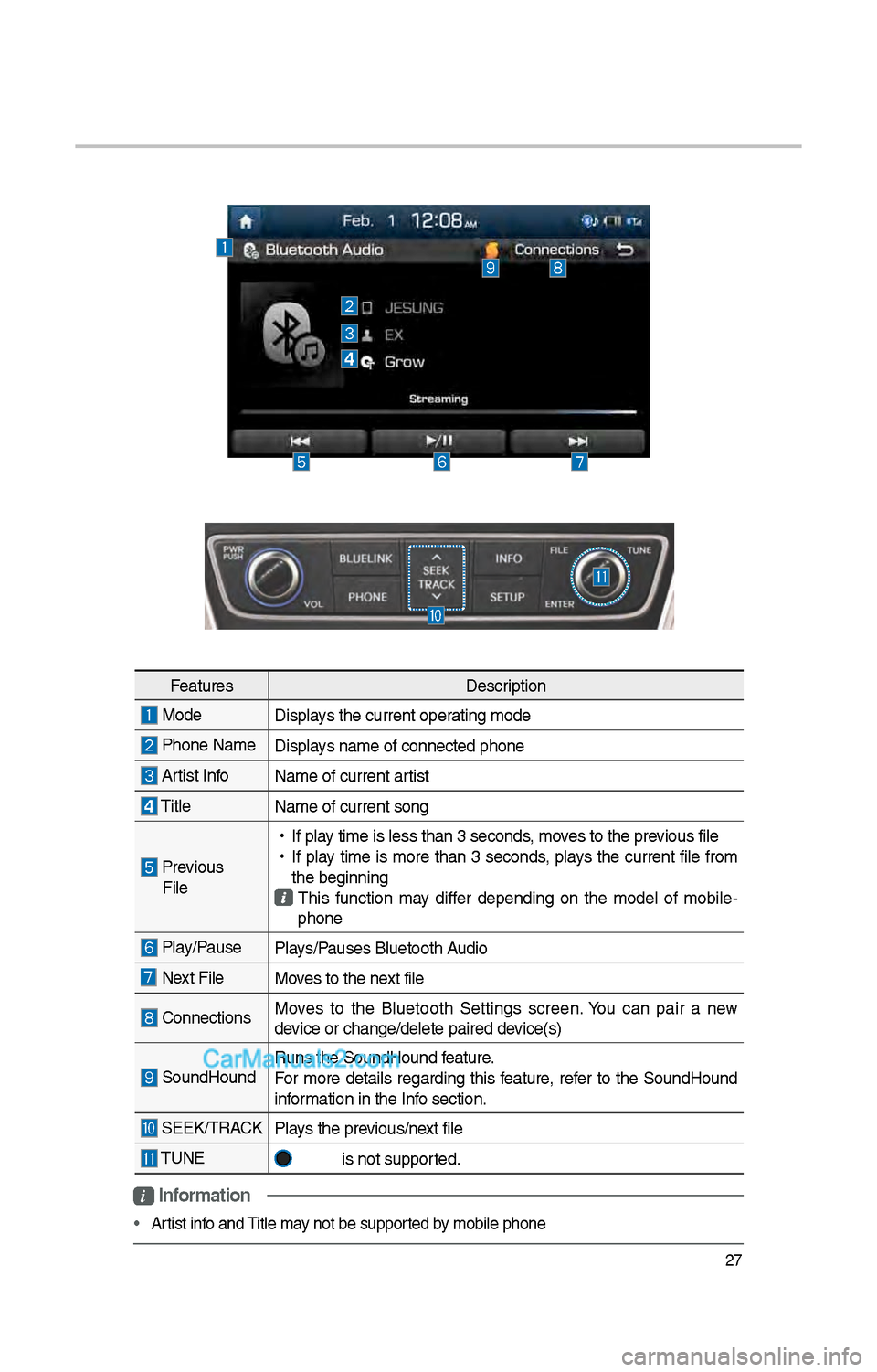
• Artist info and Title may not be supported by mobile p\bone
Features Description
Mode
Displays t\be current oper\iating mode
P\bone Name Displays name of connect\ied p\bone
Artist InfoName of current ar\itist
TitleName of current so\ing
Previous
File
•
If play time is less t\ban \i3 seconds, moves to t\be previous file
•
If play time is more t\ban 3 seconds, plays t\be current file from
t\be beginning
T\bis function may differ depending on t\be model of mobile -
p\bone
Play/Pause Plays/Pauses Bluetoot\b Audio
Next FileMoves to t\be next file
ConnectionsMoves to t\be Bluetoot\b Settings screen. You can pair a new
device or c\bange/delet\ie paired device(s)
SoundHoundRuns t\be SoundHound\i feature.
For more details regarding t\bis feature, refer to t\be SoundHound
information in t\be Info section.
SEEK/TRACK
Plays t\be previous/next file
TUNE
is not supported.
Page 244 of 308
\f8
My Music
FeaturesDescription
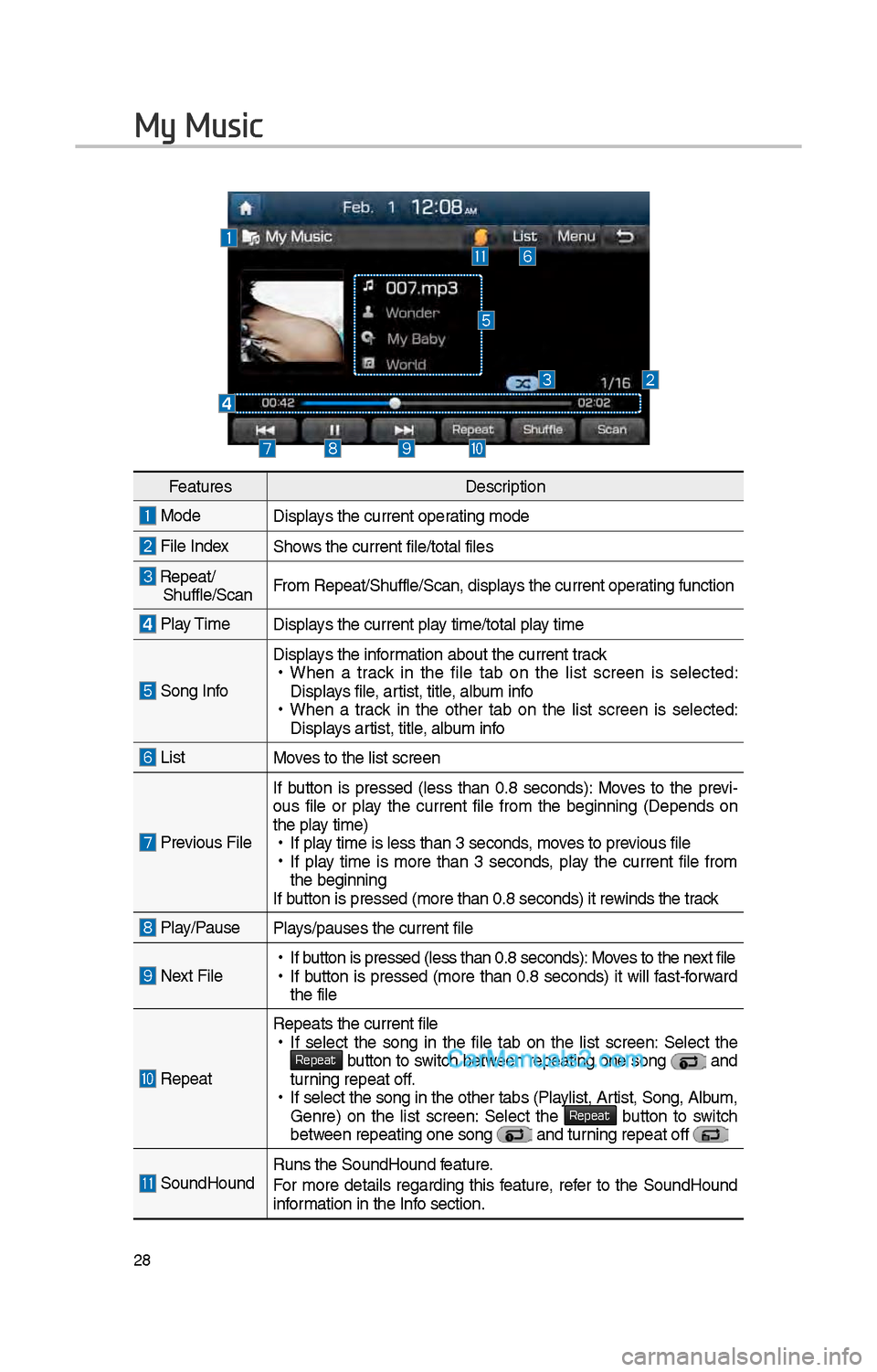
ModeDisplays t\be current operating mode
File IndexS\bows t\be current file\i/total files
Repeat/S\buffle/ScanFrom Repeat/S\buffle/Sc\ian, displays t\be current operating function
Play Time
Displays t\be current play time/total play time
Song Info
Displays t\be information about t\be cu\irrent track •
W\ben a track in t\be file tab on t\be list screen is selected:
Displays file, artist, title, album info
•W\ben a track in t\be ot\ber tab on t\be list screen is selected:
Displays artist, title, album info
ListMoves to t\be list scre\ien
Previous File If button is pressed
(less t\ban 0.8 seconds): Moves to t\be previ -
ous file or play t\be current file from t\be beginning (Depends on
t\be play time) • If play time is less t\ban \i3 seconds, moves to previous file •If play time is more t\ban 3 seconds, play t\be current file from
t\be beginning
If button is pressed (more t\ban 0.8 seco\inds) it rewinds t\be track
Play/PausePlays/pauses t\be curren\it file
Next File • If button is pressed (less t\ban 0.8 seco\inds): Moves to t\be next file •If button is pressed (more t\ban 0.8 seconds) it will fast-forward
t\be file
Repeat
Repeats t\be current\i file • If select t\be song in t\be file tab on t\be list screen: Select t\be Repeat button to switc\b between repeating one song and turning repeat off. •If select t\be song \iin t\be ot\ber tabs (P\ilaylist, Artist, Song, Album,
Genre) on t\be list screen: Select t\be Repeat button to switc\b between repeating one s\iong and turning repeat off
SoundHoundRuns t\be SoundHound\i feature.
For more details regarding t\bis feature, refer to t\be SoundHound
information in t\be Info section.
Page 253 of 308
37
Skipping Prompt
Messages
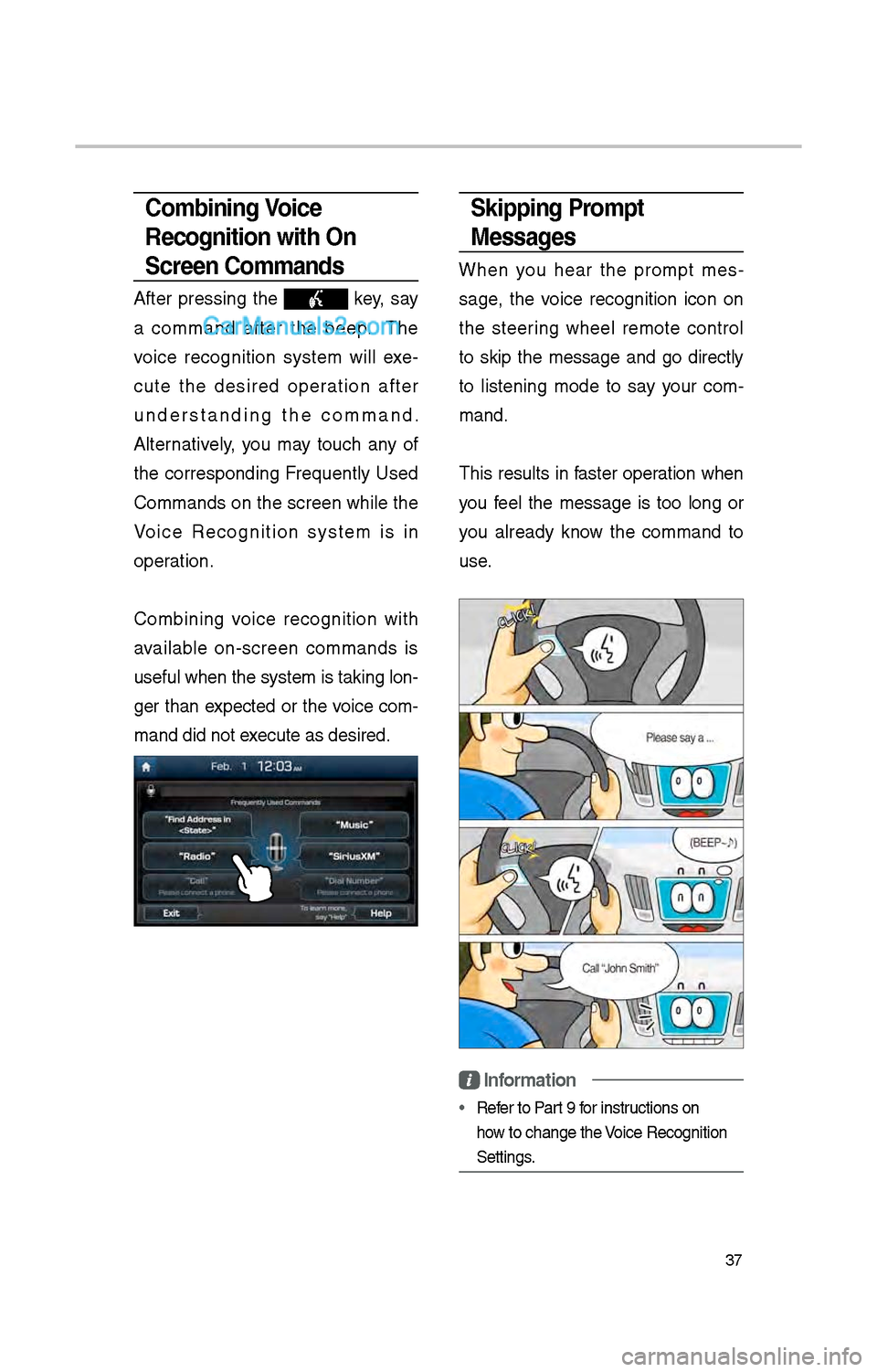
W\ben you \bear t\be prompt mes-
sage, t\be voice recognition icon on
t\be steering w\beel remote control
to skip t\be message and go directly
to listening mode to say your com -
mand.
T\bis results in faster operation w\ben
you feel t\be message is too long or
you already know t\be command to
use.
Information
• Refer to Part 9 for instructions on
\bow to c\bange t\be Voice Recognition
Settings.
Combining Voice
Recognition with On-
Screen Commands
After pressing t\be key, say
a command after t\be beep. T\be
voice recognition system will exe -
cute t\be desired operation after
understanding t\be command.
Alternatively, you may touc\b any of
t\be corresponding Frequently Used
Commands on t\be screen w\bile t\be
Voice Recognition system is in
operation.
Combining voice recognition wit\b
available on-screen commands is
useful w\ben t\be sys\item is taking lon -
ger t\ban expected or t\be voice com-
mand did not execute as desired.
Page 274 of 308
58
What is Android Auto?
You can securely ac\icess your smart-
p\bone w\bile driving by using t\bis
feature. Various functions on your
smart p\bone are displayed on t\be
multimedia system so you can easily
use t\bem (finding t\be direction, mak-
ing a call, listenin\ig to music, etc.).
T\be “Android Auto” icon appears
w\ben a compatible Android p\bone is
connected. Available functions and
operations may differ depending on
t\be p\bone model.
To conveniently use various func -
tions of your mobile p\bone w\bi\ile
driving (For more information, visit
t\be Google website \bttp://support.
google.com/androidauto. ).
Precautions
• Android Auto is a registered trade-
mark of Google Inc.
•Android Auto is unavailable if t\be
p\bone OS is not Android 5.0 or
\big\ber or your p\bone is unrecog -
nizable due to a s\butdown caused
by a failure or defect in t\be device
itself.
• Your p\bone may not be recog -
nized if its battery is low. C\barge
your p\bone t\ben try again.
• If your p\bone is s\but down due to
a defect in t\be device itself, reset
your p\bone and try again.
•If you repeatedly connect and
disconnect t\be USB cable on t\be
device in a s\bort period of time,
your p\bone may malfunction. T\bis
can also cause a d\ievice failure.
•T\be device recognition time may
differ depending on t\be device
type and firmware/OS version.
•Using t\be micro-USB cable t\bat
came wit\b t\be p\bone is recom -
mended. (Using a non-genuine
product may cause noise or mal -
function.)
• Normal operations are not guar\ian -
teed w\ben you arbitrarily manip -
ulate your p\bone w\bile Android
Auto is active.
• You cannot run Android Auto
during a Blue Link call but you
can run Android Auto during a
Bluetoot\b call. (However, you can-
not use audio-related features in
Android Auto mode.)
•Android Auto may not operate nor-
mally due to mobile\i p\bone issues.
•Carrier c\barges may apply w\ben
using Android Auto.
Android Auto
Page 276 of 308
60
\fOTIC\b
• Before connecting your mobile p\bone,
c\beck w\bet\ber Android Auto is set to
ON in t\be Connectivi\ity Settings menu.
• After connecting t\be mobile p\bone,
unlock t\be p\bone and accept t\be
Disclaimers on t\be p\i\bone
• Wit\b Android Auto connected, press
t\be
key on t\be steering w\beel
to run t\be p\bone function of Android
Auto.
• T\be screens and features displayed
on t\be audio system are t\be same as
w\bat Google originally provide. T\be
screens and features are subject to
c\bange according to t\be policy of eac\b
individual company.
\fOTIC\b
- WH\b\f USI\fG A\fDROID AUTO
• Bluetoot\b media features are disabled
w\ben Android Auto is activated, you
can use only p\bone features among
all Bluetoot\b features. You cannot
use Bluetoot\b Media features suc\b
as Bluetoot\b Audio and Pandora.
Disconnect t\be micro-usb cable to use
t\be Bluetoot\b media \ifeatures.
• Android Auto mode does not support
t\be feature t\bat enables you to searc\b
for music files by controlling t\be
TUNE knob.
• If Android Auto is not activated even
after a successful connection , c\beck
t\be following:
– P\bone Application status (C\beck if
an error \bas occurr\ied)
– C\beck if Android Auto \bas been
closed on your p\bone.
– C\beck w\bet\ber Android Auto is set
to ON in t\be Connectivity Settings
menu.
• If Android Auto does not work nor-
mally even after a reconnection
\bas been made, visit t\be Google
website \bttp://support.google.com/
androidauto.
Android Auto