Drive mode button Hyundai Santa Fe 2019 User Guide
[x] Cancel search | Manufacturer: HYUNDAI, Model Year: 2019, Model line: Santa Fe, Model: Hyundai Santa Fe 2019Pages: 557, PDF Size: 14.8 MB
Page 174 of 557
3-85
Convenient features of your vehicle
3
High Beam Assist(HBA) indicator light(if equipped)
This indicator light illuminates :
When the high-beam is on with
the light switch in the AUTO light
position.
If your vehicle detects oncoming or preceding vehicles, the High
Beam Assist (HBA) system will
switch the high beam to low beam
automatically.
For more details, refer to "High
Beam Assist (HBA) system" in this
chapter.
AUTO HOLD Indicator Light
This indicator light illuminates:
[White] When you activate the Auto
Hold system by pressing the AUTO
HOLD button.
[Green] When you stop the vehicle completely by depressing the
brake pedal with the Auto Hold
system activated.
[Yellow] When there is a malfunc- tion with the Auto Hold system.
If this occurs, have your vehicle
inspected by an authorized
HYUNDAI dealer.
For more details, refer to "Auto
Hold" in chapter 5.
Cruise Indicator Light
This indicator light illuminates:
When the cruise control system is enabled.
For more details, refer to "Cruise
Control System" in chapter 5.
SPORT Mode Indicator Light (if equipped)
This indicator light illuminates:
When you select "SPORT" mode
as drive mode.
For more details, refer to "Drive
Mode Integrated Control System"
in chapter 5.
AUTO
HOLD
Page 175 of 557
3-86
Convenient features of your vehicle
SMART Mode IndicatorLight (if equipped)
This indicator light illuminates:
When you select ''SMART" mode
as drive mode.
For more details, refer to "Drive
Mode Integrated Control System''
in chapter 5.
All Wheel Drive LOCK Indicator Light (if equipped)
This indicator light illuminates:
When you set the ignition switch
or the Engine Start/Stop button to
the ON position.
- The AWD LOCK indicator lightilluminates for about 3 seconds
and then goes off.
When you select AWD Lock mode by pressing the AWD LOCK but-
ton.
- The AWD LOCK mode is totransfer a portion of the drive
torque to the rear wheels for
increased traction on wet pave-
ment, snow covered roads or
when driving off road.
Downhill Brake Control(DBC) Indicator Light(if equipped)
This indicator light illuminates:
When you set the ignition switch
or the Engine Start/Stop button to
the ON position.
- The Downhill Brake ControlIndicator Light illuminates for about
3 seconds and then goes off.
When you activate the system by pressing the DBC button.
This indicator light blinks:
When the DBC is operating.
This indicator light illuminates yel-
low:
When there is a malfunction withthe DBC system.
If this occurs, have your vehicle
inspected by an authorized
HYUNDAI dealer.
For more details, refer to
"Downhill Brake Control (DBC)
System" in chapter 5.
AWD Lock Mode
Do not use the AWD lock mode
on dry paved roads. Doing so
can cause abnormal noise or
vibration, and may damage the
AWD system.
CAUTION
00360030002400350037
Page 198 of 557
3-109
Convenient features of your vehicle
3
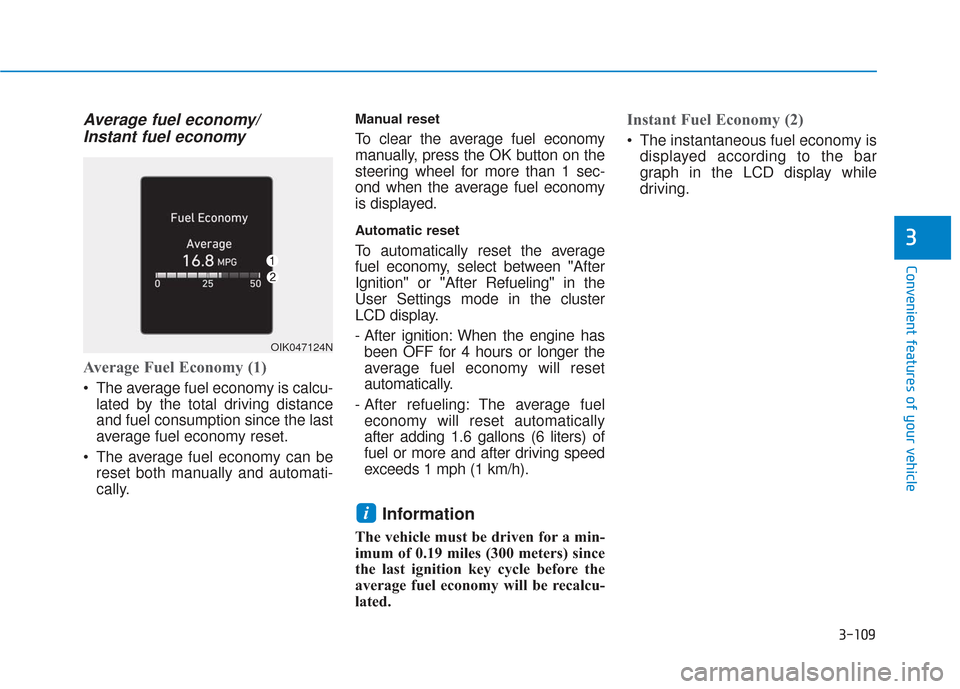
Average fuel economy/Instant fuel economy
Average Fuel Economy (1)
The average fuel economy is calcu-
lated by the total driving distance
and fuel consumption since the last
average fuel economy reset.
The average fuel economy can be reset both manually and automati-
cally.
Manual reset
To clear the average fuel economy
manually, press the OK button on the
steering wheel for more than 1 sec-
ond when the average fuel economy
is displayed.
Automatic reset
To automatically reset the average
fuel economy, select between "After
Ignition" or "After Refueling" in the
User Settings mode in the cluster
LCD display.
- After ignition: When the engine hasbeen OFF for 4 hours or longer the
average fuel economy will reset
automatically.
- After refueling: The average fuel economy will reset automatically
after adding 1.6 gallons (6 liters) of
fuel or more and after driving speed
exceeds 1 mph (1 km/h).
Information
The vehicle must be driven for a min-
imum of 0.19 miles (300 meters) since
the last ignition key cycle before the
average fuel economy will be recalcu-
lated.
Instant Fuel Economy (2)
The instantaneous fuel economy is displayed according to the bar
graph in the LCD display while
driving.
i
OIK047124N
Page 210 of 557
3-121
Convenient features of your vehicle
3
Headlamp delay function
If the key is removed from the ignition
switch or placed in the ACC position
or the LOCK/OFF position with the
headlamps ON, the headlamps
(and/or parking lamps) remain on for
about 5 minutes. However, if the dri-
ver's door is opened and closed, the
headlights are turned off after 15
seconds. Also, with the engine off if
the driver's door is opened and
closed, the headlamps (and/or park-
ing lamps) are turned off after 15
seconds.
The headlamps (and/or parking
lamps) can be turned off by pressing
the lock button on the remote key or
smart key twice or turning the head-
lamp switch to the OFF or AUTO
position.
You can activate or deactivate the
Headlamp Delay function from the
User Settings mode in the LCD dis-
play.
For more details, refer to the "LCD
Display" section in this chapter.If the driver exits the vehicle
through another door besides the
driver door, the battery saver func-
tion does not operate and the
headlamp delay function does not
turn OFF automatically.
This may cause the battery to dis-
charge. To avoid battery dis-
charge, turn OFF the headlamps
manually from the headlamp
switch before exiting the vehicle.
Headlamp leveling device
(if equipped)
It automatically adjusts the head-
lamp beam level according to the
number of passengers and loading
weight in the luggage area. It also
adjusts to the appropriate headlamp
beam level for various situations.
NOTICE
If the function does not work
properly, have the system
inspected by an authorized
HYUNDAI dealer. Do not attempt
to inspect or replace the wiring
yourself.
WARNING
Page 214 of 557
3-125
Convenient features of your vehicle
3
Welcome System (if equipped)
Welcome light
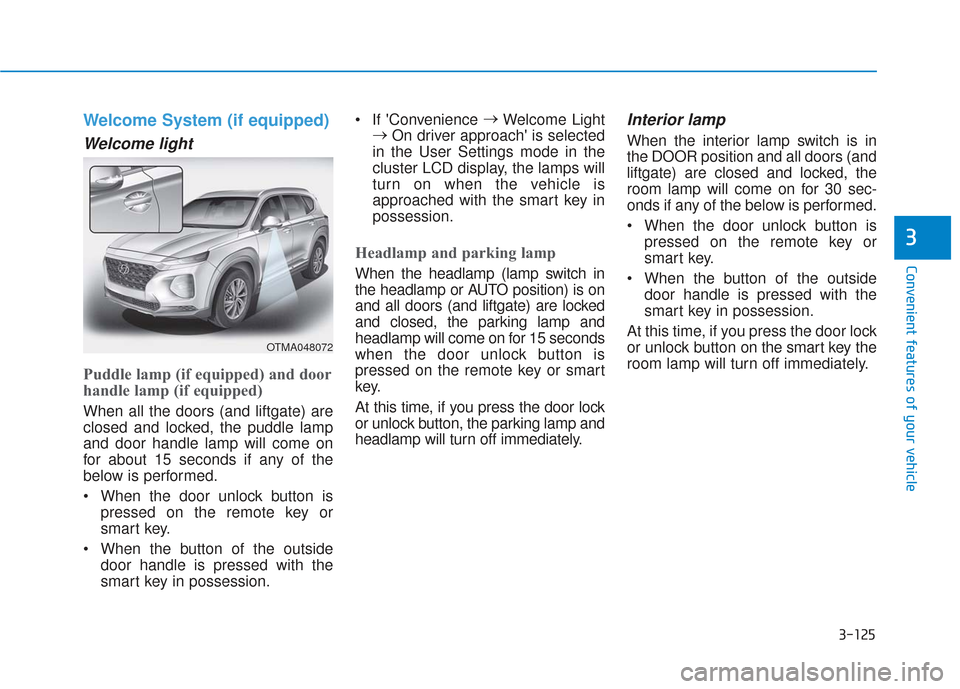
Puddle lamp (if equipped) and door
handle lamp (if equipped)
When all the doors (and liftgate) are
closed and locked, the puddle lamp
and door handle lamp will come on
for about 15 seconds if any of the
below is performed.
When the door unlock button ispressed on the remote key or
smart key.
When the button of the outside door handle is pressed with the
smart key in possession. If 'Convenience
→
Welcome Light
→ On driver approach' is selected
in the User Settings mode in the
cluster LCD display, the lamps will
turn on when the vehicle is
approached with the smart key in
possession.
Headlamp and parking lamp
When the headlamp (lamp switch in
the headlamp or AUTO position) is on
and all doors (and liftgate) are locked
and closed, the parking lamp and
headlamp will come on for 15 seconds
when the door unlock button is
pressed on the remote key or smart
key.
At this time, if you press the door lock
or unlock button, the parking lamp and
headlamp will turn off immediately.
Interior lamp
When the interior lamp switch is in
the DOOR position and all doors (and
liftgate) are closed and locked, the
room lamp will come on for 30 sec-
onds if any of the below is performed.
When the door unlock button is pressed on the remote key or
smart key.
When the button of the outside door handle is pressed with the
smart key in possession.
At this time, if you press the door lock
or unlock button on the smart key the
room lamp will turn off immediately.
OTMA048072
Page 222 of 557
3-133
Convenient features of your vehicle
3
Information
• If vehicle speed is over 10 mph (15km/h)
- the rear image stays ON when therear view was on the screen
- screen (top, front wide, front right and front left) of other modes of
SVM system turns OFF and
switches to the original AVN
screen when other modes were on
the screen
• If the SVM system is ON and the vehicle speed is under 10 mph (15
km/h)
- the rear image stays ON when therear view was on the screen
- a pop-up for selecting the SVM mode (top, front wide, front right
and front left) appears when
pressing (2) on the screen • When the vehicle is backing up, the
rear image will appear on the
screen automatically regardless of
vehicle speed or SVM button (1)
status.
- If the rear image was ON, thescreen switches to the parking
assist screen.
- If the screen (top, front wide, front right and front left) of other
modes of SVM system was ON, the
screen for setting the initial rear
view mode appears.
- When the shift lever is moved from R (Reverse) to D (Drive), the
screen of the previous mode is dis-
played.
• A warning appears on the system when:
- The liftgate is opened
- The driver's door is opened
- The passenger's door is opened
- The outer side view mirror is folded
• If the system is not operating nor- mally, the system should be checked
by an authorized HYUNDAI dealer.
For more details, refer to the sep-
arately supplied manual with your
vehicle.
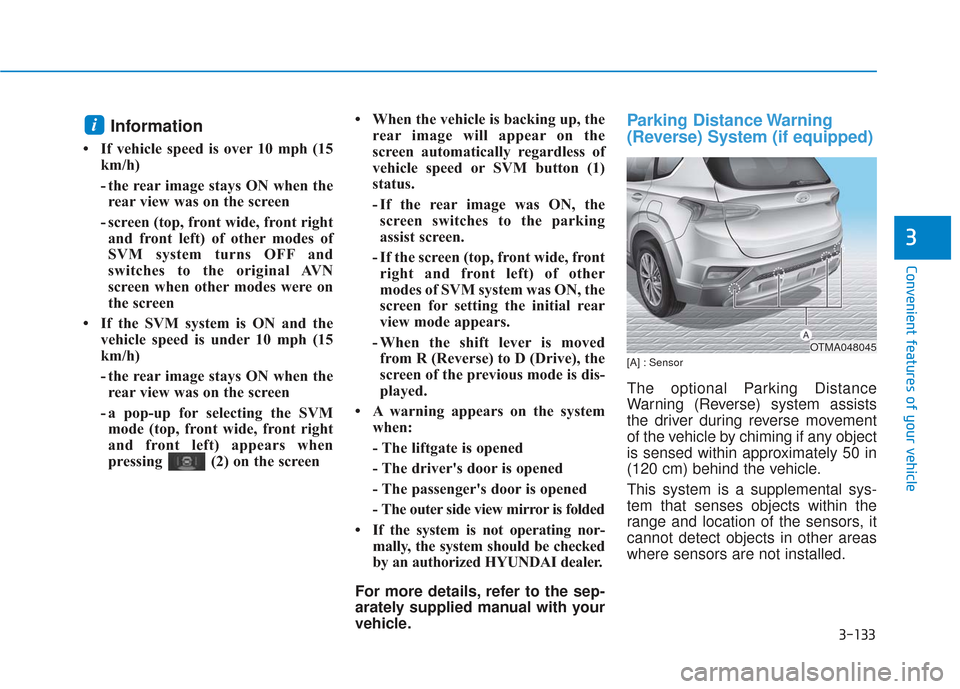
Parking Distance Warning
(Reverse) System (if equipped)
[A] : Sensor
The optional Parking Distance
Warning (Reverse) system assists
the driver during reverse movement
of the vehicle by chiming if any object
is sensed within approximately 50 in
(120 cm) behind the vehicle.
This system is a supplemental sys-
tem that senses objects within the
range and location of the sensors, it
cannot detect objects in other areas
where sensors are not installed.
i
OTMA048045
Page 233 of 557
3-144
Convenient features of your vehicle
Operation Tips
To keep dust or unpleasant fumesfrom entering the vehicle through
the ventilation system, temporarily
set the air intake control to recir-
culation mode. Return the control
to fresh mode when the unpleas-
ant air outside has diminished.
This will help keep the driver alert
and comfortable.
To help prevent the inside of the windshield from fogging, set the air
intake control to fresh mode and
fan speed to the desired position,
turn on the air conditioning sys-
tem, and adjust the temperature
control to the desired temperature.
Air conditioning
Your HYUNDAI vehicle air condition-
ing system is filled with R-1234yf
refrigerant.
1. Start the engine.
2. Press the air conditioning button.
3. Select the Face Level mode.
4. Set the air intake control toRecirculation mode temporarily to
allow the cabin to cool quickly.
When the desired temperature in
the cabin is reached, change the
air intake control back to Fresh
mode.
5. Adjust the fan speed control and temperature control to maintain
maximum comfort.
When maximum cooling is desired,
set the temperature control to the
MAX A/C position, then set the fan
speed control to the highest setting. When using the air conditioning
system, monitor the engine tem-
perature gauge closely while driv-
ing up hills or in heavy traffic when
outside temperatures are high. Air
conditioning system operation
when climbing a steep grade or in
high outside ambient tempera-
tures can cause engine overheat-
ing.
Continue to use the fan, but turn
the air conditioning system off if
the engine temperature gauge
indicates engine overheating.
NOTICE
Page 234 of 557
3-145
Convenient features of your vehicle
3
Air conditioning system operation tips
If the vehicle has been parked indirect sunlight during hot weather,
open the windows for a short time
to let the hot air inside the vehicle
escape.
After sufficient cooling has been achieved, switch back from recir-
culation mode to fresh mode.
To help reduce moisture inside of the windows on rainy or humid
days, decrease the humidity inside
the vehicle by operating the air
conditioning system with the win-
dows and sunroof closed.
Use the air conditioning system every month only for a few minutes
to ensure maximum system per-
formance.
If you operate air conditioner excessively, the difference
between the temperature of the
outside air and that of the wind-
shield could cause the outer sur-
face of the windshield to fog up,
causing loss of visibility. In this
case, set the mode selection knob
or button to the position and
fan speed control to the lower
speed.
System Maintenance
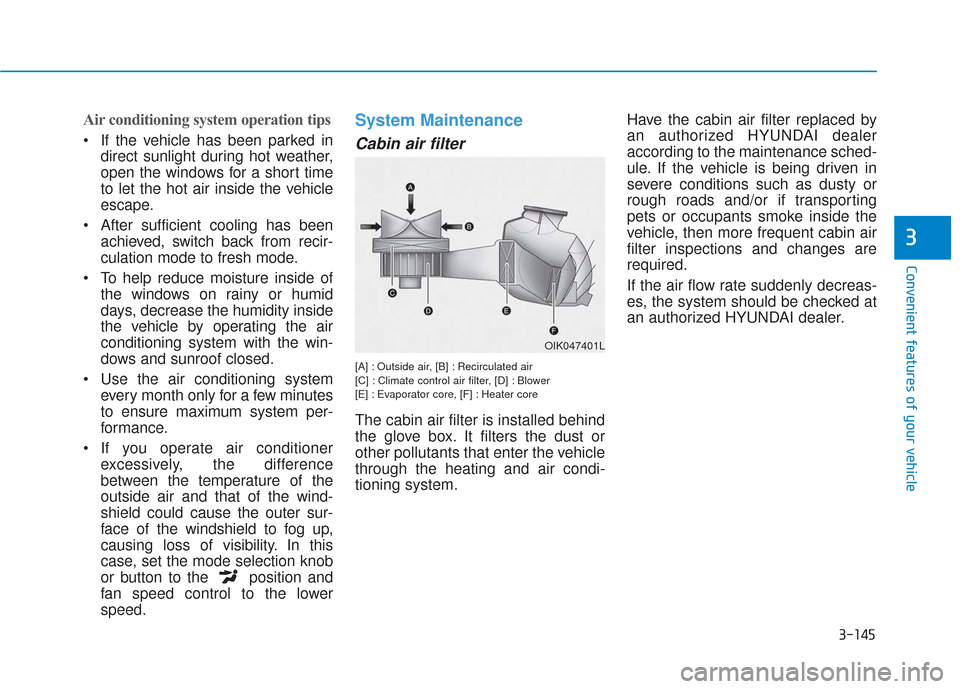
Cabin air filter
[A] : Outside air, [B] : Recirculated air
[C] : Climate control air filter, [D] : Blower
[E] : Evaporator core, [F] : Heater core
The cabin air filter is installed behind
the glove box. It filters the dust or
other pollutants that enter the vehicle
through the heating and air condi-
tioning system. Have the cabin air filter replaced by
an authorized HYUNDAI dealer
according to the maintenance sched-
ule. If the vehicle is being driven in
severe conditions such as dusty or
rough roads and/or if transporting
pets or occupants smoke inside the
vehicle, then more frequent cabin air
filter inspections and changes are
required.
If the air flow rate suddenly decreas-
es, the system should be checked at
an authorized HYUNDAI dealer.
OIK047401L
Page 236 of 557
3-147
Convenient features of your vehicle
3
A
AU
U T
TO
O M
M A
AT
TI
IC
C
C
C L
LI
IM
M A
AT
TE
E
C
C O
O N
NT
TR
R O
O L
L
S
S Y
Y S
ST
T E
EM
M
OTM048313N
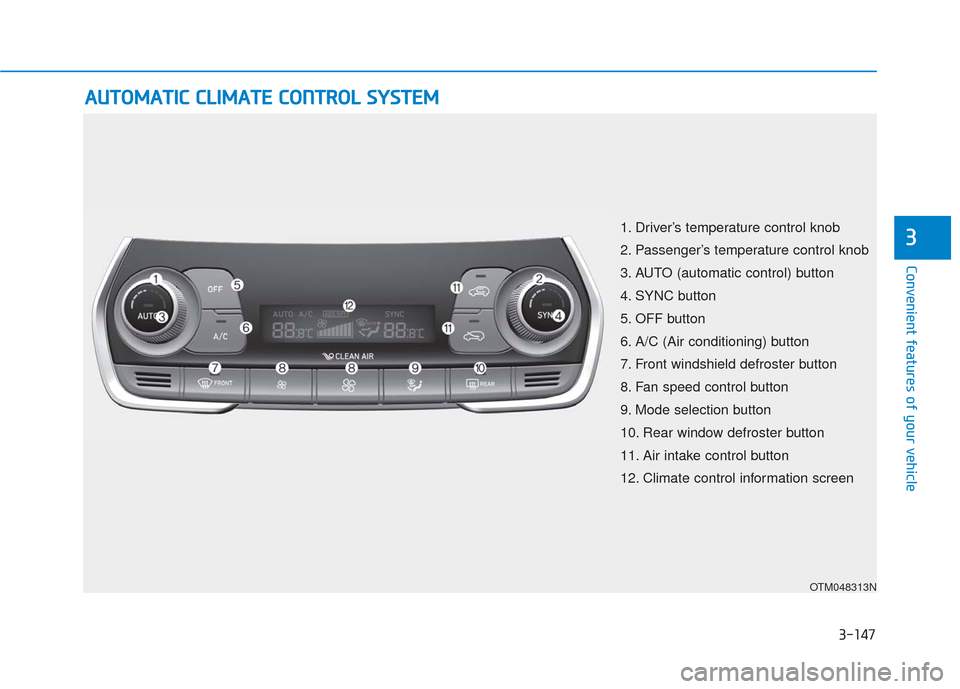
1. Driver’s temperature control knob
2. Passenger’s temperature control knob
3. AUTO (automatic control) button
4. SYNC button
5. OFF button
6. A/C (Air conditioning) button
7. Front windshield defroster button
8. Fan speed control button
9. Mode selection button
10. Rear window defroster button
11. Air intake control button
12. Climate control information screen
Page 237 of 557
3-148
Convenient features of your vehicle
Automatic Temperature
Control Mode
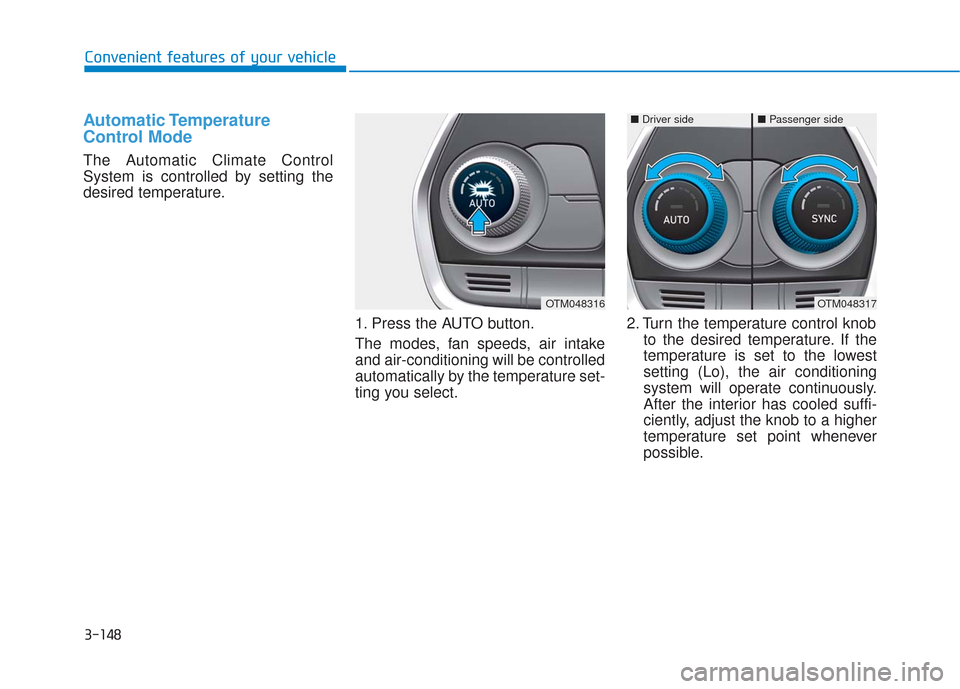
The Automatic Climate Control
System is controlled by setting the
desired temperature.1. Press the AUTO button.
The modes, fan speeds, air intake
and air-conditioning will be controlled
automatically by the temperature set-
ting you select.2. Turn the temperature control knob
to the desired temperature. If the
temperature is set to the lowest
setting (Lo), the air conditioning
system will operate continuously.
After the interior has cooled suffi-
ciently, adjust the knob to a higher
temperature set point whenever
possible.
OTM048316OTM048317
■Driver side■Passenger side