Drive mode button Hyundai Santa Fe 2019 Owner's Guide
[x] Cancel search | Manufacturer: HYUNDAI, Model Year: 2019, Model line: Santa Fe, Model: Hyundai Santa Fe 2019Pages: 557, PDF Size: 14.8 MB
Page 325 of 557
5-51
Driving your vehicle
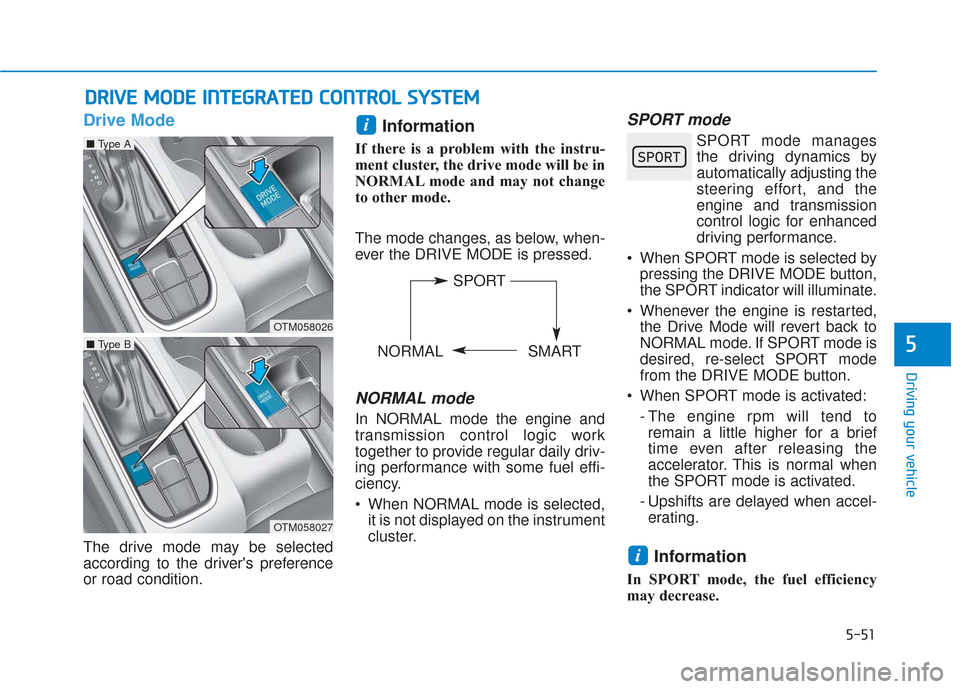
Drive Mode
The drive mode may be selected
according to the driver's preference
or road condition.
Information
If there is a problem with the instru-
ment cluster, the drive mode will be in
NORMAL mode and may not change
to other mode.
The mode changes, as below, when-
ever the DRIVE MODE is pressed.
NORMAL mode
In NORMAL mode the engine and
transmission control logic work
together to provide regular daily driv-
ing performance with some fuel effi-
ciency.
When NORMAL mode is selected,it is not displayed on the instrument
cluster.
SPORT mode
SPORT mode managesthe driving dynamics by
automatically adjusting the
steering effort, and the
engine and transmission
control logic for enhanced
driving performance.
When SPORT mode is selected by pressing the DRIVE MODE button,
the SPORT indicator will illuminate.
Whenever the engine is restarted, the Drive Mode will revert back to
NORMAL mode. If SPORT mode is
desired, re-select SPORT mode
from the DRIVE MODE button.
When SPORT mode is activated: - The engine rpm will tend toremain a little higher for a brief
time even after releasing the
accelerator. This is normal when
the SPORT mode is activated.
- Upshifts are delayed when accel- erating.
Information
In SPORT mode, the fuel efficiency
may decrease.
i
i
D D R
RI
IV
V E
E
M
M O
OD
DE
E
I
IN
N T
TE
EG
G R
RA
A T
TE
ED
D
C
C O
O N
NT
TR
R O
O L
L
S
S Y
Y S
ST
T E
EM
M
5
OTM058026
■ Type A
OTM058027
■ Type B
SPORT
NORMAL SMART
Page 326 of 557
5-52
SMART mode
SMART mode selects the
proper driving mode
between NORMAL and
SPORT by judging the driver's driv-
ing habits (i.e. Economical or
Aggressive) from the brake pedal
depression or the steering wheel
operation.
Press the DRIVE MODE button to select SMART mode. When
SMART mode is activated, the
indicator illuminates on the instru-
ment cluster.
Vehicle's equipped with a supervi- sion cluster the indicator illumi-
nates in green, when the driver's
driving is categorized to be eco-
nomical. It illuminates in white,
when the driver's driving is catego-
rized to be normal. It illuminates in
yellow, when the driver's driving is
categorized to be sportive during
abrupt braking or sharp curving.
Whenever the engine is restarted, the drive mode will revert back to
NORMAL mode. If SMART mode
is desired, re-select SMART mode. SMART mode automatically con-
trols gear shifting patterns, engine
torque, in accordance with the dri-
ver's driving habits.
Information
When you dynamically drive the vehi-
cle in SMART mode by abruptly
decelerating or sharply turning the
driving mode changes to SPORT
mode. However, it may adversely
affect fuel economy.
Various driving situations, which
you may encounter in SMART
mode
The driving mode automaticallychanges to SMART SPORT, when
you abruptly accelerate the vehicle
or repetitively operate the steering
wheel (Your driving is categorized
to be sporty.). In this mode, your
vehicle drives in a lower gear for
abrupt accelerating/decelerating
and increases the engine brake
performance.
You may still sense the engine braking performance, even when
you release the accelerator pedal
in SMART SPORT mode. It is
because your vehicle remains in
lower gear over a certain period of
time for next acceleration. Thus, it
is a normal driving situation, not
indicating any malfunction.
The driving mode automatically changes to SMART SPORT mode
only in harsh driving situations. In
most of the normal driving situa-
tions, the driving mode sets to be
in SMART NORMAL mode.
i
Driving your vehicle
00360030002400350037
Page 368 of 557
5-94
Driving your vehicle
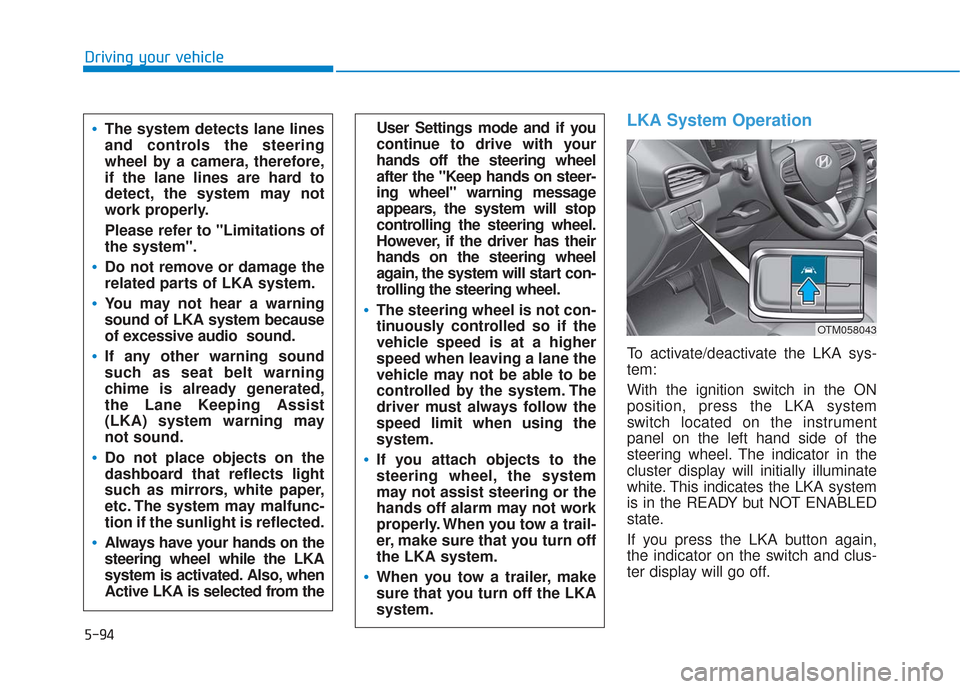
LKA System Operation
To activate/deactivate the LKA sys-
tem:
With the ignition switch in the ON
position, press the LKA system
switch located on the instrument
panel on the left hand side of the
steering wheel. The indicator in the
cluster display will initially illuminate
white. This indicates the LKA system
is in the READY but NOT ENABLED
state.
If you press the LKA button again,
the indicator on the switch and clus-
ter display will go off.
User Settings mode and if you
continue to drive with your
hands off the steering wheel
after the "Keep hands on steer-
ing wheel" warning message
appears, the system will stop
controlling the steering wheel.
However, if the driver has their
hands on the steering wheel
again, the system will start con-
trolling the steering wheel.
The steering wheel is not con-
tinuously controlled so if the
vehicle speed is at a higher
speed when leaving a lane the
vehicle may not be able to be
controlled by the system. The
driver must always follow the
speed limit when using the
system.
If you attach objects to the
steering wheel, the system
may not assist steering or the
hands off alarm may not work
properly. When you tow a trail-
er, make sure that you turn off
the LKA system.
When you tow a trailer, make
sure that you turn off the LKA
system.
The system detects lane lines
and controls the steering
wheel by a camera, therefore,
if the lane lines are hard to
detect, the system may not
work properly.
Please refer to "Limitations of
the system".
Do not remove or damage the
related parts of LKA system.
You may not hear a warning
sound of LKA system because
of excessive audio sound.
If any other warning sound
such as seat belt warning
chime is already generated,
the Lane Keeping Assist
(LKA) system warning may
not sound.
Do not place objects on the
dashboard that reflects light
such as mirrors, white paper,
etc. The system may malfunc-
tion if the sunlight is reflected.
Always have your hands on the
steering wheel while the LKA
system is activated. Also, when
Active LKA is selected from the
OTM058043
Page 391 of 557
5-117
Driving your vehicle
5
Normal:Vehicle speed following the front
vehicle to maintain the set distance
is normal.
Slow: Vehicle speed following the front
vehicle to maintain the set distance
is slower than normal speed.
Information
The last selected speed sensitivity of
the smart cruise control is remained in
the system.
To Convert to Cruise Control
Mode
The driver may choose to switch to
use the conventional Cruise Control
mode (speed only control function)
by following these steps:
1. Push the CRUISE button on the steering wheel to turn the system
on. The cruise ( ) indi-
cator will illuminate.
2. Push and hold the Vehicle-to- Vehicle Distance button for more
than 2 seconds.
3. Choose between "Smart Cruise Control" and "Cruise Control".
When the system is canceled using
the CRUISE button or the CRUISE
button is used after the engine is
turned on, the Smart Cruise Control
mode will turn on.
i
When using the conventional
Cruise Control mode, you must
manually adjust the distance to
other vehicles by depressing
the brake pedal. The system
does not automatically adjust
the distance to vehicles in front
of you.
WARNING
Page 549 of 557

I-6
Gauges and meters ..........................................................3-70
Glove box......................................................................3-\
165
Hazard warning flasher .....................................................6-2
Hazardous driving conditions .......................................5-125
Head restraints ................................................................2-17Front seat head restraints............................................2-18
Rear seat head restraints .............................................2-20
Head up display.........................................................\
....3-112
Headlamp delay function ..............................................3-121
Headlamp leveling device.............................................3-121
Headlamp position ........................................................3-115
Headlight bulb replacement ............................................7-65
Heated steering wheel .....................................................3-30
High beam operation .....................................................3-116
Highway driving ...........................................................5-127
Hill-start assist control (HAC)........................................5-36
Hood........................................................................\
........3-51
Horn ........................................................................\
........3-29
How to use this manual ....................................................F-6
Idle Stop and Go (ISG) ...................................................5-46
If the engine doesn't turn over or turns over slowly.........6-3 If the engine overheats ......................................................6-6
If the engine stalls at a crossroad or crossing...................6-2
If the engine stalls while driving ......................................6-2
If the engine turns over normally but doesn't start ...........6-3
If the engine will not start.................................................6-3
If you have a flat tire while driving ..................................6-3
Ignition switch
Engine Start/Stop button ..............................................5-9
Key ignition switch ......................................................5-6
Immobilizer system.........................................................3-12
Improtant safety precautions.............................................2-2 Air bag hazards ............................................................2-2
Always wear your seat belt ..........................................2-2
Control your speed .......................................................2-3
Driver distraction..........................................................2-2
Keep your vehicle in safe condition.............................2-3
Restrain all children .....................................................2-2
In case of emergency while driving..................................6-2
Indicator light..................................................................3-74
Inside rearview mirror ....................................................3-30
Instrument cluster ...........................................................3-68 Assist mode ................................................................3-95
Gauges and meters .....................................................3-70
Instrument panel illumination ....................................3-69
LCD display control ...................................................3-93
LCD display messages ...............................................3-87
LCD display modes ....................................................3-94
Shift indicator pop-up ................................................3-74
Transmission shift indicator .......................................3-73
Index
G
H
I
Page 551 of 557
I-8
Check Driver Attention Warning system ...................3-92
Check Forward Collision Avoidance Assist system...3-91
Check headlight ..........................................................3-91
Check headlight LED .................................................3-91
Check High Beam Assist (HBA) system ...................3-91
Check Lane Keeping Assist (LKA) system ...............3-92
Check Smart Cruise Control System .........................3-92
Check turn signal........................................................3-91
Door, Hood, Liftgate open indicator ..........................3-88
Engine overheated ......................................................3-90
Key not detected .........................................................3-87
Key not in vehicle ......................................................3-87
Lights mode ................................................................3-90
Low fuel .....................................................................3-9\
0
Low key battery..........................................................3-87
Low pressure ..............................................................3-89
Low washer fluid........................................................3-90
Press brake pedal to start engine ................................3-87
Press START button again .........................................3-87
Press START button with key ....................................3-88
Shift to P.....................................................................3-8\
7
Shift to P or N to start engine ....................................3-87
Sunroof open indicator ...............................................3-89
Window open indicator ..............................................3-89
Wiper mode ................................................................3-90
LCD display modes ........................................................3-94
Leading vehicle departure alert ....................................5-123 Liftgate ........................................................................\
....3-52
Power liftgate .............................................................3-54
Smart liftgate ..............................................................3-61
Light ........................................................................\
......3-114 Auto light position ....................................................3-114
Battery saver function ..............................................3-120
Daytime running light (DRL)...................................3-114
Front fog lamp ..........................................................3-120
Headlamp delay function .........................................3-121
Headlamp leveling device ........................................3-121
Headlamp position ....................................................3-115
High Beam Assist (HBA) system.............................3-116
High beam operation ................................................3-116
Lane change signals..................................................3-119
One-touch turn signal function ................................3-120
Parking lamp position...............................................3-115
Turn signals ..............................................................3-119
Light bulbs ......................................................................7-\
65
Lubricants and capacities..................................................8-7
Luggage compartment lamp .........................................3-123
Luggage net holder .......................................................3-177
Luggage tray .................................................................3-167
Maintenance Explanation of scheduled maintenance items ............7-18
Maintenance services ...................................................7-4
Index
M