Drive mode button Hyundai Santa Fe 2019 Owner's Guide
[x] Cancel search | Manufacturer: HYUNDAI, Model Year: 2019, Model line: Santa Fe, Model: Hyundai Santa Fe 2019Pages: 557, PDF Size: 14.8 MB
Page 242 of 557
3-153
Convenient features of your vehicle
3
Adjusting the driver and passenger
side temperature equally
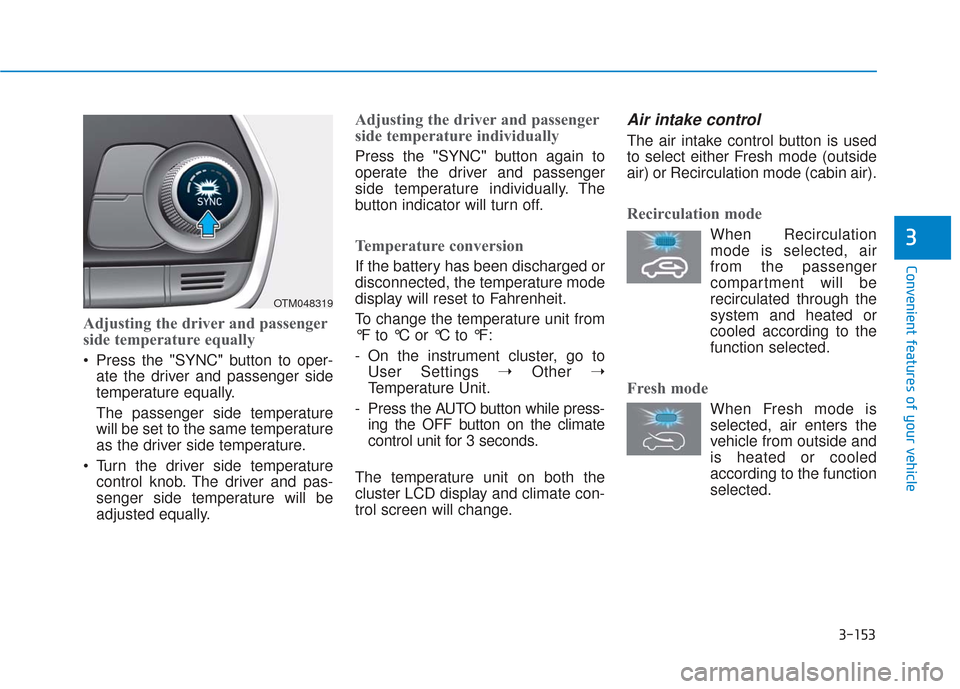
Press the "SYNC" button to oper-ate the driver and passenger side
temperature equally.
The passenger side temperature
will be set to the same temperature
as the driver side temperature.
Turn the driver side temperature control knob. The driver and pas-
senger side temperature will be
adjusted equally.
Adjusting the driver and passenger
side temperature individually
Press the "SYNC" button again to
operate the driver and passenger
side temperature individually. The
button indicator will turn off.
Temperature conversion
If the battery has been discharged or
disconnected, the temperature mode
display will reset to Fahrenheit.
To change the temperature unit from
°F to °C or °C to °F:
- On the instrument cluster, go toUser Settings ➝ Other ➝
Temperature Unit.
- Press the AUTO button while press- ing the OFF button on the climate
control unit for 3 seconds.
The temperature unit on both the
cluster LCD display and climate con-
trol screen will change.
Air intake control
The air intake control button is used
to select either Fresh mode (outside
air) or Recirculation mode (cabin air).
Recirculation mode
When Recirculation mode is selected, air
from the passenger
compartment will be
recirculated through the
system and heated or
cooled according to the
function selected.
Fresh mode
When Fresh mode is selected, air enters the
vehicle from outside and
is heated or cooled
according to the function
selected.
OTM048319
Page 275 of 557
Driving your vehicle
5
Before Driving ........................................................5-4
Before Entering the Vehicle ...........................................5-4
Before Starting ..................................................................5-4
Ignition Switch ........................................................5-6
Key Ignition Switch ...........................................................5-6
Engine Start/Stop Button................................................5-9
Automatic Transmission ......................................5-14
Automatic Transmission Operation .............................5-14
Good Driving Practices ..................................................5-18
Braking System ....................................................5-20
Power Brakes ...................................................................5-20
Disc Brakes Wear Indicator ..........................................5-21
Electronic Parking Brake (EPB)...................................5-21
Auto Hold ........................................................................\
..5-27
Anti-lock Brake System (ABS) ....................................5-30
Electronic Stability Control (ESC)................................5-32
Vehicle Stability Management (VSM).........................5-35
Hill-Start Assist Control (HAC) ....................................5-36
Downhill Brake Control (DBC) ......................................5-36
Good Braking Practices .................................................5-39
All Wheel Drive (AWD) ........................................5-40
AWD operation.................................................................5-41
Emergency precautions .................................................5-44
ISG (Idle Stop and Go) System ..........................5-46
To Activate the ISG System ..........................................5-46
To Deactivate the ISG System......................................5-49
ISG System Malfunction ................................................5-49
Battery Sensor Deactivation ........................................5-50
Drive Mode Integrated Control System ............5-51
Drive Mode .......................................................................5\
-51
Smart shift on trip computer .......................................5-53
Forward Collision-Avoidance
Assist (FCA) System ............................................5-54
System Setting and Activation.....................................5-54
FCA Warning Message and System Control ............5-57
FCA Sensor .......................................................................5\
-59
System Malfunction .......................................................5-61
Limitations of the System .............................................5-62
Blind-Spot Collision Warning/Blind-Spot
Collision-Avoidance Assist .................................5-68
System Description .........................................................5-68
System Setting and Activation.....................................5-69
Warning and System Control .......................................5-72
Detecting Sensor (Camera and Radar) ......................5-74
Limitations of the System .............................................5-77
Page 286 of 557
5-12
Driving your vehicle
Starting the engine Information
• The engine will start by pressingthe Engine Start/Stop button, only
when the smart key is in the vehi-
cle.
• Even if the smart key is in the vehi- cle, if it is far away from the driver,
the engine may not start.
• When the Engine Start/Stop button is in the ACC or ON position, if any
door is open, the system checks for
the smart key. If the smart key is
not in the vehicle, the " " indica-
tor will blink and the warning "Key
not in vehicle" will come on and if
all doors are closed, the chime will
also sound for about 5 seconds.
Keep the smart key in the vehicle
when using the ACC position or if
the vehicle engine is ON. 1. Always carry the smart key with
you.
2. Make sure the parking brake is applied.
3. Make sure the shift lever is in P (Park).
4. Depress the brake pedal.
5. Press the Engine Start/Stop but- ton.
Information
• Do not wait for the engine to warmup while the vehicle remains sta-
tionary. Start driving at moderate
engine speeds. (Aggressive acceler-
ating and decelerating should be
avoided.)
• Always start the vehicle with your foot on the brake pedal. Do not
depress the accelerator while start-
ing the vehicle. Do not rev the
engine while warming it up.
i
i
Always wear appropriate shoes
when operating your vehicle.
Unsuitable shoes, such as
high heels, ski boots, sandals,
flip-flops, etc., may interfere
with your ability to use the
brake and accelerator pedals.
Do not start the vehicle with the
accelerator pedal depressed.
The vehicle can move and lead
to an accident.
Wait until the engine rpm is
normal. The vehicle may sud-
denly move if the brake pedal
is released when the rpm is
high.
WARNING
Page 288 of 557
5-14
Driving your vehicle
A
AU
U T
TO
O M
M A
AT
TI
IC
C
T
T R
R A
A N
N S
SM
M I
IS
S S
SI
IO
O N
N
Move shift lever. Press the shift button, then move shift lever.
For your safety, depress the brake pedal while shifting gears.
Depress the brake pedal, press the shift button, and then move shift lever.OTM058006
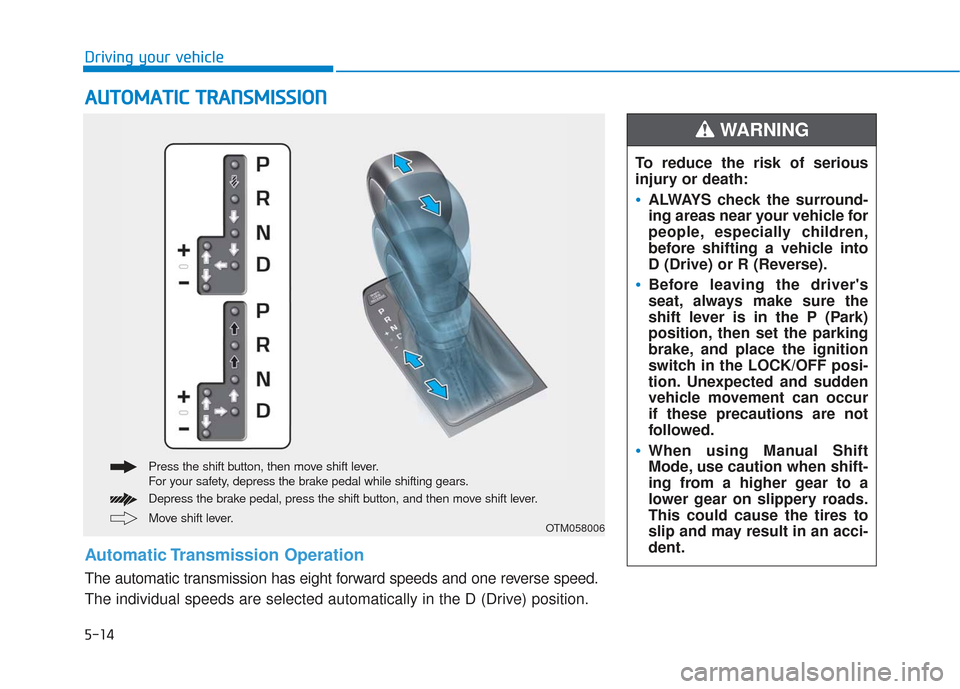
Automatic Transmission Operation
The automatic transmission has eight forward speeds and one reverse speed.
The individual speeds are selected automatically in the D (Drive) position. To reduce the risk of serious
injury or death:
ALWAYS check the surround-
ing areas near your vehicle for
people, especially children,
before shifting a vehicle into
D (Drive) or R (Reverse).
Before leaving the driver's
seat, always make sure the
shift lever is in the P (Park)
position, then set the parking
brake, and place the ignition
switch in the LOCK/OFF posi-
tion. Unexpected and sudden
vehicle movement can occur
if these precautions are not
followed.
When using Manual Shift
Mode, use caution when shift-
ing from a higher gear to a
lower gear on slippery roads.
This could cause the tires to
slip and may result in an acci-
dent.
WARNING
Page 308 of 557
5-34
Driving your vehicle
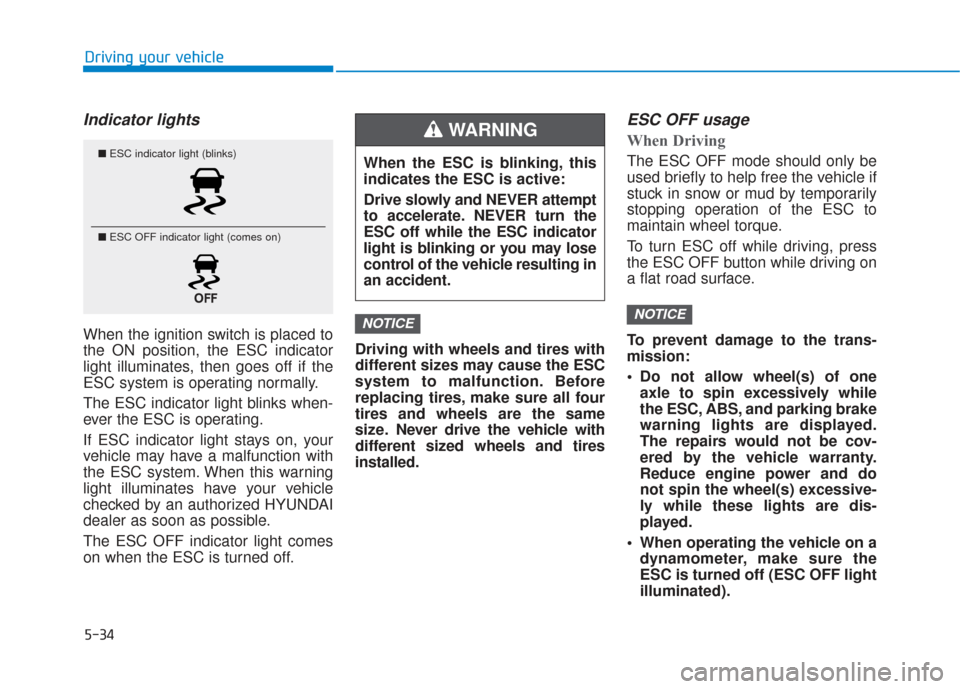
Indicator lights
When the ignition switch is placed to
the ON position, the ESC indicator
light illuminates, then goes off if the
ESC system is operating normally.
The ESC indicator light blinks when-
ever the ESC is operating.
If ESC indicator light stays on, your
vehicle may have a malfunction with
the ESC system. When this warning
light illuminates have your vehicle
checked by an authorized HYUNDAI
dealer as soon as possible.
The ESC OFF indicator light comes
on when the ESC is turned off.Driving with wheels and tires with
different sizes may cause the ESC
system to malfunction. Before
replacing tires, make sure all four
tires and wheels are the same
size. Never drive the vehicle with
different sized wheels and tires
installed.
ESC OFF usage
When Driving
The ESC OFF mode should only be
used briefly to help free the vehicle if
stuck in snow or mud by temporarily
stopping operation of the ESC to
maintain wheel torque.
To turn ESC off while driving, press
the ESC OFF button while driving on
a flat road surface.
To prevent damage to the trans-
mission:
Do not allow wheel(s) of one
axle to spin excessively while
the ESC, ABS, and parking brake
warning lights are displayed.
The repairs would not be cov-
ered by the vehicle warranty.
Reduce engine power and do
not spin the wheel(s) excessive-
ly while these lights are dis-
played.
When operating the vehicle on a dynamometer, make sure the
ESC is turned off (ESC OFF light
illuminated).
NOTICENOTICE
■ ESC indicator light (blinks)
■ ESC OFF indicator light (comes on)When the ESC is blinking, this
indicates the ESC is active:
Drive slowly and NEVER attempt
to accelerate. NEVER turn the
ESC off while the ESC indicator
light is blinking or you may lose
control of the vehicle resulting in
an accident.
WARNING
Page 311 of 557
5-37
Driving your vehicle
5
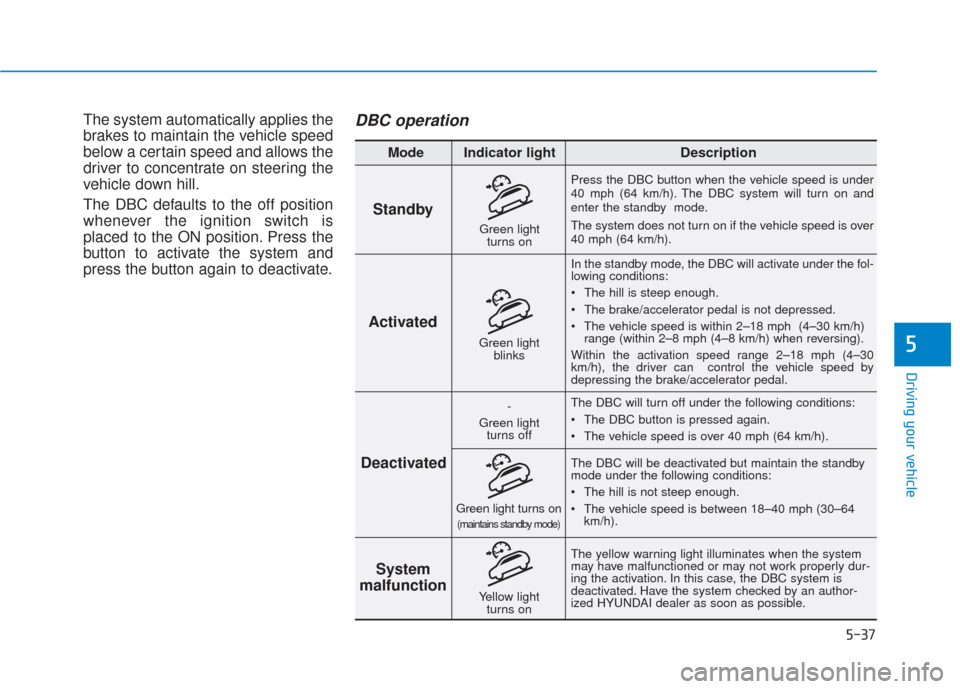
The system automatically applies the
brakes to maintain the vehicle speed
below a certain speed and allows the
driver to concentrate on steering the
vehicle down hill.
The DBC defaults to the off position
whenever the ignition switch is
placed to the ON position. Press the
button to activate the system and
press the button again to deactivate.DBC operation
Standby
Press the DBC button when the vehicle speed is under
40 mph (64 km/h). The DBC system will turn on and
enter the standby mode.
The system does not turn on if the vehicle speed is over
40 mph (64 km/h).In the standby mode, the DBC will activate under the fol-
lowing conditions:
The hill is steep enough.
The brake/accelerator pedal is not depressed.
The vehicle speed is within 2–18 mph (4–30 km/h) range (within 2–8 mph (4–8 km/h) when reversing).
Within the activation speed range 2–18 mph (4–30
km/h), the driver can control the vehicle speed by
depressing the brake/accelerator pedal.
The DBC will turn off under the following conditions:
The DBC button is pressed again.
The vehicle speed is over 40 mph (64 km/h).
The yellow warning light illuminates when the system
may have malfunctioned or may not work properly dur-
ing the activation. In this case, the DBC system is
deactivated. Have the system checked by an author-
ized HYUNDAI dealer as soon as possible. The DBC will be deactivated but maintain the standby
mode under the following conditions:
The hill is not steep enough.
The vehicle speed is between 18–40 mph (30–64
km/h).
Activated
Deactivated System
malfunction
Mode Indicator light Description
Green light
blinks
-
Green light turns off
Green light turns on(maintains standby mode)
Yellow light turns on
Green lightturns on
Page 315 of 557
5-41
Driving your vehicle
5
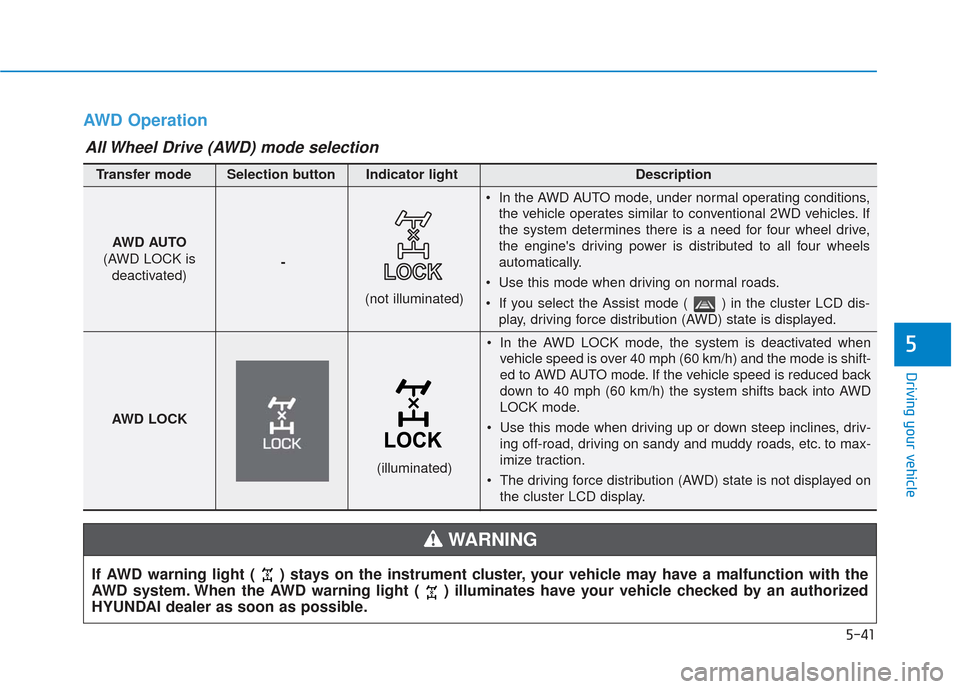
AWD Operation
If AWD warning light ( ) stays on the instrument cluster, your vehicle may have a malfunction with the
AWD system. When the AWD warning light ( ) illuminates have your vehicle checked by an authorized
HYUNDAI dealer as soon as possible.
WARNING
In the AWD LOCK mode, the system is deactivated whenvehicle speed is over 40 mph (60 km/h) and the mode is shift-
ed to AWD AUTO mode. If the vehicle speed is reduced back
down to 40 mph (60 km/h) the system shifts back into AWD
LOCK mode.
Use this mode when driving up or down steep inclines, driv- ing off-road, driving on sandy and muddy roads, etc. to max-
imize traction.
The driving force distribution (AWD) state is not displayed on the cluster LCD display.
AWD AUTO
(AWD LOCK is deactivated) -
(not illuminated)
Transfer mode Selection button Indicator light Description
In the AWD AUTO mode, under normal operating conditions,
the vehicle operates similar to conventional 2WD vehicles. If
the system determines there is a need for four wheel drive,
the engine's driving power is distributed to all four wheels
automatically.
Use this mode when driving on normal roads.
If you select the Assist mode ( ) in the cluster LCD dis- play, driving force distribution (AWD) state is displayed.
AWD LOCK
(illuminated)
All Wheel Drive (AWD) mode selection
Page 316 of 557
5-42
Driving your vehicle
When driving on normal roads,
deactivate the AWD LOCK mode
by pushing the AWD LOCK button
(AWD LOCK indicator light goes
off). Driving on normal roads with
the AWD LOCK mode, especially,
when cornering may cause
mechanical noise or vibration. The
noise and vibration will disappear
when the AWD LOCK mode is
deactivated. Prolong driving with
the noise and vibration may dam-
age some parts of the power train.
Information
When the AWD LOCK mode is deac-
tivated, a sensation may be felt as the
driving power is delivered entirely to
the front wheels.
For safe AWD operation
Before driving
Make sure all passengers are wearing seat belts.
Sit upright and closer to the steer- ing wheel than usual. Adjust the
steering wheel to a position com-
fortable for you to drive.
Driving on snow-covered or icy
roads
Start off slowly by applying theaccelerator pedal gently.
Use snow tires or tire chains.
Keep sufficient distance between your vehicle and the vehicle in
front of you.
Apply engine braking during decel- eration by switching the gear shift
lever to Manual Shift Mode and
manually selecting a lower gear.
Avoid speeding, rapid accelera- tion, sudden brake applications,
and sharp turns to prevent skids.
Driving in sand or mud
Maintain slow and constant speed.
Use tire chains driving in mud ifnecessary.
Keep sufficient distance between your vehicle and the vehicle in
front of you.
Reduce vehicle speed and always check the road condition.
Avoid speeding, rapid accelera- tion, sudden brake applications,
and sharp turns to prevent getting
stuck.
i
NOTICE
When the vehicle is stuck in
snow, sand or mud, place a non-
slip material under the drive
wheels to provide traction OR
Slowly spin the wheels in for-
ward and reverse directions
which causes a rocking motion
that may free the vehicle.
However, avoid running the
engine continuously at high
rpm, doing so may damage the
AWD system.
CAUTION
Page 320 of 557
5-46
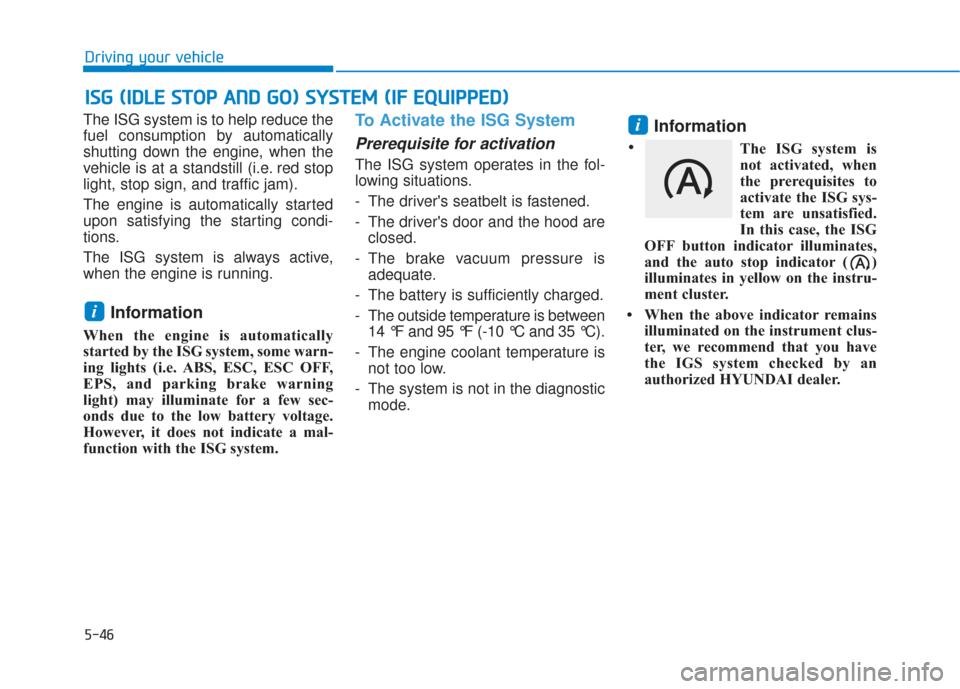
The ISG system is to help reduce the
fuel consumption by automatically
shutting down the engine, when the
vehicle is at a standstill (i.e. red stop
light, stop sign, and traffic jam).
The engine is automatically started
upon satisfying the starting condi-
tions.
The ISG system is always active,
when the engine is running.
Information
When the engine is automatically
started by the ISG system, some warn-
ing lights (i.e. ABS, ESC, ESC OFF,
EPS, and parking brake warning
light) may illuminate for a few sec-
onds due to the low battery voltage.
However, it does not indicate a mal-
function with the ISG system.
To Activate the ISG System
Prerequisite for activation
The ISG system operates in the fol-
lowing situations.
- The driver's seatbelt is fastened.
- The driver's door and the hood areclosed.
- The brake vacuum pressure is adequate.
- The battery is sufficiently charged.
- The outside temperature is between 14 °F and 95 °F (-10 °C and 35 °C).
- The engine coolant temperature is not too low.
- The system is not in the diagnostic mode.
Information
The ISG system is
not activated, when
the prerequisites to
activate the ISG sys-
tem are unsatisfied.
In this case, the ISG
OFF button indicator illuminates,
and the auto stop indicator ( )
illuminates in yellow on the instru-
ment cluster.
• When the above indicator remains illuminated on the instrument clus-
ter, we recommend that you have
the IGS system checked by an
authorized HYUNDAI dealer.
i
i
I
IS
S G
G
(
( I
ID
D L
LE
E
S
S T
T O
O P
P
A
A N
N D
D
G
G O
O )
)
S
S Y
Y S
ST
T E
EM
M
(
( I
IF
F
E
E Q
Q U
UI
IP
P P
PE
ED
D )
)
Driving your vehicle
•
Page 321 of 557
5-47
Driving your vehicle
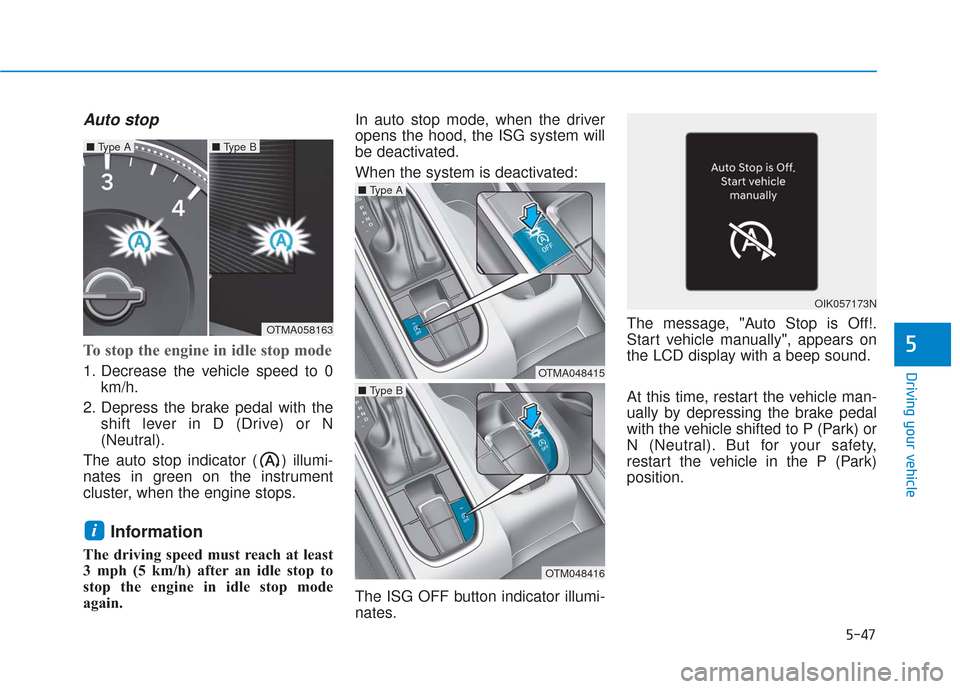
Auto stop
To stop the engine in idle stop mode
1. Decrease the vehicle speed to 0km/h.
2. Depress the brake pedal with the shift lever in D (Drive) or N
(Neutral).
The auto stop indicator ( ) illumi-
nates in green on the instrument
cluster, when the engine stops.
Information
The driving speed must reach at least
3 mph (5 km/h) after an idle stop to
stop the engine in idle stop mode
again. In auto stop mode, when the driver
opens the hood, the ISG system will
be deactivated.
When the system is deactivated:
The ISG OFF button indicator illumi-
nates.
The message, "Auto Stop is Off!.
Start vehicle manually", appears on
the LCD display with a beep sound.
At this time, restart the vehicle man-
ually by depressing the brake pedal
with the vehicle shifted to P (Park) or
N (Neutral). But for your safety,
restart the vehicle in the P (Park)
position.
i
5
OTMA058163
■
Type A■ Type B
OTMA048415
■ Type A
OTM048416
■ Type B
OIK057173N