Lane keep Hyundai Santa Fe 2020 User Guide
[x] Cancel search | Manufacturer: HYUNDAI, Model Year: 2020, Model line: Santa Fe, Model: Hyundai Santa Fe 2020Pages: 557, PDF Size: 19.29 MB
Page 207 of 557
3-118
Convenient features of your vehicle
One-touch turn signal function
To activate the One Touch Turn
Signal function, push the turn signal
lever up or down to position (B) and
then release it.
The lane change signals will blink 3,
5 or 7 times.
You can activate or deactivate the
One Touch Turn Signal function or
choose the number of blinks (3, 5, or
7) from the User Settings mode in
the LCD display.
For more details, refer to the "LCD
Display" section in this chapter.
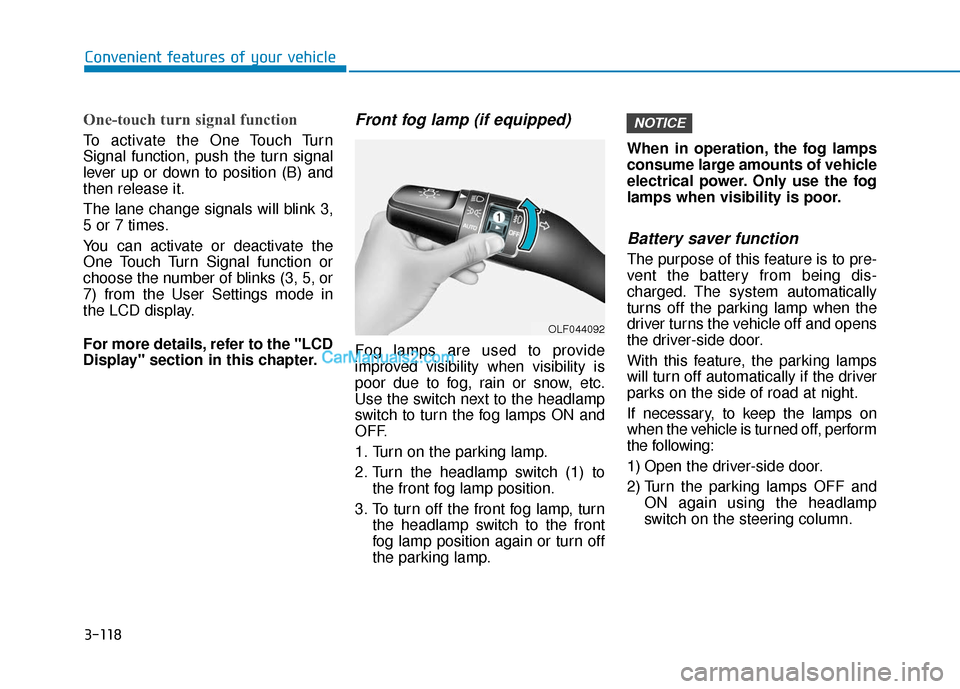
Front fog lamp (if equipped)
Fog lamps are used to provide
improved visibility when visibility is
poor due to fog, rain or snow, etc.
Use the switch next to the headlamp
switch to turn the fog lamps ON and
OFF.
1. Turn on the parking lamp.
2. Turn the headlamp switch (1) tothe front fog lamp position.
3. To turn off the front fog lamp, turn the headlamp switch to the front
fog lamp position again or turn off
the parking lamp. When in operation, the fog lamps
consume large amounts of vehicle
electrical power. Only use the fog
lamps when visibility is poor.
Battery saver function
The purpose of this feature is to pre-
vent the battery from being dis-
charged. The system automatically
turns off the parking lamp when the
driver turns the vehicle off and opens
the driver-side door.
With this feature, the parking lamps
will turn off automatically if the driver
parks on the side of road at night.
If necessary, to keep the lamps on
when the vehicle is turned off, perform
the following:
1) Open the driver-side door.
2) Turn the parking lamps OFF and
ON again using the headlamp
switch on the steering column.
NOTICE
OLF044092
Page 221 of 557
3-132
BVM (Blind-spot View Monitor) sys-
tem displays the driver-side or pas-
senger-side rear areas in the cluster
when the system is activated.
To turn on BVM system: Under condi-
tion BVM system is enabled in the
settings
1. The ignition switch is turned tothe ON position.
2. The turn signal is activated
To turn off BVM system
1. The ignition switch is turned to the OFF position.
2. The turn signal is deactivated
3. The hazard warning flasher is on
4. A warning screen pops up and takes priority over the Blind-Spot
View Monitor system.System setting
With the engine ON, the Blind-spot
View Monitor system turns on and
gets ready to be activated when the
'User Settings →Driver Assistance
→ Blind-spot safety →Blind-spot
view' is selected on the cluster. The
system stops operation when the set-
ting is deactivated.
Convenient features of your vehicle
Like all assistance systems,
BVM system has limitations.
Over-reliance on the system
may result in a collision.
Always look around your vehi-
cle to make sure there are no
objects or obstacles before
moving the vehicle in any
direction to prevent a colli-
sion.
Objects are closer than they
appear. Failure to visually
confirm that is safe to change
the lane before doing so may
result in crash and serious
injury or death.
Always keep the camera lens
clean. The camera may not
work normally if the lens is
covered with foreign material.
CAUTION
Page 276 of 557
5
Rear Cross-Traffic Collision Warning (RCCW) /
Rear Cross-Traffic Collision-Avoidance Assist
(RCCA) ...................................................................5-82
System Description .........................................................5-82
System Setting and Activation.....................................5-83
Warning and System Control .......................................5-85
Detecting Sensor .............................................................5-88
Limitations of the System .............................................5-89
Lane Keeping Assist (LKA) System ...................5-93
LKA System Operation...................................................5-94
Warning Light and Message.........................................5-97
Limitations of the System .............................................5-99
LKA System Function Change ...................................5-101
Driver Attention WARNING (DAW) System ....5-102
System Setting and Activation ..................................5-102
Resetting the System ...................................................5-103
System Standby.............................................................5-104
System Malfunction .....................................................5-104
Smart Cruise Control With Stop &
Go System............................................................5-106
Smart Cruise Control Switch ......................................5-106
Smart Cruise Control Speed .......................................5-107
Smart Cruise Control Vehicle-to-Vehicle Distance ... 5-111
Sensor to Detect Distance to the Vehicle Ahead ......5-115
To Adjust the Sensitivity of Smart Cruise Control .....5-116To Convert to Cruise Control Mode .........................5-117
Limitations of the System...........................................5-118
Leading Vehicle Departure Alert .....................5-123
System Setting and Activation ..................................5-123
Special Driving Conditions ................................5-125
Hazardous Driving Conditions....................................5-124
Rocking the Vehicle ......................................................5-125
Smooth Cornering .........................................................5-126
Driving at Night .............................................................5-126
Driving in the Rain ........................................................5-126
Driving in Flooded Areas.............................................5-127
Highway Driving ............................................................5-127
Reducing the Risk of a Rollover ...............................5-128
Winter Driving ....................................................5-129
Snow or Icy Conditions................................................5-129
Winter Precautions .......................................................5-131
Trailer Towing .....................................................5-133
If you decide to pull a trailer .....................................5-133
Trailer towing equipment ............................................5-135
Driving with a trailer ....................................................5-136
Maintenance when trailer towing.............................5-139
Vehicle Load Limit..............................................5-141
Tire Loading Information Label .................................5-142
Page 293 of 557
5-19
Driving your vehicle
5
Depressing both accelerator andbrake pedals at the same time can
trigger logic for engine power
reduction to assure vehicle decel-
eration. Vehicle acceleration will
resume after the brake pedal is
released.
Always apply the parking brake when leaving the vehicle. Do not
depend on placing the transmis-
sion in P (Park) to keep the vehicle
from moving.
Exercise extreme caution when driving on a slippery surface. Be
especially careful when braking,
accelerating or shifting gears. On
a slippery surface, an abrupt
change in vehicle speed can
cause the drive wheels to lose
traction and may cause loss of
vehicle control resulting in an acci-
dent.
Optimum vehicle performance and economy is obtained by smoothly
depressing and releasing the
accelerator. To reduce the risk of SERIOUS
INJURY or DEATH:
ALWAYS wear your seatbelt.
In a collision, an unbelted
occupant is significantly more
likely to be seriously injured
or killed than a properly belt-
ed occupant.
Avoid high speeds when cor-
nering or turning.
Do not make quick steering
wheel movements, such as
sharp lane changes or fast,
sharp turns.
The risk of rollover is greatly
increased if you lose control
of your vehicle at highway
speeds.
Loss of control MAY occur if
two or more wheels drop off
the roadway and the driver
over steers to reenter the
roadway.
WARNING In the event your vehicle
leaves the roadway, do not
steer sharply. Instead, slow
down before pulling back into
the travel lanes.
HYUNDAI recommends you
follow all posted speed limits.
Page 338 of 557
5-64
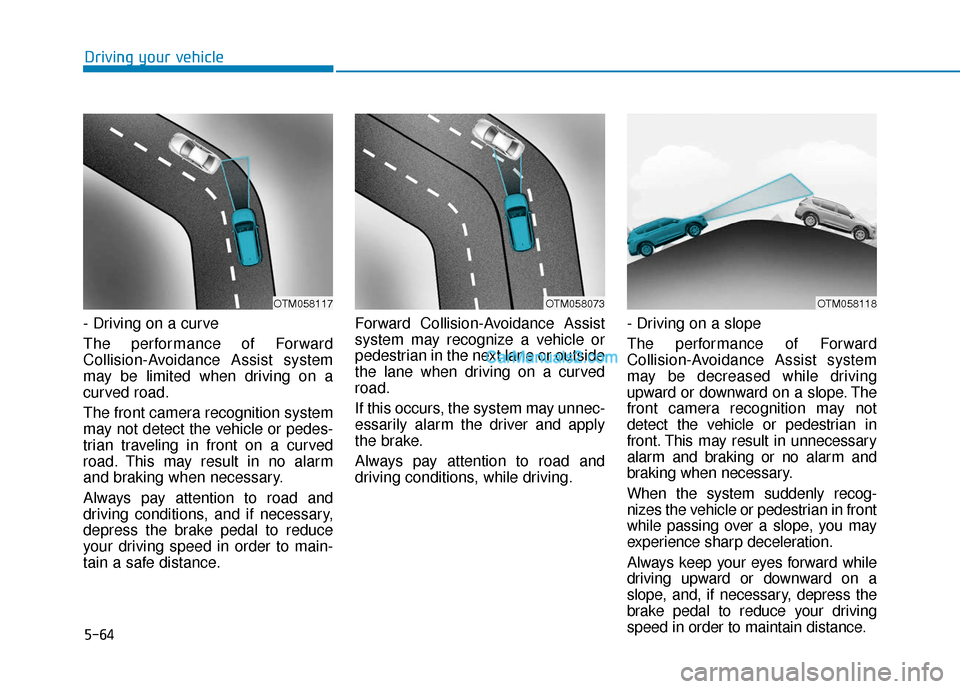
- Driving on a curve
The performance of Forward
Collision-Avoidance Assist system
may be limited when driving on a
curved road.
The front camera recognition system
may not detect the vehicle or pedes-
trian traveling in front on a curved
road. This may result in no alarm
and braking when necessary.
Always pay attention to road and
driving conditions, and if necessary,
depress the brake pedal to reduce
your driving speed in order to main-
tain a safe distance.Forward Collision-Avoidance Assist
system may recognize a vehicle or
pedestrian in the next lane or outside
the lane when driving on a curved
road.
If this occurs, the system may unnec-
essarily alarm the driver and apply
the brake.
Always pay attention to road and
driving conditions, while driving.
- Driving on a slope
The performance of Forward
Collision-Avoidance Assist system
may be decreased while driving
upward or downward on a slope. The
front camera recognition may not
detect the vehicle or pedestrian in
front. This may result in unnecessary
alarm and braking or no alarm and
braking when necessary.
When the system suddenly recog-
nizes the vehicle or pedestrian in front
while passing over a slope, you may
experience sharp deceleration.
Always keep your eyes forward while
driving upward or downward on a
slope, and, if necessary, depress the
brake pedal to reduce your driving
speed in order to maintain distance.
Driving your vehicle
OTM058073OTM058117OTM058118
Page 348 of 557
5-74
Driving your vehicle
Blind-Spot Collision-Avoidance Assist
(BCA) system is automatically deacti-
vated when:
- The vehicle drives a certain dis- tance away
- The vehicle direction is changed against the possible-colliding point
- The steering wheel is abruptly moved
- The brake pedal is depressed
- After a certain period of time
The driver should drive the vehicle in
the middle of the vehicle lanes to
keep the system in the ready status.
When the vehicle drives too close to
one side of the vehicle lanes, the
system may not properly operate.
In addition, the system may not prop-
erly control your vehicle in accor-
dance with driving situations. Thus,
always pay close attention to road
situations.
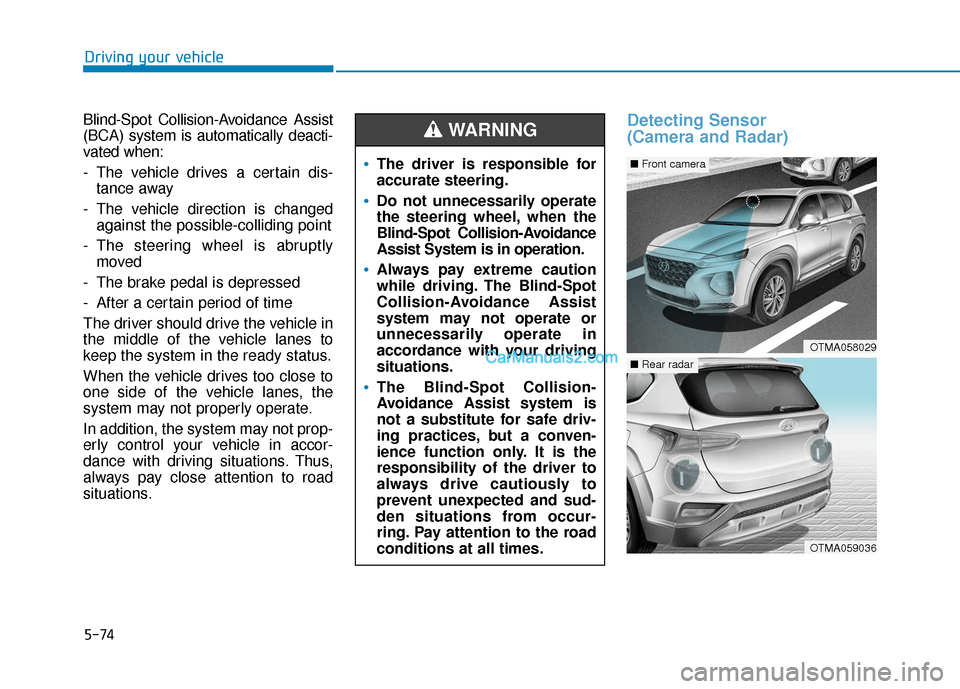
Detecting Sensor
(Camera and Radar)
The driver is responsible for
accurate steering.
Do not unnecessarily operate
the steering wheel, when the
Blind-Spot Collision-Avoidance
Assist System is in operation.
Always pay extreme caution
while driving. The Blind-Spot
Collision-Avoidance Assist
system may not operate or
unnecessarily operate in
accordance with your driving
situations.
The Blind-Spot Collision-
Avoidance Assist system is
not a substitute for safe driv-
ing practices, but a conven-
ience function only. It is the
responsibility of the driver to
always drive cautiously to
prevent unexpected and sud-
den situations from occur-
ring. Pay attention to the road
conditions at all times.
WARNING
OTMA058029
■ Front camera
OTMA059036
■Rear radar
Page 349 of 557
5-75
Driving your vehicle
5
Front camera
The front camera is a sensor detect-
ing the lane. If the sensor is covered
with snow, rain or foreign substance,
the system may temporarily be can-
celed. The system is canceled due to
the degradation of the sensor's
detection performance. Always keep
the sensor clean.
* Refer to Lane Keeping Assist(LKA) System for cautions for the
front camera sensor.
Rear radar
The rear radars are the sensors
inside the rear bumper for detecting
the side and rear areas. Always keep
the rear bumper clean for proper
operation of the system.
The system may not work
properly when the bumper
has been damaged, or if the
rear bumper has been
replaced or repaired.
The sensing range differs
somewhat according to the
width of the road. When the
road is narrow, the system
may detect other vehicles in
the next lane.
The system may turn off due
to strong electromagnetic
waves.
Always keep the sensors
clean.
NEVER arbitrarily disassem-
ble the sensor component nor
apply any impact on the sen-
sor component.
Be careful not to apply unnec-
essary force on the radar sen-
sor or sensor cover. If the sen-
sor is forcibly moved out of
proper alignment, the system
may not operate correctly. In
this case, a warning message
may not be displayed. Have
the vehicle inspected by an
authorized HYUNDAI dealer.
Do not apply foreign objects
such as a bumper sticker or a
bumper guard near the radar
sensor or apply paint to the
sensor area. Doing so may
adversely affect the perform-
ance of the sensor.
NEVER install any acces-
sories or stickers on the front
windshield, nor tint the front
windshield.
Pay extreme caution to keep
the camera sensor out of
water.
NEVER locate any reflective
objects (i.e. white paper, mir-
ror) over the crash pad. Any
light reflection may cause a
malfunction of the system.
CAUTION
Page 352 of 557
5-78
The vehicle driven on a curvedroad.
The vehicle driven through a toll- gate.
The road pavement (or the periph- eral ground) abnormally contains
metallic components (i.e. possibly
due to subway construction).
There is a fixed object near the vehicle, such as a guardrail.
While going down or up a steep road where the height of the lane is
different.
Driving on a narrow road where trees or grass or overgrown.
Driving in rural areas where the sensor does not detect another
vehicle or structure for an extended
period of time.
Driving on a wet road.
Driving on a road where the guardrail or wall is in double struc-
ture.
A big vehicle is near such as a bus or truck.
When the other vehicle approach- es very close. When the other vehicle passes at a
very fast speed.
While changing lanes.
If the vehicle has started at the same time as the vehicle next to
you and has accelerated.
When the vehicle in the next lane moves two lanes away from you
OR when the vehicle two lanes
away moves to the next lane from
you.
A motorcycle or bicycle is near.
A flat trailer is near.
If there are small objects in the detecting area such as a shopping
cart or a baby stroller.
If there is a low height vehicle such as a sports car.
The brake pedal is depressed.
ESC (Electronic Stability Control) is activated.
ESC (Electronic Stability Control) malfunctions.
The tire pressure is low or a tire is damaged.
The brake is reworked. The vehicle abruptly changes driv-
ing direction.
The vehicle makes sharp lane changes.
The vehicle sharply stops.
Temperature is extremely low around the vehicle.
The vehicle severely vibrates while driving over a bumpy road,
uneven/bumpy road, or concrete
patch.
The vehicle drives on a slippery surface due to snow, water puddle,
or ice.
The Lane Keeping Assist (LKA) or Lane Departure Warning (LDW) do
not operate normally. (if equipped)
For more information refer to "Lane
Keeping Assist (LKA) system" in
this chapter.
Driving your vehicle
Page 367 of 557
5-93
Driving your vehicle
5
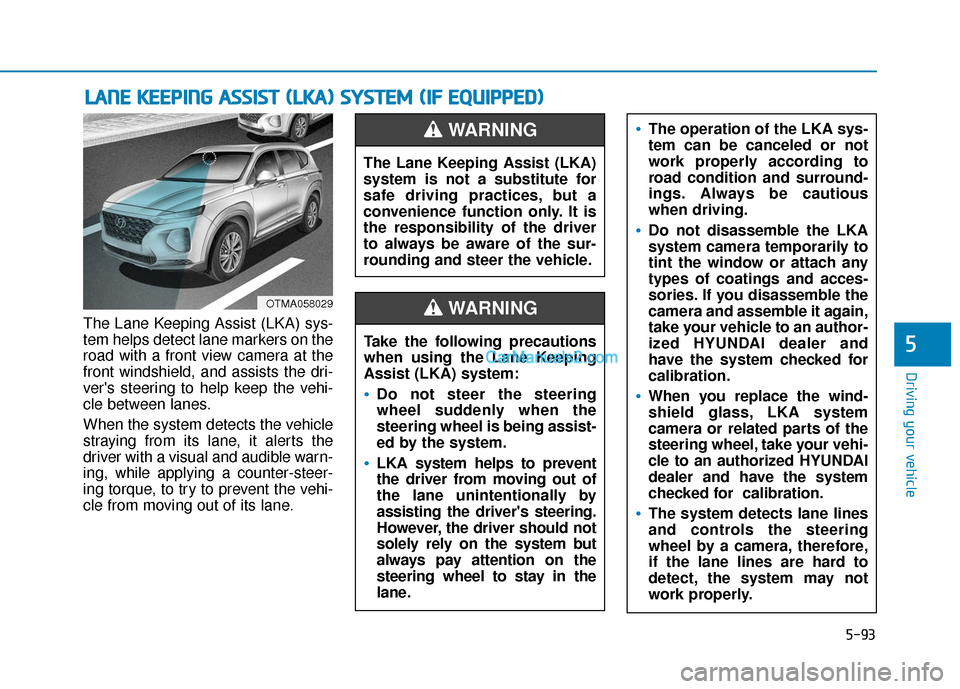
The Lane Keeping Assist (LKA) sys-
tem helps detect lane markers on the
road with a front view camera at the
front windshield, and assists the dri-
ver's steering to help keep the vehi-
cle between lanes.
When the system detects the vehicle
straying from its lane, it alerts the
driver with a visual and audible warn-
ing, while applying a counter-steer-
ing torque, to try to prevent the vehi-
cle from moving out of its lane.
L LA
A N
N E
E
K
K E
EE
EP
P I
IN
N G
G
A
A S
SS
SI
IS
S T
T
(
( L
L K
K A
A )
)
S
S Y
Y S
ST
T E
EM
M
(
( I
IF
F
E
E Q
Q U
UI
IP
P P
PE
ED
D )
)
OTMA058029
The Lane Keeping Assist (LKA)
system is not a substitute for
safe driving practices, but a
convenience function only. It is
the responsibility of the driver
to always be aware of the sur-
rounding and steer the vehicle.
WARNING
Take the following precautions
when using the Lane Keeping
Assist (LKA) system:
•Do not steer the steering
wheel suddenly when the
steering wheel is being assist-
ed by the system.
LKA system helps to prevent
the driver from moving out of
the lane unintentionally by
assisting the driver's steering.
However, the driver should not
solely rely on the system but
always pay attention on the
steering wheel to stay in the
lane.
WARNING
The operation of the LKA sys-
tem can be canceled or not
work properly according to
road condition and surround-
ings. Always be cautious
when driving.
Do not disassemble the LKA
system camera temporarily to
tint the window or attach any
types of coatings and acces-
sories. If you disassemble the
camera and assemble it again,
take your vehicle to an author-
ized HYUNDAI dealer and
have the system checked for
calibration.
When you replace the wind-
shield glass, LKA system
camera or related parts of the
steering wheel, take your vehi-
cle to an authorized HYUNDAI
dealer and have the system
checked for calibration.
The system detects lane lines
and controls the steering
wheel by a camera, therefore,
if the lane lines are hard to
detect, the system may not
work properly.
Page 368 of 557
5-94
Driving your vehicle
LKA System Operation
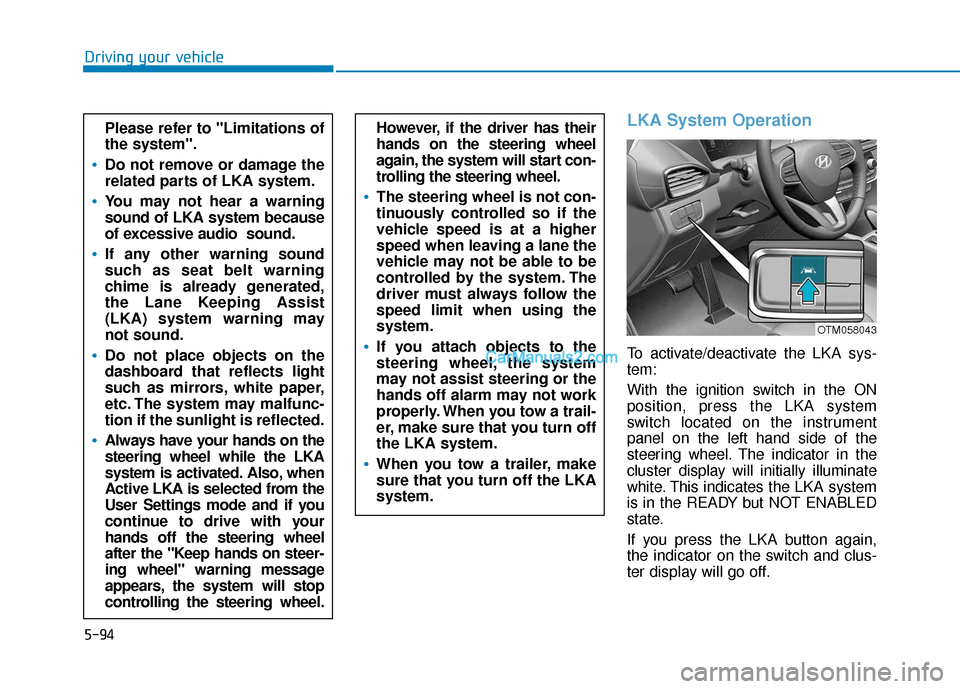
To activate/deactivate the LKA sys-
tem:
With the ignition switch in the ON
position, press the LKA system
switch located on the instrument
panel on the left hand side of the
steering wheel. The indicator in the
cluster display will initially illuminate
white. This indicates the LKA system
is in the READY but NOT ENABLED
state.
If you press the LKA button again,
the indicator on the switch and clus-
ter display will go off.
However, if the driver has their
hands on the steering wheel
again, the system will start con-
trolling the steering wheel.
The steering wheel is not con-
tinuously controlled so if the
vehicle speed is at a higher
speed when leaving a lane the
vehicle may not be able to be
controlled by the system. The
driver must always follow the
speed limit when using the
system.
If you attach objects to the
steering wheel, the system
may not assist steering or the
hands off alarm may not work
properly. When you tow a trail-
er, make sure that you turn off
the LKA system.
When you tow a trailer, make
sure that you turn off the LKA
system.
Please refer to "Limitations of
the system".
Do not remove or damage the
related parts of LKA system.
You may not hear a warning
sound of LKA system because
of excessive audio sound.
If any other warning sound
such as seat belt warning
chime is already generated,
the Lane Keeping Assist
(LKA) system warning may
not sound.
Do not place objects on the
dashboard that reflects light
such as mirrors, white paper,
etc. The system may malfunc-
tion if the sunlight is reflected.
Always have your hands on the
steering wheel while the LKA
system is activated. Also, when
Active LKA is selected from the
User Settings mode and if you
continue to drive with your
hands off the steering wheel
after the "Keep hands on steer-
ing wheel" warning message
appears, the system will stop
controlling the steering wheel.
OTM058043