bluetooth Hyundai Santa Fe Sport 2016 Owner's Guide
[x] Cancel search | Manufacturer: HYUNDAI, Model Year: 2016, Model line: Santa Fe Sport, Model: Hyundai Santa Fe Sport 2016Pages: 763, PDF Size: 37.75 MB
Page 364 of 763
Features of your vehicle
272
4
Pairing a Bluetooth®Wireless
Technology Device
What is Bluetooth®Wireless
Technology Pairing?
Pairing refers to the process of syn-
chronizing your
Bluetooth®Wireless
Technology phone or device with the
car audio system for connection.
Pairing is necessary to connect and
use the
Bluetooth®Wireless
Technology feature.
Pairing Key / Key
on the Steering Remote
Controller
When No Devices have been
Paired
1. Press the key or the key on the steering remote con-
troller. The following screen is dis-
played.
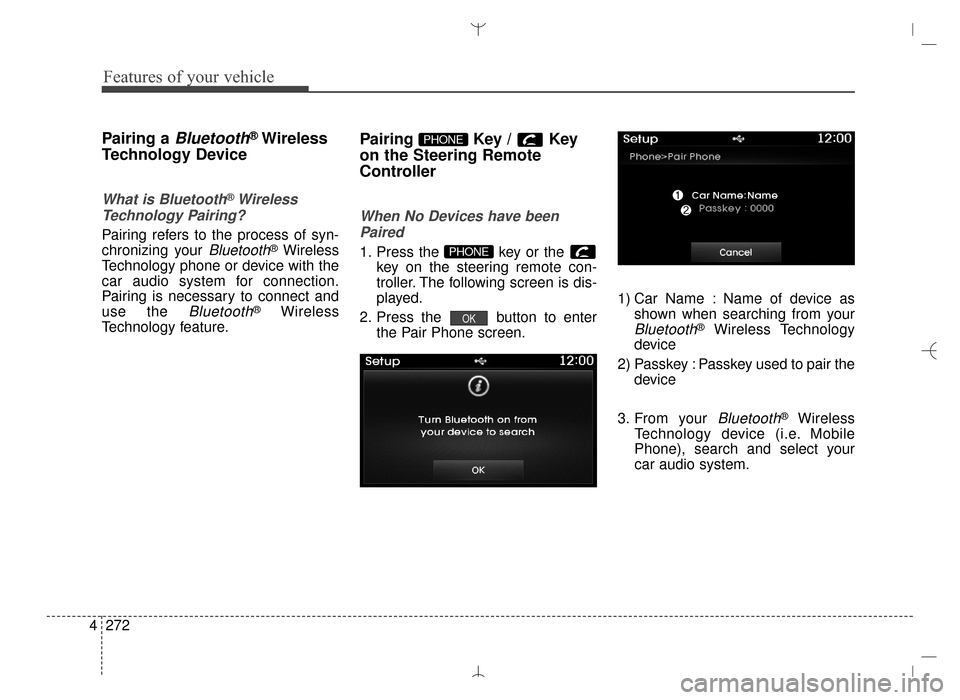
2. Press the button to enter the Pair Phone screen. 1) Car Name : Name of device as
shown when searching from your
Bluetooth®Wireless Technology
device
2) Passkey : Passkey used to pair the device
3. From your
Bluetooth®Wireless
Technology device (i.e. Mobile
Phone), search and select your
car audio system.
OK
PHONE
PHONE
AN HMA 4C (169~AUDIO 1).QXP 6/25/2015 2:05 PM Page 272
Page 365 of 763
![Hyundai Santa Fe Sport 2016 Owners Guide 4273
Features of your vehicle
[Non SSP supported device]
(SSP: Secure Simple Pairing)
4. After a few moments, a screen isdisplayed where the passkey is
entered.
Hear, enter the passkey "0000" to
pair](/img/35/16754/w960_16754-364.png "Hyundai Santa Fe Sport 2016 Owners Guide 4273
Features of your vehicle
[Non SSP supported device]
(SSP: Secure Simple Pairing)
4. After a few moments, a screen isdisplayed where the passkey is
entered.
Hear, enter the passkey \"0000\" to
pair")
4273
Features of your vehicle
[Non SSP supported device]
(SSP: Secure Simple Pairing)
4. After a few moments, a screen isdisplayed where the passkey is
entered.
Hear, enter the passkey "0000" to
pair your
Bluetooth®Wireless
Technology device with the car
audio system.
[SSP supported device]
4. After a few moments, a screen is displayed 6 digits passkey.
Hear, check the passkey on your
Bluetooth®Wireless Technology
device and confirm.
5. Once pairing is complete, the fol- lowing screen is displayed.
✽ ✽NOTICE
If Bluetooth®Wireless Technology
devices are paired but none are cur-
rently connected, pressing the key or the key on the
steering wheel displays the following
screen. Press the [Pair] button to
pair a new device or press the
[Connect] to connect a previously
paired device.
Pairing through [PHONE]
Setup
Press the key Select
[Phone] Select [Pair Phone]
Select TUNE knob
The following steps are the same as
those described in the section
"When No Devices have been
Paired" on the previous page.SETUP
PHONE
AN HMA 4C (169~AUDIO 1).QXP 6/25/2015 2:05 PM Page 273
Page 366 of 763
Features of your vehicle
274
4
✽
✽
NOTICE
•Bluetooth®Wireless Technology
features supported within the
vehicle are as follows. Some fea-
tures may not be supported
depending on your Bluetooth
®
Wireless Technology device.
- Outgoing/Incoming Handsfree
calls
- Operations during a call (Switch to Private, Switch to call waiting,
MIC on/off)
- Downloading Call History
- Downloading Mobile Contacts
- Bluetooth
®Wireless Technology
device auto connection
- Bluetooth Audio Streaming
• Up to five Bluetooth
®Wireless
Technology devices can be paired
to the Car Handsfree system.
• Only one Bluetooth
®Wireless
Technology device can be connect-
ed at a time.
• Other devices cannot be paired while a Bluetooth
®Wireless
Technology device is connected.
• Only Bluetooth
®Wireless
Technology Handsfree and
Bluetooth audio related features
are supported. (Continued)(Continued)
• Bluetooth related operations are
possible only with devices that
support Handsfree or audio fea-
tures, such as a Bluetooth
®
Wireless Technology mobile phone
or a Bluetooth audio device.
• If a connected Bluetooth
®Wireless
Technology device becomes dis-
connected due to being out of com-
munication range, turning the
device OFF, or a Bluetooth
®
Wireless Technology communica-
tion error, corresponding
Bluetooth
®Wireless Technology
devices are automatically searched
and reconnected.
• If the system becomes unstable due to communication errors
between the car Handsfree and the
Bluetooth
®Wireless Technology
device, reset the device by turning
off and back on again. Upon reset-
ting Bluetooth
®Wireless
Technology device, the system will
be restored. (Continued)(Continued)
• After pairing is complete, a con-
tacts download request is sent
once to the mobile phone. Some
mobile phones may require confir-
mation upon receiving a download
request, ensure your mobile phone
accepts the connection. Refer to
your phones user’s manual for
additional information regarding
phone pairing and connections.
AN HMA 4C (169~AUDIO 1).QXP 6/25/2015 2:05 PM Page 274
Page 367 of 763
![Hyundai Santa Fe Sport 2016 Owners Guide 4275
Features of your vehicle
Connecting a Device
Press the key Select
[Phone] Select [Phone List]
1) Connected Phone : Device that iscurrently connected
2) Paired Phone : Device that is paired but](/img/35/16754/w960_16754-366.png "Hyundai Santa Fe Sport 2016 Owners Guide 4275
Features of your vehicle
Connecting a Device
Press the key Select
[Phone] Select [Phone List]
1) Connected Phone : Device that iscurrently connected
2) Paired Phone : Device that is paired but")
4275
Features of your vehicle
Connecting a Device
Press the key Select
[Phone] Select [Phone List]
1) Connected Phone : Device that iscurrently connected
2) Paired Phone : Device that is paired but not connected From the paired phone list, select the
device you want to connect and
press the button.
Changing Priority
What is Priority?
It is possible to pair up to five
Bluetooth®Wireless Technology
devices with the car audio system.
The "Change Priority" feature is used
to set the connection priority of
paired phones.
Press the key Select
[Phone] Select [Phone List]
SETUP
ConnectSETUP
AN HMA 4C (169~AUDIO 1).QXP 6/25/2015 2:05 PM Page 275
Page 369 of 763
![Hyundai Santa Fe Sport 2016 Owners Guide 4277
Features of your vehicle
Deleting a Device
Press the key Select
[Phone] Select [Paired Phone List]
From the paired phone list, select the
device you want to delete and press
the button.
✽ ✽N](/img/35/16754/w960_16754-368.png "Hyundai Santa Fe Sport 2016 Owners Guide 4277
Features of your vehicle
Deleting a Device
Press the key Select
[Phone] Select [Paired Phone List]
From the paired phone list, select the
device you want to delete and press
the button.
✽ ✽N")
4277
Features of your vehicle
Deleting a Device
Press the key Select
[Phone] Select [Paired Phone List]
From the paired phone list, select the
device you want to delete and press
the button.
✽ ✽NOTICE
• When deleting the currently con-
nected device, the device will auto-
matically be disconnected to pro-
ceed with the deleting process.
• If a paired Bluetooth
®Wireless
Technology device is deleted, the
device’s call history and contacts
data will also be deleted.
• To re-use a deleted device, you must pair the device again.
Delete
SETUP
AN HMA 4C (169~AUDIO 1).QXP 6/25/2015 2:05 PM Page 277
Page 370 of 763
Features of your vehicle
278
4
USING Bluetooth®Wireless
Technology
Phone Menu Screen
Phone Menus
With a Bluetooth®Wireless
Technology device connected, press
the key to display the Phone
menu screen.
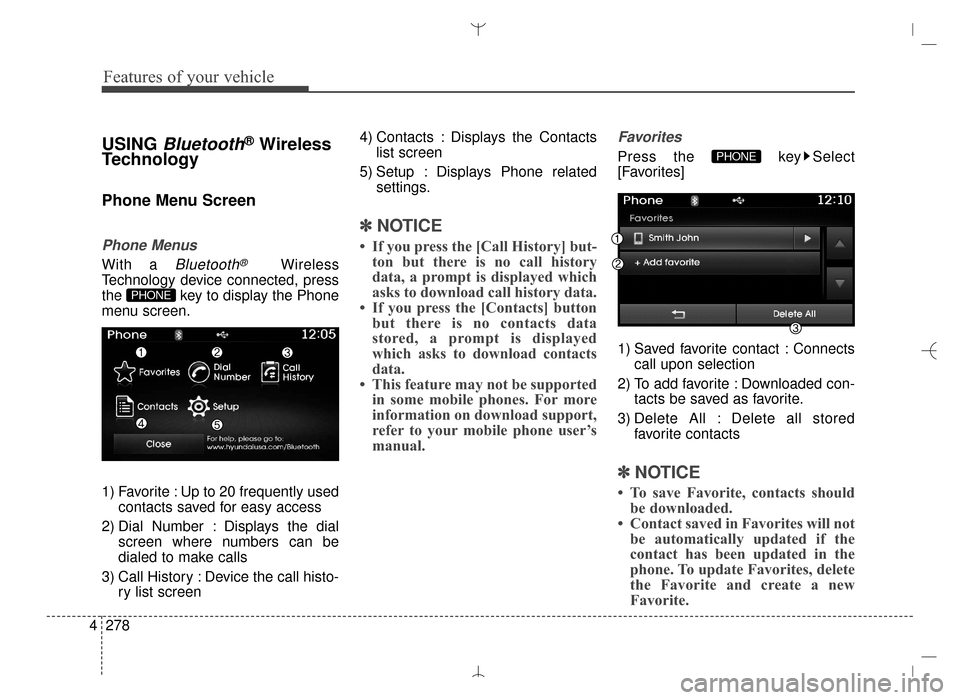
1) Favorite : Up to 20 frequently used contacts saved for easy access
2) Dial Number : Displays the dial screen where numbers can be
dialed to make calls
3) Call History : Device the call histo- ry list screen 4) Contacts : Displays the Contacts
list screen
5) Setup : Displays Phone related settings.
✽ ✽NOTICE
• If you press the [Call History] but-
ton but there is no call history
data, a prompt is displayed which
asks to download call history data.
• If you press the [Contacts] button but there is no contacts data
stored, a prompt is displayed
which asks to download contacts
data.
• This feature may not be supported in some mobile phones. For more
information on download support,
refer to your mobile phone user’s
manual.
Favorites
Press the key Select
[Favorites]
1) Saved favorite contact : Connects
call upon selection
2) To add favorite : Downloaded con- tacts besaved as favorite.
3) Delete All : Delete all stored favorite contacts
✽ ✽NOTICE
• To save Favorite, contacts should
be downloaded.
• Contact saved in Favorites will not be automatically updated if the
contact has been updated in the
phone. To update Favorites, delete
the Favorite and create a new
Favorite.
PHONE
PHONE
AN HMA 4C (169~AUDIO 1).QXP 6/25/2015 2:05 PM Page 278
Page 371 of 763
![Hyundai Santa Fe Sport 2016 Owners Guide 4279
Features of your vehicle
Calling by Dialing a Number
Press the key Select [Dial
Number]
1) Dial Pad : Used to enter phonenumber
2) Call : If a number has been entered, calls the number If no
num](/img/35/16754/w960_16754-370.png "Hyundai Santa Fe Sport 2016 Owners Guide 4279
Features of your vehicle
Calling by Dialing a Number
Press the key Select [Dial
Number]
1) Dial Pad : Used to enter phonenumber
2) Call : If a number has been entered, calls the number If no
num")
4279
Features of your vehicle
Calling by Dialing a Number
Press the key Select [Dial
Number]
1) Dial Pad : Used to enter phonenumber
2) Call : If a number has been entered, calls the number If no
number has been entered,
switches to call history screen
3) End : Deletes the entered phone number
4) Delete : Deletes entered numbers one digit at a time
Answering Calls
Answering a Call
Answering a call with a Bluetooth®
Wireless Technology device connect-
ed will display the following screen.
1) Caller : Displays the other party’s
name when the incoming caller is
saved within your contacts
2) Incoming Number : Displays the incoming number
3) Accept : Accept the incoming call
4) Reject : Reject the incoming call
✽ ✽ NOTICE
• When an incoming call pop-up is
displayed, most Audio and SETUP
mode features are disabled. Only
the call volume will operate.
• The telephone number may not be properly displayed in some mobile
phones.
• When a call is answered with the mobile phone, the call mode will
automatically revertto Private
mode.
PHONE
AN HMA 4C (169~AUDIO 1).QXP 6/25/2015 2:05 PM Page 279
Page 372 of 763
Features of your vehicle
280
4
During a Handsfree Call
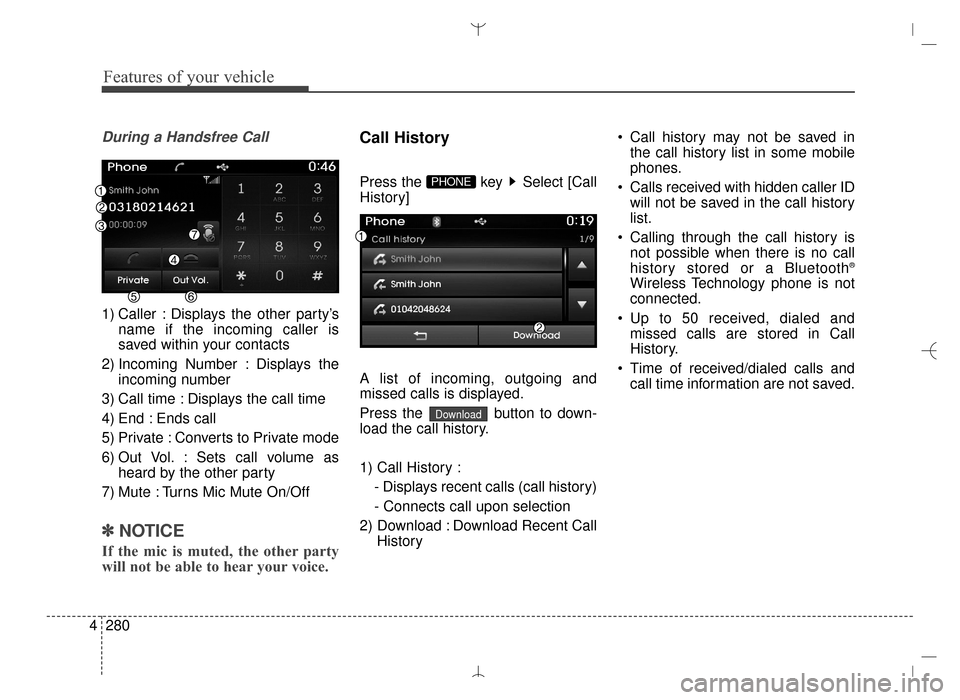
1) Caller : Displays the other party’s
name if the incoming caller is
saved within your contacts
2) Incoming Number : Displays the incoming number
3) Call time : Displays the call time
4) End : Ends call
5) Private : Converts to Private mode
6) Out Vol. : Sets call volume as heard by the other party
7) Mute : Turns Mic Mute On/Off
✽ ✽ NOTICE
If the mic is muted, the other party
will not be able to hear your voice.
Call History
Press the key Select [Call
History]
A list of incoming, outgoing and
missed calls is displayed.
Press the button to down-
load the call history.
1) Call History :
- Displays recent calls (call history)
- Connects call upon selection
2) Download : Download Recent Call History Call history may not be saved in
the call history list in some mobile
phones.
Calls received with hidden caller ID will not be saved in the call history
list.
Calling through the call history is not possible when there is no call
history stored or a Bluetooth
®
Wireless Technology phone is not
connected.
Up to 50 received, dialed and missed calls are stored in Call
History.
Time of received/dialed calls and call time information are not saved.
Download
PHONE
AN HMA 4C (169~AUDIO 1).QXP 6/25/2015 2:05 PM Page 280
Page 373 of 763
![Hyundai Santa Fe Sport 2016 Owners Guide 4281
Features of your vehicle
Contacts
Press the key Select
[Contacts]
The list of saved phone book entries
is displayed. Press the but-
ton to download the call history.
1) Contacts List :- Display](/img/35/16754/w960_16754-372.png "Hyundai Santa Fe Sport 2016 Owners Guide 4281
Features of your vehicle
Contacts
Press the key Select
[Contacts]
The list of saved phone book entries
is displayed. Press the but-
ton to download the call history.
1) Contacts List :- Display")
4281
Features of your vehicle
Contacts
Press the key Select
[Contacts]
The list of saved phone book entries
is displayed. Press the but-
ton to download the call history.
1) Contacts List :- Displays downloaded contactsentries
- Connects call upon selection
2) Sort by : Find a contact in an alphabetical order.
3) Download : Download contacts entries
✽ ✽NOTICE
• Up to 1,000 contacts saved in your
Bluetooth®Wireless Technology
phone can be downloaded into the
car contacts. Contacts that have
been downloaded to the car cannot
be edited or deleted on the phone.
• Mobile phone contacts are man- aged separately for each paired
Bluetooth
®Wireless Technology
device (max 5 devices x 1,000 con-
tacts each). Previously down-
loaded data is maintained even if
the Bluetooth
®Wireless
Technology device has been dis-
connected.
(However, the contacts and call
history saved to the phone will be
deleted if a paired phone is delet-
ed.)
• It is possible to download contacts during Bluetooth streaming audio.
• When downloading contacts, the icon will be displayed within the
status bar. • It is not possible to begin down-
loading a contact list when the
contact download feature has been
turned off with the Bluetooth
®
Wireless Technology device. In
addition, some devices may
require device authorization upon
attempting to download contacts.
If downloading does not normally
occur, check the Bluetooth
®
Wireless Technology device set-
tings or the screen state.
• The contacts download feature may not be supported in some
mobile phones. For more informa-
tion of supported Bluetooth
®
devices and function support,
refer to your phone’s user manual.Download
PHONE
AN HMA 4C (169~AUDIO 1).QXP 6/25/2015 2:05 PM Page 281
Page 374 of 763
![Hyundai Santa Fe Sport 2016 Owners Guide Features of your vehicle
282
4
Bluetooth®Wireless
Technology Setting
Pairing a New Device
Press the key Select
[Phone] Select [Pair Phone]
Bluetooth®Wireless Technology
devices can be paired with t](/img/35/16754/w960_16754-373.png "Hyundai Santa Fe Sport 2016 Owners Guide Features of your vehicle
282
4
Bluetooth®Wireless
Technology Setting
Pairing a New Device
Press the key Select
[Phone] Select [Pair Phone]
Bluetooth®Wireless Technology
devices can be paired with t")
Features of your vehicle
282
4
Bluetooth®Wireless
Technology Setting
Pairing a New Device
Press the key Select
[Phone] Select [Pair Phone]
Bluetooth®Wireless Technology
devices can be paired with the audio
system.
For more information, refer to the
"Pairing through Phone Setup" sec-
tion within
Bluetooth®Wireless
Technology.
Viewing Paired Phone List
Press the key Select
[Phone] Select [Phone List]
This feature is used to view mobile
phones that have been paired with
the audio system. Upon selecting a
paired phone, the setup menu is dis-
played.
For more information, refer to the
"Setting
Bluetooth®Wireless
Technology Connection" section
within
Bluetooth®Wireless
Technology.
1) : Moves to the previous screen
2) Connect/Disconnect Phone : Connect/ disconnects currently
selected phone 3) Delete : Deletes the currently
selected phone
4) Change Priority : Sets currently selected phone to highest connec-
tion priority
SETUP
SETUP
AN HMA 4C (169~AUDIO 1).QXP 6/25/2015 2:05 PM Page 282