navigation Hyundai Santa Fe Sport 2017 Owner's Manual
[x] Cancel search | Manufacturer: HYUNDAI, Model Year: 2017, Model line: Santa Fe Sport, Model: Hyundai Santa Fe Sport 2017Pages: 614, PDF Size: 18.99 MB
Page 25 of 614
33
Safety features of your vehicle
• ALWAYS set up your mobiledevices (i.e., MP3 players, phones,
navigation units, etc.) when your
vehicle is parked or safely stopped.
ONLY use your mobile device when allowed by laws and when
conditions permit safe use. NEVER
text or email while driving. Most
states have laws prohibiting drivers
from texting. Some states and
cities also prohibit drivers from
using handheld phones.
NEVER let the use of a mobile device distract you from driving.
You have a responsibility to your
passengers and others on the road
to always drive safely, with your
hands on the wheel as well as your
eyes and attention on the road.Control Your Speed
Excessive speed is a major factor in
crash injuries and deaths. Generally,
the higher the speed, the greater the
risk, but serious injuries can also
occur at lower speeds. Never drive
faster than is safe for current condi-
tions, regardless of the maximum
speed posted.
Keep Your Vehicle in Safe
Condition
Having a tire blowout or a mechani-
cal failure can be extremely haz-
ardous. To reduce the possibility of
such problems, check your tire pres-
sures and condition frequently, and
perform all regularly scheduled
maintenance.
Page 157 of 614
Features of your vehicle
60
4
MIRRORS
Inside rearview mirror
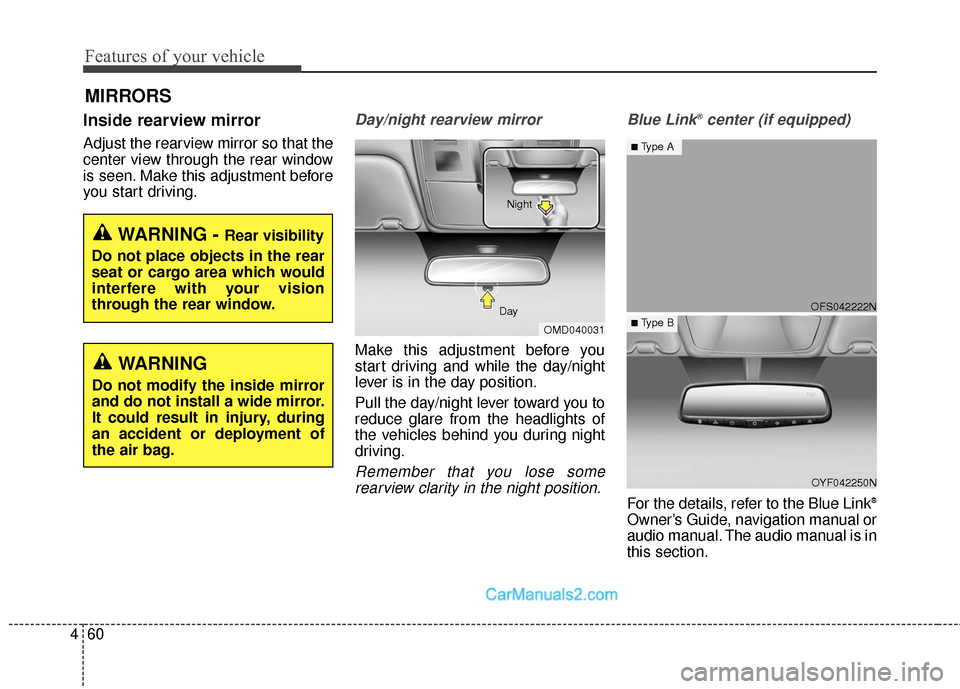
Adjust the rearview mirror so that the
center view through the rear window
is seen. Make this adjustment before
you start driving.
Day/night rearview mirror
Make this adjustment before you
start driving and while the day/night
lever is in the day position.
Pull the day/night lever toward you to
reduce glare from the headlights of
the vehicles behind you during night
driving.
Remember that you lose some
rearview clarity in the night position. Blue Link
®center (if equipped)
For the details, refer to the Blue Link®
Owner’s Guide, navigation manual or
audio manual. The audio manual is in
this section.
WARNING - Rear visibility
Do not place objects in the rear
seat or cargo area which would
interfere with your vision
through the rear window.
OMD040031
Day Night
WARNING
Do not modify the inside mirror
and do not install a wide mirror.
It could result in injury, during
an accident or deployment of
the air bag.
OFS042222N
OYF042250N
■Type A
■ Type B
Page 181 of 614
Features of your vehicle
84
4
LCD Display Control
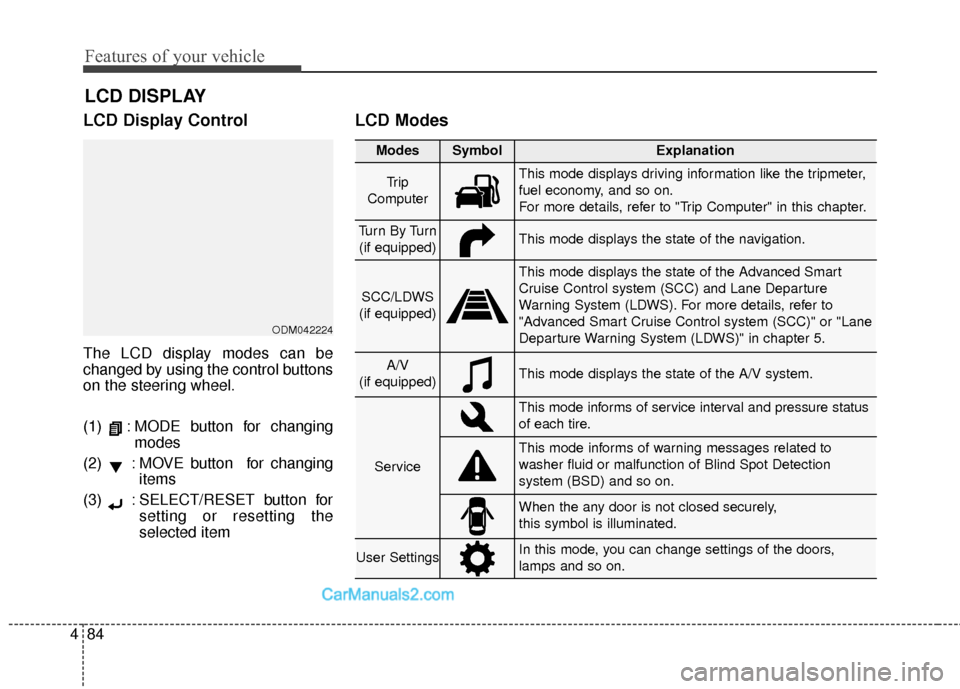
The LCD display modes can be
changed by using the control buttons
on the steering wheel.
(1) : MODE button for changing
modes
(2) : MOVE button for changing items
(3) : SELECT/RESET button for setting or resetting the
selected item
LCD Modes
LCD DISPLAY
Modes SymbolExplanation
Tr i p
ComputerThis mode displays driving information like the tripmeter,
fuel economy, and so on.
For more details, refer to "Trip Computer" in this chapter.
Tu r n B y Tu r n (if equipped)This mode displays the state of the navigation.
SCC/LDWS
(if equipped)
This mode displays the state of the Advanced Smart
Cruise Control system (SCC) and Lane Departure
Warning System (LDWS). For more details, refer to
"Advanced Smart Cruise Control system (SCC)" or "Lane
Departure Warning System (LDWS)" in chapter 5.
A/V
(if equipped)This mode displays the state of the A/V system.
Service
This mode informs of service interval and pressure status
of each tire.
This mode informs of warning messages related to
washer fluid or malfunction of Blind Spot Detection
system (BSD) and so on.
When the any door is not closed securely,
this symbol is illuminated.
User SettingsIn this mode, you can change settings of the doors,
lamps and so on.
ODM042224
Page 182 of 614
485
Features of your vehicle
Trip Computer Mode
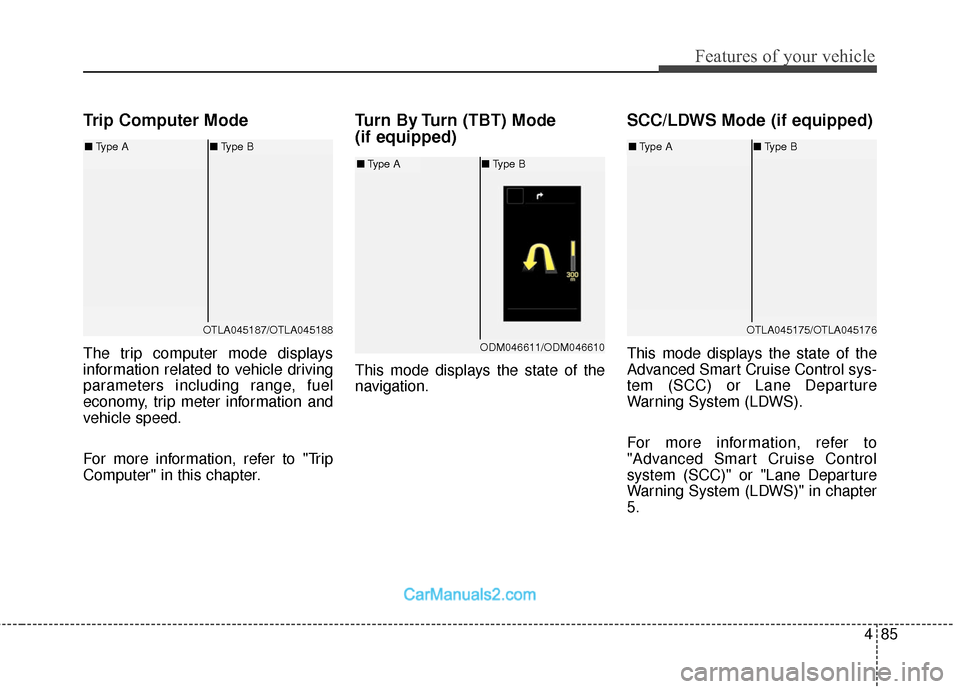
The trip computer mode displays
information related to vehicle driving
parameters including range, fuel
economy, trip meter information and
vehicle speed.
For more information, refer to "Trip
Computer" in this chapter.
Turn By Turn (TBT) Mode
(if equipped)
This mode displays the state of the
navigation.
SCC/LDWS Mode (if equipped)
This mode displays the state of the
Advanced Smart Cruise Control sys-
tem (SCC) or Lane Departure
Warning System (LDWS).
For more information, refer to
"Advanced Smart Cruise Control
system (SCC)" or "Lane Departure
Warning System (LDWS)" in chapter
5.
OTLA045187/OTLA045188
■Type A ■Type B
ODM046611/ODM046610
■Type A ■Type B
OTLA045175/OTLA045176
■Type A ■Type B
Page 482 of 614
613
What to do in an emergency
Changing a tire with TPMS
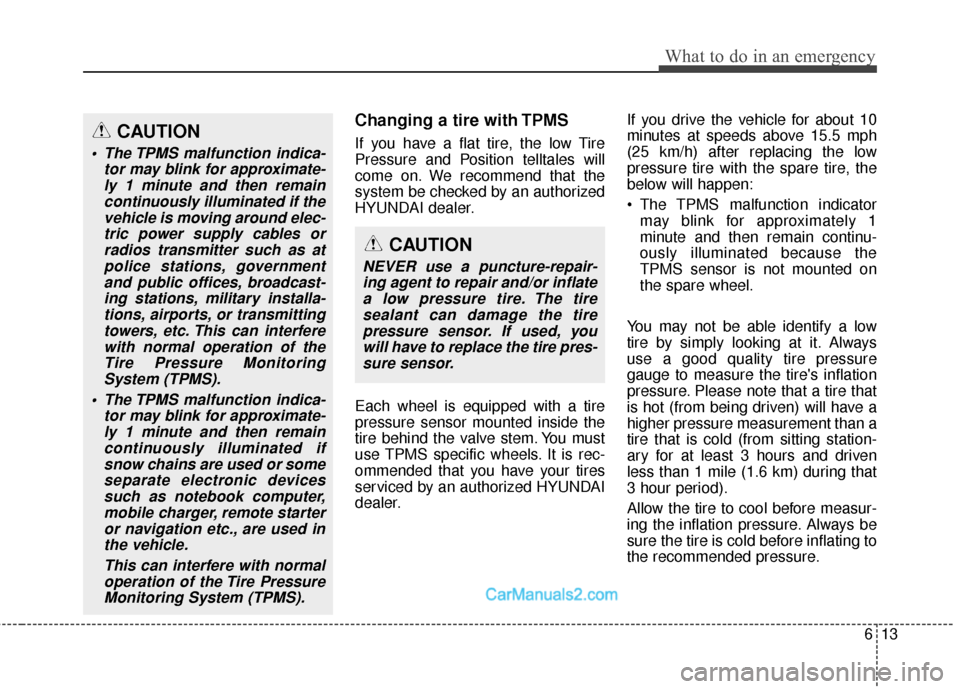
If you have a flat tire, the low Tire
Pressure and Position telltales will
come on. We recommend that the
system be checked by an authorized
HYUNDAI dealer.
Each wheel is equipped with a tire
pressure sensor mounted inside the
tire behind the valve stem. You must
use TPMS specific wheels. It is rec-
ommended that you have your tires
serviced by an authorized HYUNDAI
dealer.If you drive the vehicle for about 10
minutes at speeds above 15.5 mph
(25 km/h) after replacing the low
pressure tire with the spare tire, the
below will happen:
The TPMS malfunction indicator
may blink for approximately 1
minute and then remain continu-
ously illuminated because the
TPMS sensor is not mounted on
the spare wheel.
You may not be able identify a low
tire by simply looking at it. Always
use a good quality tire pressure
gauge to measure the tire's inflation
pressure. Please note that a tire that
is hot (from being driven) will have a
higher pressure measurement than a
tire that is cold (from sitting station-
ary for at least 3 hours and driven
less than 1 mile (1.6 km) during that
3 hour period).
Allow the tire to cool before measur-
ing the inflation pressure. Always be
sure the tire is cold before inflating to
the recommended pressure.CAUTION
The TPMS malfunction indica- tor may blink for approximate-ly 1 minute and then remaincontinuously illuminated if thevehicle is moving around elec-tric power supply cables orradios transmitter such as atpolice stations, governmentand public offices, broadcast-ing stations, military installa-tions, airports, or transmittingtowers, etc. This can interferewith normal operation of theTire Pressure MonitoringSystem (TPMS).
The TPMS malfunction indica- tor may blink for approximate-ly 1 minute and then remaincontinuously illuminated ifsnow chains are used or someseparate electronic devicessuch as notebook computer,mobile charger, remote starteror navigation etc., are used inthe vehicle.
This can interfere with normaloperation of the Tire PressureMonitoring System (TPMS).
CAUTION
NEVER use a puncture-repair-ing agent to repair and/or inflatea low pressure tire. The tiresealant can damage the tirepressure sensor. If used, youwill have to replace the tire pres-sure sensor.
Page 562 of 614
765
Maintenance
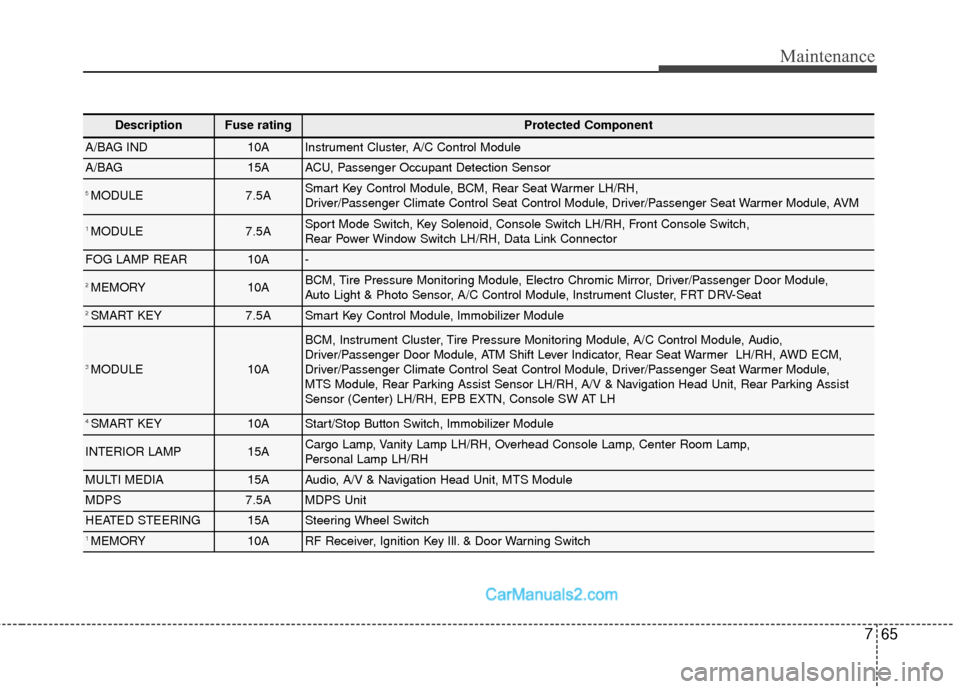
DescriptionFuse ratingProtected Component
A/BAG IND10AInstrument Cluster, A/C Control Module
A/BAG15AACU, Passenger Occupant Detection Sensor
5 MODULE7.5ASmart Key Control Module, BCM, Rear Seat Warmer LH/RH,
Driver/Passenger Climate Control Seat Control Module, Driver/Passenger Seat Warmer Module, AVM
1 MODULE7.5ASport Mode Switch, Key Solenoid, Console Switch LH/RH, Front Console Switch,
Rear Power Window Switch LH/RH, Data Link Connector
FOG LAMP REAR10A-
2 MEMORY10ABCM, Tire Pressure Monitoring Module, Electro Chromic Mirror, Driver/Passenger Door Module,
Auto Light & Photo Sensor, A/C Control Module, Instrument Cluster, FRT DRV-Seat
2 SMART KEY7.5ASmart Key Control Module, Immobilizer Module
3 MODULE10A
BCM, Instrument Cluster, Tire Pressure Monitoring Module, A/C Control Module, Audio,
Driver/Passenger Door Module, ATM Shift Lever Indicator, Rear Seat Warmer LH/RH, AWD ECM,
Driver/Passenger Climate Control Seat Control Module, Driver/Passenger Seat Warmer Module,
MTS Module, Rear Parking Assist Sensor LH/RH, A/V & Navigation Head Unit, Rear Parking Assist
Sensor (Center) LH/RH, EPB EXTN, Console SW AT LH
4 SMART KEY10AStart/Stop Button Switch, Immobilizer Module
INTERIOR LAMP15ACargo Lamp, Vanity Lamp LH/RH, Overhead Console Lamp, Center Room Lamp,
Personal Lamp LH/RH
MULTI MEDIA15AAudio, A/V & Navigation Head Unit, MTS Module
MDPS7.5AMDPS Unit
HEATED STEERING15ASteering Wheel Switch
1 MEMORY10ARF Receiver, Ignition Key Ill. & Door Warning Switch
Page 564 of 614
767
Maintenance
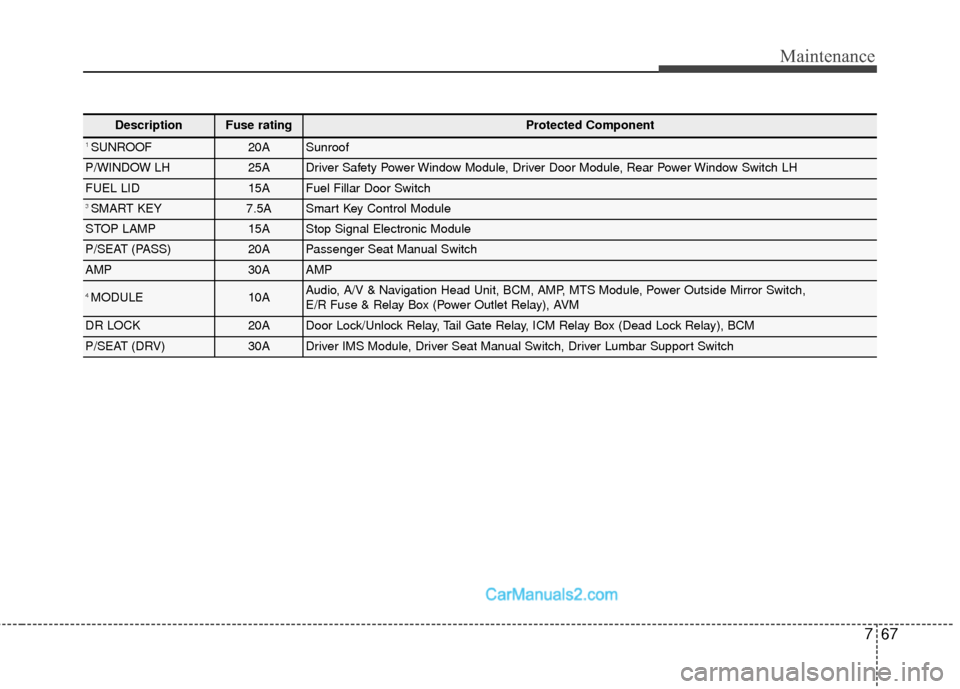
DescriptionFuse ratingProtected Component
1 SUNROOF20ASunroof
P/WINDOW LH25ADriver Safety Power Window Module, Driver Door Module, Rear Power Window Switch LH
FUEL LID15AFuel Fillar Door Switch
3 SMART KEY7.5ASmart Key Control Module
STOP LAMP15AStop Signal Electronic Module
P/SEAT (PASS)20APassenger Seat Manual Switch
AMP30AAMP
4 MODULE10AAudio, A/V & Navigation Head Unit, BCM, AMP, MTS Module, Power Outside Mirror Switch,
E/R Fuse & Relay Box (Power Outlet Relay), AVM
DR LOCK20ADoor Lock/Unlock Relay, Tail Gate Relay, ICM Relay Box (Dead Lock Relay), BCM
P/SEAT (DRV)30ADriver IMS Module, Driver Seat Manual Switch, Driver Lumbar Support Switch
Page 568 of 614
771
Maintenance
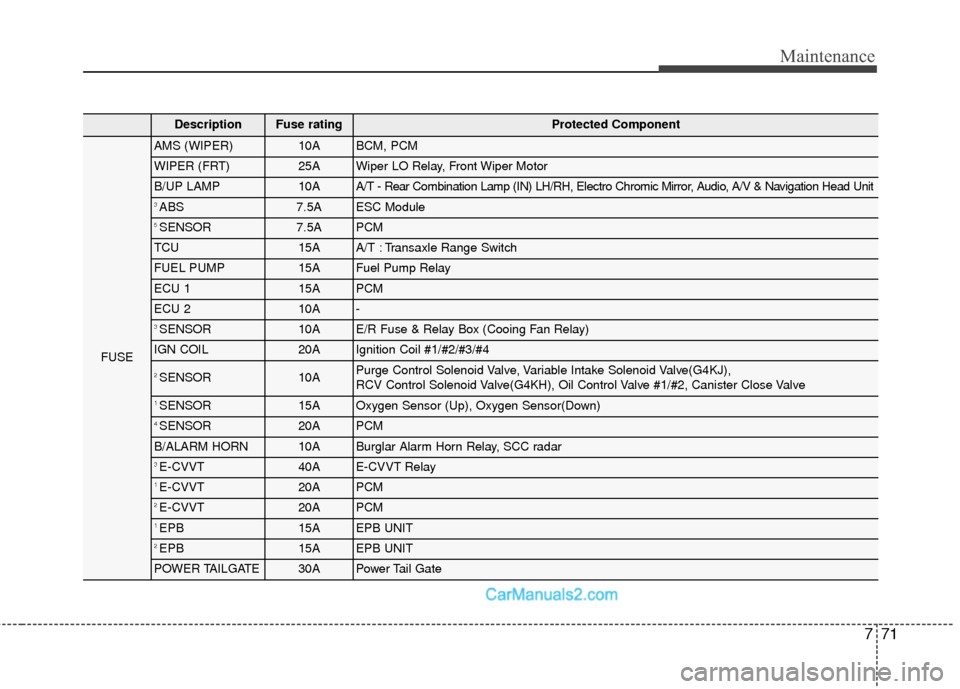
DescriptionFuse ratingProtected Component
FUSE
AMS (WIPER)10ABCM, PCM
WIPER (FRT)25AWiper LO Relay, Front Wiper Motor
B/UP LAMP10AA/T - Rear Combination Lamp (IN) LH/RH, Electro Chromic Mirror, Audio, A/V & Navigation Head Unit
3 ABS 7.5AESC Module
5 SENSOR7.5APCM
TCU15AA/T : Transaxle Range Switch
FUEL PUMP15AFuel Pump Relay
ECU 115APCM
ECU 210A-
3 SENSOR10AE/R Fuse & Relay Box (Cooing Fan Relay)
IGN COIL20AIgnition Coil #1/#2/#3/#4
2 SENSOR10APurge Control Solenoid Valve, Variable Intake Solenoid Valve(G4KJ),
RCV Control Solenoid Valve(G4KH), Oil Control Valve #1/#2, Canister Close Valve
1 SENSOR15AOxygen Sensor (Up), Oxygen Sensor(Down)
4 SENSOR20APCM
B/ALARM HORN10ABurglar Alarm Horn Relay, SCC radar
3 E-CVVT40AE-CVVT Relay
1 E-CVVT20APCM
2 E-CVVT20APCM
1 EPB15AEPB UNIT
2 EPB15AEPB UNIT
POWER TAILGATE30APower Tail Gate