ECU Hyundai Santa Fe Sport 2018 Quick Reference Guide
[x] Cancel search | Manufacturer: HYUNDAI, Model Year: 2018, Model line: Santa Fe Sport, Model: Hyundai Santa Fe Sport 2018Pages: 26, PDF Size: 11.81 MB
Page 13 of 26
MULTIMEDIA
SANTA FE SPORT
23 22
HYUNDAI
To Answer a Call:
• Press
button on the steering wheel.
To Reject a Call:
• Press button on the steering wheel.
To Adjust Ring Volume:
• Use the VOLUME buttons on the steering wheel.
To Transfer a Call to the Phone
(Private Call):
• Press and hold
button on the steering wheel until the
audio system transfers a call to the phone.
To Finish a Call:
• Press
button on the steering wheel.
BLUETOOTH OPERATIONAL TIPSIn the following situations you or the other party may have difficulty
hearing each other:
1. Keep the Bluetooth volume to a low level. High level volume may result
in distortion and echo.
2. When driving on a rough road, high speeds and/or with the window open.
3. When the air conditioning vents are facing the microphone and/or when
the air conditioning fan is at the max speed.
To redial previously dialed number,
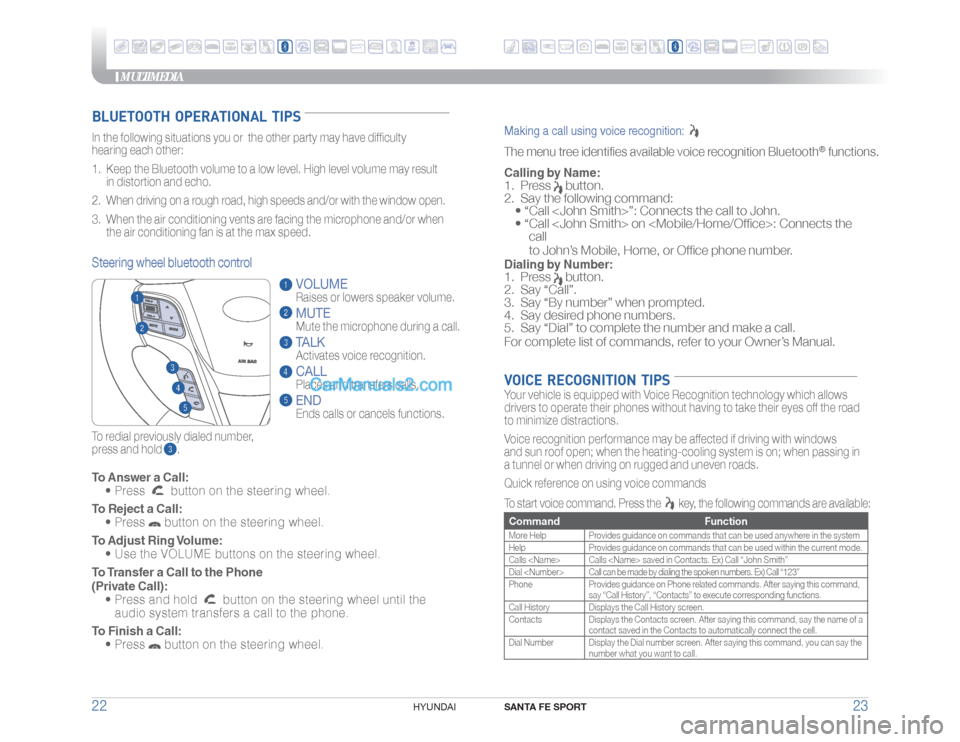
press and hold .Steering wheel bluetooth control
VOLUME
Raises or lowers speaker volume.MUTEMute the microphone during a call.TALKActivates voice recognition.CALL
Places and transfers calls.ENDEnds calls or cancels functions.
Making a call using voice recognition: The menu tree identifies available voice recognition Bluetooth
® functions.
Calling by Name:1. Press
button.
2. Say the following command:
• “Call
• “ Call
call
to John’s Mobile, Home, or Office phone number.
Dialing by Number:1. Press
button.
2. Say “Call”.
3. Say “By number” when prompted.
4. Say desired phone numbers.
5. Say “Dial” to complete the number and make a call.
For complete list of commands, refer to your Owner’s Manual.
VOICE RECOGNITION TIPSYour vehicle is equipped with Voice Recognition technology which allows
drivers to operate their phones without having to take their eyes off the road
to minimize distractions.
Voice recognition performance may be affected if driving with windows
and sun roof open; when the heating-cooling system is on; when passing in
a tunnel or when driving on rugged and uneven roads.
Quick reference on using voice commands
To start voice command. Press the
key, the following commands are available:
Command FunctionMore Help Provides guidance on commands that can be used anywhere in the system
Help Provides guidance on commands that can be used within the current mode.
Calls
Dial
Phone Provides guidance on Phone related commands. After saying this command,
say “Call History”, “Contacts” to execute corresponding functions.
Call History Displays the Call History screen.
Contacts Displays the Contacts screen. After saying this command, say the name of a
contact saved in the Contacts to automatically connect the cell.
Dial Number Display the Dial number screen. After saying this command, you can say the
number what you want to call.
ANDROIDAUTO™
ANDROIDAUTO™
Page 16 of 26
MULTIMEDIA
SANTA FE SPORT
29 28
HYUNDAI
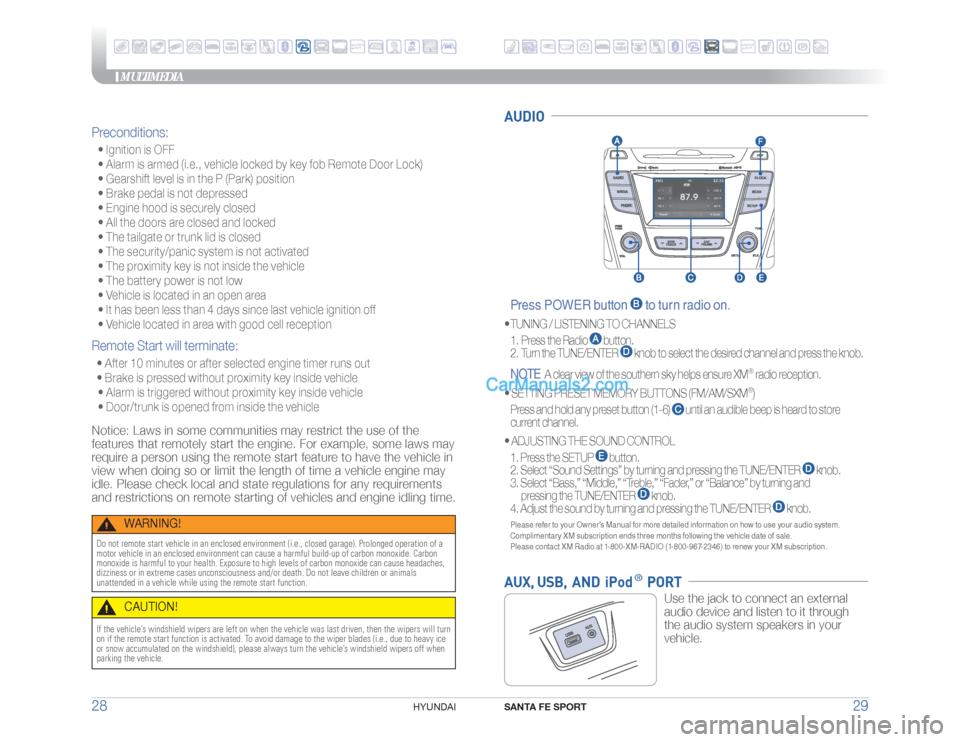
AUDIO Press POWER button
to turn radio on.
• TUNING / LISTENING TO CHANNELS
1. Press the Radio
button.
2. Turn the TUNE/ENTER
knob to select the desired channel and press the knob.
NOTE
A clear view of the southern sky helps ensure XM
®
radio reception.
•
SETTING PRESET MEMORY BUTTONS (FM/AM/SXM®)
Press and hold any preset button (1-6)
until an audible beep is heard to store
current channel.
•
ADJUSTING THE SOUND CONTROL
1. Press the SETUP
button.
2. Select “Sound Settings” by turning and pressing the TUNE/ENTER
knob.
3. Select “Bass,” “Middle,” “Treble,” “Fader,” or “Balance” by turning and
pressing the TUNE/ENTER
knob.
4. Adjust the sound by turning and pressing the TUNE/ENTER
knob.
Please refer to your Owner’s Manual for more detailed information on how to use your audio system.
Complimentary XM subscription ends three months following the vehicle date of sale.
Please contact XM Radio at 1-800-XM-RADIO (1-800-967-2346) to renew your XM subscription.AUX, USB, AND iPod
® PORT
Use the jack to connect an external
audio device and listen to it through
the audio system speakers in your
vehicle.
Preconditions: • Ignition is OFF
• Alarm is armed (i.e., vehicle locked by key fob Remote Door Lock)
• Gearshift level is in the P (Park) position
• Brake pedal is not depressed
• Engine hood is securely closed
• All the doors are closed and locked
• The tailgate or trunk lid is closed
• The security/panic system is not activated
• The proximity key is not inside the vehicle
• The battery power is not low
• Vehicle is located in an open area
• It has been less than 4 days since last vehicle ignition off
• Vehicle located in area with good cell receptionRemote Start will terminate: • After 10 minutes or after selected engine timer runs out
• Brake is pressed without proximity key inside vehicle
• Alarm is triggered without proximity key inside vehicle
• Door/trunk is opened from inside the vehicleNotice: Laws in some communities may restrict the use of the
features that remotely start the engine. For example, some laws may
require a person using the remote start feature to have the vehicle in
view when doing so or limit the length of time a vehicle engine may
idle. Please check local and state regulations for any requirements
and restrictions on remote starting of vehicles and engine idling time.
WARNING!
Do not remote start vehicle in an enclosed environment (i.e., closed garage). Prolonged operation of a
motor vehicle in an enclosed environment can cause a harmful build-up of carbon monoxide. Carbon
monoxide is harmful to your health. Exposure to high levels of carbon monoxide can cause headaches,
dizziness or in extreme cases unconsciousness and/or death. Do not leave children or animals
unattended in a vehicle while using the remote start function.
CAUTION!
If the vehicle’s windshield wipers are left on when the vehicle was last driven, then the wipers will turn
on if the remote start function is activated. To avoid damage to the wiper blades (i.e., due to heavy ice
or snow accumulated on the windshield), please always turn the vehicle’s windshield wipers off when
parking the vehicle.
ANDROIDAUTO™
ANDROIDAUTO™