sport mode Hyundai Santa Fe Sport 2018 Quick Reference Guide
[x] Cancel search | Manufacturer: HYUNDAI, Model Year: 2018, Model line: Santa Fe Sport, Model: Hyundai Santa Fe Sport 2018Pages: 26, PDF Size: 11.81 MB
Page 8 of 26
FEATURES AND CONTROLS
SANTA FE SPORT
13 12
HYUNDAI
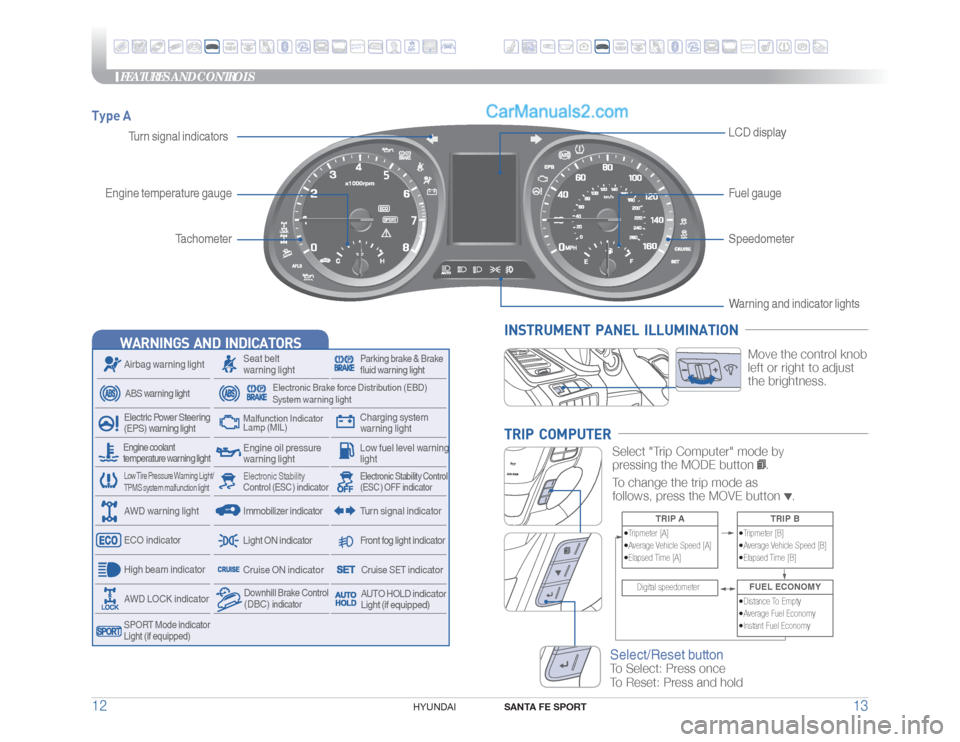
Type A
Tachometer
Speedometer
Turn signal indicatorsLCD display
Engine temperature gaugeFuel gauge
WARNINGS AND INDICATORS
Seat belt
warning light
Charging system
warning light
Airbag warning light
Electronic Brake force Distribution (EBD)
System warning light
ABS warning light
Front fog light indicator
Light ON indicator
Electric Power Steering
(EPS) warning lightHigh beam indicator
Parking brake & Brake
fluid warning light
Engine oil pressure
warning lightMalfunction Indicator
Lamp (MIL)
Low fuel level warning
light
Electronic Stability Control
(ESC )
indicator
Electronic Stability Control
(ESC ) OFF indicatorTurn signal indicator
ECO indicator
Immobilizer indicatorDownhill Brake Control (DBC)
indicator
SPORT Mode indicator
Light (if equipped)AWD LOCK indicatorAWD warning lightEngine coolant
temperature warning light
Cruise ON indicator
Cruise SET indicator
Low Tire Pressure Warning Light/
TPMS system malfunction light
AUTO HOLD indicator
Light (if equipped)ANDROIDAUTO™
ANDROIDAUTO™
Warning and indicator lights
INSTRUMENT PANEL ILLUMINATION
Move the control knob
left or right to adjust
the brightness.
TRIP COMPUTER
Select "Trip Computer" mode by
pressing the MODE button
.
To change the trip mode as
follows, press the MOVE button
.
TRIP A
•Tripmeter [A]
•Average Vehicle Speed [A]
•Elapsed Time [A]
TRIP B
•Tripmeter [B]
•Average Vehicle Speed [B]
•Elapsed Time [B]
Digital speedometer
FUEL ECONOMY•Distance To Empty
•Average Fuel Economy
•Instant Fuel Economy
Select/Reset buttonTo Select: Press once
To Reset: Press and hold
Page 9 of 26
FEATURES AND CONTROLS
SANTA FE SPORT
15 14
HYUNDAI
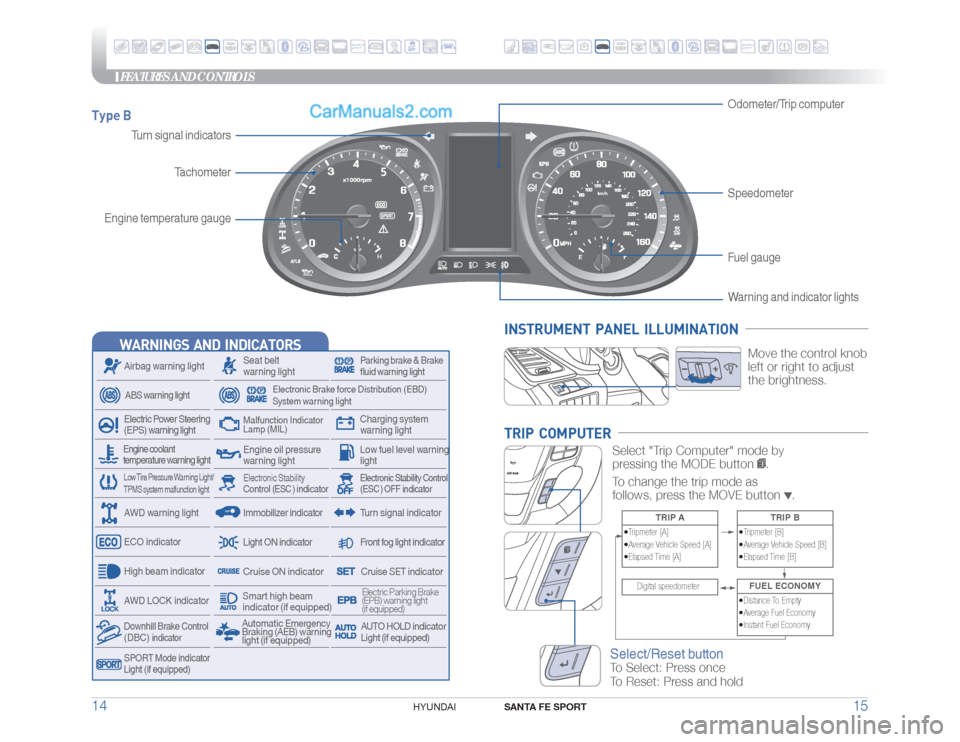
Type B
Warning and indicator lights
Engine temperature gaugeTachometer
SpeedometerFuel gauge Odometer/Trip computer
WARNINGS AND INDICATORS
Seat belt
warning light
Charging system
warning light
Airbag warning light
Electronic Brake force Distribution (EBD)
System warning light
ABS warning light
Front fog light indicator
Light ON indicator
Electric Power Steering
(EPS) warning lightHigh beam indicator
Parking brake & Brake
fluid warning light
Engine oil pressure
warning lightMalfunction Indicator
Lamp (MIL)
Low fuel level warning
light
Electronic Stability Control
(ESC )
indicator
Electronic Stability Control
(ESC ) OFF indicatorTurn signal indicator
ECO indicator
Immobilizer indicator
Downhill Brake Control (DBC)
indicator
SPORT Mode indicator
Light (if equipped)AWD LOCK indicatorAWD warning lightEngine coolant
temperature warning light
Cruise ON indicator
Cruise SET indicator
Low Tire Pressure Warning Light/
TPMS system malfunction light
Automatic Emergency
Braking (AEB) warning
light (if equipped)
Electric Parking Brake
(EPB) warning light
(if equipped)AUTO HOLD indicator
Light (if equipped)
Smart high beam
indicator (if equipped)
Turn signal indicators
ANDROIDAUTO™
ANDROIDAUTO™
INSTRUMENT PANEL ILLUMINATION
Move the control knob
left or right to adjust
the brightness.
TRIP COMPUTER
Select "Trip Computer" mode by
pressing the MODE button
.
To change the trip mode as
follows, press the MOVE button
.
TRIP A
•Tripmeter [A]
•Average Vehicle Speed [A]
•Elapsed Time [A]
TRIP B
•Tripmeter [B]
•Average Vehicle Speed [B]
•Elapsed Time [B]
Digital speedometer
FUEL ECONOMY•Distance To Empty
•Average Fuel Economy
•Instant Fuel Economy
Select/Reset buttonTo Select: Press once
To Reset: Press and hold
Page 10 of 26
FEATURES AND CONTROLS
SANTA FE SPORT
17 16
HYUNDAI
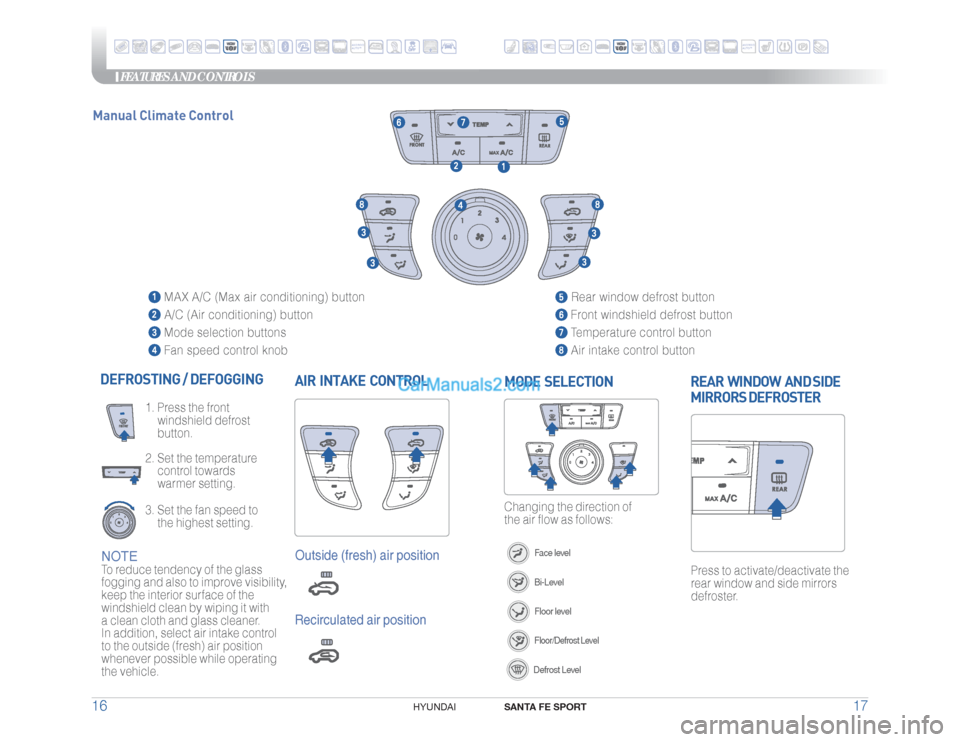
AIR INTAKE CONTROL DEFROSTING / DEFOGGING
2. Set the temperature
control towards
warmer setting.3. Set the fan speed to
the highest setting. 1. Press the front
windshield defrost
button.
Press to activate/deactivate the
rear window and side mirrors
defroster.REAR WINDOW AND SIDE
MIRRORS DEFROSTER
Changing the direction of
the air flow as follows:MODE SELECTION
Face levelBi-LevelFloor levelFloor/Defrost LevelDefrost Level
MAX A/C (Max air conditioning) button
A/C (Air conditioning) button
Mode selection buttons
Fan speed control knob
Rear window defrost button Front windshield defrost button Temperature control button Air intake control button
NOTETo reduce tendency of the glass
fogging and also to improve visibility,
keep the interior surface of the
windshield clean by wiping it with
a clean cloth and glass cleaner.
In addition, select air intake control
to the outside (fresh) air position
whenever possible while operating
the vehicle.
Outside (fresh) air positionRecirculated air position
Manual Climate Control
ANDROIDAUTO™
ANDROIDAUTO™
Page 11 of 26
FEATURES AND CONTROLS
SANTA FE SPORT
19 18
HYUNDAI
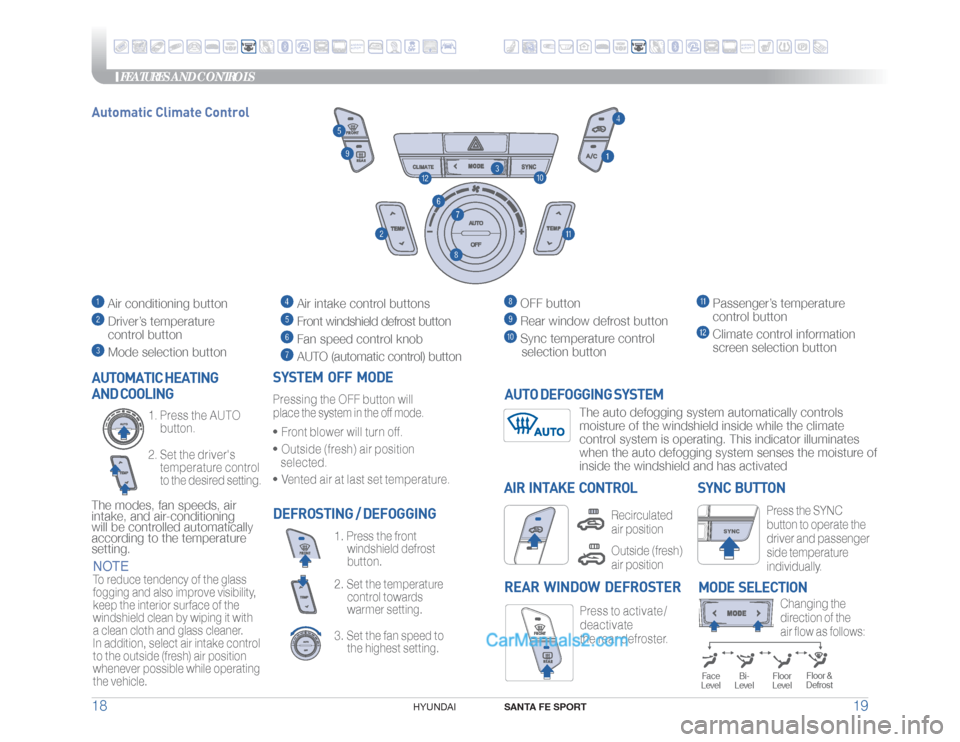
Press the SYNC
button to operate the
driver and passenger
side temperature
individually.
SYNC BUTTON
DEFROSTING / DEFOGGING
3. Set the fan speed to
the highest setting. 2. Set the temperature
control towards
warmer setting.1. Press the front
windshield defrost
button.
SYSTEM OFF MODEPressing the OFF button will place the system in the off mode.• Front blower will turn off.• Outside (fresh) air position
selected.• Vented air at last set temperature.
Press to activate /
deactivate
the rear defroster.
REAR WINDOW DEFROSTER AUTOMATIC HEATING
AND COOLING
2. Set the driver's
temperature control
to the desired setting. 1. Press the AUTO
button.
The modes, fan speeds, air
intake, and air-conditioning
will be controlled automatically
according to the temperature
setting.
Changing the
direction of the
air flow as follows:
MODE SELECTION
Floor &
Defrost
Face
Level
Bi-
Level
Floor
Level
Automatic Climate Control
AIR INTAKE CONTROL
Recirculated
air positionOutside (fresh)
air position
SYNC
Air conditioning button Driver’s temperature
control button Mode selection button
Air intake control buttons Front windshield defrost button Fan speed control knob AUTO (automatic control) button
OFF button Rear window defrost button
Sync temperature control
selection button
Passenger’s temperature
control button Climate control information
screen selection button
NOTETo reduce tendency of the glass
fogging and also improve visibility,
keep the interior surface of the
windshield clean by wiping it with
a clean cloth and glass cleaner.
In addition, select air intake control
to the outside (fresh) air position
whenever possible while operating
the vehicle.
The auto defogging system automatically controls
moisture of the windshield inside while the climate
control system is operating. This indicator illuminates
when the auto defogging system senses the moisture of
inside the windshield and has activated
AUTO DEFOGGING SYSTEM
ANDROIDAUTO™
ANDROIDAUTO™
Page 12 of 26
FEATURES AND CONTROLS
SANTA FE SPORT
21 20
HYUNDAI
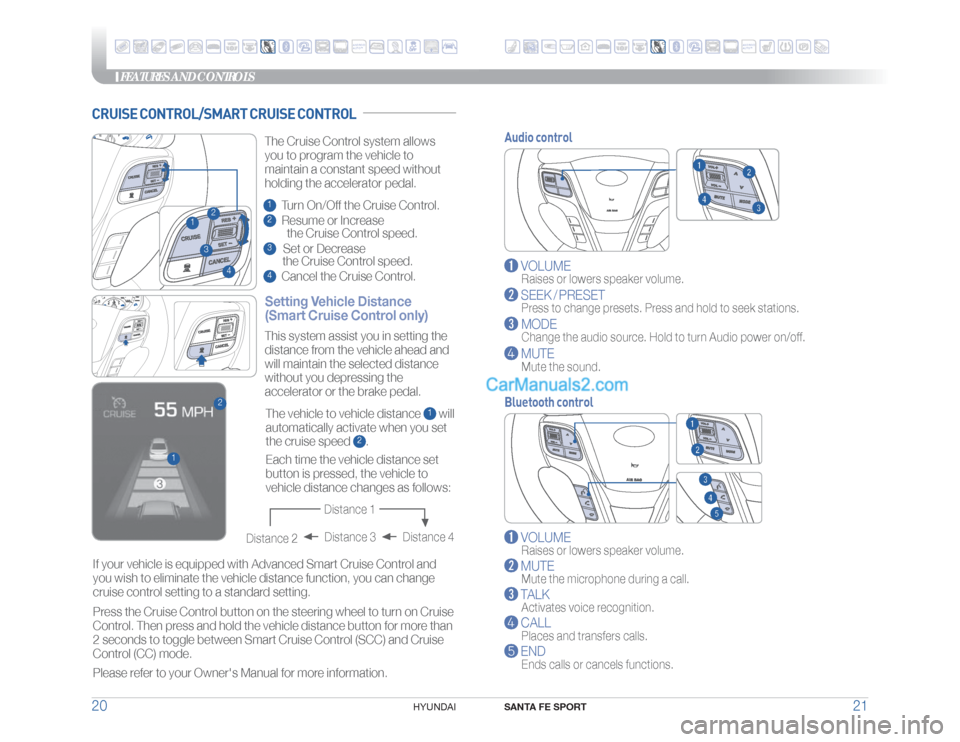
Audio control
VOLUME
Raises or lowers speaker volume.
SEEK / PRESET
Press to change presets. Press and hold to seek stations.
MODE
Change the audio source. Hold to turn Audio power on/off.
MUTE
Mute the sound.
Bluetooth control
VOLUME
Raises or lowers speaker volume.
MUTE
Mute the microphone during a call.
TALK
Activates voice recognition.
CALL
Places and transfers calls.
END
Ends calls or cancels functions.
CRUISE CONTROL/SMART CRUISE CONTROL
ANDROIDAUTO™
ANDROIDAUTO™
23
1
4
1
2
Setting Vehicle Distance
(Smart Cruise Control only)The vehicle to vehicle distance
1 will
automatically activate when you set
the cruise speed
2. This system assist you in setting the
distance from the vehicle ahead and
will maintain the selected distance
without you depressing the
accelerator or the brake pedal.
If your vehicle is equipped with Advanced Smart Cruise Control and
you wish to eliminate the vehicle distance function, you can change
cruise control setting to a standard setting.
Press the Cruise Control button on the steering wheel to turn on Cruise
Control. Then press and hold the vehicle distance button for more than
2 seconds to toggle between Smart Cruise Control (SCC) and Cruise
Control (CC) mode.
Please refer to your Owner's Manual for more information.Each time the vehicle distance set
button is pressed, the vehicle to
vehicle distance changes as follows: The Cruise Control system allows
you to program the vehicle to
maintain a constant speed without
holding the accelerator pedal.
Distance 4 Distance 3
Distance 2
Distance 1
1 Turn On/Off the Cruise Control.2 Resume or Increase
the Cruise Control speed.3 Set or Decrease
the Cruise Control speed.4 Cancel the Cruise Control.
Page 13 of 26
MULTIMEDIA
SANTA FE SPORT
23 22
HYUNDAI
To Answer a Call:
• Press
button on the steering wheel.
To Reject a Call:
• Press button on the steering wheel.
To Adjust Ring Volume:
• Use the VOLUME buttons on the steering wheel.
To Transfer a Call to the Phone
(Private Call):
• Press and hold
button on the steering wheel until the
audio system transfers a call to the phone.
To Finish a Call:
• Press
button on the steering wheel.
BLUETOOTH OPERATIONAL TIPSIn the following situations you or the other party may have difficulty
hearing each other:
1. Keep the Bluetooth volume to a low level. High level volume may result
in distortion and echo.
2. When driving on a rough road, high speeds and/or with the window open.
3. When the air conditioning vents are facing the microphone and/or when
the air conditioning fan is at the max speed.
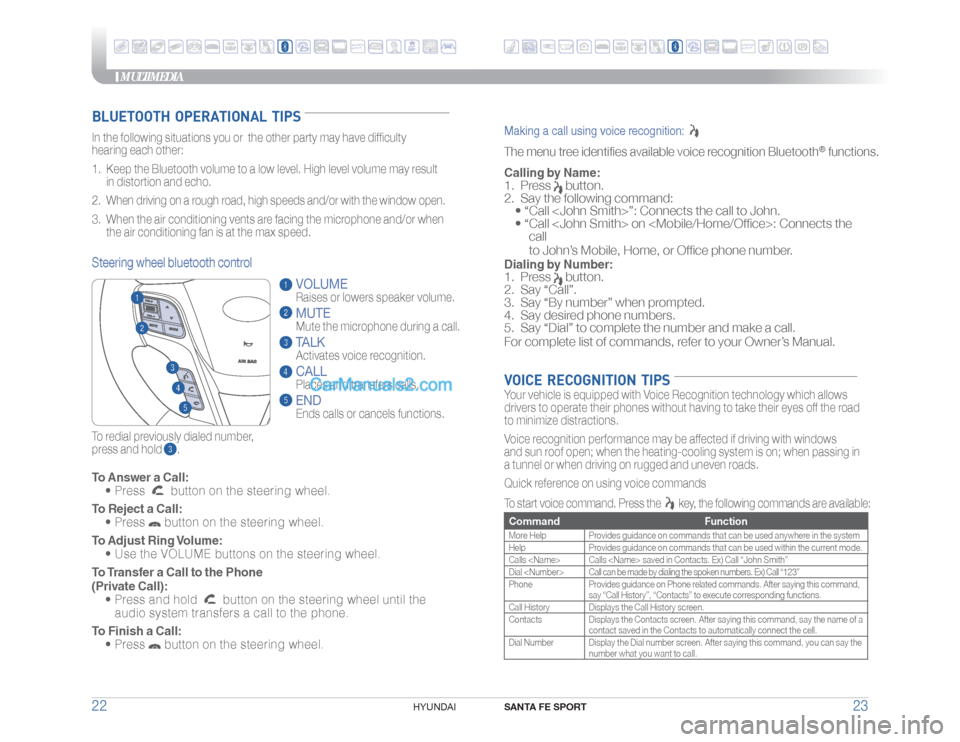
To redial previously dialed number,
press and hold .Steering wheel bluetooth control
VOLUME
Raises or lowers speaker volume.MUTEMute the microphone during a call.TALKActivates voice recognition.CALL
Places and transfers calls.ENDEnds calls or cancels functions.
Making a call using voice recognition: The menu tree identifies available voice recognition Bluetooth
® functions.
Calling by Name:1. Press
button.
2. Say the following command:
• “Call
• “ Call
call
to John’s Mobile, Home, or Office phone number.
Dialing by Number:1. Press
button.
2. Say “Call”.
3. Say “By number” when prompted.
4. Say desired phone numbers.
5. Say “Dial” to complete the number and make a call.
For complete list of commands, refer to your Owner’s Manual.
VOICE RECOGNITION TIPSYour vehicle is equipped with Voice Recognition technology which allows
drivers to operate their phones without having to take their eyes off the road
to minimize distractions.
Voice recognition performance may be affected if driving with windows
and sun roof open; when the heating-cooling system is on; when passing in
a tunnel or when driving on rugged and uneven roads.
Quick reference on using voice commands
To start voice command. Press the
key, the following commands are available:
Command FunctionMore Help Provides guidance on commands that can be used anywhere in the system
Help Provides guidance on commands that can be used within the current mode.
Calls
Dial
Phone Provides guidance on Phone related commands. After saying this command,
say “Call History”, “Contacts” to execute corresponding functions.
Call History Displays the Call History screen.
Contacts Displays the Contacts screen. After saying this command, say the name of a
contact saved in the Contacts to automatically connect the cell.
Dial Number Display the Dial number screen. After saying this command, you can say the
number what you want to call.
ANDROIDAUTO™
ANDROIDAUTO™
Page 15 of 26
MULTIMEDIA
SANTA FE SPORT
27 26
HYUNDAI
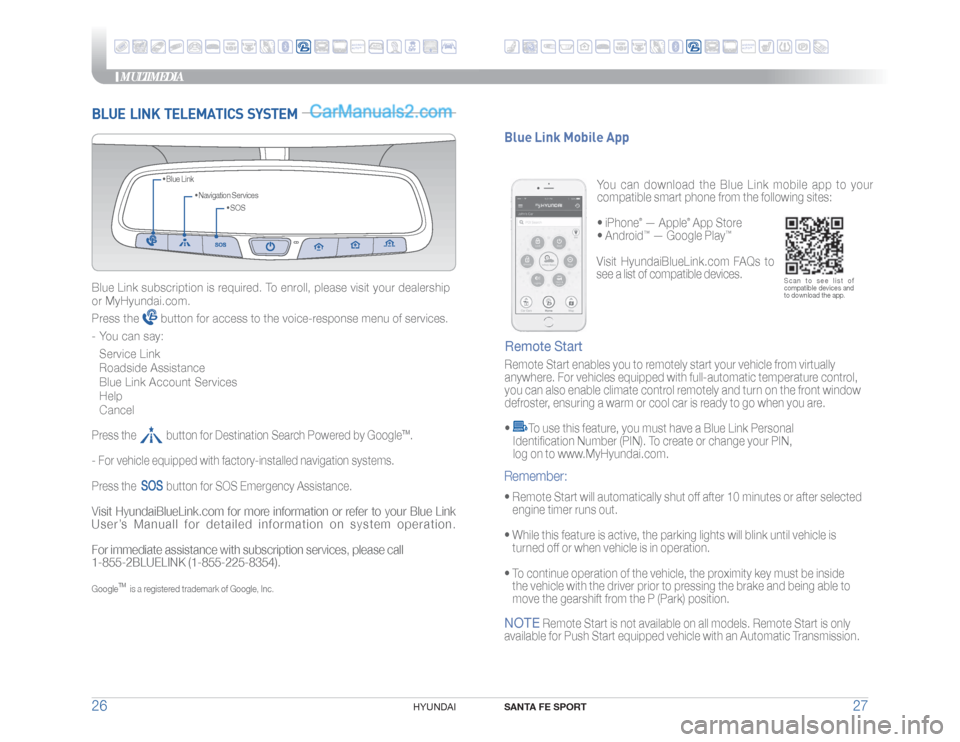
BLUE LINK TELEMATICS SYSTEM
• SOS • Navigation Services • Blue Link
Blue Link subscription is required. To enroll, please visit your dealership
or MyHyundai.com.
Press the
button for access to the voice-response menu of services.
- You can say:
Service Link
Roadside Assistance
Blue Link Account Services
Help
Cancel
Press the button for Destination Search Powered by Google
TM.
- For vehicle equipped with factory-installed navigation systems.
Press the
button for SOS Emergency Assistance.
Visit HyundaiBlueLink.com for more information or refer to your Blue Link
User’s Manuall for detailed information on system operation.
For immediate assistance with subscription services, please call
1-855-2BLUELINK (1-855-225-8354).Google
TM
is a registered trademark of Google, Inc.
You can download the Blue Link mobile app to your
compatible smart phone from the following sites:
• iPhone
® — Apple
® App Store
• Android
™ — Google Play
™
Remote Start enables you to remotely start your vehicle from virtually
anywhere. For vehicles equipped with full-automatic temperature control,
you can also enable climate control remotely and turn on the front window
defroster, ensuring a warm or cool car is ready to go when you are.
•
To use this feature, you must have a Blue Link Personal
Identification Number (PIN). To create or change your PIN,
log on to www.MyHyundai.com.
Remote Start Blue Link Mobile App• Remote Start will automatically shut off after 10 minutes or after selected
engine timer runs out.
• While this feature is active, the parking lights will blink until vehicle is
turned off or when vehicle is in operation.
• To continue operation of the vehicle, the proximity key must be inside
the vehicle with the driver prior to pressing the brake and being able to
move the gearshift from the P (Park) position.Remember:
Scan to see list of
compatible devices and
to download the app.
Visit HyundaiBlueLink.com FAQs to
see a list of compatible devices.
NOTE
Remote Start is not available on all models. Remote Start is only
available for Push Start equipped vehicle with an Automatic Transmission.
ANDROIDAUTO™
ANDROIDAUTO™
Page 17 of 26
MULTIMEDIA
SANTA FE SPORT
31 30
HYUNDAI
RADIO
VOL
PWRPUSH
MEDIA
PHONE
BLUELINK
SEEK TRACK
TUNE
ENTERSETUPFILE
RADIO
VOLPWRPUSH
MEDIA NAVI
PHONE BLUELINK
SEEK
TRACK
TUNE
ENTER
SETUPMAP
VOICE
INFO
FILE
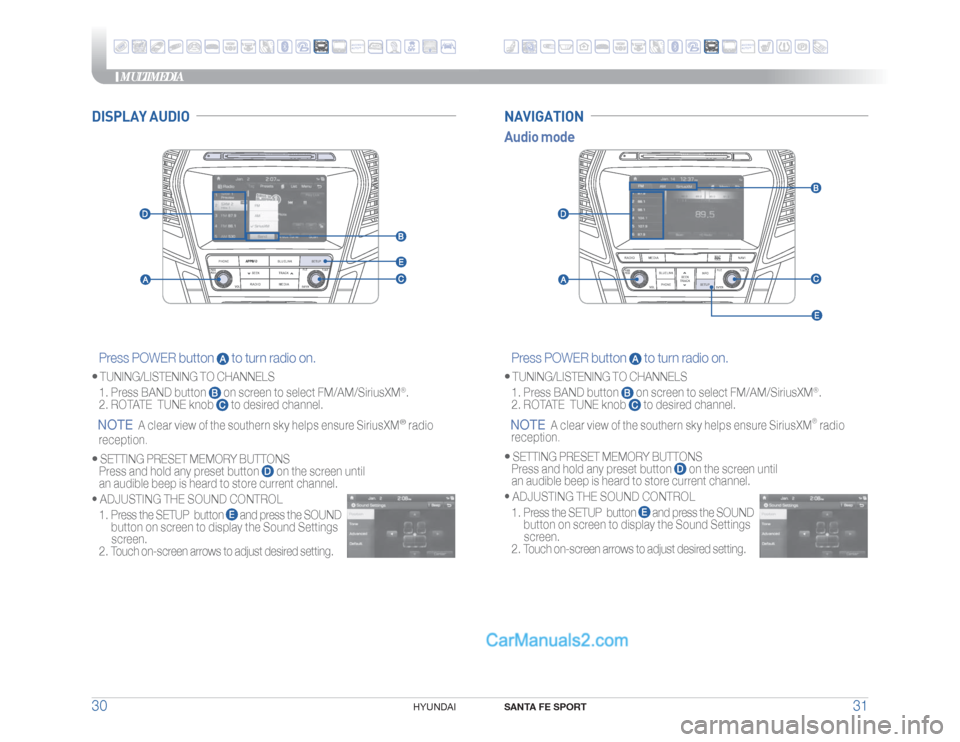
Press POWER button
to turn radio on.
• TUNING/LISTENING TO CHANNELS
1. Press BAND button
on screen to select FM/AM/SiriusXM
®.
2. ROTATE TUNE knob
to desired channel.
NOTE
A clear view of the southern sky helps ensure SiriusXM
®
radio
reception.
•
SETTING PRESET MEMORY BUTTONS
Press and hold any preset button
on the screen until
an audible beep is heard to store current channel.
•
ADJUSTING THE SOUND CONTROL
1. Press the SETUP button
and press the SOUND
button on screen to display the Sound Settings
screen.
2. Touch on-screen arrows to adjust desired setting.
Press POWER button
to turn radio on.
• TUNING/LISTENING TO CHANNELS
1. Press BAND button
on screen to select FM/AM/SiriusXM
®.
2. ROTATE TUNE knob
to desired channel.
NOTE
A clear view of the southern sky helps ensure SiriusXM
® radio
reception.
•
SETTING PRESET MEMORY BUTTONS
Press and hold any preset button
on the screen until
an audible beep is heard to store current channel.
•
ADJUSTING THE SOUND CONTROL
1. Press the SETUP button
and press the SOUND
button on screen to display the Sound Settings
screen.
2. Touch on-screen arrows to adjust desired setting.
Audio modeNAVIGATION
DISPLAY AUDIO
ANDROIDAUTO™
ANDROIDAUTO™
Page 18 of 26
MULTIMEDIA
SANTA FE SPORT
33 32
HYUNDAI
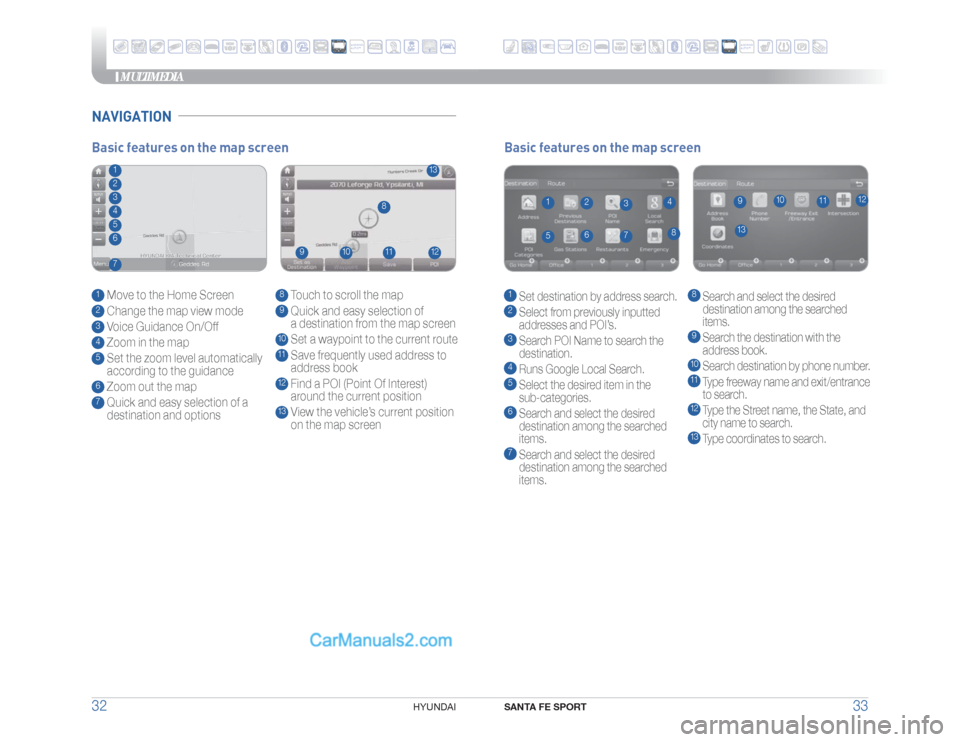
NAVIGATION
Basic features on the map screen1 Set destination by address search.2 Select from previously inputted
addresses and POI’s.3 Search POI Name to search the
destination.4 Runs Google Local Search.5 Select the desired item in the
sub-categories.6 Search and select the desired
destination among the searched
items.7 Search and select the desired
destination among the searched
items.
8 Search and select the desired
destination among the searched
items.9
Search the destination with the
address book.10 Search destination by phone number.11 Type freeway name and exit/entrance
to search.12 Type the Street name, the State, and
city name to search.13 Type coordinates to search.
1
13
8
9
10
11
12
2
3
4
5
6
7
Basic features on the map screen1 Move to the Home Screen2 Change the map view mode3 Voice Guidance On/Off4 Zoom in the map5 Set the zoom level automatically
according to the guidance6 Zoom out the map7 Quick and easy selection of a
destination and options
8 Touch to scroll the map9 Quick and easy selection of
a destination from the map screen10 Set a waypoint to the current route11 Save frequently used address to
address book12 Find a POI (Point Of Interest)
around the current position13 View the vehicle’s current position
on the map screen
1
13
8
9
10
11
12
234567
ANDROIDAUTO™
ANDROIDAUTO™
Page 19 of 26
MULTIMEDIA
SANTA FE SPORT
35 34
HYUNDAI
CAR SETUP1. Press the SETUP button on the radio.
2. Touch the “Connectivity” icon on screen.
3. Select “On” for Android Auto.
4. Connect your Android phone to the vehicle USB port. Agree to the
notification and disclaimers on your phone then the “Android Auto”
icon will appear confirming the setup.
For more detailed information on how to operate Android Auto,
please refer to your navigation manual.
For additional Android Auto support, please refer to the Android Auto
Support Website
https://support.google.com/androidauto/
Android Auto, Google Play, Android, and other marks are trademarks
of Google Inc.
ANDROID AUTO ™REQUIREMENTS:
- Micro USB cable
- OS Android™ 5.0 or higher
- Compatible Android Phone
- Data and wireless plan for applicable features
BEFORE YOU BEGIN:
- Android Auto features may operate differently than on your phone.
- Message and data charges may apply when using Android Auto.
- Android Auto relies on the performance of your phone. If you
experience performance issues:
- Close all apps and then restart them or
- Disconnect and then reconnect your phone
- Using the micro USB cable that was provided with your phone is
recommended.
- When Android Auto is active, your in-vehicle voice recognition
system is disabled and you will be using talk to Google™ to make
your requests.
PHONE SETUP Turn on Bluetooth
® on your phone and connect the micro USB cable to
your phone and the USB port on the vehicle.
Phone will prompt you to download the Android Auto app and update
other needed apps (i.e. Google Maps™, Google Play Music™, Google
Now™).
NOTE
Vehicle must be parked.
- Location mode setting should be set to High accuracy.
- Car and phone setup should be completed in one sitting. If phone
setup needs to be resumed, recommend to Force Stop the Android
Auto app on the Phone then reopen the app and accept the
Disclaimer notifications.
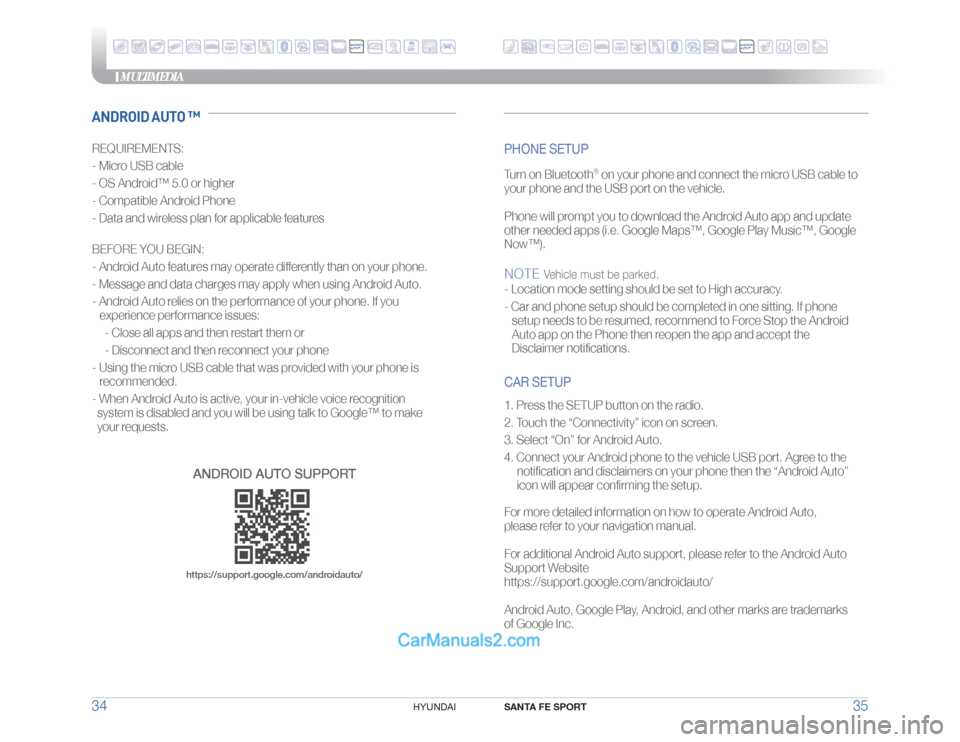
ANDROID AUTO SUPPORThttps://support.google.com/androidauto/
ANDROID
AUTO™
ANDROID
AUTO™