reset Hyundai Sonata
[x] Cancel search | Manufacturer: HYUNDAI, Model Year: , Model line: , Model:Pages: 340, PDF Size: 18.45 MB
Page 151 of 340
493
Features of your vehicle
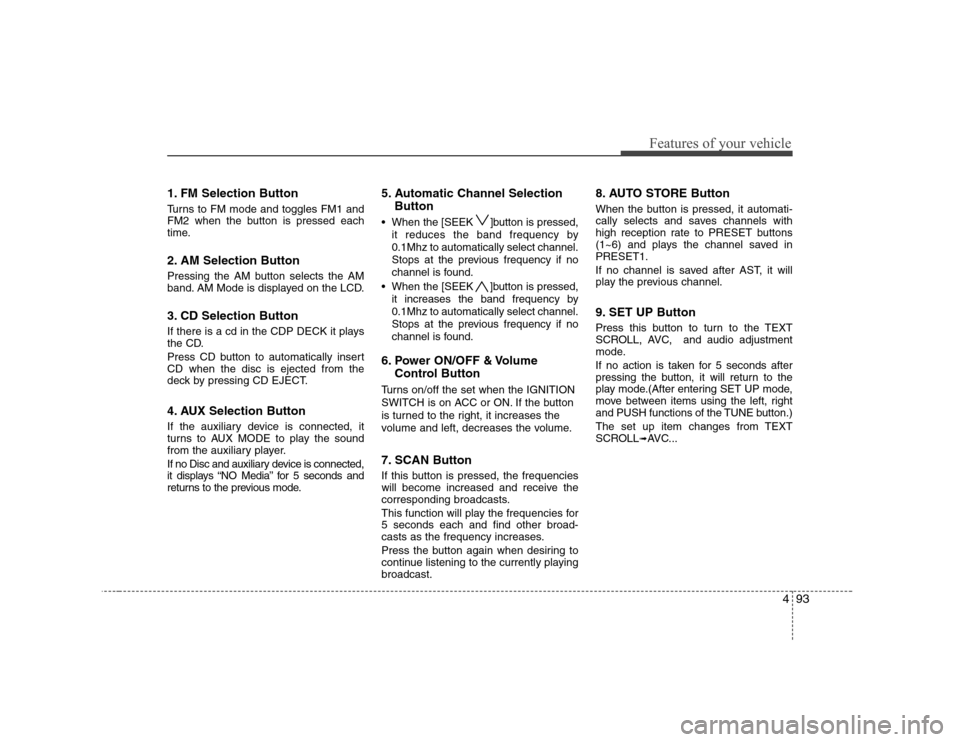
1. FM Selection Button
Turns to FM mode and toggles FM1 and
FM2 when the button is pressed each
time.
2. AM Selection Button
Pressing the AM button selects the AM
band. AM Mode is displayed on the LCD.
3. CD Selection Button
If there is a cd in the CDP DECK it plays
the CD.
Press CD button to automatically insert CD when the disc is ejected from the
deck by pressing CD EJECT.
4. AUX Selection Button
If the auxiliary device is connected, it
turns to AUX MODE to play the sound
from the auxiliary player.
If no Disc and auxiliary device is connected,
it displays “NO Media” for 5 seconds and
returns to the previous mode.5. Automatic Channel Selection
Button
When the [SEEK ]button is pressed, it reduces the band frequency by 0.1Mhz to automatically select channel.
Stops at the previous frequency if no
channel is found.
When the [SEEK ]button is pressed, it increases the band frequency by0.1Mhz to automatically select channel.
Stops at the previous frequency if no
channel is found.
6. Power ON/OFF & Volume Control Button
Turns on/off the set when the IGNITION
SWITCH is on ACC or ON. If the button
is turned to the right, it increases the
volume and left, decreases the volume.
7. SCAN Button
If this button is pressed, the frequencies
will become increased and receive the
corresponding broadcasts.
This function will play the frequencies for 5 seconds each and find other broad-
casts as the frequency increases.
Press the button again when desiring to
continue listening to the currently playingbroadcast. 8. AUTO STORE Button
When the button is pressed, it automati-
cally selects and saves channels with
high reception rate to PRESET buttons
(1~6) and plays the channel saved inPRESET1.
If no channel is saved after AST, it will
play the previous channel.
9. SET UP Button
Press this button to turn to the TEXT
SCROLL, AVC, and audio adjustment
mode.
If no action is taken for 5 seconds after
pressing the button, it will return to the
play mode.(After entering SET UP mode,
move between items using the left, right
and PUSH functions of the TUNE button.)
The set up item changes from TEXT
SCROLL
➟
AVC...
Page 162 of 340
Features of your vehicle
104
4
In case the i-Pod exclusive cable is con-
nected to the multiple terminal inside the
console on the left hand side of the dri-
ver’s seat. When the i-Pod is connected,
the ‘i-Pod’ icon will be displayed on the
top right corner of the display screen.
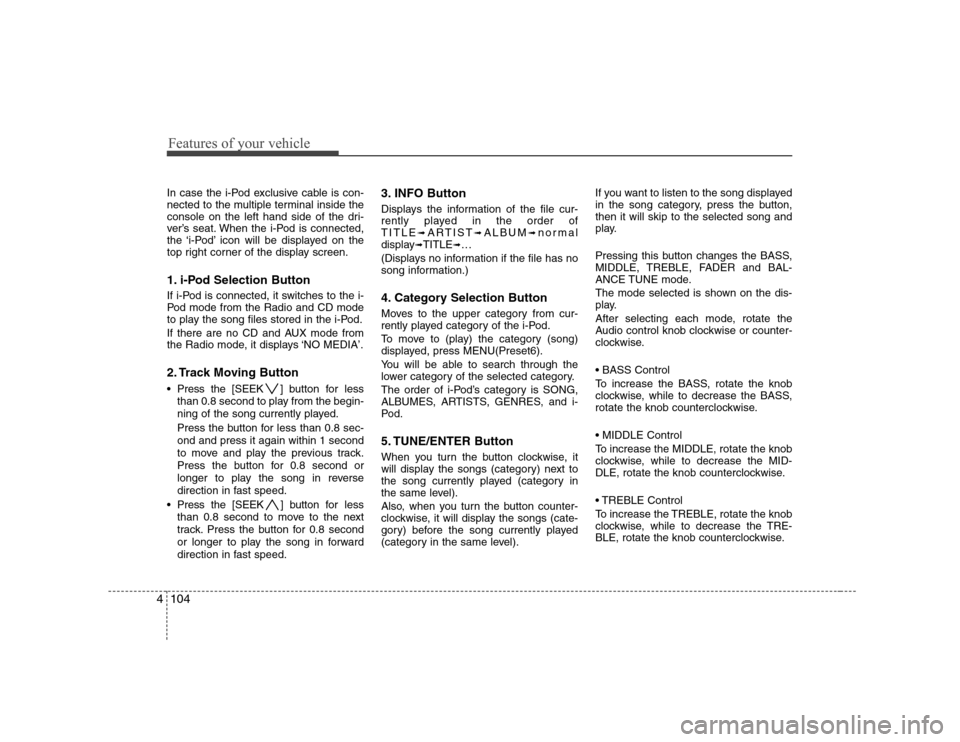
1. i-Pod Selection Button
If i-Pod is connected, it switches to the i-
Pod mode from the Radio and CD mode
to play the song files stored in the i-Pod.
If there are no CD and AUX mode from
the Radio mode, it displays ‘NO MEDIA’.
2. Track Moving Button
Press the [SEEK ] button for less
than 0.8 second to play from the begin-
ning of the song currently played.
Press the button for less than 0.8 sec- ond and press it again within 1 second
to move and play the previous track.
Press the button for 0.8 second or
longer to play the song in reverse
direction in fast speed.
Press the [SEEK ] button for less
than 0.8 second to move to the next
track. Press the button for 0.8 second
or longer to play the song in forward
direction in fast speed. 3. INFO Button
Displays the information of the file cur-
rently played in the order ofTITLE
➟ARTIST ➟ALBUM ➟normal
display ➟TITLE ➟…
(Displays no information if the file has no
song information.)
4. Category Selection Button
Moves to the upper category from cur-
rently played category of the i-Pod.
To move to (play) the category (song)
displayed, press MENU(Preset6).
You will be able to search through the
lower category of the selected category.
The order of i-Pod’s category is SONG,
ALBUMES, ARTISTS, GENRES, and i-
Pod.
5. TUNE/ENTER Button
When you turn the button clockwise, it
will display the songs (category) next to
the song currently played (category in
the same level).
Also, when you turn the button counter-
clockwise, it will display the songs (cate-
gory) before the song currently played
(category in the same level). If you want to listen to the song displayed
in the song category, press the button,then it will skip to the selected song and
play.
Pressing this button changes the BASS,
MIDDLE, TREBLE, FADER and BAL-
ANCE TUNE mode.
The mode selected is shown on the dis-
play.
After selecting each mode, rotate the
Audio control knob clockwise or counter-
clockwise.
To increase the BASS, rotate the knob
clockwise, while to decrease the BASS,
rotate the knob counterclockwise.
To increase the MIDDLE, rotate the knob
clockwise, while to decrease the MID-
DLE, rotate the knob counterclockwise.
Control
To increase the TREBLE, rotate the knob
clockwise, while to decrease the TRE-
BLE, rotate the knob counterclockwise.
Page 165 of 340
4107
Features of your vehicle
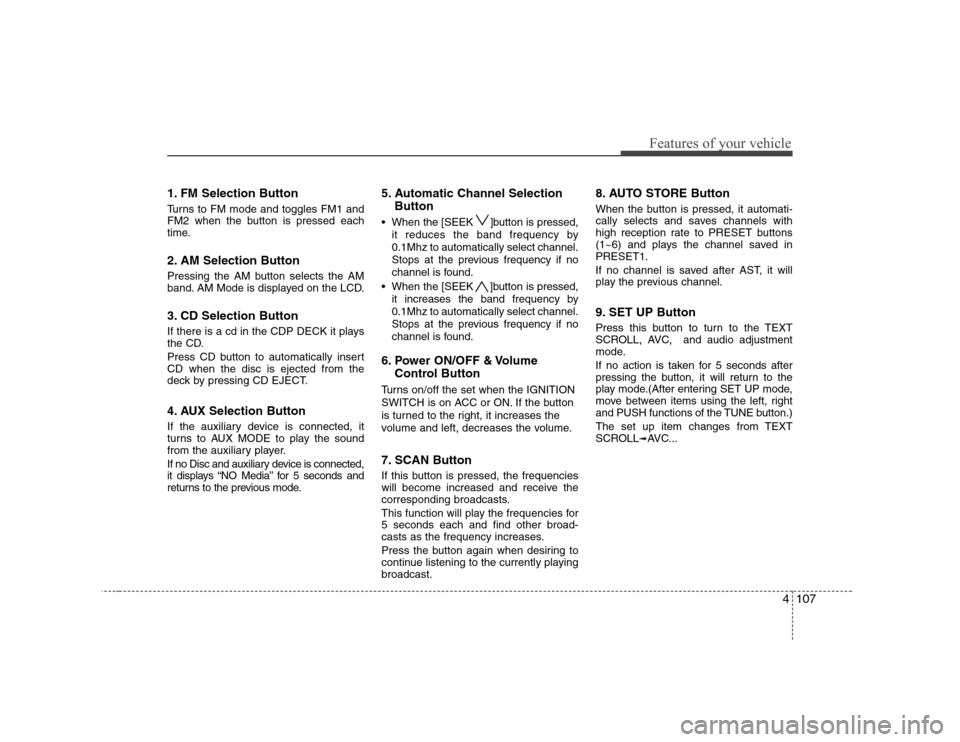
1. FM Selection Button
Turns to FM mode and toggles FM1 and
FM2 when the button is pressed each
time.
2. AM Selection Button
Pressing the AM button selects the AM
band. AM Mode is displayed on the LCD.
3. CD Selection Button
If there is a cd in the CDP DECK it plays
the CD.
Press CD button to automatically insert CD when the disc is ejected from the
deck by pressing CD EJECT.
4. AUX Selection Button
If the auxiliary device is connected, it
turns to AUX MODE to play the sound
from the auxiliary player.
If no Disc and auxiliary device is connected,
it displays “NO Media” for 5 seconds and
returns to the previous mode.5. Automatic Channel Selection
Button
When the [SEEK ]button is pressed, it reduces the band frequency by 0.1Mhz to automatically select channel.
Stops at the previous frequency if no
channel is found.
When the [SEEK ]button is pressed, it increases the band frequency by0.1Mhz to automatically select channel.
Stops at the previous frequency if no
channel is found.
6. Power ON/OFF & Volume Control Button
Turns on/off the set when the IGNITION
SWITCH is on ACC or ON. If the button
is turned to the right, it increases the
volume and left, decreases the volume.
7. SCAN Button
If this button is pressed, the frequencies
will become increased and receive the
corresponding broadcasts.
This function will play the frequencies for 5 seconds each and find other broad-
casts as the frequency increases.
Press the button again when desiring to
continue listening to the currently playingbroadcast. 8. AUTO STORE Button
When the button is pressed, it automati-
cally selects and saves channels with
high reception rate to PRESET buttons
(1~6) and plays the channel saved inPRESET1.
If no channel is saved after AST, it will
play the previous channel.
9. SET UP Button
Press this button to turn to the TEXT
SCROLL, AVC, and audio adjustment
mode.
If no action is taken for 5 seconds after
pressing the button, it will return to the
play mode.(After entering SET UP mode,
move between items using the left, right
and PUSH functions of the TUNE button.)
The set up item changes from TEXT
SCROLL
➟
AVC...
Page 176 of 340
Features of your vehicle
118
4
In case the i-Pod exclusive cable is con-
nected to the multiple terminal inside the
console on the left hand side of the dri-
ver’s seat. When the i-Pod is connected,
the ‘i-Pod’ icon will be displayed on the
top right corner of the display screen.
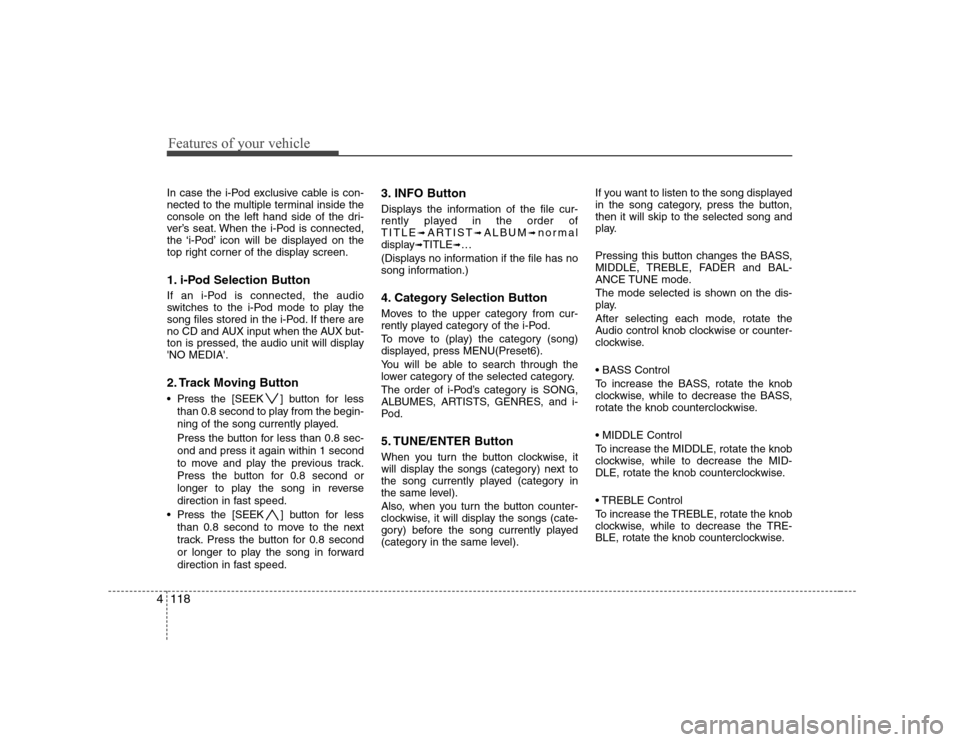
1. i-Pod Selection Button
If an i-Pod is connected, the audio
switches to the i-Pod mode to play the
song files stored in the i-Pod. If there are
no CD and AUX input when the AUX but-
ton is pressed, the audio unit will display'NO MEDIA'.
2. Track Moving Button
Press the [SEEK ] button for less
than 0.8 second to play from the begin-
ning of the song currently played.
Press the button for less than 0.8 sec- ond and press it again within 1 second
to move and play the previous track.
Press the button for 0.8 second or
longer to play the song in reverse
direction in fast speed.
Press the [SEEK ] button for less
than 0.8 second to move to the next
track. Press the button for 0.8 second
or longer to play the song in forward
direction in fast speed. 3. INFO Button
Displays the information of the file cur-
rently played in the order ofTITLE
➟ARTIST ➟ALBUM ➟normal
display ➟TITLE ➟…
(Displays no information if the file has no
song information.)
4. Category Selection Button
Moves to the upper category from cur-
rently played category of the i-Pod.
To move to (play) the category (song)
displayed, press MENU(Preset6).
You will be able to search through the
lower category of the selected category.
The order of i-Pod’s category is SONG,
ALBUMES, ARTISTS, GENRES, and i-
Pod.
5. TUNE/ENTER Button
When you turn the button clockwise, it
will display the songs (category) next to
the song currently played (category in
the same level).
Also, when you turn the button counter-
clockwise, it will display the songs (cate-
gory) before the song currently played
(category in the same level). If you want to listen to the song displayed
in the song category, press the button,then it will skip to the selected song and
play.
Pressing this button changes the BASS,
MIDDLE, TREBLE, FADER and BAL-
ANCE TUNE mode.
The mode selected is shown on the dis-
play.
After selecting each mode, rotate the
Audio control knob clockwise or counter-
clockwise.
To increase the BASS, rotate the knob
clockwise, while to decrease the BASS,
rotate the knob counterclockwise.
To increase the MIDDLE, rotate the knob
clockwise, while to decrease the MID-
DLE, rotate the knob counterclockwise.
Control
To increase the TREBLE, rotate the knob
clockwise, while to decrease the TRE-
BLE, rotate the knob counterclockwise.
Page 207 of 340
Driving your vehicle
30
5
E090400AUN
To temporarily accelerate with the
cruise control on:
If you want to speed up temporarily when
the cruise control is on, depress the
accelerator pedal. Increased speed will
not interfere with cruise control operationor change the set speed.
To return to the set speed, take your foot
off the accelerator.
E090500ANF
To cancel cruise control, do one
of the following:
Press the brake pedal.
Press the clutch pedal with a manualtransaxle.
Shift into N (Neutral) with an automatic transaxle.
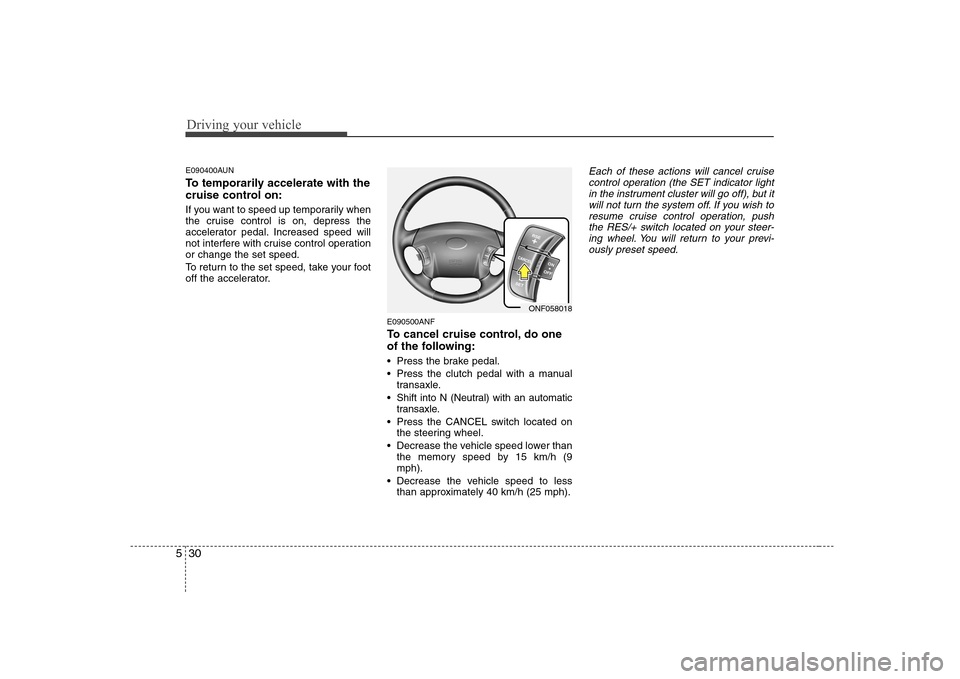
Press the CANCEL switch located on the steering wheel.
Decrease the vehicle speed lower than the memory speed by 15 km/h (9 mph).
Decrease the vehicle speed to less than approximately 40 km/h (25 mph).Each of these actions will cancel cruise
control operation (the SET indicator light in the instrument cluster will go off), but it
will not turn the system off. If you wish to resume cruise control operation, pushthe RES/+ switch located on your steer-
ing wheel. You will return to your previ- ously preset speed.
ONF058018
Page 285 of 340
Maintenance
42
7
G130300AUN Reset items
Items should be reset after the battery
has been discharged or the battery hasbeen disconnected.
Auto up/down window (See section 4)
Sunroof (See section 4)
Trip computer (See section 4)
Climate control system
(See section 4)
Clock (See section 4)
Audio (See section 4)(Continued)
Disconnect the battery charger in the following order.
1. Turn off the battery charger main switch.
2. Unhook the negative clamp from the negative battery terminal.
3. Unhook the positive clamp from the positive battery terminal.
Before performing maintenance or recharging the battery, turn off all accessories and stop the
engine.
The negative battery cable must be removed first and installed
last when the battery is discon-nected.
Page 290 of 340
747
Maintenance
G200500AUN-EA Wheel alignment and tyre balance
The wheels on your vehicle were aligned and balanced carefully at the
factory to give you the longest tyre
life and best overall performance.
In most cases, you will not need to
have your wheels aligned again.
However, if you notice unusual tyre
wear or your vehicle pulling one way
or the other, the alignment may needto be reset.
If you notice your vehicle vibrating
when driving on a smooth road, your
wheels may need to be rebalanced.G200600BFD-EA
Tyre replacement
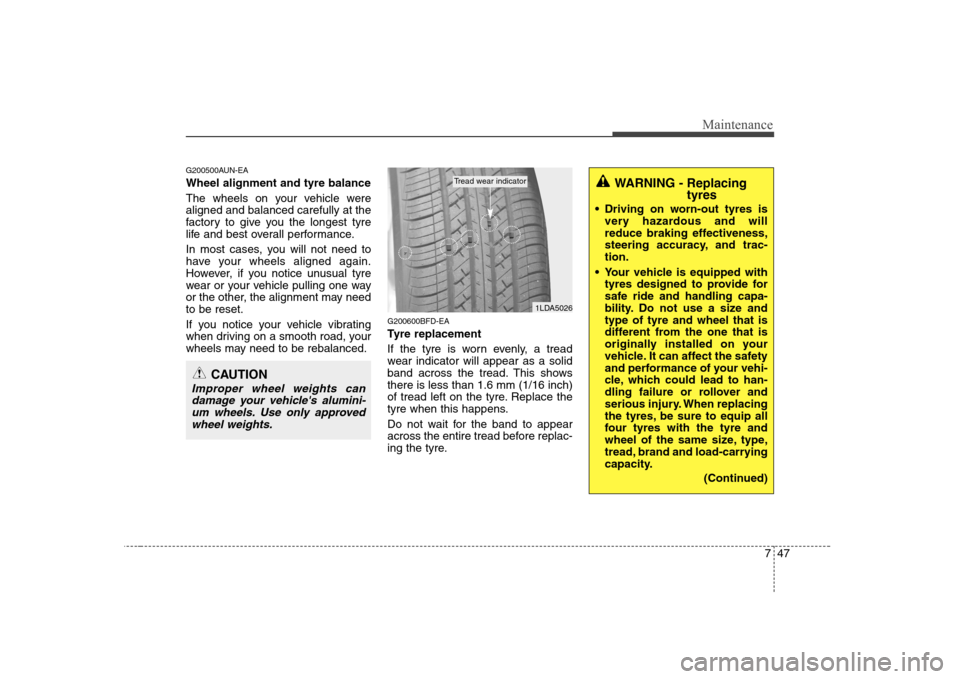
If the tyre is worn evenly, a tread
wear indicator will appear as a solid
band across the tread. This showsthere is less than 1.6 mm (1/16 inch)
of tread left on the tyre. Replace the
tyre when this happens.
Do not wait for the band to appear
across the entire tread before replac-
ing the tyre.
CAUTION
Improper wheel weights can
damage your vehicle's alumini- um wheels. Use only approvedwheel weights.
1LDA5026
Tread wear indicatorWARNING - Replacing tyres
Driving on worn-out tyres is very hazardous and will
reduce braking effectiveness,
steering accuracy, and trac-tion.
Your vehicle is equipped with tyres designed to provide for
safe ride and handling capa-
bility. Do not use a size andtype of tyre and wheel that is
different from the one that is
originally installed on your
vehicle. It can affect the safety
and performance of your vehi-
cle, which could lead to han-
dling failure or rollover and
serious injury. When replacing
the tyres, be sure to equip all
four tyres with the tyre and
wheel of the same size, type,
tread, brand and load-carrying
capacity.
(Continued)