charging Hyundai Sonata
[x] Cancel search | Manufacturer: HYUNDAI, Model Year: , Model line: , Model:Pages: 363, PDF Size: 30.3 MB
Page 12 of 363
15
Introduction
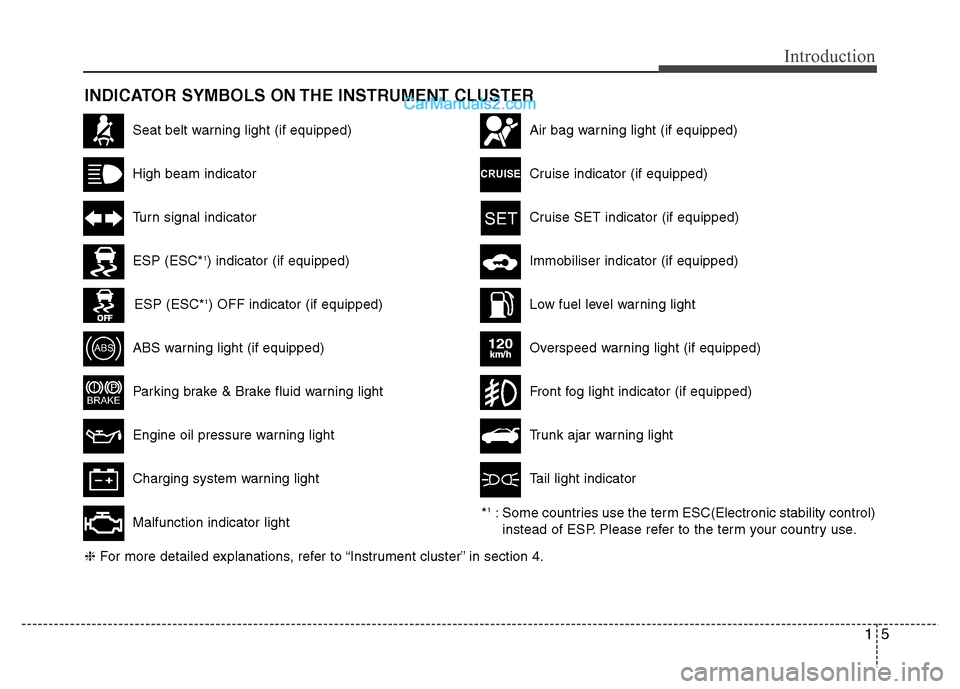
INDICATOR SYMBOLS ON THE INSTRUMENT CLUSTER
Seat belt warning light (if equipped)
High beam indicator
Turn signal indicator
ABS warning light (if equipped)
Parking brake & Brake fluid warning light
Engine oil pressure warning light
ESP (ESC*1
) indicator (if equipped)
ESP (ESC* 1
) OFF indicator (if equipped)
Malfunction indicator light
Air bag warning light (if equipped)
Cruise indicator (if equipped)
Cruise SET indicator (if equipped)
Immobiliser indicator (if equipped)
Low fuel level warning light
❈ For more detailed explanations, refer to “Instrument cluster” in section 4.
Charging system warning light Overspeed warning light (if equipped)
120km/h
Tail light indicator
Trunk ajar warning light
Front fog light indicator (if equipped)
* 1
: Some countries use the term ESC(Electronic stability control)
instead of ESP. Please refer to the term your country use.
Page 22 of 363
Safety features of your vehicle
6
3
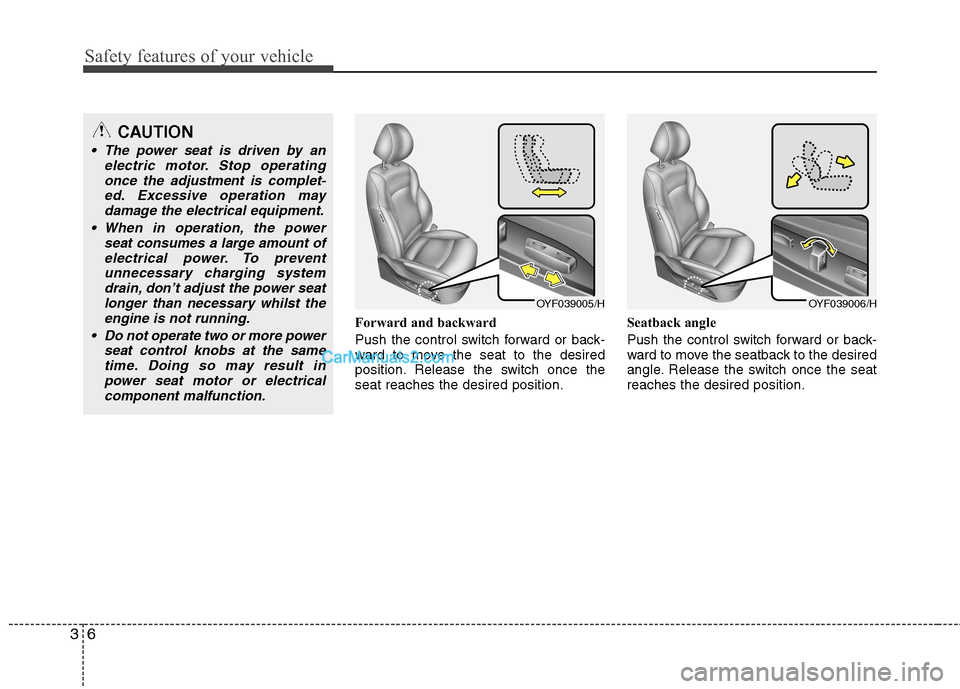
Forward and backward
Push the control switch forward or back-
ward to move the seat to the desired
position. Release the switch once theseat reaches the desired position. Seatback angle
Push the control switch forward or back-
ward to move the seatback to the desired
angle. Release the switch once the seatreaches the desired position.
OYF039005/HOYF039006/H
CAUTION
The power seat is driven by an
electric motor. Stop operating
once the adjustment is complet-ed. Excessive operation maydamage the electrical equipment.
When in operation, the power seat consumes a large amount ofelectrical power. To preventunnecessary charging system drain, don’t adjust the power seat
longer than necessary whilst theengine is not running.
Do not operate two or more power seat control knobs at the sametime. Doing so may result in
power seat motor or electricalcomponent malfunction.
Page 129 of 363
457
Features of your vehicle
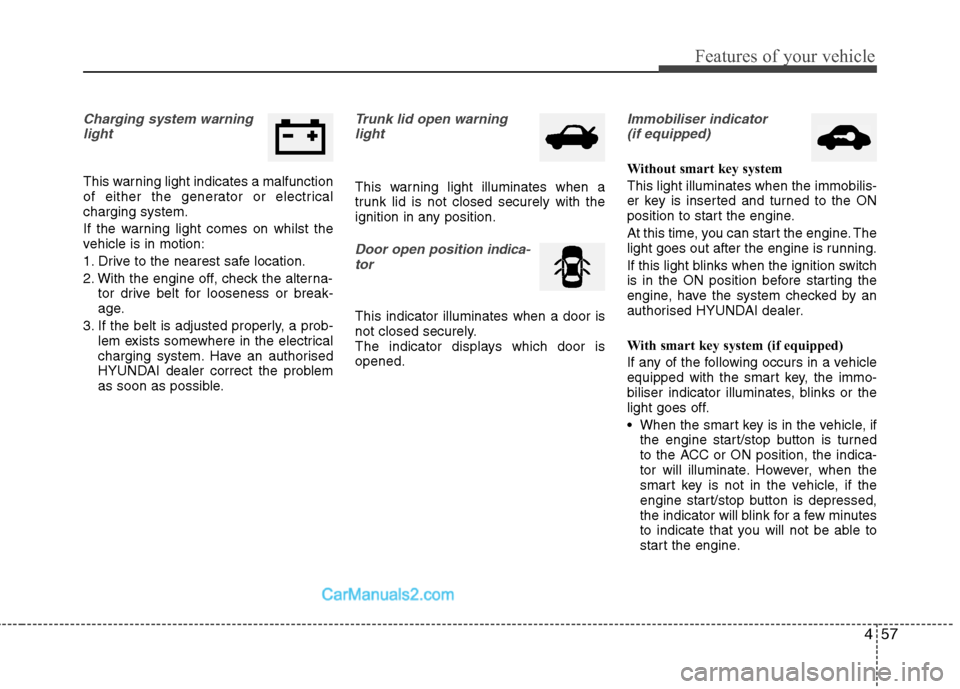
Charging system warninglight
This warning light indicates a malfunction
of either the generator or electricalcharging system.
If the warning light comes on whilst the
vehicle is in motion:
1. Drive to the nearest safe location.
2. With the engine off, check the alterna- tor drive belt for looseness or break-
age.
3. If the belt is adjusted properly, a prob- lem exists somewhere in the electrical
charging system. Have an authorised
HYUNDAI dealer correct the problem
as soon as possible.
Trunk lid open warning
light
This warning light illuminates when a
trunk lid is not closed securely with the
ignition in any position.
Door open position indica-
tor
This indicator illuminates when a door is
not closed securely.
The indicator displays which door isopened.
Immobiliser indicator (if equipped)
Without smart key system This light illuminates when the immobilis-
er key is inserted and turned to the ON
position to start the engine.
At this time, you can start the engine. The
light goes out after the engine is running.
If this light blinks when the ignition switch
is in the ON position before starting the
engine, have the system checked by an
authorised HYUNDAI dealer.
With smart key system (if equipped)
If any of the following occurs in a vehicle
equipped with the smart key, the immo-
biliser indicator illuminates, blinks or the
light goes off.
When the smart key is in the vehicle, if the engine start/stop button is turned
to the ACC or ON position, the indica-
tor will illuminate. However, when the
smart key is not in the vehicle, if the
engine start/stop button is depressed,
the indicator will blink for a few minutes
to indicate that you will not be able to
start the engine.
Page 150 of 363
Features of your vehicle
78
4
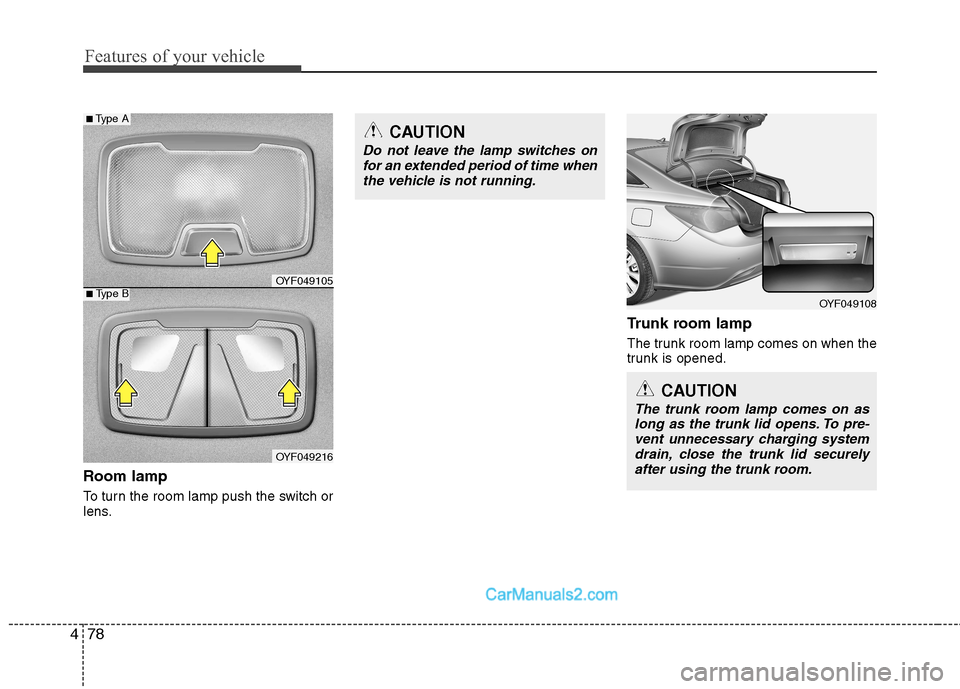
Room lamp
To turn the room lamp push the switch or
lens. Trunk room lamp
The trunk room lamp comes on when the
trunk is opened.
OYF049108
CAUTION
Do not leave the lamp switches on
for an extended period of time when
the vehicle is not running.
CAUTION
The trunk room lamp comes on aslong as the trunk lid opens. To pre-vent unnecessary charging system drain, close the trunk lid securelyafter using the trunk room.
OYF049105
OYF049216
■ Type B
■ Type A
Page 151 of 363
479
Features of your vehicle
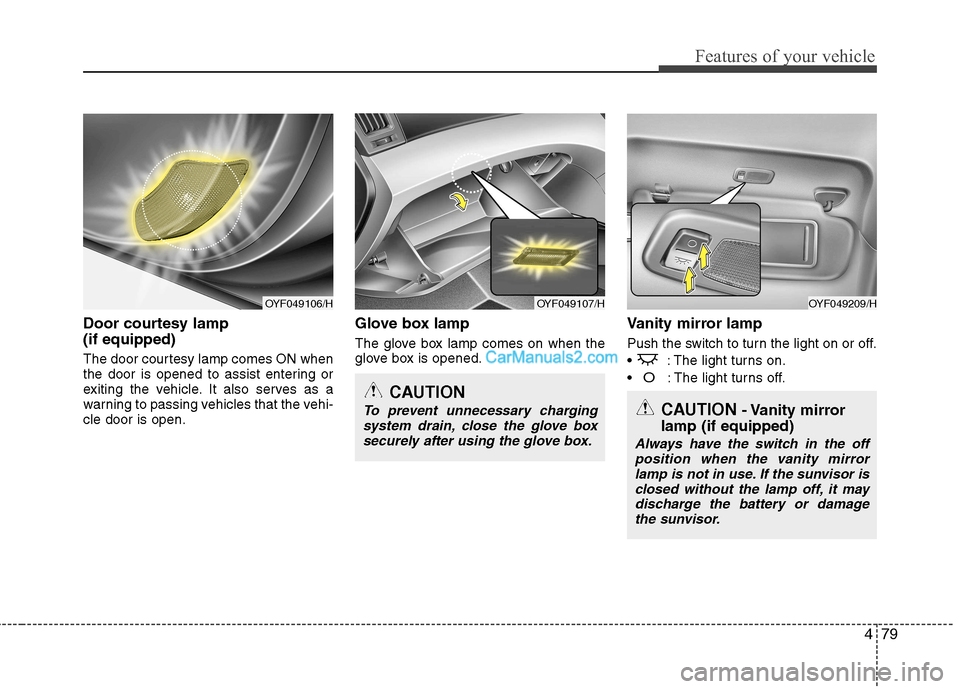
Door courtesy lamp (if equipped)
The door courtesy lamp comes ON when
the door is opened to assist entering or
exiting the vehicle. It also serves as a
warning to passing vehicles that the vehi-cle door is open.Glove box lamp
The glove box lamp comes on when the
glove box is opened.
Vanity mirror lamp
Push the switch to turn the light on or off.
: The light turns on.
O: The light turns off.
OYF049107/HOYF049209/H
CAUTION
To prevent unnecessary charging
system drain, close the glove box securely after using the glove box.
OYF049106/H
CAUTION - Vanity mirror
lamp (if equipped)
Always have the switch in the off position when the vanity mirror
lamp is not in use. If the sunvisor is closed without the lamp off, it maydischarge the battery or damage the sunvisor.
Page 192 of 363
Features of your vehicle
120
4
(Continued)
If you use devices such as a USB hub purchased separately, thevehicle’s audio system may notrecognize the USB device. In that
case, connect the USB devicedirectly to the multimedia termi-nal of the vehicle.
If USB device is divided by logical drives, only the music files on thehighest-priority drive are recog-nized by car audio.
Devices such as MP3 Player/ Mobile phone/Digital camera are
not recognizable by standardUSB I/F can be unrecognizable.
Charging through the USB may not be supported in some mobile
devices.
❋
❋ A car exclusive cable (sold sep-
arately) is required to use theiPod.
Some non-standard USB devices (METAL COVER TYPE USB) canbe unrecognizable.
Some USB flash memory readers (such as CF, SD, microSD, etc.) orexternal-HDD type devices can beunrecognizable.
(Continued)
(Continued) Music files protected by DRM (DIGITAL RIGHTS MANAGE-MENT) are not recognizable.
The data in the USB memory may be lost whilst using this audio.Always back up important data ona personal storage device.
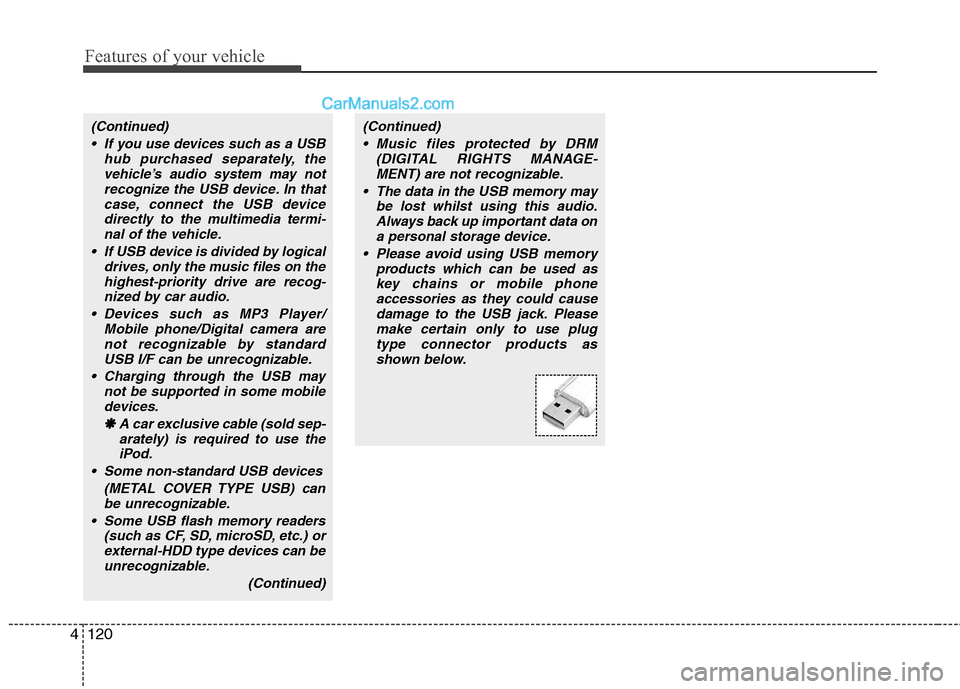
Please avoid using USB memory products which can be used as
key chains or mobile phone accessories as they could causedamage to the USB jack. Pleasemake certain only to use plug
type connector products asshown below.
Page 198 of 363
✽✽NOTICE FOR USING iPod DEVICE
Some iPod models might not support the communication protocol and the
files will not be played.
Supported iPod models:
- iPod Mini
- iPod 4th(Photo) ~ 6th(Classic) gen-eration
- iPod Nano 1st~4th generation
- iPod Touch 1st~2nd generation
The order of search or playback of songs in the iPod can be different
from the order searched in the audio
system.
If the iPod crashes due to its own mal- function, reset the iPod. (Reset: Refer
to iPod manual)
An iPod may not operate normally on
low battery.(Continued)
When the iPod cable is connect- ed, the system can be switched tothe AUX mode even without theiPod device and may cause noise.
Disconnect the iPod cable whenyou are not using the iPod device.
When not using iPod with car audio, detach the iPod cable from
iPod. Otherwise, the iPod mayremain in accessary mode, andmay not work properly.
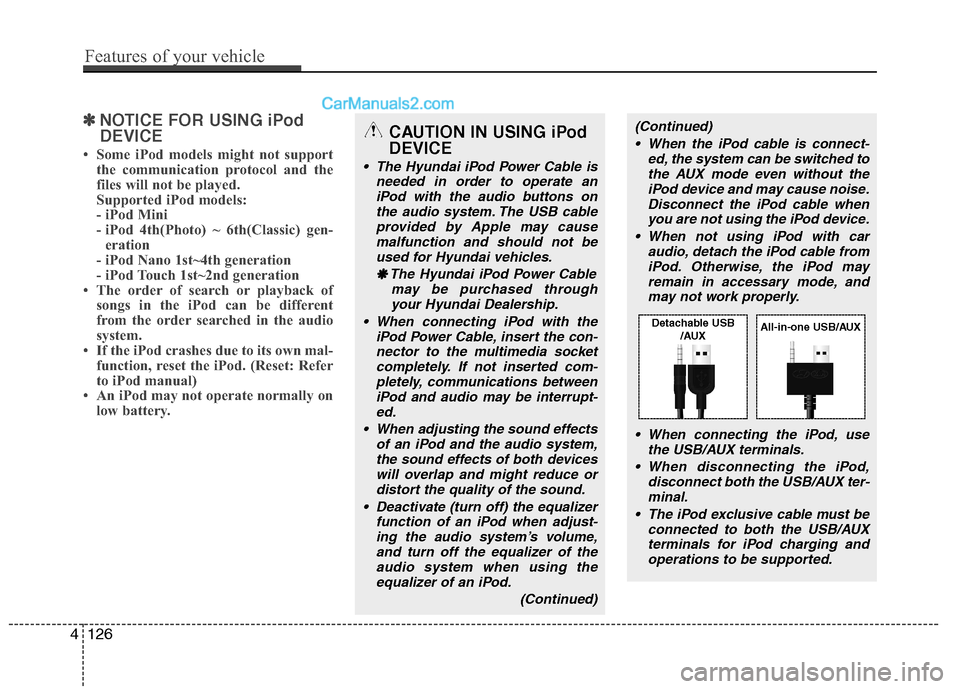
When connecting the iPod, use the USB/AUX terminals.
When disconnecting the iPod, disconnect both the USB/AUX ter-minal.
The iPod exclusive cable must be connected to both the USB/AUXterminals for iPod charging and
operations to be supported.CAUTION IN USING iPod DEVICE
The Hyundai iPod Power Cable is needed in order to operate an
iPod with the audio buttons onthe audio system. The USB cableprovided by Apple may cause malfunction and should not be
used for Hyundai vehicles.
❋
❋ The Hyundai iPod Power Cable
may be purchased throughyour Hyundai Dealership.
When connecting iPod with the iPod Power Cable, insert the con-nector to the multimedia socketcompletely. If not inserted com- pletely, communications between
iPod and audio may be interrupt-ed.
When adjusting the sound effects of an iPod and the audio system,the sound effects of both devices
will overlap and might reduce or distort the quality of the sound.
Deactivate (turn off) the equalizer function of an iPod when adjust-
ing the audio system’s volume,and turn off the equalizer of theaudio system when using theequalizer of an iPod.
(Continued)
4126
Features of your vehicle
Detachable USB/AUXAll-in-one USB/AUX
Page 203 of 363
55
Driving your vehicle
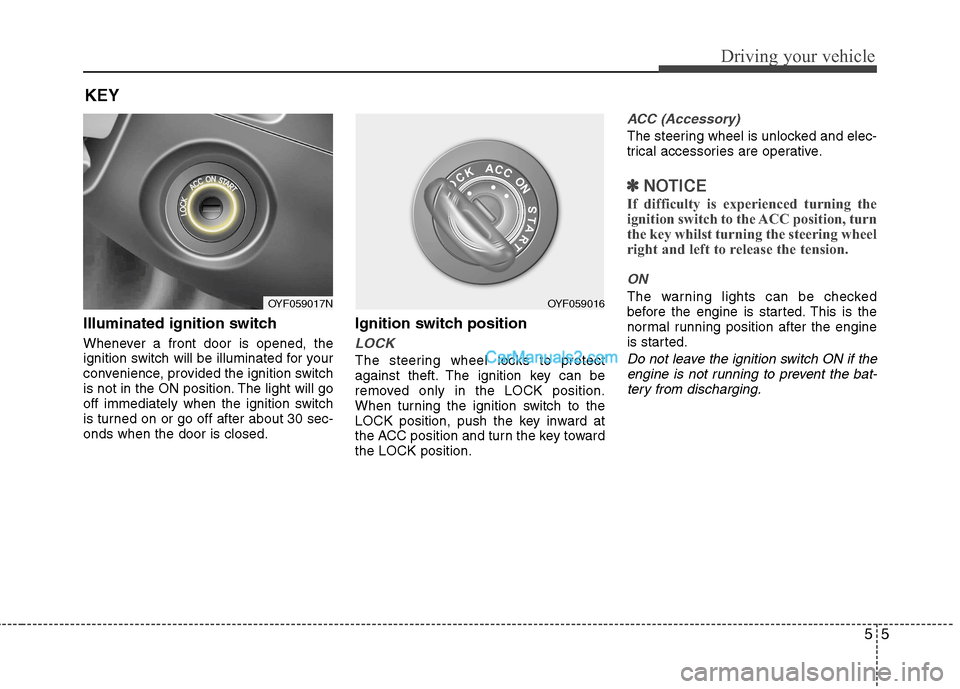
Illuminated ignition switch
Whenever a front door is opened, the
ignition switch will be illuminated for your
convenience, provided the ignition switch
is not in the ON position. The light will go
off immediately when the ignition switch
is turned on or go off after about 30 sec-onds when the door is closed.Ignition switch position
LOCK
The steering wheel locks to protect
against theft. The ignition key can be
removed only in the LOCK position.
When turning the ignition switch to the
LOCK position, push the key inward at
the ACC position and turn the key towardthe LOCK position.
ACC (Accessory)
The steering wheel is unlocked and elec-
trical accessories are operative.
✽✽
NOTICE
If difficulty is experienced turning the
ignition switch to the ACC position, turn
the key whilst turning the steering wheel
right and left to release the tension.
ON
The warning lights can be checked
before the engine is started. This is the
normal running position after the engine
is started.
Do not leave the ignition switch ON if the engine is not running to prevent the bat-tery from discharging.
KEY
OYF059017NOYF059016
Page 206 of 363
Driving your vehicle
8
5
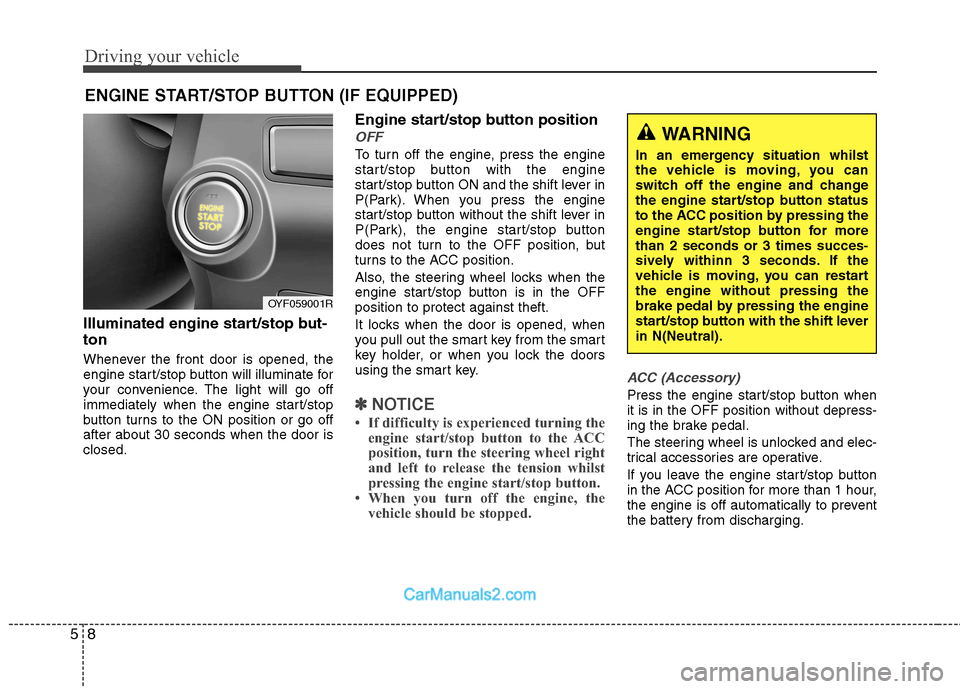
Illuminated engine start/stop but- ton
Whenever the front door is opened, the
engine start/stop button will illuminate for
your convenience. The light will go off
immediately when the engine start/stop
button turns to the ON position or go offafter about 30 seconds when the door isclosed. Engine start/stop button position
OFF
To turn off the engine, press the engine
start/stop button with the engine
start/stop button ON and the shift lever in
P(Park). When you press the engine
start/stop button without the shift lever in
P(Park), the engine start/stop button
does not turn to the OFF position, but
turns to the ACC position.
Also, the steering wheel locks when the
engine start/stop button is in the OFFposition to protect against theft.
It locks when the door is opened, when
you pull out the smart key from the smart
key holder, or when you lock the doors
using the smart key.
✽✽
NOTICE
If difficulty is experienced turning the engine start/stop button to the ACC
position, turn the steering wheel right
and left to release the tension whilst
pressing the engine start/stop button.
When you turn off the engine, the vehicle should be stopped.
ACC (Accessory)
Press the engine start/stop button when it is in the OFF position without depress-
ing the brake pedal.
The steering wheel is unlocked and elec-
trical accessories are operative.
If you leave the engine start/stop button
in the ACC position for more than 1 hour,
the engine is off automatically to prevent
the battery from discharging.
ENGINE START/STOP BUTTON (IF EQUIPPED)
WARNING
In an emergency situation whilst
the vehicle is moving, you can
switch off the engine and change
the engine start/stop button status
to the ACC position by pressing the
engine start/stop button for morethan 2 seconds or 3 times succes-
sively withinn 3 seconds. If the
vehicle is moving, you can restartthe engine without pressing the
brake pedal by pressing the engine
start/stop button with the shift leverin N(Neutral).
OYF059001R
Page 207 of 363
59
Driving your vehicle
ON
Press the engine start/stop button whilst
it is in the ACC position without depress-
ing the brake pedal.
The warning lights can be checked
before the engine is started. Do not leave
the button in the ON position if the engine
is not running to prevent the battery fromdischarging.
START
To start the engine, press the brake
pedal and press the engine start/stop
button with the shift lever in the P (Park)
or the N (Neutral) position. For your safe-
ty, start the engine with the shift lever in
the P (Park) position.
✽✽NOTICE
If you press the engine start/stop but- ton without depressing the brake
pedal, the engine does not start and
the engine start/stop button changes
as follow :
OFF →
→
ACC →→
ON →→
OFF
If you leave the engine start/stop but-
ton in the ACC or the ON position for
a long time, the battery may be dis-
charged.
WARNING
Never press the engine start/stop button whilst the vehicle is in
motion. This would result in theengine turning off and loss of
power assist for the steering and
brakes, which may lead to loss of
directional control and braking
function, which could cause anaccident.
The anti-theft steering column lock is not a substitute for the
parking brake. Before leaving the
driver’s seat, always make sure
the shift lever is engaged in P
(Park),set the parking brake fully
and shut the engine off.
Unexpected and sudden vehicle
movement may occur if theseprecautions are not taken.
(Continued)
(Continued)
Never reach for the enginestart/stop button, or any other
controls through the steering
wheel whilst the vehicle is in
motion. The presence of yourhand or arm in this area could
cause a loss of vehicle control,
an accident and serious bodily
injury or death.
Do not place any movable objects around the driver’s seat as they
may move whilst driving, inter-
fere with the driver and lead to anaccident.