fan Hyundai Sonata 2006 User Guide
[x] Cancel search | Manufacturer: HYUNDAI, Model Year: 2006, Model line: Sonata, Model: Hyundai Sonata 2006Pages: 276, PDF Size: 12.9 MB
Page 63 of 276
1
FEATURES OF YOUR HYUNDAI
49
B240D02NF-AATAdditional Safety PrecautionsoNever let passengers ride in the cargo
area (trunk) or on top of a folded-down
back seat. All occupants should sit upright,
fully back in their seats with their seat belts
on and their feet on the floor.
oPassengers should not move out of or
change seats while the vehicle is mov-
ing. A passenger who is not wearing a seat
belt during a crash or emergency stop can
be thrown against the inside of the vehicle,
against other occupants, or out of the ve-
hicle.
oEach seat belt is designed to restrain one
occupant. If more than one person uses the
same seat belt, they could be seriously
injured or killed in a collision.
oDo not use any accessories on seat
belts. Devices claiming to improve occu-
pant comfort or reposition the seat belt can
reduce the protection provided by the seat
belt and increase the chance of serious
injury in a crash.oPassengers should not place hard or
sharp objects between themselves and
the airbags. Carrying hard or sharp objects
on your lap or in your mouth can result in
injuries if an airbag inflates.
oKeep occupants away from the airbag
covers. All occupants should sit upright, fully
back in their seats with their seat belts on and
their feet on the floor. If occupants are too
close to the airbag covers, they could be
injured if the airbags inflate.
oDo not attach or place objects on or near
the airbag covers. Any object attached to
or placed on the front or side impact airbag
covers could interfere with the proper opera-
tion of the airbags.
oDo not modify the front seats. Modifica-
tion of the front seats could interfere with the
operation of the supplemental restraint sys-
tem sensing components or side impact
airbags.
oDo not place items under the front seats.
Placing items under the front seats could
interfere with the operation of the supple-
mental restraint system sensing compo-
nents and wiring harnesses.
!
WARNING:
o Sitting improperly or out of position can
cause occupants to be shifted too close
to a deploying airbag, strike the interior
structure or be thrown from the vehicle
resulting in serious injury or death.
o Always sit upright with the seatback in
an upright position, centered on the seat
cushion with your seat belt on, legs
comfortably extended and your feet on
the floor. oNever hold an infant or child on your lap.
The infant or child could be seriously injured
or killed in the event of a crash. All infants and
children should be properly restrained in
appropriate child safety seats or seat belts
in the rear seat.Adding Equipment to or Modifying Your
Airbag-Equipped Vehicle.If you modify your vehicle by changing your
vehicle's frame, bumper system, front end or
side sheet metal or ride height, this may affect
the operation of your vehicle's airbag system.
Page 113 of 276
1
FEATURES OF YOUR HYUNDAI
9999
B670B02O-AATFan Speed Control (Blower Control)
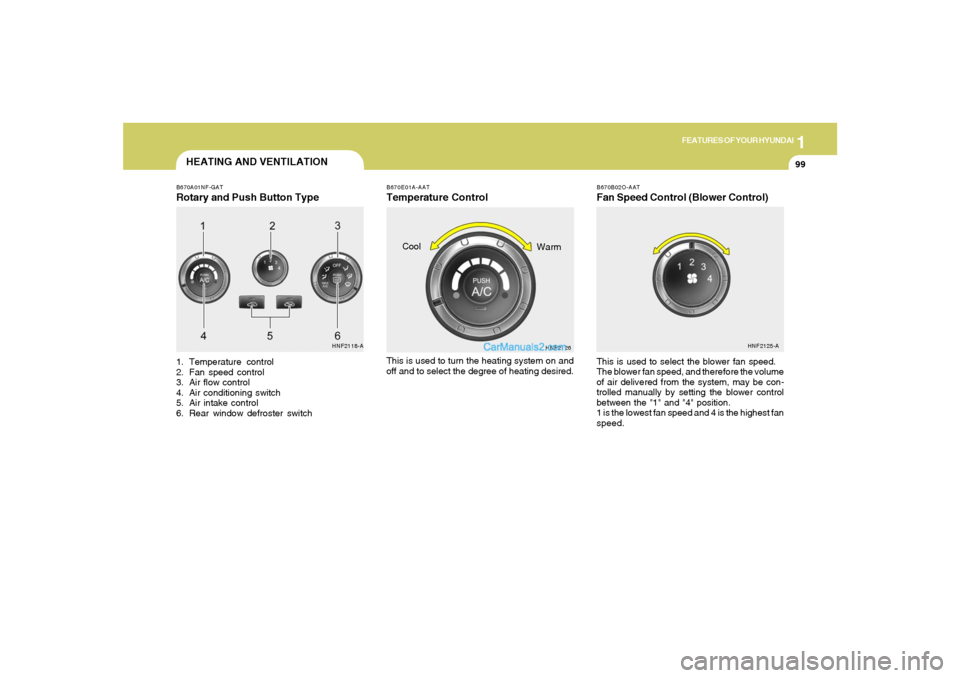
HEATING AND VENTILATIONB670A01NF-GATRotary and Push Button Type1. Temperature control
2. Fan speed control
3. Air flow control
4. Air conditioning switch
5. Air intake control
6. Rear window defroster switchThis is used to select the blower fan speed.
The blower fan speed, and therefore the volume
of air delivered from the system, may be con-
trolled manually by setting the blower control
between the "1" and "4" position.
1 is the lowest fan speed and 4 is the highest fan
speed.
HNF2118-AHNF2125-A
B670E01A-AATTemperature ControlThis is used to turn the heating system on and
off and to select the degree of heating desired.
HNF2126
Cool
Warm
Page 114 of 276
1FEATURES OF YOUR HYUNDAI
100
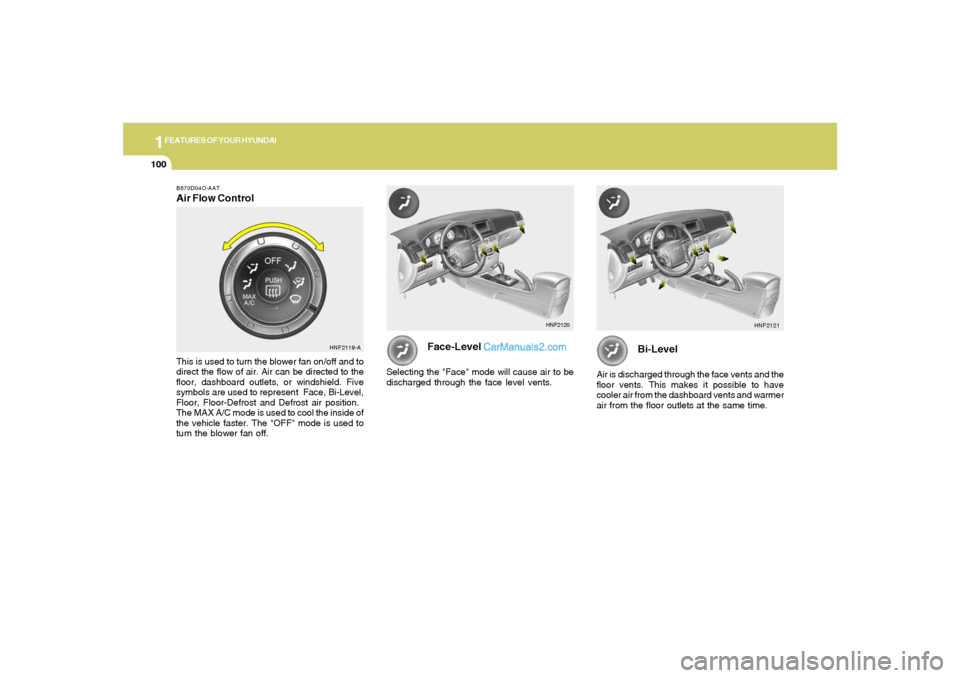
B670D04O-AATAir Flow ControlThis is used to turn the blower fan on/off and to
direct the flow of air. Air can be directed to the
floor, dashboard outlets, or windshield. Five
symbols are used to represent Face, Bi-Level,
Floor, Floor-Defrost and Defrost air position.
The MAX A/C mode is used to cool the inside of
the vehicle faster. The "OFF" mode is used to
turn the blower fan off.
Face-Level
Selecting the "Face" mode will cause air to be
discharged through the face level vents.
Bi-Level
Air is discharged through the face vents and the
floor vents. This makes it possible to have
cooler air from the dashboard vents and warmer
air from the floor outlets at the same time.
HNF2119-AHNF2121 HNF2120
Page 118 of 276
1FEATURES OF YOUR HYUNDAI
104
VENTILATION
B700A02A-AATBI-LEVEL HEATING
B710A01A-AAT
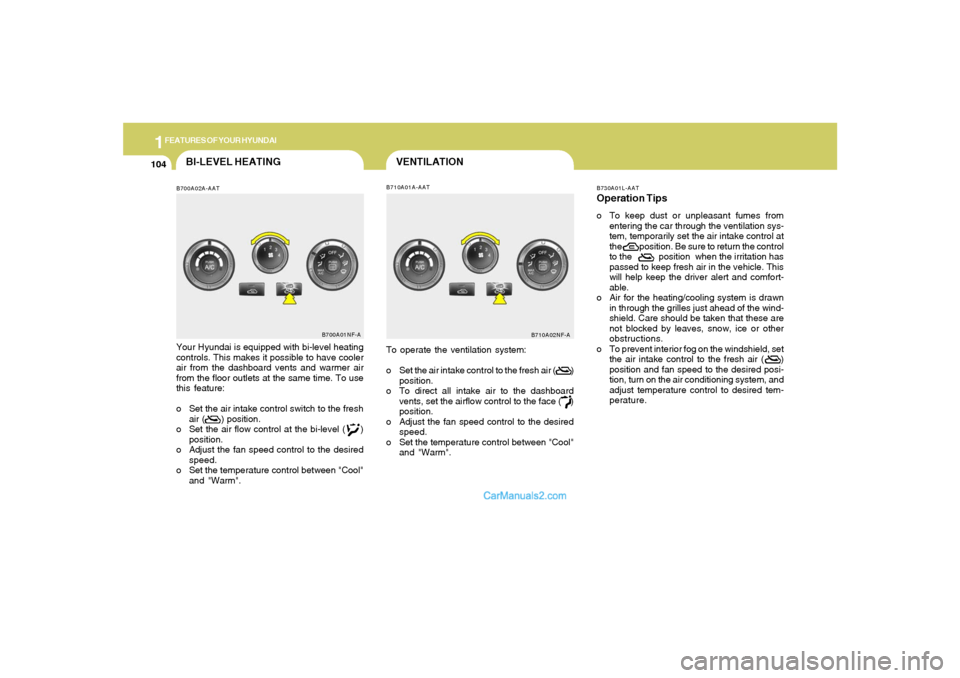
Your Hyundai is equipped with bi-level heating
controls. This makes it possible to have cooler
air from the dashboard vents and warmer air
from the floor outlets at the same time. To use
this feature:
o Set the air intake control switch to the fresh
air ( ) position.
o Set the air flow control at the bi-level ( )
position.
o Adjust the fan speed control to the desired
speed.
o Set the temperature control between "Cool"
and "Warm".
B700A01NF-A
To operate the ventilation system:
o Set the air intake control to the fresh air ( )
position.
o To direct all intake air to the dashboard
vents, set the airflow control to the face ( )
position.
o Adjust the fan speed control to the desired
speed.
o Set the temperature control between "Cool"
and "Warm".
B710A02NF-AB730A01L-AAT
Operation Tipso To keep dust or unpleasant fumes from
entering the car through the ventilation sys-
tem, temporarily set the air intake control at
the position. Be sure to return the control
to the position when the irritation has
passed to keep fresh air in the vehicle. This
will help keep the driver alert and comfort-
able.
o Air for the heating/cooling system is drawn
in through the grilles just ahead of the wind-
shield. Care should be taken that these are
not blocked by leaves, snow, ice or other
obstructions.
o To prevent interior fog on the windshield, set
the air intake control to the fresh air ( )
position and fan speed to the desired posi-
tion, turn on the air conditioning system, and
adjust temperature control to desired tem-
perature.
Page 119 of 276
1
FEATURES OF YOUR HYUNDAI
105105
AIR CONDITIONING SYSTEM
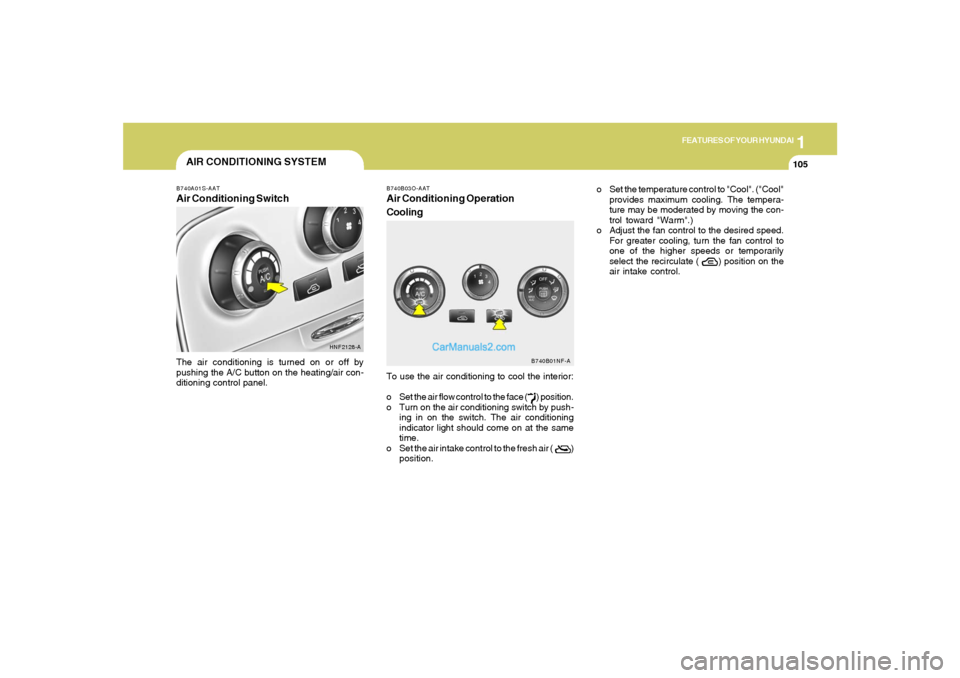
B740B03O-AATAir Conditioning Operation
CoolingTo use the air conditioning to cool the interior:
o Set the air flow control to the face ( ) position.
o Turn on the air conditioning switch by push-
ing in on the switch. The air conditioning
indicator light should come on at the same
time.
o Set the air intake control to the fresh air ( )
position.
B740A01S-AATAir Conditioning SwitchThe air conditioning is turned on or off by
pushing the A/C button on the heating/air con-
ditioning control panel.
HNF2128-A
B740B01NF-A
o Set the temperature control to "Cool". ("Cool"
provides maximum cooling. The tempera-
ture may be moderated by moving the con-
trol toward "Warm".)
o Adjust the fan control to the desired speed.
For greater cooling, turn the fan control to
one of the higher speeds or temporarily
select the recirculate ( ) position on the
air intake control.
Page 120 of 276
1FEATURES OF YOUR HYUNDAI
106
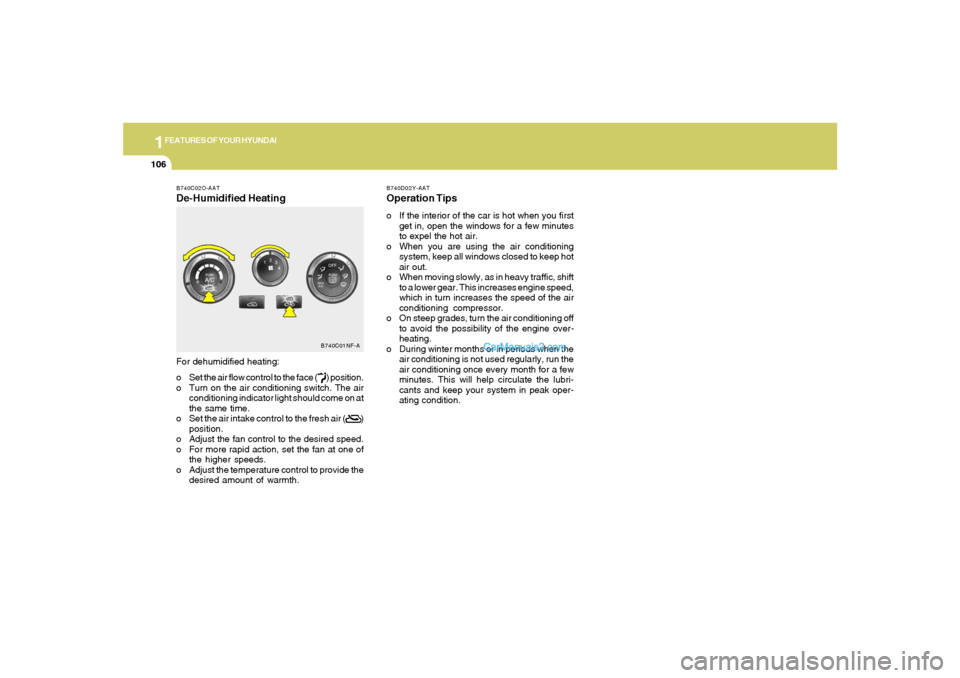
B740C02O-AATDe-Humidified HeatingFor dehumidified heating:
o Set the air flow control to the face ( ) position.
o Turn on the air conditioning switch. The air
conditioning indicator light should come on at
the same time.
o Set the air intake control to the fresh air ( )
position.
o Adjust the fan control to the desired speed.
o For more rapid action, set the fan at one of
the higher speeds.
o Adjust the temperature control to provide the
desired amount of warmth.
B740C01NF-A
B740D02Y-AATOperation Tipso If the interior of the car is hot when you first
get in, open the windows for a few minutes
to expel the hot air.
o When you are using the air conditioning
system, keep all windows closed to keep hot
air out.
o When moving slowly, as in heavy traffic, shift
to a lower gear. This increases engine speed,
which in turn increases the speed of the air
conditioning compressor.
o On steep grades, turn the air conditioning off
to avoid the possibility of the engine over-
heating.
o During winter months or in periods when the
air conditioning is not used regularly, run the
air conditioning once every month for a few
minutes. This will help circulate the lubri-
cants and keep your system in peak oper-
ating condition.
Page 121 of 276
1
FEATURES OF YOUR HYUNDAI
107107
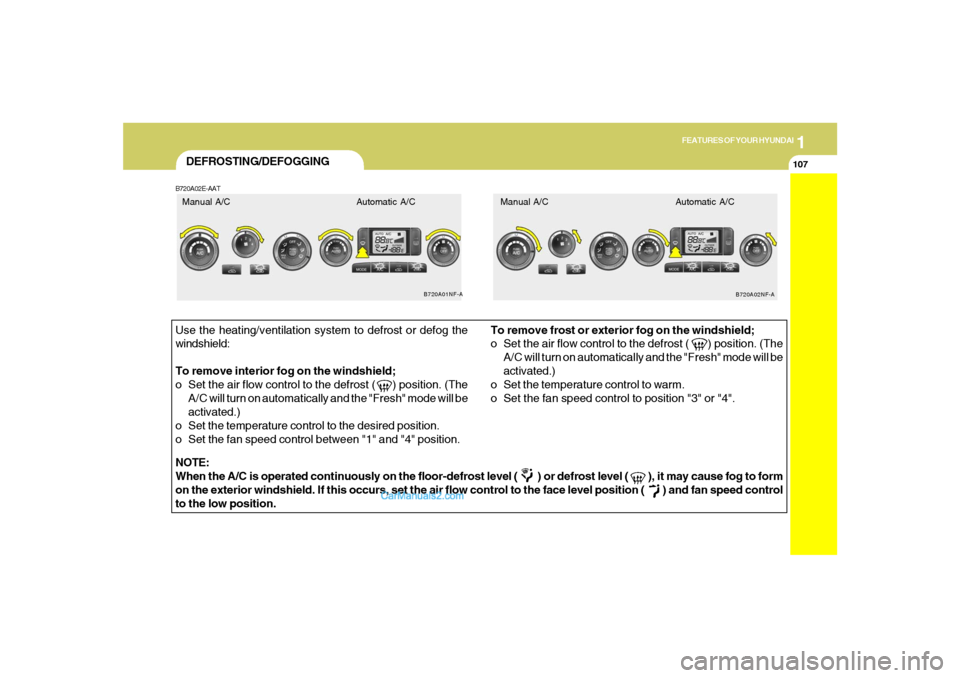
DEFROSTING/DEFOGGINGB720A02E-AATUse the heating/ventilation system to defrost or defog the
windshield:
To remove interior fog on the windshield;
o Set the air flow control to the defrost ( ) position. (The
A/C will turn on automatically and the "Fresh" mode will be
activated.)
o Set the temperature control to the desired position.
o Set the fan speed control between "1" and "4" position.To remove frost or exterior fog on the windshield;
o Set the air flow control to the defrost ( ) position. (The
A/C will turn on automatically and the "Fresh" mode will be
activated.)
o Set the temperature control to warm.
o Set the fan speed control to position "3" or "4".
NOTE:
When the A/C is operated continuously on the floor-defrost level ( ) or defrost level ( ), it may cause fog to form
on the exterior windshield. If this occurs, set the air flow control to the face level position ( ) and fan speed control
to the low position.
B720A01NF-A
B720A02NF-A
Manual A/C Automatic A/C Manual A/C Automatic A/C
Page 122 of 276
1FEATURES OF YOUR HYUNDAI
108
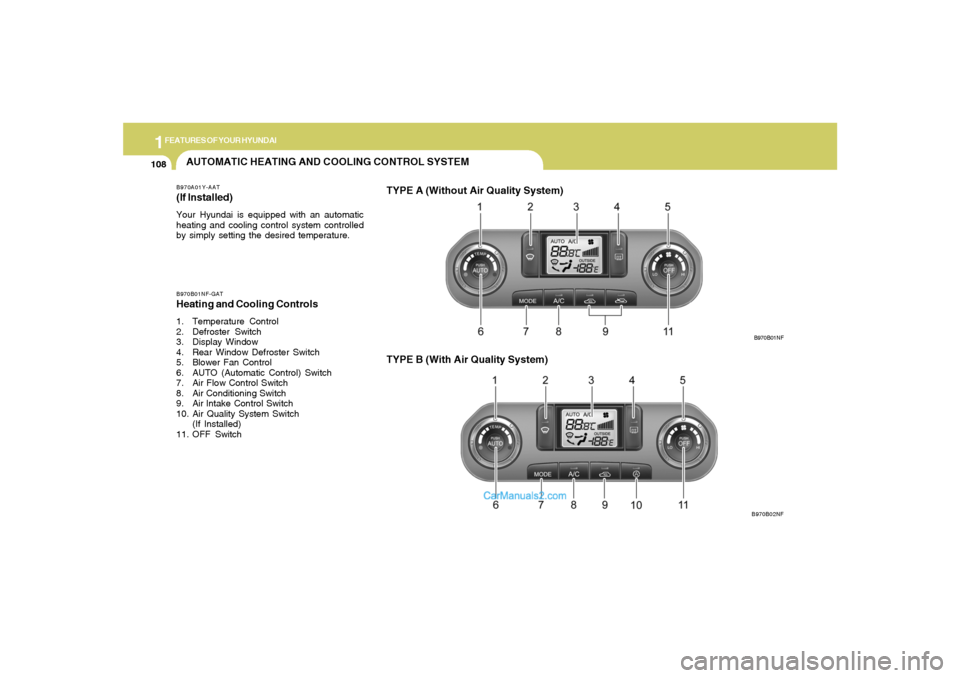
AUTOMATIC HEATING AND COOLING CONTROL SYSTEMB970A01Y-AAT(If lnstalled)Your Hyundai is equipped with an automatic
heating and cooling control system controlled
by simply setting the desired temperature.B970B01NF-GATHeating and Cooling Controls1. Temperature Control
2. Defroster Switch
3. Display Window
4. Rear Window Defroster Switch
5. Blower Fan Control
6. AUTO (Automatic Control) Switch
7. Air Flow Control Switch
8. Air Conditioning Switch
9. Air lntake Control Switch
10. Air Quality System Switch
(If Installed)
11. OFF Switch
TYPE B (With Air Quality System)
B970B01NF
B970B02NF
TYPE A (Without Air Quality System)
Page 124 of 276
1FEATURES OF YOUR HYUNDAI
110
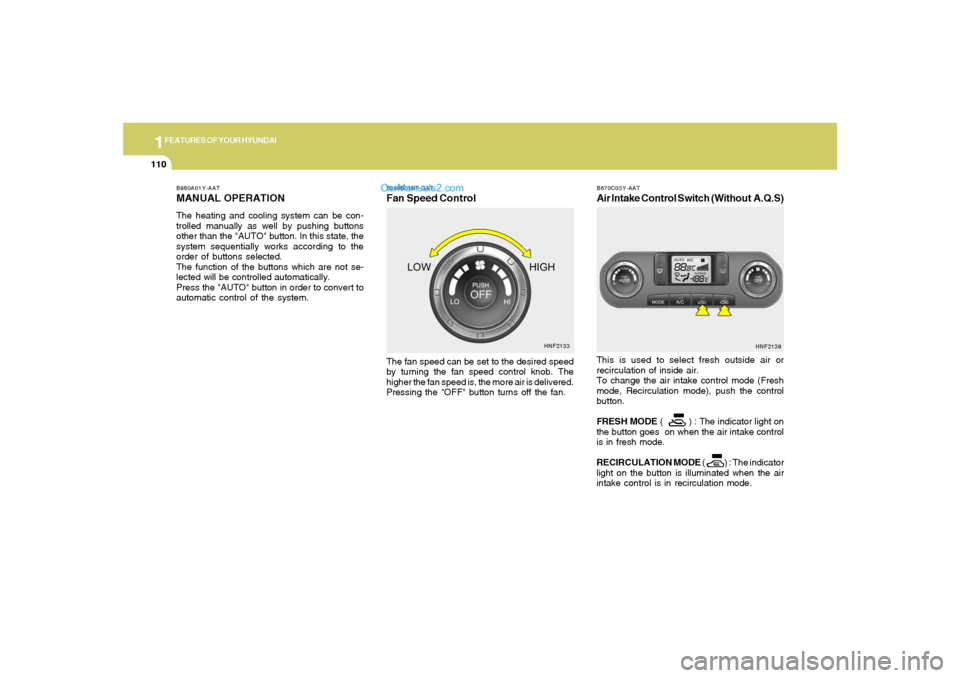
B980B01NF-GATFan Speed ControlThe fan speed can be set to the desired speed
by turning the fan speed control knob. The
higher the fan speed is, the more air is delivered.
Pressing the "OFF" button turns off the fan.
HNF2133 B980A01Y-AAT
MANUAL OPERATIONThe heating and cooling system can be con-
trolled manually as well by pushing buttons
other than the "AUTO" button. In this state, the
system sequentially works according to the
order of buttons selected.
The function of the buttons which are not se-
lected will be controlled automatically.
Press the "AUTO" button in order to convert to
automatic control of the system.
B670C03Y-AATAir Intake Control Switch (Without A.Q.S)This is used to select fresh outside air or
recirculation of inside air.
To change the air intake control mode (Fresh
mode, Recirculation mode), push the control
button.
FRESH MODE ( ) : The indicator light on
the button goes on when the air intake control
is in fresh mode.
RECIRCULATION MODE ( ) : The indicator
light on the button is illuminated when the air
intake control is in recirculation mode.
HNF2139
Page 127 of 276
1
FEATURES OF YOUR HYUNDAI
113113
HNF2122
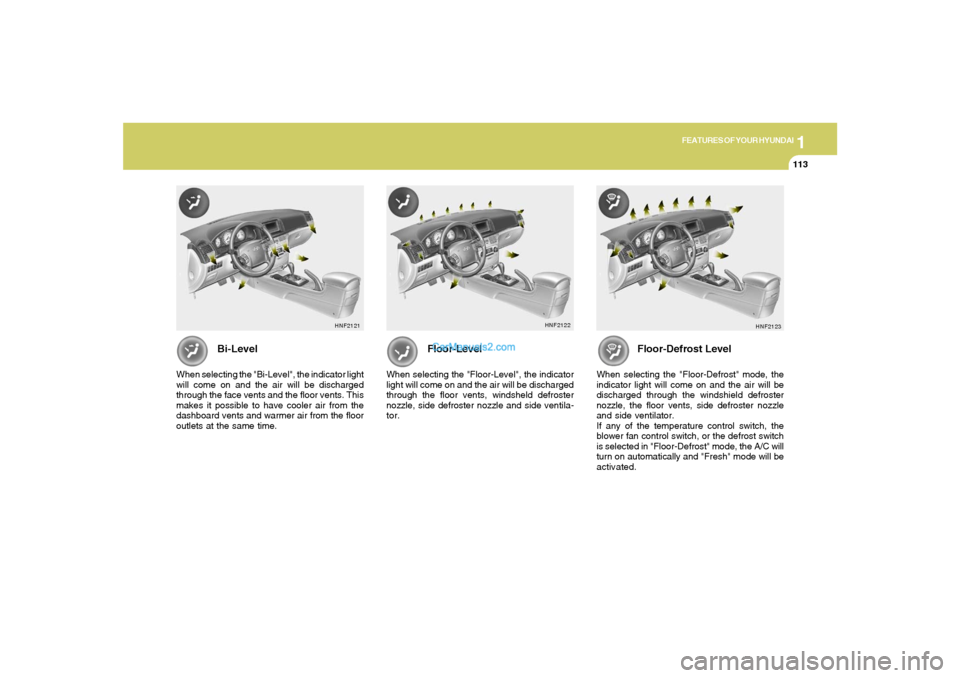
Floor-Level
When selecting the "Floor-Level", the indicator
light will come on and the air will be discharged
through the floor vents, windsheld defroster
nozzle, side defroster nozzle and side ventila-
tor.
Bi-Level
When selecting the "Bi-Level", the indicator light
will come on and the air will be discharged
through the face vents and the floor vents. This
makes it possible to have cooler air from the
dashboard vents and warmer air from the floor
outlets at the same time.
HNF2121
Floor-Defrost Level
When selecting the "Floor-Defrost" mode, the
indicator light will come on and the air will be
discharged through the windshield defroster
nozzle, the floor vents, side defroster nozzle
and side ventilator.
If any of the temperature control switch, the
blower fan control switch, or the defrost switch
is selected in "Floor-Defrost" mode, the A/C will
turn on automatically and "Fresh" mode will be
activated.
HNF2123