lock Hyundai Sonata 2011 Repair Manual
[x] Cancel search | Manufacturer: HYUNDAI, Model Year: 2011, Model line: Sonata, Model: Hyundai Sonata 2011Pages: 380, PDF Size: 7.97 MB
Page 179 of 380
499
Features of your vehicle
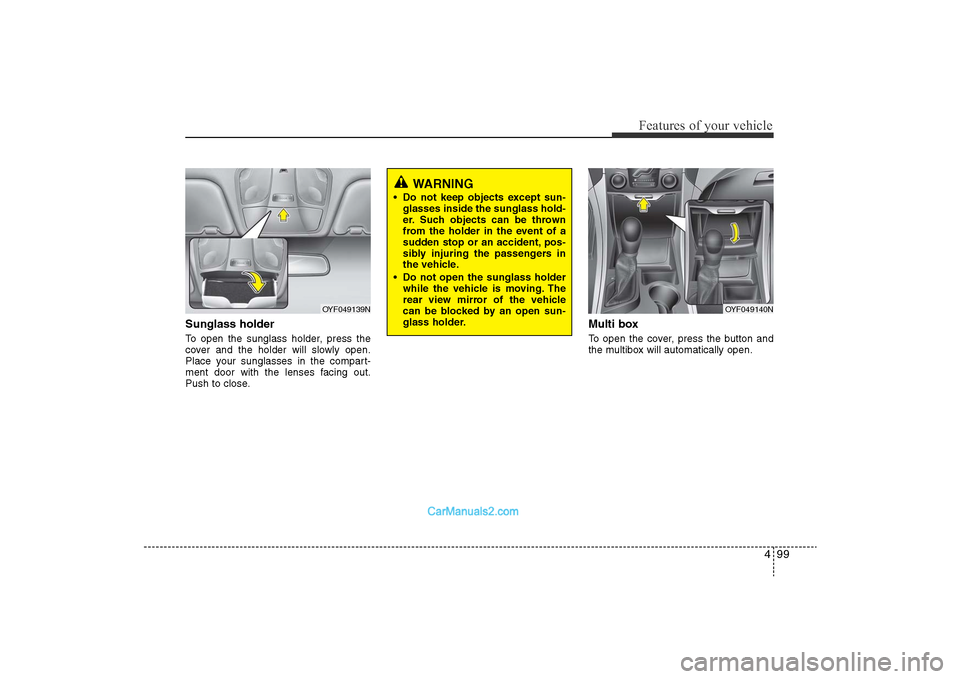
Sunglass holder To open the sunglass holder, press the
cover and the holder will slowly open.
Place your sunglasses in the compart-
ment door with the lenses facing out.
Push to close.
Multi boxTo open the cover, press the button and
the multibox will automatically open.
OYF049139N
OYF049140N
WARNING
• Do not keep objects except sun-glasses inside the sunglass hold-
er. Such objects can be thrown
from the holder in the event of a
sudden stop or an accident, pos-
sibly injuring the passengers in
the vehicle.
• Do not open the sunglass holder while the vehicle is moving. The
rear view mirror of the vehicle
can be blocked by an open sun-
glass holder.
YF HMA 4-103.QXP 12/24/2009 5:18 PM Page 99
Page 182 of 380
Features of your vehicle102
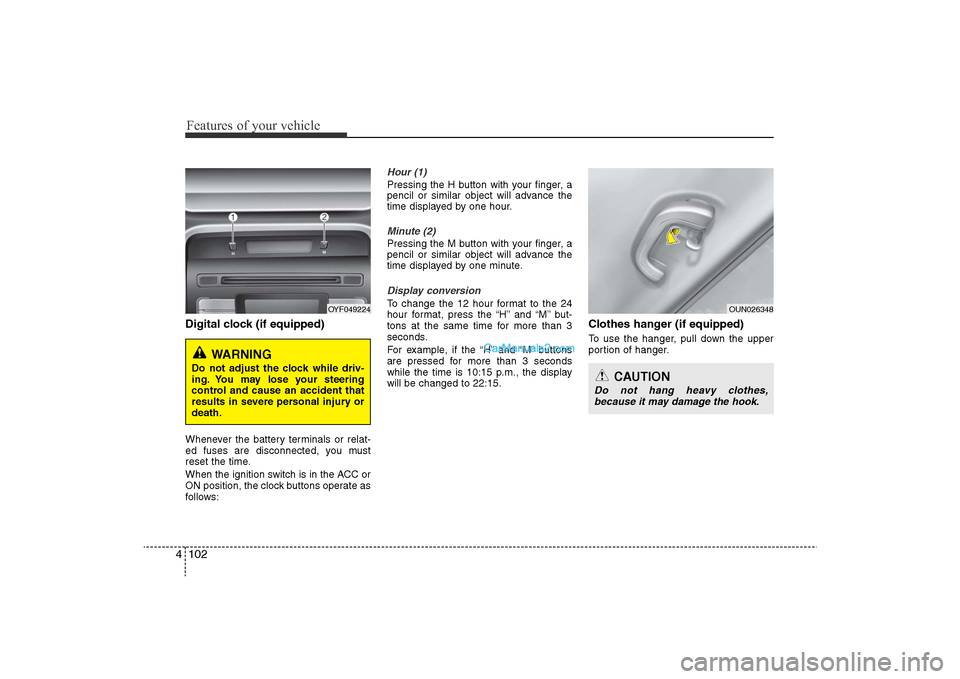
4Digital clock (if equipped)Whenever the battery terminals or relat-
ed fuses are disconnected, you must
reset the time.
When the ignition switch is in the ACC or
ON position, the clock buttons operate as
follows:
Hour (1)Pressing the H button with your finger, a
pencil or similar object will advance the
time displayed by one hour.Minute (2)Pressing the M button with your finger, a
pencil or similar object will advance the
time displayed by one minute.Display conversionTo change the 12 hour format to the 24
hour format, press the “H” and “M” but-
tons at the same time for more than 3
seconds.
For example, if the “H” and “M” buttons
are pressed for more than 3 seconds
while the time is 10:15 p.m., the display
will be changed to 22:15.
Clothes hanger (if equipped)To use the hanger, pull down the upper
portion of hanger.
OYF049224
WARNING
Do not adjust the clock while driv-
ing. You may lose your steering
control and cause an accident that
results in severe personal injury or
death.
OUN026348
CAUTION
Do not hang heavy clothes,
because it may damage the hook.
YF HMA 4-103.QXP 12/24/2009 5:19 PM Page 102
Page 187 of 380
4 107
Features of your vehicle
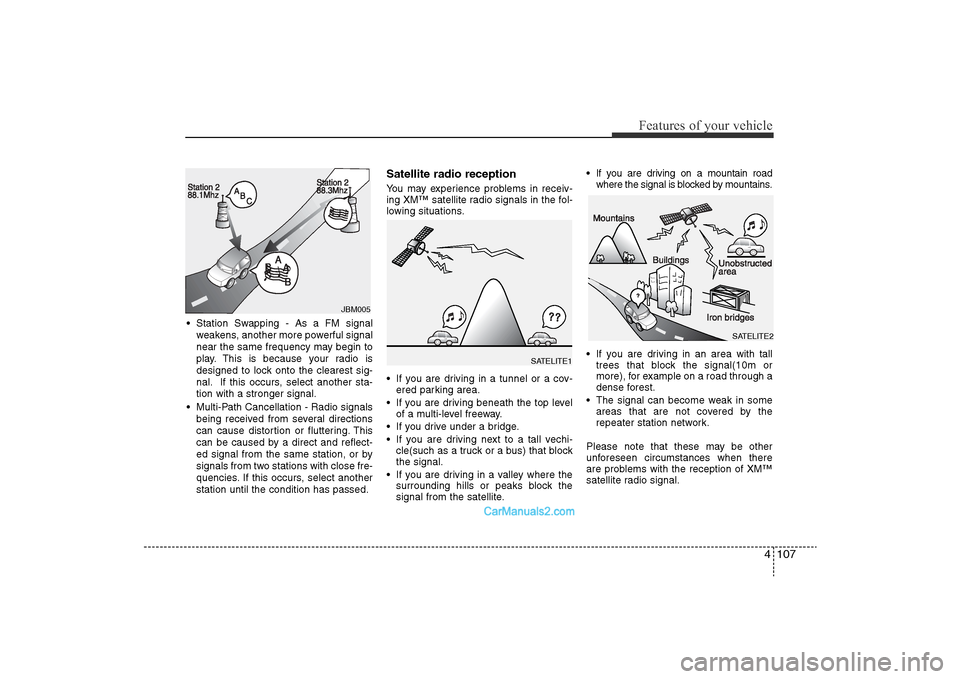
• Station Swapping - As a FM signalweakens, another more powerful signal
near the same frequency may begin to
play. This is because your radio is
designed to lock onto the clearest sig-
nal. If this occurs, select another sta-
tion with a stronger signal.
• Multi-Path Cancellation - Radio signals being received from several directions
can cause distortion or fluttering. This
can be caused by a direct and reflect-
ed signal from the same station, or by
signals from two stations with close fre-
quencies. If this occurs, select another
station until the condition has passed.
Satellite radio receptionYou may experience problems in receiv-
ing XM™ satellite radio signals in the fol-
lowing situations.
• If you are driving in a tunnel or a cov-ered parking area.
• If you are driving beneath the top level of a multi-level freeway.
• If you drive under a bridge.
• If you are driving next to a tall vechi- cle(such as a truck or a bus) that block
the signal.
• If you are driving in a valley where the surrounding hills or peaks block the
signal from the satellite. • If you are driving on a mountain road
where the signal is blocked by mountains.
• If you are driving in an area with tall trees that block the signal(10m or
more), for example on a road through a
dense forest.
• The signal can become weak in some areas that are not covered by the
repeater station network.
Please note that these may be other
unforeseen circumstances when there
are problems with the reception of XM™
satellite radio signal.
JBM005
SATELITE1
SATELITE2
YF HMA 4-104~(AUDIO).QXP 12/24/2009 5:21 PM Page 107
Page 190 of 380
![Hyundai Sonata 2011 Repair Manual
Features of your vehicle110
41. AM Selection ButtonPressing the [AM] button selects the AM
band. AM Mode is displayed on the LCD.2. FM Selection ButtonTurns to FM mode and toggles FM1and
FM2 when the](/img/35/16817/w960_16817-189.png "Hyundai Sonata 2011 Repair Manual
Features of your vehicle110
41. AM Selection ButtonPressing the [AM] button selects the AM
band. AM Mode is displayed on the LCD.2. FM Selection ButtonTurns to FM mode and toggles FM1and
FM2 when the")
Features of your vehicle110
41. AM Selection ButtonPressing the [AM] button selects the AM
band. AM Mode is displayed on the LCD.2. FM Selection ButtonTurns to FM mode and toggles FM1and
FM2 when the button is pressed each
time.3. FM/AM ButtonTurns to FM or AM mode, and toggles in
the order of FM1
➟FM2
➟AM
➟FM1...
when the button is pressed each time.
4.
Power ON/OFF Button & VolumeControl Knob
Turns on/off the set when the IGNITION
SWITCH is on ACC or ON. If the button
is turned to the right, it increases the vol-
ume and left,decreases the volume.
• Adjusts the volume of the car audio system. Rotate clockwise to increase
the volume or counterclockwise to
decrease.
5. Preset ButtonPush [1]~[6] buttons less than 0.8 sec-
ond to play the channel saved in each
button.Push Preset button for 0.8 second
or longer to save current channel to the
respective button with a beep.6. SCAN Button• When the button is pressed, it automat-ically scans the radio stations upwards.
• The SCAN feature steps through each station, starting from the initial station,
for ten seconds.
• press the [SCAN] button again to stop the scan feature and to listen to the cur-
rently selected channel.7. MUTE ButtonPress the button to mute the sound.
8. SETUP Button
Press this button to turn to the XM option
and the other adjustment mode.
If no action is taken for 5 seconds after
pressing the button, it will return to the
play mode.(After entering SEPUP mode,
move between items using the left, right
and PUSH functions of the [TUNE]
knob.)
The setup changes in the order of TEXT
SCROLL
➟AV C
➟BT
➟XM
In case of PA760YF, Using the
[ FOLDER ] and [ENTER] button.
The setup Change in the order of
SOUND
➟XM
➟HD RADIO
➟ AVC
➟ CLOCK
➟SCROLL
➟PHONE
➟RETURN
• SCROLL
ters longer than the LCD text display
and can be turned ON/OFF through the
sound quality control knob.
(For PA760YF, Press the [ FOLDER ]
button.)
YF HMA 4-104~(AUDIO).QXP 12/24/2009 5:21 PM Page 110
Page 191 of 380
4 111
Features of your vehicle
• AVCThis funtion automatically adjusts the
volume level according to the speed of
the vehicle and can be turned ON/OFF
through the sound quality control knob.
(For PA760YF, Press the [ FOLDER ]
button.)
• SOUND
Pressing the [ FOLDER ] button
to select the sound the following order
: Sound Setup, Variable EQ Select the
Sound Setup and press [ENTER] the
button to set.
Pressing the [ENTER] button to adjust
the Sound Setup the following order :
BASS, MIDDLE, TREBLE, FADER,
BALANCE. Select the BASS and press
the [ FOLDER ] button to set.
Use the same method to adjust MID-
DLE, TREBLE, FADER, BALANCE
and press the button to [ENTER] com-
plete and exit from Sound Setup adjust-
ment mode.
• Variable EQ
to Select the sound the following order
: Sound Setup, Variable EQ Select the
Variable EQ and press the [ENTER]
button to set. Pressing the [ FOLDER ] button
to select the Variable EQ the following
order : Normal, Powerful, Concert
Select and press the [ENTER] button to
complete and exit from Variable EQ set
up mode.
• XM It will be able to change the XM display.
ex) Display by category/channel or
artist/song title.
Select the XM Display through the
[ FOLDER ] button(for PA710YF,
Turn the control knob), and press the
[ENTER] button(for PA710YF, press
[TUNE] knob) to complete and exit
XM setup mode.
• HD RADIO This funtion is used to enable FM/AM
HD RADIO receptions, and detail dis-
play. Press the [ FOLDER ] button
to select the HD RADIO setup the fol-
lowing order : HD RADIO FM, HD
RADIO AM, Details. Press the [ENTER]
button to the HD RADIO setup and can
be turned ON/OFF through the [
FOLDER ] button.
Press the [ENTER] button to complete
and exit HD RADIO setup mode. • CLOCK
Pressing the [ FOLDER ] button
to adjust the clock in the following
order: CLOCK SET, TIME FORMAT,
RETURN. Adjust the CLOCK SET and
press [ENTER] button to set.
Use the same method to adjust TIME
FORMAT and press the [ENTER] but-
ton to complete and exit and from clock
adjustment mode.
9. Manual Channel Selector & Sound Quality Control Knob Turn this control while listening to a radio
channel to manually adjust frequency.
Turn clockwise to increase frequency and
counterclockwise to reduce frequency.
Pressing the button changes the BASS,
MIDDLE, TREBLE, FADER and BAL-
ANCE TUNE mode.
The mode selected is shown on the dis-
play. After selecting each mode, rotate
the Audio control knob clockwise or
counterclockwise.
BASS Control
To increase the BASS, rotate the knob
clockwise, while to decrease the BASS,
rotate the knob counterclockwise.
YF HMA 4-104~(AUDIO).QXP 12/24/2009 5:21 PM Page 111
Page 192 of 380
Features of your vehicle112
4MIDDLE Control
To increase the MIDDLE, rotate the knob
clockwise, while to decrease the MID-
DLE, rotate the knob counterclockwise.
TREBLE Control
To increase the TREBLE, rotate the knob
clockwise, while to decrease the TRE-
BLE, rotate the knob counterclockwise.
FADER Control
Turn the control knob clockwise to
emphasize rear speaker sound(front
speaker sound will be attenuated).
When the control knob is turned counter-
clockwise, front speaker sound will be
emphasized(rear speaker sound will be
attenuated).
BALANCE Control
Rotate the knob clockwise to emphasize
right speaker sound(left speaker sound
will be attenuated).
When the control knob is turned counter
clockwise, left speaker sound will be
emphasized(right speaker sound will be
attenuated).
10. Manual Channel Selector Press the [ FOLDER ] button while
listening to a radio channel to manually
adjust frequency.11. Automatic Channel Selection
Button• When the [SEEK ] button is pressed,
it increases the band frequency to auto-
matically select channel. Stops at the
previous frequency if no channel is
found.
• When the [TRACK ] button is press- ed, it reduces the band frequency to
automatically select channel. Stops at
the previous frequency if no channel is
found.
YF HMA 4-104~(AUDIO).QXP 12/24/2009 5:21 PM Page 112
Page 195 of 380
4 115
Features of your vehicle
• MP3/WMA : FILE NAME
➟TITLE
➟
ARTIST
➟ALBUM
➟FOLDER
➟TOTAL
FILE... (not displayed if the information
is not available on the DISC.)
10. Folder Moving ButtonPress the [FOLDER ] button to move
to child folder of the current folder and
displays the first song in the folder.
Press TUNE/ENTER Knob(for PA760YF,
Press [ENTER] button) to move to the
folder played. It will play the first song in
the folder.
Press the [FOLDER ] button to move
to parent folder of the current folder and
displays the first song in the folder.
Press TUNE/ENTER knob(for PA760YF,
Press [ENTER] button) to move the fold-
er displayed.11. Search/ENTER Button Turn this button clockwise to display the
songs next to the currently played song.
Turn the button counterclockwise to dis-
play the songs before the current played
song. Press the button to skip and play
the selected song.
12. Search ButtonPress the [TUNE ] button to display
the songs next to the currently played
song.
Press the [ TUNE] button to display
the songs before to the currently played
song.13. ENTER ButtonPress the [ENTER] button to play the
selected song.14. CD LOAD ButtonPush [LOAD] button to load CDs to avail-
able CDC deck (from 1~6). Push [LOAD]
button for more than 2 seconds to load
into all available decks. The last CD will
play. 10 seconds idle status will disable
loading process.15. DISC Selection Button• [DISC ] Change Button Changes disc to the previous disc.
• [DISC ] Change Button Changes disc to the next disc.
YF HMA 4-104~(AUDIO).QXP 12/24/2009 5:21 PM Page 115
Page 200 of 380
Features of your vehicle120
48. Search/ENTER ButtonTurn this button clockwise to display the
songs next to the currently played song.
Turn the button counterclockwise to dis-
play the songs before the currently
played song. Press the button to skip and
play the selected song.9. Search ButtonPress the [TUNE ] button to display the
songs next to the currently played song.
Press the [ TUNE] button to display the
songs before to the currently played song.10. ENTER ButtonPress the [ENTER] button to play the
selected song.
YF HMA 4-104~(AUDIO).QXP 12/24/2009 5:21 PM Page 120
Page 203 of 380
4 123
Features of your vehicle
1. iPod Selection ButtonIf an iPod is connected, he system
switches to the iPod mode from the pre-
vious to play the song files stored in iPod.
If no CD and auxiliary device is connect-
ed, the system displays "NO Media" for 3
seconds and returns to the previous
mode2. Track Moving Button• Press the [TRACK ] button for lessthan 0.8 second to play from the begin-
ning of the song currently played.
Press the button for less than 0.8 sec-
ond and press it again within 1 sec-
onds to move and play the previous
track. Press the button for 0.8 second
or longer to play the song in reverse
direction in fast speed.
• Press the [SEEK ] button for less than 0.8 second to move to the next
track. Press the button for 0.8 second
or longer to play the song in forward
direction in fast speed.
3. RANDOM Playback ButtonPress the button for less than 0.8 second
to activate or deactivate the random play-
back of the songs within the current cat-
egory. Press the button for longer than
0.8 second to randomly play all songs in
the entire album of iPod. Press the button
once again to cancel the mode.4. REPEAT ButtonRepeats the song currently played.5. INFO Selection ButtonDisplays the information of the file cur-
rently played in the order of TITLE
➟
ARTIST
➟ALBUM
➟NORMAL DISPLAY
➟
TITLE
➟... (Displays no information if the
file has no song information.)
6. Category Selection ButtonMoves to the upper category from cur-
rently played category of iPod.
To move to(play) the category(song) dis-
played, MENU(preset6) You will be able
to search through the lower category of
the selected category.
The order of iPod's category is SONG,
ALBUMES ARTISTS, GENRES, and
iPod.
7. Search/ENTER ButtonWhen you turn the button clockwise, it
will display the songs(category) next to
the song currently played(category in the
same level). Also, when you turn the but-
ton counterclockwise, it will display the
songs(category) before the song current-
ly played (category in the same level).
If you want to listen to the song displayed
in the song category, press the button,
then it will skip to the selected song and
play.8. Search Button
Press the
[TUNE ]
button to dis-
play the songs(category) next to the
song currently played (category in
the same level)
Press the
[ TUNE]
button to display
the songs(category) before to the
song currently played(category in the
same level)
9. ENTER Button
Press the [ENTER] button to play
the selected song.
YF HMA 4-104~(AUDIO).QXP 12/24/2009 5:22 PM Page 123
Page 205 of 380
4 125
Features of your vehicle
Using XM satellite RadioYour vehicle is equipped with 3 months
complimentary period of XM Satellite
Radio. XM provides access to over 130
channels of music, information, and
entertainment programming.1. XM Selection ButtonTurns to XM Satellite Radio Mode. XM
mode toggles in order to XM1
➟XM2
➟
XM3
➟XM1... when the button is pressed
each time.
2. INFO ButtonDisplays the information of the current
channel in the order of Artist/Song title
➟
Category/Channel name
➟Current Play
Channel
➟Artist/Song title
➟Category/
Channel name... when the button is
pressed each time. The complete text
information is not displayed, rotate the
tune button to see the next page.
3. Automatic Channel Selection Button• Push [TRACK ] button for less than
0.8 second to select previous channel.
• Push [TRACK ] button for 0.8 sec- ond or longer to continuously move to
previous channel. • Push [SEEK ] button for less than
0.8 second to select next channel.
• Push [SEEK ] button for 0.8 second or longer to continuously move to next channel.
• Radio ID : Seek or Tune to XM channel 0 to display the Radio ID.
4. SCAN ButtonPress to hear a brief sampling of all
channel. To cancel the scan mode, press
the button once again.5. CATEGORY Search Button• Push [FOLDER ] button to searchprevious category.
• Push [CAT ] button to search next category. To listen to the displayed cat-
egory, press the TUNE/SETUP but-
ton(for PA760YF, press [ENTER] but-
ton). To scan channel in displayed cat-
egory, press the scan button.
To search channel in displayed catego-
ry, press seek buttons or turn the tune
button clockwise/counterclockwise(for
PA760YF, press [ TUNE ]).
(CATEGORY icon is will be turned on
in Category mode)
6. Manual Channel Selection Button
While listening to XM broadcast, rotate
this control to the right or left to search
other channels while listening to current
channel. (Turn to the right to searchhigh-
er channels and left, lower channels)
In case of PA760YF, press the
[TUNE ] button to search higher chan-
nels and the [ TUNE] button, lower
channels.7. Preset ButtonPush [1]~[6] buttons less than 0.8 sec-
ond to play the channel saved in each
button. Push Preset button for 0.8 sec-
ond or longer to save current channel to
the respective button with a beep.
YF HMA 4-104~(AUDIO).QXP 12/24/2009 5:22 PM Page 125