bluetooth Hyundai Sonata 2011 Owner's Manual
[x] Cancel search | Manufacturer: HYUNDAI, Model Year: 2011, Model line: Sonata, Model: Hyundai Sonata 2011Pages: 380, PDF Size: 7.97 MB
Page 183 of 380
4 103
Features of your vehicle
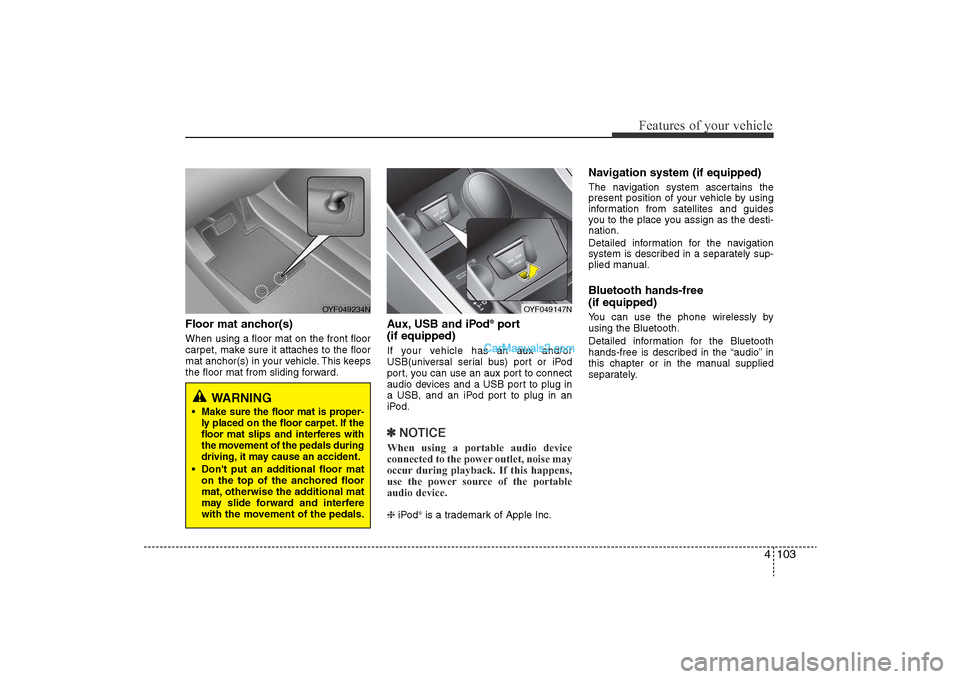
Floor mat anchor(s)When using a floor mat on the front floor
carpet, make sure it attaches to the floor
mat anchor(s) in your vehicle. This keeps
the floor mat from sliding forward.
Aux, USB and iPod
®port
(if equipped)
If your vehicle has an aux and/or
USB(universal serial bus) port or iPod
port, you can use an aux port to connect
audio devices and a USB port to plug in
a USB, and an iPod port to plug in an
iPod.✽ NOTICEWhen using a portable audio device
connected to the power outlet, noise may
occur during playback. If this happens,
use the power source of the portable
audio device. ❈ iPod
“is a trademark of Apple Inc.
Navigation system (if equipped)The navigation system ascertains the
present position of your vehicle by using
information from satellites and guides
you to the place you assign as the desti-
nation.
Detailed information for the navigation
system is described in a separately sup-
plied manual.Bluetooth hands-free
(if equipped)You can use the phone wirelessly by
using the Bluetooth.
Detailed information for the Bluetooth
hands-free is described in the “audio” in
this chapter or in the manual supplied
separately.
WARNING
•Make sure the floor mat is proper-
ly placed on the floor carpet. If the
floor mat slips and interferes with
the movement of the pedals during
driving, it may cause an accident.• Don't put an additional floor mat
on the top of the anchored floor
mat, otherwise the additional mat
may slide forward and interfere
with the movement of the pedals.
OYF049234N
OYF049147N
YF HMA 4-103.QXP 12/24/2009 5:19 PM Page 103
Page 189 of 380
4 109
Features of your vehicle
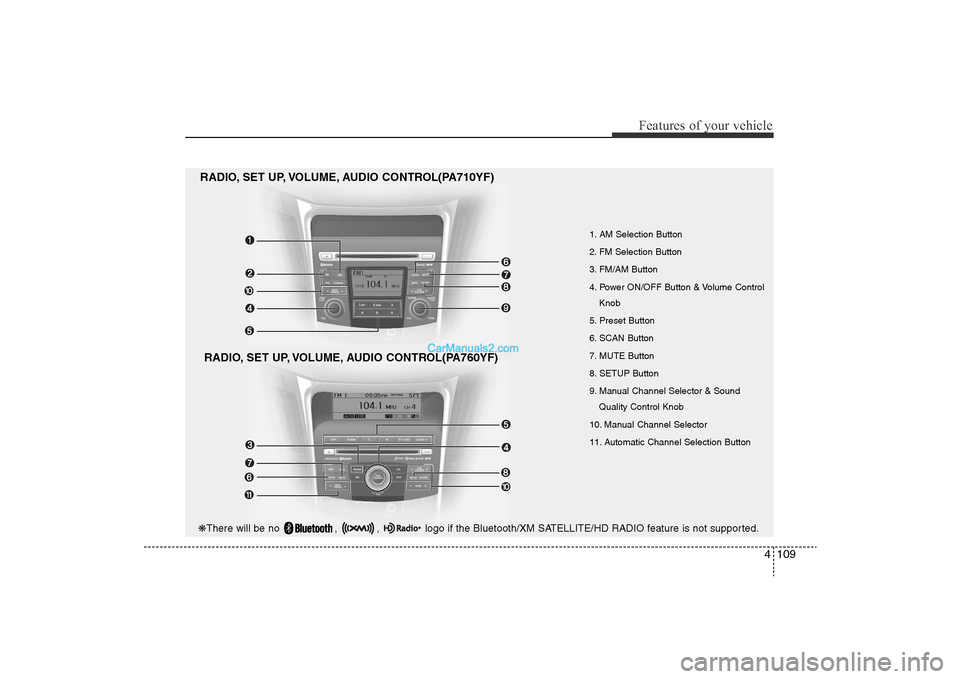
1. AM Selection Button
2. FM Selection Button
3. FM/AM Button
4. Power ON/OFF Button & Volume ControlKnob
5. Preset Button
6. SCAN Button
7. MUTE Button
8. SETUP Button
9. Manual Channel Selector & Sound Quality Control Knob
10. Manual Channel Selector
11. Automatic Channel Selection Button
RADIO, SET UP, VOLUME, AUDIO CONTROL(PA710YF)
RADIO, SET UP, VOLUME, AUDIO CONTROL(PA760YF)
❋ There will be no , , logo if the Bluetooth/XM SATELLITE/HD RADIO feature is not supported.
YF HMA 4-104~(AUDIO).QXP 12/24/2009 5:21 PM Page 109
Page 193 of 380
4 113
Features of your vehicle
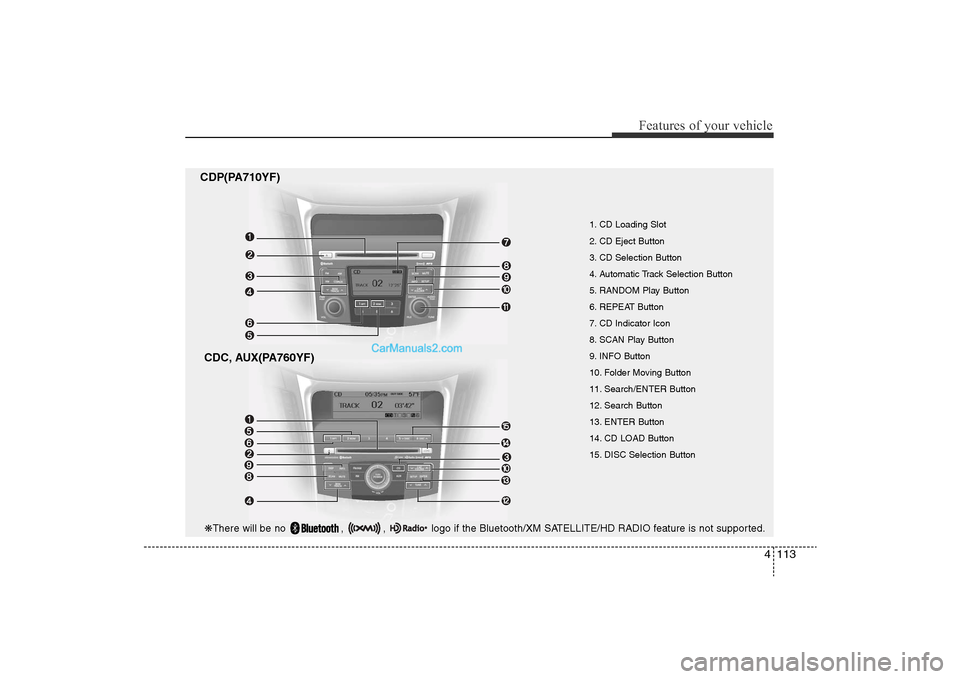
CDP(PA710YF)CDC, AUX(PA760YF)
1. CD Loading Slot
2. CD Eject Button
3. CD Selection Button
4. Automatic Track Selection Button
5. RANDOM Play Button
6. REPEAT Button
7. CD Indicator Icon
8. SCAN Play Button
9. INFO Button
10. Folder Moving Button
11. Search/ENTER Button
12. Search Button
13. ENTER Button
14. CD LOAD Button
15. DISC Selection Button
❋ There will be no , , logo if the Bluetooth/XM SATELLITE/HD RADIO feature is not supported.
YF HMA 4-104~(AUDIO).QXP 12/24/2009 5:21 PM Page 113
Page 198 of 380
Features of your vehicle118
4
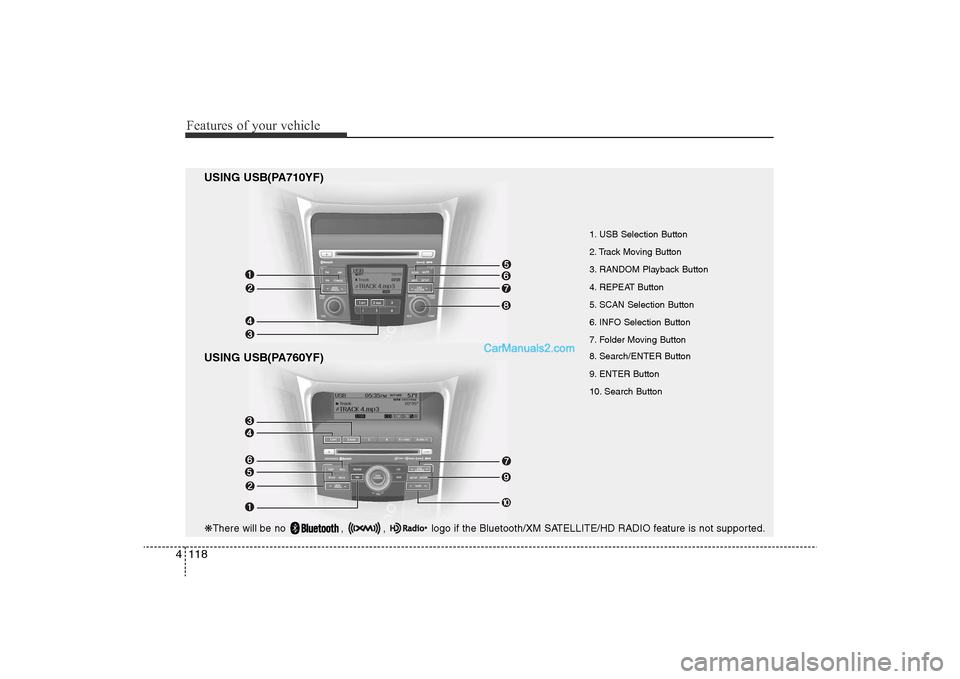
USING USB(PA710YF)
USING USB(PA760YF)
1. USB Selection Button
2. Track Moving Button
3. RANDOM Playback Button
4. REPEAT Button
5. SCAN Selection Button
6. INFO Selection Button
7. Folder Moving Button
8. Search/ENTER Button
9. ENTER Button
10. Search Button
❋ There will be no , , logo if the Bluetooth/XM SATELLITE/HD RADIO feature is not supported.
YF HMA 4-104~(AUDIO).QXP 12/24/2009 5:21 PM Page 118
Page 202 of 380
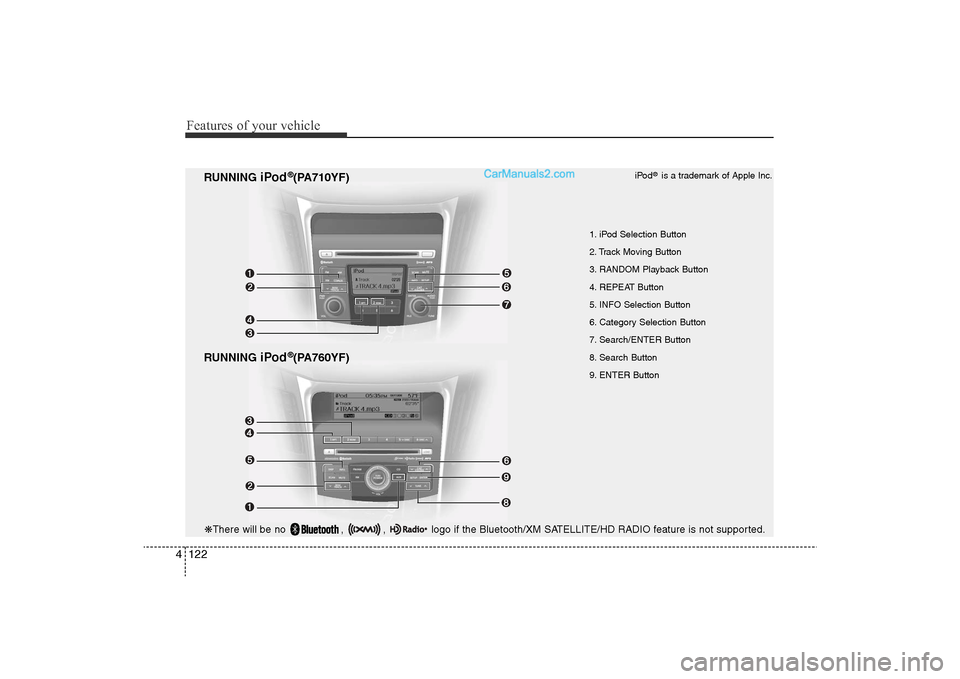
Features of your vehicle122
4
RUNNING
iPod
®(PA760YF)
RUNNING
iPod
®(PA710YF)
1. iPod Selection Button
2. Track Moving Button
3. RANDOM Playback Button
4. REPEAT Button
5. INFO Selection Button
6. Category Selection Button
7. Search/ENTER Button
8. Search Button
9. ENTER Button iPod
®is a trademark of Apple Inc.
❋
There will be no , , logo if the Bluetooth/XM SATELLITE/HD RADIO feature is not supported.
YF HMA 4-104~(AUDIO).QXP 12/24/2009 5:22 PM Page 122
Page 204 of 380
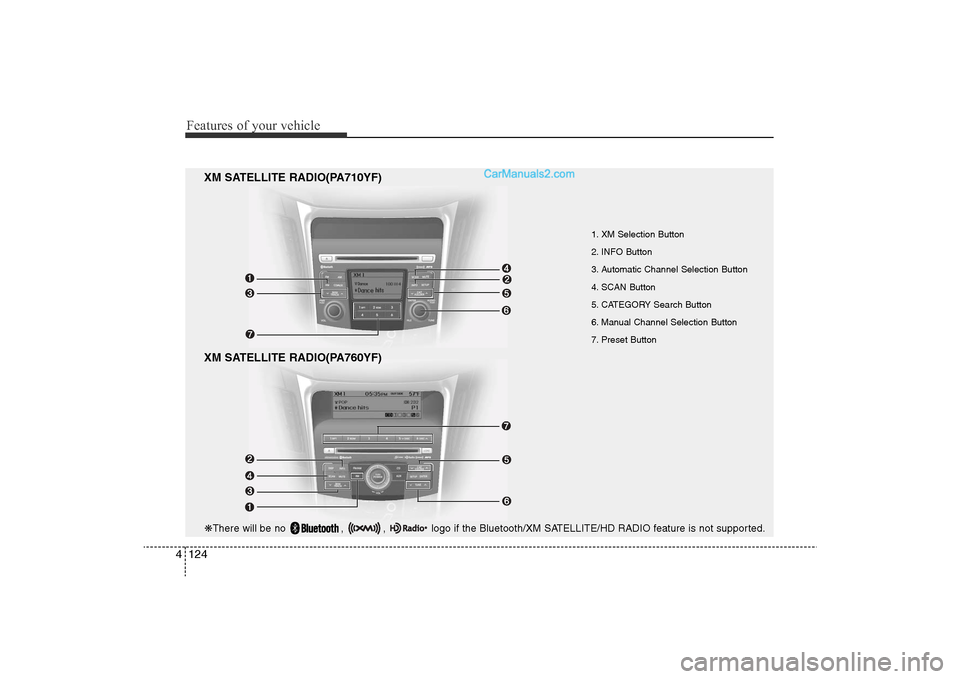
Features of your vehicle124
4
XM SATELLITE RADIO(PA760YF)
1. XM Selection Button
2. INFO Button
3. Automatic Channel Selection Button
4. SCAN Button
5. CATEGORY Search Button
6. Manual Channel Selection Button
7. Preset Button
XM SATELLITE RADIO(PA710YF)
❋ There will be no , , logo if the Bluetooth/XM SATELLITE/HD RADIO feature is not supported.
YF HMA 4-104~(AUDIO).QXP 12/24/2009 5:22 PM Page 124
Page 206 of 380
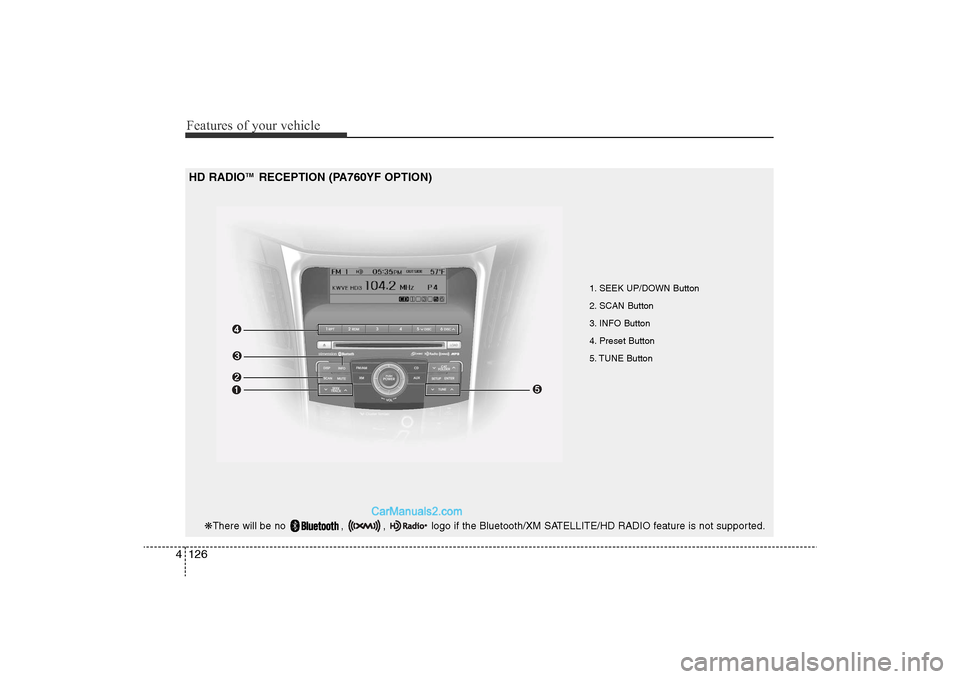
Features of your vehicle126
4
1. SEEK UP/DOWN Button
2. SCAN Button
3. INFO Button
4. Preset Button
5. TUNE Button
HD RADIO
TM
RECEPTION (PA760YF OPTION)
❋ There will be no , , logo if the Bluetooth/XM SATELLITE/HD RADIO feature is not supported.
YF HMA 4-104~(AUDIO).QXP 12/24/2009 5:22 PM Page 126
Page 209 of 380
4 129
Features of your vehicle
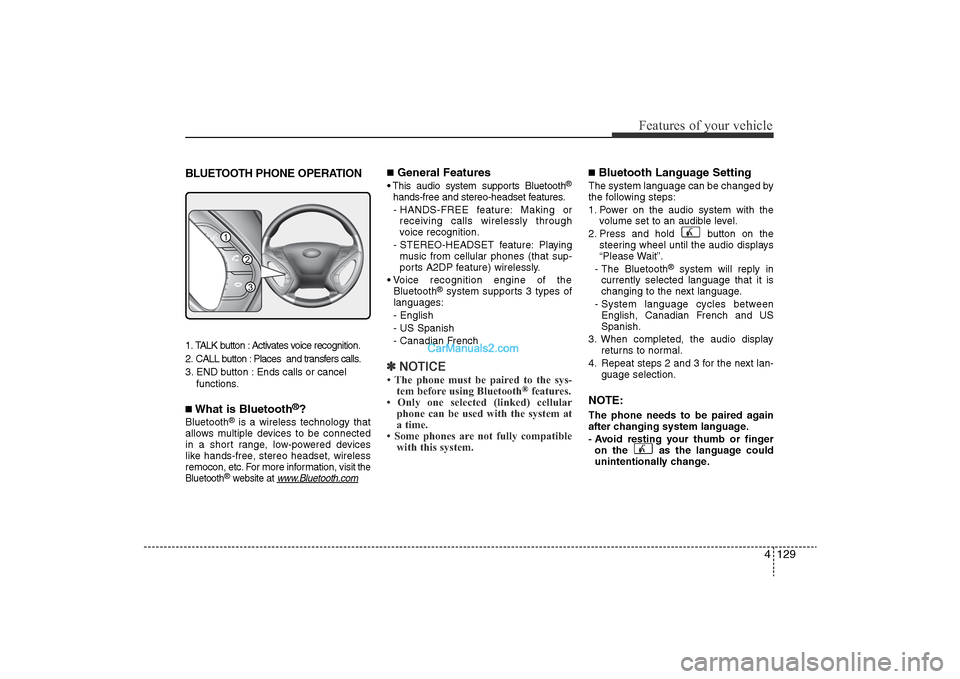
BLUETOOTH PHONE OPERATION1. TALK button : Activates voice recognition.
2. CALL button : Places and transfers calls.
3. END button : Ends calls or cancel functions.■What is Bluetooth
®?
Bluetooth
®is a wireless technology that
allows multiple devices to be connected
in a short range, low-powered devices
like hands-free, stereo headset, wireless
remocon, etc. For more information, visit
the
Bluetooth
®website at
www
.Bluetooth.com
■General Features• This audio system supports Bluetooth
®
hands-free and stereo-headset features.
- HANDS-FREE feature: Making or receiving calls wirelessly through
voice recognition.
- STEREO-HEADSET feature: Playing music from cellular phones (that sup-
ports A2DP feature) wirelessly.
• Voice recognition engine of the Bluetooth
®system supports 3 types of
languages:
- English
- US Spanish
- Canadian French
✽ NOTICE• The phone must be paired to the sys-
tem before using Bluetooth
®features.
• Only one selected (linked) cellular phone can be used with the system at
a time.
• Some phones are not fully compatible with this system.
■Bluetooth Language SettingThe system language can be changed by
the following steps:
1. Power on the audio system with the
volume set to an audible level.
2. Press and hold button on the steering wheel until the audio displays
“Please Wait”.
- The Bluetooth
®
system will reply in
currently selected language that it is
changing to the next language.
- System language cycles between English, Canadian French and US
Spanish.
3. When completed, the audio display returns to normal.
4. Repeat steps 2 and 3 for the next lan- guage selection.
NOTE:The phone needs to be paired again
after changing system language.
- Avoid resting your thumb or fingeron the as the language could
unintentionally change.
1
3
2
YF HMA 4-104~(AUDIO).QXP 12/24/2009 5:22 PM Page 129
Page 210 of 380
Features of your vehicle130
4
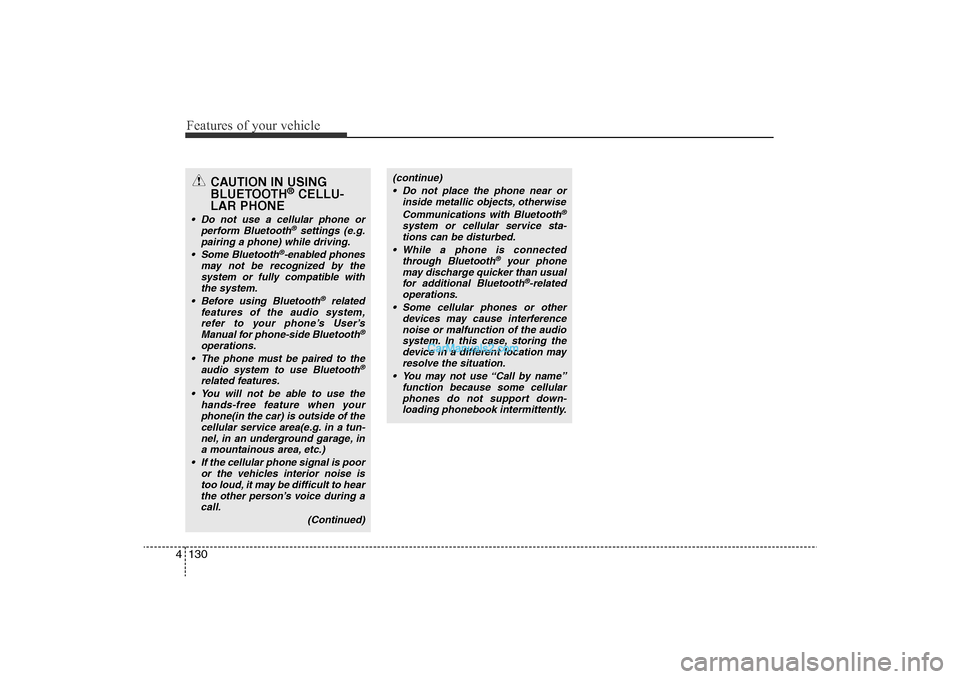
CAUTION IN USING
BLUETOOTH
®CELLU-
LAR PHONE
• Do not use a cellular phone or
perform Bluetooth
®settings (e.g.
pairing a phone) while driving.
• Some Bluetooth
®-enabled phones
may not be recognized by the system or fully compatible with the system.
• Before using Bluetooth
®related
features of the audio system, refer to your phone’s User’s Manual for phone-side Bluetooth
®
operations.
•The phone must be paired to the audio system to use Bluetooth
®
related features.• You will not be able to use the hands-free feature when yourphone(in the car) is outside of the cellular service area(e.g. in a tun-nel, in an underground garage, in a mountainous area, etc.)
• If the cellular phone signal is poor or the vehicles interior noise istoo loud, it may be difficult to hearthe other person’s voice during acall.
(Continued)
(continue)• Do not place the phone near or inside metallic objects, otherwise
Communications with Bluetooth
®
system or cellular service sta-tions can be disturbed.
• While a phone is connected through Bluetooth
®
your phone
may discharge quicker than usual for additional Bluetooth
®-related
operations.
• Some cellular phones or other devices may cause interferencenoise or malfunction of the audiosystem. In this case, storing thedevice in a different location may resolve the situation.
• You may not use “Call by name” function because some cellularphones do not support down-loading phonebook intermittently.
YF HMA 4-104~(AUDIO).QXP 12/24/2009 5:22 PM Page 130
Page 211 of 380
4 131
Features of your vehicle
■Voice Recognition Activation• The voice recognition engine containedin the Bluetooth System can be activat-
ed in the following conditions:
- Button Activation The voice recognition system will be
active when the button is
pressed and after the sound of a
Beep.
- Active Listening The voice recognition system will be
active for a period of time when the
Voice Recognition system has asked
for a customer response.
• The system can recognize single digits- from zero to nine while numbers greater
than ten will not be recognized.
• If the command is not recognized, the system will announce "Pardon" or No
input voice signal from microphone. (No
response)
• The system shall cancel voice recogni- tion mode in following cases : When
pressing the button and saying
cancel following the beep. When not
making a call and pressing the but-
ton. When voice recognition has failed 3
consecutive times.
• At any time if you say “help”, the system
will announce what commands are
available.
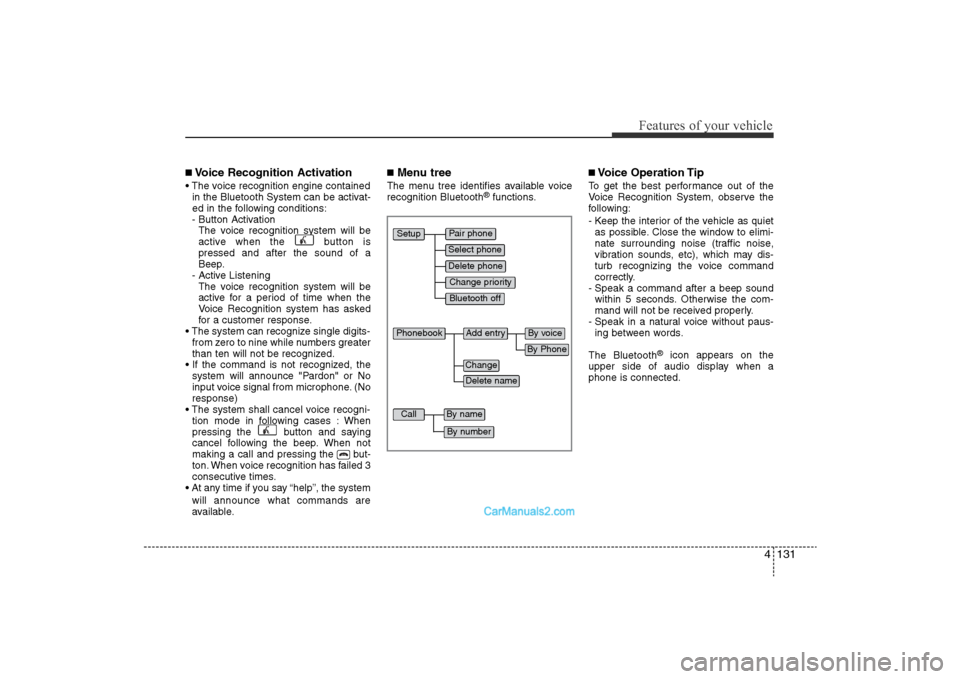
■Menu treeThe menu tree identifies available voice
recognition Bluetooth
®functions.
■Voice Operation TipTo get the best performance out of the
Voice Recognition System, observe the
following:
- Keep the interior of the vehicle as quietas possible. Close the window to elimi-
nate surrounding noise (traffic noise,
vibration sounds, etc), which may dis-
turb recognizing the voice command
correctly.
- Speak a command after a beep sound within 5 seconds. Otherwise the com-
mand will not be received properly.
- Speak in a natural voice without paus- ing between words.
The Bluetooth
®
icon appears on the
upper side of audio display when a
phone is connected.
Pair phone
Select phone
Change priority
Delete phone
Bluetooth off
Setup
Add entry
Phonebook
Change
Delete name
By Phone
By voice
Call
By name
By number
YF HMA 4-104~(AUDIO).QXP 12/24/2009 5:22 PM Page 131