Air Hyundai Sonata 2013 Manual PDF
[x] Cancel search | Manufacturer: HYUNDAI, Model Year: 2013, Model line: Sonata, Model: Hyundai Sonata 2013Pages: 410, PDF Size: 35.93 MB
Page 184 of 410
4 103
Features of your vehicle
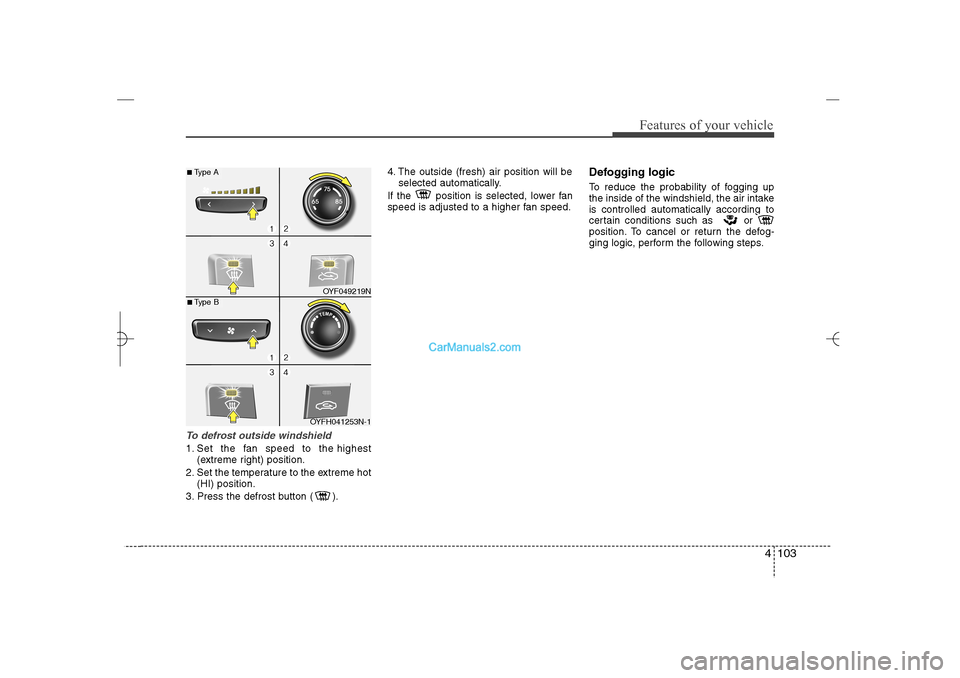
To defrost outside windshield 1. Set the fan speed to the highest
(extreme right) position.
2. Set the temperature to the extreme hot
(HI) position.
3. Press the defrost button ( ).4. The outside (fresh) air position will be
selected automatically.
If the position is selected, lower fan
speed is adjusted to a higher fan speed.
Defogging logicTo reduce the probability of fogging up
the inside of the windshield, the air intake
is controlled automatically according to
certain conditions such as or
position. To cancel or return the defog-
ging logic, perform the following steps.
OYF049219N
OYFH041253N-1
■Type A■Type B
YF HMA 4a-111.qxp 1/16/2012 6:35 PM Page 103
Page 185 of 410
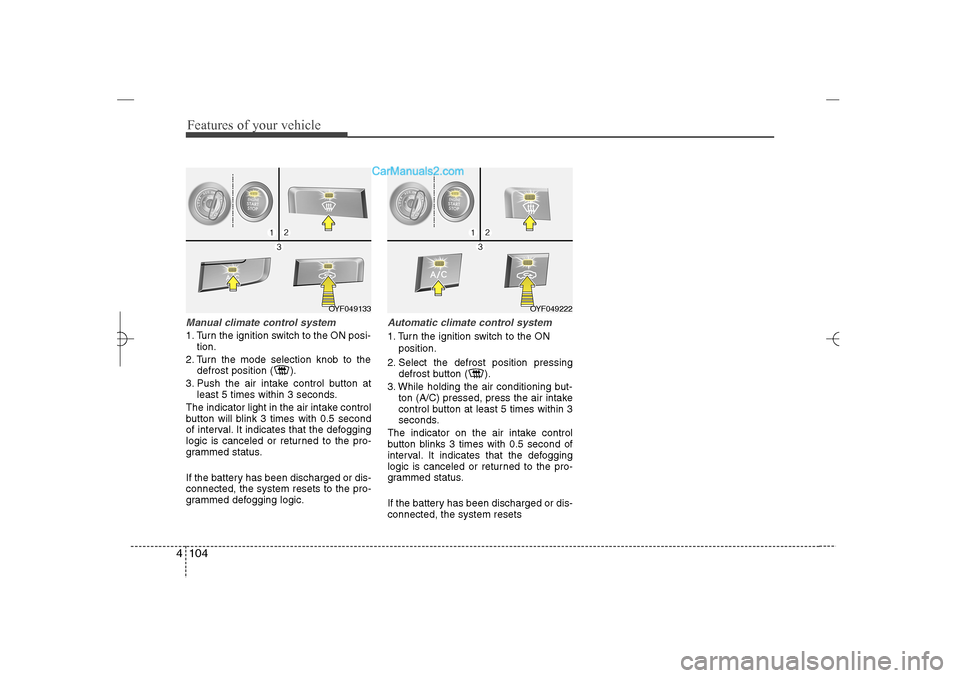
Features of your vehicle104 4Manual climate control system1. Turn the ignition switch to the ON posi-
tion.
2. Turn the mode selection knob to the
defrost position ( ).
3. Push the air intake control button at
least 5 times within 3 seconds.
The indicator light in the air intake control
button will blink 3 times with 0.5 second
of interval. It indicates that the defogging
logic is canceled or returned to the pro-
grammed status.
If the battery has been discharged or dis-
connected, the system resets to the pro-
grammed defogging logic.
Automatic climate control system1. Turn the ignition switch to the ON
position.
2. Select the defrost position pressing
defrost button ( ).
3. While holding the air conditioning but-
ton (A/C) pressed, press the air intake
control button at least 5 times within 3
seconds.
The indicator on the air intake control
button blinks 3 times with 0.5 second of
interval. It indicates that the defogging
logic is canceled or returned to the pro-
grammed status.
If the battery has been discharged or dis-
connected, the system resets
OYF049222
OYF049133
YF HMA 4a-111.qxp 1/16/2012 6:35 PM Page 104
Page 189 of 410
Features of your vehicle108 4Adjust the sunvisor extension forward or
backward (4).
To use the vanity mirror, pull down the
visor and slide the mirror cover (3).
Push the switch to turn the light on or off.
(if equipped)
: The light turns on.
O
: The light turns off.
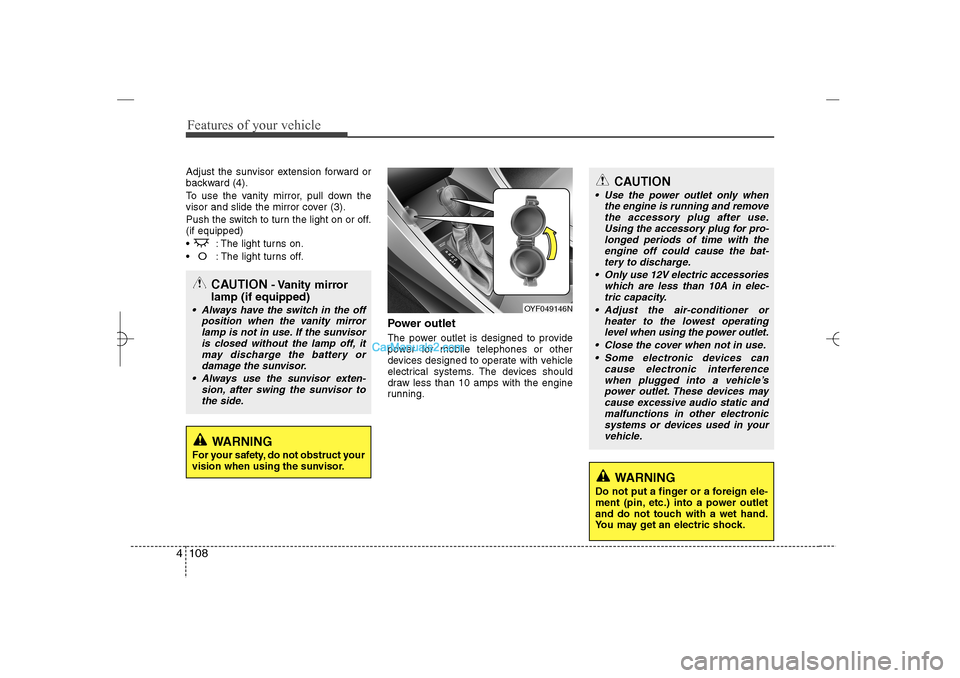
Power outletThe power outlet is designed to provide
power for mobile telephones or other
devices designed to operate with vehicle
electrical systems. The devices should
draw less than 10 amps with the engine
running.
CAUTION
Use the power outlet only when
the engine is running and remove
the accessory plug after use.
Using the accessory plug for pro-
longed periods of time with the
engine off could cause the bat-
tery to discharge.
Only use 12V electric accessories
which are less than 10A in elec-
tric capacity.
Adjust the air-conditioner or
heater to the lowest operating
level when using the power outlet.
Close the cover when not in use.
Some electronic devices can
cause electronic interference
when plugged into a vehicle’s
power outlet. These devices may
cause excessive audio static and
malfunctions in other electronic
systems or devices used in your
vehicle.
WARNING
Do not put a finger or a foreign ele-
ment (pin, etc.) into a power outlet
and do not touch with a wet hand.
You may get an electric shock.
OYF049146N
CAUTION
- Vanity mirror
lamp (if equipped)
Always have the switch in the off
position when the vanity mirror
lamp is not in use. If the sunvisor
is closed without the lamp off, it
may discharge the battery or
damage the sunvisor.
Always use the sunvisor exten-
sion, after swing the sunvisor to
the side.
WARNING
For your safety, do not obstruct your
vision when using the sunvisor.
YF HMA 4a-111.qxp 1/16/2012 6:35 PM Page 108
Page 201 of 410
![Hyundai Sonata 2013 Manual PDF Features of your vehicle120 4PHONE SETUPPress the key Select [Phone]
through TUNE knob or key
Select menu through TUNE knob
Pair PhoneSelect [Pair Phone] Set through TUNE
knob
➀Search for devic](/img/35/16808/w960_16808-200.png "Hyundai Sonata 2013 Manual PDF Features of your vehicle120 4PHONE SETUPPress the key Select [Phone]
through TUNE knob or key
Select menu through TUNE knob
Pair PhoneSelect [Pair Phone] Set through TUNE
knob
➀Search for devic")
Features of your vehicle120 4PHONE SETUPPress the key Select [Phone]
through TUNE knob or key
Select menu through TUNE knob
Pair PhoneSelect [Pair Phone] Set through TUNE
knob
➀Search for device names as displayed
on your mobile phone and connect.
➁Input the passkey displayed on the
screen. (Passkey : 0000)
❈The device name and passkey will be
displayed on the screen for up to 3
minutes. If pairing is not completed
within the 3 minutes, the mobile phone
pairing process will automatically be
canceled.
➂Pairing completion is displayed.
❈In some mobile phones, pairing will
automatically be followed by connec-
tion.
❈It is possible to pair up to fiveBluetooth
®
Wireless Technology
enabled mobile phones.
3
SETUP
CAUTION
To pair a Bluetooth
®
Wireless
Technology enabled mobile phone,
authentication and connection
processes are first required. As a
result, you cannot pair your mobile
phone while driving the vehicle.
First park your vehicle before use.
YF HMA 4b-112~(Audio).qxp 3/5/2012 4:24 PM Page 120
Page 202 of 410
![Hyundai Sonata 2013 Manual PDF 4 121
Features of your vehicle
Phone ListThe names of up to 5 paired phones will
be displayed.
A [ ] is displayed in front of the currently
connected phone.
Select the desired name to setup the
select](/img/35/16808/w960_16808-201.png "Hyundai Sonata 2013 Manual PDF 4 121
Features of your vehicle
Phone ListThe names of up to 5 paired phones will
be displayed.
A [ ] is displayed in front of the currently
connected phone.
Select the desired name to setup the
select")
4 121
Features of your vehicle
Phone ListThe names of up to 5 paired phones will
be displayed.
A [ ] is displayed in front of the currently
connected phone.
Select the desired name to setup the
selected phone.
Connecting a phoneSelect [Phone List] Select mobile phone
through TUNE knob Select [Connect
Phone]
➀Select a mobile phone that is not cur-
rently connected.
➁Connect the selected mobile phone.
➂Connection completion is displayed.
❈If a phone is already connected, dis-
connect the currently connected phone
and select a new phone to connect.
Disconnecting a connected phoneSelect [Phone List] Select mobile phone
through TUNE knob Select
[Disconnect Phone]➀
Select the currently connected mobile
phone.
➁
Disconnect the selected mobile
phone.
➂
Disconnection completion is dis-
played. Changing connection sequence
(Priority)
This is used to change the order (priority)
of automatic connection for the paired
mobile phones.
Select [Phone List] Select [Priority]
through TUNE knob Select No. 1
Priority mobile phone➀
Select [Priority].
➁
From the paired phones, select the
phone desired for No.1 priority.
➂
The changed priority sequence is dis-
played.
❈Once the connection sequence (priority)
is changed, the new no. 1 priority mobile
phone will be connected.
- When the no. 1 priority cannot be
connected: Automatically attempts to
connect the most recently connected
phone.
- Cases when the most recently con-
nected phone cannot be connected:
Attempts to connect in the order in
which paired phones are listed.
- The connected phone will automati-
cally be changed to No. 1 priority.
YF HMA 4b-112~(Audio).qxp 3/5/2012 4:24 PM Page 121
Page 204 of 410
4 123
Features of your vehicle
Bluetooth
®Wireless Technology
System Off
This feature is used when you do not
wish to use the
Bluetooth
®
Wireless
Technology system.
Select [
Bluetooth
®Wireless Technology
System Off] Set through TUNE knob
❈If a phone is already connected, dis-
connect the currently connected phone
and turn the Bluetooth
®
Wireless
Technology system off.
Using the
Bluetooth
®Wireless
Technology System
To use
Bluetooth
®Wireless Technology
when the system is currently off, follow
these next steps.
Turning On Bluetooth
®
Wireless
Technology through the Key
Press the key Screen Guidance❈Moves to the screen where
Bluetooth
®
Wireless Technology functions can be
used and displays guidance. Turning On
Bluetooth
®
Wireless
Technology through the Key
Press the key Select [Phone]
through TUNE knob or key➀A screen asking whether to turn onBluetooth
®
Wireless Technology will
be displayed.
➁On the screen, select to turn on
Bluetooth
®Wireless Technology and
display guidance.
❈If the
Bluetooth
®Wireless Technology
system is turned on, the system will
automatically try to connect the most
recently connected Bluetooth
®Wireless
Technology enabled mobile phone.
YES3
SETUP
SETUP
PHONE
PHONE
CAUTION
Bluetooth
®
Wireless Technology
connection may become intermit-
tently disconnected in some
mobile phones. Follow these next
steps to try again.
1) Turn the Bluetooth
®
Wireless
Technology function within the
mobile phone ON/OFF and try to
connect again.
2) Turn the mobile phone power
ON/OFF and try to connect again.
3) Completely remove the mobile
phone battery, reboot, and then
try to connect again.
4) Reboot the audio system and try
to connect again
5) Delete all paired devices in your
mobile phone and the audio sys-
tem and pair again for use.
YF HMA 4b-112~(Audio).qxp 3/5/2012 4:24 PM Page 123
Page 226 of 410
4 145
Features of your vehicle
Bluetooth
®Wireless Technology
AUDIO
What is
Bluetooth
®Wireless
Technology?
Bluetooth
®
Wireless Technology is a
wireless technology that allows multiple
devices to be connected in a short range,
low-powered devices like hands-free,
stereo headset, wireless remote con-
troller, etc. For more information, visit the
Bluetooth
®Wireless Technology website
at www
.Bluetooth.com
Before using
Bluetooth
®
Wireless
Technology audio features
Bluetooth
®Wireless Technology audio
may not be supported depending on
the compatibility of your
Bluetooth
®
Wireless Technology mobile phone.
In order to use
Bluetooth
®
Wireless
Technology audio, you must first pair
and connect the
Bluetooth
®Wireless
Technology mobile phone.
Bluetooth
®Wireless Technology audio
can be used only when the [Audio
Streaming] of Phone is turned .
❈Setting Bluetooth
®
Wireless
Technology Audio Streaming : Press
the key Select [Phone]
through the tune knob or key
Select [Audio Streaming] through the
TUNE knob Set
/
Starting
Bluetooth
®Wireless
Technology Audio
Press the key to change the
mode in order of CD➟USB➟AUX➟My
Music➟BT Audio.
If BT Audio is selected,
Bluetooth
®
Wireless Technology audio will start
playing.
❈Audio may not automatically start playing
in some mobile phones.
Using the
Bluetooth
®Wireless
Technology audio features
Play / Stop
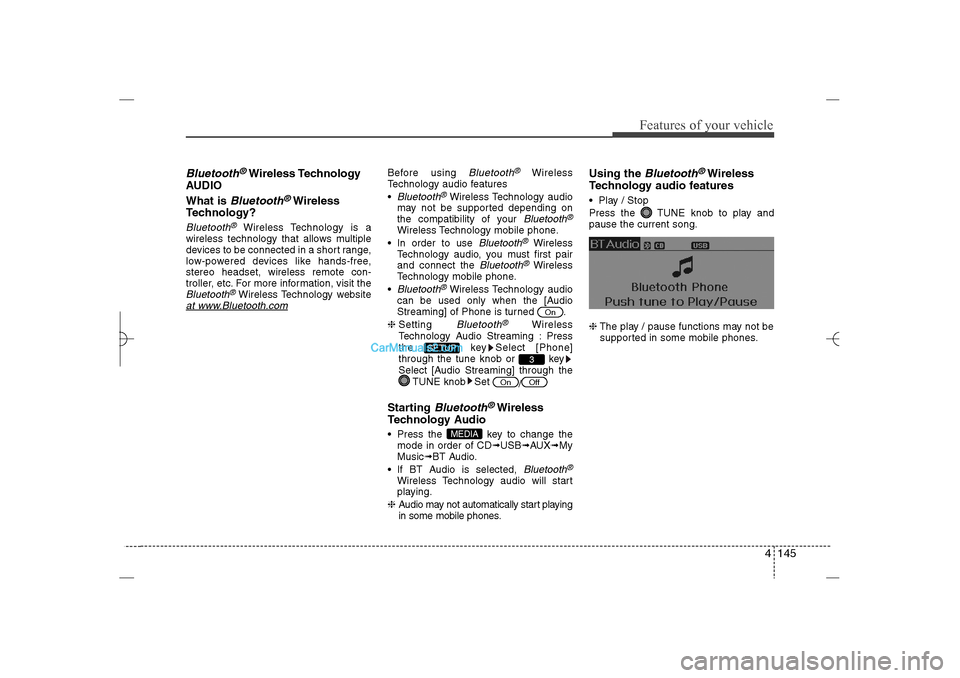
Press the TUNE knob to play and
pause the current song.
❈The play / pause functions may not be
supported in some mobile phones.
MEDIA
Off
On
3
SETUP
On
YF HMA 4b-112~(Audio).qxp 3/5/2012 4:24 PM Page 145
Page 227 of 410
Features of your vehicle146 4PhoneBefore using the
Bluetooth
®
Wireless
Technology enabled phone features
In order to use
Bluetooth
®
Wireless
Technology phone, you must first pair
and connect the
Bluetooth
®Wireless
Technology mobile phone.
If the mobile phone is not paired or
connected, it is not possible to enter
Phone mode. Once a phone is paired
or connected, the guidance screen will
be displayed.
If Priority is set upon vehicle ignition
(IGN/ACC ON), the
Bluetooth
®
Wireless Technology enabled phone
will be automatically connected. Even if
you are outside, the
Bluetooth
®
Wireless Technology enabled phone
will be automatically connected once
you are in the vicinity of the vehicle. If
you do not want automatic
Bluetooth
®
Wireless Technology enabled phone
connection, set the
Bluetooth
®
Wireless Technology power to OFF.
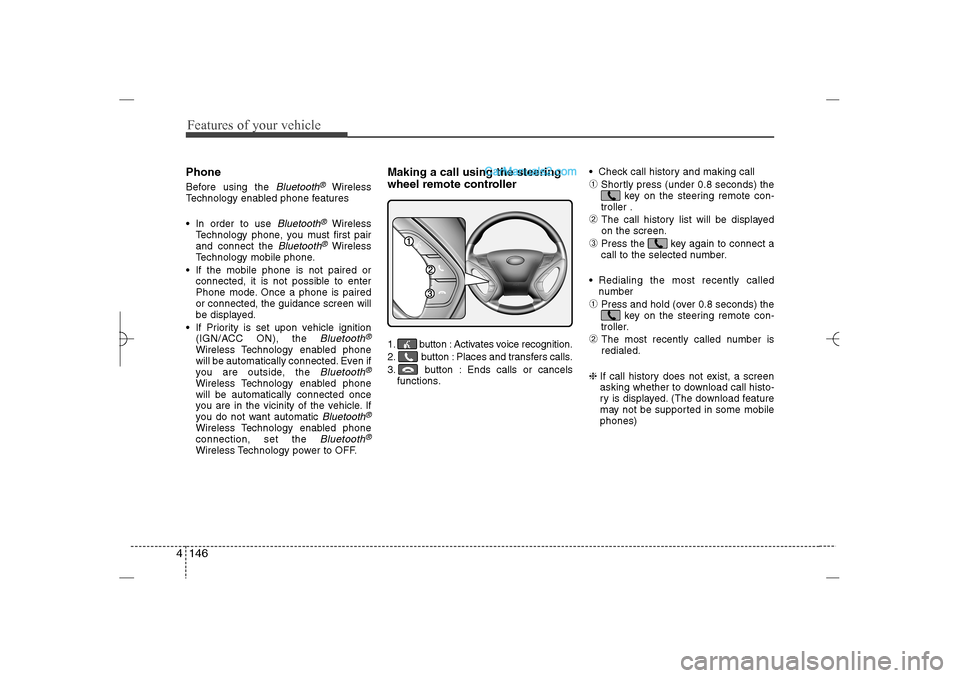
Making a call using the steering
wheel remote controller1. button : Activates voice recognition.
2. button : Places and transfers calls.
3. button : Ends calls or cancels
functions. Check call history and making call
➀
Shortly press (under 0.8 seconds) the
key on the steering remote con-
troller .
➁
The call history list will be displayed
on the screen.
➂
Press the key again to connect a
call to the selected number.
Redialing the most recently called
number
➀
Press and hold (over 0.8 seconds) the
key on the steering remote con-
troller.
➁
The most recently called number is
redialed.
❈ If call history does not exist, a screen
asking whether to download call histo-
ry is displayed. (The download feature
may not be supported in some mobile
phones)
YF HMA 4b-112~(Audio).qxp 3/5/2012 4:24 PM Page 146
Page 228 of 410
![Hyundai Sonata 2013 Manual PDF 4 147
Features of your vehicle
Phone MENUPress the key to display three
menus (Call History, Contacts, Phone
Setup).Call historyPress the key Set [ Call
History] through the TUNE knob or
key.
The c](/img/35/16808/w960_16808-227.png "Hyundai Sonata 2013 Manual PDF 4 147
Features of your vehicle
Phone MENUPress the key to display three
menus (Call History, Contacts, Phone
Setup).Call historyPress the key Set [ Call
History] through the TUNE knob or
key.
The c")
4 147
Features of your vehicle
Phone MENUPress the key to display three
menus (Call History, Contacts, Phone
Setup).Call historyPress the key Set [ Call
History] through the TUNE knob or
key.
The call history is displayed and can be
used to select a number and make a call.
If call history does not exist, a screen
asking whether to download call history
is displayed. (The download feature may
not be supported in some mobile
phones)Contacts
Press the key Set [ Contacts]
through the TUNEknob or key.The Contacts are displayed and can be
used to select a number and make a call.
❈ If more than one number is saved to
one contact, then a screen showing
the mobile phone number, house and
office number are displayed. Select the
desired number to make the call.
❈ If Contacts do not exist, a screen asking
whether to download Contacts is dis-
played. (The download feature may not
be supported in some mobile phones)Phone SetupPress the key Set [ Phone
Setup] through the TUNEknob or
key.The
Bluetooth
®
Wireless Technology
enabled mobile phone setup screen is
displayed. For more information, refer to
“Phone Setup”.
3
PHONE
2
PHONE
1
PHONEPHONE
CAUTION IN USINGBLUETOOTH
®WIRELESS
TECHNOLOGY CELLU-
LAR PHONE
Do not use a cellular phone or
perform Bluetooth
®
Wireless
Technology settings (e.g. pairing
a phone) while driving.
Some Bluetooth
®
Wireless
Technology-enabled phones may
not be recognized by the system or
fully compatible with the system.
Before using Bluetooth®Wireless
Technology related features of
the audio system, refer your
phone’s User’s Manual for phone-
side Bluetooth
®
Wireless
Technology operations.
The phone must be paired to the
audio system to use Bluetooth
®
Wireless Technology related fea-
tures.
You will not be able to use the
hands-free feature when your
phone (in the car) is outside of
the cellular service area (e.g. in a
tunnel, in a underground, in a
mountainous area, etc.).
(Continued)
YF HMA 4b-112~(Audio).qxp 3/5/2012 4:24 PM Page 147
Page 229 of 410
Features of your vehicle148 4
NOTE:Bluetooth
®
Wireless Technology
phone compatibility can be checked
by visiting www.hyundaiusa.com and
under the SERVICE & PARTS - BLUE-
TOOTH COMPATIBILITY menu.
The website provides 9 types of
information, including information
on Pairing, Connection, Handsfree
Calling, Streaming, and more.
(Continued)
If the cellular phone signal is poor
or the vehicles interior noise is too
loud, it may be difficult to hear the
other person’s voice during a call.
Do not place the phone near or
inside metallic objects, otherwise
communications with Bluetooth
®
Wireless Technology system or
cellular service stations can be
disturbed.
While a phone is connected
through Bluetooth
®
Wireless
Technology your phone may dis-
charge quicker than usual for
additional Bluetooth
®
Wireless
Technology-related operations.
Some cellular phones or other
devices may cause interference
noise or malfunction to audio
system. In this case, store the
device in a different location may
resolve the condition.
Phone contact names should be
saved in English or they may not
be displayed correctly.
(Continued)
(Continued)
If Priority is set upon vehicle igni-
tion(IGN/ACC ON), the Bluetooth
®
Wireless Technology phone will
be automatically connected.
Even if you are outside, the
Bluetooth
®
Wireless Technology
phone will be automatically con-
nected once you are in the vicini-
ty of the vehicle.
If you do not want automatic
Bluetooth
®
Wireless Technology
connection, turn the Bluetooth
®
Wireless Technology feature off.
The hands-free call volume and
quality may differ depending on
the mobile phone type.
YF HMA 4b-112~(Audio).qxp 3/5/2012 4:24 PM Page 148