lock Hyundai Sonata 2013
[x] Cancel search | Manufacturer: HYUNDAI, Model Year: 2013, Model line: Sonata, Model: Hyundai Sonata 2013Pages: 410, PDF Size: 35.93 MB
Page 186 of 410
4 105
Features of your vehicle
These compartments can be used to
store small items.
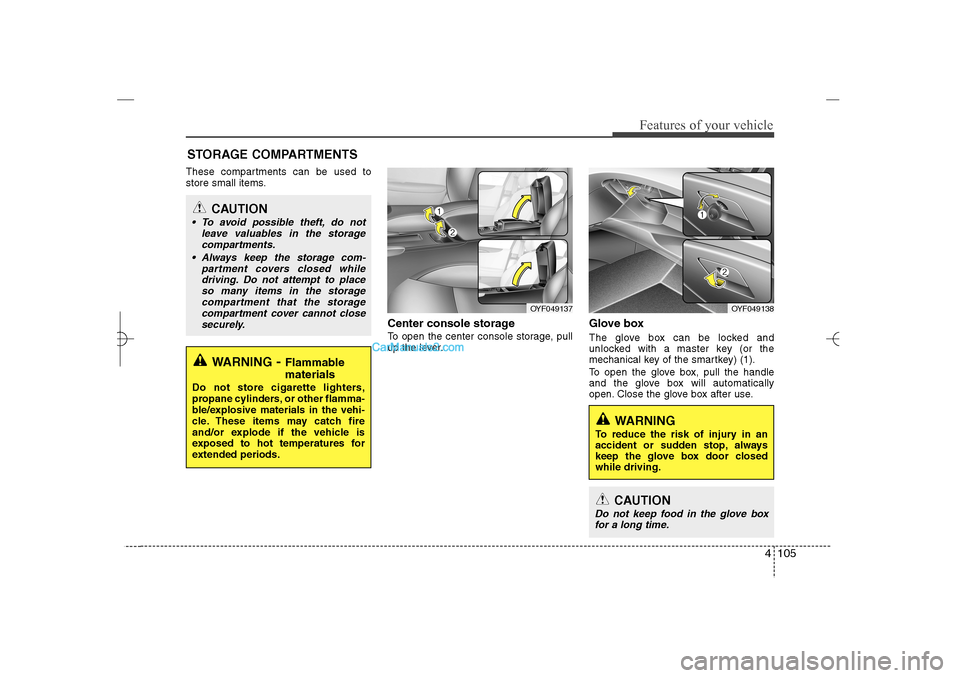
Center console storage To open the center console storage, pull
up the lever.
Glove boxThe glove box can be locked and
unlocked with a master key (or the
mechanical key of the smartkey) (1).
To open the glove box, pull the handle
and the glove box will automatically
open. Close the glove box after use.
STORAGE COMPARTMENTS
WARNING
- Flammable
materials
Do not store cigarette lighters,
propane cylinders, or other flamma-
ble/explosive materials in the vehi-
cle. These items may catch fire
and/or explode if the vehicle is
exposed to hot temperatures for
extended periods.
CAUTION
To avoid possible theft, do not
leave valuables in the storage
compartments.
Always keep the storage com-
partment covers closed while
driving. Do not attempt to place
so many items in the storage
compartment that the storage
compartment cover cannot close
securely.
OYF049138
OYF049137
WARNING
To reduce the risk of injury in an
accident or sudden stop, always
keep the glove box door closed
while driving.
CAUTION
Do not keep food in the glove box
for a long time.
YF HMA 4a-111.qxp 1/16/2012 6:35 PM Page 105
Page 187 of 410
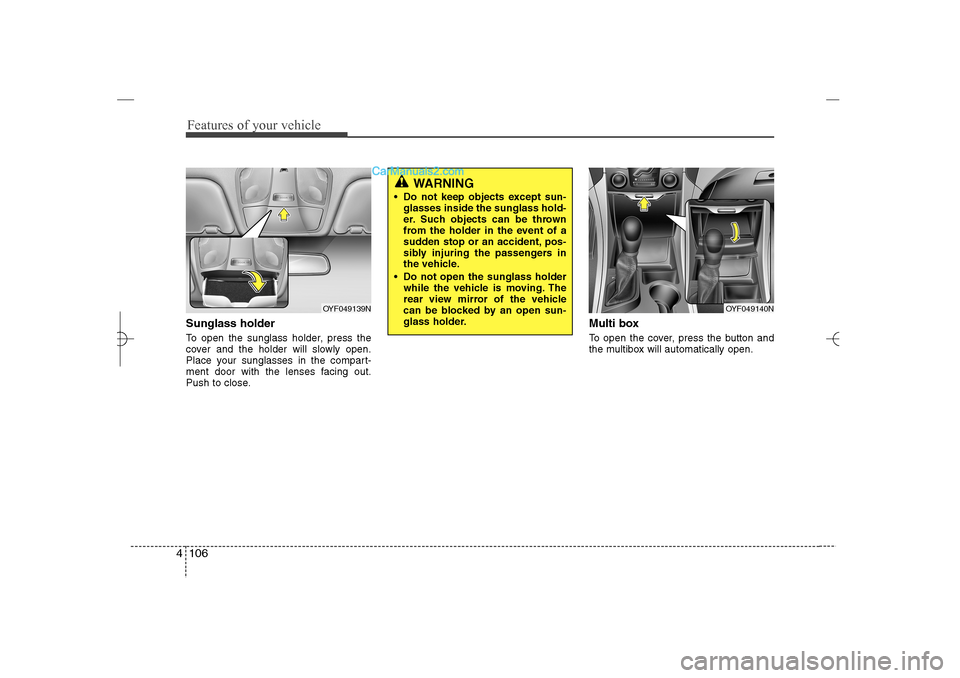
Features of your vehicle106 4Sunglass holder To open the sunglass holder, press the
cover and the holder will slowly open.
Place your sunglasses in the compart-
ment door with the lenses facing out.
Push to close.
Multi boxTo open the cover, press the button and
the multibox will automatically open.
OYF049139N
OYF049140N
WARNING
Do not keep objects except sun-
glasses inside the sunglass hold-
er. Such objects can be thrown
from the holder in the event of a
sudden stop or an accident, pos-
sibly injuring the passengers in
the vehicle.
Do not open the sunglass holder
while the vehicle is moving. The
rear view mirror of the vehicle
can be blocked by an open sun-
glass holder.
YF HMA 4a-111.qxp 1/16/2012 6:35 PM Page 106
Page 190 of 410
4 109
Features of your vehicle
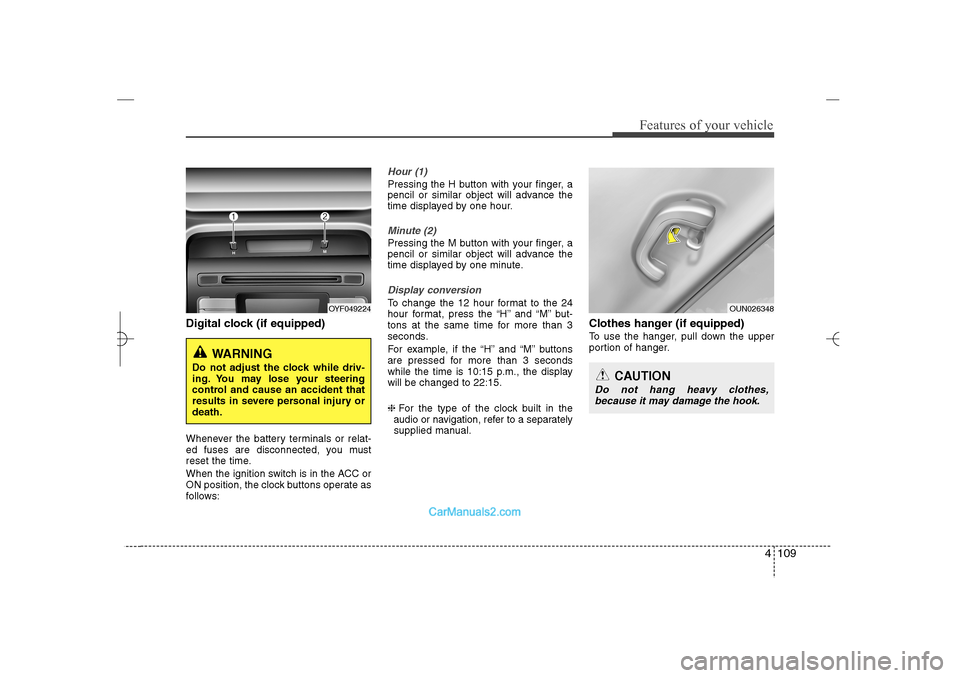
Digital clock (if equipped)Whenever the battery terminals or relat-
ed fuses are disconnected, you must
reset the time.
When the ignition switch is in the ACC or
ON position, the clock buttons operate as
follows:
Hour (1)Pressing the H button with your finger, a
pencil or similar object will advance the
time displayed by one hour.Minute (2)Pressing the M button with your finger, a
pencil or similar object will advance the
time displayed by one minute.Display conversionTo change the 12 hour format to the 24
hour format, press the “H” and “M” but-
tons at the same time for more than 3
seconds.
For example, if the “H” and “M” buttons
are pressed for more than 3 seconds
while the time is 10:15 p.m., the display
will be changed to 22:15.
❈For the type of the clock built in the
audio or navigation, refer to a separately
supplied manual.
Clothes hanger (if equipped)To use the hanger, pull down the upper
portion of hanger.
OYF049224
WARNING
Do not adjust the clock while driv-
ing. You may lose your steering
control and cause an accident that
results in severe personal injury or
death.
OUN026348
CAUTION
Do not hang heavy clothes,
because it may damage the hook.
YF HMA 4a-111.qxp 1/16/2012 6:35 PM Page 109
Page 214 of 410
4 133
Features of your vehicle
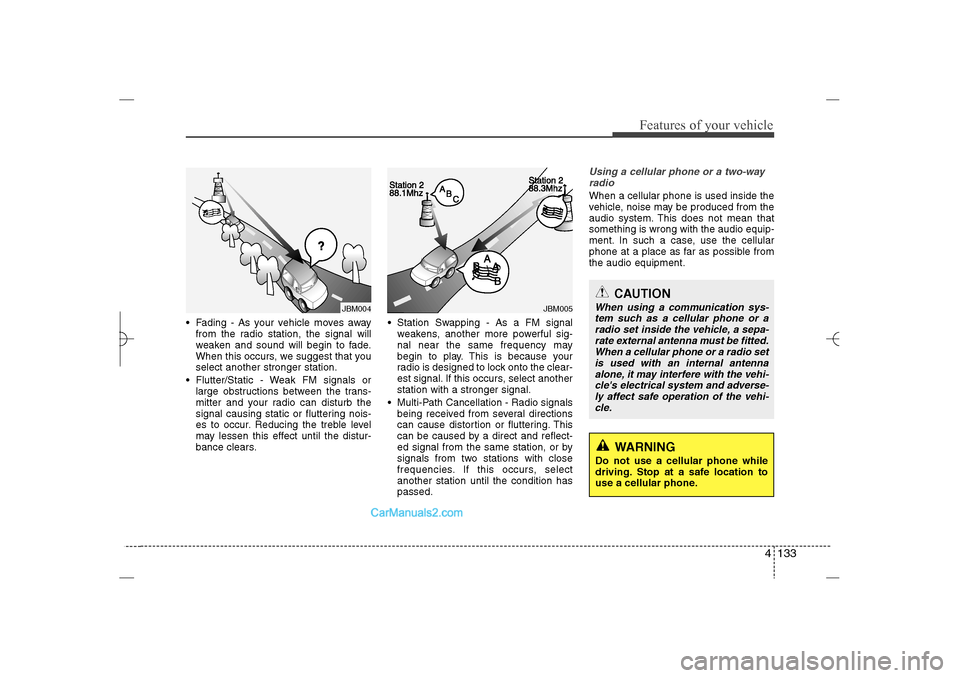
Fading - As your vehicle moves away
from the radio station, the signal will
weaken and sound will begin to fade.
When this occurs, we suggest that you
select another stronger station.
Flutter/Static - Weak FM signals or
large obstructions between the trans-
mitter and your radio can disturb the
signal causing static or fluttering nois-
es to occur. Reducing the treble level
may lessen this effect until the distur-
bance clears. Station Swapping - As a FM signal
weakens, another more powerful sig-
nal near the same frequency may
begin to play. This is because your
radio is designed to lock onto the clear-
est signal. If this occurs, select another
station with a stronger signal.
Multi-Path Cancellation - Radio signals
being received from several directions
can cause distortion or fluttering. This
can be caused by a direct and reflect-
ed signal from the same station, or by
signals from two stations with close
frequencies. If this occurs, select
another station until the condition has
passed.
Using a cellular phone or a two-way
radio When a cellular phone is used inside the
vehicle, noise may be produced from the
audio system. This does not mean that
something is wrong with the audio equip-
ment. In such a case, use the cellular
phone at a place as far as possible from
the audio equipment.
JBM005
JBM004
CAUTION
When using a communication sys-
tem such as a cellular phone or a
radio set inside the vehicle, a sepa-
rate external antenna must be fitted.
When a cellular phone or a radio set
is used with an internal antenna
alone, it may interfere with the vehi-
cle's electrical system and adverse-
ly affect safe operation of the vehi-
cle.
WARNING
Do not use a cellular phone while
driving. Stop at a safe location to
use a cellular phone.
YF HMA 4b-112~(Audio).qxp 3/5/2012 4:24 PM Page 133
Page 215 of 410
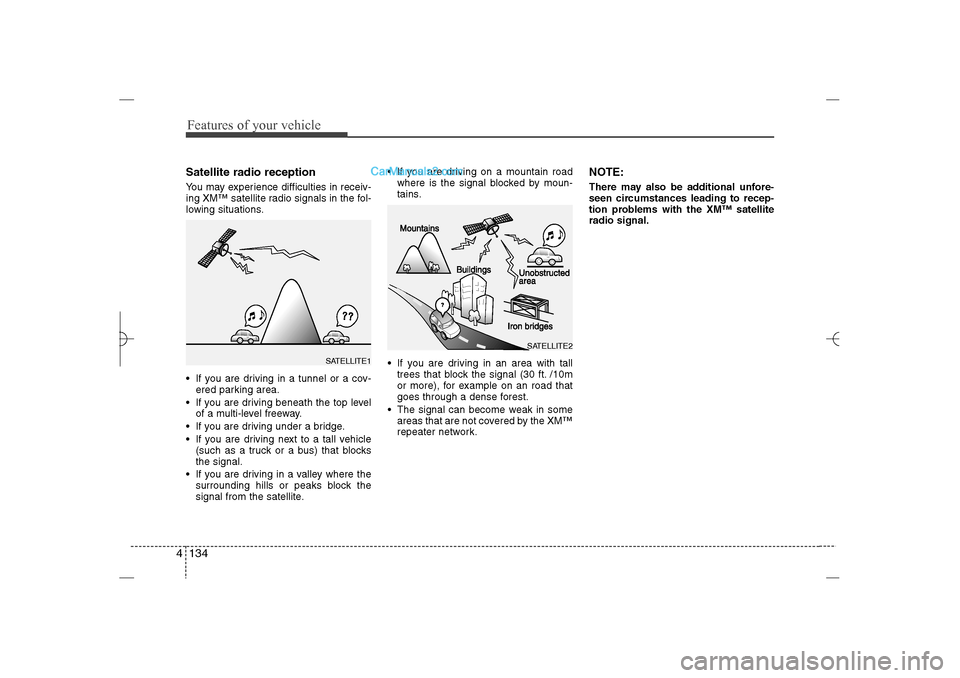
Features of your vehicle134 4Satellite radio receptionYou may experience difficulties in receiv-
ing XM™ satellite radio signals in the fol-
lowing situations.
If you are driving in a tunnel or a cov-
ered parking area.
If you are driving beneath the top level
of a multi-level freeway.
If you are driving under a bridge.
If you are driving next to a tall vehicle
(such as a truck or a bus) that blocks
the signal.
If you are driving in a valley where the
surrounding hills or peaks block the
signal from the satellite. If you are driving on a mountain road
where is the signal blocked by moun-
tains.
If you are driving in an area with tall
trees that block the signal (30 ft. /10m
or more), for example on an road that
goes through a dense forest.
The signal can become weak in some
areas that are not covered by the XM™
repeater network.
NOTE:There may also be additional unfore-
seen circumstances leading to recep-
tion problems with the XM™ satellite
radio signal.
SATELLITE2
SATELLITE1
YF HMA 4b-112~(Audio).qxp 3/5/2012 4:24 PM Page 134
Page 245 of 410
53
Driving your vehicle
Before entering vehicle• Be sure that all windows, outside mir-
ror(s), and outside lights are clean.
Check the condition of the tires.
Check under the vehicle for any sign of
leaks.
Be sure there are no obstacles behind
you if you intend to back up.Necessary inspections Fluid levels, such as engine oil, engine
coolant, brake fluid, and washer fluid
should be checked on a regular basis,
with the exact interval depending on the
fluid. Further details are provided in sec-
tion 7, “Maintenance”.
Before starting Close and lock all doors.
Position the seat so that all controls are
easily reached.
Adjust the inside and outside rearview
mirrors.
Be sure that all lights work.
Check all gauges.
Check the operation of warning lights
when the ignition switch is turned to
the ON position.
Release the parking brake and make
sure the brake warning light goes out.
For safe operation, be sure you are famil-
iar with your vehicle and its equipment.
BEFORE DRIVING
WARNING
Driving while distracted can result in
a loss of vehicle control, that may
lead to an accident, severe personal
injury, and death. The driver's pri-
mary responsibility is in the safe and
legal operation of a vehicle, and use
of any handheld devices, other
equipment, or vehicle systems which
take the driver's eyes, attention and
focus away from the safe operation
of a vehicle or which are not permis-
sible by law should never be used
during operation of the vehicle.
CALIFORNIA PROPOSI-
TION 65 WARNING
Engine exhaust and a wide variety
of automobile components and
parts, including components found
in the interior furnishings in a vehi-
cle, contain or emit chemicals
known to the State of California to
cause cancer and birth defects and
reproductive harm. In addition, cer-
tain fluids contained in vehicles
and certain products of component
wear contain or emit chemicals
known to the State of California to
cause cancer and birth defects or
other reproductive harm.
WARNING
All passengers must be properly
belted whenever the vehicle is mov-
ing. Refer to “Seat belts” in section
3 for more information on their
proper use.
YF HMA 5.qxp 1/16/2012 6:22 PM Page 3
Page 247 of 410
55
Driving your vehicle
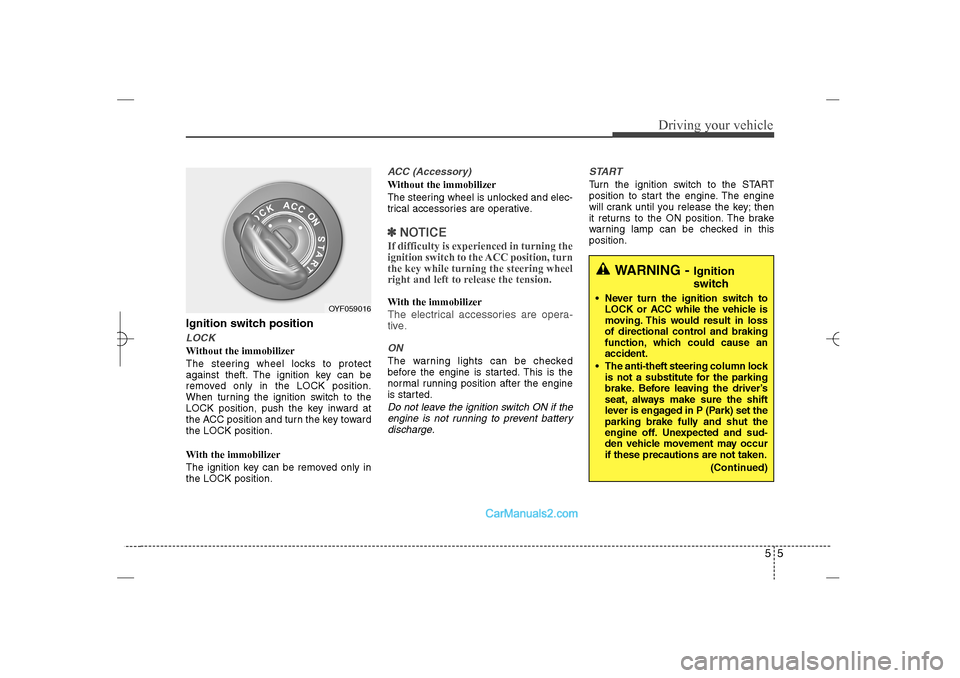
Ignition switch positionLOCKWithout the immobilizer
The steering wheel locks to protect
against theft. The ignition key can be
removed only in the LOCK position.
When turning the ignition switch to the
LOCK position, push the key inward at
the ACC position and turn the key toward
the LOCK position.
With the immobilizer
The ignition key can be removed only in
the LOCK position.
ACC (Accessory)Without the immobilizer
The steering wheel is unlocked and elec-
trical accessories are operative.✽ ✽
NOTICEIf difficulty is experienced in turning the
ignition switch to the ACC position, turn
the key while turning the steering wheel
right and left to release the tension.With the immobilizerThe electrical accessories are opera-
tive.ONThe warning lights can be checked
before the engine is started. This is the
normal running position after the engine
is started.Do not leave the ignition switch ON if the
engine is not running to prevent battery
discharge.START
Turn the ignition switch to the START
position to start the engine. The engine
will crank until you release the key; then
it returns to the ON position. The brake
warning lamp can be checked in this
position.
WARNING -
Ignition
switch
Never turn the ignition switch to
LOCK or ACC while the vehicle is
moving. This would result in loss
of directional control and braking
function, which could cause an
accident.
The anti-theft steering column lock
is not a substitute for the parking
brake. Before leaving the driver’s
seat, always make sure the shift
lever is engaged in P (Park) set the
parking brake fully and shut the
engine off. Unexpected and sud-
den vehicle movement may occur
if these precautions are not taken.
(Continued)
OYF059016
YF HMA 5.qxp 1/16/2012 6:23 PM Page 5
Page 253 of 410
511
Driving your vehicle
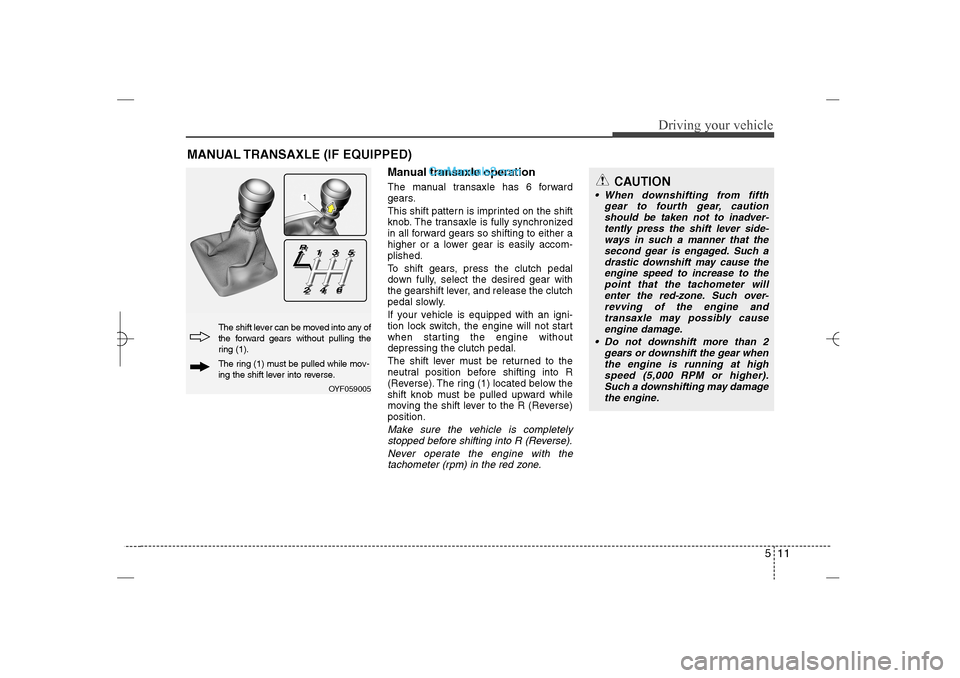
Manual transaxle operationThe manual transaxle has 6 forward
gears.
This shift pattern is imprinted on the shift
knob. The transaxle is fully synchronized
in all forward gears so shifting to either a
higher or a lower gear is easily accom-
plished.
To shift gears, press the clutch pedal
down fully, select the desired gear with
the gearshift lever, and release the clutch
pedal slowly.
If your vehicle is equipped with an igni-
tion lock switch, the engine will not start
when starting the engine without
depressing the clutch pedal.
The shift lever must be returned to the
neutral position before shifting into R
(Reverse). The ring (1) located below the
shift knob must be pulled upward while
moving the shift lever to the R (Reverse)
position.Make sure the vehicle is completely
stopped before shifting into R (Reverse).
Never operate the engine with the
tachometer (rpm) in the red zone.
MANUAL TRANSAXLE (IF EQUIPPED)
OYF059005
The shift lever can be moved into any of
the forward gears without pulling the
ring (1).The ring (1) must be pulled while mov-
ing the shift lever into reverse.
CAUTION
When downshifting from fifth
gear to fourth gear, caution
should be taken not to inadver-
tently press the shift lever side-
ways in such a manner that the
second gear is engaged. Such a
drastic downshift may cause the
engine speed to increase to the
point that the tachometer will
enter the red-zone. Such over-
revving of the engine and
transaxle may possibly cause
engine damage.
Do not downshift more than 2
gears or downshift the gear when
the engine is running at high
speed (5,000 RPM or higher).
Such a downshifting may damage
the engine.
YF HMA 5.qxp 1/16/2012 6:23 PM Page 11
Page 256 of 410
Driving your vehicle14 5
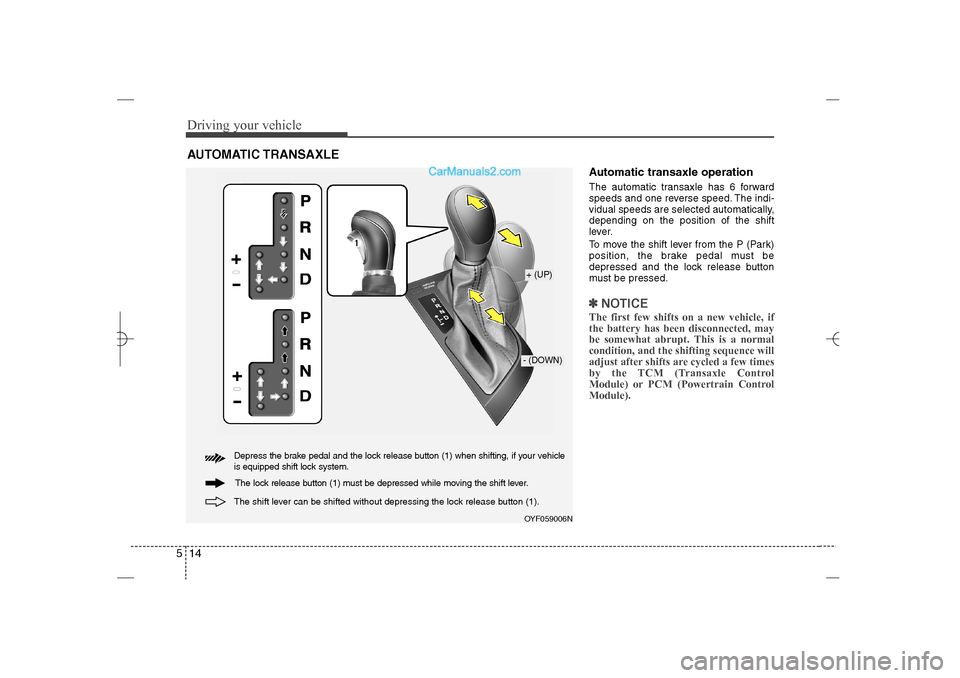
Automatic transaxle operationThe automatic transaxle has 6 forward
speeds and one reverse speed. The indi-
vidual speeds are selected automatically,
depending on the position of the shift
lever.
To move the shift lever from the P (Park)
position, the brake pedal must be
depressed and the lock release button
must be pressed.✽ ✽
NOTICEThe first few shifts on a new vehicle, if
the battery has been disconnected, may
be somewhat abrupt. This is a normal
condition, and the shifting sequence will
adjust after shifts are cycled a few times
by the TCM (Transaxle Control
Module) or PCM (Powertrain Control
Module).
AUTOMATIC TRANSAXLE
OYF059006N+ (UP)- (DOWN)
Depress the brake pedal and the lock release button (1) when shifting, if your vehicle
is equipped shift lock system.
The shift lever can be shifted without depressing the lock release button (1).
The lock release button (1) must be depressed while moving the shift lever.
YF HMA 5.qxp 1/16/2012 6:23 PM Page 14
Page 257 of 410
515
Driving your vehicle
For smooth operation, depress the brake
pedal when shifting from N (Neutral) to a
forward or reverse gear.Transaxle ranges
The indicator in the instrument cluster
displays the shift lever position when the
ignition switch is in the ON position.
P (Park)
Always come to a complete stop before
shifting into P (Park). This position locks
the transaxle and prevents the drive
wheels from rotating.
WARNING
- Automatic
transaxle
Always check the surrounding
areas near your vehicle for peo-
ple, especially children, before
shifting a car into D (Drive) or R
(Reverse).
Before leaving the driver’s seat,
always make sure the shift lever
is in the P (Park) position; then
set the parking brake fully and
shut the engine off. Unexpected
and sudden vehicle movement
can occur if these precautions
are not followed in the order iden-
tified.
CAUTION
To avoid damage to your
transaxle, do not accelerate the
engine in R (Reverse) or any for-
ward gear position with the
brakes on.
When stopped on an incline, do
not hold the vehicle stationary
with engine power. Use the serv-
ice brake or the parking brake.
Do not shift from N (Neutral) or P
(Park) into D (Drive), or R
(Reverse) when the engine is
above idle speed.
WARNING
Shifting into P (Park) while the
vehicle is in motion will cause the
drive wheels to lock which will
cause you to lose control of the
vehicle.
Do not use the P (Park) position
in place of the parking brake.
Always make sure the shift lever
is latched in the P (Park) position
and set the parking brake fully.
Never leave a child unattended in
a vehicle.
YF HMA 5.qxp 1/16/2012 6:23 PM Page 15