audio Hyundai Sonata 2014 Owner's Manual
[x] Cancel search | Manufacturer: HYUNDAI, Model Year: 2014, Model line: Sonata, Model: Hyundai Sonata 2014Pages: 665, PDF Size: 17.43 MB
Page 439 of 665
![Hyundai Sonata 2014 Owners Manual Scroll text
Press the key Select
[Display] Select [Scroll text]
This feature is used to scroll text dis-
played on the screen when it is too
long to be displayed at once.
When turned on, t](/img/35/16805/w960_16805-438.png "Hyundai Sonata 2014 Owners Manual Scroll text
Press the key Select
[Display] Select [Scroll text]
This feature is used to scroll text dis-
played on the screen when it is too
long to be displayed at once.
When turned on, t")
Scroll text
Press the key Select
[Display] Select [Scroll text]
This feature is used to scroll text dis-
played on the screen when it is too
long to be displayed at once.
When turned on, the text is repeat-
edly scrolled. When turned off, the
text is scrolled just once.
MP3 Information Display
Press the key Select
[Display] Select [Song Info]
This feature is used to change the
information displayed within USB
and MP3 CD modes.
1) Folder File : Displays file name
and folder name
2) Album Ar tist Song : Displays
album name/artist name/song
Sound Settings
Audio Settings
Press the key Select
[Sound] Select [Audio Setting]
Use the , , , buttons to
adjust the Fader/Balance settings.
Use the , buttons to adjust the
Bass/Middle/Treble settings.
Press the button to reset.Default
4-181
Multimedia System
4
Page 441 of 665
![Hyundai Sonata 2014 Owners Manual Bluetooth®Wireless
Technology Setting
Pairing a New Device
Press the key Select
[Phone] Select [Pair Phone]
Bluetooth®Wireless Technology
devices can be paired with the audio
system.
For more](/img/35/16805/w960_16805-440.png "Hyundai Sonata 2014 Owners Manual Bluetooth®Wireless
Technology Setting
Pairing a New Device
Press the key Select
[Phone] Select [Pair Phone]
Bluetooth®Wireless Technology
devices can be paired with the audio
system.
For more")
Bluetooth®Wireless
Technology Setting
Pairing a New Device
Press the key Select
[Phone] Select [Pair Phone]
Bluetooth®Wireless Technology
devices can be paired with the audio
system.
For more infor mation, refer to the
“Pairing through Phone Setup” sec-
tion within Bluetooth®Wireless
Technology.
Viewing Paired Phone List
Press the key Select
[Phone] Select [Paired Phone List]
This feature is used to view mobile
phones that have been paired with
the audio system. Upon selecting a
paired phone, the setup menu is dis-
played.
For more infor mation, refer to the
“Setting Bluetooth®Wireless
Te c h n o l o g y C o n n e c t i o n ” s e c t i o n w i t h -
in Bluetooth®Wireless Technology.
1) : Moves to the previous
screen
2) Connect/Disconnect Phone :
Connect/disconnects currently
selected phone
3) Delete : Deletes the currently
selected phone
4) Change Priority : Sets currently
selected phone to highest connec-
tion priority
Information
- BEFORE DOWNLOADING
Phone books
• Only Phone books within connected
phones can be downloaded. Also
check to see that your mobile phone
supports the download feature.
• To learn more about whether your
mobile phone supports Phone books
downloads, refer to your mobile
phone user’s manual.
• The Phone books for only the con-
nected phone can be downloaded.
Before downloading, check to see
whether your phone supports the
download feature.
i
4-183
Multimedia System
4
Page 442 of 665
![Hyundai Sonata 2014 Owners Manual Downloading Phone books
Press the key Select
[Phone] Select [Phonebooks Download]
The Phone books is downloaded
from the mobile phone and the
download progress is displayed.
Information
â€](/img/35/16805/w960_16805-441.png "Hyundai Sonata 2014 Owners Manual Downloading Phone books
Press the key Select
[Phone] Select [Phonebooks Download]
The Phone books is downloaded
from the mobile phone and the
download progress is displayed.
Information
â€")
Downloading Phone books
Press the key Select
[Phone] Select [Phonebooks Download]
The Phone books is downloaded
from the mobile phone and the
download progress is displayed.
Information
• Up to 1,000 Phone books entries can
be copied into car Phone books.
• Up to 1,000 Phone books entries can
be saved for each paired device.
•Upon downloading Phone books
data, previously saved Phone books
data will be deleted. However,
Phone books entries saved to other
paired phones are not deleted.
Auto Download (Phone books)
Press the key Select
[Phone] Select [Auto Download]
This feature is used to automatically
download mobile contacts entries
once a Bluetooth®Wireless
Technology phone is connected.
Information
•The Auto Download feature will
download mobile phone books
entries every time the phone is con-
nected. The download time may dif-
fer depending on the number of
saved contacts entries and the com-
munication state.
• When downloading a Phone books,
first check to see that your mobile
phone supports the Phone books
download feature.
Audio Streaming
Press the key Select
[Phone] Select [Audio Streaming]
When Streaming Audio is turned on,
you can play music files saved in
your Bluetooth®Wireless Technology
device from the car.
ii
4-184
Multimedia System
Page 443 of 665
![Hyundai Sonata 2014 Owners Manual Outgoing Volume
Press the key Select
[Phone] Select [Outgoing Volume]
Use the , buttons to adjust the
outgoing volume level.
Turning Bluetooth System Off
Press the key Select
[Phone] Select [Blu](/img/35/16805/w960_16805-442.png "Hyundai Sonata 2014 Owners Manual Outgoing Volume
Press the key Select
[Phone] Select [Outgoing Volume]
Use the , buttons to adjust the
outgoing volume level.
Turning Bluetooth System Off
Press the key Select
[Phone] Select [Blu")
Outgoing Volume
Press the key Select
[Phone] Select [Outgoing Volume]
Use the , buttons to adjust the
outgoing volume level.
Turning Bluetooth System Off
Press the key Select
[Phone] Select [Bluetooth System
Off]
Once Bluetooth®Wireless Technology
is turned off, Bluetooth®Wireless
Te c h n o l o g y r e l a t e d f e a t u r e s w i l l n o t b e
supported within the audio system.
Information
To t u r n Bluetooth®Wireless
Technology back on, go to
[Phone] and press “Yes”.
System Setting
Memory Information
Press the key Select
[System] Select [Memory Information]
This feature displays information
related to system memory.
1) Using : Displays capacity currently
in use
2) Capacity : Displays total capacity
i
4-185
Multimedia System
4
Page 444 of 665
![Hyundai Sonata 2014 Owners Manual 4-186
Multimedia System
Vo i c e R e c o g n i t i o n M o d e S e t t i n g
(if equipped)
Press the key Select
[System] Select [Voice Recognition
System]
This feature is used to select](/img/35/16805/w960_16805-443.png "Hyundai Sonata 2014 Owners Manual 4-186
Multimedia System
Vo i c e R e c o g n i t i o n M o d e S e t t i n g
(if equipped)
Press the key Select
[System] Select [Voice Recognition
System]
This feature is used to select")
4-186
Multimedia System
Vo i c e R e c o g n i t i o n M o d e S e t t i n g
(if equipped)
Press the key Select
[System] Select [Voice Recognition
System]
This feature is used to select the
desired prompt feedback option from
Normal and Expert.
1) Normal : When using voice recog-
nition, provides detailed guidance
prompts
2) Expert : When using voice recog-
nition, omits some guidance
prompts
Information
Voice Recognition is depend on the
Audio System.
Language
Press the key Select
[System] Select [Language]
This feature is used to change the
system and voice recognition lan-
guage.
If the language is changed, the sys-
tem will restart and apply the select-
ed language.
REAR VIEW CAMERA
(if equipped)
• The system has been equipped
with a rear view camera for user
safety by allowing a wider rear
range of vision.
•The rear view camera will automat-
ically operate when the ignition key
is turned ON and the transmission
lever is set to R.
•The rear view camera will automat-
ically stop operating when set to a
different lever.
The rear view camera has been
equipped with an optical lens to
provide a wider range of vision and
may appear different from the actu-
al distance. For safety, directly
check the rear and left/right sides.
NOTICE
i
Page 445 of 665
4-187
Multimedia System
4
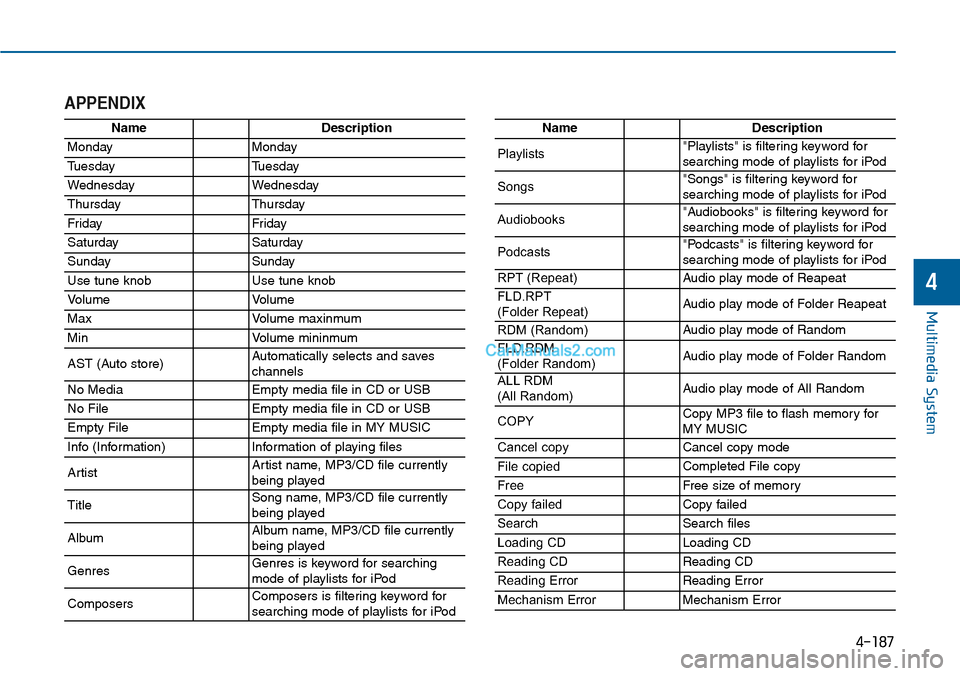
APPENDIX
NameDescription
MondayMonday
TuesdayTuesday
WednesdayWednesday
ThursdayThursday
Fr idayFr iday
SaturdaySaturday
SundaySunday
Use tune knobUse tune knob
Vo l u m eVo l u m e
MaxVo l u m e m a x i n m u m
MinVo l u m e m i n i n m u m
AST (Auto store)Automatically selects and saves channels
No MediaEmpty media file in CD or USB
No FileEmpty media file in CD or USB
Empty FileEmpty media file in MY MUSIC
Info (Information)Information of playing files
ArtistArtist name, MP3/CD file currentlybeing played
TitleSong name, MP3/CD file currentlybeing played
AlbumAlbum name, MP3/CD file currentlybeing played
GenresGenres is keyword for searchingmode of playlists for iPod
ComposersComposers is filtering keyword forsearching mode of playlists for iPod
NameDescription
Playlists"Playlists" is filtering keyword forsearching mode of playlists for iPod
Songs"Songs" is filtering keyword for searching mode of playlists for iPod
Audiobooks"Audiobooks" is filtering keyword forsearching mode of playlists for iPod
Podcasts"Podcasts" is filtering keyword forsearching mode of playlists for iPod
RPT (Repeat)Audio play mode of Reapeat
FLD.RPT(Folder Repeat)Audio play mode of Folder Reapeat
RDM (Random)Audio play mode of Random
FLD.RDM (Folder Random)Audio play mode of Folder Random
ALL RDM(All Random)Audio play mode of All Random
COPYCopy MP3 file to flash memory for MY MUSIC
Cancel copyCancel copy mode
File copiedCompleted File copy
FreeFree size of memor y
Copy failedCopy failed
SearchSearch files
Loading CDLoading CD
Reading CDReading CD
Reading ErrorReading Error
Mechanism ErrorMechanism Error
Page 446 of 665
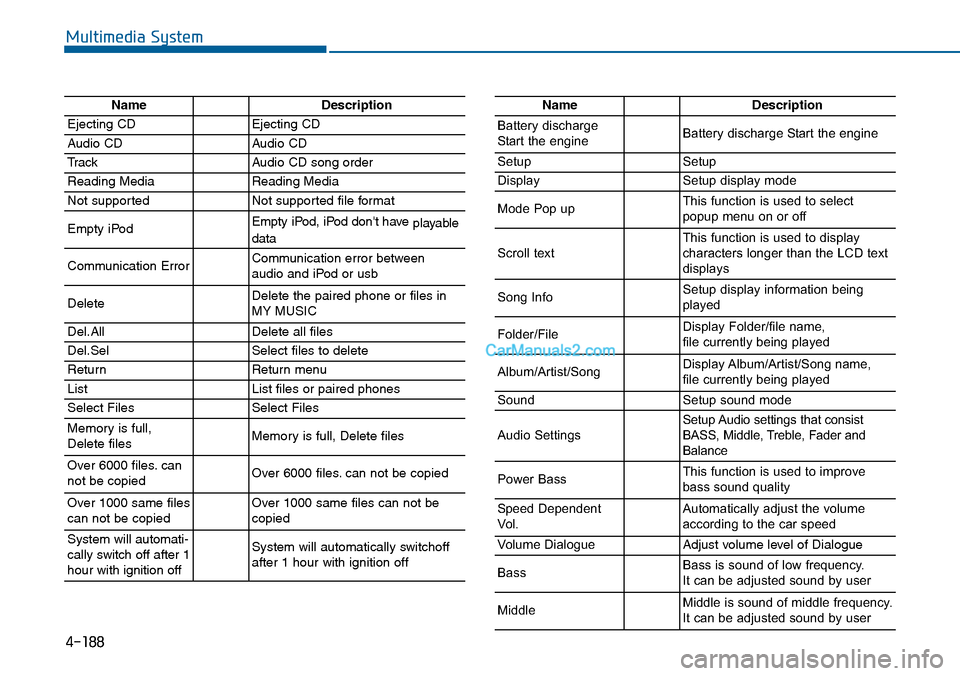
4-188
Multimedia System
NameDescription
Ejecting CDEjecting CD
Audio CDAudio CD
TrackAudio CD song order
Reading MediaReading Media
Not supportedNot supported file format
Empty iPodEmpty iPod, iPod don't have playabledata
Communication ErrorCommunication error between audio and iPod or usb
DeleteDelete the paired phone or files in MY MUSIC
Del.AllDelete all files
Del.SelSelect files to delete
ReturnReturn menu
ListList files or paired phones
Select FilesSelect Files
Memory is full,Delete files Memory is full, Delete files
Over 6000 files. cannot be copied Over 6000 files. can not be copied
Over 1000 same filescan not be copied Over 1000 same files can not becopied
System will automati-cally switch off after 1hour with ignition off
System will automatically switchoffafter 1 hour with ignition off
NameDescription
Battery dischargeStart the engineBattery discharge Start the engine
SetupSetup
DisplaySetup display mode
Mode Pop upThis function is used to selectpopup menu on or off
Scroll textThis function is used to display characters longer than the LCD textdisplays
Song InfoSetup display information beingplayed
Folder/FileDisplay Folder/file name, file currently being played
Album/Artist/SongDisplay Album/Artist/Song name, file currently being played
SoundSetup sound mode
Audio SettingsSetup Audio settings that consistBASS, Middle, Treble, Fader andBalance
Power BassThis function is used to improvebass sound quality
Speed DependentVo l .Automatically adjust the volume according to the car speed
Vo l u m e D i a l o g u eAdjust volume level of Dialogue
BassBass is sound of low frequency. It can be adjusted sound by user
MiddleMiddle is sound of middle frequency. It can be adjusted sound by user
Page 448 of 665
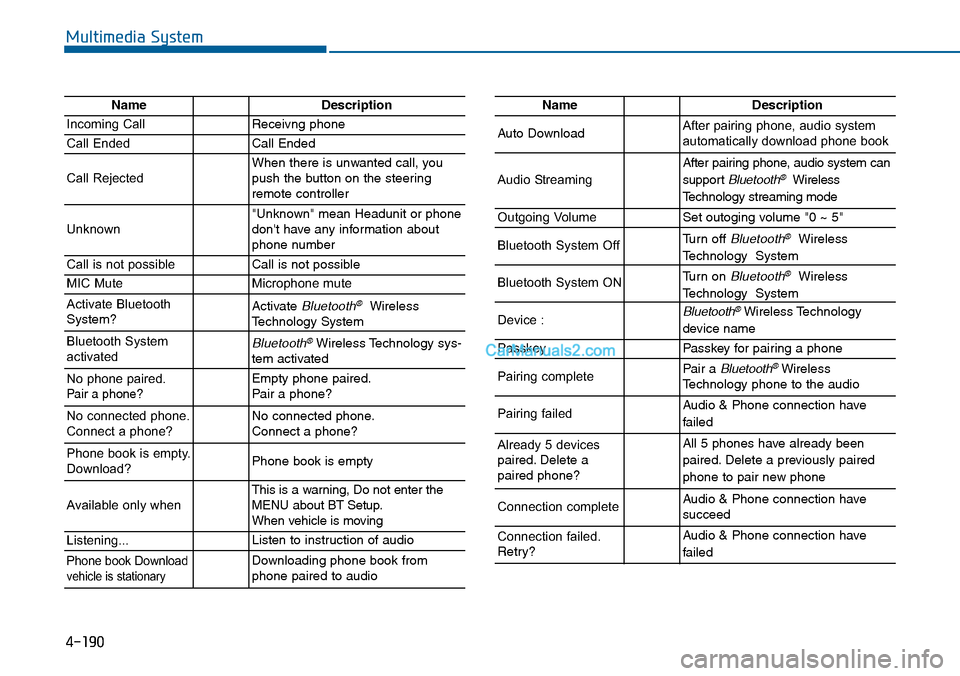
4-190
Multimedia System
NameDescription
Incoming CallReceivng phone
Call EndedCall Ended
Call RejectedWhen there is unwanted call, youpush the button on the steeringremote controller
Unknown"Unknown" mean Headunit or phonedon't have any information aboutphone number
Call is not possibleCall is not possible
MIC MuteMicrophone mute
Activate BluetoothSystem?Activate Bluetooth®WirelessTechnology System
Bluetooth SystemactivatedBluetooth®Wireless Technology sys-tem activated
No phone paired. Pair a phone?Empty phone paired.Pair a phone?
No connected phone.Connect a phone?No connected phone.Connect a phone?
Phone book is empty.Download?Phone book is empty
Available only when This is a warning, Do not enter theMENU about BT Setup.When vehicle is moving
Listening...Listen to instruction of audio
Phone book Downloadvehicle is stationaryDownloading phone book fromphone paired to audio
NameDescription
Auto DownloadAfter pairing phone, audio systemautomatically download phone book
Audio Streaming
After pairing phone, audio system can
support Bluetooth®Wireless
Te c h n o l o g y s t r e a m i n g m o d e
Outgoing VolumeSet outoging volume "0 ~ 5"
Bluetooth System OffTurn off Bluetooth®Wireless
Technology System
Bluetooth System ONTurn on Bluetooth®Wireless
Technology System
Device : Bluetooth®Wireless Technology
device name
PasskeyPasskey for pair ing a phone
Pairing completePair a Bluetooth®WirelessTechnology phone to the audio
Pairing failedAudio & Phone connection have
failed
Already 5 devicespaired. Delete apaired phone?
All 5 phones have already been
paired. Delete a previously paired
phone to pair new phone
Connection completeAudio & Phone connection have succeed
Connection failed.Retry?
Audio & Phone connection have
failed
Page 449 of 665
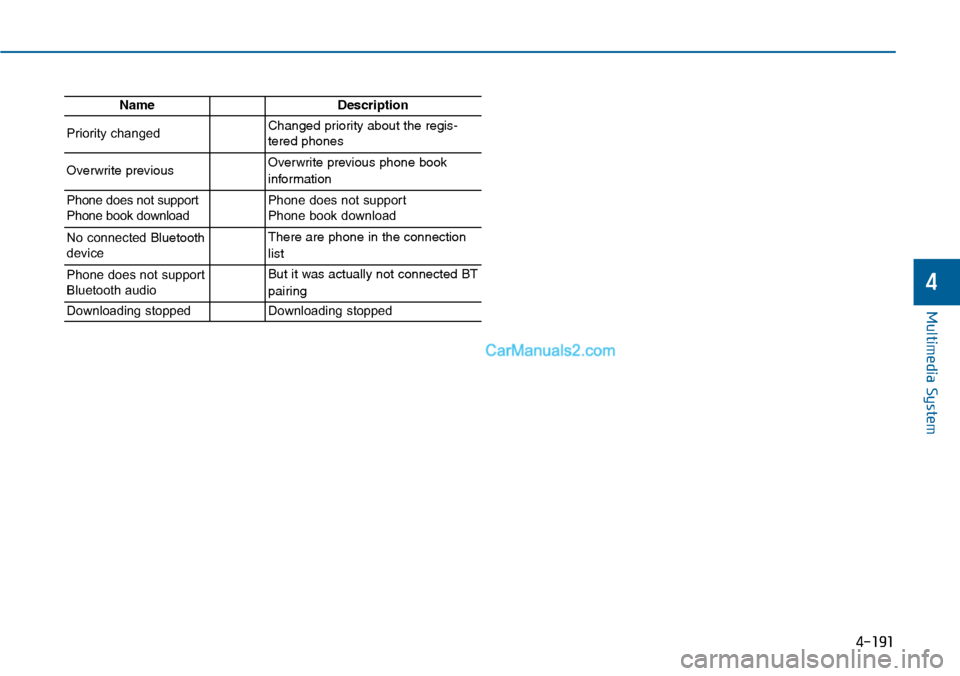
4-191
Multimedia System
4
NameDescription
Priority changedChanged priority about the regis-tered phones
Overwrite previous Overwrite previous phone book
information
Phone does not supportPhone book downloadPhone does not support Phone book download
No connected Bluetoothdevice
There are phone in the connection
list
Phone does not supportBluetooth audio
But it was actually not connected BT
pairing
Downloading stoppedDownloading stopped
Page 618 of 665
7-61
7
Maintenance
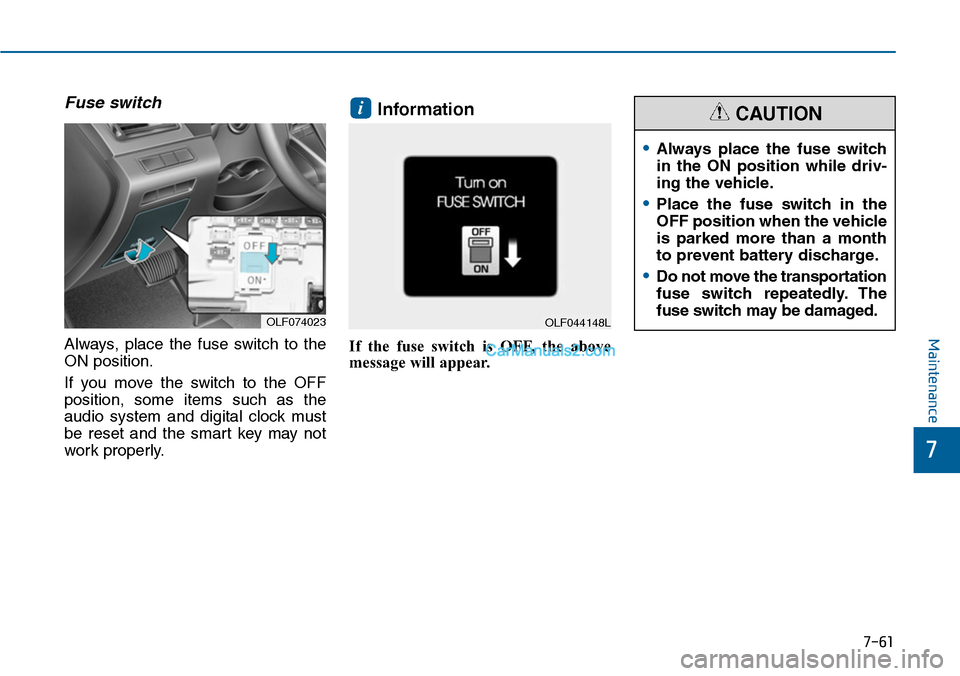
Fuse switch
Always, place the fuse switch to the
ON position.
If you move the switch to the OFF
position, some items such as the
audio system and digital clock must
be reset and the smart key may not
work properly.
Information
If the fuse switch is OFF, the above
message will appear.
i
OLF074023
•Always place the fuse switch
in the ON position while driv-
ing the vehicle.
•Place the fuse switch in the
OFF position when the vehicle
is parked more than a month
to prevent battery discharge.
•Do not move the transportation
fuse switch repeatedly. The
fuse switch may be damaged.
CAUTION
OLF044148L