change time Hyundai Sonata 2014 User Guide
[x] Cancel search | Manufacturer: HYUNDAI, Model Year: 2014, Model line: Sonata, Model: Hyundai Sonata 2014Pages: 665, PDF Size: 17.43 MB
Page 168 of 665
3-72
Convenient features of your vehicle
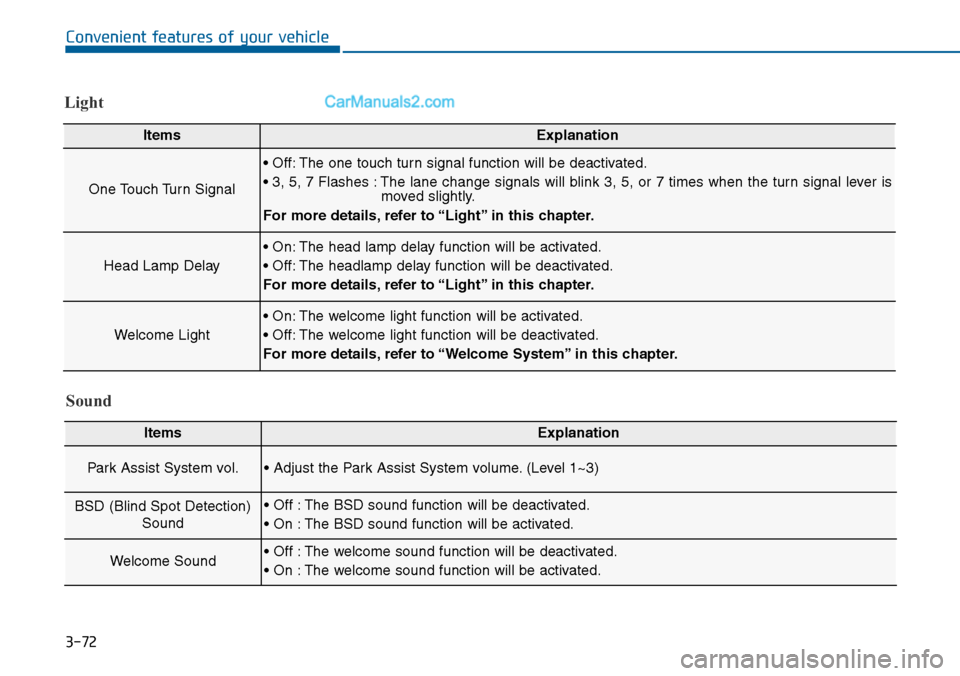
Light
ItemsExplanation
One Touch Turn Signal
• Off: The one touch turn signal function will be deactivated.
• 3, 5, 7 Flashes : The lane change signals will blink 3, 5, or 7 times when the turn signal lever ismoved slightly.
For more details, refer to “Light” in this chapter.
Head Lamp Delay
• On: The head lamp delay function will be activated.
• Off: The headlamp delay function will be deactivated.
For more details, refer to “Light” in this chapter.
Welcome Light
• On: The welcome light function will be activated.
• Off: The welcome light function will be deactivated.
For more details, refer to “Welcome System” in this chapter.
Sound
ItemsExplanation
Par k Assist System vol.• Adjust the Park Assist System volume. (Level 1~3)
BSD (Blind Spot Detection)
Sound
• Off : The BSD sound function will be deactivated.
• On : The BSD sound function will be activated.
Welcome Sound• Off : The welcome sound function will be deactivated.
• On : The welcome sound function will be activated.
Page 171 of 665
3-75
Convenient features of your vehicle
3
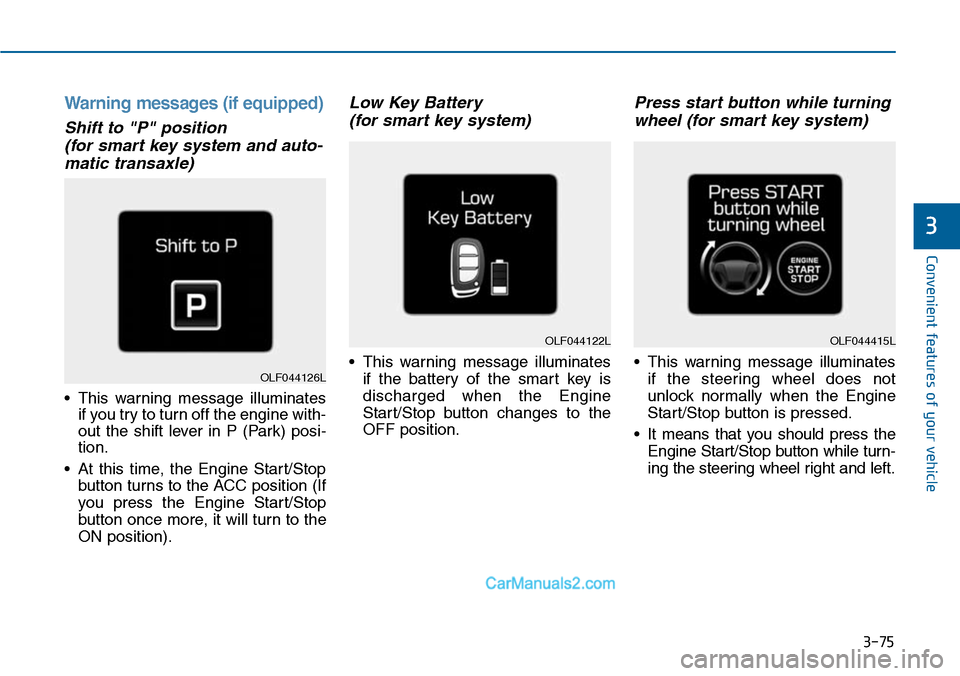
Warning messages (if equipped)
Shift to "P" position
(for smart key system and auto-
matic transaxle)
•This warning message illuminates
if you try to turn off the engine with-
out the shift lever in P (Park) posi-
tion.
•At this time, the Engine Start/Stop
button turns to the ACC position (If
you press the Engine Star t/Stop
button once more, it will turn to the
ON position).
Low Key Battery
(for smart key system)
•This warning message illuminates
if the battery of the smart key is
discharged when the Engine
Start/Stop button changes to the
OFF position.
Press start button while turning
wheel (for smart key system)
•This warning message illuminates
if the steering wheel does not
unlock normally when the Engine
Start/Stop button is pressed.
•It means that you should press the
Engine Start/Stop button while turn-
ing the steering wheel right and left.
OLF044122L
OLF044126L
OLF044415L
Page 179 of 665
3-83
Convenient features of your vehicle
3
Overview
Description
The trip computer is a microcomput-
er-controlled driver information sys-
tem that displays information related
to driving.
Information
Some driving information stored in
the trip computer (for example
Average Vehicle Speed) resets if the
battery is disconnected.
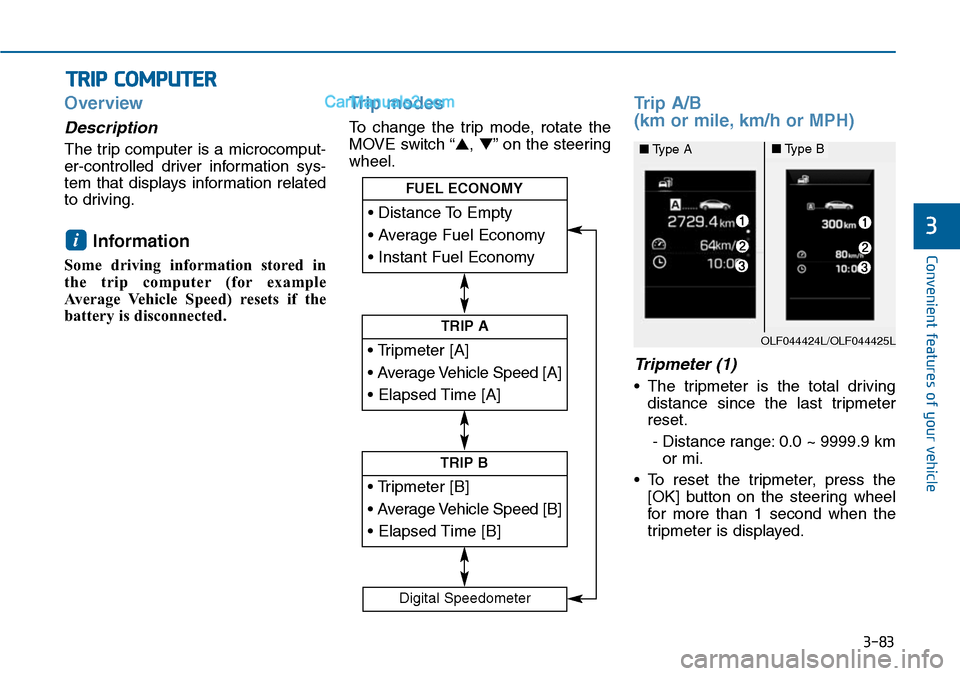
Trip modes
To change the trip mode, rotate the
MOVE switch “▲,▼”on the steering
wheel.
Trip A/B
(km or mile, km/h or MPH)
Tripmeter (1)
•The tripmeter is the total driving
distance since the last tripmeter
reset.
- Distance range: 0.0 ~ 9999.9 km
or mi.
•To reset the tripmeter, press the
[OK] button on the steering wheel
for more than 1 second when the
tripmeter is displayed.
i
TRIP COMPUTER
• Tripmeter [A]
• Average Vehicle Speed [A]
• Elapsed Time [A]
TRIP A
• Tripmeter [B]
• Average Vehicle Speed [B]
• Elapsed Time [B]
TRIP B
• Distance To Empty
• Average Fuel Economy
• Instant Fuel Economy
FUEL ECONOMY
Digital Speedometer
OLF044424L/OLF044425L
■Type A■Type B
Page 196 of 665
3-100
Convenient features of your vehicle
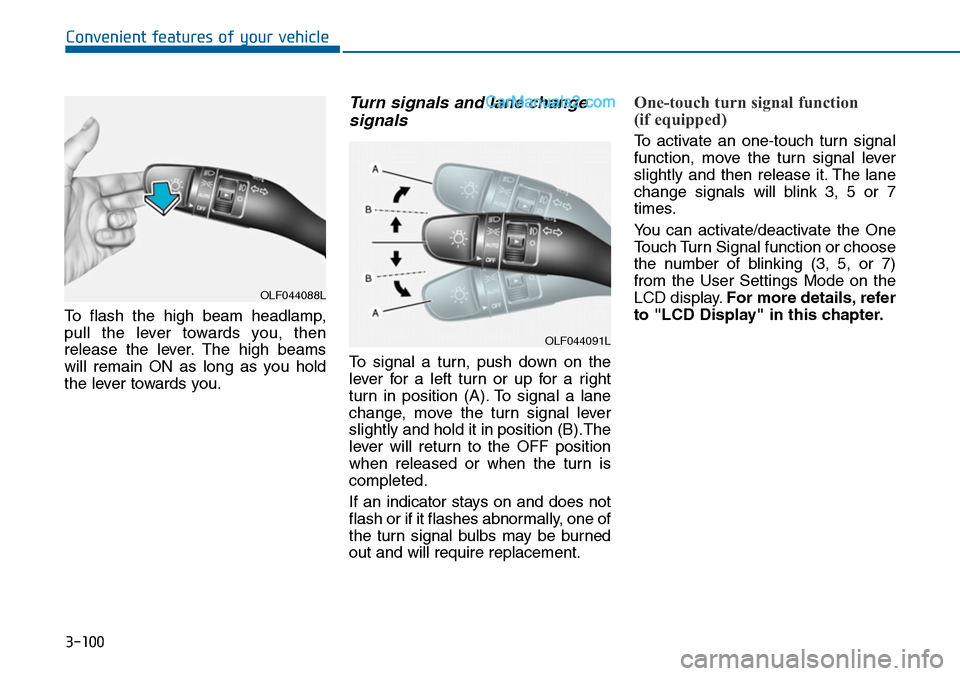
To flash the high beam headlamp,
pull the lever towards you, then
release the lever. The high beams
will remain ON as long as you hold
the lever towards you.
Turn signals and lane change
signals
To signal a turn, push down on the
lever for a left turn or up for a right
turn in position (A). To signal a lane
change, move the turn signal lever
slightly and hold it in position (B).The
lever will return to the OFF position
when released or when the turn is
completed.
If an indicator stays on and does not
flash or if it flashes abnormally, one of
the turn signal bulbs may be burned
out and will require replacement.
One-touch turn signal function
(if equipped)
To activate an one-touch turn signal
function, move the turn signal lever
slightly and then release it. The lane
change signals will blink 3, 5 or 7
times.
Yo u c a n a c t i v a t e / d e a c t i v a t e t h e O n e
Touch Turn Signal function or choose
the number of blinking (3, 5, or 7)
from the User Settings Mode on the
LCD display.For more details, refer
to "LCD Display" in this chapter.
OLF044088L
OLF044091L
Page 227 of 665
3-131
Convenient features of your vehicle
3
Air conditioning
HYUNDAI Air Conditioning Systems
are filled with R-134a refrigerant.
1. Start the engine. Push the air con-
ditioning button.
2. Set the mode to the position.
3. Set the air intake control to the out-
side air or recirculated air position.
4. Adjust the fan speed control and
temperature control to maintain
maximum comfort.
Information
• When using the air conditioning sys-
tem, monitor the temperature gauge
closely while driving up hills or in
heavy traffic when outside tempera-
tures are high. Air conditioning sys-
tem operation may cause engine
overheating. Continue to use the
blower fan but turn the air condi-
tioning system off if the temperature
gauge indicates engine overheating.
•When opening the windows in
humid weather air conditioning
may create water droplets inside the
vehicle. Since excessive water
droplets may cause damage to elec-
trical equipment, air conditioning
should only be used with the win-
dows closed.
Air conditioning system operation
tips
•If the vehicle has been parked in
direct sunlight during hot weather,
open the windows for a short time
to let the hot air inside the vehicle
escape.
•To help reduce moisture inside of
the windows on rainy or humid
days, decrease the humidity inside
the vehicle by operating the air
conditioning system.
•During air conditioning system
operation, you may occasionally
notice a slight change in engine
speed as the air conditioning com-
pressor cycles. This is a normal
system operation characteristic.
•Use the air conditioning system
ever y month only for a few minutes
to ensure maximum system per-
formance.
•When using the air conditioning
system, you may notice clear water
dripping (or even puddling) on the
ground under the passenger side
of the vehicle. This is a normal sys-
tem operation characteristic.
i
Page 228 of 665
3-132
Convenient features of your vehicle
•Operating the air conditioning sys-
tem in the recirculated air position
provides maximum cooling, how-
ever, continual operation in this
mode may cause the air inside the
vehicle to become stale.
•During cooling operation, you may
occasionally notice a misty air flow
because of rapid cooling and
humid air intake. This is a normal
system operation characteristics.
System maintenance
Climate control air filter
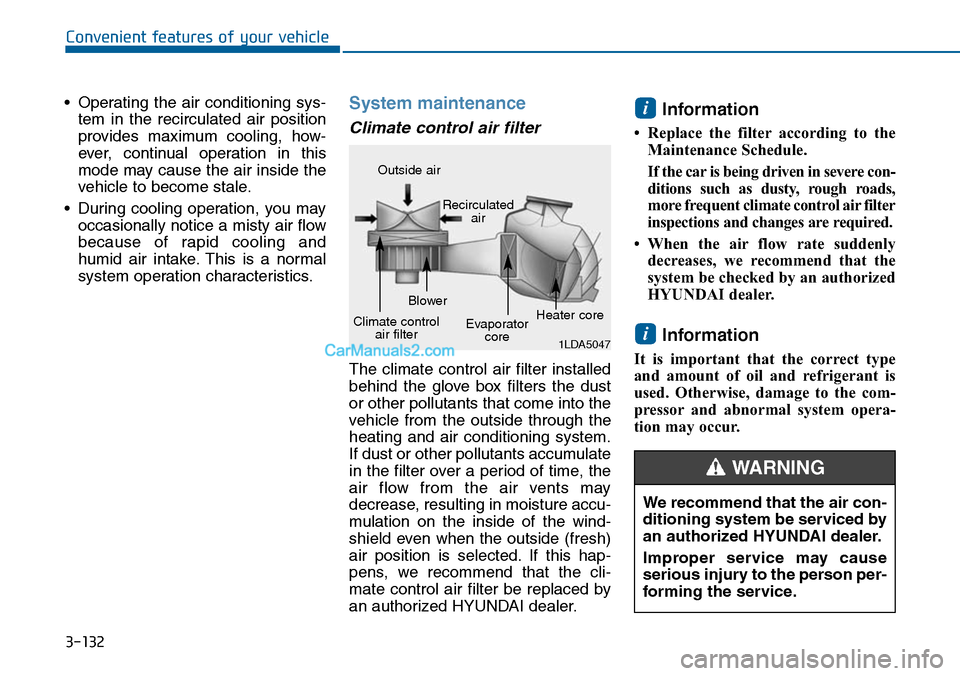
The climate control air filter installed
behind the glove box filters the dust
or other pollutants that come into the
vehicle from the outside through the
heating and air conditioning system.
If dust or other pollutants accumulate
in the filter over a period of time, the
air flow from the air vents may
decrease, resulting in moisture accu-
mulation on the inside of the wind-
shield even when the outside (fresh)
air position is selected. If this hap-
pens, we recommend that the cli-
mate control air filter be replaced by
an authorized HYUNDAI dealer.
Information
• Replace the filter according to the
Maintenance Schedule.
If the car is being driven in severe con-
ditions such as dusty, rough roads,
more frequent climate control air filter
inspections and changes are required.
• When the air flow rate suddenly
decreases, we recommend that the
system be checked by an authorized
HYUNDAI dealer.
Information
It is important that the correct type
and amount of oil and refrigerant is
used. Otherwise, damage to the com-
pressor and abnormal system opera-
tion may occur.
i
i
1LDA5047
Outside air
Recirculatedair
Climate controlair filter
Blower
Evaporatorcore
Heater core
We recommend that the air con-
ditioning system be serviced by
an authorized HYUNDAI dealer.
Improper service may cause
serious injury to the person per-
forming the service.
WARNING
Page 240 of 665
3-144
Convenient features of your vehicle
Information
• When using the air conditioning sys-
tem, monitor the temperature gauge
closely while driving up hills or in
heavy traffic when outside tempera-
tures are high. Air conditioning sys-
tem operation may cause engine
overheating. Continue to use the
blower fan but turn the air condi-
tioning system off if the temperature
gauge indicates engine overheating.
•When opening the windows in
humid weather air conditioning
may create water droplets inside the
vehicle. Since excessive water
droplets may cause damage to elec-
trical equipment, air conditioning
should only be used with the win-
dows closed.
Air conditioning system operation
tips
•If the vehicle has been parked in
direct sunlight during hot weather,
open the windows for a short time
to let the hot air inside the vehicle
escape.
•Use air conditioning to reduce
humidity and moisture inside the
vehicle on rainy or humid days.
•During air conditioning system
operation, you may occasionally
notice a slight change in engine
speed as the air conditioning com-
pressor cycles. This is a normal
system operation characteristic.
•Use the air conditioning system
ever y month only for a few minutes
to ensure maximum system per-
formance.
•When using the air conditioning
system, you may notice clear water
dripping (or even puddling) on the
ground under the passenger side
of the vehicle. This is a normal sys-
tem operation characteristic.
•Operating the air conditioning sys-
tem in the recirculated air position
provides maximum cooling, how-
ever, continual operation in this
mode may cause the air inside the
vehicle to become stale.
•During cooling operation, you may
occasionally notice a misty air flow
because of rapid cooling and
humid air intake. This is a normal
system operation characteristic.
i
Page 241 of 665
3-145
Convenient features of your vehicle
3
System maintenance
Climate control air filter
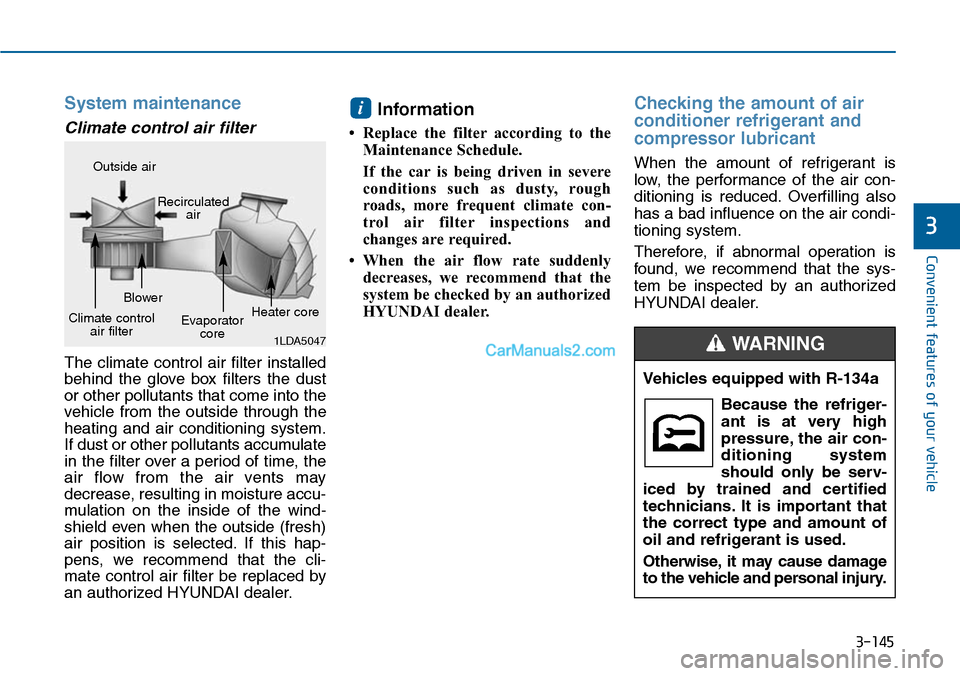
The climate control air filter installed
behind the glove box filters the dust
or other pollutants that come into the
vehicle from the outside through the
heating and air conditioning system.
If dust or other pollutants accumulate
in the filter over a period of time, the
air flow from the air vents may
decrease, resulting in moisture accu-
mulation on the inside of the wind-
shield even when the outside (fresh)
air position is selected. If this hap-
pens, we recommend that the cli-
mate control air filter be replaced by
an authorized HYUNDAI dealer.
Information
• Replace the filter according to the
Maintenance Schedule.
If the car is being driven in severe
conditions such as dusty, rough
roads, more frequent climate con-
trol air filter inspections and
changes are required.
• When the air flow rate suddenly
decreases, we recommend that the
system be checked by an authorized
HYUNDAI dealer.
Checking the amount of air
conditioner refrigerant and
compressor lubricant
When the amount of refrigerant is
low, the performance of the air con-
ditioning is reduced. Overfilling also
has a bad influence on the air condi-
tioning system.
Therefore, if abnormal operation is
found, we recommend that the sys-
tem be inspected by an authorized
HYUNDAI dealer.
i
1LDA5047
Outside air
Recirculatedair
Climate controlair filter
Blower
Evaporatorcore
Heater core
Vehicles equipped with R-134a
Because the refriger-
ant is at very high
pressure, the air con-
ditioning system
should only be serv-
iced by trained and certified
technicians. It is important that
the correct type and amount of
oil and refrigerant is used.
Otherwise, it may cause damage
to the vehicle and personal injury.
WARNING
Page 255 of 665
3-159
Convenient features of your vehicle
3
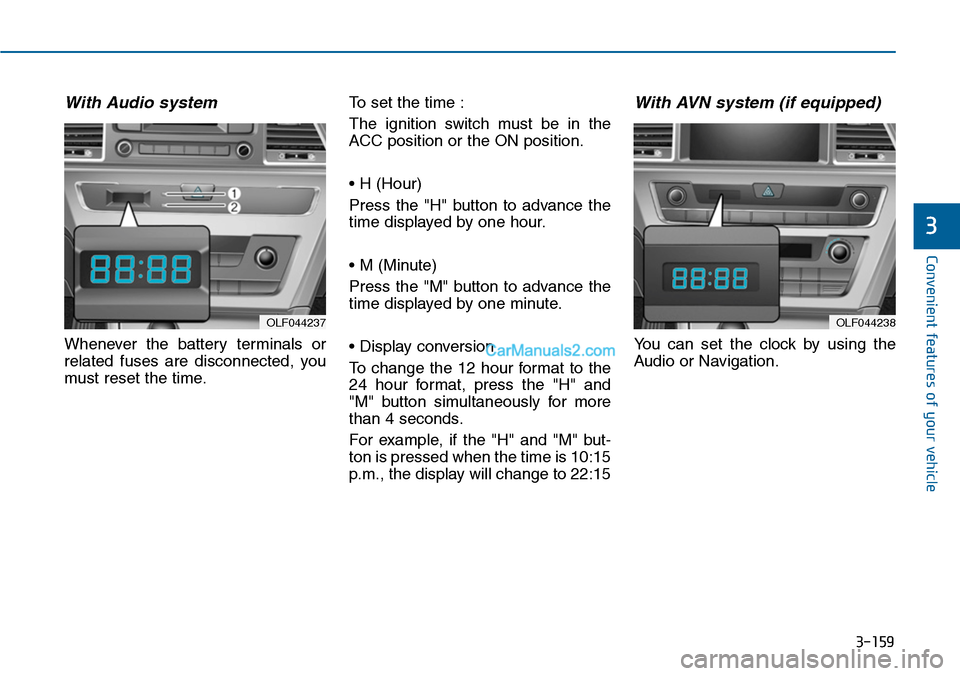
With Audio system
Whenever the battery terminals or
related fuses are disconnected, you
must reset the time.
To set the time :
The ignition switch must be in the
ACC position or the ON position.
• H (Hour)
Press the "H" button to advance the
time displayed by one hour.
• M (Minute)
Press the "M" button to advance the
time displayed by one minute.
• Display conversion
To change the 12 hour format to the
24 hour format, press the "H" and
"M" button simultaneously for more
than 4 seconds.
For example, if the "H" and "M" but-
ton is pressed when the time is 10:15
p.m., the display will change to 22:15
With AVN system (if equipped)
Yo u c a n s e t t h e c l o c k b y u s i n g t h e
Audio or Navigation.
OLF044237OLF044238
Page 274 of 665
4-16
Multimedia System
Information
-Using the iPod®device
•iPod®is a registered trademark of
Apple Inc.
• In order to use the iPod®while oper-
ating the keys, you must use a dedi-
cated iPod®cable. (the cable that is
supplied when purchasing iPod®
/iPhone®products)
• If the iPod®is connected to the vehi-
cle while it is playing, a high pitch
sound could occur for approximate-
ly 1-2 seconds immediately after
connecting. If possible, connect the
iPod to the vehicle with the iPod®
stopped/ paused.
• During ACC ON state, connecting
the iPod®through the iPod®cable
will charge the iPod®through the
car audio system.
•When connecting with the iPod®
cable, make sure to fully insert the
jack to prevent communication
interference.
(Continued)
(Continued)
• When the EQ features of an exter-
nal device, such as the iPod®, and
the audio system are both active, EQ
effects could overlap and cause
sound deterioration and distortion.
Whenever possible, turn off the EQ
feature within the external device
upon use by connecting with the
audio system.
•Noise may occurwhen an iPod®or
AUX device is connected. When
such devices are not being used, dis-
connect the device for storage.
•When the iPod®or AUX device
power is connected to the power
jack, playing the external device
may result in noise. In such cases,
disconnect the power connection
before use.
•Skipping or improper operation
may occur depending on the charac-
teristics of your iPod®/Phone®device.
(Continued)
(Continued)
•If youriPhone®is connected to both
the Bluetooth®Wireless Technology
and USB, the sound may not be
properly played. In your iPhone®,
select the Dock connector or
Bluetooth®Wireless Technology to
change the sound output (source).
• iPod mode cannot be operated when
the iPod®cannot be recognized due
to versions that do not support com-
munication protocols.
•For fifth generation iPod®Nano
devices, the iPod®may not be recog-
nized when the battery level is low.
Please charge the iPod®for use.
•Search/play orders shown within
the iPod®device may differ with the
orders shown within the audio sys-
tem.
•If the iPod®malfunctions due to an
iPod®device defect, reset the iPod®
and try again. (To learn more, refer to
your iPod®manual)
(Continued)
i