change time Hyundai Sonata 2014 Workshop Manual
[x] Cancel search | Manufacturer: HYUNDAI, Model Year: 2014, Model line: Sonata, Model: Hyundai Sonata 2014Pages: 665, PDF Size: 17.43 MB
Page 366 of 665
![Hyundai Sonata 2014 Workshop Manual 4-108
Multimedia System
Scroll Text
Press the key Select
[Display] Select [Scroll text]
This feature is used to scroll text dis-
played on the screen when it is too
long to be displayed at on](/img/35/16805/w960_16805-365.png "Hyundai Sonata 2014 Workshop Manual 4-108
Multimedia System
Scroll Text
Press the key Select
[Display] Select [Scroll text]
This feature is used to scroll text dis-
played on the screen when it is too
long to be displayed at on")
4-108
Multimedia System
Scroll Text
Press the key Select
[Display] Select [Scroll text]
This feature is used to scroll text dis-
played on the screen when it is too
long to be displayed at once.
When turned on, the text is repeat-
edly scrolled. When turned off, the
text is scrolled just once.
MP3 Information Display
Press the key Select
[Display] Select [Song Info]
This feature is used to change the
information displayed within USB
and MP3 CD modes.
1) Folder File : Displays file name
and folder name
2) Album Ar tist Song : Displays
album name/artist name/song
Sound Settings
Audio Settings
Press the key Select
[Sound] Select [Audio Setting]
Use the , , , buttons to
adjust the Fader/Balance settings.
Use the , buttons to adjust the
Bass/Middle/Treble settings.
Press the button to reset.Default
SETUP
SETUP SETUP
Page 371 of 665
![Hyundai Sonata 2014 Workshop Manual 4-113
Multimedia System
4
System Setting
Memory Information
Press the key Select
[System] Select [Memory Information]
This feature displays information
related to system memory.
1) Using : Displa](/img/35/16805/w960_16805-370.png "Hyundai Sonata 2014 Workshop Manual 4-113
Multimedia System
4
System Setting
Memory Information
Press the key Select
[System] Select [Memory Information]
This feature displays information
related to system memory.
1) Using : Displa")
4-113
Multimedia System
4
System Setting
Memory Information
Press the key Select
[System] Select [Memory Information]
This feature displays information
related to system memory.
1) Using : Displays capacity currently
in use
2) Capacity : Displays total capacity
Language
Press the key Select
[System] Select [Language]
This feature is used to change the
system and voice recognition lan-
guage.
If the language is changed, the sys-
tem will restart and apply the select-
ed language.
SETUP
SETUP
Page 373 of 665
![Hyundai Sonata 2014 Workshop Manual 4-115
Multimedia System
4
Mode Pop up
Press the key Select
[Display] Select [Mode Pop up]
This feature is used to display the
Mode Pop up screen when entering
radio and media modes.
When](/img/35/16805/w960_16805-372.png "Hyundai Sonata 2014 Workshop Manual 4-115
Multimedia System
4
Mode Pop up
Press the key Select
[Display] Select [Mode Pop up]
This feature is used to display the
Mode Pop up screen when entering
radio and media modes.
When")
4-115
Multimedia System
4
Mode Pop up
Press the key Select
[Display] Select [Mode Pop up]
This feature is used to display the
Mode Pop up screen when entering
radio and media modes.
When this feature is turned on,
pressing the or key
will display the Mode Pop up screen.
Information
The media Mode Pop up screen can be
displayed only when two or more
media modes have been connected.
Text Scroll
Press the key Select
[Display] Select [Text Scroll]
This feature is used to scroll text dis-
played on the screen when it is too
long to be displayed at once.
When turned on, the text is repeat-
edly scrolled. When turned off, the
text is scrolled just once.
MP3 Information Display
Press the key Select
[Display] Select [Media Display]
This feature is used to change the
information displayed within USB
and MP3 CD modes.
1) Folder File : Displays file name
and folder name
2) Album Ar tist Song : Displays
album name/artist name/song
SETUP SETUP
i
MEDIA RADIO
SETUP
Page 375 of 665
![Hyundai Sonata 2014 Workshop Manual 4-117
Multimedia System
4
Bluetooth®Wireless
Technology Setting
Pairing a New Device
Press the key Select
[Phone] Select [Pair Phone]
Bluetooth®Wireless Technology
devices can be paired with t](/img/35/16805/w960_16805-374.png "Hyundai Sonata 2014 Workshop Manual 4-117
Multimedia System
4
Bluetooth®Wireless
Technology Setting
Pairing a New Device
Press the key Select
[Phone] Select [Pair Phone]
Bluetooth®Wireless Technology
devices can be paired with t")
4-117
Multimedia System
4
Bluetooth®Wireless
Technology Setting
Pairing a New Device
Press the key Select
[Phone] Select [Pair Phone]
Bluetooth®Wireless Technology
devices can be paired with the audio
system.
For more infor mation, refer to the
“Pairing through Phone Setup” sec-
tion within Bluetooth®Wireless
Technology.
Viewing Paired Phone List
Press the key Select
[Phone] Select [Paired Phone List]
This feature is used to view mobile
phones that have been paired with
the audio system. Upon selecting a
paired phone, the setup menu is dis-
played.
For more information, refer to the
“Setting Bluetooth®Wireless
Te c h n o l o g y C o n n e c t i o n ” s e c t i o n w i t h -
in Bluetooth®Wireless Technology.
1) : Moves to the previous
screen
2) Connect/Disconnect Phone :
Connect/disconnects currently
selected phone
3) Delete : Deletes the currently
selected phone
4) Change Priority : Sets currently
selected phone to highest connec-
tion priority
Information
- BEFORE DOWNLOADING
Contacts
• Only contacts within connected
phones can be downloaded. Also
check to see that your mobile phone
supports the download feature.
• To learn more about whether your
mobile phone supports contacts
downloads, refer to your mobile
phone user’s manual.
• The contacts for only the connected
phone can be downloaded. Before
downloading, check to see whether
your phone supports the download
feature.
i
SETUP
SETUP
Page 381 of 665
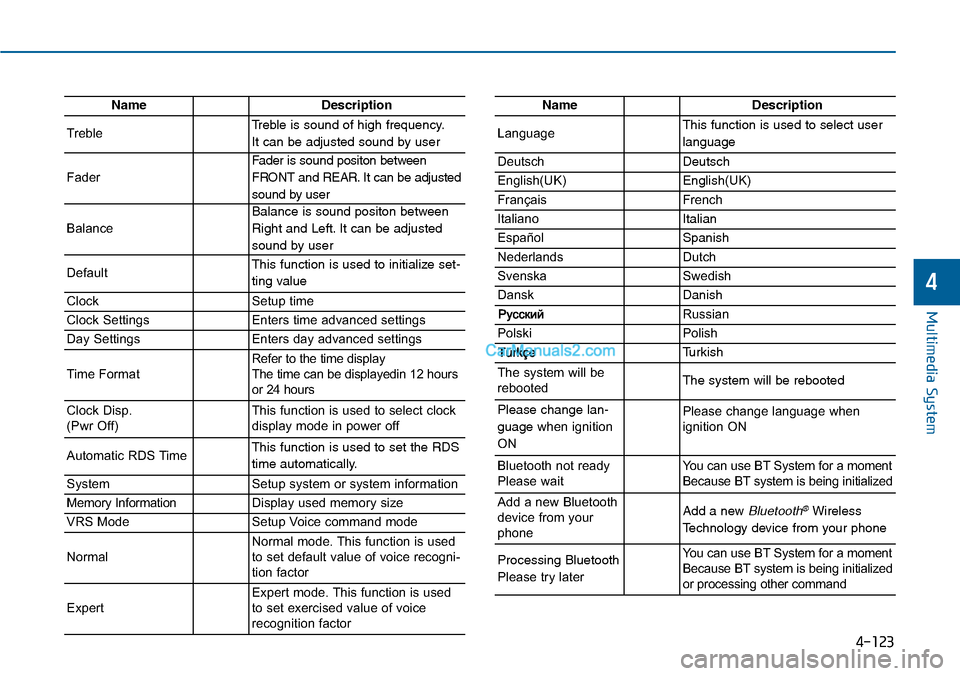
4-123
Multimedia System
4
NameDescription
TrebleTreble is sound of high frequency.
It can be adjusted sound by user
Fader
Fader is sound positon between
FRONT and REAR. It can be adjusted
sound by user
Balance
Balance is sound positon between
Right and Left. It can be adjusted
sound by user
DefaultThis function is used to initialize set-
ting value
ClockSetup time
Clock SettingsEnters time advanced settings
Day SettingsEnters day advanced settings
Time FormatRefer to the time display The time can be displayedin 12 hoursor 24 hours
Clock Disp.(Pwr Off)This function is used to select clockdisplay mode in power off
Automatic RDS TimeThis function is used to set the RDS
time automatically.
SystemSetup system or system information
Memory InformationDisplay used memory size
VRS ModeSetup Voice command mode
NormalNormal mode. This function is usedto set default value of voice recogni-tion factor
ExpertExpert mode. This function is usedto set exercised value of voicerecognition factor
NameDescription
LanguageThis function is used to select user
language
DeutschDeutsch
English(UK)English(UK)
FrançaisFrench
Italiano Italian
EspañolSpanish
NederlandsDutch
SvenskaSwedish
DanskDanish
Russian
PolskiPolish
Turkish
The system will berebootedThe system will be rebooted
Please change lan-
guage when ignition
ON
Please change language when ignition ON
Bluetooth not readyPlease waitYo u c a n u s e B T S y s t e m f o r a m o m e n tBecause BT system is being initialized
Add a new Bluetoothdevice from yourphone
Add a new Bluetooth®Wireless
Technology device from your phone
Processing Bluetooth
Please try later
Yo u c a n u s e B T S y s t e m f o r a m o m e n tBecause BT system is being initializedor processing other command
Page 383 of 665
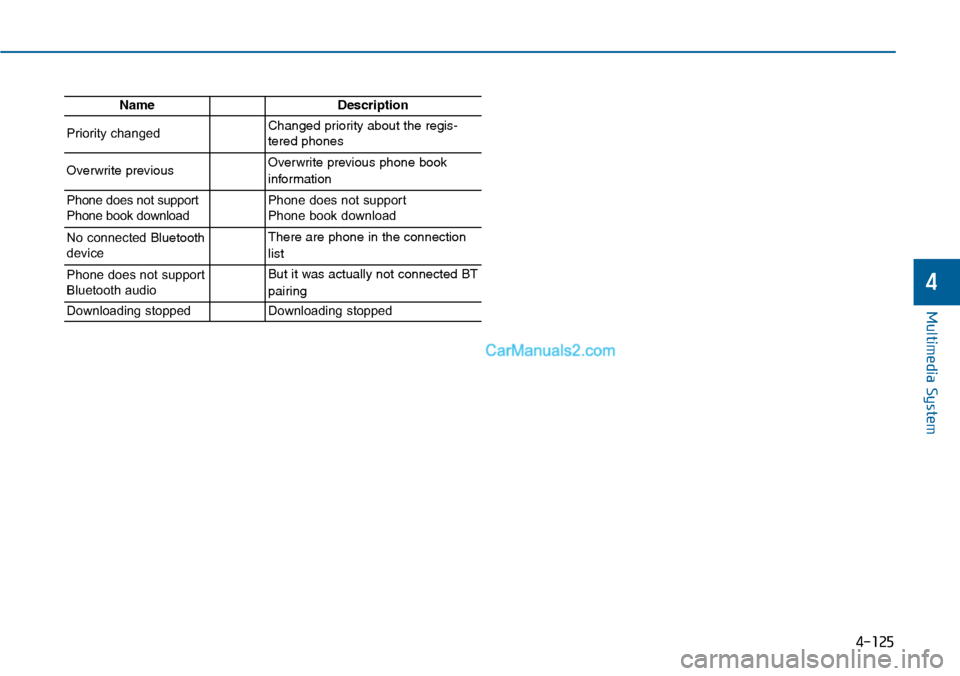
4-125
Multimedia System
4
NameDescription
Priority changedChanged priority about the regis-tered phones
Overwrite previous Overwrite previous phone book
information
Phone does not supportPhone book downloadPhone does not support Phone book download
No connected Bluetoothdevice
There are phone in the connection
list
Phone does not supportBluetooth audio
But it was actually not connected BT
pairing
Downloading stoppedDownloading stopped
Page 384 of 665
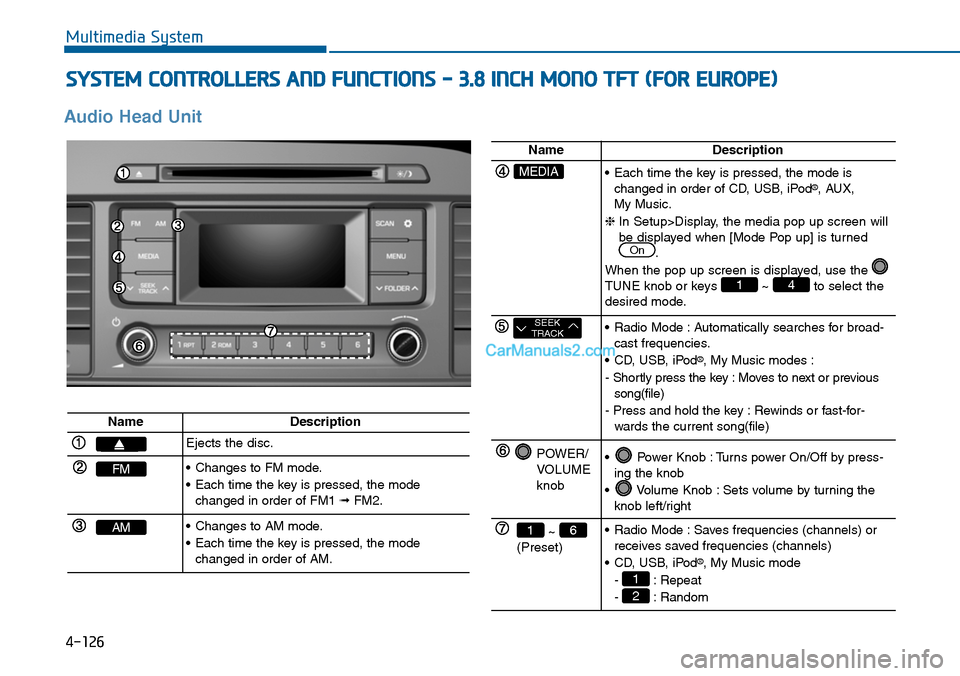
4-126
SYSTEM CONTROLLERS AND FUNCTIONS - 3.8 INCH MONO TFT (FOR EUROPE)
Multimedia System
Audio Head Unit
NameDescription
Ejects the disc.
FM•Changes to FM mode.
•Each time the key is pressed, the modechanged in order of FM1 ➟FM2.
AM•Changes to AM mode.
•Each time the key is pressed, the modechanged in order of AM.
NameDescription
MEDIA•Each time the key is pressed, the mode ischanged in order of CD, USB, iPod®, AUX, My Music.
❈In Setup>Display, the media pop up screen willbe displayed when [Mode Pop up] is turned.
When the pop up screen is displayed, use the TUNE knob or keys ~ to select thedesired mode.
41
On
SEEKTRACK•Radio Mode :Automatically searches for broad-cast frequencies.
•CD, USB, iPod®, My Music modes :
- Shortly press the key : Moves to next or previoussong(file)
- Press and hold the key : Rewinds or fast-for-wards the current song(file)
POWER/VOLUMEknob
•Power Knob :Turns power On/Off by press-ing the knob
•Volume Knob :Sets volume by turning theknob left/right
~ (Preset)
61•Radio Mode :Saves frequencies (channels) orreceives saved frequencies (channels)
•CD, USB, iPod®, My Music mode
- : Repeat
- : Random2
1
Page 385 of 665
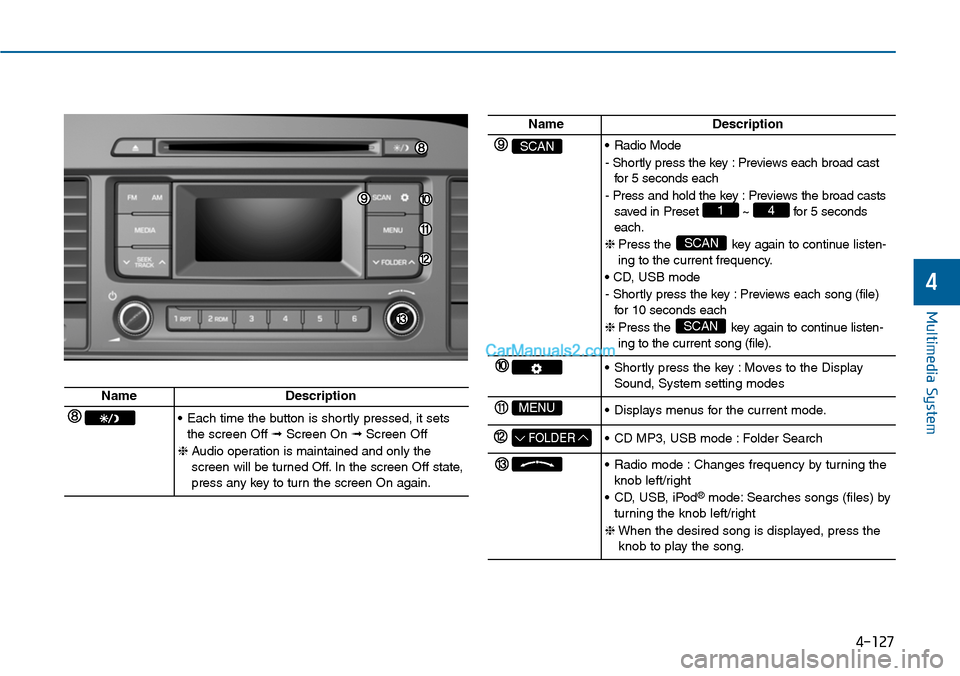
4-127
Multimedia System
4
NameDescription
SCAN•Radio Mode
- Shortly press the key : Previews each broad castfor 5 seconds each
- Press and hold the key : Previews the broad castssaved in Preset ~ for 5 secondseach.
❈ Press the key again to continue listen-ing to the current frequency.
• CD, USB mode
- Shortly press the key : Previews each song (file)for 10 seconds each
❈ Press the key again to continue listen-ing to the current song (file).
SCAN
SCAN
41
•Shortly press the key :Moves to the DisplaySound, System setting modes
MENU•Displays menus for the current mode.
FOLDER•CD MP3, USB mode :Folder Search
•Radio mode :Changes frequency by turning theknob left/right
•CD, USB, iPod®mode: Searches songs (files) byturning the knob left/right
❈When the desired song is displayed, press theknob to play the song.
NameDescription
•Each time the button is shortly pressed, it setsthe screen Off ➟Screen On ➟Screen Off
❈Audio operation is maintained and only thescreen will be turned Off. In the screen Off state,press any key to turn the screen On again.
Page 386 of 665
![Hyundai Sonata 2014 Workshop Manual SETUP
Display Settings
Press the key Select
[Display] through TUNE knob or
key
Mode Pop up
[Mode Pop up] Changes /selection mode
• During On state, press the
or key to display the mo](/img/35/16805/w960_16805-385.png "Hyundai Sonata 2014 Workshop Manual SETUP
Display Settings
Press the key Select
[Display] through TUNE knob or
key
Mode Pop up
[Mode Pop up] Changes /selection mode
• During On state, press the
or key to display the mo")
SETUP
Display Settings
Press the key Select
[Display] through TUNE knob or
key
Mode Pop up
[Mode Pop up] Changes /selection mode
• During On state, press the
or key to display the mode
change pop up screen.
Scroll Text
[Scroll Text] Set /
•:Maintains scroll
•:Scrolls only one (1) time.
Song Info
When playing an MP3 file, select the
desired display info from ‘Folder/File’
or ‘Album/Artist/Song’.
Sound Settings
Press the key Select
[Sound] through TUNE knob or
key2
Off
On
OffOn
MEDIA
RADIO
OffOn
1
Multimedia System
4-128
Page 388 of 665
![Hyundai Sonata 2014 Workshop Manual 4-130
Multimedia System
System Settings
Press the key Select [System]
through tune knob or key
Memory Information
Displays currently used memory and
total my music memory.
Select [Memory Information](/img/35/16805/w960_16805-387.png "Hyundai Sonata 2014 Workshop Manual 4-130
Multimedia System
System Settings
Press the key Select [System]
through tune knob or key
Memory Information
Displays currently used memory and
total my music memory.
Select [Memory Information")
4-130
Multimedia System
System Settings
Press the key Select [System]
through tune knob or key
Memory Information
Displays currently used memory and
total my music memory.
Select [Memory Information] OK
The currently used memory is dis-
played on the left side while total my
music memory. is displayed on the
right side.
Language
This menu is used to set the display
and voice recognition language.
Select [Language] Set through TUNE
knob
❈The system will reboot after the
language is changed.
❈Language support by region
-
3