wheel Hyundai Sonata 2014 Owner's Guide
[x] Cancel search | Manufacturer: HYUNDAI, Model Year: 2014, Model line: Sonata, Model: Hyundai Sonata 2014Pages: 665, PDF Size: 17.43 MB
Page 123 of 665
3-27
Convenient features of your vehicle
3
Tilt steering / Telescope steering
Information
After adjustment, sometimes the lock-
release lever may not lock the steering
wheel.
It is not a malfunction. This occurs
when two gears engage. In this case,
adjust the steering wheel again and
then lock the steering wheel.
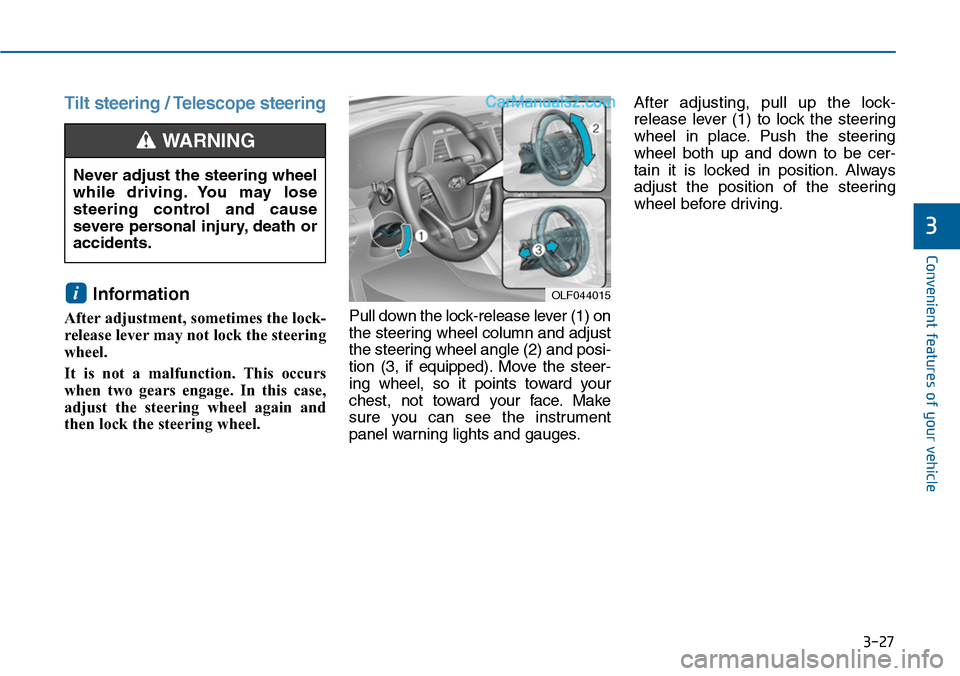
Pull down the lock-release lever (1) on
the steering wheel column and adjust
the steering wheel angle (2) and posi-
tion (3, if equipped). Move the steer-
ing wheel, so it points toward your
chest, not toward your face. Make
sure you can see the instrument
panel warning lights and gauges.
After adjusting, pull up the lock-
release lever (1) to lock the steering
wheel in place. Push the steering
wheel both up and down to be cer-
tain it is locked in position. Always
adjust the position of the steering
wheel before driving.
i
Never adjust the steering wheel
while driving. You may lose
steering control and cause
severe personal injury, death or
accidents.
WARNING
OLF044015
Page 124 of 665
3-28
Convenient features of your vehicle
Heated steering wheel
(if equipped)
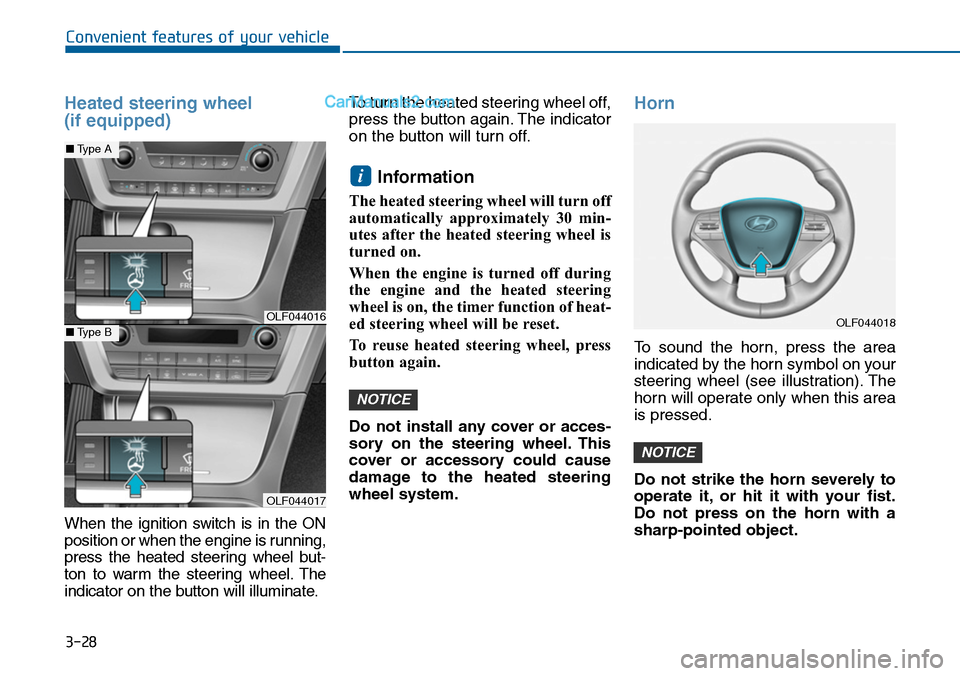
When the ignition switch is in the ON
position or when the engine is running,
press the heated steering wheel but-
ton to warm the steering wheel. The
indicator on the button will illuminate.
To turn the heated steering wheel off,
press the button again. The indicator
on the button will turn off.
Information
The heated steering wheel will turn off
automatically approximately 30 min-
utes after the heated steering wheel is
turned on.
When the engine is turned off during
the engine and the heated steering
wheel is on, the timer function of heat-
ed steering wheel will be reset.
To reuse heated steering wheel, press
button again.
Do not install any cover or acces-
sory on the steering wheel. This
cover or accessory could cause
damage to the heated steering
wheel system.
Horn
To sound the horn, press the area
indicated by the horn symbol on your
steering wheel (see illustration). The
horn will operate only when this area
is pressed.
Do not strike the horn severely to
operate it, or hit it with your fist.
Do not press on the horn with a
sharp-pointed object.
NOTICE
NOTICE
i
OLF044016
OLF044017
■Type A
■Type BOLF044018
Page 171 of 665
3-75
Convenient features of your vehicle
3
Warning messages (if equipped)
Shift to "P" position
(for smart key system and auto-
matic transaxle)
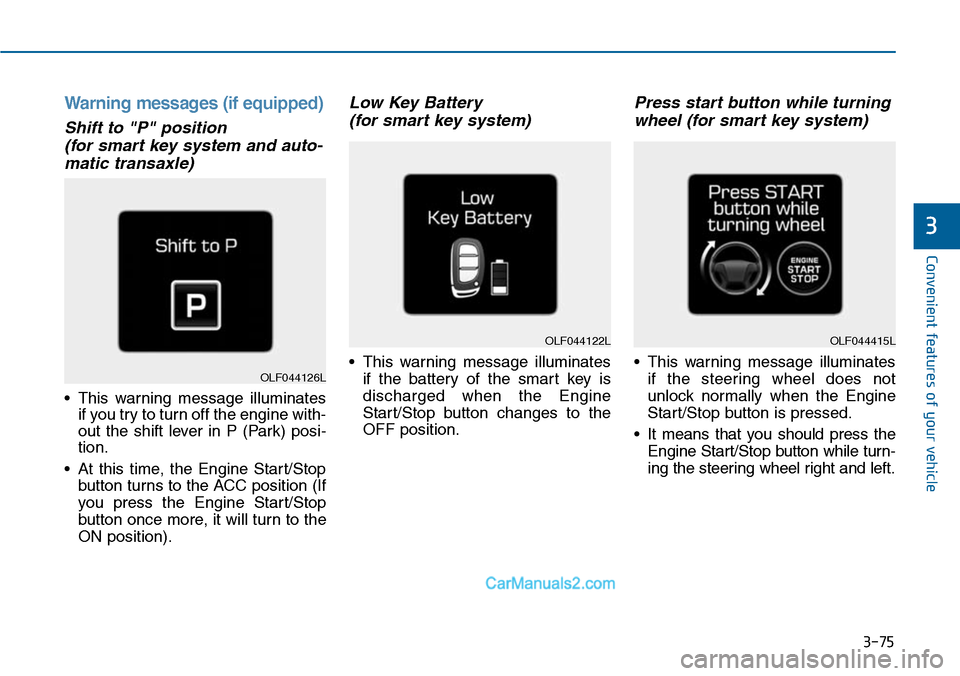
•This warning message illuminates
if you try to turn off the engine with-
out the shift lever in P (Park) posi-
tion.
•At this time, the Engine Start/Stop
button turns to the ACC position (If
you press the Engine Star t/Stop
button once more, it will turn to the
ON position).
Low Key Battery
(for smart key system)
•This warning message illuminates
if the battery of the smart key is
discharged when the Engine
Start/Stop button changes to the
OFF position.
Press start button while turning
wheel (for smart key system)
•This warning message illuminates
if the steering wheel does not
unlock normally when the Engine
Start/Stop button is pressed.
•It means that you should press the
Engine Start/Stop button while turn-
ing the steering wheel right and left.
OLF044122L
OLF044126L
OLF044415L
Page 172 of 665
3-76
Convenient features of your vehicle
Steering wheel unlocked
(for smart key system)
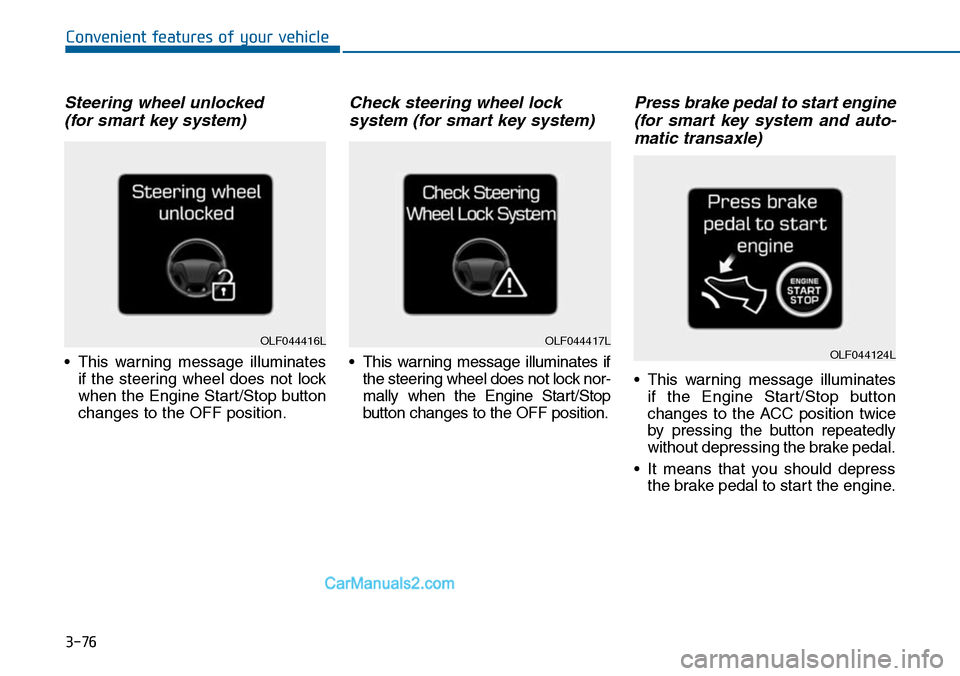
•This warning message illuminates
if the steering wheel does not lock
when the Engine Start/Stop button
changes to the OFF position.
Check steering wheel lock
system (for smart key system)
•This warning message illuminates if
the steering wheel does not lock nor-
mally when the Engine Start/Stop
button changes to the OFF position.
Press brake pedal to start engine
(for smart key system and auto-
matic transaxle)
•This warning message illuminates
if the Engine Start/Stop button
changes to the ACC position twice
by pressing the button repeatedly
without depressing the brake pedal.
•It means that you should depress
the brake pedal to start the engine.
OLF044416LOLF044417LOLF044124L
Page 176 of 665
3-80
Convenient features of your vehicle
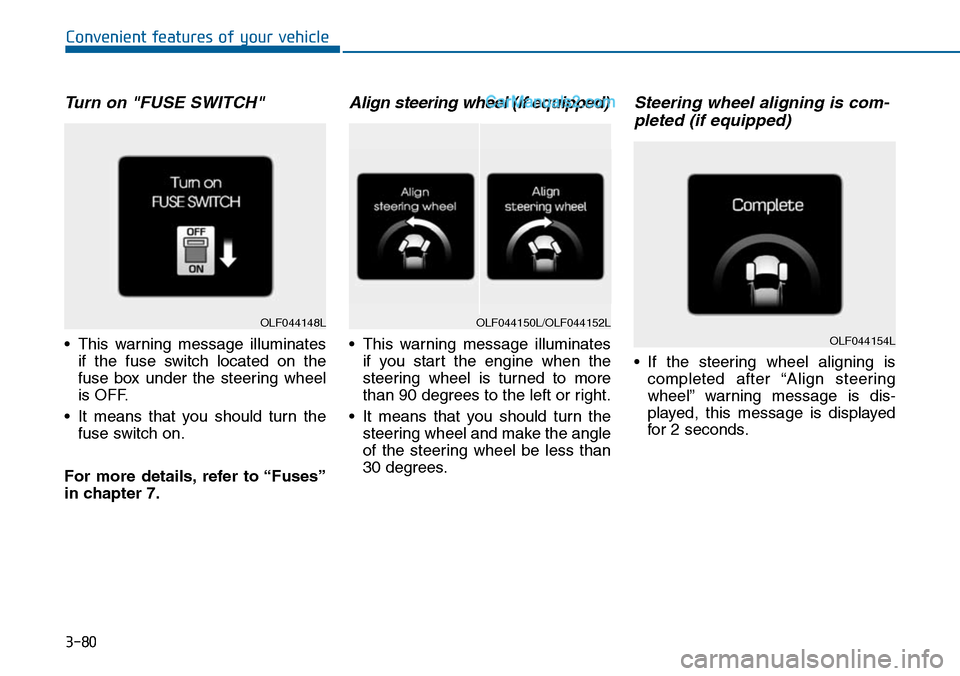
Turn on "FUSE SWITCH"
•This warning message illuminates
if the fuse switch located on the
fuse box under the steering wheel
is OFF.
•It means that you should turn the
fuse switch on.
For more details, refer to “Fuses”
in chapter 7.
Align steering wheel (if equipped)
•This warning message illuminates
if you start the engine when the
steering wheel is turned to more
than 90 degrees to the left or right.
•It means that you should turn the
steering wheel and make the angle
of the steering wheel be less than
30 degrees.
Steering wheel aligning is com-
pleted (if equipped)
•If the steering wheel aligning is
completed after “Align steering
wheel” warning message is dis-
played, this message is displayed
for 2 seconds.
OLF044148LOLF044150L/OLF044152L
OLF044154L
Page 179 of 665
3-83
Convenient features of your vehicle
3
Overview
Description
The trip computer is a microcomput-
er-controlled driver information sys-
tem that displays information related
to driving.
Information
Some driving information stored in
the trip computer (for example
Average Vehicle Speed) resets if the
battery is disconnected.
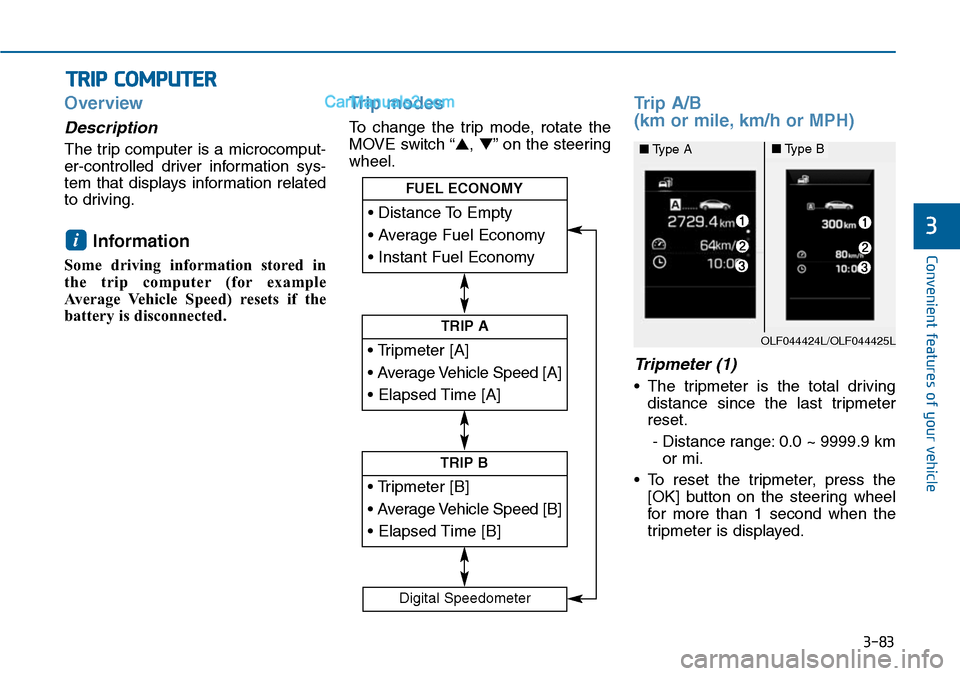
Trip modes
To change the trip mode, rotate the
MOVE switch “▲,▼”on the steering
wheel.
Trip A/B
(km or mile, km/h or MPH)
Tripmeter (1)
•The tripmeter is the total driving
distance since the last tripmeter
reset.
- Distance range: 0.0 ~ 9999.9 km
or mi.
•To reset the tripmeter, press the
[OK] button on the steering wheel
for more than 1 second when the
tripmeter is displayed.
i
TRIP COMPUTER
• Tripmeter [A]
• Average Vehicle Speed [A]
• Elapsed Time [A]
TRIP A
• Tripmeter [B]
• Average Vehicle Speed [B]
• Elapsed Time [B]
TRIP B
• Distance To Empty
• Average Fuel Economy
• Instant Fuel Economy
FUEL ECONOMY
Digital Speedometer
OLF044424L/OLF044425L
■Type A■Type B
Page 180 of 665
3-84
Convenient features of your vehicle
Average Vehicle Speed (2)
•The average vehicle speed is cal-
culated by the total driving dis-
tance and driving time since the
last average vehicle speed reset.
- Speed range: 0 ~ 999 km/h or MPH
•To reset the average vehicle speed,
press the [OK] button on the steer-
ing wheel for more than 1 second
when the average vehicle speed is
displayed.
Information
•The average vehicle speed is not dis-
played if the driving distance is less
than 300 meters (0.19 miles) or the
driving time is less than 10 seconds
since the ignition switch or the Engine
Start/Stop button is turned to ON.
• Even if the vehicle is not in motion,
the average vehicle speed keeps cal-
culating while the engine is running.
Elapsed Time (3)
•The elapsed time is the total driv-
ing time since the last elapsed time
reset.
- Time range (hh:mm): 00:00 ~ 99:59
•To reset the elapsed time, press
the [OK] button on the steering
wheel for more than 1 second
when the elapsed time is dis-
played.
Information
Even if the vehicle is not in motion, the
elapsed time keeps calculating while
the engine is running.
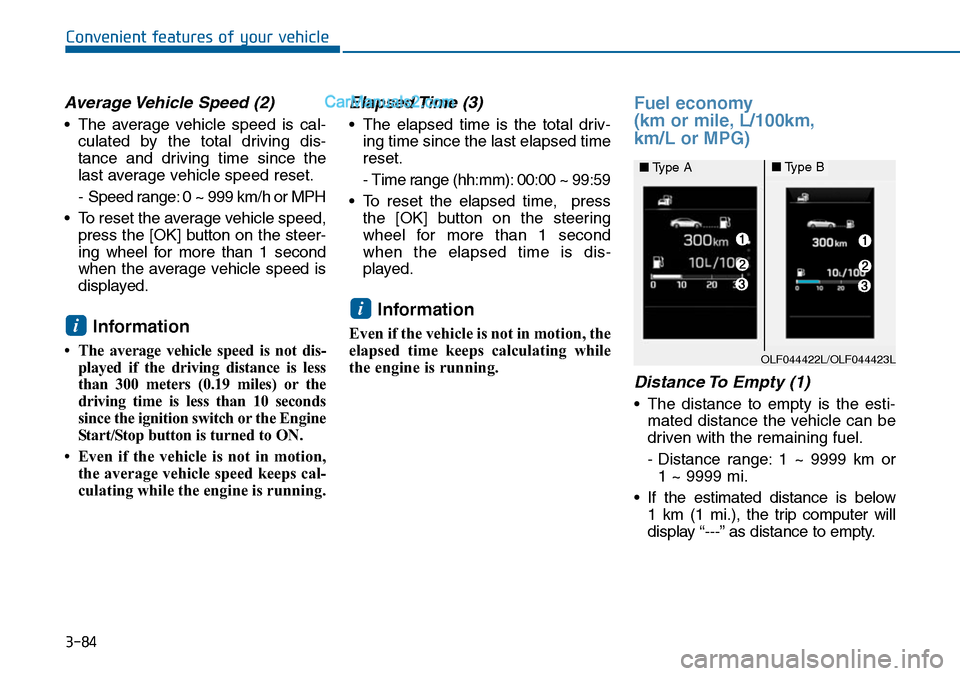
Fuel economy
(km or mile, L/100km,
km/L or MPG)
Distance To Empty (1)
•The distance to empty is the esti-
mated distance the vehicle can be
driven with the remaining fuel.
- Distance range: 1 ~ 9999 km or
1 ~ 9999 mi.
•If the estimated distance is below
1 km (1 mi.), the trip computer will
display “---” as distance to empty.
i
i
OLF044422L/OLF044423L
■Type A■Type B
Page 181 of 665
3-85
Convenient features of your vehicle
3
Information
• If the vehicle is not on level ground
or the battery power has been inter-
rupted, the distance to empty func-
tion may not operate correctly.
• The distance to empty may differ
from the actual driving distance as
it is an estimate of the available
driving distance.
• The trip computer may not register
additional fuel if less than 6 liters
(1.6 gallons) of fuel are added to the
vehicle.
• The fuel economy and distance to
empty may vary significantly based
on driving conditions, driving
habits, and condition of the vehicle.
Average Fuel Economy (2)
•The average fuel economy is calcu-
lated by the total driving distance
and fuel consumption since the last
average fuel economy reset.
- Fuel economy range: 0.0 ~ 99.9
L/100km, km/L or MPG
•The average fuel economy can be
reset both manually and automati-
cally.
Manual reset
To c l e a r t h e a v e r a g e f u e l e c o n o m y
manually, press the [OK] button on
the steering wheel for more than 1
second when the average fuel econo-
my is displayed.
Automatic reset
To m a k e t h e a v e r a g e f u e l e c o n o m y
be reset automatically whenever refu-
eling, select the “Auto Reset” mode in
User Setting menu of the LCD display
(Refer to “LCD Display”).
Under “Auto Reset” mode, the aver-
age fuel economy will be cleared to
zero (---) when the vehicle speed
exceeds 1 km/h after refueling more
than 6 liters (1.6 gallons).
Information
The average fuel economy is not dis-
played for more accurate calculation
if the vehicle does not drive more than
10 seconds or 300 meters (0.19 miles)
since the ignition switch or the Engine
Start/Stop button is turned to ON.
Instant Fuel Economy (3)
•This mode displays the instant fuel
economy during the last few sec-
onds when the vehicle speed is
more than 10 km/h (6.2 MPH).
- Fuel economy range: 0 ~ 30
L/100km, km/L or 0 ~ 50 MPG
i
i
Page 184 of 665
3-88
Convenient features of your vehicle
Parking Brake & Brake
Fluid Warning Light
This warning light illuminates:
•Once you set the ignition switch
switch or the Engine Star t/Stop
button to the ON position.
- It illuminates for approximately 3
seconds
- It remains on if the parking brake
is applied.
•When the parking brake is applied.
•When the brake fluid level in the
reservoir is low.
- If the warning light illuminates
with the parking brake released, it
indicates the brake fluid level in
reservoir is low.
If the brake fluid level in the reser-
voir is low:
1. Drive carefully to the nearest safe
location and stop your vehicle.
2. With the engine stopped, check the
brake fluid level immediately and
add fluid as required (For more
details, refer to “Brake Fluid” in
chapter 7).Then check all brake
components for fluid leaks. If any
leak on brake system is still found,
the warning light remains on, or the
brakes do not operate properly, do
not drive the vehicle.
In this case, we recommend that
you have the vehicle towed to an
authorized HYUNDAI dealer and
inspected.
Dual-diagonal braking system
Yo u r v e h i c l e i s e q u i p p e d w i t h d u a l -
diagonal braking systems. This
means you still have braking on two
wheels even if one of the dual sys-
tems should fail.
With only one of the dual systems
working, more than normal pedal
travel and greater pedal pressure are
required to stop the vehicle.
Also, the vehicle will not stop in as
short a distance with only a portion
of the brake system working.
If the brakes fail while you are driv-
ing, shift to a lower gear for addition-
al engine braking and stop the vehi-
cle as soon as it is safe to do so.
Page 223 of 665
3-127
Convenient features of your vehicle
3
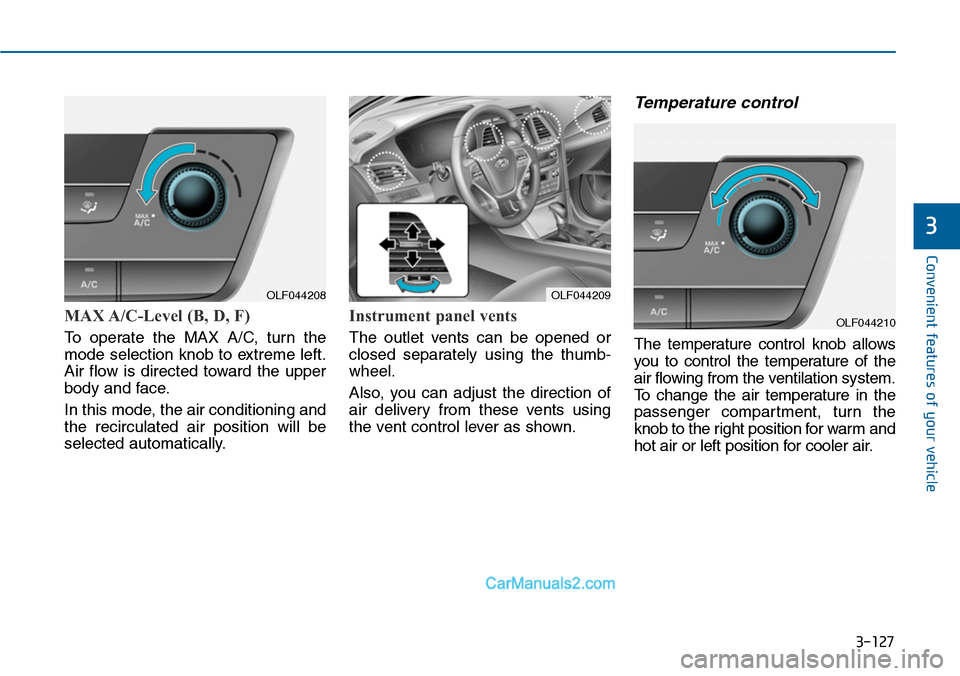
MAX A/C-Level (B, D, F)
To operate the MAX A/C, turn the
mode selection knob to extreme left.
Air flow is directed toward the upper
body and face.
In this mode, the air conditioning and
the recirculated air position will be
selected automatically.
Instrument panel vents
The outlet vents can be opened or
closed separately using the thumb-
wheel.
Also, you can adjust the direction of
air delivery from these vents using
the vent control lever as shown.
Temperature control
The temperature control knob allows
you to control the temperature of the
air flowing from the ventilation system.
To c h a n g e t h e a i r t e m p e r a t u r e i n t h e
passenger compartment, turn the
knob to the right position for warm and
hot air or left position for cooler air.
OLF044208OLF044209
OLF044210