battery Hyundai Sonata 2015 - RHD (UK, Australia) Owner's Guide
[x] Cancel search | Manufacturer: HYUNDAI, Model Year: 2015, Model line: Sonata, Model: Hyundai Sonata 2015Pages: 504, PDF Size: 10.88 MB
Page 225 of 504
3-141
Convenient features of your vehicle
3
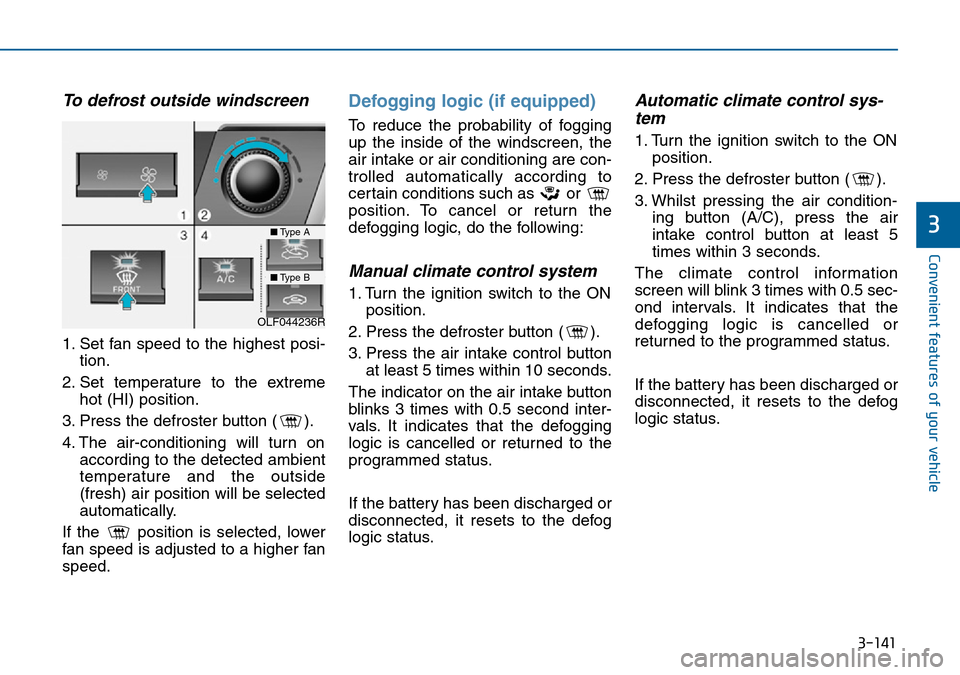
To defrost outside windscreen
1. Set fan speed to the highest posi-
tion.
2. Set temperature to the extreme
hot (HI) position.
3. Press the defroster button ( ).
4. The air-conditioning will turn on
according to the detected ambient
temperature and the outside
(fresh) air position will be selected
automatically.
If the position is selected, lower
fan speed is adjusted to a higher fan
speed.
Defogging logic (if equipped)
To reduce the probability of fogging
up the inside of the windscreen, the
air intake or air conditioning are con-
trolled automatically according to
certain conditions such as or
position. To cancel or return the
defogging logic, do the following:
Manual climate control system
1. Turn the ignition switch to the ON
position.
2. Press the defroster button ( ).
3. Press the air intake control button
at least 5 times within 10 seconds.
The indicator on the air intake button
blinks 3 times with 0.5 second inter-
vals. It indicates that the defogging
logic is cancelled or returned to the
programmed status.
If the battery has been discharged or
disconnected, it resets to the defog
logic status.
Automatic climate control sys-
tem
1. Turn the ignition switch to the ON
position.
2. Press the defroster button ( ).
3. Whilst pressing the air condition-
ing button (A/C), press the air
intake control button at least 5
times within 3 seconds.
The climate control information
screen will blink 3 times with 0.5 sec-
ond intervals. It indicates that the
defogging logic is cancelled or
returned to the programmed status.
If the battery has been discharged or
disconnected, it resets to the defog
logic status.
OLF044236R
■Type A
■Type B
Page 234 of 504
3-150
Convenient features of your vehicle
To prevent damage to the power
outlets :
• Use the power outlet only when
the engine is running and
remove the accessory plug after
use. Using the accessory plug
for prolonged periods of time
with the engine off could cause
the battery to discharge.
• Only use 12V electric acces-
sories which draw less than 180
W (Watts).
• Adjust the air conditioner or
heater to the lowest operating
level when using the power out-
let.
• Close the cover when not in use.
(Continued)(Continued)
• Some electronic devices can
cause electronic interference
when plugged into a vehicle’s
power outlet. These devices may
cause excessive audio static
and malfunctions in other elec-
tronic systems or devices used
in your vehicle.
• Push the plug in as far as it will
go. If good contact is not made,
the plug may overheat and the
fuse may open.
• Plug in battery equipped electri-
cal/electronic devices with
reverse current protection. The
current from the battery may
flow into the vehicle's electri-
cal/electronic system and cause
system malfunction.
NOTICE
Avoid electrical shocks. Do not
place your fingers or foreign
objects (pin, etc.) into a power
outlet or touch the power outlet
with a wet hand.
WARNING
Page 236 of 504
3-152
Convenient features of your vehicle
Clock
Whenever the battery terminals or
related fuses are disconnected, you
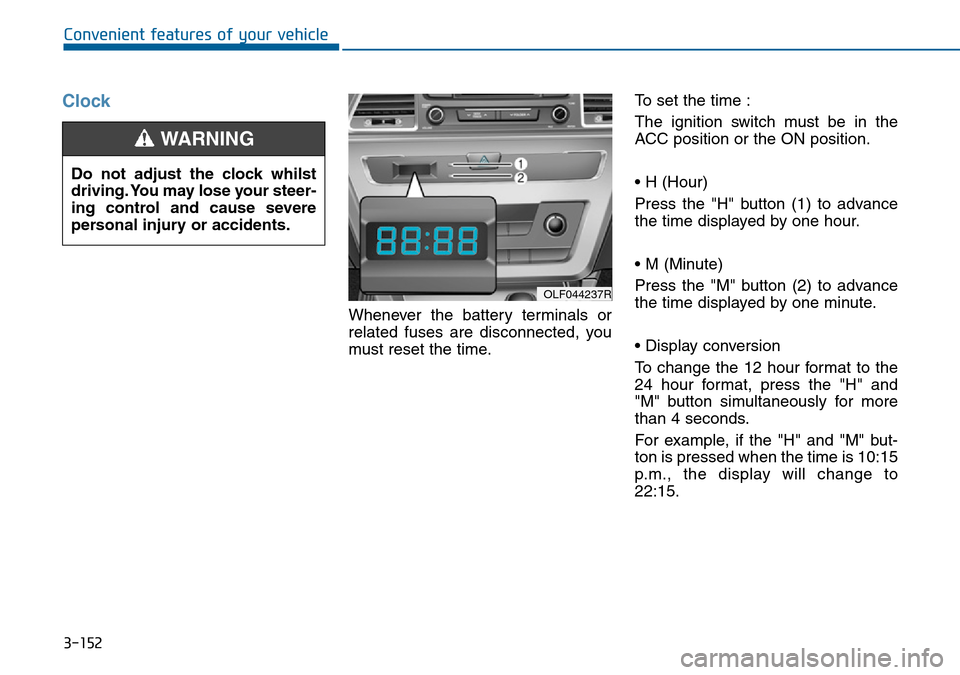
must reset the time.To set the time :
The ignition switch must be in the
ACC position or the ON position.
• H (Hour)
Press the "H" button (1) to advance
the time displayed by one hour.
• M (Minute)
Press the "M" button (2) to advance
the time displayed by one minute.
• Display conversion
To change the 12 hour format to the
24 hour format, press the "H" and
"M" button simultaneously for more
than 4 seconds.
For example, if the "H" and "M" but-
ton is pressed when the time is 10:15
p.m., the display will change to
22:15.
OLF044237R
Do not adjust the clock whilst
driving. You may lose your steer-
ing control and cause severe
personal injury or accidents.
WARNING
Page 255 of 504
4-16
Multimedia System
Information
-
Using the iPod®device
• iPod
®is a registered trademark of
Apple Inc.
• In order to use the iPod
®while oper-
ating the keys, you must use a dedi-
cated iPod
®cable. (the cable that is
supplied when purchasing iPod®
/iPhone®products)
• If the iPod
®is connected to the vehi-
cle while it is playing, a high pitch
sound could occur for approximate-
ly 1-2 seconds immediately after
connecting. If possible, connect the
iPod to the vehicle with the iPod
®
stopped/ paused.
• During ACC ON state, connecting
the iPod
®through the iPod®cable
will charge the iPod®through the
car audio system.
• When connecting with the iPod
®
cable, make sure to fully insert the
jack to prevent communication
interference.
(Continued)(Continued)
• When the EQ features of an exter-
nal device, such as the iPod
®, and
the audio system are both active, EQ
effects could overlap and cause
sound deterioration and distortion.
Whenever possible, turn off the EQ
feature within the external device
upon use by connecting with the
audio system.
• Noise may occur when an iPod
®or
AUX device is connected. When
such devices are not being used, dis-
connect the device for storage.
• When the iPod
®or AUX device
power is connected to the power
jack, playing the external device
may result in noise. In such cases,
disconnect the power connection
before use.
• Skipping or improper operation
may occur depending on the charac-
teristics of your iPod
®/Phone®device.
(Continued)(Continued)
• If your iPhone
®is connected to both
the Bluetooth®Wireless Technology
and USB, the sound may not be
properly played. In your iPhone
®,
select the Dock connector or
Bluetooth
®Wireless Technology to
change the sound output (source).
• iPod mode cannot be operated when
the iPod
®cannot be recognized due
to versions that do not support com-
munication protocols.
• For fifth generation iPod
®Nano
devices, the iPod®may not be recog-
nized when the battery level is low.
Please charge the iPod
®for use.
• Search/play orders shown within
the iPod
®device may differ with the
orders shown within the audio sys-
tem.
• If the iPod
®malfunctions due to an
iPod®device defect, reset the iPod®
and try again. (To learn more, refer to
your iPod®manual)
(Continued)
i
Page 258 of 504
4-19
Multimedia System
4
(Continued)
• Park the vehicle when connecting
the head unit with the mobile phone.
•Bluetooth
®connection may become
intermittently disconnected in some
mobile phones. Follow these steps to
try again.
1. Within the mobile phone, turn the
Bluetooth
®function off/on and try
again.
2. Turn the mobile phone power
Off/On and try again.
3. Completely remove the mobile
phone battery, reboot, and then
again.
4. Reboot the Audio System and try
again.
5. Delete all paired devices, pair and
try again.
• Handsfree call quality and volume
may differ depending on the model
of your mobile phone.
Page 293 of 504
4-54
Multimedia System
(Continued)
• If you do not want to automatically
connect yourBluetooth
®Wireless
Technology phone, try the following.
1. Turn off the Bluetooth
®Wireless
Technology feature in your mobile
phone.
- For more information on
Bluetooth
®Wireless Technology fea-
tures within your mobile, refer to
your mobile phone user’s manual.
2. Turn off the Bluetooth
®Wireless
Technology feature in your car
audio system.
- To turn off the Bluetooth
®Wireless
Technology feature in your car
audio system, go to
[Phone] and [turn off] the
Bluetooth
®Wireless Technology
feature.
• Park the vehicle when connecting the
car audio system with your mobile
phone.
(Continued)(Continued)
•Bluetooth
®Wireless Technology con-
nection may become intermittently
disconnected in some mobile phones.
Follow these steps to try again.
1. Turn the Bluetooth
®Wireless
Technology function within the
mobile phone off/on and try
again.
2. Turn the mobile phone power
Off/On and try again.
3 Completely remove the mobile
phone battery, reboot, and then
again.
4. Reboot the audio system and try
again.
5. Delete all paired devices, pair and
try again.
• The Handsfree call volume and
quality may differ depending on the
mobile phone.
(Continued)(Continued)
•Bluetooth
®Wireless Technology fea-
tures supported within the vehicle
are as follows. Some features may
not be supported depending on your
Bluetooth
®Wireless Technologydevice.
- Answering and placing Bluetooth
®
Wireless Technology Handsfree
calls
- Menu operation during call
(Switch to Private, Switch to call
waiting, Outgoing volume)
- Download Call History
- Download Mobile Phone book
- Phone book/Call History Auto
Download
-Bluetooth
®Wireless Technology
device auto connection -
Bluetooth
®Wireless Technology
Audio
• It is possible to pair up to five
Bluetooth
®Wireless Technology
devices to the car system.
(Continued)
SETUP
Page 310 of 504
4-71
Multimedia System
4
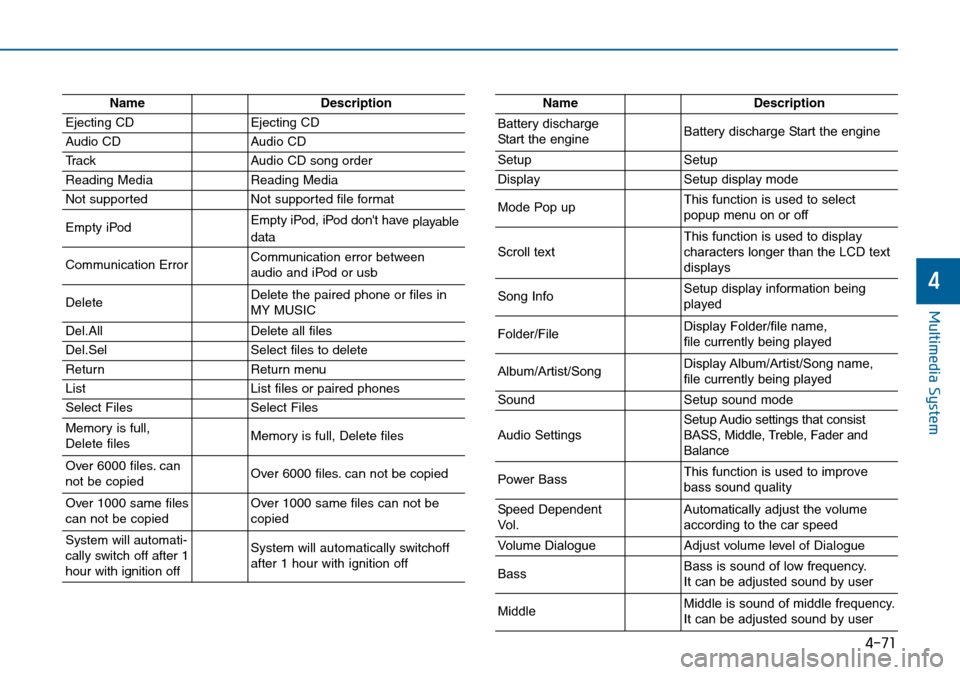
NameDescription
Ejecting CDEjecting CD
Audio CDAudio CD
Tr a c kAudio CD song order
Reading MediaReading Media
Not supportedNot supported file format
Empty iPodEmpty iPod, iPod don't have
playable
data
Communication ErrorCommunication error between
audio and iPod or usb
DeleteDelete the paired phone or files in
MY MUSIC
Del.AllDelete all files
Del.SelSelect files to delete
ReturnReturn menu
ListList files or paired phones
Select FilesSelect Files
Memory is full,
Delete files Memory is full, Delete files
Over 6000 files. can
not be copied Over 6000 files. can not be copied
Over 1000 same files
can not be copied Over 1000 same files can not be
copied
System will automati-
cally switch off after 1
hour with ignition offSystem will automatically switchoff
after 1 hour with ignition off
NameDescription
Battery discharge
Start the engineBattery discharge Start the engine
SetupSetup
DisplaySetup display mode
Mode Pop upThis function is used to select
popup menu on or off
Scroll textThis function is used to display
characters longer than the LCD text
displays
Song InfoSetup display information being
played
Folder/FileDisplay Folder/file name,
file currently being played
Album/Artist/SongDisplay Album/Artist/Song name,
file currently being played
SoundSetup sound mode
Audio SettingsSetup Audio settings that consist
BASS, Middle, Treble, Fader and
Balance
Power BassThis function is used to improve
bass sound quality
Speed Dependent
Vol.Automatically adjust the volume
according to the car speed
Volume DialogueAdjust volume level of Dialogue
BassBass is sound of low frequency.
It can be adjusted sound by user
MiddleMiddle is sound of middle frequency.
It can be adjusted sound by user
Page 319 of 504
5-6
Driving your vehicle
Key ignition switch positions
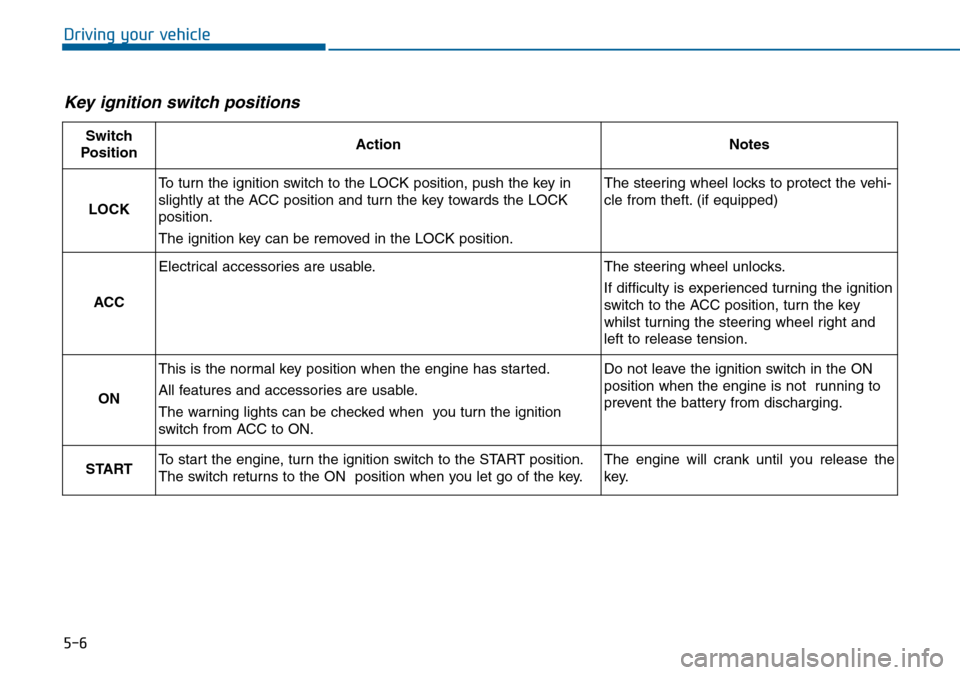
Switch
PositionActionNotes
LOCK
To turn the ignition switch to the LOCK position, push the key in
slightly at the ACC position and turn the key towards the LOCK
position.
The ignition key can be removed in the LOCK position.The steering wheel locks to protect the vehi-
cle from theft. (if equipped)
ACC
Electrical accessories are usable.The steering wheel unlocks.
If difficulty is experienced turning the ignition
switch to the ACC position, turn the key
whilst turning the steering wheel right and
left to release tension.
ON
This is the normal key position when the engine has started.
All features and accessories are usable.
The warning lights can be checked when you turn the ignition
switch from ACC to ON.Do not leave the ignition switch in the ON
position when the engine is not running to
prevent the battery from discharging.
STARTTo start the engine, turn the ignition switch to the START position.
The switch returns to the ON position when you let go of the key.The engine will crank until you release the
key.
Page 322 of 504
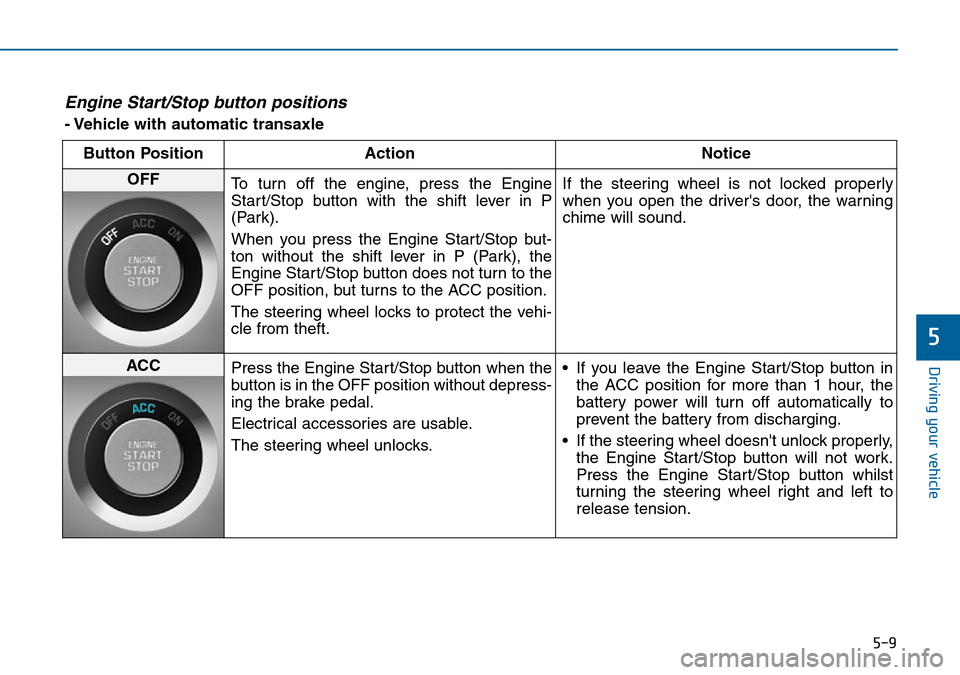
5-9
Driving your vehicle
5
Engine Start/Stop button positions
- Vehicle with automatic transaxle
Button Position Action Notice
OFF
To turn off the engine, press the Engine
Start/Stop button with the shift lever in P
(Park).
When you press the Engine Start/Stop but-
ton without the shift lever in P (Park), the
Engine Start/Stop button does not turn to the
OFF position, but turns to the ACC position.
The steering wheel locks to protect the vehi-
cle from theft.If the steering wheel is not locked properly
when you open the driver's door, the warning
chime will sound.
ACC
Press the Engine Start/Stop button when the
button is in the OFF position without depress-
ing the brake pedal.
Electrical accessories are usable.
The steering wheel unlocks.• If you leave the Engine Start/Stop button in
the ACC position for more than 1 hour, the
battery power will turn off automatically to
prevent the battery from discharging.
• If the steering wheel doesn't unlock properly,
the Engine Start/Stop button will not work.
Press the Engine Start/Stop button whilst
turning the steering wheel right and left to
release tension.
Page 323 of 504
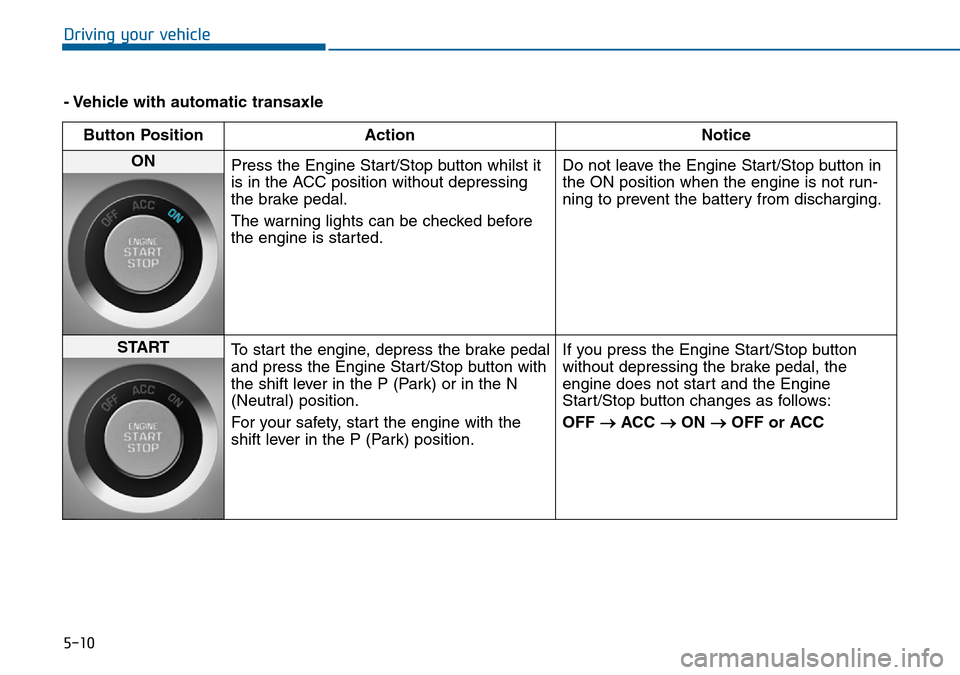
5-10
Driving your vehicle
- Vehicle with automatic transaxle
Button Position Action Notice
ON
Press the Engine Start/Stop button whilst it
is in the ACC position without depressing
the brake pedal.
The warning lights can be checked before
the engine is started.Do not leave the Engine Start/Stop button in
the ON position when the engine is not run-
ning to prevent the battery from discharging.
START
To start the engine, depress the brake pedal
and press the Engine Start/Stop button with
the shift lever in the P (Park) or in the N
(Neutral) position.
For your safety, start the engine with the
shift lever in the P (Park) position.If you press the Engine Start/Stop button
without depressing the brake pedal, the
engine does not start and the Engine
Start/Stop button changes as follows:
OFF
→ACC →ON →OFF or ACC