display Hyundai Sonata 2015 - RHD (UK, Australia) Service Manual
[x] Cancel search | Manufacturer: HYUNDAI, Model Year: 2015, Model line: Sonata, Model: Hyundai Sonata 2015Pages: 504, PDF Size: 10.88 MB
Page 265 of 504
![Hyundai Sonata 2015 - RHD (UK, Australia) Service Manual 4-26
Multimedia System
Folder Repeat
Set [ F.RPT] through the TUNE
knob or key to repeat songs
within the current folder.
❈Press F.RPT again to turn off.
All Random
Set [ A.RDM] through the TUNE
kn](/img/35/16797/w960_16797-264.png "Hyundai Sonata 2015 - RHD (UK, Australia) Service Manual 4-26
Multimedia System
Folder Repeat
Set [ F.RPT] through the TUNE
knob or key to repeat songs
within the current folder.
❈Press F.RPT again to turn off.
All Random
Set [ A.RDM] through the TUNE
kn")
4-26
Multimedia System
Folder Repeat
Set [ F.RPT] through the TUNE
knob or key to repeat songs
within the current folder.
❈Press F.RPT again to turn off.
All Random
Set [ A.RDM] through the TUNE
knob or key to randomly play all
songs within the CD.
❈Press A.RDM again to turn off.
Information
Set [ Info] through the TUNE
knob or key to display informa-
tion of the current song.
❈Press the key to turn off
info display.
Copy
Set [ Copy] through the TUNE
knob or key.
❈This is used to copy the current
song into My Music. You can play
the copied Music in My Music
mode.
❈If another key is pressed while
copying is in progress, a pop up
asking you whether to cancel
copying is displayed.
❈If another media is connected or
inserted (USB, CD, iPod
®, AUX)
while copying is in progress, copy-
ing is canceled.
❈Music will not be played while
copying is in progress.
MENU : iPod®
In iPod mode, press key.
Repeat
Set [ RPT] through the TUNE
knob or key to repeat the cur-
rent song.
❈ Press RPT again to turn repeat off.
Random
Set [ RDM] through the TUNE
knob or key.
Plays all songs within the currently
playing category in random order.
❈Press RDM again to turn off.
2 RDM
1 RPT
MENU
6
MENU
5
4
3
Page 266 of 504
![Hyundai Sonata 2015 - RHD (UK, Australia) Service Manual 4-27
Multimedia System
4
Information
Set [ Info] through the TUNE
knob or key.
Displays information of the current
song.
❈Press the key to turn off
info display.
Search
Set [ Search]through the TU](/img/35/16797/w960_16797-265.png "Hyundai Sonata 2015 - RHD (UK, Australia) Service Manual 4-27
Multimedia System
4
Information
Set [ Info] through the TUNE
knob or key.
Displays information of the current
song.
❈Press the key to turn off
info display.
Search
Set [ Search]through the TU")
4-27
Multimedia System
4
Information
Set [ Info] through the TUNE
knob or key.
Displays information of the current
song.
❈Press the key to turn off
info display.
Search
Set [ Search]through the TUNE
knob or key.
Displays iPod
®category list.
❈Searching iPod
®category is
key pressed, move to par-
ent category.
MENU : My Music Mode
In My Music mode, press key.
Repeat
Set [ RPT] through the TUNE knob
or key.
Repeats the currently playing song.
❈Press RPT again to turn repeat off.
Random
Set [ RDM] through the TUNEknob
or key.
Plays all songs within the currently
playing folder in random order.
❈Press RDM again to turn random
off.
Information
Set [ Info] through the TUNEknob
or key.
Displays information of the current
song.
❈Press the key to turn off
info display.
Delete
Set [ Delete] through the TUNE
knob or key.
• Deletes currently playing file
In the play screen, pressing delete
will delete the currently playing song.
• Deletes file from list
➀ Select the file you wish to delete
by using the TUNE knob.
➁Press the key and select
the delete menu to delete the
selected file.
MENU
4
MENU
3
2 RDM
1 RPT
MENU
MENU
4
MENU
3
Page 269 of 504
4-30
Multimedia System
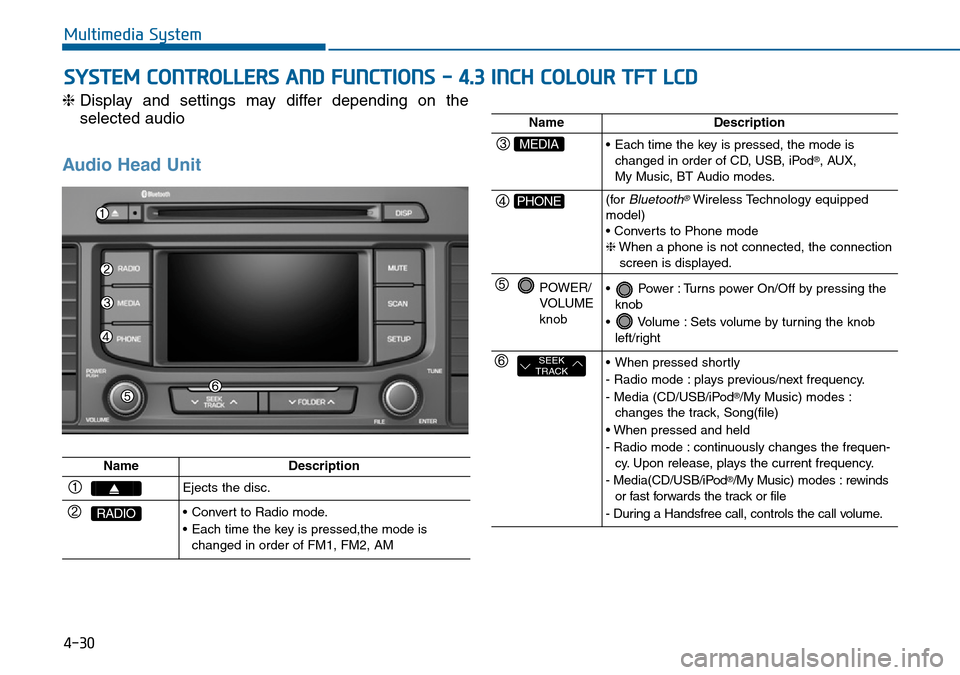
SYSTEM CONTROLLERS AND FUNCTIONS - 4.3 INCH COLOUR TFT LCD
❈Display and settings may differ depending on the
selected audio
Audio Head Unit
NameDescription
Ejects the disc.
RADIO• Convert to Radio mode.
• Each time the key is pressed,the mode is
changed in order of FM1, FM2, AM
NameDescription
MEDIA• Each time the key is pressed, the mode is
changed in order of CD, USB, iPod®, AUX,
My Music, BT Audio modes.
PHONE(forBluetooth®Wireless Technology equipped
model)
• Converts to Phone mode
❈When a phone is not connected, the connection
screen is displayed.
POWER/
VOLUME
knob• Power : Turns power On/Off by pressing the
knob
• Volume : Sets volume by turning the knob
left/right
SEEK
TRACK• When pressed shortly
- Radio mode : plays previous/next frequency.
- Media (CD/USB/iPod
®/My Music) modes :
changes the track, Song(file)
• When pressed and held
- Radio mode : continuously changes the frequen-
cy. Upon release, plays the current frequency.
- Media(CD/USB/iPod
®/My Music) modes : rewinds
or fast forwards the track or file
- During a Handsfree call, controls the call volume.
Page 272 of 504
4-33
Multimedia System
4
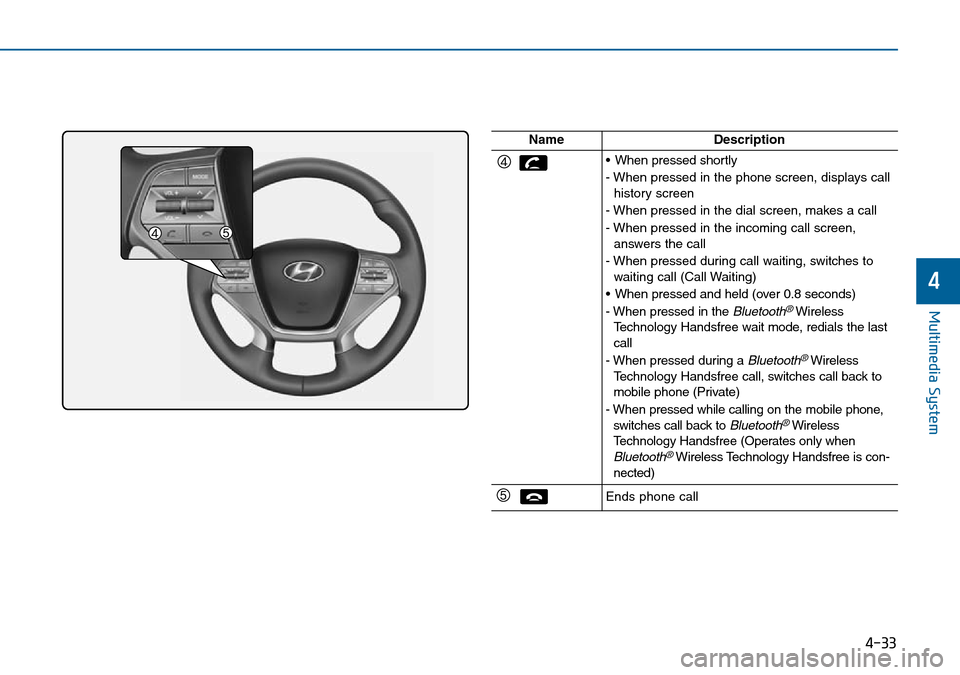
NameDescription
• When pressed shortly
- When pressed in the phone screen, displays call
history screen
- When pressed in the dial screen, makes a call
- When pressed in the incoming call screen,
answers the call
- When pressed during call waiting, switches to
waiting call (Call Waiting)
• When pressed and held (over 0.8 seconds)
- When pressed in the
Bluetooth®Wireless
Technology Handsfree wait mode, redials the last
call
- When pressed during a
Bluetooth®Wireless
Technology Handsfree call, switches call back to
mobile phone (Private)
- When pressed while calling on the mobile phone,
switches call back to
Bluetooth®Wireless
Technology Handsfree (Operates only when
Bluetooth®Wireless Technology Handsfree is con-
nected)
Ends phone call
Page 273 of 504
4-34
Multimedia System
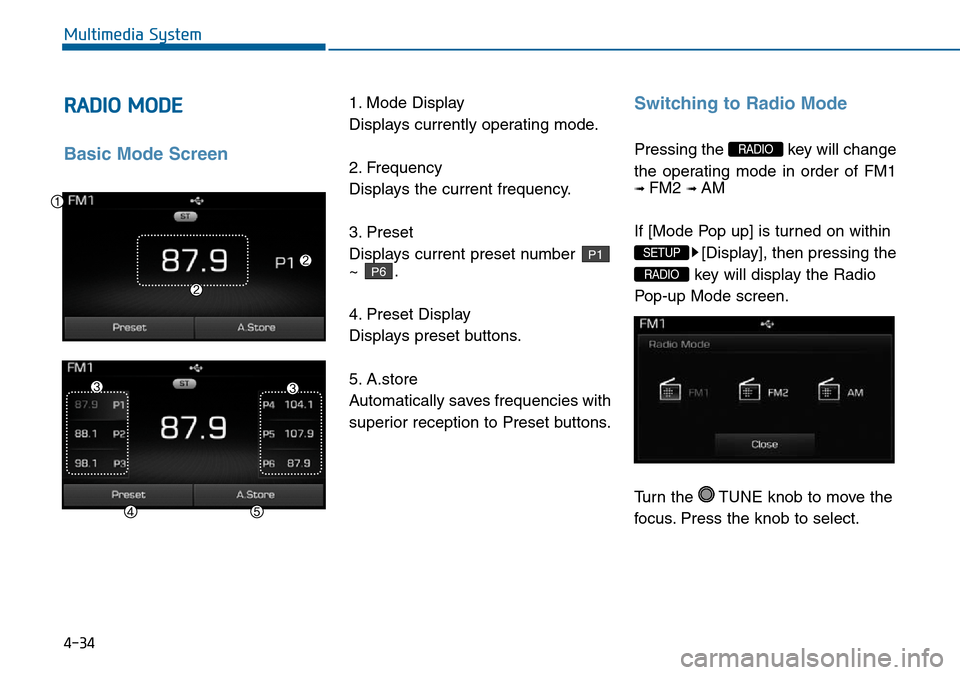
RADIO MODE
Basic Mode Screen
1. Mode Display
Displays currently operating mode.
2. Frequency
Displays the current frequency.
3. Preset
Displays current preset number
~ .
4. Preset Display
Displays preset buttons.
5. A.store
Automatically saves frequencies with
superior reception to Preset buttons.Switching to Radio Mode
Pressing the key will change
the operating mode in order of FM1
➟ FM2 ➟ AM
If [Mode Pop up] is turned on within
[Display], then pressing the
key will display the Radio
Pop-up Mode screen.
Turn the TUNE knob to move the
focus. Press the knob to select.
RADIO
SETUP
RADIO
P6
P1
Page 274 of 504
4-35
Multimedia System
4
Searching Radio Frequencies
Using Seek
Press the key to play the
previous/next frequency.
Using TUNE
Turn the TUNE knob to select the
desired frequency.
• FM : Increases/decreased by
100kHz
• AM : Increases/decreased by 9kHz
Using Radio Mode
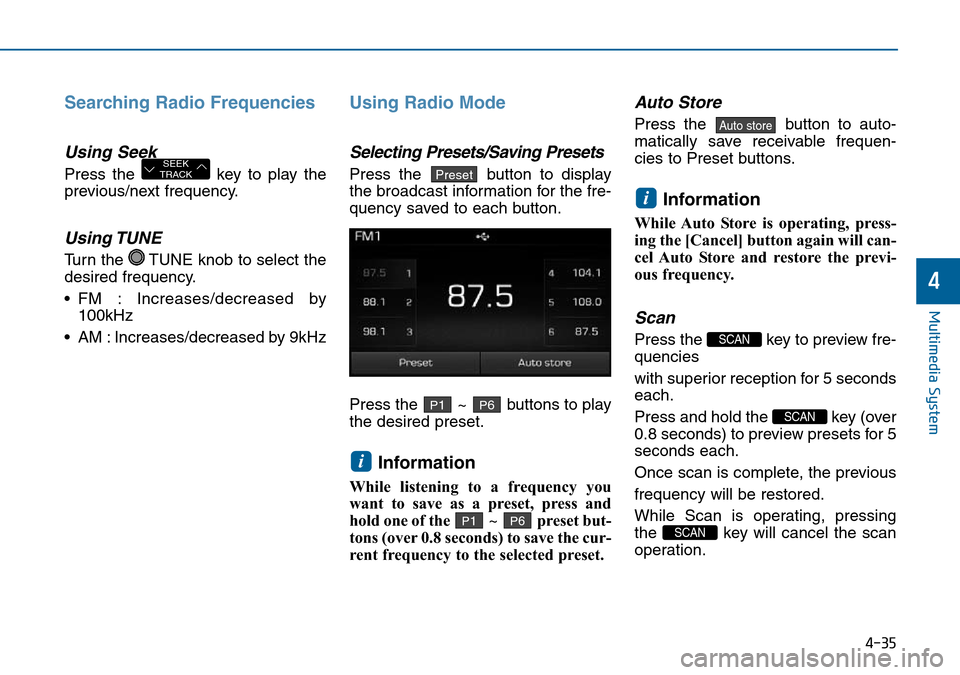
Selecting Presets/Saving Presets
Press the button to display
the broadcast information for the fre-
quency saved to each button.
Press the ~ buttons to play
the desired preset.
Information
While listening to a frequency you
want to save as a preset, press and
hold one of the ~ preset but-
tons (over 0.8 seconds) to save the cur-
rent frequency to the selected preset.
Auto Store
Press the button to auto-
matically save receivable frequen-
cies to Preset buttons.
Information
While Auto Store is operating, press-
ing the [Cancel] button again will can-
cel Auto Store and restore the previ-
ous frequency.
Scan
Press the key to preview fre-
quencies
with superior reception for 5 seconds
each.
Press and hold the key (over
0.8 seconds) to preview presets for 5
seconds each.
Once scan is complete, the previous
frequency will be restored.
While Scan is operating, pressing
the key will cancel the scan
operation.
SCAN
SCAN
SCAN
i
Auto store
P6P1
i
P6P1
PresetSEEK
TRACK
Page 275 of 504
![Hyundai Sonata 2015 - RHD (UK, Australia) Service Manual 4-36
Multimedia System
MEDIA MODE
Pressing the key will change
the operating mode in order of CD
➟
USB(iPod®) ➟ AUX ➟ My Music ➟BT
Audio.
If [Mode Pop up] is turned on within
[Display], the](/img/35/16797/w960_16797-274.png "Hyundai Sonata 2015 - RHD (UK, Australia) Service Manual 4-36
Multimedia System
MEDIA MODE
Pressing the key will change
the operating mode in order of CD
➟
USB(iPod®) ➟ AUX ➟ My Music ➟BT
Audio.
If [Mode Pop up] is turned on within
[Display], the")
4-36
Multimedia System
MEDIA MODE
Pressing the key will change
the operating mode in order of CD
➟
USB(iPod®) ➟ AUX ➟ My Music ➟BT
Audio.
If [Mode Pop up] is turned on within
[Display], then pressing the
key will display the Media
Pop-up Mode screen.
Turn the TUNE knob to move the
focus. Press the knob to select.
Information
The media mode pop up screen can be
displayed only when there are two or
more media modes turned on.
Title Icon
When a Bluetooth®Wireless
Technology, iPod®, USB, or AUX
device is connected or a CD is
inserted, the corresponding mode
icon will be displayed.
Icon Title
Bluetooth®Wireless Technology
CD
iPod®
USB
AUX
i
MEDIA
SETUP
MEDIA
Page 276 of 504
4-37
Multimedia System
4
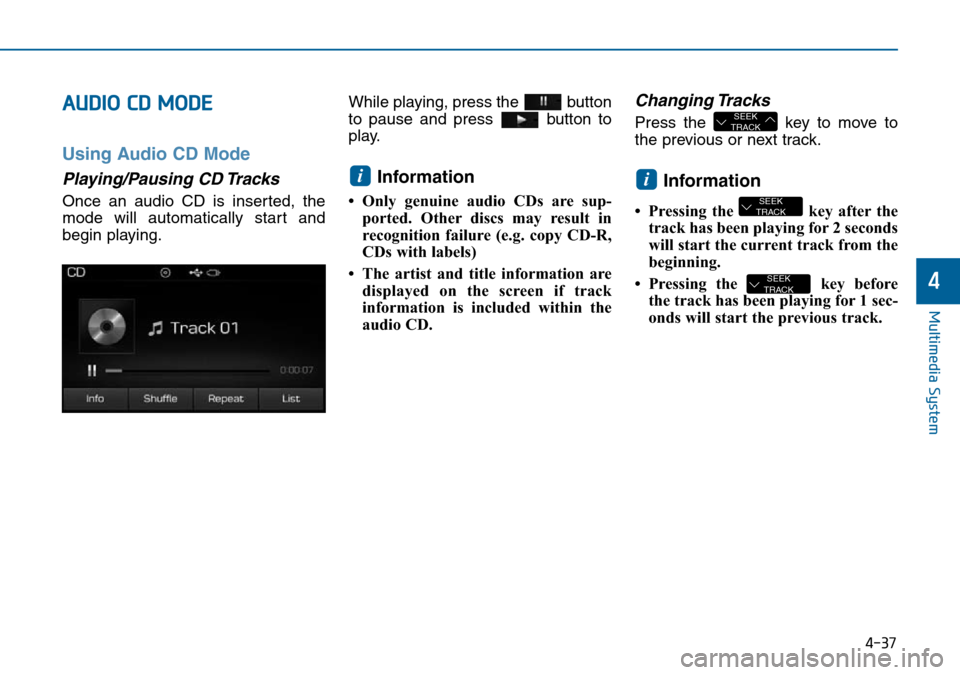
AUDIO CD MODE
Using Audio CD Mode
Playing/Pausing CD Tracks
Once an audio CD is inserted, the
mode will automatically start and
begin playing.While playing, press the button
to pause and press button to
play.
Information
• Only genuine audio CDs are sup-
ported. Other discs may result in
recognition failure (e.g. copy CD-R,
CDs with labels)
• The artist and title information are
displayed on the screen if track
information is included within the
audio CD.
Changing Tracks
Press the key to move to
the previous or next track.
Information
• Pressing the key after the
track has been playing for 2 seconds
will start the current track from the
beginning.
• Pressing the key before
the track has been playing for 1 sec-
onds will start the previous track.
SEEK
TRACK
SEEK
TRACK
i
SEEK
TRACK
i
Page 278 of 504
4-39
Multimedia System
4
Info
Press the button to display
details about the current disc.
Random(Shuffle)
Press the button to play tracks
in random(Shuffle) order.
Press the button again to turn
the Random(Shuffle) feature off.
• Random(Shuffle): Plays all tracks
in random(Shuffle) order.
Repeat
Press the button to repeat the
current track. Press the button again
to turn the repeat feature off.
• Repeat : Repeats the current track.
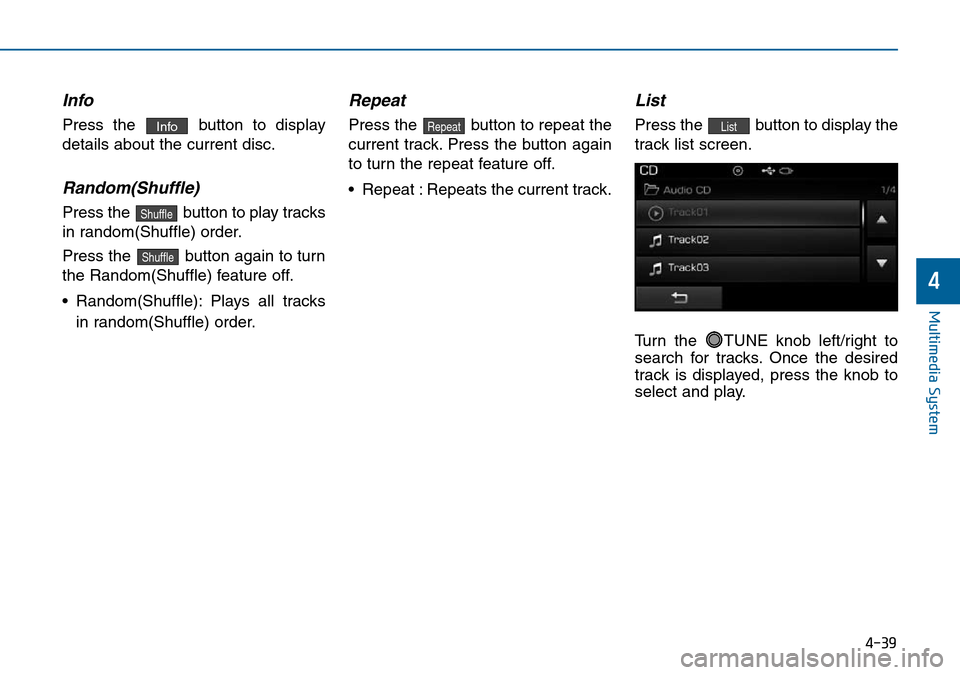
List
Press the button to display the
track list screen.
Turn the TUNE knob left/right to
search for tracks. Once the desired
track is displayed, press the knob to
select and play.ListRepeat
Shuffle
Shuffle
Info
Page 279 of 504
4-40
Multimedia System
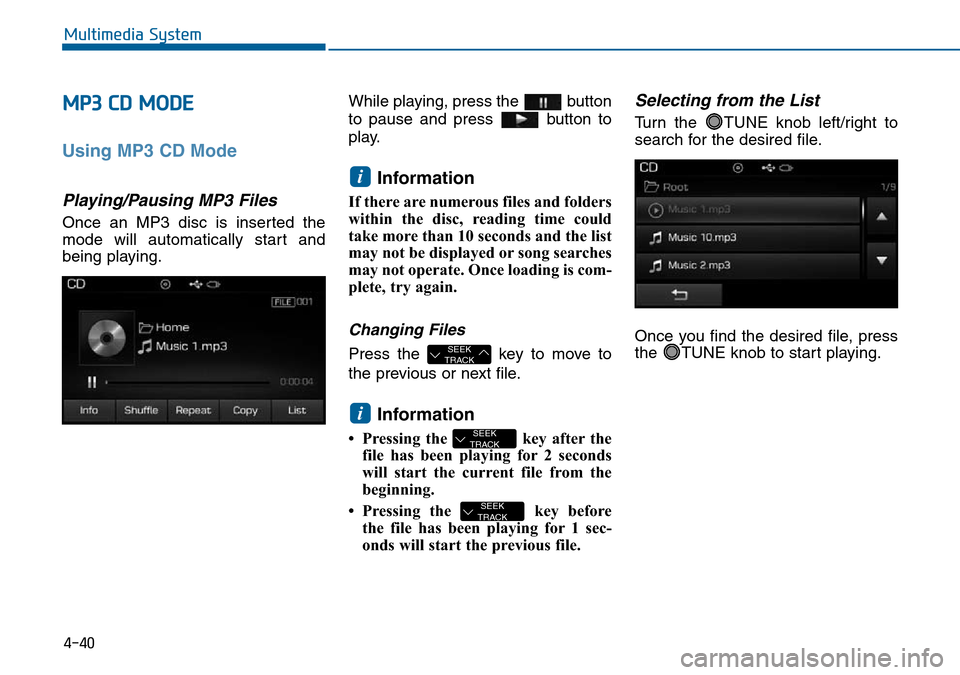
MP3 CD MODE
Using MP3 CD Mode
Playing/Pausing MP3 Files
Once an MP3 disc is inserted the
mode will automatically start and
being playing.While playing, press the button
to pause and press button to
play.
Information
If there are numerous files and folders
within the disc, reading time could
take more than 10 seconds and the list
may not be displayed or song searches
may not operate. Once loading is com-
plete, try again.
Changing Files
Press the key to move to
the previous or next file.
Information
• Pressing the key after the
file has been playing for 2 seconds
will start the current file from the
beginning.
• Pressing the key before
the file has been playing for 1 sec-
onds will start the previous file.
Selecting from the List
Turn the TUNE knob left/right to
search for the desired file.
Once you find the desired file, press
the TUNE knob to start playing.
SEEK
TRACK
SEEK
TRACK
i
SEEK
TRACK
i