instrument cluster Hyundai Sonata 2016 Owner's Manual
[x] Cancel search | Manufacturer: HYUNDAI, Model Year: 2016, Model line: Sonata, Model: Hyundai Sonata 2016Pages: 603, PDF Size: 16.3 MB
Page 13 of 603

F13F13
Accessing your vehicle .........................................3-4
Remote Key........................................................................\
.3-4
Smart Key ........................................................................\
....3-8
Immobilizer System .........................................................3-12
Door locks .............................................................3-14
Outside the Vehicle.........................................................3-14
Inside the Vehicle ............................................................3-15
Auto Door Lock/Unlock Features ...............................3-17
Child-Protector Rear Door locks ................................3-18
Theft-alarm system.............................................3-19
Driver position memory system .........................3-20
Storing Positions into Memory ....................................3-20
Easy Access Function ....................................................3-21
Steering wheel......................................................3-22
Electric Power Steering (EPS) .....................................3-22
Tilt Steering / Telescope Steering ..............................3-23
Heated Steering Wheel ..................................................3-23
Horn ........................................................................\
............3-24
Mirrors ...................................................................3-25
Inside Rearview Mirror ..................................................3-25
Outside Rearview Mirror ...............................................3-40
Reverse Parking Aid Function......................................3-43
Windows ................................................................3-44
Power Windows ...............................................................3-45
Panoramic sunroof ..............................................3-48
Sunshade ........................................................................\
...3-48
Sliding the Sunroof .........................................................3-49
Tilting the Sunroof .........................................................3-49
Closing the Sunroof........................................................3-50
To Reset the Sunroof.....................................................3-51
Exterior features .................................................3-52
Hood ........................................................................\
...........3-52
Trunk ........................................................................\
..........3-53
Smart Trunk ......................................................................3-\
56
Fuel Filler Door ................................................................3-59
Instrument cluster................................................3-63
Instrument Cluster Control............................................3-65
LCD Display Control ........................................................3-66
3Convenient features of your vehicle
Page 26 of 603
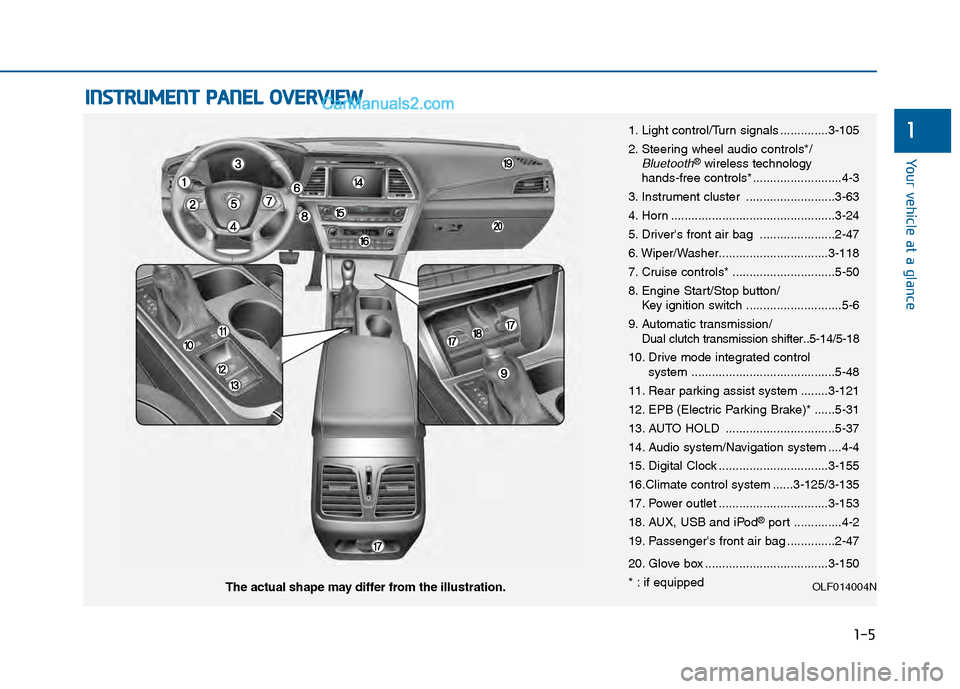
1-5
Your vehicle at a glance
1
I
IN
N S
ST
T R
R U
U M
M E
EN
N T
T
P
P A
A N
N E
EL
L
O
O V
VE
ER
R V
V I
IE
E W
W
1. Light control/Turn signals ..............3-105
2. Steering wheel audio controls*/
Bluetooth®wireless technology
hands-free controls* ..........................4-3
3. Instrument cluster ..........................3-63
4. Horn ................................................3-24
5. Driver's front air bag ......................2-47
6. Wiper/Washer................................3-118
7. Cruise controls* ..............................5-50
8. Engine Start/Stop button/ Key ignition switch ............................5-6
9. Automatic transmission/
Dual clutch transmission shifter..5-14/5-18
10. Drive mode integrated control system ..........................................5-48
11. Rear parking assist system ........3-121
12. EPB (Electric Parking Brake)* ......5-31
13. AUTO HOLD ................................5-37
14. Audio system/Navigation system ....4-4
15. Digital Clock ................................3-155
16.Climate control system ......3-125/3-135
17. Power outlet ................................3-153
18. AUX, USB and iPod
®port ..............4-2
19. Passenger's front air bag ..............2-47
20. Glove box ....................................3-150
* : if equipped
OLF014004NThe actual shape may differ from the illustration.
Page 81 of 603
2-54
Safety system of your vehicle
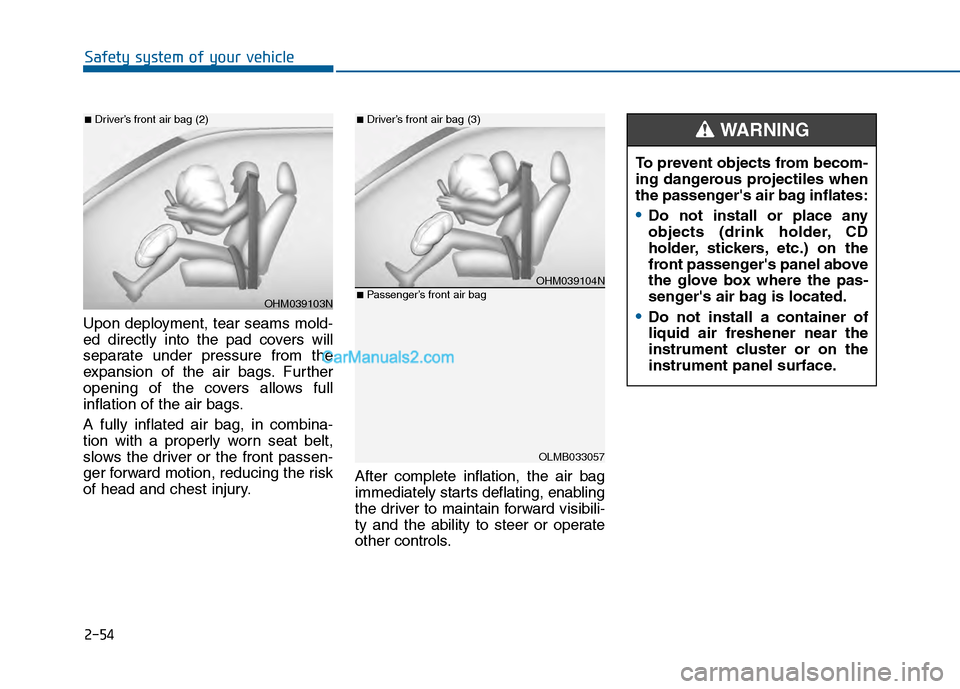
Upon deployment, tear seams mold-
ed directly into the pad covers will
separate under pressure from the
expansion of the air bags. Further
opening of the covers allows full
inflation of the air bags.
A fully inflated air bag, in combina-
tion with a properly worn seat belt,
slows the driver or the front passen-
ger forward motion, reducing the risk
of head and chest injury. After complete inflation, the air bag
immediately starts deflating, enabling
the driver to maintain forward visibili-
ty and the ability to steer or operate
other controls.
OHM039103N
■Driver’s front air bag (2)
OHM039104N
■Driver’s front air bag (3)
OLMB033057
■Passenger’s front air bag
To prevent objects from becom-
ing dangerous projectiles when
the passenger's air bag inflates:
Do not install or place any
objects (drink holder, CD
holder, stickers, etc.) on the
front passenger's panel above
the glove box where the pas-
senger's air bag is located.
Do not install a container of
liquid air freshener near the
instrument cluster or on the
instrument panel surface.
WARNING
Page 96 of 603

Convenient features of your vehicle
Accessing your vehicle .........................................3-4
Remote Key........................................................................\
.3-4
Smart Key ........................................................................\
....3-8
Immobilizer System .........................................................3-12
Door locks .............................................................3-14
Outside the Vehicle.........................................................3-14
Inside the Vehicle ............................................................3-15
Auto Door Lock/Unlock Features ...............................3-17
Child-Protector Rear Door locks ................................3-18
Theft-alarm system.............................................3-19
Driver position memory system .........................3-20
Storing Positions into Memory ....................................3-20
Easy Access Function ....................................................3-21
Steering wheel......................................................3-22
Electric Power Steering (EPS) .....................................3-22
Tilt Steering / Telescope Steering ..............................3-23
Heated Steering Wheel ..................................................3-23
Horn ........................................................................\
............3-24
Mirrors ...................................................................3-25
Inside Rearview Mirror ..................................................3-25
Outside Rearview Mirror ...............................................3-40
Reverse Parking Aid Function......................................3-43
Windows ................................................................3-44
Power Windows ...............................................................3-45
Panoramic sunroof ..............................................3-48
Sunshade ........................................................................\
...3-48
Sliding the Sunroof .........................................................3-49
Tilting the Sunroof .........................................................3-49
Closing the Sunroof........................................................3-50
To Reset the Sunroof.....................................................3-51
Exterior features .................................................3-52
Hood ........................................................................\
...........3-52
Trunk ........................................................................\
..........3-53
Smart Trunk ......................................................................3-\
56
Fuel Filler Door ................................................................3-59
Instrument cluster................................................3-63
Instrument Cluster Control............................................3-65
LCD Display Control ........................................................3-66
LCD Display ...........................................................3-71
LCD Modes ........................................................................\
3-71
Trip Computer Mode.......................................................3-72
Turn By Turn (TBT) Mode ............................................3-73
SCC/LDWS Mode .............................................................3-73
A/V Mode........................................................................\
..3-73
Information Mode ...........................................................3-74
User Settings Mode ........................................................3-76
Warning Messages..........................................................3-81
3
Page 117 of 603
3-22
Convenient features of your vehicle
S
ST
T E
EE
ER
R I
IN
N G
G
W
W H
HE
EE
EL
L
Electric Power Steering (EPS)
The system assists you with steering
the vehicle. If the engine is turned off
or if the power steering system
becomes inoperative, you may still
steer the vehicle, but it will require
increased steering effort.
Should you notice any change in the
effort required to steer during normal
vehicle operation, have the system
checked by an authorized HYUNDAI
dealer.
Information
The following symptoms may occur
during normal vehicle operation:
• The steering effort may be high
immediately after placing the igni-
tion switch in the ON position.
This happens as the system per-
forms the EPS system diagnostics.
When the diagnostics is completed,
the steering wheel will return to its
normal condition.
• A click noise may be heard from the EPS relay after the ignition switch is
in the ON or OFF position.
• Motor noise may be heard when the vehicle is at stop or at a low driving
speed.
• When you operate the steering wheel in low temperature, abnormal
noise may occur. If temperature
rises, the noise will disappear. This
is a normal condition.
i
If the Electric Power Steering
System does not operate nor-
mally, the warning light ( ) will
illuminate on the instrument
cluster. You may steer the vehi-
cle, but it will require increased
steering efforts. Take your vehi-
cle to an authorized HYUNDAI
dealer and have the system
checked as soon as possible.
CAUTION
Page 160 of 603
3-65
Convenient features of your vehicle
3
Instrument Cluster Control
Adjusting instrument clusterillumination
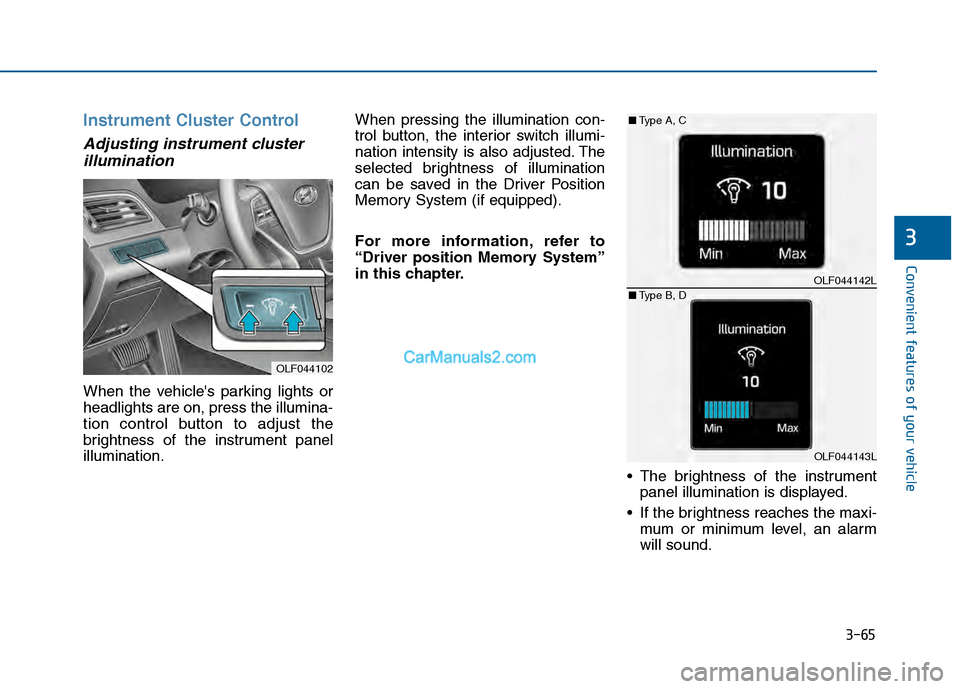
When the vehicle's parking lights or
headlights are on, press the illumina-
tion control button to adjust the
brightness of the instrument panel
illumination. When pressing the illumination con-
trol button, the interior switch illumi-
nation intensity is also adjusted. The
selected brightness of illumination
can be saved in the Driver Position
Memory System (if equipped).
For more information, refer to
“Driver position Memory System”
in this chapter.
The brightness of the instrumentpanel illumination is displayed.
If the brightness reaches the maxi- mum or minimum level, an alarm
will sound.
OLF044102
OLF044142L
OLF044143L
■ Type A, C
■ Type B, D
Page 171 of 603
3-76
Convenient features of your vehicle
User Settings Mode
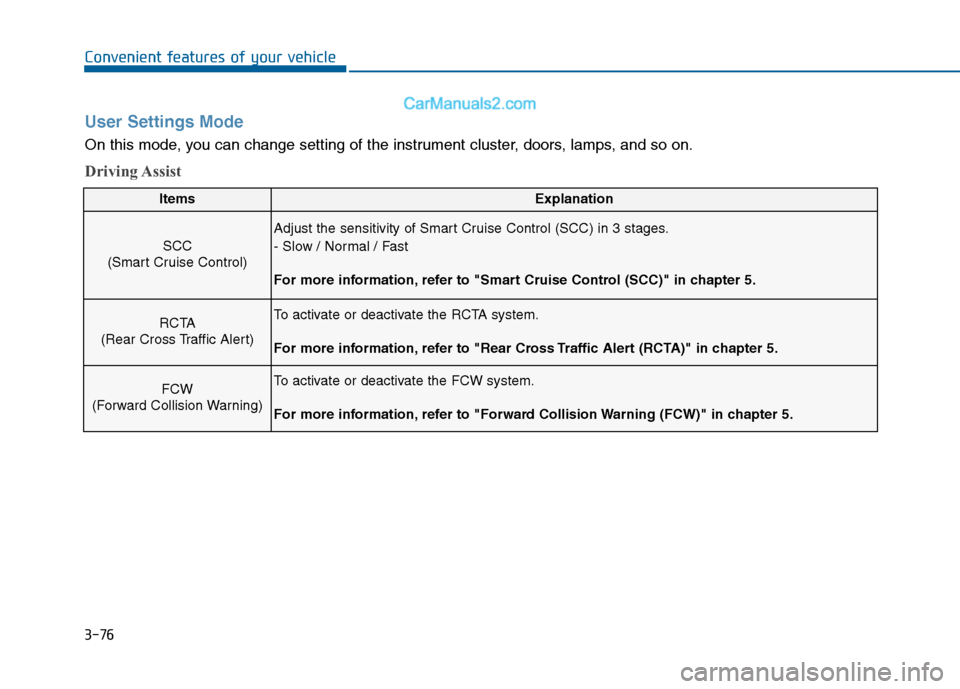
On this mode, you can change setting of the instrument cluster, doors, lamps, and so on.
Driving Assist
ItemsExplanation
SCC
(Smart Cruise Control)
Adjust the sensitivity of Smart Cruise Control (SCC) in 3 stages.
- Slow / Normal / Fast
For more information, refer to "Smart Cruise Control (SCC)" in chapter 5.
RCTA
(Rear Cross Traffic Alert)To activate or deactivate the RCTA system.
For more information, refer to "Rear Cross Traffic Alert (RCTA)" in chapter 5.
FCW
(Forward Collision Warning)To activate or deactivate the FCW system.
For more information, refer to "Forward Collision Warning (FCW)" in chapter 5.
Page 236 of 603
3-141
Convenient features of your vehicle
3
Adjusting the driver and passen-
ger side temperature individually
Press the "SYNC" button again to
operate the driver and passenger
side temperature individually. The
button indicator will turn off.
Temperature conversion
If the battery has been discharged or
disconnected, the temperature mode
display will reset to Fahrenheit.
To change the temperature unit from
°F to °C or °C to °F:
- On the instrument cluster, go toUser Settings Mode ➝ Other
Features ➝Temperature Unit.
- Press the AUTO button for 3 sec- onds while pressing the OFF button.
(Automatic climate control system)
Both the temperature unit on the
cluster LCD display and climate con-
trol screen will change.
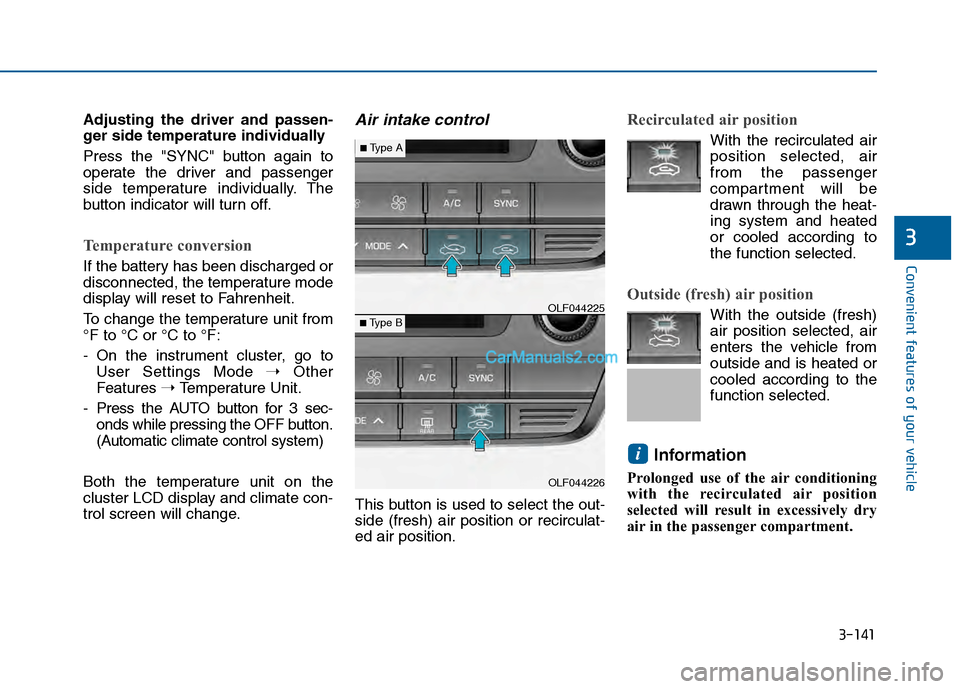
Air intake control
This button is used to select the out-
side (fresh) air position or recirculat-
ed air position.
Recirculated air position
With the recirculated air position selected, air
from the passenger
compartment will be
drawn through the heat-
ing system and heated
or cooled according to
the function selected.
Outside (fresh) air position
With the outside (fresh)
air position selected, air
enters the vehicle from
outside and is heated or
cooled according to the
function selected.
Information
Prolonged use of the air conditioning
with the recirculated air position
selected will result in excessively dry
air in the passenger compartment.
i
OLF044226
■Type B OLF044225
■Type A
Page 406 of 603
5-48
Driving your vehicle
D
DR
RI
IV
V E
E
M
M O
OD
DE
E
I
IN
N T
TE
EG
G R
RA
A T
TE
ED
D
C
C O
O N
NT
TR
R O
O L
L
S
S Y
Y S
ST
T E
EM
M
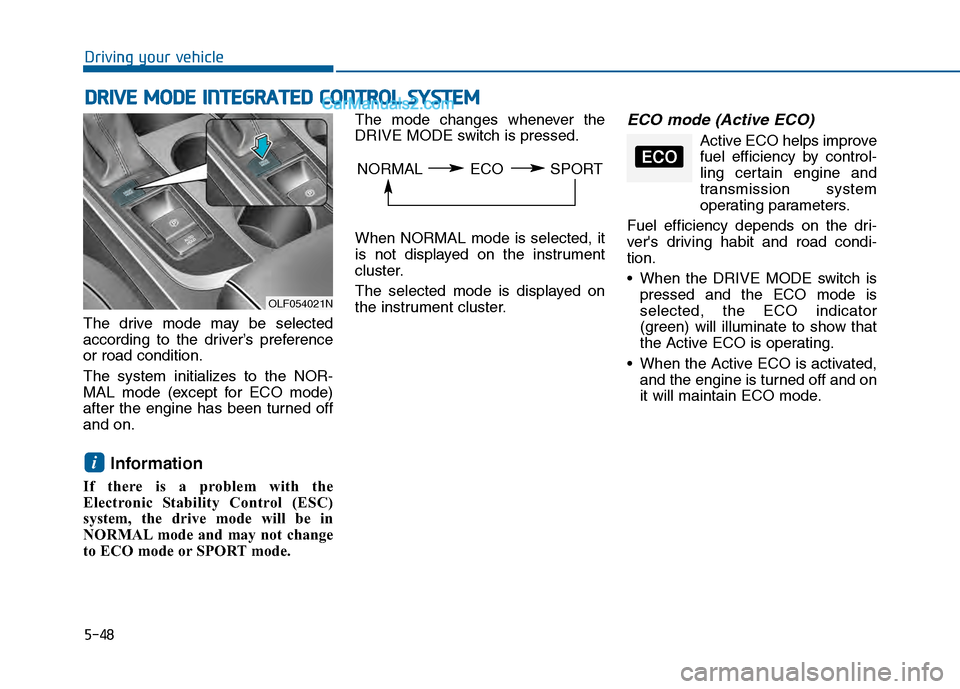
The drive mode may be selected
according to the driver’s preference
or road condition.
The system initializes to the NOR-
MAL mode (except for ECO mode)
after the engine has been turned off
and on.
Information
If there is a problem with the
Electronic Stability Control (ESC)
system, the drive mode will be in
NORMAL mode and may not change
to ECO mode or SPORT mode. The mode changes whenever the
DRIVE MODE switch is pressed.
When NORMAL mode is selected, it
is not displayed on the instrument
cluster.
The selected mode is displayed on
the instrument cluster.
ECO mode (Active ECO)
Active ECO helps improve
fuel efficiency by control-
ling certain engine and
transmission system
operating parameters.
Fuel efficiency depends on the dri-
ver's driving habit and road condi-
tion.
When the DRIVE MODE switch is pressed and the ECO mode is
selected, the ECO indicator
(green) will illuminate to show that
the Active ECO is operating.
When the Active ECO is activated, and the engine is turned off and on
it will maintain ECO mode.
i
OLF054021N
NORMAL ECO SPORTECO
Page 408 of 603
5-50
Driving your vehicle
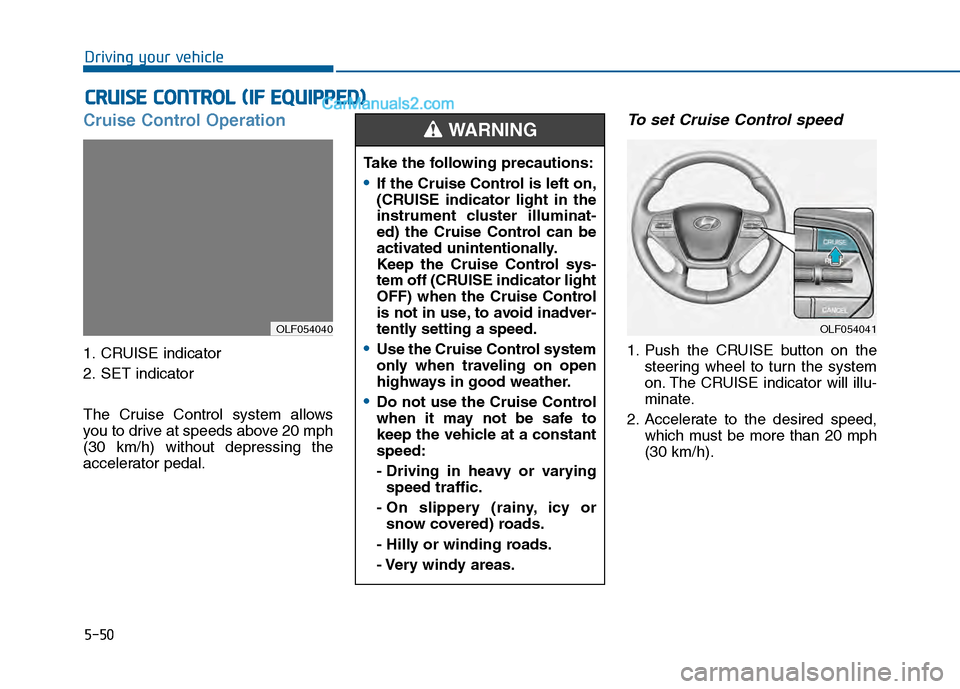
Cruise Control Operation
1. CRUISE indicator
2. SET indicator
The Cruise Control system allows
you to drive at speeds above 20 mph
(30 km/h) without depressing the
accelerator pedal.
To set Cruise Control speed
1. Push the CRUISE button on thesteering wheel to turn the system
on. The CRUISE indicator will illu-
minate.
2. Accelerate to the desired speed, which must be more than 20 mph
(30 km/h).
C CR
R U
U I
IS
S E
E
C
C O
O N
NT
TR
R O
O L
L
(
( I
IF
F
E
E Q
Q U
UI
IP
P P
PE
ED
D )
)
OLF054040
Take the following precautions:
If the Cruise Control is left on,
(CRUISE indicator light in the
instrument cluster illuminat-
ed) the Cruise Control can be
activated unintentionally.
Keep the Cruise Control sys-
tem off (CRUISE indicator light
OFF) when the Cruise Control
is not in use, to avoid inadver-
tently setting a speed.
Use the Cruise Control system
only when traveling on open
highways in good weather.
Do not use the Cruise Control
when it may not be safe to
keep the vehicle at a constant
speed:
- Driving in heavy or varying
speed traffic.
- On slippery (rainy, icy or snow covered) roads.
- Hilly or winding roads.
- Very windy areas.
WARNING
OLF054041