display Hyundai Sonata 2017 Manual PDF
[x] Cancel search | Manufacturer: HYUNDAI, Model Year: 2017, Model line: Sonata, Model: Hyundai Sonata 2017Pages: 563, PDF Size: 17.7 MB
Page 328 of 563
5-20
To hold the vehicle on a hill usethe foot brake or the parking
brake. If the vehicle is held by
applying the accelerator pedal
on a hill the clutch and trans-
mission will be overheated
resulting in damage.
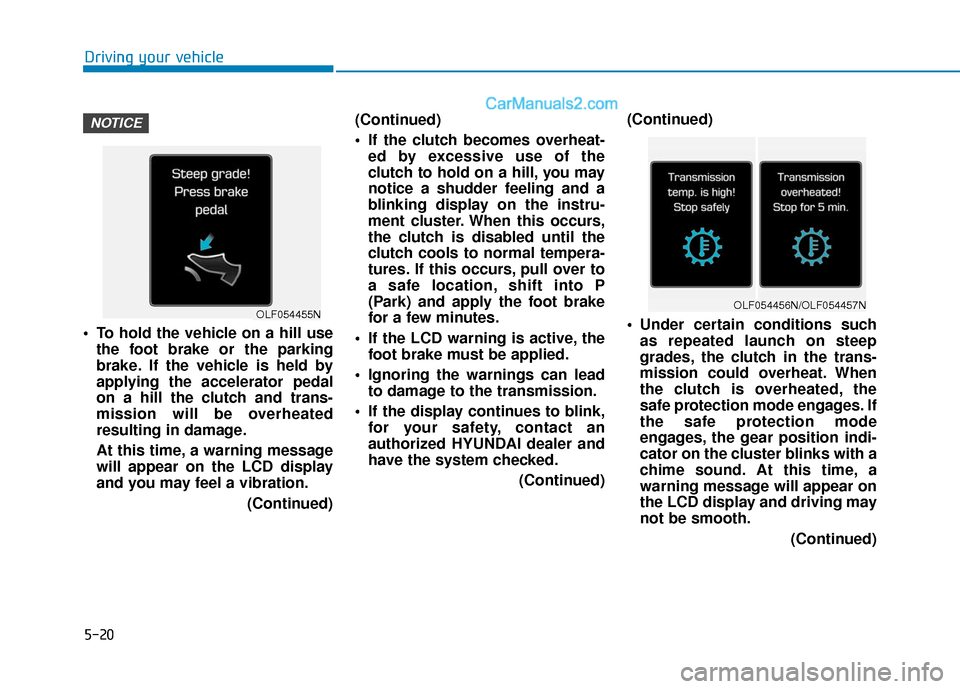
At this time, a warning message
will appear on the LCD display
and you may feel a vibration.
(Continued)(Continued)
If the clutch becomes overheat-
ed by excessive use of the
clutch to hold on a hill, you may
notice a shudder feeling and a
blinking display on the instru-
ment cluster. When this occurs,
the clutch is disabled until the
clutch cools to normal tempera-
tures. If this occurs, pull over to
a safe location, shift into P
(Park) and apply the foot brake
for a few minutes.
If the LCD warning is active, the foot brake must be applied.
Ignoring the warnings can lead to damage to the transmission.
If the display continues to blink, for your safety, contact an
authorized HYUNDAI dealer and
have the system checked.
(Continued)(Continued)
Under certain conditions such
as repeated launch on steep
grades, the clutch in the trans-
mission could overheat. When
the clutch is overheated, the
safe protection mode engages. If
the safe protection mode
engages, the gear position indi-
cator on the cluster blinks with a
chime sound. At this time, a
warning message will appear on
the LCD display and driving may
not be smooth.
(Continued)
NOTICE
Driving your vehicle
OLF054455NOLF054456N/OLF054457N
Page 329 of 563
5-21
Driving your vehicle
(Continued)If you ignore this warning, the
driving condition may become
worse. To return the normal driv-
ing condition, stop the vehicle
and apply the foot brake for a
few minutes before driving off.
Gear shifts may be more notice- able than a conventional auto-
matic transmission. This is a
normal characteristic of this
type of Ecoshift dual clutch
transmission.
During the first 1000 miles, you may feel that the vehicle may not
be smooth when accelerating at
low speed. During this break-in
period, the shift quality and per-
formance of your new vehicle is
continuously optimized.
Always come to a complete stop before shifting into D (Drive) or
R (Reverse).
Do not put the shift lever in N (Neutral) while driving. The indicator in the instrument clus-
ter displays the shift lever position
when the ignition switch is in the ON
position.
P (Park)
Always come to a complete stop
before shifting into P (Park).
To shift from P (Park), you must
depress firmly on the brake pedal
and make sure your foot is off the
accelerator pedal.
If you have done all of the above and
still cannot shift the lever out of P
(Park), see "Shift-Lock Release" on
page 5-25.
The shift lever must be in P (Park)
before turning the engine off.
5
Shifting into P (Park) while the
vehicle is in motion may
cause you to lose control of
the vehicle.
After the vehicle has stopped,
always make sure the shift
lever is in P (Park), apply the
parking brake, and turn the
engine off.
Do not use the P (Park) posi-
tion in place of the parking
brake.
WARNING
Page 348 of 563
![Hyundai Sonata 2017 Manual PDF 5-40
Driving your vehicle
Press brake pedal to deactivate
AUTO HOLD
If you did not apply the brake pedal
when you release the Auto Hold by
pressing the [AUTO HOLD] switch, a
warning will sound and a m](/img/35/16780/w960_16780-347.png "Hyundai Sonata 2017 Manual PDF 5-40
Driving your vehicle
Press brake pedal to deactivate
AUTO HOLD
If you did not apply the brake pedal
when you release the Auto Hold by
pressing the [AUTO HOLD] switch, a
warning will sound and a m")
5-40
Driving your vehicle
Press brake pedal to deactivate
AUTO HOLD
If you did not apply the brake pedal
when you release the Auto Hold by
pressing the [AUTO HOLD] switch, a
warning will sound and a message
will appear.
AUTO HOLD conditions not met.
Close door, hood and fasten seatbelt
When you press the [AUTO HOLD]
switch, if the driver's door and engine
hood are not closed or the driver's
seat belt is not fastened, a warning
will sound and a message will
appear on the LCD display. In that
time, press the [AUTO HOLD] button
after closing the driver's door, engine
hood and fastening the seat belt.
Anti-lock Brake System (ABS)
OLF044407NOLF046409N
An Anti-Lock Braking System
(ABS) or an Electronic Stability
Control (ESC) system will not
prevent accidents due to
improper or dangerous driving
maneuvers. Even though vehi-
cle control is improved during
emergency braking, always
maintain a safe distance
between you and objects ahead
of you. Vehicle speeds should
always be reduced during
extreme road conditions. The
braking distance for cars
equipped with ABS or ESC may
be longer than for those without
these systems in the following
road conditions.(Continued)
WARNING
Page 354 of 563
5-46
Driving your vehicle
To prevent damage to the trans-
mission:
Do not allow wheel(s) of one axle to spin excessively while
the ESC, ABS, and brake warn-
ing lights are displayed. The
repairs would not be covered by
the vehicle warranty. Reduce
engine power and do not spin
the wheel(s) excessively while
these lights are displayed.
When operating the vehicle on a dynamometer, ensure the ESC is
turned off (ESC OFF light illumi-
nated).
Information
Turning the ESC off does not affect
ABS or standard brake system opera-
tion.
Hill-Start Assist Control (HAC)
The Hill-Start Assist Control (HAC)
prevents the vehicle from rolling
backwards when starting a vehicle
from a stop on a hill. The system
operates the brakes automatically for
approximately 2 seconds and releas-
es the brake when the accelerator
pedal is depressed or after 2 sec-
onds. The HAC does not operate when
the shift lever is in P (Park) or N
(Neutral)
The HAC activates even though the ESC (Electronic Stability
Control) is off but does not acti-
vate when the ESC has malfunc-
tioned.
NOTICE
i
NOTICE
Always be ready to depress the
accelerator pedal when starting
off on a incline. The HAC acti-
vates only for approximately 2
seconds.
WARNING
Page 356 of 563
5-48
Driving your vehicle
D
DR
RI
IV
V E
E
M
M O
OD
DE
E
I
IN
N T
TE
EG
G R
RA
A T
TE
ED
D
C
C O
O N
NT
TR
R O
O L
L
S
S Y
Y S
ST
T E
EM
M
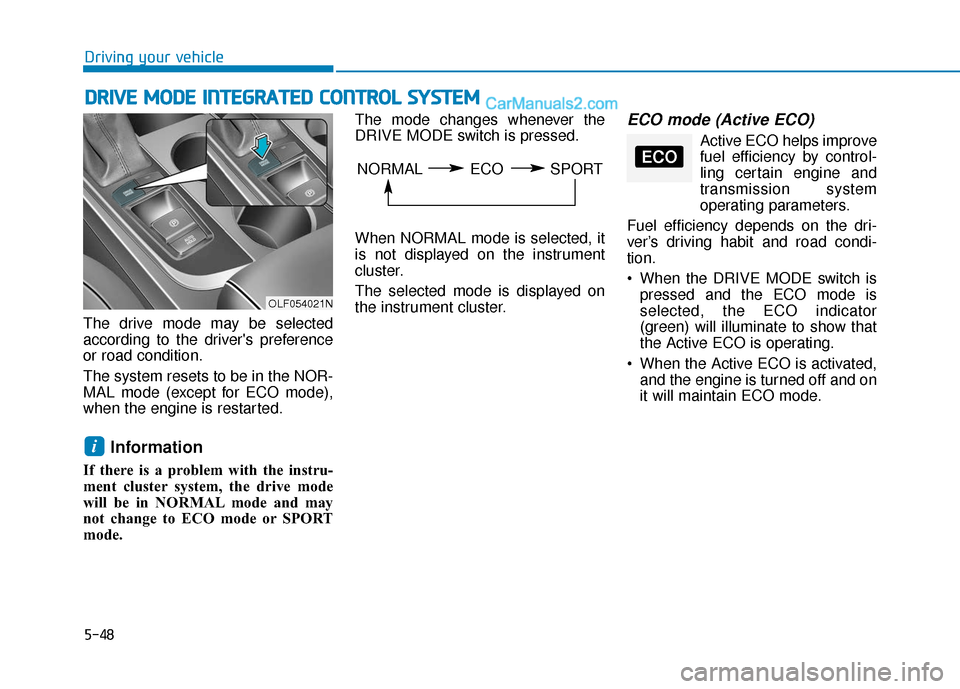
The drive mode may be selected
according to the driver's preference
or road condition.
The system resets to be in the NOR-
MAL mode (except for ECO mode),
when the engine is restarted.
Information
If there is a problem with the instru-
ment cluster system, the drive mode
will be in NORMAL mode and may
not change to ECO mode or SPORT
mode. The mode changes whenever the
DRIVE MODE switch is pressed.
When NORMAL mode is selected, it
is not displayed on the instrument
cluster.
The selected mode is displayed on
the instrument cluster.
ECO mode (Active ECO)
Active ECO helps improve
fuel efficiency by control-
ling certain engine and
transmission system
operating parameters.
Fuel efficiency depends on the dri-
ver’s driving habit and road condi-
tion.
When the DRIVE MODE switch is pressed and the ECO mode is
selected, the ECO indicator
(green) will illuminate to show that
the Active ECO is operating.
When the Active ECO is activated, and the engine is turned off and on
it will maintain ECO mode.
i
OLF054021N
NORMAL ECO SPORTECO
Page 364 of 563
5-56
Driving your vehicle
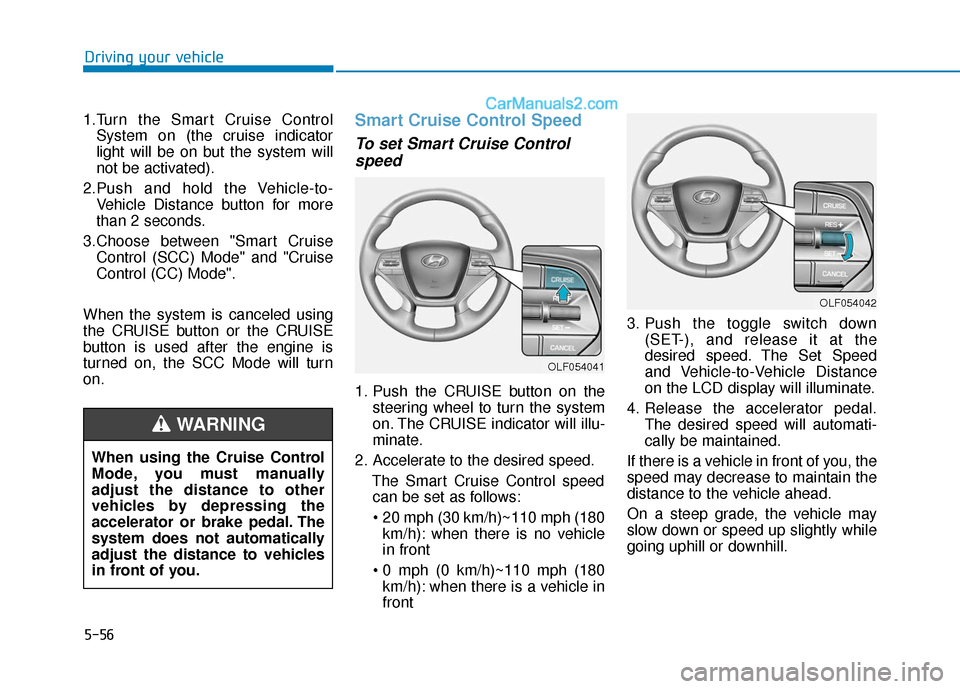
1.Turn the Smart Cruise Control System on (the cruise indicator
light will be on but the system will
not be activated).
2.Push and hold the Vehicle-to- Vehicle Distance button for more
than 2 seconds.
3.Choose between "Smart Cruise Control (SCC) Mode" and "Cruise
Control (CC) Mode".
When the system is canceled using
the CRUISE button or the CRUISE
button is used after the engine is
turned on, the SCC Mode will turn
on.
Smart Cruise Control Speed
To set Smart Cruise Control speed
1. Push the CRUISE button on the
steering wheel to turn the system
on. The CRUISE indicator will illu-
minate.
2. Accelerate to the desired speed. The Smart Cruise Control speedcan be set as follows:
km/h): when there is no vehicle
in front
km/h): when there is a vehicle in
front 3. Push the toggle switch down
(SET-), and release it at the
desired speed. The Set Speed
and Vehicle-to-Vehicle Distance
on the LCD display will illuminate.
4. Release the accelerator pedal. The desired speed will automati-
cally be maintained.
If there is a vehicle in front of you, the
speed may decrease to maintain the
distance to the vehicle ahead.
On a steep grade, the vehicle may
slow down or speed up slightly while
going uphill or downhill.
OLF054042
OLF054041
When using the Cruise Control
Mode, you must manually
adjust the distance to other
vehicles by depressing the
accelerator or brake pedal. The
system does not automatically
adjust the distance to vehicles
in front of you.
WARNING
Page 366 of 563
5-58
Driving your vehicle
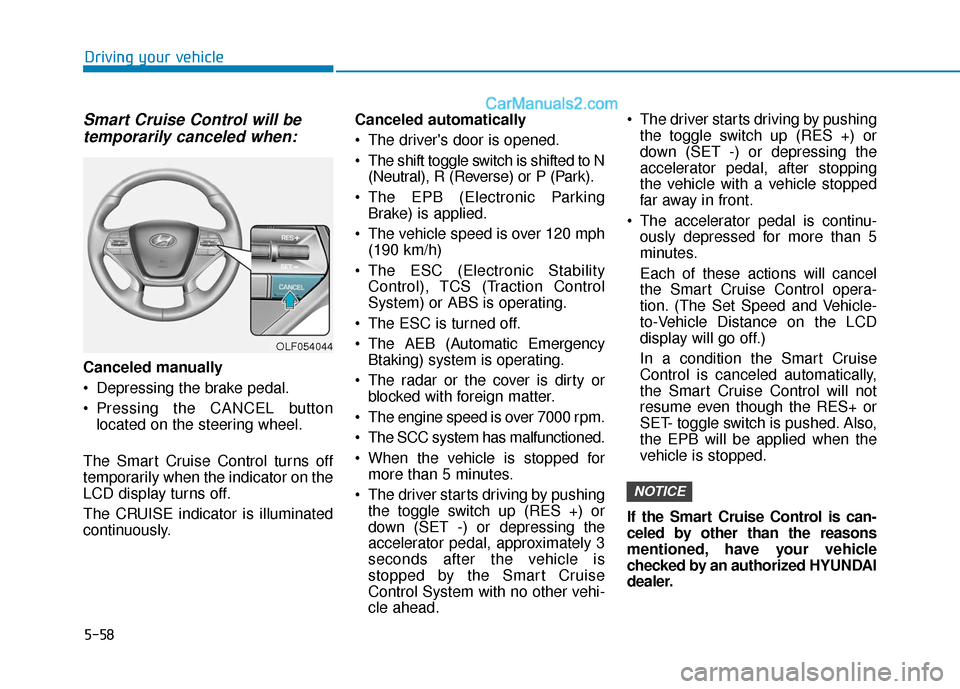
Smart Cruise Control will betemporarily canceled when:
Canceled manually
Depressing the brake pedal.
Pressing the CANCEL button
located on the steering wheel.
The Smart Cruise Control turns off
temporarily when the indicator on the
LCD display turns off.
The CRUISE indicator is illuminated
continuously. Canceled automatically
The driver's door is opened.
The shift toggle switch is shifted to N
(Neutral), R (Reverse) or P (Park).
The EPB (Electronic Parking Brake) is applied.
The vehicle speed is over 120 mph (190 km/h)
The ESC (Electronic Stability Control), TCS (Traction Control
System) or ABS is operating.
The ESC is turned off.
The AEB (Automatic Emergency Btaking) system is operating.
The radar or the cover is dirty or blocked with foreign matter.
The engine speed is over 7000 rpm.
The SCC system has malfunctioned.
When the vehicle is stopped for more than 5 minutes.
The driver starts driving by pushing the toggle switch up (RES +) or
down (SET -) or depressing the
accelerator pedal, approximately 3
seconds after the vehicle is
stopped by the Smart Cruise
Control System with no other vehi-
cle ahead. The driver starts driving by pushing
the toggle switch up (RES +) or
down (SET -) or depressing the
accelerator pedal, after stopping
the vehicle with a vehicle stopped
far away in front.
The accelerator pedal is continu- ously depressed for more than 5
minutes.
Each of these actions will cancel
the Smart Cruise Control opera-
tion. (The Set Speed and Vehicle-
to-Vehicle Distance on the LCD
display will go off.)
In a condition the Smart Cruise
Control is canceled automatically,
the Smart Cruise Control will not
resume even though the RES+ or
SET- toggle switch is pushed. Also,
the EPB will be applied when the
vehicle is stopped.
If the Smart Cruise Control is can-
celed by other than the reasons
mentioned, have your vehicle
checked by an authorized HYUNDAI
dealer.
NOTICE
OLF054044
Page 378 of 563
5-70
Driving your vehicle
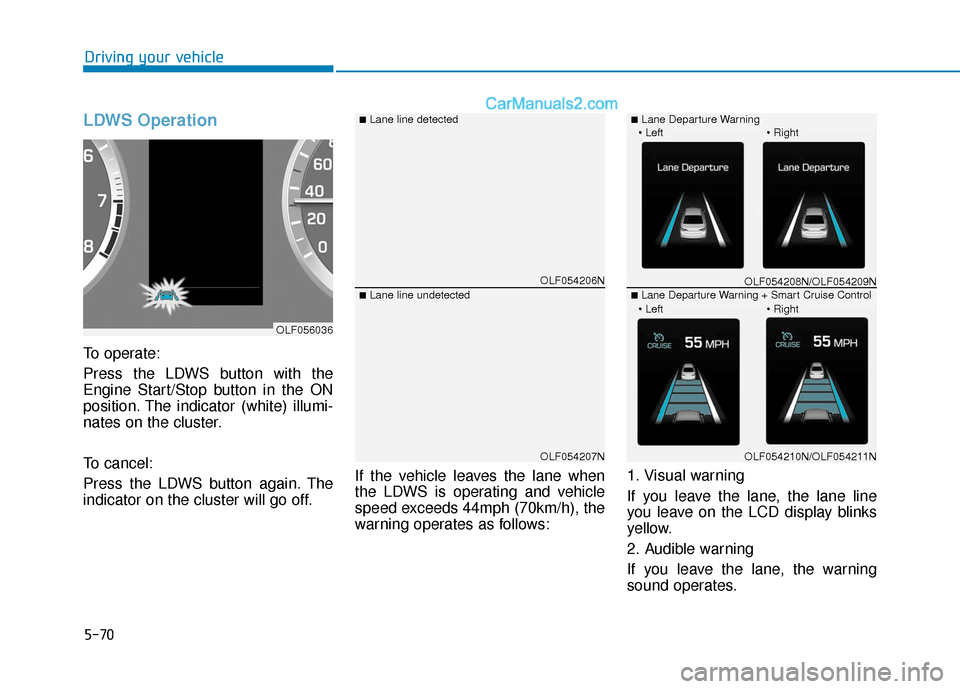
LDWS Operation
To operate:
Press the LDWS button with the
Engine Start/Stop button in the ON
position. The indicator (white) illumi-
nates on the cluster.
To cancel:
Press the LDWS button again. The
indicator on the cluster will go off.If the vehicle leaves the lane when
the LDWS is operating and vehicle
speed exceeds 44mph (70km/h), the
warning operates as follows:1. Visual warning
If you leave the lane, the lane line
you leave on the LCD display blinks
yellow.
2. Audible warning
If you leave the lane, the warning
sound operates.
OLF054206N
OLF054207N
■Lane line detected
■Lane line undetected
OLF056036
OLF054208N/OLF054209N
OLF054210N/OLF054211N
■Lane Departure Warning
■Lane Departure Warning + Smart Cruise Control
Page 382 of 563
5-74
Driving your vehicle
BSD (Blind Spot Detection) /
LCA (Lane Change Assist)
Operating conditions
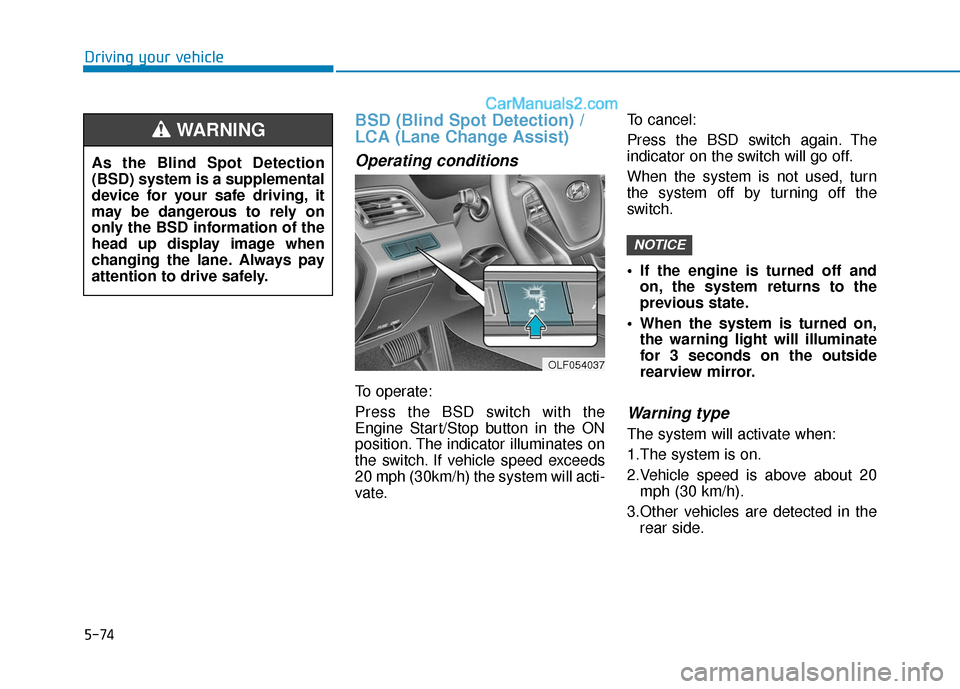
To operate:
Press the BSD switch with the
Engine Start/Stop button in the ON
position. The indicator illuminates on
the switch. If vehicle speed exceeds
20 mph (30km/h) the system will acti-
vate.To cancel:
Press the BSD switch again. The
indicator on the switch will go off.
When the system is not used, turn
the system off by turning off the
switch.
If the engine is turned off and
on, the system returns to the
previous state.
When the system is turned on, the warning light will illuminate
for 3 seconds on the outside
rearview mirror.
Warning type
The system will activate when:
1.The system is on.
2.Vehicle speed is above about 20mph (30 km/h).
3.Other vehicles are detected in the rear side.
NOTICE
OLF054037
As the Blind Spot Detection
(BSD) system is a supplemental
device for your safe driving, it
may be dangerous to rely on
only the BSD information of the
head up display image when
changing the lane. Always pay
attention to drive safely.
WARNING
Page 384 of 563
5-76
Driving your vehicle
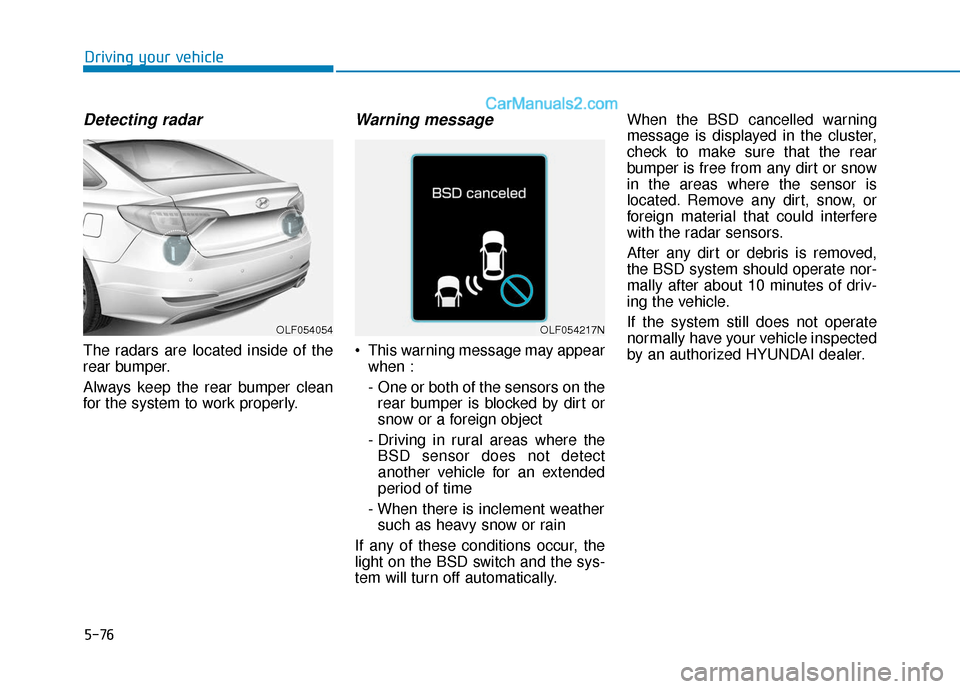
Detecting radar
The radars are located inside of the
rear bumper.
Always keep the rear bumper clean
for the system to work properly.
Warning message
This warning message may appearwhen :
- One or both of the sensors on therear bumper is blocked by dirt or
snow or a foreign object
- Driving in rural areas where the BSD sensor does not detect
another vehicle for an extended
period of time
- When there is inclement weather such as heavy snow or rain
If any of these conditions occur, the
light on the BSD switch and the sys-
tem will turn off automatically. When the BSD cancelled warning
message is displayed in the cluster,
check to make sure that the rear
bumper is free from any dirt or snow
in the areas where the sensor is
located. Remove any dirt, snow, or
foreign material that could interfere
with the radar sensors.
After any dirt or debris is removed,
the BSD system should operate nor-
mally after about 10 minutes of driv-
ing the vehicle.
If the system still does not operate
normally have your vehicle inspected
by an authorized HYUNDAI dealer.
OLF054054OLF054217N