display Hyundai Sonata 2017 Workshop Manual
[x] Cancel search | Manufacturer: HYUNDAI, Model Year: 2017, Model line: Sonata, Model: Hyundai Sonata 2017Pages: 563, PDF Size: 17.7 MB
Page 273 of 563
4-25
Multimedia System
4
S
Si
ir
r i
iu
u s
sX
X M
M
R
R A
A D
DI
IO
O
Using SiriusXMSatellite Radio
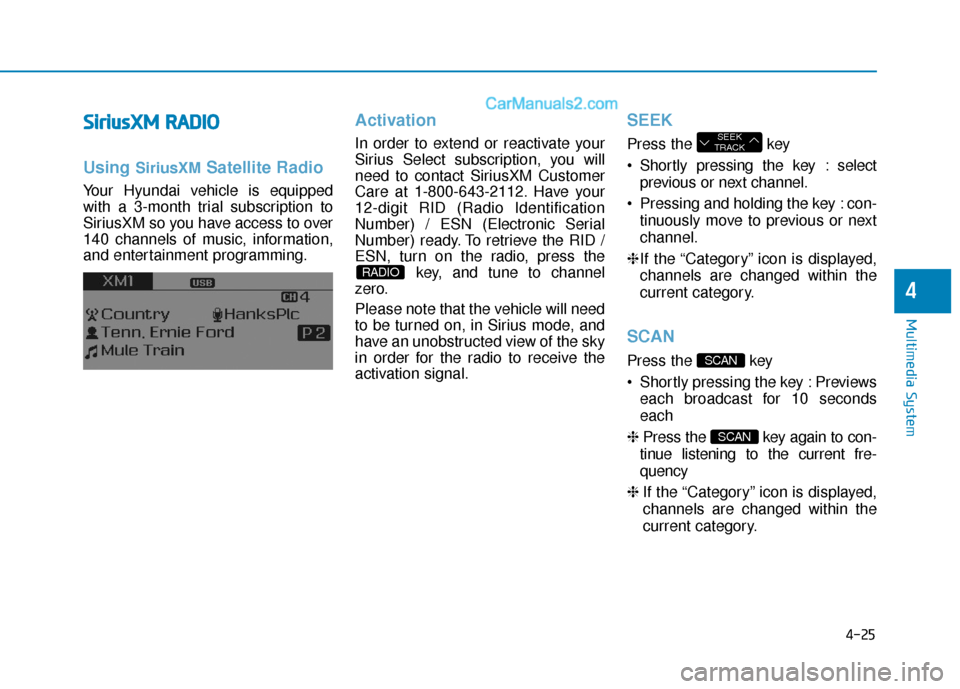
Your Hyundai vehicle is equipped
with a 3-month trial subscription to
SiriusXM so you have access to over
140 channels of music, information,
and entertainment programming.
Activation
In order to extend or reactivate your
Sirius Select subscription, you will
need to contact SiriusXM Customer
Care at 1-800-643-2112. Have your
12-digit RID (Radio Identification
Number) / ESN (Electronic Serial
Number) ready. To retrieve the RID /
ESN, turn on the radio, press the
key, and tune to channel
zero.
Please note that the vehicle will need
to be turned on, in Sirius mode, and
have an unobstructed view of the sky
in order for the radio to receive the
activation signal.
SEEK
Press the key
Shortly pressing the key : select
previous or next channel.
Pressing and holding the key : con- tinuously move to previous or next
channel.
❈ If the “Category” icon is displayed,
channels are changed within the
current category.
SCAN
Press the key
Shortly pressing the key : Previews each broadcast for 10 seconds
each
❈ Press the key again to con-
tinue listening to the current fre-
quency
❈ If the “Category” icon is displayed,
channels are changed within the
current category.
SCAN
SCAN
SEEK
TRACK
RADIO
Page 274 of 563

4-26
Multimedia System
Category
Press the key Set through
the
TUNEknob
The display will indicate the cate- gory menus, highlight the category
that the current channel belongs
to.
In the Category List Mode, press the key to navigate cate-
gory list.
Press the tune knob to select the lowest channel in the highlighted
category.
❈ If channel is selected by selecting
category, then the “CATEGORY”
icon is displayed at the top of the
screen.
Preset
Press the ~ key
Shortly pressing the key (under 0.8
seconds): Plays the frequency
saved in the corresponding key.
Pressing and holding the key (over 0.8 seconds): Pressing and holding
the desired key from ~
will save the current broadcast to
the selected key and sound a
BEEP.
Information - Trobleshooting
1. Antenna Error
If this message is displayed, the anten-
na or antenna cable is broken or
unplugged. Please consult with your
Hyundai dealership.
2. No Signal
If this message is displayed, it means
that the antenna is covered and that
the SiriusXM Satellite Radio signal is
not available. Ensure the antenna is
uncovered and has a clear view of the
sky.
Menu
Select category menu through the TUNE knob Press the key
Select [ Info] through the TUNE
knob or key
Info (Information)
Displays the Artist/Song info of the
current song.
1
MENU
i
61
61
CATFOLDER
CATFOLDER
Page 277 of 563
![Hyundai Sonata 2017 Workshop Manual 4-29
Multimedia System
4
MENU : Audio CD
In Audio CD mode, press key.
Repeat
Set [ RPT] through the TUNE
knob or key to repeat the cur-
rent song.
❈Press RPT again to turn off.
Random
Set [ RDM] t](/img/35/16780/w960_16780-276.png "Hyundai Sonata 2017 Workshop Manual 4-29
Multimedia System
4
MENU : Audio CD
In Audio CD mode, press key.
Repeat
Set [ RPT] through the TUNE
knob or key to repeat the cur-
rent song.
❈Press RPT again to turn off.
Random
Set [ RDM] t")
4-29
Multimedia System
4
MENU : Audio CD
In Audio CD mode, press key.
Repeat
Set [ RPT] through the TUNE
knob or key to repeat the cur-
rent song.
❈Press RPT again to turn off.
Random
Set [ RDM] through the TUNE
knob or key to randomly play
songs within the current CD.
❈Press RDM again to turn off.
Information
Set [ Info] through the TUNE
knob or key to display informa-
tion of the current song.
❈ Press the key to turn off
info display.
MENU : MP3 CD / USB
In MP3 CD / USB mode, press
key.
Repeat
Set [ RPT] through the TUNE
knob or key to repeat the cur-
rent song.
❈Press RPT again to turn off.
Folder Random
Set [ F.RDM] through the TUNE
knob or key to randomly play
songs within the current folder.
❈Press F.RDM again to turn off.2 RDM
1 RPT
MENU
MENU
3
2 RDM
1 RPT
MENU
Page 278 of 563
![Hyundai Sonata 2017 Workshop Manual 4-30
Multimedia System
Folder Repeat
Set [ F.RPT] through the TUNE
knob or key to repeat songs
within the current folder.
❈Press F.RPT again to turn off.
All Random
Set [ A.RDM] through the TUNE
kn](/img/35/16780/w960_16780-277.png "Hyundai Sonata 2017 Workshop Manual 4-30
Multimedia System
Folder Repeat
Set [ F.RPT] through the TUNE
knob or key to repeat songs
within the current folder.
❈Press F.RPT again to turn off.
All Random
Set [ A.RDM] through the TUNE
kn")
4-30
Multimedia System
Folder Repeat
Set [ F.RPT] through the TUNE
knob or key to repeat songs
within the current folder.
❈Press F.RPT again to turn off.
All Random
Set [ A.RDM] through the TUNE
knob or key to randomly play all
songs within the CD/USB.
❈Press A.RDM again to turn off.
Information
Set [ Info] through the TUNE
knob or key to display informa-
tion of the current song.
❈Press the key to turn off
info display.
Copy
Set [ Copy] through the TUNE
knob or key.
❈This is used to copy the current
song into My Music. You can play
the copied Music in My Music
mode.
❈ If another key is pressed while
copying is in progress, a pop up
asking you whether to cancel
copying is displayed.
❈ If another media is connected or
inserted (USB, CD, iPod
®, AUX)
while copying is in progress, copy-
ing is canceled.
❈ Music will not be played while
copying is in progress.
MENU : iPod®
In iPod mode, press key.
Repeat
Set [ RPT] through the TUNE
knob or key to repeat the cur-
rent song.
❈ Press RPT again to turn repeat off.
Random
Set [ RDM] through the TUNE
knob or key.
Plays all songs within the currently
playing category in random order.
❈ Press RDM again to turn off.
2 RDM
1 RPT
MENU
6
MENU
5
4
3
Page 279 of 563
![Hyundai Sonata 2017 Workshop Manual 4-31
Multimedia System
4
Information
Set [ Info] through the TUNE
knob or key.
Displays information of the current
song.
❈Press the key to turn off
info display.
Search
Set [ Search] through the T](/img/35/16780/w960_16780-278.png "Hyundai Sonata 2017 Workshop Manual 4-31
Multimedia System
4
Information
Set [ Info] through the TUNE
knob or key.
Displays information of the current
song.
❈Press the key to turn off
info display.
Search
Set [ Search] through the T")
4-31
Multimedia System
4
Information
Set [ Info] through the TUNE
knob or key.
Displays information of the current
song.
❈Press the key to turn off
info display.
Search
Set [ Search] through the TUNE
knob or key.
Displays iPod
®category list.
❈ Searching iPod
®category is
key pressed, move to par-
ent category.
MENU : My Music Mode
In My Music mode, press key.
Repeat
Set [ RPT] through the TUNE knob
or key.
Repeats the currently playing song.
❈ Press RPT again to turn repeat off.
Random
Set [ RDM] through the TUNEknob
or key.
Plays all songs within the currently
playing folder in random order.
❈ Press RDM again to turn random
off.
Information
Set [ Info] through the TUNEknob
or key.
Displays information of the current
song.
❈ Press the key to turn off
info display.
Delete
Set [ Delete] through the TUNE
knob or key.
Deletes currently playing file
In the play screen, pressing delete
will delete the currently playing song.
Deletes file from list
➀ Select the file you wish to delete by
using the TUNE knob.
➁ Press the key and select
the delete menu to delete the
selected file.
MENU
4
MENU
3
2 RDM
1 RPT
MENU
MENU
4
MENU
3
Page 281 of 563
4-33
Multimedia System
4
Bluetooth®Wireless
Technology AUDIO
What is
Bluetooth®Wireless
Technology?
Bluetooth®Wireless Technology allows
devices to be connected in a short dis-
tance, including hands-free devices,
stereo headsets, wireless remote con-
trollers, etc. For more information, visit
the
Bluetooth®Wireless Technology
website
at www.Bluetooth.com
Before using Bluetooth®Wireless
Technology audio features
Bluetooth®Wireless Technology
audio may not be supported
depending on the compatibility of
your
Bluetooth®Wireless
Technology mobile phone.
In order to use
Bluetooth®Wireless
Technology audio, you must first
pair and connect the
Bluetooth®
Wireless Technology mobile phone.
Bluetooth®Wireless Technology
audio can be used only when the
[Audio Streaming] of Phone is
turned .
Starting Bluetooth®Wireless
Technology Audio
Press the key to change
the mode in order of CD ➟ USB ➟
AUX ➟ My Music ➟ BT Audio.
If BT Audio is selected,
Bluetooth®
Wireless Technology audio will
start playing.
❈ Audio may not automatically start
playing in some mobile phones.
Using the Bluetooth®Wireless
Technology audio features
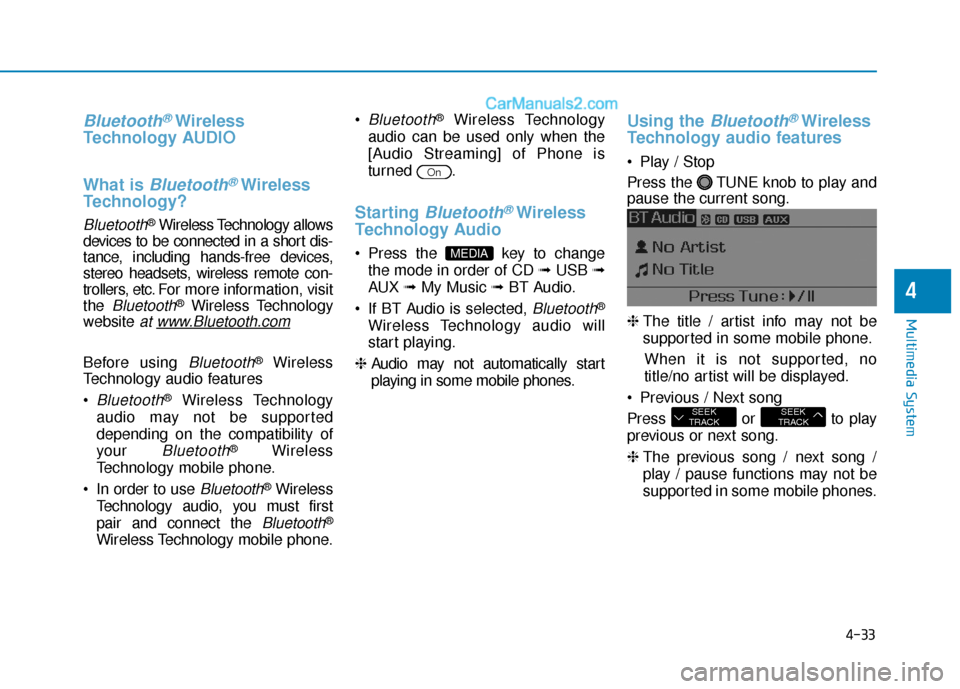
Play / Stop
Press the TUNE knob to play and
pause the current song.
❈ The title / artist info may not be
supported in some mobile phone.
When it is not supported, no
title/no artist will be displayed.
Previous / Next song
Press or to play
previous or next song.
❈ The previous song / next song /
play / pause functions may not be
supported in some mobile phones.
SEEK
TRACKSEEK
TRACK
MEDIA
On
Page 282 of 563
4-34
Multimedia System
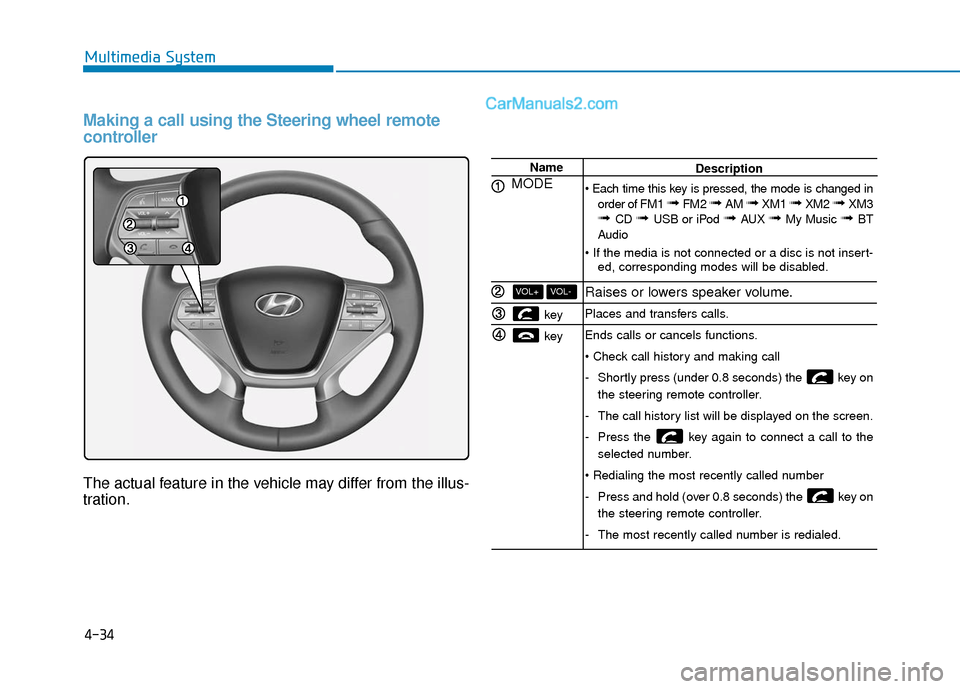
Making a call using the Steering wheel remote
controller
The actual feature in the vehicle may differ from the illus-
tration.
Name
MODE
key
key
VOL-VOL+
Description
order of FM1
➟ FM2 ➟ AM ➟ XM1 ➟ XM2 ➟ XM3➟ CD ➟ USB or iPod ➟ AUX ➟ My Music ➟ BT
Audio
ed, corresponding modes will be disabled.
Raises or lowers speaker volume.
Places and transfers calls.
Ends calls or cancels functions.
-Shortly press (under 0.8 seconds) the key on
the steering remote controller.
- The call history list will be displayed on the screen.
- Press the key again to connect a call to the
selected number.
- Press and hold (over 0.8 seconds) the key on
the steering remote controller.
- The most recently called number is redialed.
Page 283 of 563
4-35
Multimedia System
4
Bluetooth®Wireless Technology
Pairing a
Bluetooth®Wireless
Technology Device
What is Bluetooth®Wireless
Technology Pairing?
Pairing refers to the process of syn-
chronizing your
Bluetooth®Wireless
Technology phone or device with the
car audio system for connection.
Pairing is necessary to connect and
use the
Bluetooth®Wireless
Technology feature.
PHONE (if equipped)
Before using the
Bluetooth®
Wireless Technology phone
features
In order to use Bluetooth®Wireless
Technology phone, you must first
pair and connect the
Bluetooth®
Wireless Technology mobile phone.
If the mobile phone is not paired or connected, it is not possible to
enter Phone mode. Once a phone
is paired or connected, the guid-
ance screen will be displayed.
If Priority is set upon vehicle igni- tion(IGN/ACC ON), the
Bluetooth®
Wireless Technology phone will be
automatically connected. Even if
you are outside, the first
Bluetooth®
Wireless Technology phone will be
automatically connected once you
are in the vicinity of the vehicle. If you
do not want automatic
Bluetooth®
Wireless Technology phone connec-
tion, set the
Bluetooth®Wireless
Technology power to OFF.
Driving while distracted can
result in a loss of vehicle con-
trol that may lead to an acci-
dent, severe personal injury,
and death. The driver’s primary
responsibility is in the safe and
legal operation of a vehicle, and
use of any handheld devices,
other equipment, or vehicle sys-
tems which take the driver’s
eyes, attention and focus away
from the safe operation of a
vehicle or which are not permis-
sible by law should never be
used during operation of the
vehicle.
WARNING
Page 284 of 563
4-36
Multimedia System
Pairing key / key
on the Steering Remote
Controller
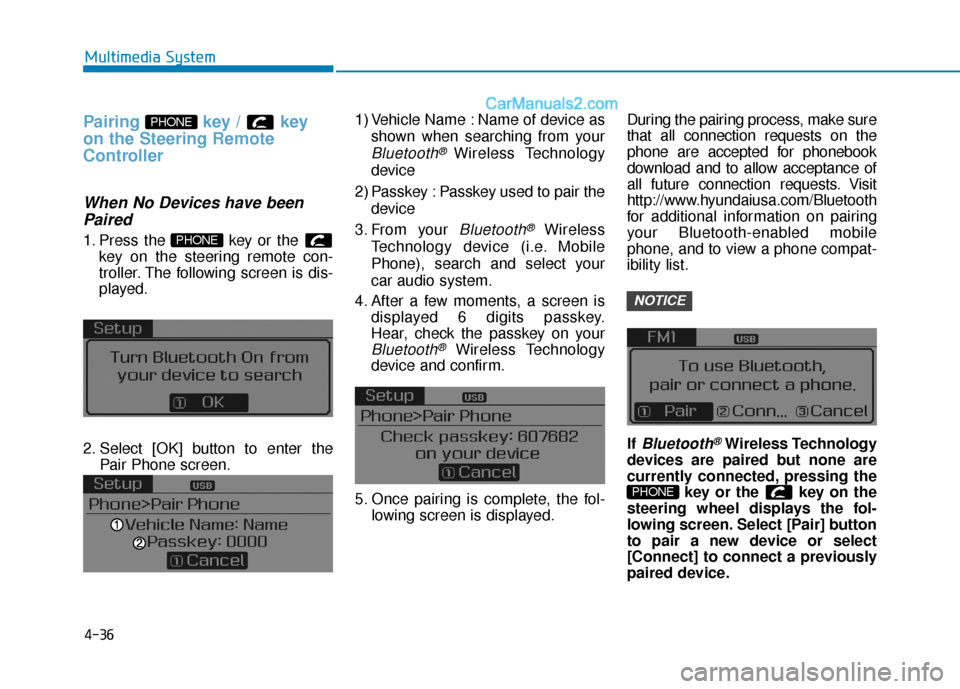
When No Devices have beenPaired
1. Press the key or the
key on the steering remote con-
troller. The following screen is dis-
played.
2. Select [OK] button to enter the Pair Phone screen. 1) Vehicle Name : Name of device as
shown when searching from your
Bluetooth® Wireless Technology
device
2) Passkey : Passkey used to pair the device
3. From your
Bluetooth®Wireless
Technology device (i.e. Mobile
Phone), search and select your
car audio system.
4. After a few moments, a screen is displayed 6 digits passkey.
Hear, check the passkey on your
Bluetooth®Wireless Technology
device and confirm.
5. Once pairing is complete, the fol- lowing screen is displayed. During the pairing process, make sure
that all connection requests on the
phone are accepted for phonebook
download and to allow acceptance of
all future connection requests. Visit
http://www.hyundaiusa.com/Bluetooth
for additional information on pairing
your Bluetooth-enabled mobile
phone, and to view a phone compat-
ibility list.
If
Bluetooth®Wireless Technology
devices are paired but none are
currently connected, pressing the key or the key on the
steering wheel displays the fol-
lowing screen. Select [Pair] button
to pair a new device or select
[Connect] to connect a previously
paired device.
PHONE
NOTICE
PHONE
PHONE
Page 287 of 563
![Hyundai Sonata 2017 Workshop Manual 4-39
Multimedia System
4
From the paired phone list, select
the phone you want to switch to the
highest priority, then select [Change
Priority] button from the Menu. The
selected device will be change](/img/35/16780/w960_16780-286.png "Hyundai Sonata 2017 Workshop Manual 4-39
Multimedia System
4
From the paired phone list, select
the phone you want to switch to the
highest priority, then select [Change
Priority] button from the Menu. The
selected device will be change")
4-39
Multimedia System
4
From the paired phone list, select
the phone you want to switch to the
highest priority, then select [Change
Priority] button from the Menu. The
selected device will be changed to
the highest priority. Priority icon will be displayed when
the selected phone is set as a pri-
ority phone.Disconnecting a Device
Press the key Select
[Phone] Select [Phone List]
From the paired phone list, select the
currently connected device and
select [Disconnect] button.SETUP
NOTICE