trailer Hyundai Sonata 2017 Owner's Manual
[x] Cancel search | Manufacturer: HYUNDAI, Model Year: 2017, Model line: Sonata, Model: Hyundai Sonata 2017Pages: 563, PDF Size: 17.7 MB
Page 310 of 563
5
Special Driving Conditions ..................................5-93
Hazardous Driving Conditions ......................................5-93
Rocking the Vehicle ........................................................5-93
Smooth Cornering ...........................................................5-94
Driving at Night................................................................5-94
Driving in the Rain ..........................................................5-95
Driving in Flooded Areas ...............................................5-95
Winter Driving ......................................................5-96
Snow or Icy Conditions ..................................................5-96
Winter Precautions .........................................................5-98
Vehicle Load Limit..............................................5-100
Tire Loading Information Label .................................5-101
Trailer Towing .....................................................5-105
Page 362 of 563
5-54
Driving your vehicle
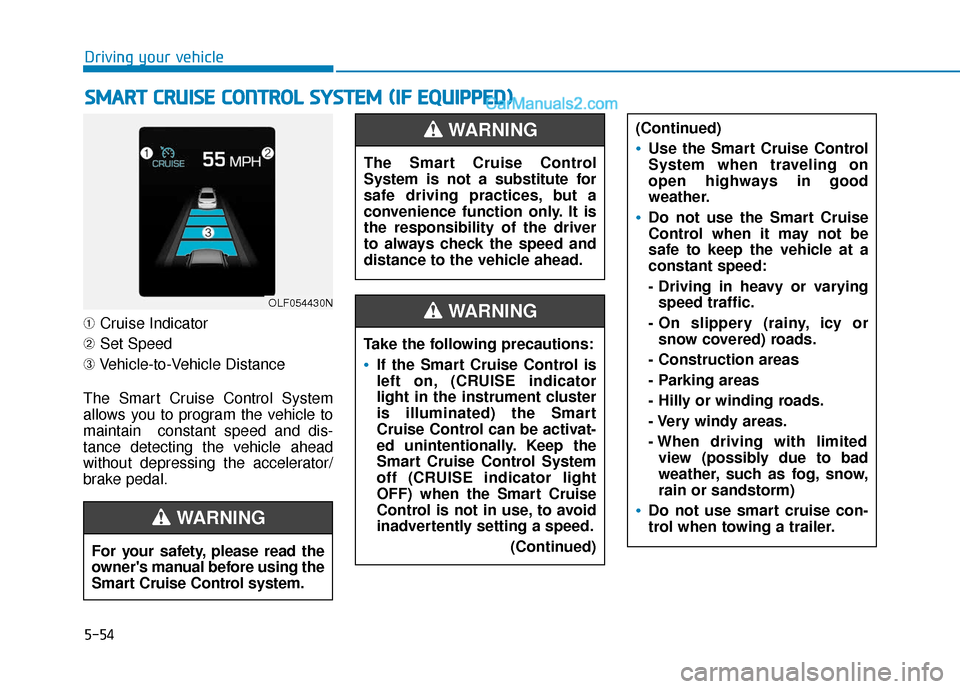
➀ Cruise Indicator
➁ Set Speed
➂ Vehicle-to-Vehicle Distance
The Smart Cruise Control System
allows you to program the vehicle to
maintain constant speed and dis-
tance detecting the vehicle ahead
without depressing the accelerator/
brake pedal.
S S M
M A
AR
RT
T
C
C R
R U
U I
IS
S E
E
C
C O
O N
NT
TR
R O
O L
L
S
S Y
Y S
ST
T E
EM
M
(
( I
IF
F
E
E Q
Q U
UI
IP
P P
PE
ED
D )
)
OLF054430N
For your safety, please read the
owner's manual before using the
Smart Cruise Control system.
WARNING
The Smart Cruise Control
System is not a substitute for
safe driving practices, but a
convenience function only. It is
the responsibility of the driver
to always check the speed and
distance to the vehicle ahead.
WARNING
Take the following precautions:
If the Smart Cruise Control is
left on, (CRUISE indicator
light in the instrument cluster
is illuminated) the Smart
Cruise Control can be activat-
ed unintentionally. Keep the
Smart Cruise Control System
off (CRUISE indicator light
OFF) when the Smart Cruise
Control is not in use, to avoid
inadvertently setting a speed.
(Continued)
(Continued)
Use the Smart Cruise Control
System when traveling on
open highways in good
weather.
Do not use the Smart Cruise
Control when it may not be
safe to keep the vehicle at a
constant speed:
- Driving in heavy or varyingspeed traffic.
- On slippery (rainy, icy or snow covered) roads.
- Construction areas
- Parking areas
- Hilly or winding roads.
- Very windy areas.
- When driving with limited view (possibly due to bad
weather, such as fog, snow,
rain or sandstorm)
Do not use smart cruise con-
trol when towing a trailer.
WARNING
Page 374 of 563
5-66
Driving your vehicle
Vehicle recognition
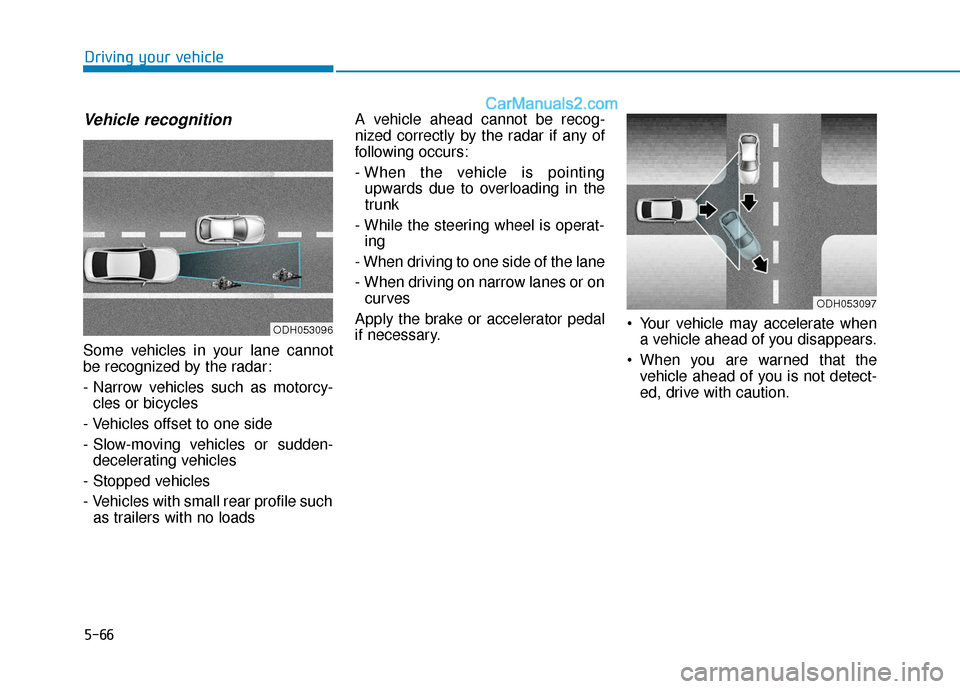
Some vehicles in your lane cannot
be recognized by the radar:
- Narrow vehicles such as motorcy-cles or bicycles
- Vehicles offset to one side
- Slow-moving vehicles or sudden- decelerating vehicles
- Stopped vehicles
- Vehicles with small rear profile such as trailers with no loads A vehicle ahead cannot be recog-
nized correctly by the radar if any of
following occurs:
- When the vehicle is pointing
upwards due to overloading in the
trunk
- While the steering wheel is operat- ing
- When driving to one side of the lane
- When driving on narrow lanes or on curves
Apply the brake or accelerator pedal
if necessary. Your vehicle may accelerate when
a vehicle ahead of you disappears.
When you are warned that the vehicle ahead of you is not detect-
ed, drive with caution.
ODH053096
ODH053097
Page 388 of 563
5-80
Driving your vehicle
(Continued)
- Metal substances are near the vehicles such as in a construc-
tion area.
- A big vehicle is near such as a bus or truck.
- A motorcycle or bicycle is near.
- A flat trailer is near.
- If the vehicle has started at the same time as the vehicle next to
you and has accelerated.
- When the other vehicle passes by at a higher rate of speed.
- When changing lanes.
- When going down or up a steep road where the height of the lane
is different.
- When the other vehicle drives very close.
- When a trailer or carrier is installed.
- When the temperature near the rear bumper area is high or low.
- When the radars are covered by a wall or a pillar of a parking lot.
(Continued)(Continued)
- When your vehicle is backing up,
if the detected vehicle also backs
up.
- Small objects like shopping carts and strollers.
- If there is a vehicle with decreased ride height (lowered).
- When the vehicle is close to another vehicle.
- When the vehicle in the next lane moves two lanes away from you
OR when the vehicle two lanes
away moves to the next lane
from you.
- When driving through a narrow road with many trees or bushes.
- When driving on wet surface.
Information
This device complies with Part 15 of
the FCC rules.
Operation is subject to the following
two conditions:
1. This device may not cause harmful interference, and
2. This device must accept any inter- ference received, including interfer-
ence that may cause undesired
operation.
i
Page 397 of 563
5-89
Driving your vehicle
5
Limitations of the system
The Automatic Emergency Braking
(AEB) system is designed to monitor
the vehicle ahead or a pedestrian in
the roadway through radar signals
and camera recognition to warn the
driver that a collision is imminent,
and if necessary, apply emergency
braking.
In certain situations, the radar sen-
sor or the camera may not be able to
detect the vehicle or pedestrian
ahead. In these cases, the AEB sys-
tem may not operate normally. The
driver must pay careful attention in
the following situations where the
AEB operation may be limited.
Detecting vehicles
The sensor may be limited when:
- The radar sensor or camera isblocked with a foreign object or
debris
- Inclement weather such as heavy rain or snow obscures the field of
view of the radar sensor or camera
- There is interference by electro- magnetic waves
- There is severe irregular reflection from the radar sensor
- The vehicle in front is too small to be detected by the camera recog-
nition system (for example a motor-
cycle or a bicycle, etc.)
- The vehicle in front is an oversize vehicle or trailer that is too big to
be detected by the camera recog-
nition system (for example a tractor
trailer, etc.)
- The driver's field of view is not well illuminated (either too dark or too
much reflection or too much back-
light that obscures the field of view) - The vehicle in front does not have
their rear lights properly turned ON
- The outside brightness changes suddenly, for example when enter-
ing or exiting a tunnel
- The vehicle in front is driving errat- ically
Page 410 of 563
5-102
Driving your vehicle
Vehicle capacity weight
904 lbs. (410 kg)
Vehicle capacity weight is the maxi-
mum combined weight of occupants
and cargo. If your vehicle is equipped
with a trailer, the combined weight
includes the tongue load.
Seating capacity
Total : 5 persons (Front seat : 2 persons,
Rear seat : 3 persons)
Seating capacity is the maximum
number of occupants including a
driver, your vehicle may carry.
However, the seating capacity may
be reduced based upon the weight of
all of the occupants, and the weight
of the cargo being carried or towed.
Do not overload the vehicle as there
is a limit to the total weight, or load
limit including occupants and cargo,
the vehicle can carry.
Towing capacity
We do not recommend using this
vehicle for trailer towing.
Cargo capacity
The cargo capacity of your vehicle
will increase or decrease depending
on the weight and the number of
occupants and the tongue load, if
your vehicle is equipped with a trailer.
Steps for determining correct load limit
1. Locate the statement "The com-
bined weight of occupants and
cargo should never exceed XXX
kg or XXX lbs.’’ on your vehicle’s
placard.
2. Determine the combined weight of the driver and passengers that will
be riding in your vehicle.
3. Subtract the combined weight of the driver and passengers from
XXX kg or XXX lbs.
4. The resulting figure equals the available amount of cargo and lug-
gage load capacity. For example, if
the "XXX" amount equals 1400
lbs. and there will be five 150 lb.
passengers in your vehicle, the
amount of available cargo and lug-
gage load capacity is 650 lbs.
(1400 - 750 (5 x 150) = 650 lbs.) 5. Determine the combined weight of
luggage and cargo being loaded
on the vehicle. That weight may
not safely exceed the available
cargo and luggage load capacity
calculated in Step 4.
6. If your vehicle will be towing a trail- er, load from your trailer will be
transferred to your vehicle.
Consult this manual to determine
how this reduces the available
cargo and luggage load capacity
of your vehicle.
Do not overload the vehicle as
there is a limit to the total
weight, or load limit, including
occupants and cargo, the vehi-
cle can carry. Overloading can
shorten the life of the vehicle. If
the GVWR or the GAWR is
exceeded, parts on the vehicle
can break, and it can change the
handling of your vehicle. These
could cause you to lose control
and result in an accident.
WARNING
Page 412 of 563
5-104
Driving your vehicle
Certification label
The certification label is located on
the driver’s door sill at the center pil-
lar and shows the maximum allow-
able weight of the fully loaded vehi-
cle. This is called the GVWR (Gross
Vehicle Weight Rating). The GVWR
includes the weight of the vehicle, all
occupants, fuel and cargo.
This label also tells you the maxi-
mum weight that can be supported
by the front and rear axles, called
Gross Axle Weight Rating (GAWR).The total weight of the vehicle,
including all occupants, accessories,
cargo, and trailer tongue load must
not exceed the Gross Vehicle Weight
Rating (GVWR) or the Gross Axle
Weight Rating (GAWR). To find out
the actual loads on your front and
rear axles, you need to go to a weigh
station and weigh your vehicle. Be
sure to spread out your load equally
on both sides of the centerline.
OBH059070
Overloading
Never exceed the GVWR for
your vehicle, the GAWR for
either the front or rear axle
and vehicle capacity weight.
Exceeding these ratings can
affect your vehicle's handling
and braking ability, and cause
an accident.
Do not overload your vehicle.
Overloading your vehicle can
cause heat buildup in your
vehicle's tires and possible
tire failure, increased stop-
ping distances and poor vehi-
cle handling-all of which may
result in a crash.
WARNING
Page 413 of 563
5-105
Driving your vehicle
5
If you carry items inside your
vehicle (e.g., suitcases, tools,
packages, or anything else),
they are moving as fast as the
vehicle. If you have to stop or
turn quickly, or if there is a
crash, the items will keep going
and can cause an injury if they
strike the driver or a passenger.
Put items in the cargo area of
your vehicle. Try to spread the
weight evenly.
Do not stack items, like suit-
cases, inside the vehicle
above the tops of the seats.
Do not leave an unsecured
child restraint in your vehicle.
When you carry something
inside the vehicle, secure it.
WARNING
T TR
R A
A I
IL
L E
E R
R
T
T O
O W
W I
IN
N G
G
Overloading your vehicle may
cause damage. Repairs would not
be covered by your warranty. Do
not overload your vehicle. We do not recommend using this
vehicle for trailer towing.
NOTICE
Page 437 of 563
6-24
It is possible that some tires, espe-
cially with larger punctures or dam-
age to the sidewall, cannot be sealed
completely.
Air pressure loss in the tire may
adversely affect tire performance.
For this reason, you should avoid
abrupt steering or other driving
maneuvers, especially if the vehicle
is heavily loaded or if a trailer is in
use.
The Tire Mobility Kit is not designed
or intended as a permanent tire
repair method and is to be used for
one tire only.
This instruction shows you step by
step how to temporarily seal the
puncture simply and reliably.
Read the section "Notes on the safe
use of the Tire Mobility Kit".Notes on the safe use of theTire Mobility Kit
Park your car at the side of the
road so that you can work with the
Tire Mobility Kit away from moving
traffic.
To be sure your vehicle will not move, even when you’re on fairly
level ground, always set your park-
ing brake.
Only use the Tire Mobility Kit for sealing/inflation passenger car
tires. Only punctured areas located
within the tread region of the tire
can be sealed using the tire mobil-
ity kit.
Do not use on motorcycles, bicy- cles or any other type of tires.
When the tire and wheel are dam- aged, do not use Tire Mobility Kit
for your safety.
Use of the Tire Mobility Kit may not be effective for tire damage larger
than approximately 0.24 inch (6
mm).
Please contact the nearest
HYUNDAI dealership if the tire
cannot be made roadworthy with
the Tire Mobility Kit. Do not use the Tire Mobility Kit if a
tire is severely damaged by driving
run flat or with insufficient air pres-
sure.
Do not remove any foreign objects such as nails or screws that have
penetrated the tire.
Provided the car is outdoors, leave the engine running. Otherwise
operating the compressor may
eventually drain the car battery.
Never leave the Tire Mobility Kit unattended while it is being used.
Do not leave the compressor run- ning for more than 10 minutes at a
time or it may overheat.
Do not use the Tire Mobility Kit if the ambient temperature is below
-22°F (-30°C).
What to do in an emergency
Page 465 of 563
Maintenance
7-20
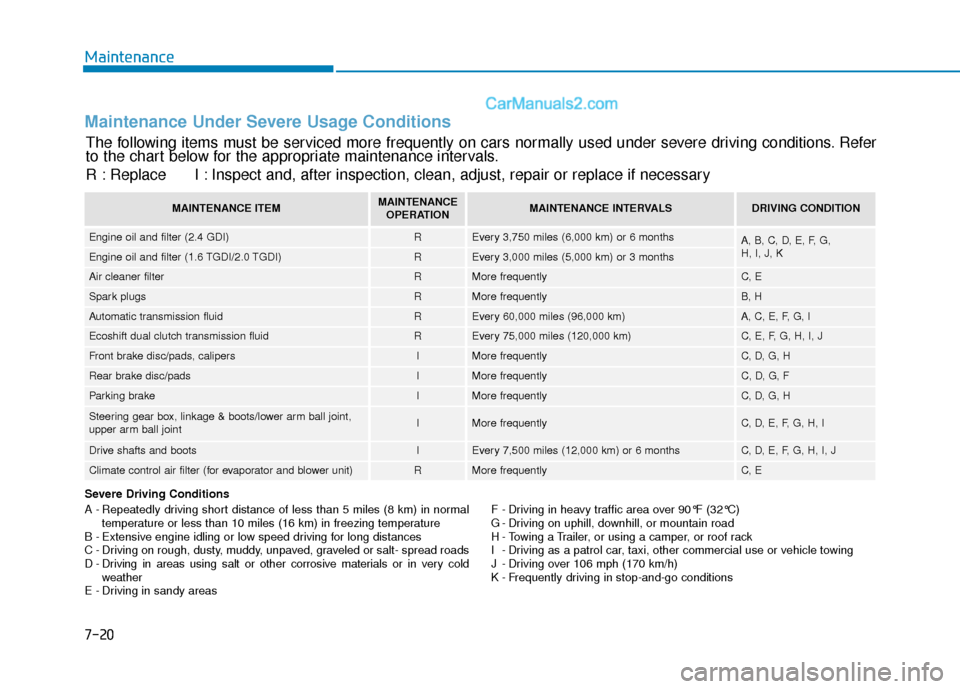
Maintenance Under Severe Usage Conditions
Severe Driving Conditions
A - Repeatedly driving short distance of less than 5 miles (8 km) in normaltemperature or less than 10 miles (16 km) in freezing temperature
B - Extensive engine idling or low speed driving for long distances
C - Driving on rough, dusty, muddy, unpaved, graveled or salt- spread roads
D - Driving in areas using salt or other corrosive materials or in very cold weather
E - Driving in sandy areas F - Driving in heavy traffic area over 90°F (32°C)
G - Driving on uphill, downhill, or mountain road
H - Towing a Trailer, or using a camper, or roof rack
I - Driving as a patrol car, taxi, other commercial use or vehicle towing
J - Driving over 106 mph (170 km/h)
K - Frequently driving in stop-and-go conditions
The following items must be serviced more frequently on cars normally used under severe driving conditions. Refer
to the chart below for the appropriate maintenance intervals.
R : Replace I : Inspect and, after inspection, clean, adjust, repair or replace if neces\
sary
MAINTENANCE ITEMMAINTENANCE
OPERATIONMAINTENANCE INTERVALSDRIVING CONDITION
Engine oil and filter (2.4 GDI)REvery 3,750 miles (6,000 km) or 6 monthsA, B, C, D, E, F, G,
H, I, J, K
Engine oil and filter (1.6 TGDI/2.0 TGDI)REvery 3,000 miles (5,000 km) or 3 months
Air cleaner filterRMore frequentlyC, E
Spark plugsRMore frequentlyB, H
Automatic transmission fluidREvery 60,000 miles (96,000 km)A, C, E, F, G, I
Ecoshift dual clutch transmission fluid REvery 75,000 miles (120,000 km)C, E, F, G, H, I, J
Front brake disc/pads, calipersIMore frequentlyC, D, G, H
Rear brake disc/padsIMore frequentlyC, D, G, F
Parking brakeIMore frequentlyC, D, G, H
Steering gear box, linkage & boots/lower arm ball joint,
upper arm ball jointIMore frequentlyC, D, E, F, G, H, I
Drive shafts and bootsIEvery 7,500 miles (12,000 km) or 6 monthsC, D, E, F, G, H, I, J
Climate control air filter (for evaporator and blower unit)RMore frequentlyC, E