light Hyundai Sonata 2020 Owner's Manual
[x] Cancel search | Manufacturer: HYUNDAI, Model Year: 2020, Model line: Sonata, Model: Hyundai Sonata 2020Pages: 537, PDF Size: 14.54 MB
Page 398 of 537
While Driving6-114
• The shadow is on the lane marker by a median strip, trees, guardrail, noise
barriers, etc.
• The lane markers are complicated or a structure substitutes for the lines such
as a construction area.
• There are crosswalk signs or other symbols on the road.
• The lane marker in a tunnel is stained with oil, etc.
• The lane suddenly disappears such as at the intersection.
• Driving the shared lane usage (bicycle lane, pedestrians lane, etc.)
When external condition is intervened
• The brightness outside changes suddenly such as when entering or
exiting a tunnel, or when passing
under a bridge.
• The brightness outside is too low such as when the headlamps are not on at
night or the vehicle is going through
a tunnel.
• There is a boundary structure in the roadway such as a concrete barrier,
guardrail and reflector post that is
inadvertently being detected by the
camera.
• When light coming from a street light or an oncoming vehicle is reflected on
a wet road surface such as a puddle in
the road.
• The field of view in front is obstructed by sun glare. • There is not enough distance between
you and the vehicle in front to be
able to detect the lane marker or the
vehicle ahead is driving on the lane
marker.
• Driving on a steep grade, over a hill, or when driving on a curved road.
• The adverse road conditions cause excessive vehicle vibrations while
driving.
• The surrounding of the inside rear view mirror temperature is high due to
direct sunlight, etc.
• The sensor recognition changes suddenly when passing over a speed
bump or driving on a steep up/down
or right/left grade
When front visibility is poor
• The windshield or the camera lens is blocked with dirt or debris.
• The windshield glass is fogged up; a clear view of the road is obstructed.
• Placing objects on the dashboard, etc.
• The sensor cannot detect the lane because of fog, heavy rain or snow.
Page 400 of 537
While Driving6-116
System Setting and Operation
System setting
• With the Engine Start/Stop button in the ON or START position, Highway
Driving Assist can be activated
by selecting 'Driver Assistance
Highway Driving Assist’ from the User
Settings mode on the infotainment
system. For detailed information,
please refer to the infotainment
system manual separately supplied.
• If the engine is turned off then on again, the system maintains the last
setting.
Operating conditions
Select 'Highway Driving Assist' from
the Settings menu in the infotainment
system screen and satisfy the following
conditions for the system to operate.
• Driving on the highway main line
• Smart Cruise Control is operating
- If Smart Cruise Control is in the READY state the Highway Driving
Assist will be in the READY state.
The
indicator on the cluster
will illuminate white.
• Vehicle speed is under 95 mph (153 km/h)
If all the mentioned conditions are
satisfied, the system is ENABLED and
the
indicator on the cluster will
illuminate green.
Steering wheel control
ODN8A069215ODN8A069215
Steering control
If the vehicle detects both lane markers
(lane color whit
e), the
indicator light
will change from white to green. This
indicates that the steering wheel is being
controlled.
ODN8A069216ODN8A069216
Temporary deactivation
The
indicator light changes from
green to white when the steering wheel
control is temporarily deactivated. Even
if the steering wheel is not controlled,
the distance between the vehicle ahead
will be maintained.
Page 402 of 537
While Driving6-118
Warning Message
Hands-off warning
ODN8A069219ODN8A069219
Keep hands on steering wheel
If the driver takes their hands off the
s
teering wheel for several seconds while
HDA system is activated, the system will
warn the driver.
Information
If the steering wheel is held with a light
grip, the message may appear because
HDA system may not recognize that the
driver has their hands on the steering
wheel.
WARNING
The warning message may appear
late according to road conditions.
Therefore, always have your hands on
the steering wheel while driving. Highway Driving Assist (HDA) system
canceled
If the driver still does not have their
hands on the s
teering wheel after the
message "Keep hands on steering
wheel", HDA system will be canceled.
However, if Lane Following Assist is
reactivated manually by the driver,
Highway Driving Assist System will
reactivate.
To activate Lane Following Assist, refer to
“Lane Following Assist” in this chapter.
HDA system will not be in the ENABLED
state and/or the steering wheel will not
be assisted when:
• The turn signal is turned on before changing a lane. If you change
lanes without the turn signal on, the
steering wheel might be controlled.
• The vehicle is not driven in the middle of the lane when the system is turned
on or right after changing a lane.
• ESC (Electronic Stability Control) or VSM (Vehicle Stability Management)
is activated.
• The vehicle is driven on a sharp curve.
• Vehicle speed is over 95 mph (153 km/h).
• The vehicle makes sharp lane changes.
• The vehicle brakes suddenly.
• Only one lane marker is detected.
• The lane is very wide or narrow.
• There are more than two lane markers on the road (e.g. construction area).
• Radius of a curve is too small.
• The vehicle is driven on a steep incline.
• The steering wheel is turned suddenly.
Page 406 of 537
While Driving6-122
WARNING
• Always be aware of road conditions
while driving and be alert for
unexpected situations even though
Rear Cross-Traffic Collision Warning
system and Rear Cross-Traffic
Collision-Avoidance Assist system
are operating.
• Rear Cross-Traffic Collision Warning
system and Rear Cross-Traffic
Collision-Avoidance Assist system
are supplemental systems to assist
you. Do not entirely rely on the
systems. Always pay attention, while
driving, for your safety.
• Rear Cross-Traffic Collision Warning
system and Rear Cross-Traffic
Collision-Avoidance Assist system
are not substitutes for proper and
safe driving. Always drive safely and
use caution when backing up the
vehicle.
System Setting and Activation
System setting
• The driver can activate the systems
by placing the ignition switch to the
ON position and by selecting “User
Settings → Driver Assistance → Parking
Safety → Rear Cross-Traffic Safety”.
RCCW and RCCA turn on and get
ready to be activated when ‘Rear
Cross-Traffic safety’ is selected.
• When the engine is turned off then on again, the systems are always ready to
be activated.
• When the system is initially turned on and when the engine is turned off
then on again, the warning light will
illuminate for 3 seconds on the side
view mirror.
The driver can select the initial warning
activation time in the User Settings in
the LCD display or infotainment system
display by selecting ‘User Settings →
Driver Assistance → Warning Timing’.
Page 407 of 537
06
6-123
The options for the initial Rear Cross-
Traffic Collision Warning includes the
following: - Normal: When this condition is selected, the
initial Rear Cross-Traffic Collision
Warning is activated normally. If this
setting feels sensitive, change the
option to ‘Later’.
The warning activation time may feel
late if the a vehicle at the side or rear
abruptly accelerates.
- Later: Select this warning activation time
when the traffic is light and you are
driving at a low speed.
Information
If you change the warning timing, the
warning time of other systems may
change. Always be aware before changing
the warning timing.
The driver can select the warning volume
of Rear Cross-Traffic Collision Warning
by selecting ‘User Settings → Driver
Assistance → Warning Volume → High/
Medium/Low’.
Information
If you change the warning volume, the
warning volume of other systems may
change. Always be aware before changing
the warning volume.
Operating conditions
To operate:
Go to the “User Settings → Driver
Assistance → Parking Safety → Rear Cross-
Traffic Safety” on the LCD display or
infotainment system display. The system
will turn on and standby to activate.
The system will activate when vehicle
speed is below 7 mph (10 km/h) and with
the shift button in R (Reverse).
The system will not activate when the vehicle speed exceeds 7 mph (10
km/h). The system will activate again
when the speed is below 5 mph (8
km/h).
The system’s detecting range is
approximately 1 ~ 65 ft (0.5 ~ 20 m). An
approaching vehicle will be detected if
their vehicle speed is within 5 ~ 22.5 mph
(8 ~ 36 km/h).
Note that the detecting range and
operating speed may vary under certain
conditions. As always, use caution and
pay close attention to your surroundings
when backing up your vehicle.
Page 408 of 537

While Driving6-124
Warning and System Control
Rear Cross-Traffic Collision Warning (RCCW) system
LeftLeft
ODN8H069036ODN8H069036
RightRight
ODN8H069037ODN8H069037
LeftLeft
ODN8069038ODN8069038
RightRight
ODN8069039ODN8069039
If the vehicle detected by the radar sensors approaches from the rear left/right side of
your vehicle, the warning chime will sound, the warning light on the side view mirror
will blink and a message will appear on the LCD display or infotainment system display.
If the rear view monitor system is in activation, a message will also appear on the
infotainment system screen.
The warning will stop when: - The detected vehicle moves out of the sensing area or
- when the vehicle is right behind your vehicle or
- when the vehicle is not approaching your vehicle or
- when the other vehicle slows down.
- The vehicle’s approaching speed is decreased.
Page 409 of 537
06
6-125
Rear Cross-Traffic Collision-Avoidance Assist (RCCA) system
LeftLeft
ODN8H069203LODN8H069203L
RightRight
ODN8H069204LODN8H069204L
LeftLeft
ODN8069038ODN8069038
RightRight
ODN8069038ODN8069038
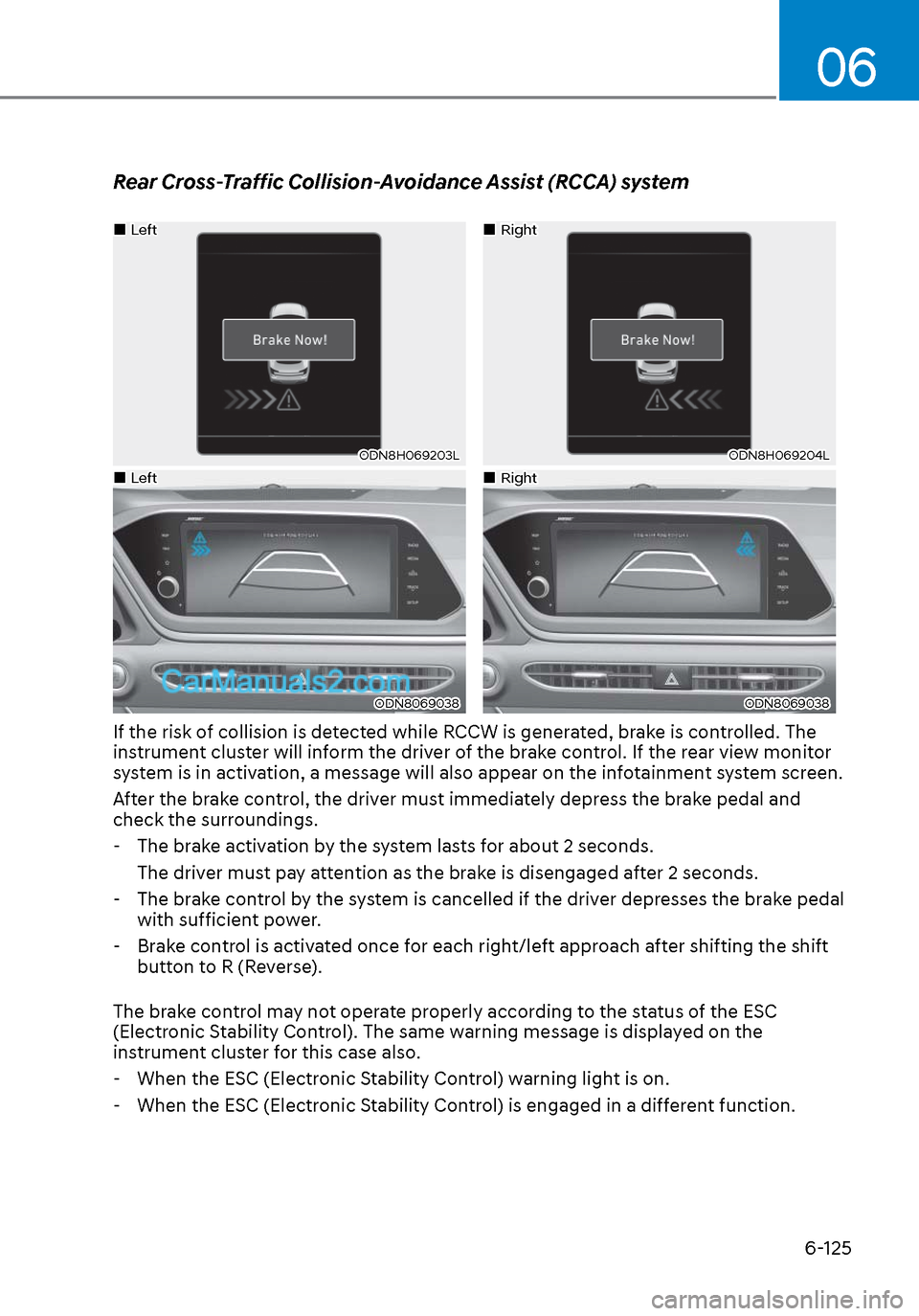
If the risk of collision is detected while RCCW is generated, brake is controlled. The
instrument cluster will inform the driver of the brake control. If the rear view monitor
system is in activation, a message will also appear on the infotainment system screen.
After the brake control, the driver must immediately depress the brake pedal and
check the surroundings. - The brake activation by the system lasts for about 2 seconds. The driver must pay attention as the brake is disengaged after 2 seconds.
- The brake control by the system is cancelled if the driver depresses the brake pedal
with sufficient power.
- Brake control is activated once for each right/left approach after shifting the shift
button to R (Reverse).
The brake control may not operate properly according to the status of the ESC
(Electronic Stability Control). The same warning message is displayed on the
instrument cluster for this case also.
- When the ESC (Electronic Stability Control) warning light is on.
- When the ESC (Electronic Stability Control) is engaged in a different function.
Page 410 of 537
While Driving6-126
CAUTION
• When the operation condition of
Rear Cross-Traffic Collision Warning
system is satisfied, the warning
will occur every time a vehicle
approaches the side or rear of your
stopped (0 mph (0 km/h) vehicle
speed) vehicle.
• The system’s warning or brake may
not operate properly if the left or
right of your vehicle’s rear bumper is
blocked by a vehicle or obstacle.
• The driver should always use
extreme caution while operating
the vehicle, whether or not the
warning light on the side view mirror
illuminates or there is a warning
alarm.
• Playing the vehicle audio system at
high volume may offset the system’s
warning sounds.
• The warning of Rear Cross-Traffic
Collision Warning System may not
sound while other system’s warning
sounds.
• If any other warning sound such as
seat belt warning chime is already
generated, Rear Cross-Traffic
Collision Warning system warning
may not sound.
WARNING
• Drive safely even though the vehicle
is equipped with Rear Cross-Traffic
Collision Warning system and Rear
Cross-Traffic Collision-Avoidance
Assist system. Do not solely rely
on the system but check your
surrounding when backing the
vehicle up.
• The driver is responsible for accurate
brake control.
• Always pay extreme caution while
driving. Rear Cross-Traffic Collision
Warning system and Rear Cross-
Traffic Collision-Avoidance Assist
system may not operate properly or
unnecessarily operate in accordance
with your driving situations.
• Rear Cross-Traffic Collision-
Avoidance Assist system is not a
substitute for safe driving practices,
but a convenience function only. It
is the responsibility of the driver to
always drive cautiously to prevent
unexpected and sudden situations
from occurring. Pay attention to the
road conditions at all times.
Page 417 of 537
06
6-133
Hazardous Driving Conditions
When hazardous driving elements
are encountered such as water, snow,
ice, mud and sand, take the below
suggestions:
• Drive cautiously and keep a longer braking distance.
• Avoid abrupt braking or steering.
• When your vehicle is stuck in snow, mud, or sand, use second
gear. Accelerate slowly to avoid
unnecessary wheel spin.
• Put sand, rock salt, tire chains or other non-slip materials under the wheels to
provide additional traction while the
vehicle becomes stuck in ice, snow,
or mud.
WARNING
Downshifting with an automatic
transmission while driving on slippery
surfaces can cause an accident. The
sudden change in tire speed could
cause the tires to skid. Be careful when
downshifting on slippery surfaces.
Rocking the Vehicle
If it is necessary to rock the vehicle to
free it from snow, sand, or mud, first turn
the steering wheel right and left to clear
the area around your front wheels. Then,
shift back and forth between R (Reverse)
and a forward gear.
Try to avoid spinning the wheels, and do
not race the engine.
To prevent transmission wear, wait until
the wheels stop spinning before shifting
gears. Release the accelerator pedal
while shifting, and press lightly on the
accelerator pedal while the transmission
is in gear. Slowly spinning the wheels in
forward and reverse directions causes a
rocking motion that may free the vehicle.
WARNING
If the vehicle is stuck and excessive
wheel spin occurs, the temperature
of the tires can increase very quickly.
If the tires become damaged, a tire
blow out or tire explosion can occur.
This condition is dangerous - you and
others may be injured. Do not attempt
this procedure if people or objects are
anywhere near the vehicle.
If you attempt to free the vehicle, the
vehicle can overheat quickly, possibly
causing an engine compartment fire
or other damage. Try to avoid spinning
the wheels as much as possible to
prevent overheating of either the tires
or the engine. DO NOT allow the vehicle
to spin the wheels above 35 mph (56
km/h).
Information
The ESC system must be turned OFF
before rocking the vehicle.
NOTICE
If you are still stuck after rocking the
vehicle a few times, have the vehicle
pulled out by a tow vehicle to avoid
engine overheating, possible damage to
the transmission, and tire damage. See
"Towing" in chapter 7.
SPECIAL DRIVING CONDITIONS
Page 418 of 537
While Driving6-134
Smooth Cornering
Avoid braking or gear changing in
corners, especially when roads are wet.
Ideally, corners should always be taken
under gentle acceleration.
Driving at Night
Night driving presents more hazards than
driving in the daylight. Here are some
important tips to remember:
• Slow down and keep more distance between you and other vehicles, as it
may be more difficult to see at night,
especially in areas where there may
not be any street lights.
• Adjust your mirrors to reduce the glare from other driver's headlamps.
• Keep your headlamps clean and properly aimed. Dirty or improperly
aimed headlamps will make it much
more difficult to see at night.
• Avoid staring directly at the headlamps of oncoming vehicles. You
could be temporarily blinded, and it
will take several seconds for your eyes
to readjust to the darkness.
Driving in the Rain
Rain and wet roads can make driving
dangerous. Here are a few things to
consider when driving in the rain or on
slick pavement:
• Slow down and allow extra following distance. A heavy rainfall makes
it harder to see and increases the
distance needed to stop your vehicle.
• Turn OFF your Cruise Control.
• Replace your windshield wiper blades when they show signs of streaking or
missing areas on the windshield.
• Tires should be properly maintained with at least 2/32nds of an inch of
tread depth. If your tires do not have
enough tread, making a quick stop on
wet pavement can cause a skid and
possibly lead to an accident. See "Tire
Tread" in chapter 8.
• Turn on your headlamps to make it easier for others to see you.
• Driving too fast through large puddles can affect your brakes. If you must go
through puddles, try to drive through
them slowly.
• If you believe your brakes may be wet, apply them lightly while driving until
normal braking operation returns.
Hydroplaning
If the road is wet enough and you are
going fast enough, your vehicle may
have little or no contact with the road
surface and actually ride on the water.
The best advice is SLOW DOWN when
the road is wet.
The risk of hydroplaning increases as
the depth of tire tread decreases, refer
to "Tire Tread" in chapter 8.