chapter 6 Hyundai Sonata 2020 User Guide
[x] Cancel search | Manufacturer: HYUNDAI, Model Year: 2020, Model line: Sonata, Model: Hyundai Sonata 2020Pages: 537, PDF Size: 14.54 MB
Page 93 of 537
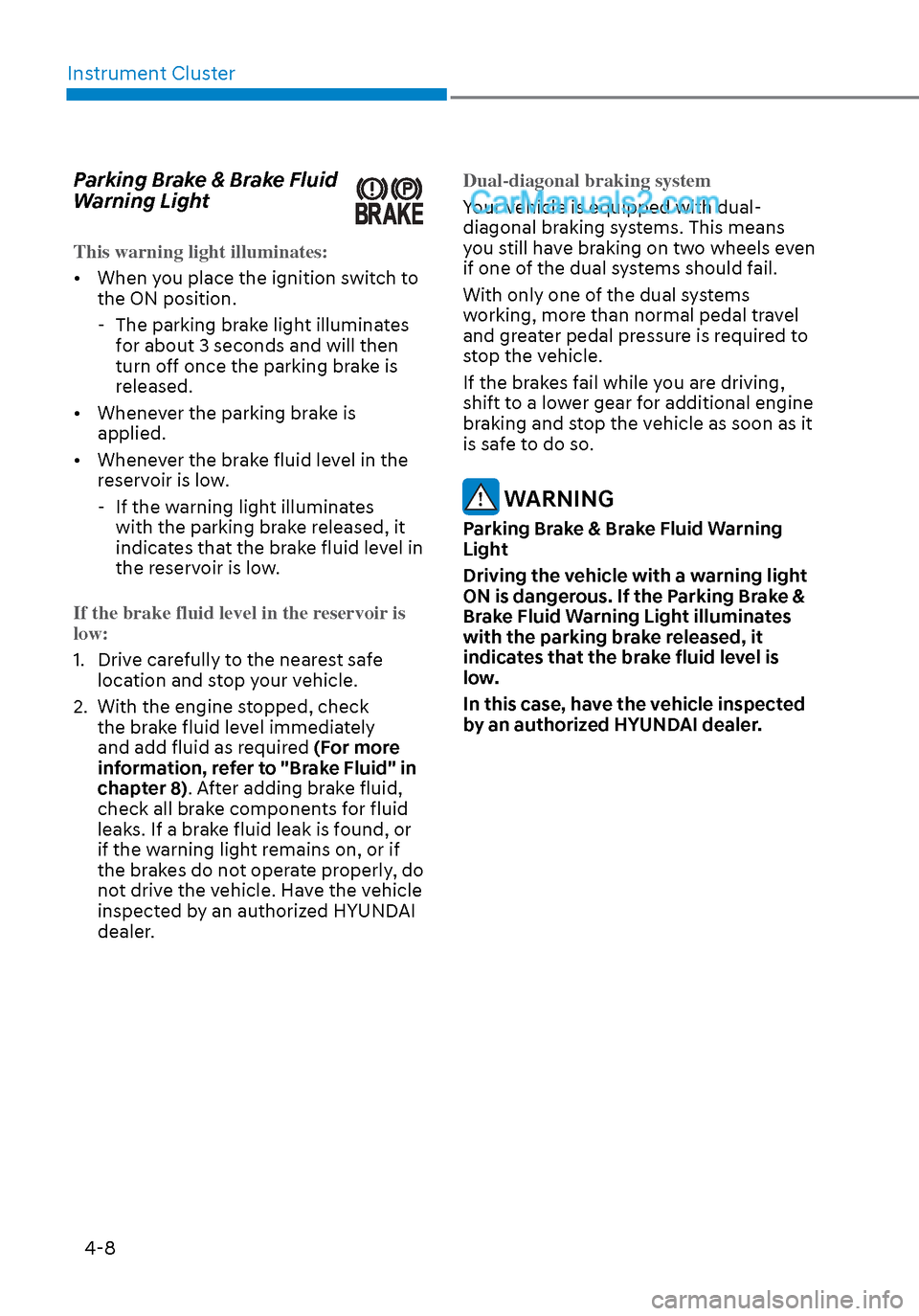
Instrument Cluster4-8
Parking Brake & Brake Fluid
Warning Light
This warning light illuminates:
• When you place the ignition switch to the ON position.
-
The parking brake light illuminates
for about 3 seconds and will then
turn off once the parking brake is
released.
• Whenever the parking brake is applied.
• Whenever the brake fluid level in the reservoir is low.
- If the warning light illuminates with the parking brake released, it
indicates that the brake fluid level in
the reservoir is low.
If the brake fluid level in the reservoir is
low:
1. Drive carefully to the nearest safe loca
tion and stop your vehicle.
2. With the engine stopped, check the brake fluid level immediately
and add fluid as required (For more
information, refer to "Brake Fluid" in
chapter 8). After adding brake fluid,
check all brake components for fluid
leaks. If a brake fluid leak is found, or
if the warning light remains on, or if
the brakes do not operate properly, do
not drive the vehicle. Have the vehicle
inspected by an authorized HYUNDAI
dealer. Dual-diagonal braking system
Your vehicle is equipped with dual-
diagonal br
aking systems. This means
you still have braking on two wheels even
if one of the dual systems should fail.
With only one of the dual systems
working, more than normal pedal travel
and greater pedal pressure is required to
stop the vehicle.
If the brakes fail while you are driving,
shift to a lower gear for additional engine
braking and stop the vehicle as soon as it
is safe to do so.
WARNING
Parking Brake & Brake Fluid Warning
Light
Driving the vehicle with a warning light
ON is dangerous. If the Parking Brake &
Brake Fluid Warning Light illuminates
with the parking brake released, it
indicates that the brake fluid level is
low.
In this case, have the vehicle inspected
by an authorized HYUNDAI dealer.
Page 95 of 537
![Hyundai Sonata 2020 User Guide Instrument Cluster4-10
AUTO HOLD Indicator Light
(if equipped)
This indicator light illuminates:
• [White] When you activate the auto hold s
ystem by pressing the AUTO
HOLD button.
• [Green]](/img/35/16773/w960_16773-94.png "Hyundai Sonata 2020 User Guide Instrument Cluster4-10
AUTO HOLD Indicator Light
(if equipped)
This indicator light illuminates:
• [White] When you activate the auto hold s
ystem by pressing the AUTO
HOLD button.
• [Green]")
Instrument Cluster4-10
AUTO HOLD Indicator Light
(if equipped)
This indicator light illuminates:
• [White] When you activate the auto hold s
ystem by pressing the AUTO
HOLD button.
• [Green] When you stop the vehicle completely by depressing the brake
pedal with the auto hold system
activated.
• [Yellow] When there is a malfunction with the auto hold system.
In this case, have the vehicle
inspected by an authorized HYUNDAI
dealer.
For more information, refer to “Auto
Hold” in chapter 6.
Electric Power Steering (EPS)
Warning Light
This warning light illuminates:
• When you place the ignition switch to the ON position.
-
The Electric Power Steering Warning
light illuminates for about 3 seconds
and then goes off.
• Whenever there is a malfunction with the EPS.
If this occurs, have the vehicle
inspected by an authorized HYUNDAI
dealer.
Malfunction Indicator Lamp
(MIL)
This warning light illuminates:
• When you place the ignition switch to the ON position.
-
The malfunction indicator light
illuminates for about 3 seconds and
then goes off.
• Whenever there is a malfunction with either the emission control system or
the engine or the vehicle powertrain.
If this occurs, have the vehicle
inspected by an authorized HYUNDAI
dealer.
NOTICE
Driving with the Malfunction Indicator
Lamp (MIL) on may cause damage to
the emission control system which
could affect drivability and/or fuel
economy.
NOTICE
If the Malfunction Indicator Lamp
(MIL) illuminates, potential catalytic
converter damage is possible which
could result in loss of engine power.
In this case, have the vehicle inspected
by an authorized HYUNDAI dealer as
soon as possible.
Page 96 of 537
04
4-11
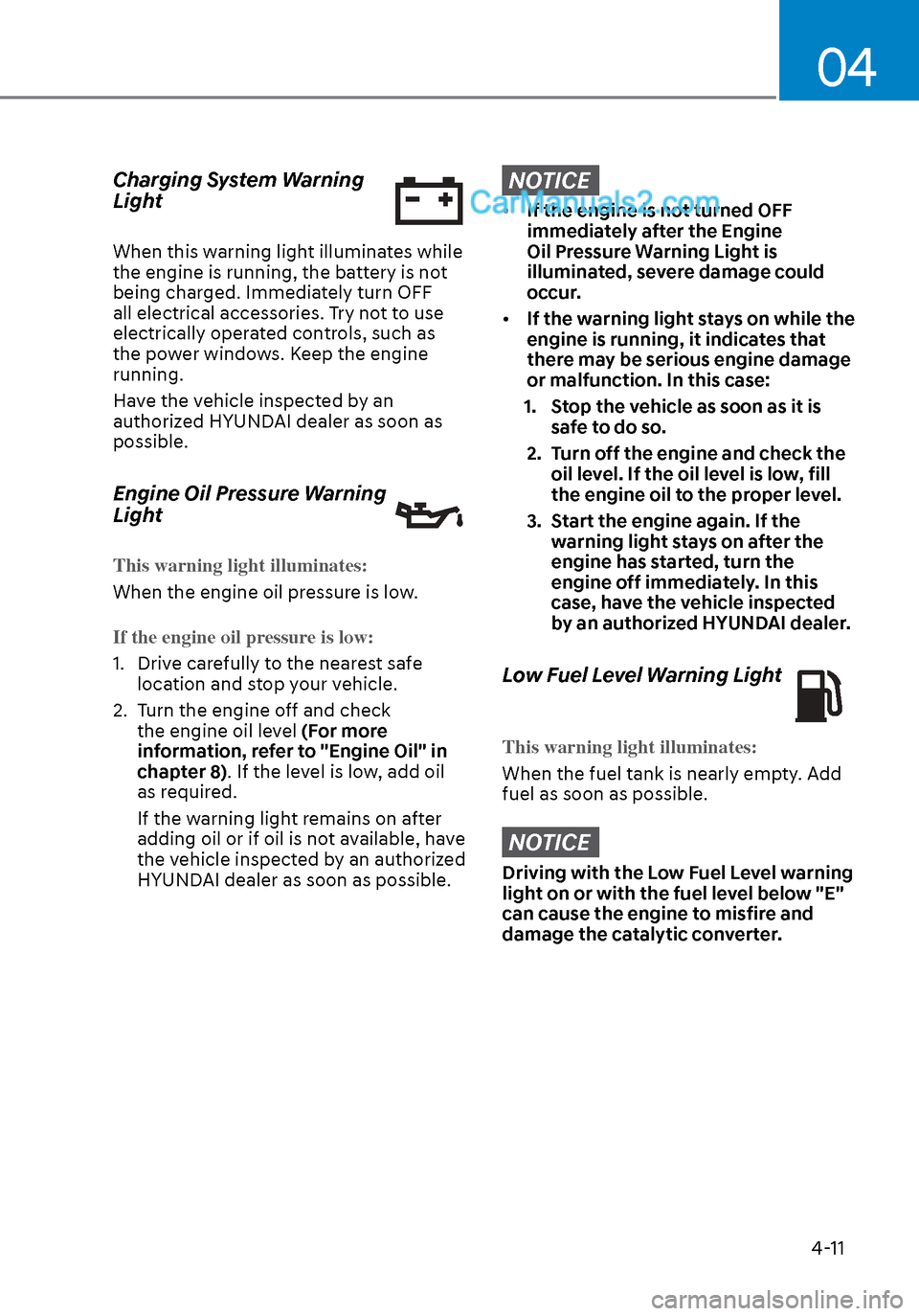
Charging System Warning
Light
When this warning light illuminates while
the engine is running, the battery is not
being charged. Immediately turn OFF
all electrical accessories. Try not to use
electrically operated controls, such as
the power windows. Keep the engine
running.
Have the vehicle inspected by an
authorized HYUNDAI dealer as soon as
possible.
Engine Oil Pressure Warning
Light
This warning light illuminates:
When the engine oil pressure is low.
If the engine oil pressure is low:
1. Drive carefully to the nearest safe loca
tion and stop your vehicle.
2. Turn the engine off and check the engine oil level (For more
information, refer to "Engine Oil" in
chapter 8). If the level is low, add oil
as required.
If the warning light remains on after
adding oil or if oil is not available, have
the vehicle inspected by an authorized
HYUNDAI dealer as soon as possible.
NOTICE
• If the engine is not turned OFF
immediately after the Engine
Oil Pressure Warning Light is
illuminated, severe damage could
occur.
• If the warning light stays on while the
engine is running, it indicates that
there may be serious engine damage
or malfunction. In this case:
1. Stop the vehicle as soon as it is safe to do so.
2. Turn off the engine and check the oil level. If the oil level is low, fill
the engine oil to the proper level.
3. Start the engine again. If the warning light stays on after the
engine has started, turn the
engine off immediately. In this
case, have the vehicle inspected
by an authorized HYUNDAI dealer.
Low Fuel Level Warning Light
This warning light illuminates:
When the fuel tank is nearly empty. Add
fuel as soon as possible.
NOTICE
Driving with the Low Fuel Level warning
light on or with the fuel level below "E"
can cause the engine to misfire and
damage the catalytic converter.
Page 97 of 537
Instrument Cluster4-12
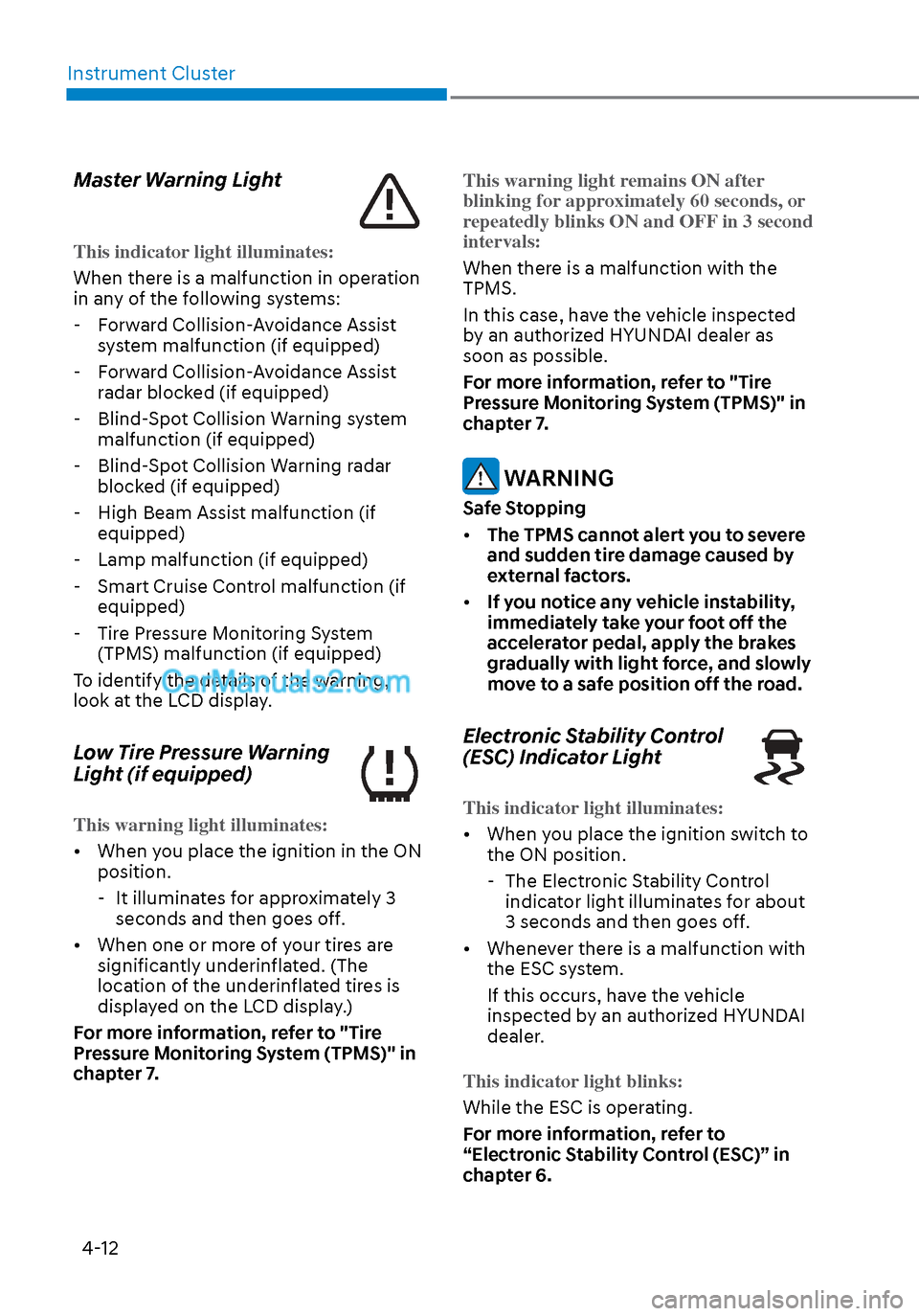
Master Warning Light
This indicator light illuminates:
When there is a malfunction in operation
in an
y of the following systems:
- Forward Collision-Avoidance Assist system malfunction (if equipped)
- Forward Collision-Avoidance Assist radar blocked (if equipped)
- Blind-Spot Collision Warning system malfunction (if equipped)
- Blind-Spot Collision Warning radar blocked (if equipped)
- High Beam Assist malfunction (if equipped)
- Lamp malfunction (if equipped)
- Smart Cruise Control malfunction (if equipped)
- Tire Pressure Monitoring System (TPMS) malfunction (if equipped)
To identify the details of the warning,
look at the LCD display.
Low Tire Pressure Warning
Light (if equipped)
This warning light illuminates:
• When you place the ignition in the ON position.
-
It illuminates for approximately 3
seconds and then goes off.
• When one or more of your tires are significantly underinflated. (The
location of the underinflated tires is
displayed on the LCD display.)
For more information, refer to "Tire
Pressure Monitoring System (TPMS)" in
chapter 7. This warning light remains ON after
blinking for
approximately 60 seconds, or
repeatedly blinks ON and OFF in 3 second
intervals:
When there is a malfunction with the
TPMS.
In this case, ha
ve the vehicle inspected
by an authorized HYUNDAI dealer as
soon as possible.
For more information, refer to "Tire
Pressure Monitoring System (TPMS)" in
chapter 7.
WARNING
Safe Stopping
• The TPMS cannot alert you to severe
and sudden tire damage caused by
external factors.
• If you notice any vehicle instability,
immediately take your foot off the
accelerator pedal, apply the brakes
gradually with light force, and slowly
move to a safe position off the road.
Electronic Stability Control
(ESC) Indicator Light
This indicator light illuminates:
• When you place the ignition switch to
the ON position.
-
The Electronic Stability Control
indicator light illuminates for about
3 seconds and then goes off.
• Whenever there is a malfunction with the ESC system.
If this occurs, have the vehicle
inspected by an authorized HYUNDAI
dealer.
This indicator light blinks:
While the ESC is operating.
F
or more information, refer to
“Electronic Stability Control (ESC)” in
chapter 6.
Page 98 of 537
04
4-13
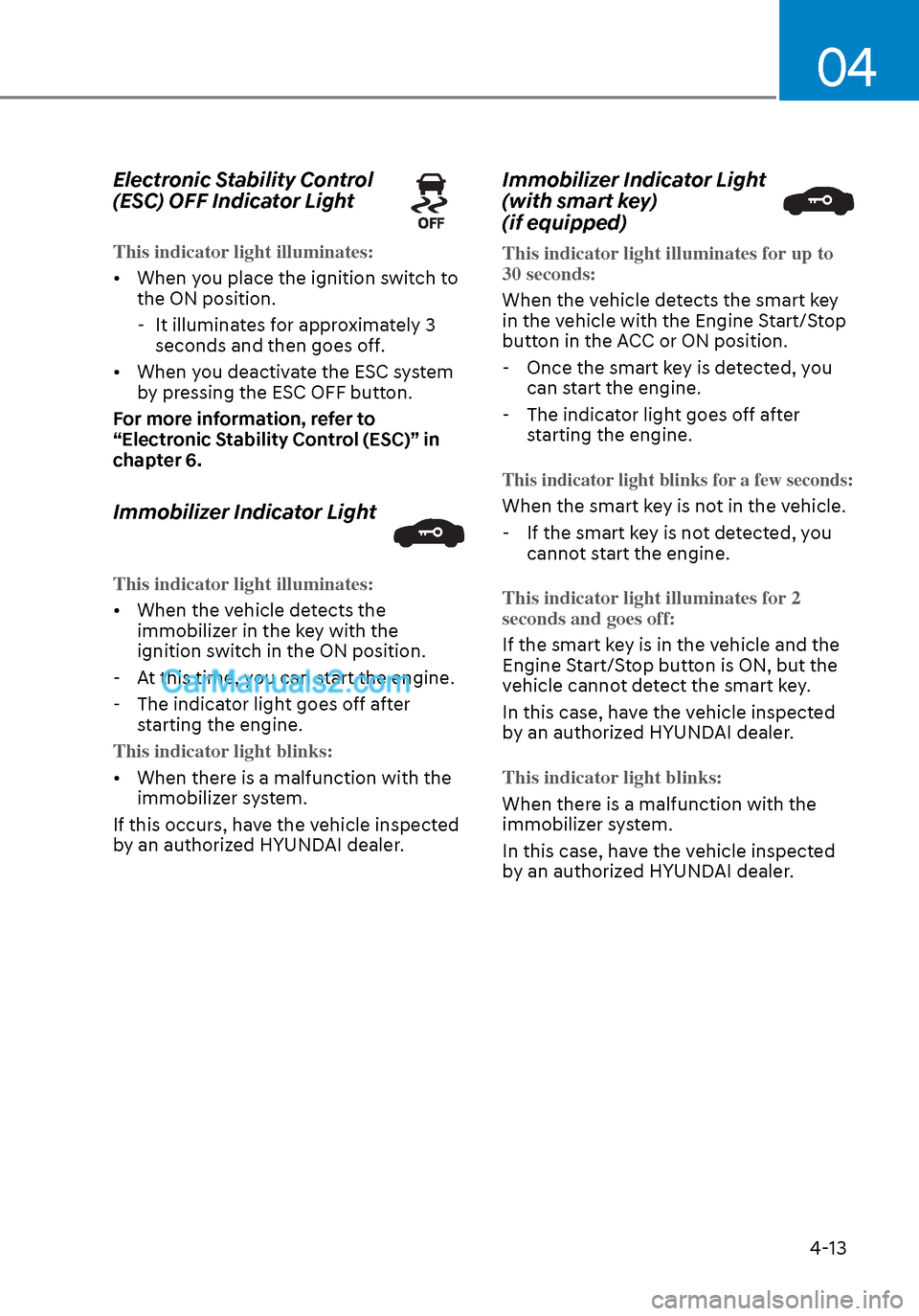
Electronic Stability Control
(ESC) OFF Indicator Light
This indicator light illuminates:
• When you place the ignition switch to the ON position.
-
It illuminates for approximately 3
seconds and then goes off.
• When you deactivate the ESC system by pressing the ESC OFF button.
For more information, refer to
“Electronic Stability Control (ESC)” in
chapter 6.
Immobilizer Indicator Light
This indicator light illuminates:
• When the vehicle detects the immobiliz
er in the key with the
ignition switch in the ON position.
- At this time, you can start the engine.
- The indicator light goes off after
starting the engine.
This indicator light blinks:
• When there is a malfunction with the immobiliz
er system.
If this occurs, have the vehicle inspected
by an authorized HYUNDAI dealer.
Immobilizer Indicator Light
(with smart key)
(if equipped)
This indicator light illuminates for up to
30 seconds:
When the vehicle detects the smart key
in the v
ehicle with the Engine Start/Stop
button in the ACC or ON position.
- Once the smart key is detected, you can start the engine.
- The indicator light goes off after
starting the engine.
This indicator light blinks for a few seconds:
When the smart key is not in the vehicle.
- If the smart key is not detected, you cannot start the engine.
This indicator light illuminates for 2
seconds and goes off:
If the smart key is in the vehicle and the
E
ngine Start/Stop button is ON, but the
vehicle cannot detect the smart key.
In this case, have the vehicle inspected
by an authorized HYUNDAI dealer.
This indicator light blinks:
When there is a malfunction with the
immobiliz
er system.
In this case, have the vehicle inspected
by an authorized HYUNDAI dealer.
Page 99 of 537
Instrument Cluster4-14
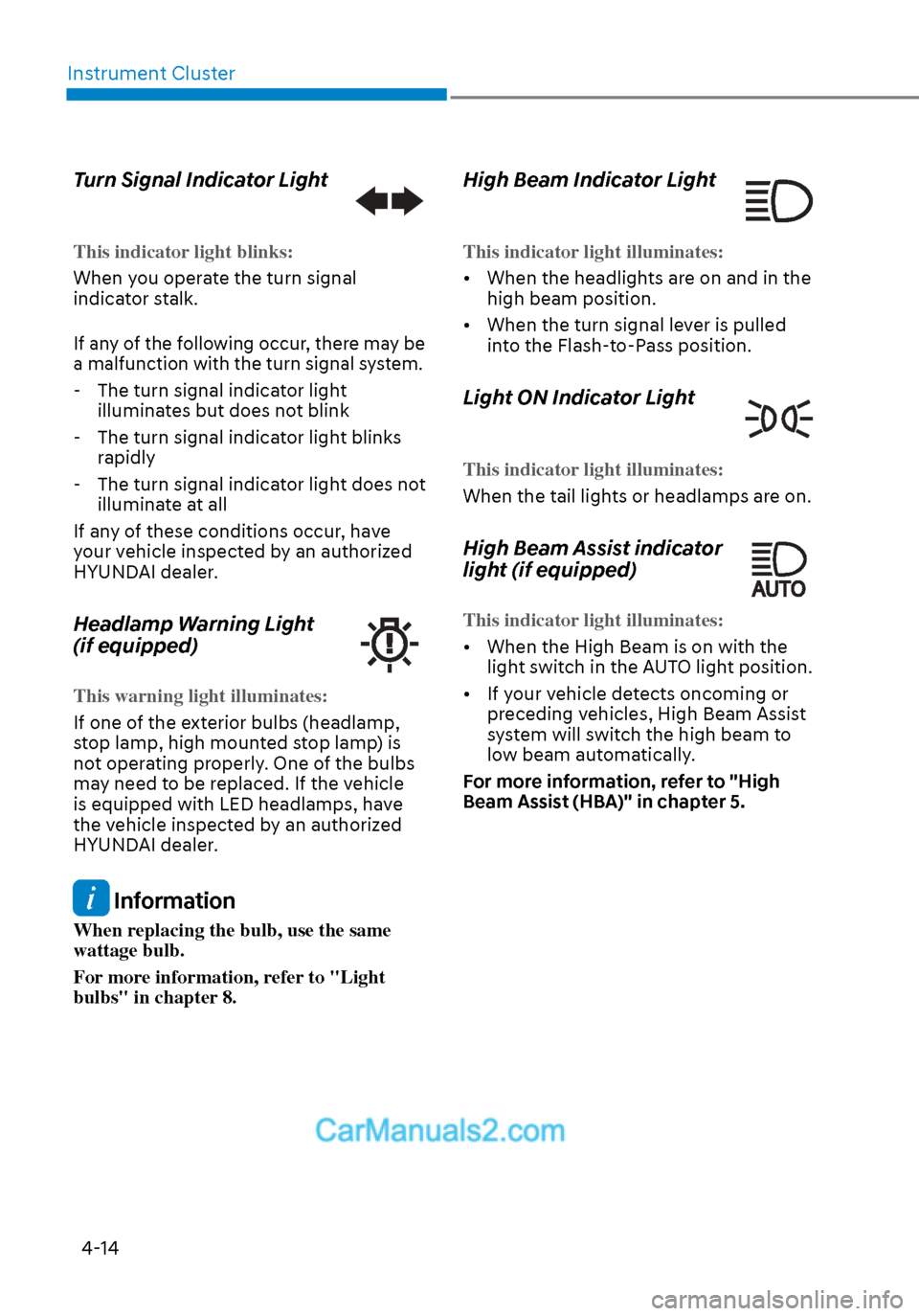
Turn Signal Indicator Light
This indicator light blinks:
When you operate the turn signal
indica
tor stalk.
If any of the following occur, there may be
a malfunction with the turn signal system.
- The turn signal indicator light
illuminates but does not blink
- The turn signal indicator light blinks
rapidly
- The turn signal indicator light does not
illuminate at all
If any of these conditions occur, have
your vehicle inspected by an authorized
HYUNDAI dealer.
Headlamp Warning Light
(if equipped)
This warning light illuminates:
If one of the exterior bulbs (headlamp,
s
top lamp, high mounted stop lamp) is
not operating properly. One of the bulbs
may need to be replaced. If the vehicle
is equipped with LED headlamps, have
the vehicle inspected by an authorized
HYUNDAI dealer.
Information
When replacing the bulb, use the same
wattage bulb.
For more information, refer to "Light
bulbs" in chapter 8.
High Beam Indicator Light
This indicator light illuminates:
• When the headlights are on and in the high beam position.
•
When the turn signal lever is pulled
into the Flash-to-Pass position.
Light ON Indicator Light
This indicator light illuminates:
When the tail lights or headlamps are on.
High Beam Assist indicator
light (if equipped)
This indicator light illuminates:
• When the High Beam is on with the ligh
t switch in the AUTO light position.
• If your vehicle detects oncoming or preceding vehicles, High Beam Assist
system will switch the high beam to
low beam automatically.
For more information, refer to "High
Beam Assist (HBA)" in chapter 5.
Page 100 of 537
04
4-15
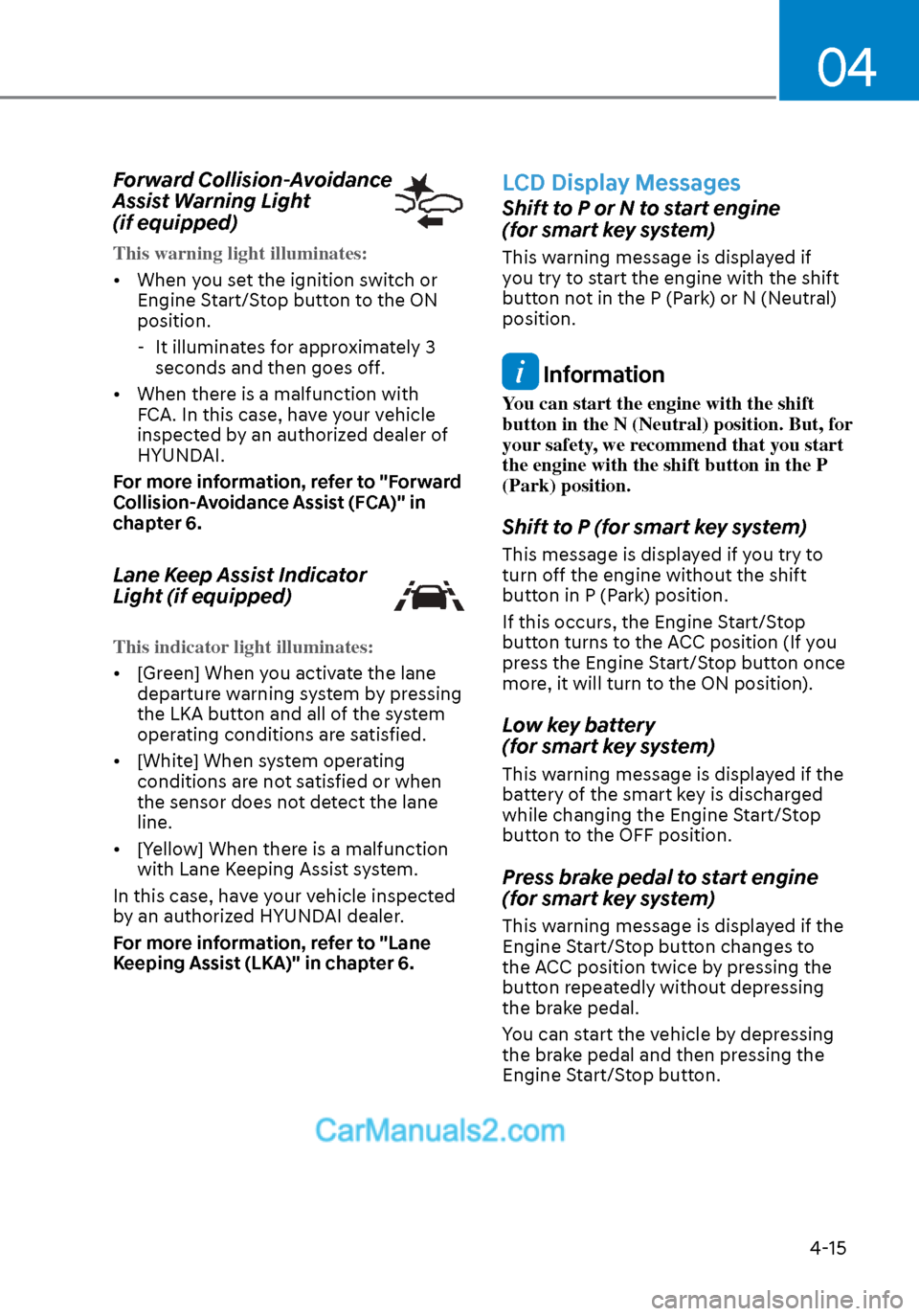
Forward Collision-Avoidance
Assist Warning Light
(if equipped)
This warning light illuminates:
• When you set the ignition switch or E
ngine Start/Stop button to the ON
position.
- It illuminates for approximately 3 seconds and then goes off.
• When there is a malfunction with FCA. In this case, have your vehicle
inspected by an authorized dealer of
HYUNDAI.
For more information, refer to "Forward
Collision-Avoidance Assist (FCA)" in
chapter 6.
Lane Keep Assist Indicator
Light (if equipped)
This indicator light illuminates:
• [Green] When you activate the lane departur
e warning system by pressing
the LKA button and all of the system
operating conditions are satisfied.
• [White] When system operating conditions are not satisfied or when
the sensor does not detect the lane
line.
• [Yellow] When there is a malfunction with Lane Keeping Assist system.
In this case, have your vehicle inspected
by an authorized HYUNDAI dealer.
For more information, refer to "Lane
Keeping Assist (LKA)" in chapter 6.
LCD Display Messages
Shift to P or N to start engine
(for smart key system)
This warning message is displayed if
you try to start the engine with the shift
button not in the P (Park) or N (Neutral)
position.
Information
You can start the engine with the shift
button in the N (Neutral) position. But, for
your safety, we recommend that you start
the engine with the shift button in the P
(Park) position.
Shift to P (for smart key system)
This message is displayed if you try to
turn off the engine without the shift
button in P (Park) position.
If this occurs, the Engine Start/Stop
button turns to the ACC position (If you
press the Engine Start/Stop button once
more, it will turn to the ON position).
Low key battery
(for smart key system)
This warning message is displayed if the
battery of the smart key is discharged
while changing the Engine Start/Stop
button to the OFF position.
Press brake pedal to start engine
(for smart key system)
This warning message is displayed if the
Engine Start/Stop button changes to
the ACC position twice by pressing the
button repeatedly without depressing
the brake pedal.
You can start the vehicle by depressing
the brake pedal and then pressing the
Engine Start/Stop button.
Page 102 of 537
04
4-17
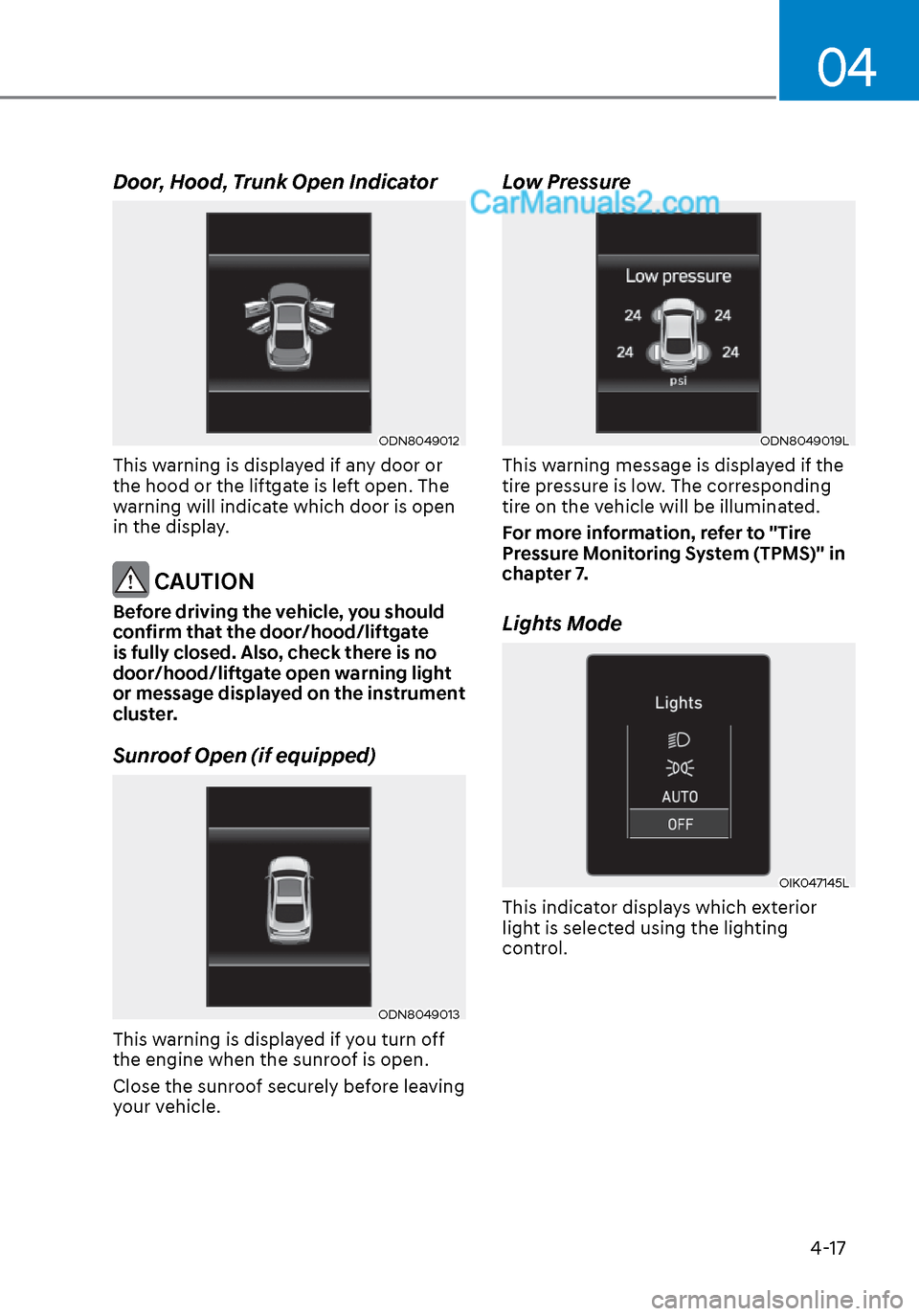
Door, Hood, Trunk Open Indicator
ODN8049012ODN8049012
This warning is displayed if any door or
the hood or the liftgate is left open. The
warning will indicate which door is open
in the display.
CAUTION
Before driving the vehicle, you should
confirm that the door/hood/liftgate
is fully closed. Also, check there is no
door/hood/liftgate open warning light
or message displayed on the instrument
cluster.
Sunroof Open (if equipped)
ODN8049013ODN8049013
This warning is displayed if you turn off
the engine when the sunroof is open.
Close the sunroof securely before leaving
your vehicle.
Low Pressure
ODN8049019LODN8049019L
This warning message is displayed if the
tire pressure is low. The corresponding
tire on the vehicle will be illuminated.
For more information, refer to "Tire
Pressure Monitoring System (TPMS)" in
chapter 7.
Lights Mode
OIK047145LOIK047145L
This indicator displays which exterior
light is selected using the lighting
control.
Page 106 of 537
04
4-21
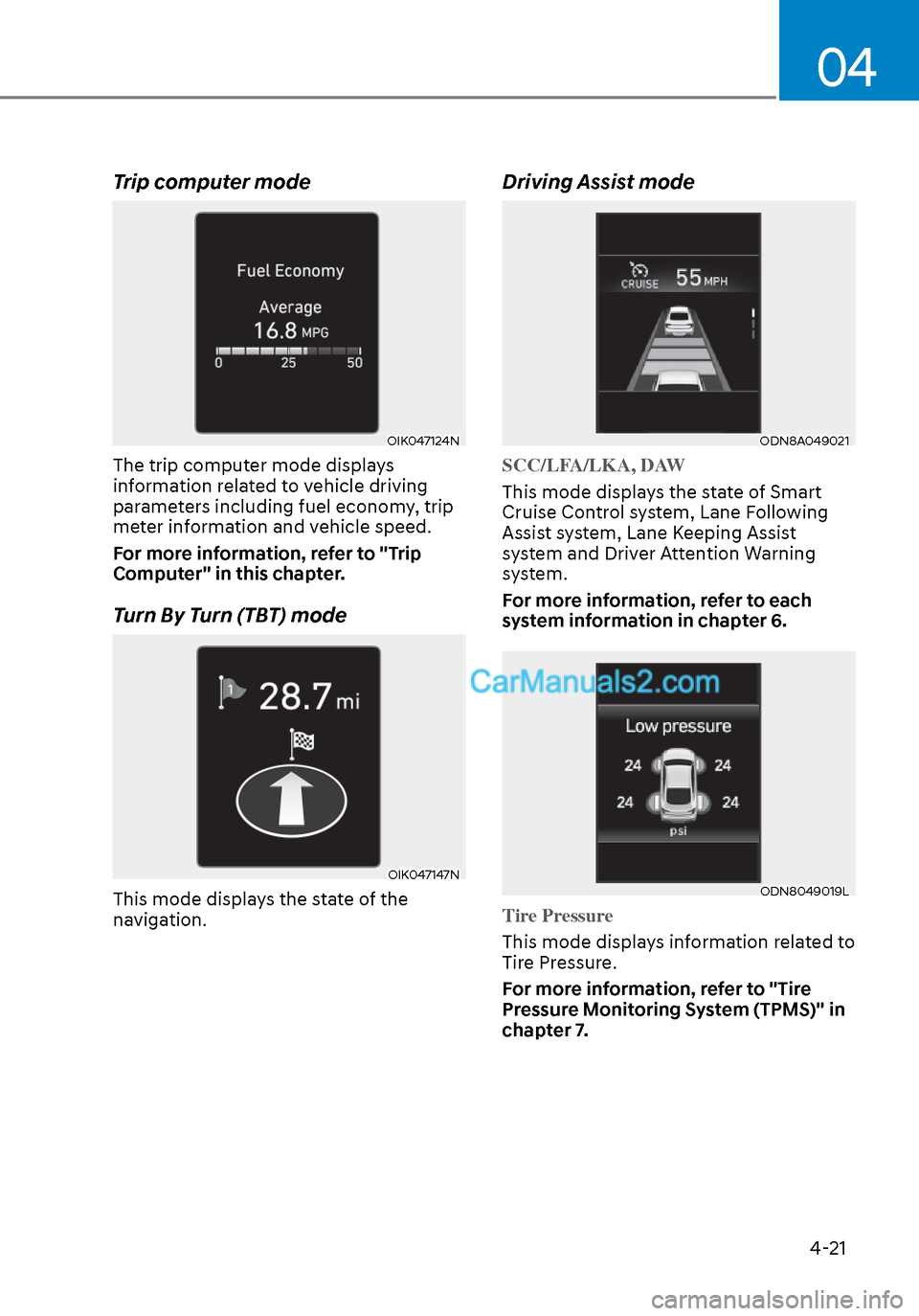
Trip computer mode
OIK047124NOIK047124N
The trip computer mode displays
information related to vehicle driving
parameters including fuel economy, trip
meter information and vehicle speed.
For more information, refer to "Trip
Computer" in this chapter.
Turn By Turn (TBT) mode
OIK047147NOIK047147N
This mode displays the state of the
navigation.
Driving Assist mode
ODN8A049021ODN8A049021
SCC/LFA/LKA, DAW
This mode displays the state of Smart
Cruise Contr
ol system, Lane Following
Assist system, Lane Keeping Assist
system and Driver Attention Warning
system.
For more information, refer to each
system information in chapter 6.
ODN8049019LODN8049019L
Tire Pressure
This mode displays information related to
Tir
e Pressure.
For more information, refer to "Tire
Pressure Monitoring System (TPMS)" in
chapter 7.
Page 109 of 537
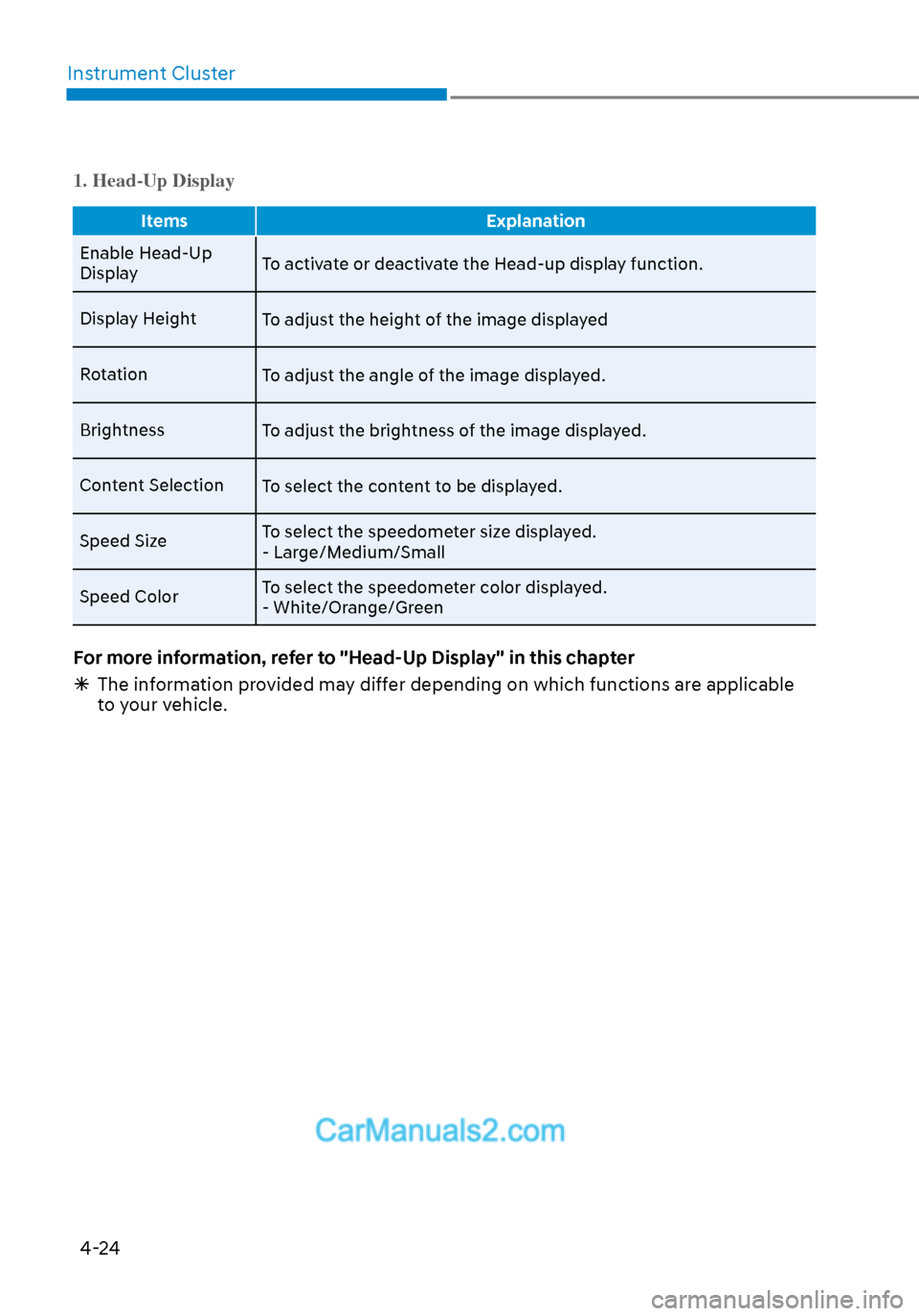
Instrument Cluster4-24
1. Head-Up Display
Items Explanation
Enable Head-Up
Displa
y To activate or deactivate the Head-up display function.
Display Height To adjust the height of the image displayed
Rotation To adjust the angle of the image displayed.
Brightness To adjust the brightness of the image displayed.
Content Selection To select the content to be displayed.
Speed Size To select the speedometer size displayed.
- Large/Medium/Small
Speed Color To select the speedometer color displayed.
- White/Orange/Green
For more information, refer to "Head-Up Display" in this chapter
The information provided may differ depending on which functions are applicable
to your vehicle.