light Hyundai Sonata 2020 Owner's Guide
[x] Cancel search | Manufacturer: HYUNDAI, Model Year: 2020, Model line: Sonata, Model: Hyundai Sonata 2020Pages: 537, PDF Size: 14.54 MB
Page 113 of 537
Instrument Cluster4-28
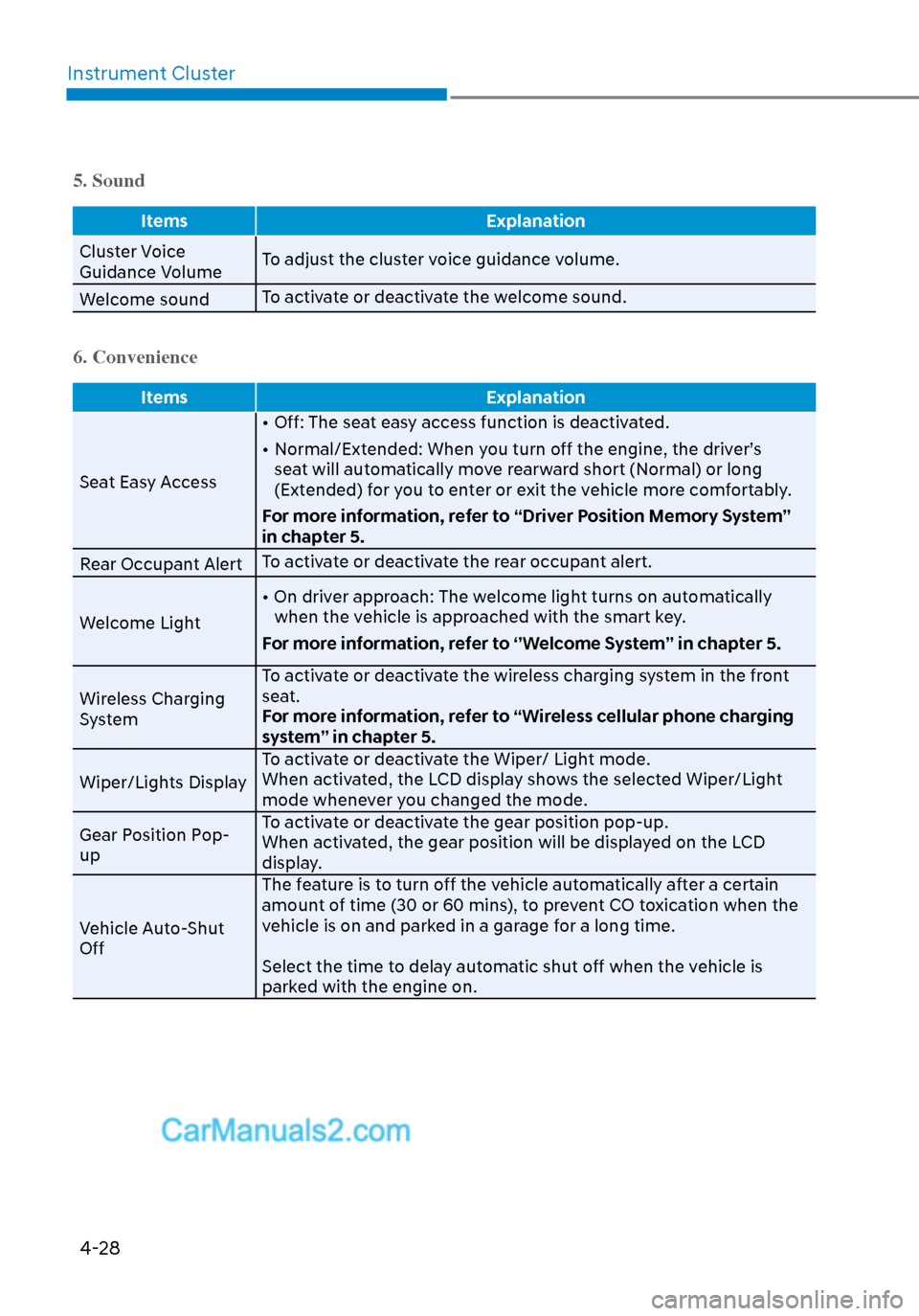
5. Sound
Items Explanation
Cluster Voice
Guidance V
olumeTo adjust the cluster voice guidance volume.
Welcome sound To activate or deactivate the welcome sound.
6. Convenience
Items
Explanation
Seat Easy Access •
Off: The seat easy access function is deactivated.
• Normal/Extended: When you turn off the engine, the driver’s seat will automatically move rearward short (Normal) or long
(Extended) for you to enter or exit the vehicle more comfortably.
For more information, refer to “Driver Position Memory System”
in chapter 5.
Rear Occupant Alert To activate or deactivate the rear occupant alert.
Welcome Light • On driver approach: The welcome light turns on automatically
when the vehicle is approached with the smart key.
For more information, refer to ‘’Welcome System’’ in chapter 5.
Wireless Charging
System To activate or deactivate the wireless charging system in the front
seat.
For more information, refer to “Wireless cellular phone charging
system” in chapter 5.
Wiper/Lights Display To activate or deactivate the Wiper/ Light mode.
When activated, the LCD display shows the selected Wiper/Light
mode whenever you changed the mode.
Gear Position Pop-
up To activate or deactivate the gear position pop-up.
When activated, the gear position will be displayed on the LCD
display.
Vehicle Auto-Shut
Off The feature is to turn off the vehicle automatically after a certain
amount of time (30 or 60 mins), to prevent CO toxication when the
vehicle is on and parked in a garage for a long time.
Select the time to delay automatic shut off when the vehicle is
parked with the engine on.
Page 117 of 537
Instrument Cluster4-32
Automatic reset
To automatically reset the average fuel
economy after refueling, select the "Fuel
Econ. Reset" mode in the User Settings
menu on the LCD display.
- After Ignition: When the engine has
been OFF for 4 hours or longer the
average fuel economy will reset
automatically.
- After Refueling: The average fuel economy will reset automatically after
adding 1.6 gallons (6 liters) of fuel or
more and after driving speed exceeds
1 mph (1 km/h).
Information
The vehicle must be driven for a minimum
of 0.19 miles (300 meters) since the last
ignition key cycle before the average fuel
economy will be recalculated.
Instant Fuel Economy (2)
The instantaneous fuel economy is
displa
yed according to the bar graph in
the LCD display while driving.
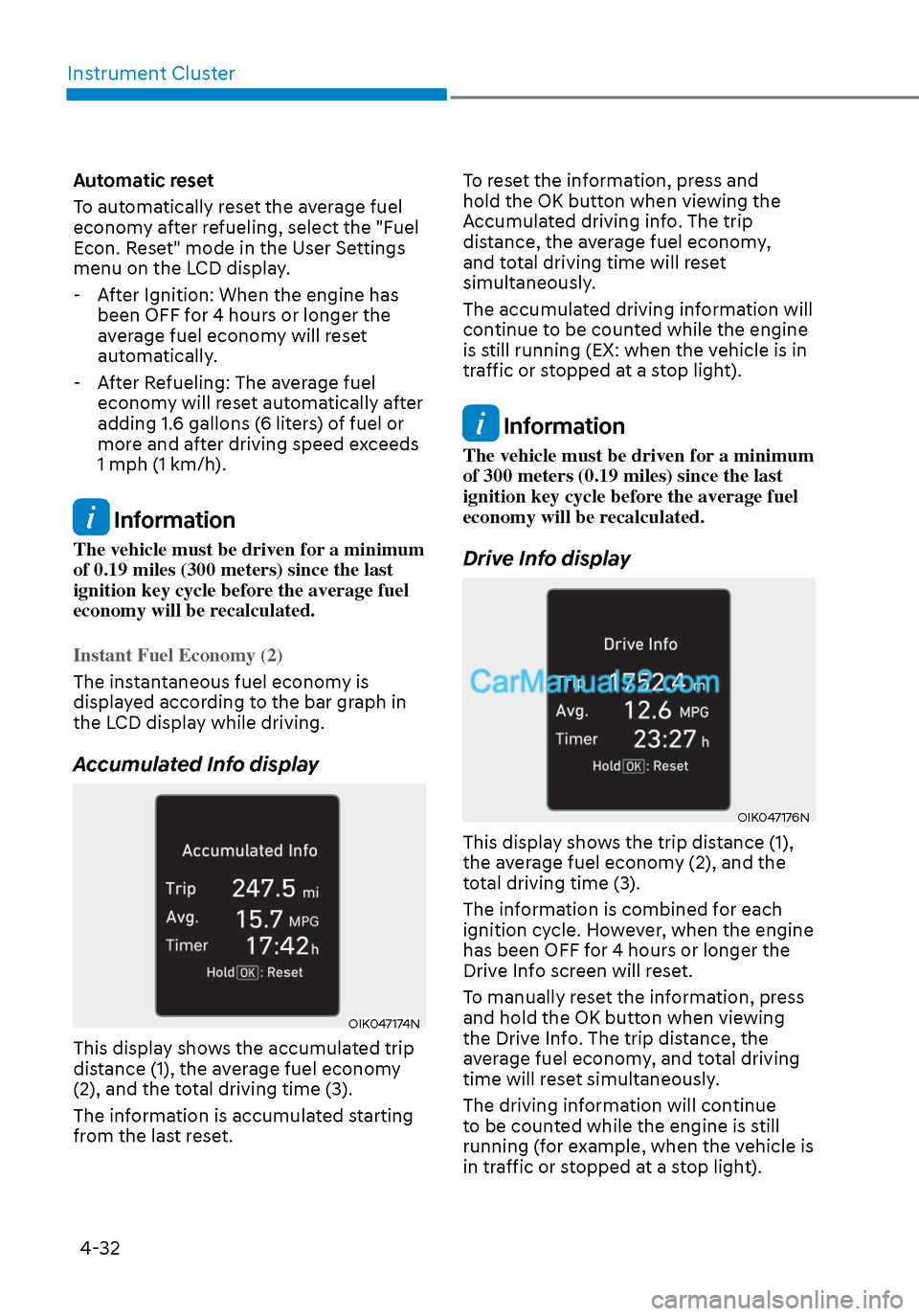
Accumulated Info display
OIK047174NOIK047174N
This display shows the accumulated trip
distance (1), the average fuel economy
(2), and the total driving time (3).
The information is accumulated starting
from the last reset. To reset the information, press and
hold the OK button when viewing the
Accumulated driving info. The trip
distance, the average fuel economy,
and total driving time will reset
simultaneously.
The accumulated driving information will
continue to be counted while the engine
is still running (EX: when the vehicle is in
traffic or stopped at a stop light).
Information
The vehicle must be driven for a minimum
of 300 meters (0.19 miles) since the last
ignition key cycle before the average fuel
economy will be recalculated.
Drive Info display
OIK047176NOIK047176N
This display shows the trip distance (1),
the average fuel economy (2), and the
total driving time (3).
The information is combined for each
ignition cycle. However, when the engine
has been OFF for 4 hours or longer the
Drive Info screen will reset.
To manually reset the information, press
and hold the OK button when viewing
the Drive Info. The trip distance, the
average fuel economy, and total driving
time will reset simultaneously.
The driving information will continue
to be counted while the engine is still
running (for example, when the vehicle is
in traffic or stopped at a stop light).
Page 124 of 537
04
4-39
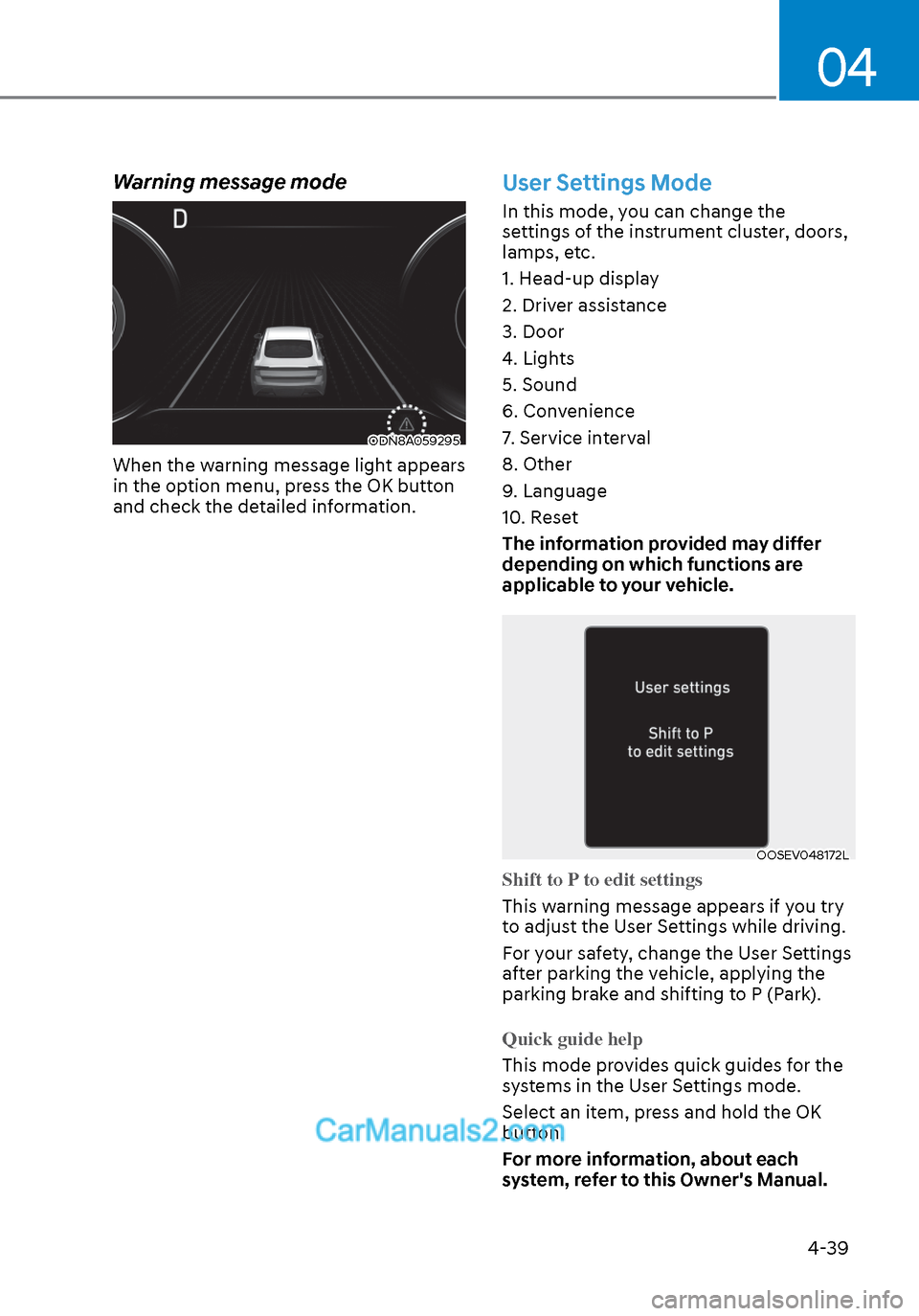
Warning message mode
ODN8A059295ODN8A059295
When the warning message light appears
in the option menu, press the OK button
and check the detailed information.
User Settings Mode
In this mode, you can change the
settings of the instrument cluster, doors,
lamps, etc.
1. Head-up display
2. Driver assistance
3. Door
4. Lights
5. Sound
6. Convenience
7. Service interval
8. Other
9. Language
10. Reset
The information provided may differ
depending on which functions are
applicable to your vehicle.
OOSEV048172LOOSEV048172L
Shift to P to edit settings
This warning message appears if you try
t
o adjust the User Settings while driving.
For your safety, change the User Settings
after parking the vehicle, applying the
parking brake and shifting to P (Park).
Quick guide help
This mode provides quick guides for the
s
ystems in the User Settings mode.
Select an item, press and hold the OK
button.
For more information, about each
system, refer to this Owner's Manual.
Page 127 of 537
Instrument Cluster4-42
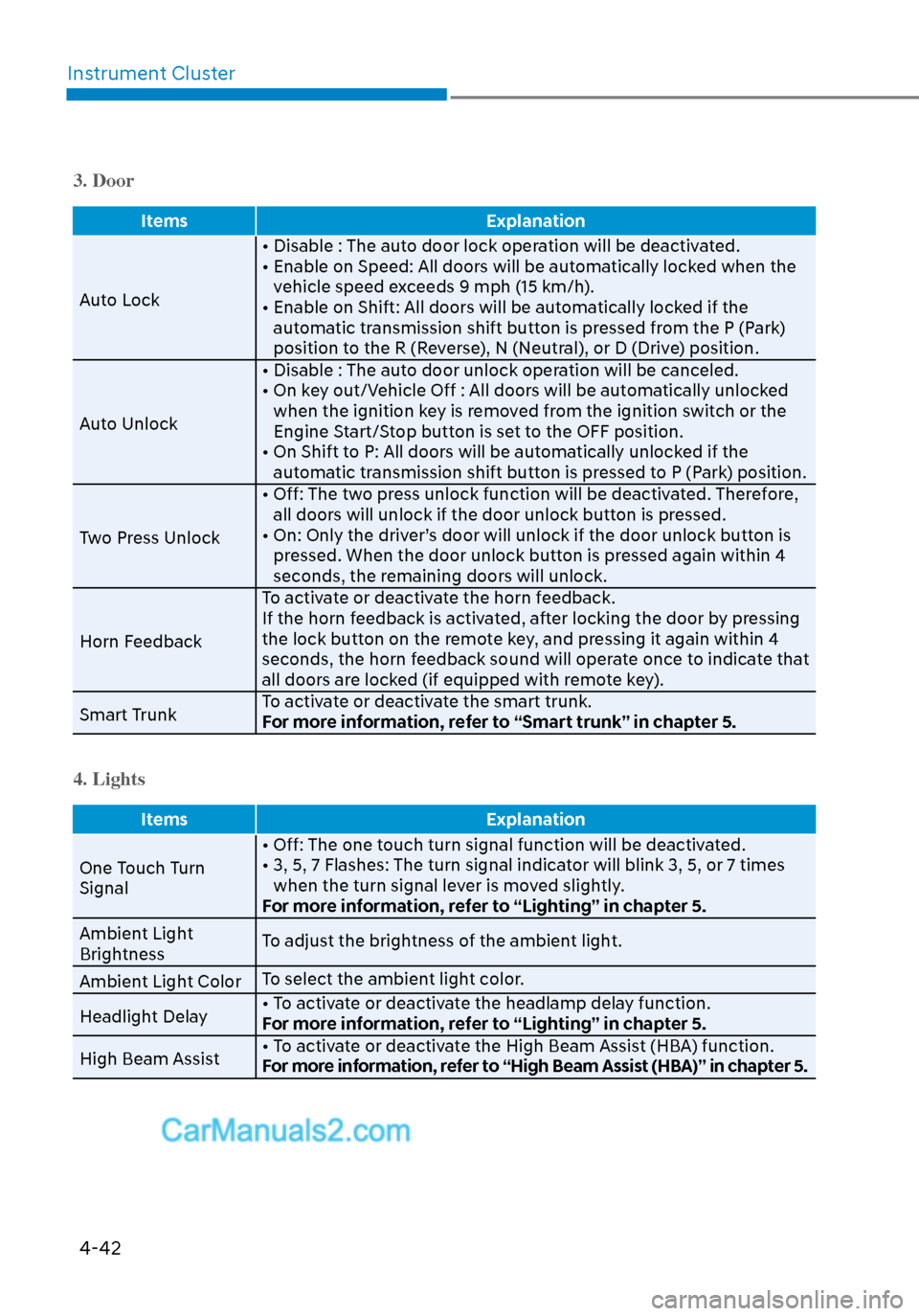
3. Door
Items Explanation
Auto Lock • Disable : The aut
o door lock operation will be deactivated.
• Enable on Speed: All doors will be automatically locked when the vehicle speed exceeds 9 mph (15 km/h).
• Enable on Shift: All doors will be automatically locked if the automatic transmission shift button is pressed from the P (Park)
position to the R (Reverse), N (Neutral), or D (Drive) position.
Auto Unlock • Disable : The auto door unlock operation will be canceled.
• On key out/Vehicle Off : All doors will be automatically unlocked
when the ignition key is removed from the ignition switch or the
Engine Start/Stop button is set to the OFF position.
• On Shift to P: All doors will be automatically unlocked if the automatic transmission shift button is pressed to P (Park) position.
Two Press Unlock • Off: The two press unlock function will be deactivated. Therefore,
all doors will unlock if the door unlock button is pressed.
• On: Only the driver’s door will unlock if the door unlock button is pressed. When the door unlock button is pressed again within 4
seconds, the remaining doors will unlock.
Horn Feedback To activate or deactivate the horn feedback.
If the horn feedback is activated, after locking the door by pressing
the lock button on the remote key, and pressing it again within 4
seconds, the horn feedback sound will operate once to indicate that
all doors are locked (if equipped with remote key).
Smart Trunk To activate or deactivate the smart trunk.
For more information, refer to “Smart trunk” in chapter 5.
4. Lights
Items
Explanation
One Touch Turn
Signal • Off: The one t
ouch turn signal function will be deactivated.
• 3, 5, 7 Flashes: The turn signal indicator will blink 3, 5, or 7 times when the turn signal lever is moved slightly.
For more information, refer to “Lighting” in chapter 5.
Ambient Light
Brightness To adjust the brightness of the ambient light.
Ambient Light Color To select the ambient light color.
Headlight Delay • To activate or deactivate the headlamp delay function.
For more information, refer to “Lighting” in chapter 5.
High Beam Assist • To activate or deactivate the High Beam Assist (HBA) function.
For more information, refer to “High Beam Assist (HBA)” in chapter 5.
Page 128 of 537
04
4-43
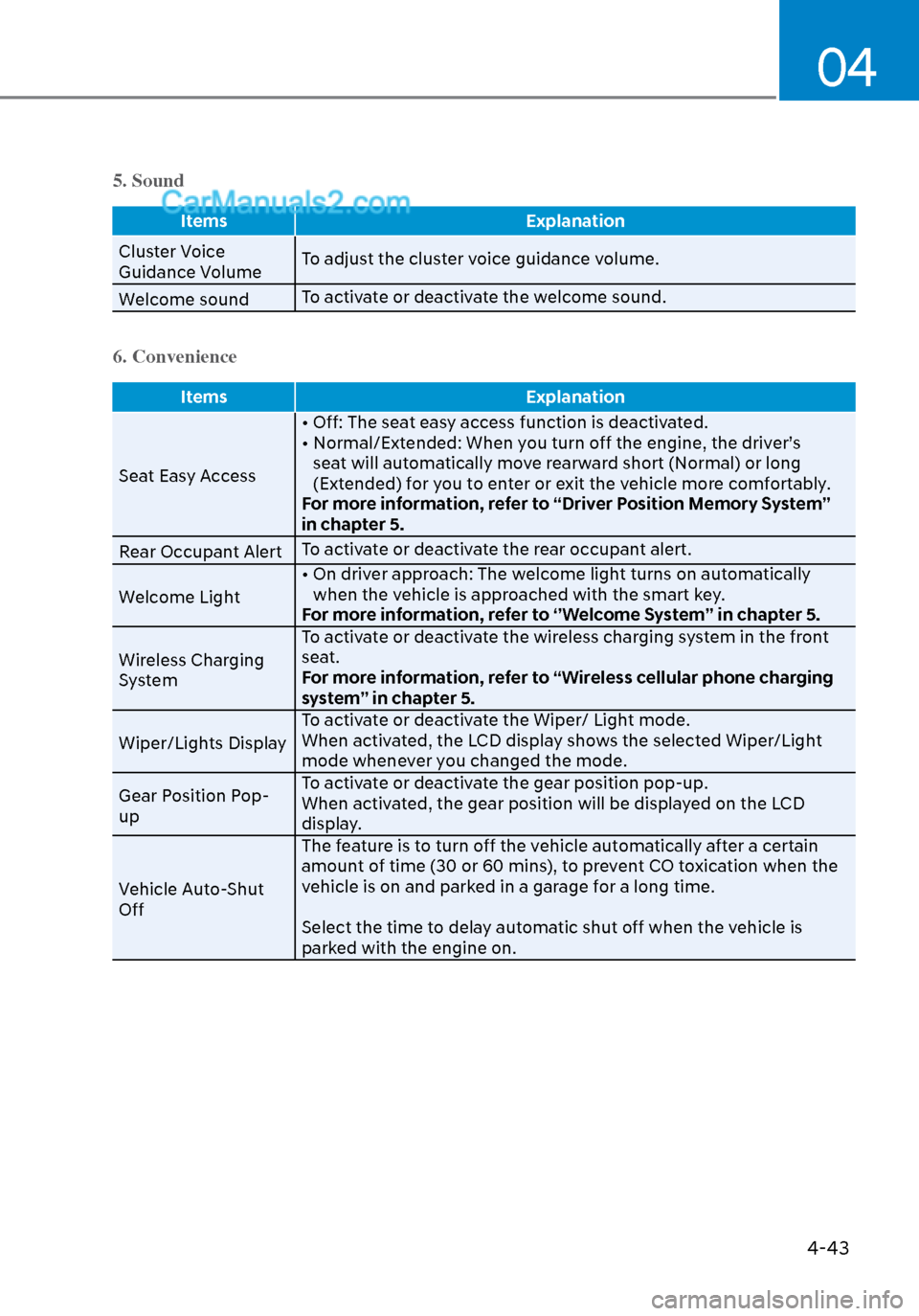
5. Sound
ItemsExplanation
Cluster Voice
Guidance V
olumeTo adjust the cluster voice guidance volume.
Welcome sound To activate or deactivate the welcome sound.
6. Convenience
Items
Explanation
Seat Easy Access • Off: The sea
t easy access function is deactivated.
• Normal/Extended: When you turn off the engine, the driver’s seat will automatically move rearward short (Normal) or long
(Extended) for you to enter or exit the vehicle more comfortably.
For more information, refer to “Driver Position Memory System”
in chapter 5.
Rear Occupant Alert To activate or deactivate the rear occupant alert.
Welcome Light • On driver approach: The welcome light turns on automatically
when the vehicle is approached with the smart key.
For more information, refer to ‘’Welcome System’’ in chapter 5.
Wireless Charging
System To activate or deactivate the wireless charging system in the front
seat.
For more information, refer to “Wireless cellular phone charging
system” in chapter 5.
Wiper/Lights Display To activate or deactivate the Wiper/ Light mode.
When activated, the LCD display shows the selected Wiper/Light
mode whenever you changed the mode.
Gear Position Pop-
up To activate or deactivate the gear position pop-up.
When activated, the gear position will be displayed on the LCD
display.
Vehicle Auto-Shut
Off The feature is to turn off the vehicle automatically after a certain
amount of time (30 or 60 mins), to prevent CO toxication when the
vehicle is on and parked in a garage for a long time.
Select the time to delay automatic shut off when the vehicle is
parked with the engine on.
Page 132 of 537
 ........................................................................\
...... 5-72
Lighting ...............................................................\
...............")
5
Head Up Display (HUD) ........................................................................\
...... 5-72
Lighting ...............................................................\
.......................................... 5-74
Exterior Lights ........................................................................\
.................................5-74
Interior Lights ........................................................................\
.................................5-80
Welcome System ........................................................................\
........................... 5-83
Wipers and Washers ........................................................................\
............5-84Windshield Wipers ........................................................................\
......................... 5-84
Windshield Washers ........................................................................\
....................... 5-85
Rear View Monitor (RVM) ........................................................................\
...5-86Rear View Monitor with Parking Guidance ...........................................................5-86
Rear View Monitor - Top View ........................................................................\
.......5-86
Surround View Monitor (SVM) ...................................................................5-88
Reverse Parking Collision-Avoidance Assist ..............................................5-89
System Setting and Operation ........................................................................\
......5-89
Warning and System Control ........................................................................\
.........5-90
Detecting Sensor ........................................................................\
............................ 5-92
System Malfunction ........................................................................\
....................... 5-93
Limitations of the System ........................................................................\
.............. 5-93
Reverse Parking Distance Warning (PDW) ................................................ 5-95Operation of Reverse Parking Distance Warning System .................................... 5-95
To Turn Off Reverse Parking Distance Warning System ..................................... 5-97
Non-Operational Conditions of Reverse Parking Distance Warning System ..... 5-97
Reverse Parking Distance Warning System Precautions .....................................5-98
Forward/Reverse Parking Distance Warning (PDW) ................................5-99Operation of Forward/Reverse Parking Distance Warning System .................. 5-100
Non-Operational Conditions of Forward/Reverse Parking Distance Warning
System .....................................................................\
...............................................5-102
Forward/Reverse Parking Distance Warning System Precautions ....................5-103
Remote Smart Parking Assist (RSPA) ....................................................... 5-104Operating Condition ........................................................................\
.....................5-105
How Remote Smart Parking Assist System Works ............................................. 5-108
Additional Instructions ........................................................................\
...................5-113
Display Operation Status ........................................................................\
.............. 5-114
How the Remote Moving Forward/Backward System Works .............................5-115
Manual Climate Control System ............................................................... 5-118Heating and Air Conditioning ........................................................................\
....... 5-119
System Operation ........................................................................\
.......................... 5-124
System Maintenance ........................................................................\
.................... 5-125
Page 134 of 537
Convenient Features5-4
Remote Key (if equipped)
OIG046001OIG046001
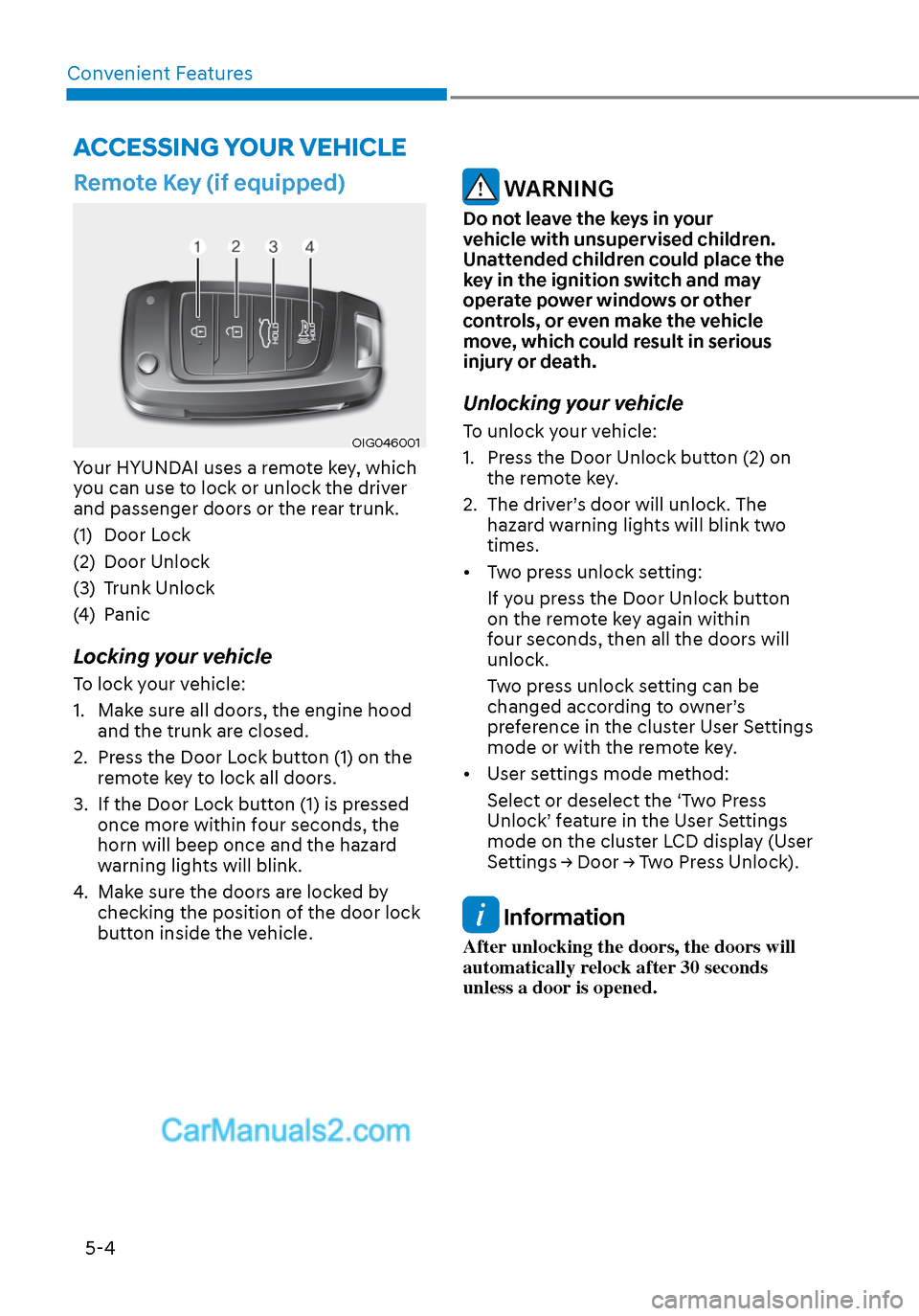
Your HYUNDAI uses a remote key, which
you can use to lock or unlock the driver
and passenger doors or the rear trunk.
(1) Door Lock
(2) Door Unlock
(3) Trunk Unlock
(4) Panic
Locking your vehicle
To lock your vehicle:
1. Make sure all doors, the engine hood and the trunk are closed.
2. Press the Door Lock button (1) on the remote key to lock all doors.
3. If the Door Lock button (1) is pressed once more within four seconds, the
horn will beep once and the hazard
warning lights will blink.
4. Make sure the doors are locked by checking the position of the door lock
button inside the vehicle.
WARNING
Do not leave the keys in your
vehicle with unsupervised children.
Unattended children could place the
key in the ignition switch and may
operate power windows or other
controls, or even make the vehicle
move, which could result in serious
injury or death.
Unlocking your vehicle
To unlock your vehicle:
1. Press the Door Unlock button (2) on the remote key.
2. The driver’s door will unlock. The hazard warning lights will blink two
times.
• Two press unlock setting: If you press the Door Unlock button
on the remote key again within
four seconds, then all the doors will
unlock.
Two press unlock setting can be
changed according to owner’s
preference in the cluster User Settings
mode or with the remote key.
• User settings mode method:
Select or deselect the ‘Two Press
Unlock’ feature in the User Settings
mode on the cluster LCD display (User
Settings → Door → Two Press Unlock).
Information
After unlocking the doors, the doors will
automatically relock after 30 seconds
unless a door is opened.
ACCESSING YOUR VEHICLE
Page 135 of 537
05
5-5
Trunk unlocking
To unlock the trunk :
1. Press and hold the Trunk Unlock button (3) on the remote key for more
than one second.
2. The hazard warning lights will blink two times and the trunk will be
unlocked.
3. Once the trunk is opened and then closed, the trunk will automatically
re-lock after 30 seconds.
Information
The word “HOLD” is written on the
button to inform you that you must press
and hold the button for more than one
second.
Panic button (4)
Press and hold the Panic button (4) for
more than one second. The horn sounds
and hazard warning lights flash for about
30 seconds.
To cancel the panic mode, press any
button on the remote key.
Start-up
For information, refer to the “Key
Ignition Switch” section in chapter 6.
NOTICE
To prevent damaging the remote key:
• Keep the remote key away from
water or any liquid and fire. Internal
circuits may malfunction if the inside
of the remote key gets damp (from
liquids or moisture) or if it is heated.
This can exclude the remote key from
being covered under warranty.
• Avoid dropping or throwing the
remote key.
• Protect the remote key from extreme
temperatures.
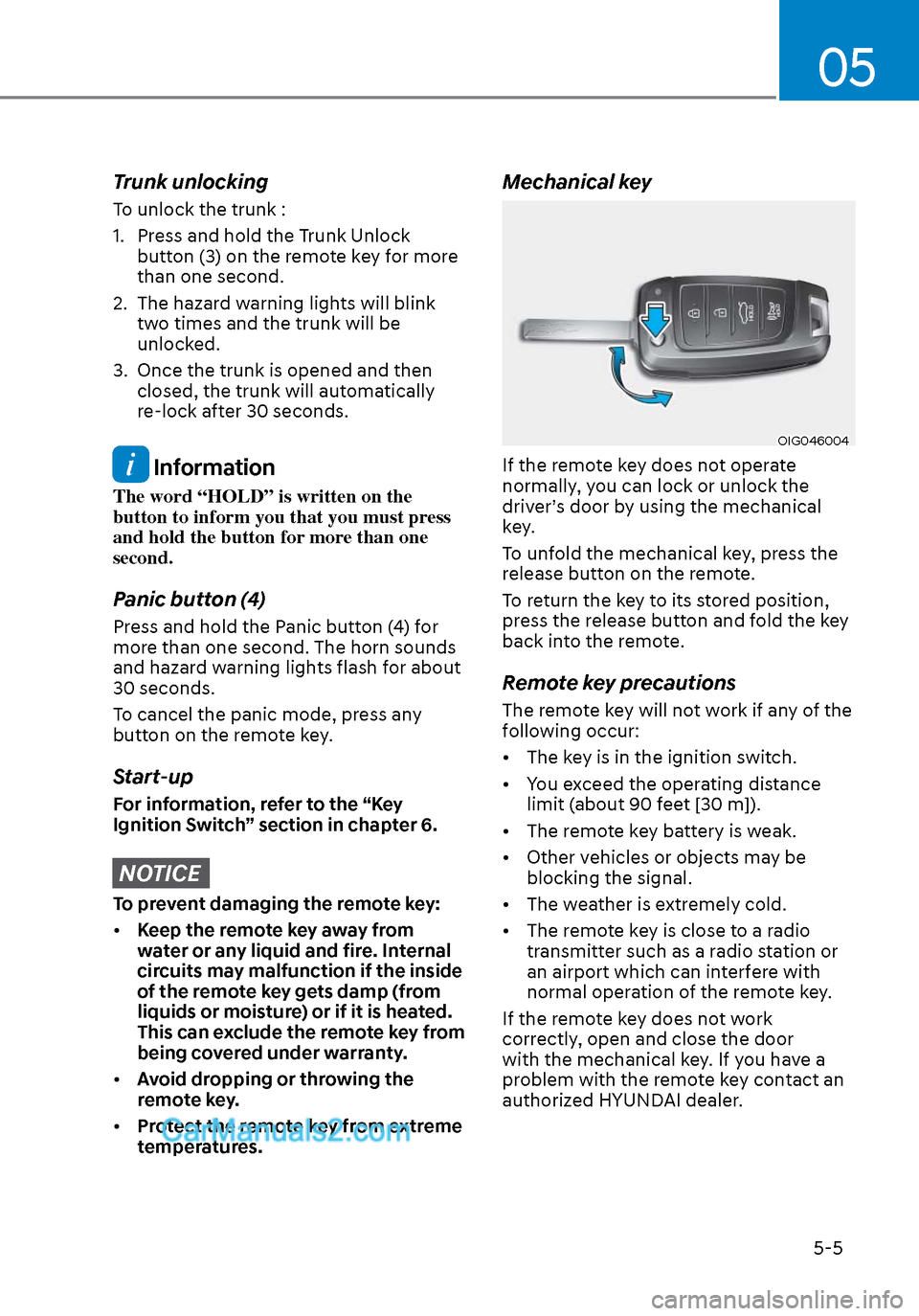
Mechanical key
OIG046004OIG046004
If the remote key does not operate
normally, you can lock or unlock the
driver’s door by using the mechanical
key.
To unfold the mechanical key, press the
release button on the remote.
To return the key to its stored position,
press the release button and fold the key
back into the remote.
Remote key precautions
The remote key will not work if any of the
following occur:
• The key is in the ignition switch.
• You exceed the operating distance
limit (about 90 feet [30 m]).
• The remote key battery is weak.
• Other vehicles or objects may be blocking the signal.
• The weather is extremely cold.
• The remote key is close to a radio transmitter such as a radio station or
an airport which can interfere with
normal operation of the remote key.
If the remote key does not work
correctly, open and close the door
with the mechanical key. If you have a
problem with the remote key contact an
authorized HYUNDAI dealer.
Page 137 of 537
05
5-7
Smart Key (if equipped)
Type AType A
ODN8059006ODN8059006
Type BType B
ODN8059007ODN8059007
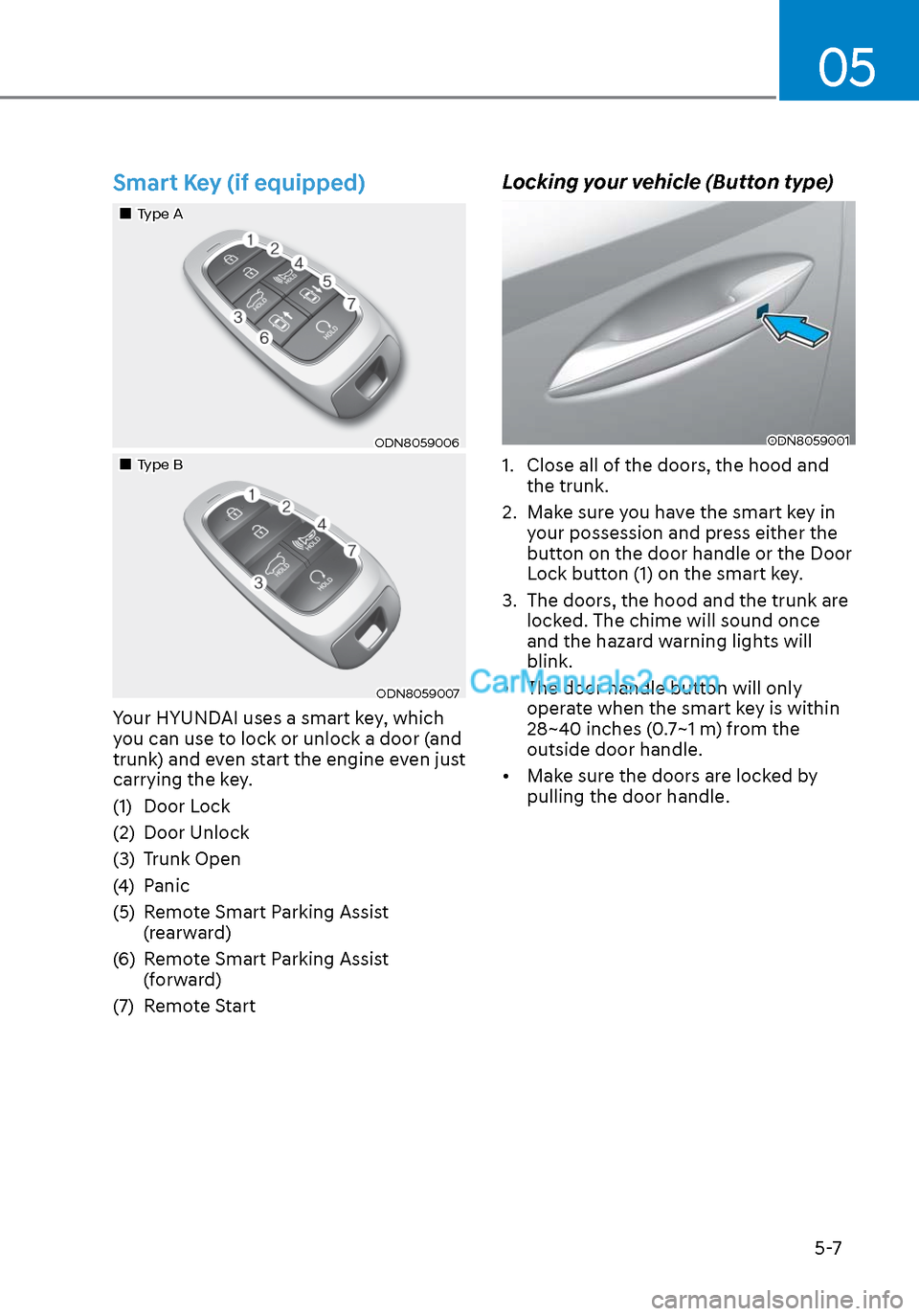
Your HYUNDAI uses a smart key, which
you can use to lock or unlock a door (and
trunk) and even start the engine even just
carrying the key.
(1) Door Lock
(2) Door Unlock
(3) Trunk Open
(4) Panic
(5) Remote Smart Parking Assist (rearward)
(6) Remote Smart Parking Assist (forward)
(7) Remote Start
Locking your vehicle (Button type)
ODN8059001ODN8059001
1. Close all of the doors, the hood and the trunk.
2. Make sure you have the smart key in your possession and press either the
button on the door handle or the Door
Lock button (1) on the smart key.
3. The doors, the hood and the trunk are locked. The chime will sound once
and the hazard warning lights will
blink.
• The door handle button will only operate when the smart key is within
28~40 inches (0.7~1 m) from the
outside door handle.
• Make sure the doors are locked by pulling the door handle.
Page 138 of 537
Convenient Features5-8
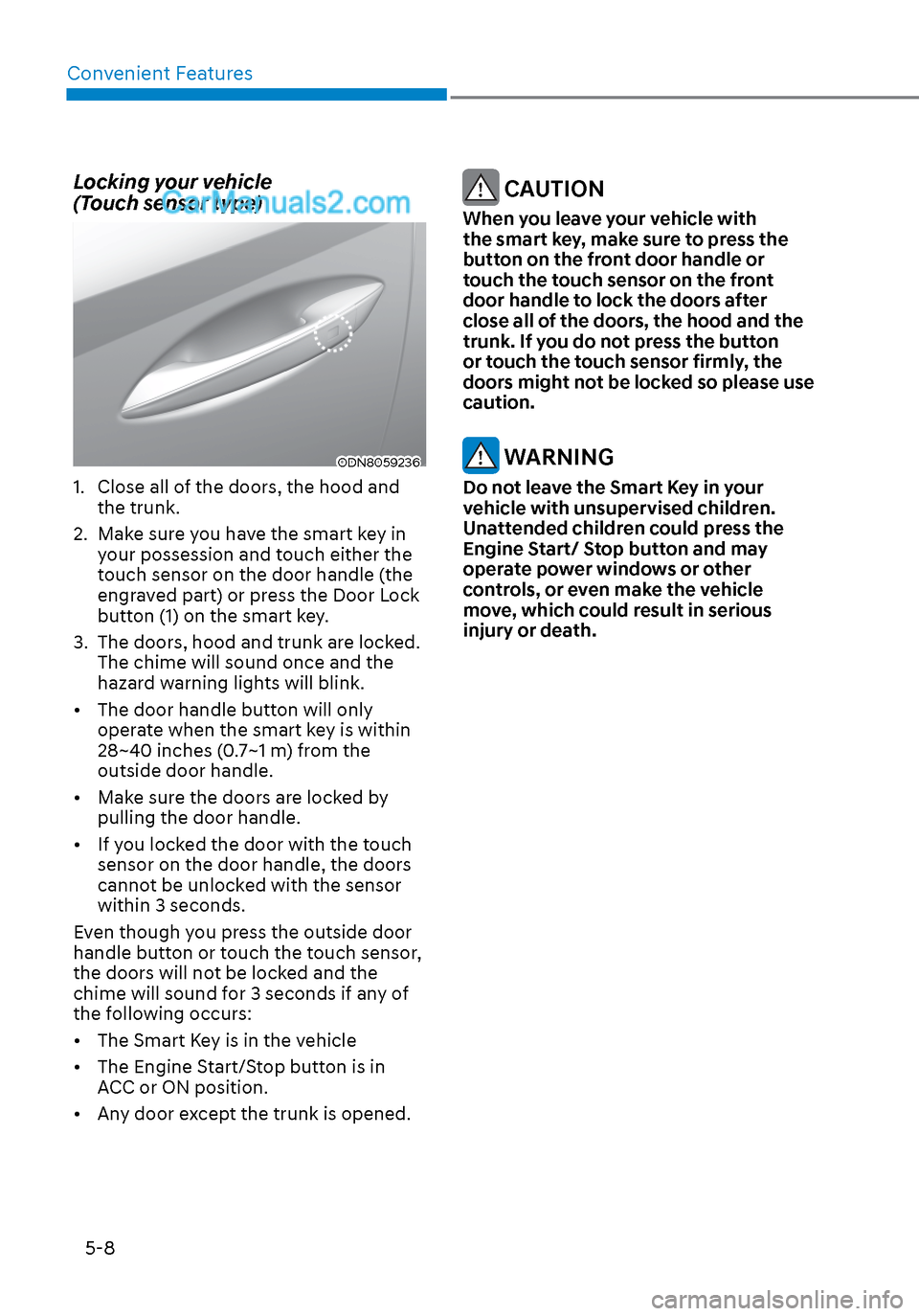
Locking your vehicle
(Touch sensor type)
ODN8059236ODN8059236
1. Close all of the doors, the hood and the trunk.
2. Make sure you have the smart key in your possession and touch either the
touch sensor on the door handle (the
engraved part) or press the Door Lock
button (1) on the smart key.
3. The doors, hood and trunk are locked. The chime will sound once and the
hazard warning lights will blink.
• The door handle button will only operate when the smart key is within
28~40 inches (0.7~1 m) from the
outside door handle.
• Make sure the doors are locked by pulling the door handle.
• If you locked the door with the touch sensor on the door handle, the doors
cannot be unlocked with the sensor
within 3 seconds.
Even though you press the outside door
handle button or touch the touch sensor,
the doors will not be locked and the
chime will sound for 3 seconds if any of
the following occurs:
• The Smart Key is in the vehicle
• The Engine Start/Stop button is in ACC or ON position.
• Any door except the trunk is opened.
CAUTION
When you leave your vehicle with
the smart key, make sure to press the
button on the front door handle or
touch the touch sensor on the front
door handle to lock the doors after
close all of the doors, the hood and the
trunk. If you do not press the button
or touch the touch sensor firmly, the
doors might not be locked so please use
caution.
WARNING
Do not leave the Smart Key in your
vehicle with unsupervised children.
Unattended children could press the
Engine Start/ Stop button and may
operate power windows or other
controls, or even make the vehicle
move, which could result in serious
injury or death.